
Technologies
Crisis Core Reunion Is a Magnificent Final Fantasy 7 Classic Remastered
Review: Zack Fair’s beautifully 2007 spinoff adventure escapes Sony’s PSP, and Square Enix has brought it in line with Final Fantasy 7 Remake.
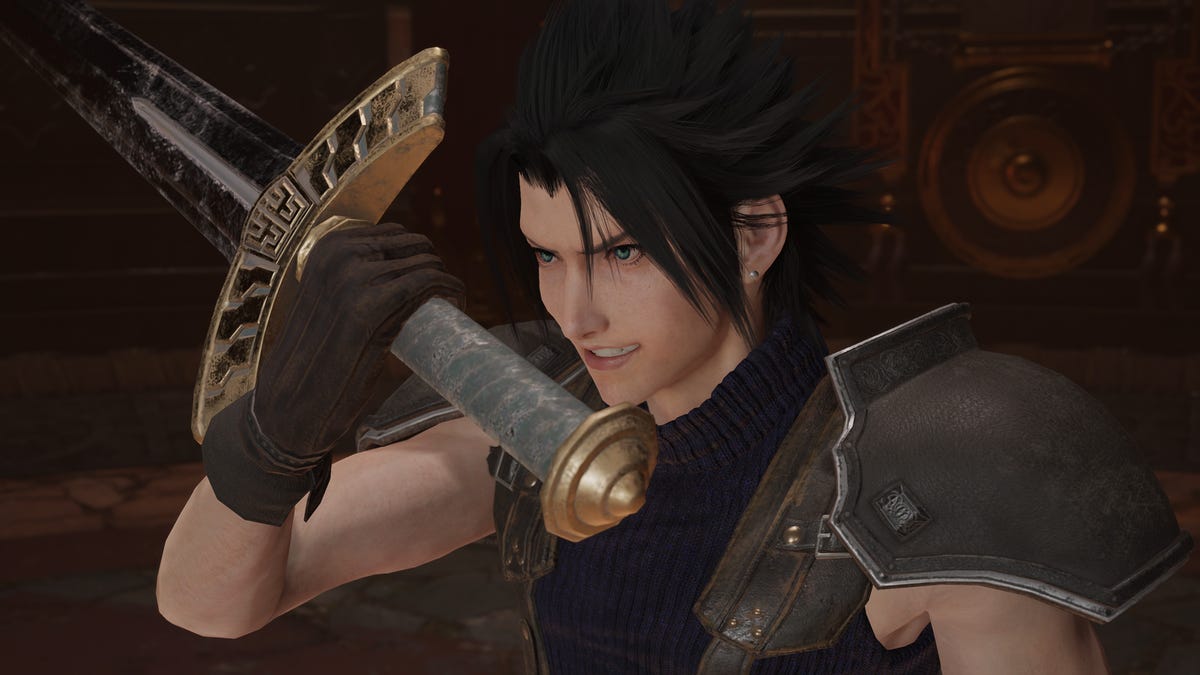
Final Fantasy 7 fans were ready to eat well back in the mid-noughties, as developer Square Enix released several spinoffs expanding the universe of the legendary 1997 PlayStation RPG. Unfortunately, most of the new stories — like PS2 shooter Dirge of Cerberus and CGI movie Advent Children — turned to be fast food next to the delicious and nutritious meal that was Final Fantasy 7.
The sole exception was the excellent 2007 action-RPG Crisis Core. This prequel cast you in the role of Zack Fair, a character with a small-but-crucial role in Final Fantasy 7’s main story, and explored his career as a member of megacorporation Shinra’s Soldier paramilitary group.
It offered roughly 25 hours of main story gameplay, a solid chunk of side missions and an inevitable emotional gut-punch of an ending that seared itself into fans’ brains.
The problem: It was only on PlayStation Portable (the PSP) and remained marooned on Sony’s now-obsolete handheld for more than 15 years. However, after the 2020 Final Fantasy 7 Remake and its downloadable content hinted at Zack’s playing a bigger part in the upcoming Rebirth, Square Enix is finally letting a new generation of gamers dive into Crisis Core.
Crisis Core: Final Fantasy 7 Reunion hit PS4, PS5, Xbox One, Xbox Series X|S, Nintendo Switch and PC on Tuesday. I’ve played a chunk of the game on PS5, and found this remastered classic to be a nostalgic joy.
Initially, I thought this was just the PSP game with some modern flourishes — 3D character models, upgraded environments and the ability to finally play it on a massive TV screen (or mirror the handheld original on Switch). Some of the prerendered cutscenes aren’t as well remastered, with graphical artifacts occasionally marring the image.
As I played, it became increasingly clear that Square Enix had made more subtle changes as well; developers have brought the combat closer to the Remake’s beautiful flow. Chaining physical, magical attacks and summoning god-like beings who perform super attacks feels natural and smooth — partially because all the modern systems’ controllers have more buttons to use than the PSP — making for a far more pleasant experience than it was in 2007.
You also have a new way to interrupt your most powerful enemies’ biggest attacks, by doing as much damage as possible when they’re charging up. It might not seem like a major addition, but it adds a layer of strategy to boss encounters you might otherwise have played defensively.
The slot machine-style Digital Mind Wave system that periodically gives you bonuses or summons an ally in combat remains inscrutable as ever — it also determines when Zack and his abilities level up. Rest assured that this isn’t random, so it seems that way you just can’t see how much experience points you have. Its link to Zack’s emotional effect also used to great narrative effect at a few key points.
All the cutscenes are fully voice acted now — chunks of the original were text-only — with the Remake’s excellent cast back in their roles. That includes Superman & Lois’ Tyler Hoechlin as future villain Sephiroth, who’s a pretty chill (if a bit aloof) dude for much of this game.
However, for good or ill, Crisis Core Reunion is fundamentally the same game we got in 2007. It’s still divided into easily digestible story chapters where Zack goes out on assignments for Shinra, unlocking bite-size missions along the way — it can’t quite shake off its roots as a portable game designed for quick sessions.
It feels a little stop-start in the early hours, especially as the game’s various systems are introduced to you, but you’ll soon get into the groove.
The gameplay loop of doing a chapter, then blasting through a bunch of unlocked missions and talking to the various characters in the hub around Shinra headquarters is satisfying — similar to Mass Effect, another classic 2007 RPG. It’s basically a few rooms and streets, greatly enhanced by the game’s magnificent art direction (without the slow loading of the PSP version).
Zack is also an ultra-charismatic protagonist, and his enthusiasm is a breath of fresh air compared to Final Fantasy 7’s moody Cloud. Fans who know about the relationship between these two will find getting to know Zack particularly rewarding.
The other characters are a mixed bag — Zack’s Soldier mentor Angeal is so stiff that I practically drift off whenever he’s on screen, and main villain Genesis is a dorky Sephiroth wannabe. The voice actors do their best, but the writing around these two just isn’t compelling. However, Cloud and Aerith make up for it when they enter the story.
And seeing the early adventures of these gaming icons, and how Zack helped to shape them, is the best reason to play Crisis Core Reunion. It’s still a 2007 PSP game at heart (as evidenced by the beautiful mid-noughties flip phones), but Square Enix’s ambition made it one of the best games on that system. I’m so glad it’s not trapped there any more. It’s a game every Final Fantasy 7 fan needs to play before Rebirth arrives late next year.
Technologies
Here’s How a Former Overwatch Pro Made the Support Hero He Always Wanted
Scott «Custa» Kennedy used his experience as a former Overwatch League pro to design one of the game’s most popular heroes in Reign of Talon season 1.
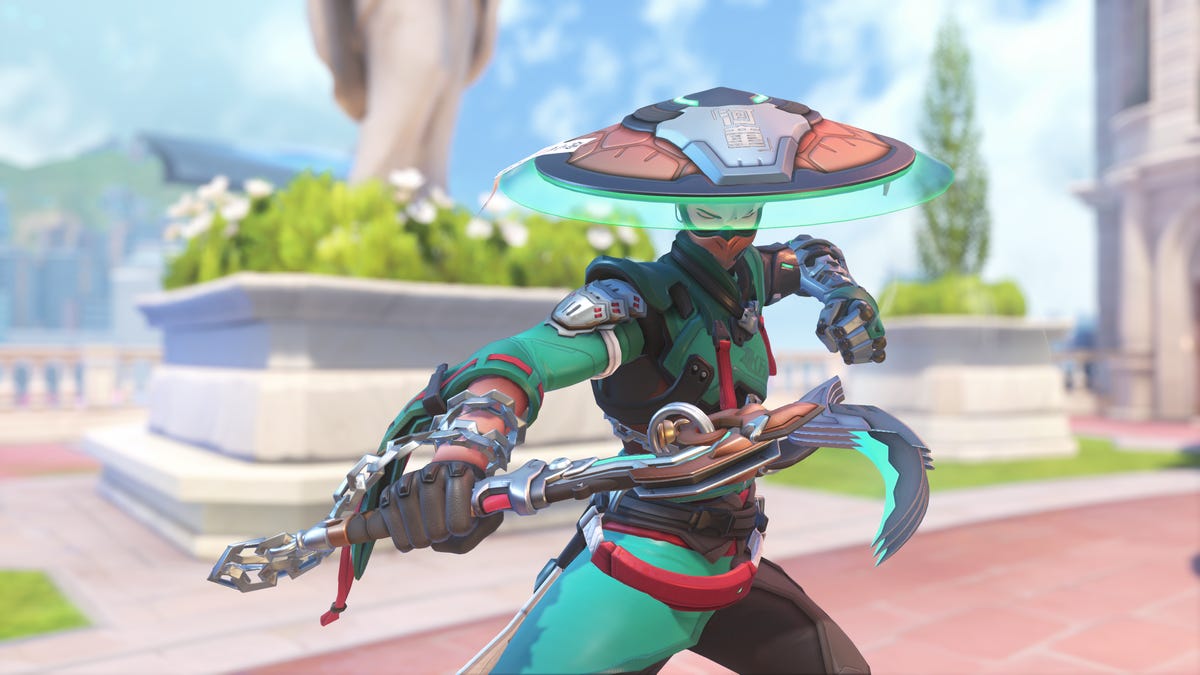
Overwatch’s Reign of Talon season 1 is starting to wind down, and the biggest story has been the five new heroes who joined the roster. A lot of attention has understandably gone to Jetpack Cat, a hero once scrapped in the game’s early design, but resurrected on the cusp of the game’s 10th anniversary. She’s been the subject of bans and memery due to her unique kit that features permanent flight and the ability to fly any other hero through the air with her Lifeline ability.
But another support hero has quietly gone under the radar as one of the most-played characters in the new season: Mizuki.
Mizuki is a complex hero, similar on paper to support heroes Brigitte and Lucio, who mix damage with healing in the radius around them, but with his own unique mechanics. He has a constant healing aura around him, which grows more powerful as he deals damage with his weapon or uses other healing abilities. His main weapon is a projectile that bounces off surfaces. One of his abilities, Katashiro Return, offers a burst of movement, but also the ability to teleport back to your starting point within a few seconds.
That all adds up to a hero design that gives players lots of options but also requires you to carefully strategize to turn the tide of battle. Do you stay with your team to maximize the value of your healing aura? Or do you split from them for a higher-risk, higher-reward play? Do you use your Katashiro Return ability to flank behind an enemy team, or save it to disengage from an unexpected attack?
Despite spending most of my time in Overwatch playing support heroes, including Ana and Kiriko, I found Mizuki challenging early in the season, even as I watched enemy Mizukis pump out damage and secure clutch kills while constantly healing their teams.
This «unlockable challenge» element was an intentional part of Mizuki’s design, as I was soon to learn from chatting with the hero’s creator, a former Overwatch eSports pro.
By and large, support players have embraced this challenge. An Overwatch spokesperson told me via email that «Mizuki is consistently in the top four for all support picks in Season 1, across every region.» He’s one of several elements powering a revival of the game, along with a new ongoing story, weekly faction missions and the promise of more new heroes every season. People have flocked back into the game since the start of Season 1, with its average player count on Steam more than doubling over the past month.
Mizuki’s design was led by Scott «Custa» Kennedy, a longtime presence in Overwatch’s professional scene as both a player and match analyst, and now an associate hero designer. I spoke with Scott at Blizzard’s spotlight event and also spoke with him and Mizuki’s character artist, Melissa Kelly, in early March to discuss how they created one of the game’s most popular heroes.
From professional player to associate designer
After a few years as a professional player and several more as an analyst and caster for the Overwatch League, Kennedy was looking for the next step in his career.
«Overwatch [had] been my life for, like, the last 10 years in many different facets,» he said, but as he reached retirement age in the esports realm, he wanted a change. He spoke with some of the Overwatch developers, including associate game director Alec Dawson, about what it would take to get into game development.
After doing some QA work and hands-on game development («I made the world’s hardest 2D cat platformer in three days,» he said), Kennedy secured an associate hero designer opening for Overwatch, which was a perfect fit with his experience.
When given the task of envisioning the game’s next healer, Kennedy said he didn’t want to make another support designed around «point-and-shoot» mechanics that healed teammates and hurt enemies, like Ana or Juno.
«I wanted [Mizuki] to be more of an AoE healing aura-type hero because I think that’s something that’s been underrepresented in our heroes,» Kennedy said. Instead, he came up with the area-of-effect healing that’s similar to how Lucio and Brigitte heal, but with the added layer of that healing becoming more powerful the better you play in combat.
Managing that nuance was a learning experience for Kennedy.
«One of the biggest things that I learned is how complexity can be really cool on paper, but when you’re making a hero how quickly that snowballs into making a player overwhelmed,» Kennedy said. But he feels the team ultimately found a good balance, where inexperienced players can still contribute with him, while more experienced and skilled players can benefit even more.
Kelly added that Mizuki was a complicated hero on the design side, too.
«One of the issues is that he was looking kind of like a [damage hero],» she said. «He looked very aggressive for a healer. So we were just trying to soften him up.» Kelly pointed out that Mizuki’s weapon is a mix of a priest’s staff and a sickle, which also blurs the lines a bit between support and damage heroes.
That nuance seems to be a big part of Mizuki’s appeal. Even though I generally prefer the kind of «point-and-shoot» healing hero Kennedy said he wanted to avoid, I’ve found Mizuki to be one of the most interesting additions to the roster, especially among support heroes. His Binding Chain ability, which roots an enemy hit by the chain into place, rewards good aim and timely use, while his Healing Kasa and Katashiro Return abilities let my brain ponder over creative escapes and ambushes.
When I play Mizuki, I’m always thinking while I fight, and I enjoy feeling that kind of active engagement with the game.
Mizuki’s reception and prospects for pro play
Kennedy worried that players would be turned off by how complex the hero is — wondering, «Are players going to try him, not understand him and then be like… ‘I’m just gonna play the cat?'» (The cat, of course, is Jetpack Cat, who was released alongside Mizuki in season 1 and immediately became one of the most popular and most-banned heroes. She has a more intuitive, point-and-heal design, although her launch state also allows for particularly aggressive gameplay.)
Instead, Kennedy has enjoyed watching players stick with Mizuki and later post about how they’ve «unlocked» the hero by figuring out the formula to succeed with him. Kennedy said it’s rewarding to see players grasp his original concept for the hero as it plays out in-game. After that initial, somewhat disastrous first game I played, I started clicking with Mizuki, too.
Players still struggled with parts of Mizuki’s kit, and Kennedy noted some initial frustrations with «intentional design limitations» he and the team placed on the hero. Players seemed to want to use his Katashiro Return ability to go on aggressive flanks, but found it didn’t last long enough to successfully move behind enemy teams. That kind of larger repositioning would go against the design team’s vision for the hero, who is meant to stay near his team and use the ability to return to them quickly.
Now, Kennedy said, «players seem to understand the limitations of the hero, and that’s been cool to see.»
Mizuki has had a strong launch, and has been sitting around a 54% win rate in competitive modes since the start of the season. That’s quite high, ranking just behind last season’s top performer: the damage hero Vendetta. I asked Kennedy how he reads that data — whether Mizuki is overtuned or just a good fit among this season’s most-played heroes.
Kennedy said Mizuki was in a «pretty healthy» spot, but could get pulled down a bit in future seasons. «The numbers that he can put out in terms of healing and damage output are things that really put him above everyone else at this point. So it’s definitely something we’re keeping an eye on.»
But that power won’t necessarily translate to Mizuki being picked up in professional play, at least based on last month’s Overwatch Championship Series Bootcamp. Kennedy said the hero’s kit isn’t as good for staying alive and executing plays as heroes such as Lucio and Kiriko, who have long been must-picks in pro play.
«I could see Mizuki getting more playtime in a world in which we start playing more rush metas [centered around tanks like Ramattra or Orisa],» he said, «but with how fast the game is being played at the highest level, it can be difficult for Mizuki to keep up.»
Kennedy brought up one of Overwatch’s biggest and most inevitable challenges over its decade-long tenure: balancing heroes for both the pro level and the rest of the game, and how the difficulty lies in the fact that certain resources — such as speed boosts, mobility and burst damage — are more valuable at the highest levels of coordinated play. The design team is always working to make sure heroes are never totally out of balance at either skill level, he said.
That work has been on display since the launch of Season 1, with balance patches coming out virtually every week up through the midseason patch on March 10. Those updates mostly focused on the five new heroes but also included some changes to Vendetta, who continues to terrorize the game with a very strong win rate and the ability to cut someone down almost out of nowhere, leaving opponents very little time to react.
Still, the season overall has been a win for the game, thanks largely to the influx of new heroes and the different playstyles they add to the game.
«[I’m] definitely a little overwhelmed with how positive everyone has been with Mizuki — and honestly, the five heroes in general,» Kennedy said. «I think the reception’s been awesome. We couldn’t have asked for anything better.»
Technologies
Amazon’s Spring Sale Just Added a Ton of Gaming Deals. Here Are Our Favorites, Expiring Soon
Technologies
Today’s NYT Connections: Sports Edition Hints and Answers for March 30, #553
Here are hints and the answers for the NYT Connections: Sports Edition puzzle for March 30 No. 553.
Looking for the most recent regular Connections answers? Click here for today’s Connections hints, as well as our daily answers and hints for The New York Times Mini Crossword, Wordle and Strands puzzles.
Today’s Connections: Sports Edition is a tough one. You’ll need to know a little about four very different sports in order to solve it. If you’re struggling with today’s puzzle, read on for hints and the answers.
Connections: Sports Edition is published by The Athletic, the subscription-based sports journalism site owned by The Times. It doesn’t appear in the NYT Games app, but it does in The Athletic’s own app. Or you can play it for free online.
Read more: NYT Connections: Sports Edition Puzzle Comes Out of Beta
Hints for today’s Connections: Sports Edition groups
Here are four hints for the groupings in today’s Connections: Sports Edition puzzle, ranked from the easiest yellow group to the tough (and sometimes bizarre) purple group.
Yellow group hint: Make a racket.
Green group hint: Goooooal!
Blue group hint: Baseball stars.
Purple group hint: Toss the pigskin.
Answers for today’s Connections: Sports Edition groups
Yellow group: Tennis Grand Slams.
Green group: Premier League teams.
Blue group: Last four World Series MVPs.
Purple group: ____ football.
Read more: Wordle Cheat Sheet: Here Are the Most Popular Letters Used in English Words
What are today’s Connections: Sports Edition answers?
The yellow words in today’s Connections
The theme is Tennis Grand Slams. The four answers are Australian, French, U.S., and Wimbledon.
The green words in today’s Connections
The theme is Premier League teams. The four answers are Chelsea, Leeds, Liverpool and Sunderland.
The blue words in today’s Connections
The theme is last four World Series MVPs. The four answers are Freeman, Peña, Seager and Yamamoto.
The purple words in today’s Connections
The theme is ____ football. The four answers are American, fantasy, flag and total.
-
 Technologies3 года ago
Tech Companies Need to Be Held Accountable for Security, Experts Say
-
 Technologies3 года ago
Best Handheld Game Console in 2023
-
 Technologies3 года ago
Tighten Up Your VR Game With the Best Head Straps for Quest 2
-
 Technologies4 года ago
Black Friday 2021: The best deals on TVs, headphones, kitchenware, and more
-
 Technologies5 лет ago
Google to require vaccinations as Silicon Valley rethinks return-to-office policies
-
 Technologies5 лет ago
Verum, Wickr and Threema: next generation secured messengers
-
 Technologies4 года ago
Olivia Harlan Dekker for Verum Messenger
-
 Technologies4 года ago
The number of Сrypto Bank customers increased by 10% in five days