
Technologies
Leave your COVID vaccine card at home: 8 safe ways to store it on your phone
You may need to show proof you are vaccinated to enter many restaurants, gyms and event venues or even the office, as the delta variant spreads. Here’s how to keep your vaccine information handy while leaving the paper card back at home.
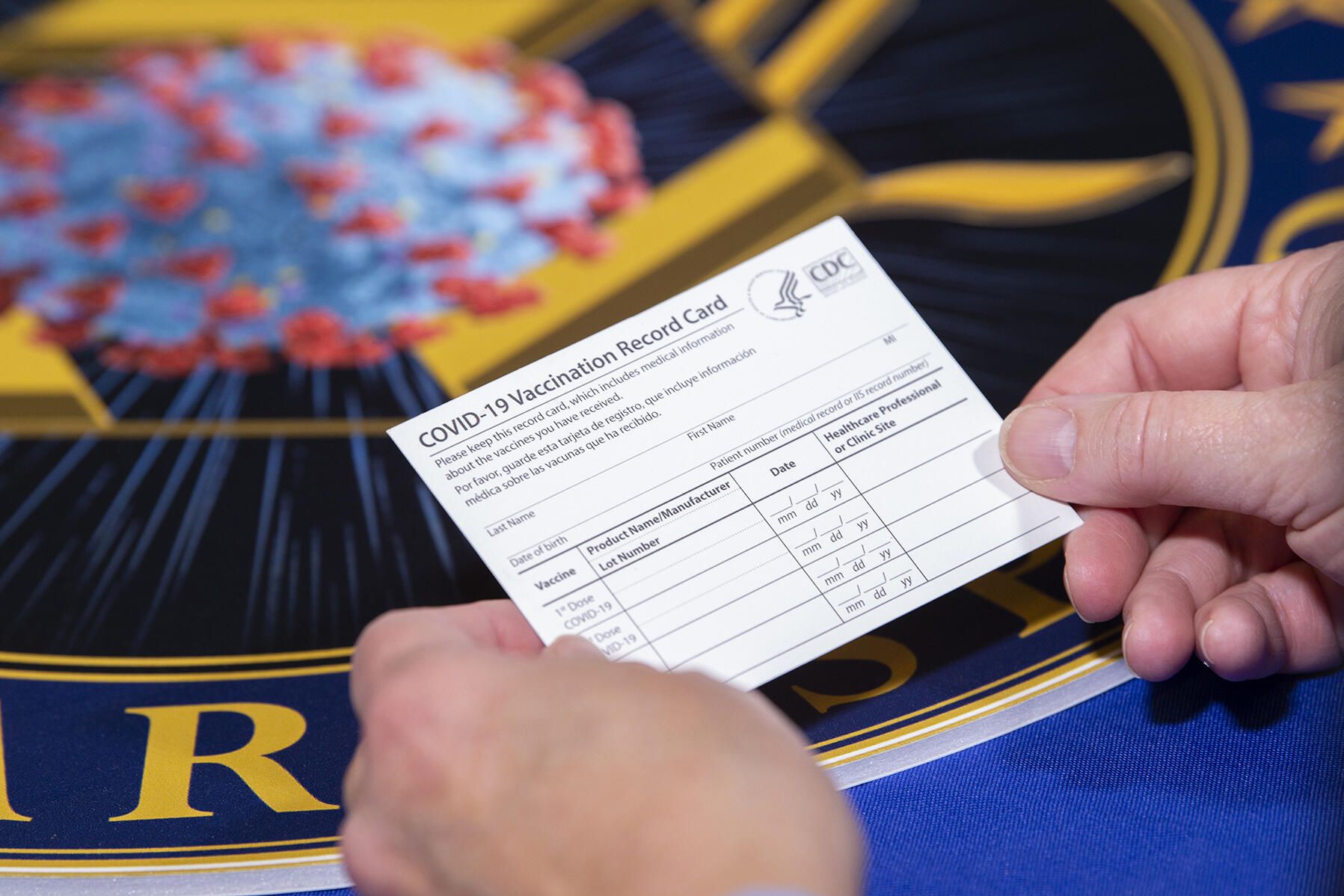
With new vaccine mandates that span government workers and school districts to larger employers, the need to keep your COVID-19 vaccine card handy becomes more and more important. That goes for kids, too, who shortly may be eligible for the vaccine.
And it’s not just at the federal level. Cities and counties across the country are requiring proof of vaccination to attend live indoor events and enter gyms, restaurants and bars.
The vaccines continue to be highly effective in preventing hospitalization. Over the summer, as the delta variant spread across the US, the number of COVID-19 cases, hospitalizations and deaths climbed. Unvaccinated people have accounted for nearly all the hospitalizations and deaths — over 97% as of July. With the federal mandates, the Biden administration aims to stem the surge and put pressure on those who are eligible but not yet vaccinated.
That rectangular paper card you received when you were vaccinated will suffice to prove that you’re vaccinated. (And if there’s still room on the card, it can show you got a booster shot from Pfizer, Moderna or Johnson & Johnson when those are available.)
But what if you lose it, or it’s damaged or stolen? The Centers for Disease Control and Prevention doesn’t have a record of your vaccination status. We do know how to get a new vaccine card if yours is lost or damaged.
Rather than carrying around the card — or laminating it, which prevents your health care provider from updating it with future booster shots — take a few minutes to add a digital copy of your vaccination card to your phone. Here are a few options I’ve found while researching how to safely store mine.
There isn’t one approved way to show proof of your vaccination card
The US doesn’t have a single online system or app you can use to show proof of vaccination on your phone. Instead, what qualifies as proof varies by city, county and even business. Some places may accept a picture of your vaccination card; others may require you to use an app that’s authorized at state level.
It’s a confusing mess, to put it mildly. I strongly urge you to take a few minutes to research what your city, county or state will accept as proof, as it can vary.
For example, concert producer AEG Presents will accept a “physical copy of a COVID-19 Vaccination Record Card, a digital copy of such card or such other proof as is permitted locally.”
Along with school mandates, many colleges are are also requiring students and employees to be vaccinated. Seattle University, for example, requires students to be vaccinated to attend in-person classes via an online form that uploads photos of the front and back of the vaccination card.
When in doubt, look for information on the business’s website, or call the local health department and ask for clarification. This is bound to save you time, headaches and being turned away at the door.
Have an iPhone or an Android phone? Here’s an easy way to save your card
If you have an iPhone, with an update coming soon for iOS 15 you’ll be able to add your vaccine card to your Apple Wallet to present to whenever you need to show you’re fully vaccinated. (You can keep a copy in the Health app right now.)
Over on Android, you can add your vaccine card to the Google Pay app. I need to remind myself each time where my card is in Google Pay, so I added a shortcut icon to my home screen to quickly find it.
Own a Samsung phone? There’s an app just for you
Samsung now gives Galaxy phone owners the option to add proof of vaccination to Samsung Pay,its wallet app. By having direct access to your vaccination record, youwon’t have to fiddle around with creating photo albums and tappingthrough multiple screens before you’re able to show it to a bouncer atyour local watering hole.
To add your card to Samsung Pay, you’ll need to download the CommonHealth app(Samsung’s partner) from the Google Play Store. Follow the prompts inthe app to verify your vaccination status. Once the app confirms you’veindeed gotten the shots, you’ll be prompted to download a Smart HealthCard to Samsung Pay.
That card is what you’ll then show to anyone requesting you show proof of vaccination.
Use your phone to take a clear photo of your card
Is that too much fuss? The simplest way to have a digital record of your vaccine status is to snap a picture of your vaccination card and keep it on your phone. The CDC even recommends keeping a picture of your card as a backup copy.
Simply use the camera app on your phone to snap the photo. You can favorite the photo to quickly locate it or store it in a notes app, a folder or somewhere that’s easy to remember so you don’t have to endlessly scroll your camera roll to find it. Make sure you’re in a well-lit area and get close enough to the card that its dates and details are legible. I also suggest putting the card on a dark surface, while remaining conscious of shadows of your arms or the phone on the card itself.
Here’s an example of one way to save your vaccination card as a new photo album. On an iPhone, open the Photos app, select the Albums tab and then tap the + sign in the top left corner followed by New Album. Give the album a name and then tap Save. Next, select the photos of your card to add it to the album.
On an Android phone, it depends on which app you’re using, but the process should generally be the same. If you’re using the Google Photos app, open the app and then select the picture of your vaccination card. Tap the three-dot menu button in the top-right corner, followed by the Add to Album button. Select +New album and give it a name such as “Vaccination Card” and tap the checkmark button when you’re done.
Excelsior and more: Look for apps based on your location
Some states — including California, Colorado, Hawaii, New York and Oregon — offer some form of digital vaccination card. The myColorado app requires you to create an account, verify your identity and then add your digital driver’s license to your phone. After you’ve done that, you can then add your myVaccine record to the app.
Louisiana’s LA Wallet app takes a similar approach to Colorado’s, allowing you to add your driver’s license and proof of vaccination to your phone.
California’s implementation requires you to fill out a form to verify your identity, after which you’ll receive a text message or email with a link to a QR code you can save to your phone. When scanned, the code will offer proof of vaccination. The link will also include a digital copy of your vaccination record.
MyIR Mobile is another app used by several state health departments to provide a digital copy of your vaccination card. Currently, if you live in Louisiana, Maryland, Mississippi, North Dakota, Washington, West Virginia or Washington, DC, this is the app you’ll use.
More options to create and store your digital vaccination card
I’ve had a large number of readers reach out to me about this article, each one offering advice and guidance about storing a proof of vaccination card.
Some suggestions include well-known airport security service Clear. In fact, some concert and exhibition halls are requiring attendees use Clear to verify their vaccination status to attend a show. You can go to clearme.com/healthpass to download the app and get your card added.
VaxYes is another service that verifies your vaccination status and then adds your vaccination card to Apple Wallet. I’ve read that you can add your card to the Google Pay app, but after signing up and going through the process myself, I don’t see the option on a Pixel 5 running Android 12.
If your local municipality or employer used the CDC’s Vaccine Administration Management System, then you can use the VAMS website to access your vaccination records. I had more than one reader reach out to me about using this system to show proof of vaccination, but without an account myself, I’m unable to go through the process of accessing a vaccination record.
Another suggestion I received from multiple readers is to use a scanner app on your phone and store a scanned copy of your vaccination card in something like your OneDrive personal vault or a password manager (almost all of them offer some sort of secure file storage) instead of storing the photo in Google Photos or Apple’s iCloud photos. On an iPhone, you can use the scanner that’s built into the Notes app. On Android, Google’s Stack PDF scanner will be enough to get the job done.
This story updates as the national vaccine conversation continues. For more information about the forthcoming booster shots, make sure to read this. We have up-to-date details about the delta variant, as well as delta plus and the lambda variant.
Technologies
Trump administration advances $24.3 billion fighter jet deal to Saudi Arabia as Houthis escalate attacks
The deal comes as Iran-backed Houthis escalate attacks on Saudi Arabia and seek control of the strategically important Bab el-Mandeb Strait.

U.S. President Donald Trump’s administration has approved the potential $24.3 billion sale of nearly 50 F-35 warplanes to Saudi Arabia in what is seen as a major boost for the kingdom as it faces intensifying attacks from the Iran-backed Houthis in Yemen.
The package, which was announced on Thursday, includes the sale of 48 of Lockheed Martin’s F-35 jets, the world’s most advanced fighter aircraft, and 49 Pratt & Whitney engines and other parts.
“This proposed sale will support the foreign policy and national security objectives of the United States by improving the security of a major non-NATO ally that is a force for political stability and economic progress in the Gulf region,” the State Department said in a statement.
The announcement comes as the Houthis have recently ramped up attacks on targets in Saudi Arabia and launched a lightning ground offensive to exercise control of the Bab el-Mandeb Strait, a strategically vital oil choke point.
The Trump administration said the proposed deal would help improve Riyadh’s capability to deter current and future threats but would “not alter the military balance in the region” — referring to a longstanding U.S. policy that Israel must maintain a military advantage over potential rivals in the Middle East.
Congress has 30 days to scrutinize or attempt to block the deal, and some lawmakers have already raised concerns.
Representative Raja Krishnamoorthi, D-Ill. said the U.S. should not move ahead with the deal at a time “when our own intelligence community is warning that it could put the crown jewels of American military technology within reach of the Chinese Communist Party.”
In a statement on social media, Krishnamoorthi added: “We must not sell our most advanced fighter jet anywhere the CCP may be able to get its hands on the technology inside it.”
Congress has previously questioned arms deals with Riyadh following the 2018 killing of Saudi journalist Jamal Kohsoggi, a high-profile critic of the kingdom.
In May last year, Trump had praised Saudi Arabia and its leaders after the White House announced a commitment for the kingdom to invest $600 billion in a series of deals with the U.S.
Among the agreements was a nearly $142 billion defense sales deal, which the White House said at the time would provide “state-of-the-art warfighting equipment and services from over a dozen U.S. defense firms.”
Trump, who has a close relationship with Saudi Arabia Crown Prince Mohammed bin Salman, had welcomed the crown prince to the White House in November.
Technologies
Now that the Fed raised rates, where to score the best yields on your cash
From money market funds to Treasury bills, where experts are stashing their cash — and some of the yields they’re finding.
Investors should soon see better yields on their cash now that the Federal Reserve has hiked interest rates. The central bank’s Federal Open Market Committee voted unanimously to increase the federal funds rate by a quarter percentage point, to a target range of 3.75% to 4%, on Wednesday. It was the first hike since July 2023. “The good news is you may see a little bit more [yield] on your high-yield savings accounts. You may see a little bit more on your CD [certificate of deposit] now,” said certified financial planner Marguerita Cheng , CEO of Blue Ocean Global Wealth and a member of the CNBC Financial Advisor Council. That said, there are some nuances — and varying yields available. In addition to high-yield savings and CDs, investors can stash cash in money market funds and Treasury bills. High-yield savings accounts and CDs are insured by the Federal Deposit Insurance Corporation, while Treasurys are backed by the U.S. government. “It really comes down to: What’s the purpose for the cash [and] how soon do you need it,” Cheng said. “There are a lot of options depending on what your purpose is, your time horizon and your tax bracket.” Also bear in mind that while the income from cash-equivalent investments may seem attractive, inflation can eat away at your return. Chris Gunster, head of fixed income at Fidelis Capital, likes to keep his clients’ cash balances at a minimum. “It’s all about inflation. It’s what you earn after inflation and after taxes. If inflation continues to rise faster than the yields that you’re earning on money market funds, you’re not doing so well,” he said. Here are different options for your cash. T-bills T-bills, securities with a maturity of one year or less, react to the Fed’s rate moves, Gunster pointed out. The most recent yield on bills already issued largely priced in Wednesday’s rate hike ahead of the move. Investors can buy bills on TreasuryDirect.gov in maturities from four to 52 weeks. While any earnings are subject to federal taxes, the income is exempt from state and local taxes. There are also exchange-traded funds focused on bills, such as the iShares 0-3 month Treasury Bond ETF (SGOV) and the SPDR Bloomberg 1-3 Month T-Bill ETF (BIL). High-yield savings accounts The annual percentage yields in high-yield savings accounts are also typically tied to the federal funds rate, although other factors could weigh in, such as the bank’s deposit demand. Individual institutions make the call on their rates. “Updates from bank management teams this week (not a single bank meaningfully changed their net interest income guidance) and from our meetings suggest that deposit competition is intense, but deposit promotions may have already priced in several additional rate hikes,” Bank of America Securities analyst Ebrahim Poonawala said in a note Tuesday. The high-yield rates are variable, which means investors can’t lock in income when the Fed hikes. Money market funds Money market funds follow the fed funds rate. However, they won’t immediately respond to the central bank’s decision, so investors won’t be able to participate in higher rates as quickly as if they were in T-bills, Gunster said. That said, he prefers money market funds for his clients’ cash. The current annualized seven-day yield on the Crane 100 list of the largest taxable money market funds is 3.79%, as of Tuesday. “Money market funds are easy to do. You will get the increased rate, and even so, with yields where they are, it’s not a bad investment right now,” he said. For those in the highest tax bracket, Gunster believes large, high-quality municipal money market funds are the place to be. The short-term debt held in the funds is issued by state and local governments and the income is exempt from federal income taxes. CD ladders Investors can lock in rates in a certificate of deposit, which means the money stays put for the stated time. Early withdrawals are subject to penalty. The rates are set by the banks, just like those for high-yield savings accounts. A good way to manage CDs is to own several, at varying maturities, known as a ladder, Cheng said. “I don’t want people to tie all their money up for a year,” she said. “You could build a CD ladder with terms as short as six months, or seven months, nine months, and stagger it.” Floating rate assets For those who want to take the search for income a step further, floating-rate funds can be a good idea, Cheng said. That includes funds containing bank loans and collateralized loan obligations. CLOs are pools of floating-rate loans to businesses. Their payouts fluctuate in tandem with shifting short-term interest rates. “I’m not saying that this is a cash replacement … but it’s a good way to ease into having your cash work a little bit harder,” Cheng said. “If you don’t need the income, reinvest. If you need the income, it is taxable, but it does pay a little bit more because it’s always resetting.”
This site is now part of Versant. By continuing to use this service, you agree to our Terms. You also acknowledge that our updated Privacy Policy applies, including to your existing data. For details on your data rights, click here.
On this service, we and our vendors use cookies and other tools (“Cookies”) to store and access information on your device, such as device identifiers, IP address, and your browser type. You can access a list of all our potential 1021 vendors by selecting “IAB and Google Vendors,” although we may work with only a small selection of these on this service. Your data may be used to save and communicate your privacy choices; ensure security, prevent fraud, and debug our products and services; personalize advertising and content; for advertising and content measurement; to conduct audience research and services development; so we can improve our services and develop new ones; to match and combine offline data with your online activity; and for social features. We may share this data with select vendors with your consent.
Click “I Accept”, to consent to our use of these Cookies or “Reject All” to reject our use of these Cookies. Click “Manage Choices” to set your preferences. If you previously made choices with respect to Versant’s use of Cookies on this browser and device, you will need to update them. You can adjust your choices any time through the “Cookie Preferences” link in the footer of relevant Versant sites or in-app settings. Visit our Cookie Notice and Privacy Policy to learn more.
We will also use other Cookies that are essential or related to our services, including for security and fraud prevention.
Store and/or access information on a device. Personalised advertising and content, advertising and content measurement, audience research and services development.
– Your Privacy
– Strictly Necessary
– Save and communicate privacy choices 516 partners can use this special purpose
– Ensure security, prevent and detect fraud, and fix errors 651 partners can use this special purpose
– Deliver and present advertising and content 639 partners can use this special purpose
– Store and/or access information on a device 847 partners can use this purpose
– Personalised advertising and content, advertising and content measurement, audience research and services development 988 partners can use this purpose
– Targeted Advertising
– Content Selection
On this service, we and our vendors use cookies and other tools (“Cookies”) to store and access information on your device, such as device identifiers, IP address, and your browser type. Your data may be used to save and communicate your privacy choices; ensure security, prevent fraud, and debug our products and services; personalize advertising and content; for advertising and content measurement; to conduct audience research and services development; so we can improve our services and develop new ones; to match and combine offline data with your online activity; and for social features. We may share this data with select vendors with your consent. You can adjust your choices any time through the “Cookie Preferences” link in the footer of relevant Versant sites or in-app settings.
We will also use other Cookies that are essential or related to our services, including for security and fraud prevention. To learn more about some of our vendors, see the IAB and Google Vendors under each purpose. Visit our Cookie Notice and Privacy Policy to learn more.
Always Active
These Cookies and SDKs are required for Service functionality, including security and fraud prevention, and to enable any purchasing capabilities. You can set your browser to block these tracking technologies, but some parts of the site may not function properly.
The choices you make regarding the purposes and entities listed in this notice are saved and made available to those entities in the form of digital signals (such as a string of characters). This is necessary in order to enable both this service and those entities to respect such choices.
Your data can be used to monitor for and prevent unusual and possibly fraudulent activity (for example, regarding advertising, ad clicks by bots), and ensure systems and processes work properly and securely. It can also be used to correct any problems you, the publisher or the advertiser may encounter in the delivery of content and ads and in your interaction with them.
Certain information (like an IP address or device capabilities) is used to ensure the technical compatibility of the content or advertising, and to facilitate the transmission of the content or ad to your device.
Cookies, device or similar online identifiers (e.g. login-based identifiers, randomly assigned identifiers, network based identifiers) together with other information (e.g. browser type and information, language, screen size, supported technologies etc.) can be stored or read on your device to recognise it each time it connects to an app or to a website, for one or several of the purposes presented here.
– Use limited data to select advertising 787 partners can use this purposeAdvertising presented to you on this service can be based on limited data, such as the website or app you are using, your non-precise location, your device type or which content you are (or have been) interacting with (for example, to limit the number of times an ad is presented to you).
– Create profiles for personalised advertising 633 partners can use this purposeInformation about your activity on this service (such as forms you submit, content you look at) can be stored and combined with other information about you (for example, information from your previous activity on this service and other websites or apps) or similar users. This is then used to build or improve a profile about you (that might include possible interests and personal aspects). Your profile can be used (also later) to present advertising that appears more relevant based on your possible interests by this and other entities.
– Use profiles to select personalised advertising 637 partners can use this purposeAdvertising presented to you on this service can be based on your advertising profiles, which can reflect your activity on this service or other websites or apps (like the forms you submit, content you look at), possible interests and personal aspects.
– Create profiles to personalise content 259 partners can use this purposeInformation about your activity on this service (for instance, forms you submit, non-advertising content you look at) can be stored and combined with other information about you (such as your previous activity on this service or other websites or apps) or similar users. This is then used to build or improve a profile about you (which might for example include possible interests and personal aspects). Your profile can be used (also later) to present content that appears more relevant based on your possible interests, such as by adapting the order in which content is shown to you, so that it is even easier for you to find content that matches your interests.
– Use profiles to select personalised content 231 partners can use this purposeContent presented to you on this service can be based on your content personalisation profiles, which can reflect your activity on this or other services (for instance, the forms you submit, content you look at), possible interests and personal aspects. This can for example be used to adapt the order in which content is shown to you, so that it is even easier for you to find (non-advertising) content that matches your interests.
– Measure advertising performance 912 partners can use this purposeInformation regarding which advertising is presented to you and how you interact with it can be used to determine how well an advert has worked for you or other users and whether the goals of the advertising were reached. For instance, whether you saw an ad, whether you clicked on it, whether it led you to buy a product or visit a website, etc. This is very helpful to understand the relevance of advertising campaigns.
– Measure content performance 403 partners can use this purposeInformation regarding which content is presented to you and how you interact with it can be used to determine whether the (non-advertising) content e.g. reached its intended audience and matched your interests. For instance, whether you read an article, watch a video, listen to a podcast or look at a product description, how long you spent on this service and the web pages you visit etc. This is very helpful to understand the relevance of (non-advertising) content that is shown to you.
– Understand audiences through statistics or combinations of data from different sources 575 partners can use this purposeReports can be generated based on the combination of data sets (like user profiles, statistics, market research, analytics data) regarding your interactions and those of other users with advertising or (non-advertising) content to identify common characteristics (for instance, to determine which target audiences are more receptive to an ad campaign or to certain contents).
– Develop and improve services 683 partners can use this purposeInformation about your activity on this service, such as your interaction with ads or content, can be very helpful to improve products and services and to build new products and services based on user interactions, the type of audience, etc. This specific purpose does not include the development or improvement of user profiles and identifiers.
– Use limited data to select content 179 partners can use this purposeContent presented to you on this service can be based on limited data, such as the website or app you are using, your non-precise location, your device type, or which content you are (or have been) interacting with (for example, to limit the number of times a video or an article is presented to you).
These Cookies and SDKs are used to collect data about your browsing habits, use of the Services, your preferences, and your interaction with advertisements across platforms and devices for the purpose of delivering targeted advertising content, both on our Services and on third party sites. Third-party sites and services also use Targeting Cookies to deliver content, including advertisements relevant to your interests on the Services. If you reject these Cookies or SDKs, you will see less relevant advertising.
Data collected under this category through Cookies and SDKs can also be used to select and deliver personalized content, such as news articles and videos.
Consent Leg.Interest
label
Technologies
Warren Buffett stepping down as chairman of Berkshire Hathaway: ‘Father Time always wins’
Buffett’s son, Howard, will replace him as chairman as dictated by a long-standing succession plan, Berkshire said.

Warren Buffett is stepping down as chairman of Berkshire Hathaway, the sprawling conglomerate worth $1 trillion that he has led since 1965. The 96-year-old legendary investor announced the move in a letter to shareholders Friday.
Buffett will become chairman emeritus, effective immediately, while remaining a director on the board, the company said in a separate announcement. His son, Howard Buffett, will replace him as chairman as dictated by a long-standing succession plan, Berkshire said. Susan Decker will continue as lead independent director.
“Father Time always wins,” wrote Buffett. “He has, however, been generous with me. He has given me the opportunity to see Berkshire reach a point where I am more confident than ever about what lies ahead.”
His decision comes a little more than nine months after Greg Abel, 64, took over as CEO while Buffett retained the chairmanship. Buffett first announced his exit as CEO at Berkshire’s annual meeting in May 2025, shocking the crowd of thousands at the time despite his advanced age.
“The culture Warren built and the values he championed will remain at the heart of Berkshire, and Howard will be their guardian,” said Abel in the company release.
“Greg runs the company; Howard will guard its culture and values – both worth more than anything on our balance sheet,” wrote Buffett. “Think of Howard as a policy the shareholders own and hope never to claim against.”
Buffett’s legacy in building the Omaha, Nebraska-based Berkshire is unapparelled in corporate America, taking over a failed New England textiles mill at the tender age of 34 and transforming it over the next six decades into a financial and industrial juggernaut with $44.5 billion in operating earnings last year and nearly 400,000 employees. Berkshire under Buffett’s tenure posted a 19.7% compounded annual return to shareholders, nearly double the return of the S&P 500.
Active chairman
As chairman this year, Buffett remained active within the company. Abel told CNBC in March that Buffett was still coming into the Omaha office every day and the CEO still frequently consulted with him.
In May, Buffett attended the company’s celebrated annual meeting, making some brief remarks from his seat and giving an interview with CNBC’s Becky Quick. It was the first “Woodstock for Capitalists” — as the meeting came to be known — not presided over by Buffett, but instead by Abel.
In July, Buffett revealed to CNBC’s that he was the driving force behind Berkshire’s recent big investment in Alphabet. The Google parent is now Berkshire’s third biggest stock holding behind Apple and American Express after a $10 billion private stock purchase in June.
In that same interview, Buffett noted that he had broken his leg a few weeks ago but was recovering.
Buffett acknowledged his growing limitations because of his age as he was getting ready to hand the reins over to Abel last year. In a Thanksgiving letter to shareholders, he wrote, “To my surprise, I generally feel good. Though I move slowly and read with increasing difficulty, I am at the office five days a week.”
In the Friday letter, Buffett joked about it.
“Recently, I celebrated my 96th birthday with family and friends, including one of my great-grandchildren, who had just turned one. He’s moving a bit faster than I am these days,” he wrote.
Berkshire’s 2026 underperformance
Berkshire shares have struggled this year and Buffett’s exit as chairman raises the stakes for Abel further to perform. The stock is up just 1% in 2026 as the S&P 500 has rallied more than 11%. Rising oil prices and investors’ preference for higher growth parts of the market are partly to blame, but shareholders are also waiting to see whether the new CEO can be as adept as Buffett in deploying the firm’s sizable capital.
For now, investors would likely be happy with Abel using some more of the company’s $365.5 billion cash hoard to buy back more Berkshire shares. He has begun to do just that, stepping up repurchases to $4.5 billion in the second quarter.
Berkshire’s largest shareholder praised the job done by Abel so far in his Friday letter: “My expectations for him were sky high from the start, and he has exceeded them.”
“The company is in excellent hands, and I look forward to remaining a shareholder alongside you,” Buffett said in closing.
When reached for comment by CNBC, Abel said: “Warren described in his letter today how his role at Berkshire has been ‘the best job in the world.’ He gave me an extraordinary responsibility – the best job in American business – and then the latitude to lead in a manner consistent with Berkshire’s culture and values. I look forward to continuing to work alongside Warren, with Howard serving as Chairman and Sue as Lead Independent Director, and I am grateful for that opportunity.”
-
 Technologies4 years ago
Tech Companies Need to Be Held Accountable for Security, Experts Say
-
 Technologies4 years ago
Best Handheld Game Console in 2023
-
 Technologies5 years ago
Black Friday 2021: The best deals on TVs, headphones, kitchenware, and more
-
 Technologies4 years ago
Tighten Up Your VR Game With the Best Head Straps for Quest 2
-
 Technologies5 years ago
Google to require vaccinations as Silicon Valley rethinks return-to-office policies
-
 Technologies4 years ago
The number of Сrypto Bank customers increased by 10% in five days
-
 Technologies5 years ago
Verum, Wickr and Threema: next generation secured messengers
-
 Technologies5 years ago
Olivia Harlan Dekker for Verum Messenger