
Technologies
9 hidden Amazon Prime perks that can save you money and make your life easier
There’s more to your membership than Prime Video and fast shipping.
Amazon is a go-to for almost anything, especially during the pandemic. A few clicks and less two days later, what you need is at your door. But on top of fast shipping, Prime Video and Prime Music, for Amazon Prime members, the trillion-dollar tech titan has dozens of services only a few clicks away. Some of the other less familiar perks buried in the vastness of Amazon’s site. We’re here to help pick the best of the bunch so you don’t get lost in the search tool.
Amazon expanded its sphere during the pandemic — visits to its site reportedly increased by 37% from February 2020 to January 2021 — as it pushed new programs, including Amazon Sidewalk, the auto-on broadband-sharing program for Amazon Echo speakers and Ring devices. But its shopping experience continues to be its bread and butter.
But avid Amazon customers may not know about a few of the hidden deals and discounts that aren’t advertised as much. Prime members can get free books and save big books if they know where to look. We’ve hacked through Amazon’s jungle of services to find the most useful (and surprising) Amazon programs that you can use today.
Read more: Amazon Prime Video: The 25 best films to see this week
1. Over 2,500 free books and magazines using Prime Reading and Kindle Unlimited
Prime Reading is your own personal lending library that comes with a Prime membership. With a rotating selection of over 2,500 books and magazines, you can access Prime Reading with the Kindle app on your desktop or portable device or your Kindle e-reader. This Amazon service also lets you share titles with members of your household. Some books in Prime Reading come with Audible narrations so you can multitask while you listen.
Prime Reading also includes First Reads, which gives members a sneak peek at books before they’re released to the general public.
Kindle Unlimited is a $10-a-month subscription service separate from an Amazon Prime account. It gives you unlimited access to more than 1 million ebooks and up to three magazine subscriptions on a Kindle device or Kindle app.
2. Trade in used devices for gift cards and get discounts for preowned products
Amazon is boarding the train to sustainability station, and it’s something you can directly benefit from. With Amazon Trade-In, you can send back your used electronics in exchange for Amazon gift cards. Make sure to check on the eligibility of each product — some trade-in options are only available for a limited time.
Amazon Renewed gives you access to products that may have been opened but unused by their original owners, or were refurbished. Amazon assures that these preowned items work and look like new, coming with the Amazon Renewed Guarantee. A variety of products and brands are available, even from premium names like Apple and Vitamix.
3. Find Amazon Warehouse discounts
Amazon Warehouse resells millions of like-new or preowned items that have been returned by customers. Some of the products only had their boxes opened by original purchasers before they were sent back, unused, so they’re resold at a discount. While there’s no regular manufacturing warranty on these products, they are backed by Amazon’s 30-day return policy and 90-day renewed item return policy.
To read more about how you can get the most out of Amazon Warehouse, check out our guide on shopping for the best Amazon Warehouse deals.
4. Sift through overstocked items in Amazon Outlet
Just like a brick-and-mortar outlet store, but without the gas money. The Amazon Outlet features overstocked items and other products at discounted prices. Like at an outlet, you can find premium brands, items under $10 and products ranging from home furniture and clothing to books and pet supplies. It’s a good place to stay within a budget while being the first owner, unlike some items in the Amazon Warehouse.
Keep in mind that although the online shopping experience is convenient, just like an outlet, the best deals can take sifting to find. Luckily, you can do it from the couch.
5. Land limited-time discounts through Lightning Deals
Amazon’s Lightning Deals are a promotion where a product or service is on sale for a short period of time or until it’s sold out. You can find them all throughout the site, but especially on Prime Day and in Today’s Deals. On Prime Day, Lightning Deals are only for Prime members.
There is one lightning deal per customer until the promotion ends or all the deals are claimed by other shoppers. You can join a waitlist for a deal, but keep in mind that these discounts are extremely time-sensitive, so grab them fast. Unless refreshing the page over and over is your thing, these deals aren’t necessarily the tool to find something specific because of their fleeting nature and limited availability.
6. 5GB of photo storage with Amazon Photos
Amazon’s online shoebox for photos and videos offers secure and unlimited full-resolution photo storage plus 5GB of video for Prime members. To use this feature, you can choose to manually or automatically upload media in the Amazon Photos app. You can personalize the displays on Amazon devices like Fire TV, Echo Show and Fire tablets as long as you have the app. There are also ways to create keepsakes using the pictures you upload, such as custom cards and prints.
With the Family Vault perk, up to five family members can share in the same plan. If you want more beyond what Prime offers, there are paid plans available. If you choose to switch — which can be done anytime — there is a 100GB option for $2 per month and 1TB plan for $7 per month.
7. Share Prime benefits with loved ones using Amazon Household
Sharing is caring, and Amazon Household lets you extend access to Prime benefits and digital content with others. Using Household, share your Prime account with:
- Up to two adults, each with their own Amazon account. Adults can manage accounts of teens and children.
- Up to four teens (ages 13 through 17). Teens can have their own Amazon login to stream content and shop with parent approval.
- Up to four children (children can’t shop on Amazon).
8. Get discounts on Whole Foods hauls
Healthy shopping can rack up the number at the bottom of the receipt. But if you enter your email address, phone number or scan the QR code on your Whole Foods Market app at checkout during your next grocery haul, Prime members receive discounts on select products.
Blue tags indicate sales exclusive to Prime members, while yellow tags mean an extra 10% off of an item already on sale. This gets you discounts on weekly bestsellers, including produce, packaged goods and beauty products, but note that it excludes alcohol. The few cents saved on items may seem insignificant individually, but savings do add up at the end of the shopping trip.
Also, if you don’t want to make the trip across town, Amazon offers two-hour delivery of groceries for free, as long as you meet the minimum purchase amount. But if you don’t mind the drive, there are also one-hour pickup windows depending on your location — just remember to check in with the Amazon app to see if you need to enter the store.
9. Handpick a wish list with Prime’s wedding registry
If the big day is coming up, Amazon’s wedding registry can get a gift wish list set up for everything from daily essentials to group presents. Amazon can help you cover all the gifting bases, and that makes it a convenient option for you and your wedding guests.
The registry includes lists of editors’ picks and bestsellers to help you sort through Amazon’s options, while the browsing feature can inspire new ideas or highlight something you may have forgotten about. You can also buy any item that’s left on the registry for 20% off — which can be returned within 180 days if you decide you don’t like it.
For more, here are our picks for the best Alexa devices and which e-reader is right for you.
Technologies
Today’s Wordle Hints, Answer and Help for April 7, #1753
Here are hints and the answer for today’s Wordle for April 7, No. 1,753.
Looking for the most recent Wordle answer? Click here for today’s Wordle hints, as well as our daily answers and hints for The New York Times Mini Crossword, Connections, Connections: Sports Edition and Strands puzzles.
Today’s Wordle puzzle wasn’t too tricky, for a change. If you need a new starter word, check out our list of which letters show up the most in English words. If you need hints and the answer, read on.
Read more: New Study Reveals Wordle’s Top 10 Toughest Words of 2025
Today’s Wordle hints
Before we show you today’s Wordle answer, we’ll give you some hints. If you don’t want a spoiler, look away now.
Wordle hint No. 1: Repeats
Today’s Wordle answer has one repeated letter.
Wordle hint No. 2: Vowels
Today’s Wordle answer has one vowel, but it’s the repeated letter, so you’ll see it twice.
Wordle hint No. 3: First letter
Today’s Wordle answer begins with D.
Wordle hint No. 4: Last letter
Today’s Wordle answer ends with E.
Wordle hint No. 5: Meaning
Today’s Wordle answer can relate to something that is closely compacted.
TODAY’S WORDLE ANSWER
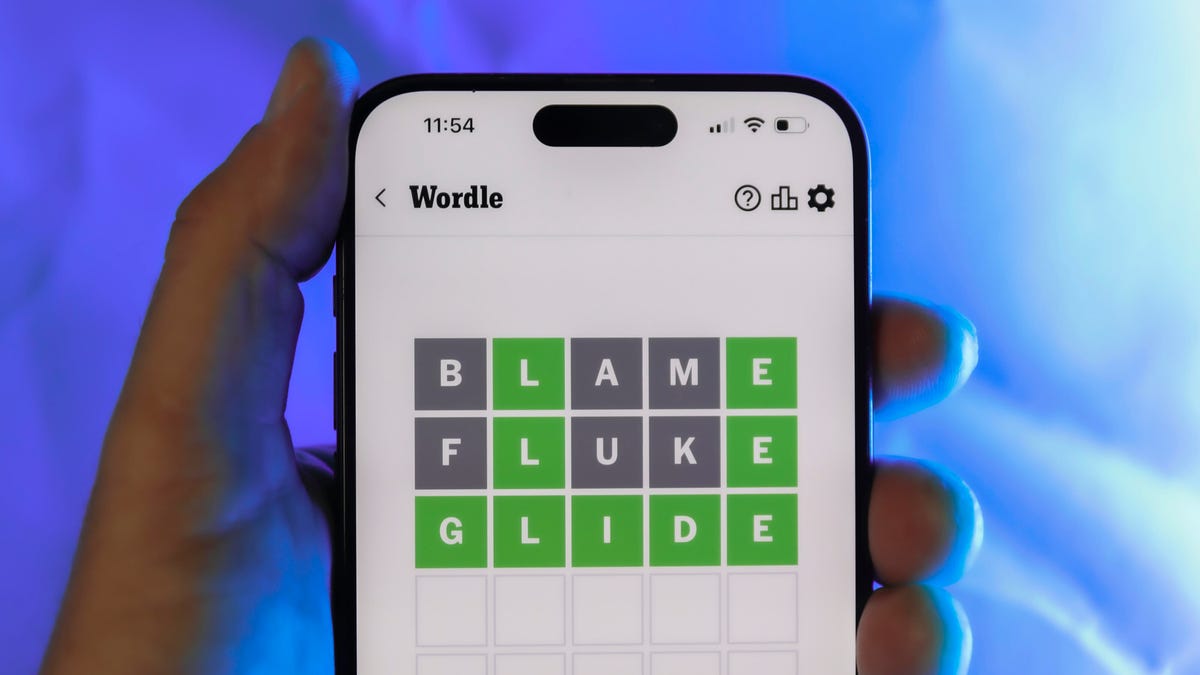
Today’s Wordle answer is DENSE.
Yesterday’s Wordle answer
Yesterday’s Wordle answer, April 6, No. 1752, was SWORN.
Recent Wordle answers
April 2, No. 1748: SOBER
April 3, No. 1749: SINGE
April 4, No. 1750: SANDY
April 5, No. 1751: ENVOY
What’s the best Wordle starting word?
Don’t be afraid to use our tip sheet ranking all the letters in the alphabet by frequency of uses. In short, you want starter words that lean heavy on E, A and R, and don’t contain Z, J and Q.
Some solid starter words to try:
ADIEU
TRAIN
CLOSE
STARE
NOISE
Technologies
Today’s NYT Mini Crossword Answers for Tuesday, April 7
Here are the answers for The New York Times Mini Crossword for April 7.

Looking for the most recent Mini Crossword answer? Click here for today’s Mini Crossword hints, as well as our daily answers and hints for The New York Times Wordle, Strands, Connections and Connections: Sports Edition puzzles.
Need some help with today’s Mini Crossword? Read on for all the answers. And if you could use some hints and guidance for daily solving, check out our Mini Crossword tips.
If you’re looking for today’s Wordle, Connections, Connections: Sports Edition and Strands answers, you can visit CNET’s NYT puzzle hints page.
Read more: Tips and Tricks for Solving The New York Times Mini Crossword
Let’s get to those Mini Crossword clues and answers.
Mini across clues and answers
1A clue: Informative commercial, for short
Answer: PSA
4A clue: Something you trace to draw a Thanksgiving turkey
Answer: HAND
5A clue: ___ Johnson, former Prime Minister of the U.K.
Answer: BORIS
6A clue: Opposite of include
Answer: OMIT
7A clue: Crosses (out)
Answer: XES
Mini down clues and answers
1D clue: City with the Notre-Dame Cathedral
Answer: PARIS
2D clue: Bad mood
Answer: SNIT
3D clue: About eight minutes of the average half-hour sitcom
Answer: ADS
4D clue: Remote worker’s office, perhaps
Answer: HOME
5D clue: Word that can follow each group of circled letters (and hints at its shape)
Answer: BOX
Technologies
NASA’s Artemis II Breaks Record With Trip Around The Moon
-
 Technologies3 года ago
Tech Companies Need to Be Held Accountable for Security, Experts Say
-
 Technologies3 года ago
Best Handheld Game Console in 2023
-
 Technologies3 года ago
Tighten Up Your VR Game With the Best Head Straps for Quest 2
-
 Technologies4 года ago
Black Friday 2021: The best deals on TVs, headphones, kitchenware, and more
-
 Technologies5 лет ago
Google to require vaccinations as Silicon Valley rethinks return-to-office policies
-
 Technologies5 лет ago
Verum, Wickr and Threema: next generation secured messengers
-
 Technologies4 года ago
Olivia Harlan Dekker for Verum Messenger
-
 Technologies4 года ago
The number of Сrypto Bank customers increased by 10% in five days