
Technologies
How to Find All the Saved Wi-Fi Passwords Hidden on Your iPhone
If you’ve ever connected to a Wi-Fi network, the passwords are stored somewhere on your iPhone. Here’s how to find them.

A reliable, high-speed internet connection is an integral part of your daily life, which is why you constantly seek out Wi-Fi when cellular isn’t enough to do the job on your iPhone. Besides your home network, you’ve probably connected to Wi-Fi at friends’ houses, coffee shops, airports and libraries, but with so many networks, it’s impossible to remember all these passwords.

For the most part, you don’t need to remember any Wi-Fi passwords — once you connect to a network, your iPhone automatically reconnects to it when it’s nearby.
But there may be times when you’ll need to know the actual password, if, for example, a friend or family member wants to connect to that same network and there’s no other way for you to share the password with them.
Handily, your iPhone stores the passwords for all the Wi-Fi networks you connect to — you just need to know where to find them.
Interested in other lesser-known features on your iPhone? Check out these 14 hidden features on iOS 16 and the trackpad hidden in your iPhone keyboard.

The Lisen phone stand is ergonomically designed to provide you with a more comfortable viewing angle to help reduce strain on your neck and back. Simply adjust the height, set down your phone (vertically or horizontally) and read the news or watch videos on your phone while you multitask.
View password for Wi-Fi network you’re currently connected to
This first method allows you to view the password of the Wi-Fi network you’re either currently connected to or have connected to in the past and are near enough to the router for the network to appear in your settings.
If you meet these requirements, go to Settings > Wi-Fi, find the Wi-Fi network you want the password for and tap the information icon. Next, tap Password and use Face ID, Touch ID or enter your passcode to view the Wi-Fi network password. Finally, hit Copy to save the password to your clipboard.
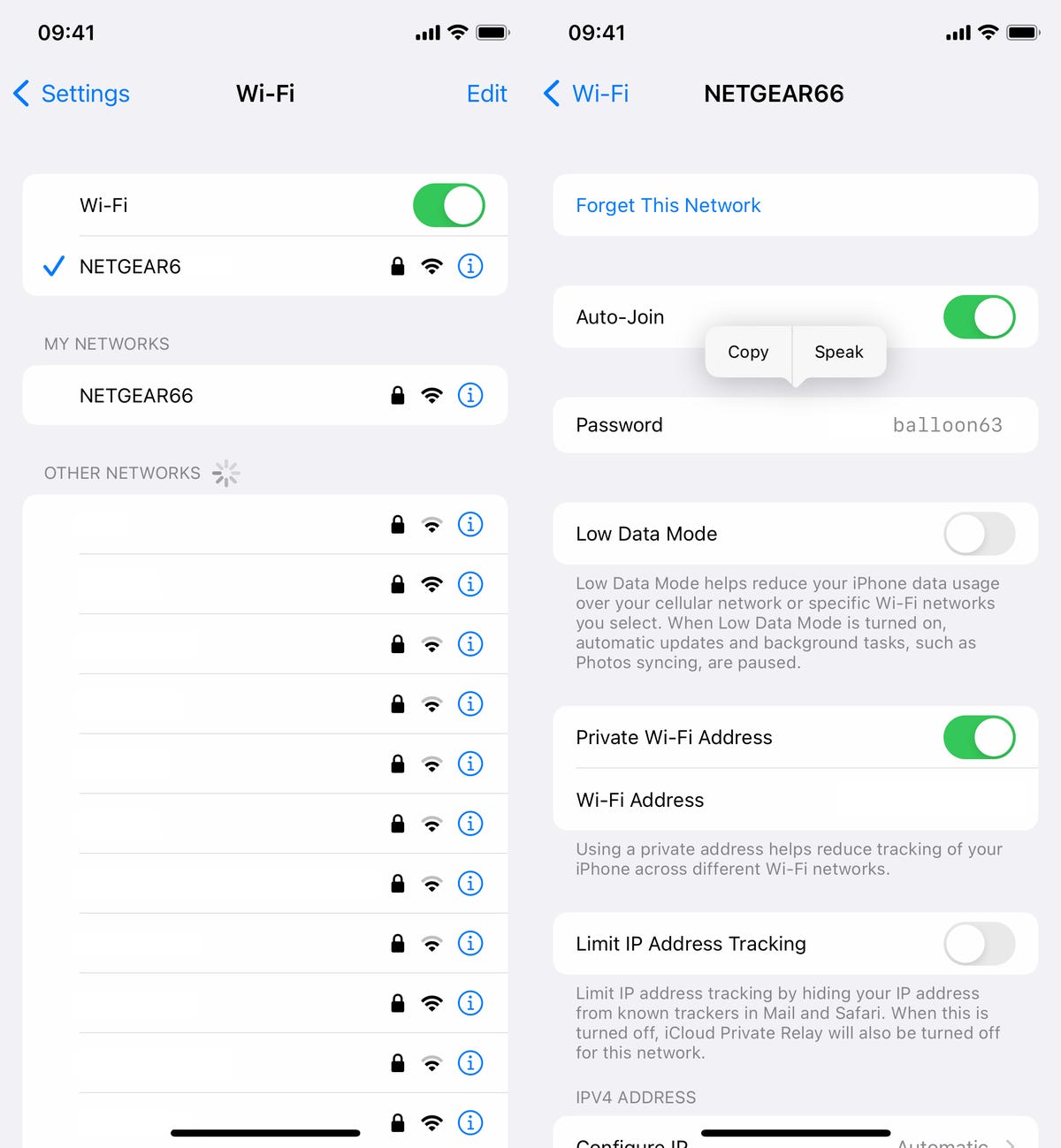
You can view passwords for any Wi-Fi networks you’ve ever connected to, as long as you’re currently connected to it or near enough that it appears under My Networks.
Screenshots by Nelson Aguilar/CNETHowever, as mentioned, this only works for Wi-Fi networks you’re currently connected to or near to, but there is a way to find the passwords to all the other Wi-Fi networks you’ve connected to in the past.
Find the rest of your saved Wi-Fi passwords
If you want to view every single stored Wi-Fi password on your iPhone, go to Settings > Wi-Fi and tap the Edit button on the top right. A list of your known networks, or every single Wi-Fi network you’ve ever connected to, will appear in alphabetical and numerical order.
To view a password, tap the information icon and then hit Password.
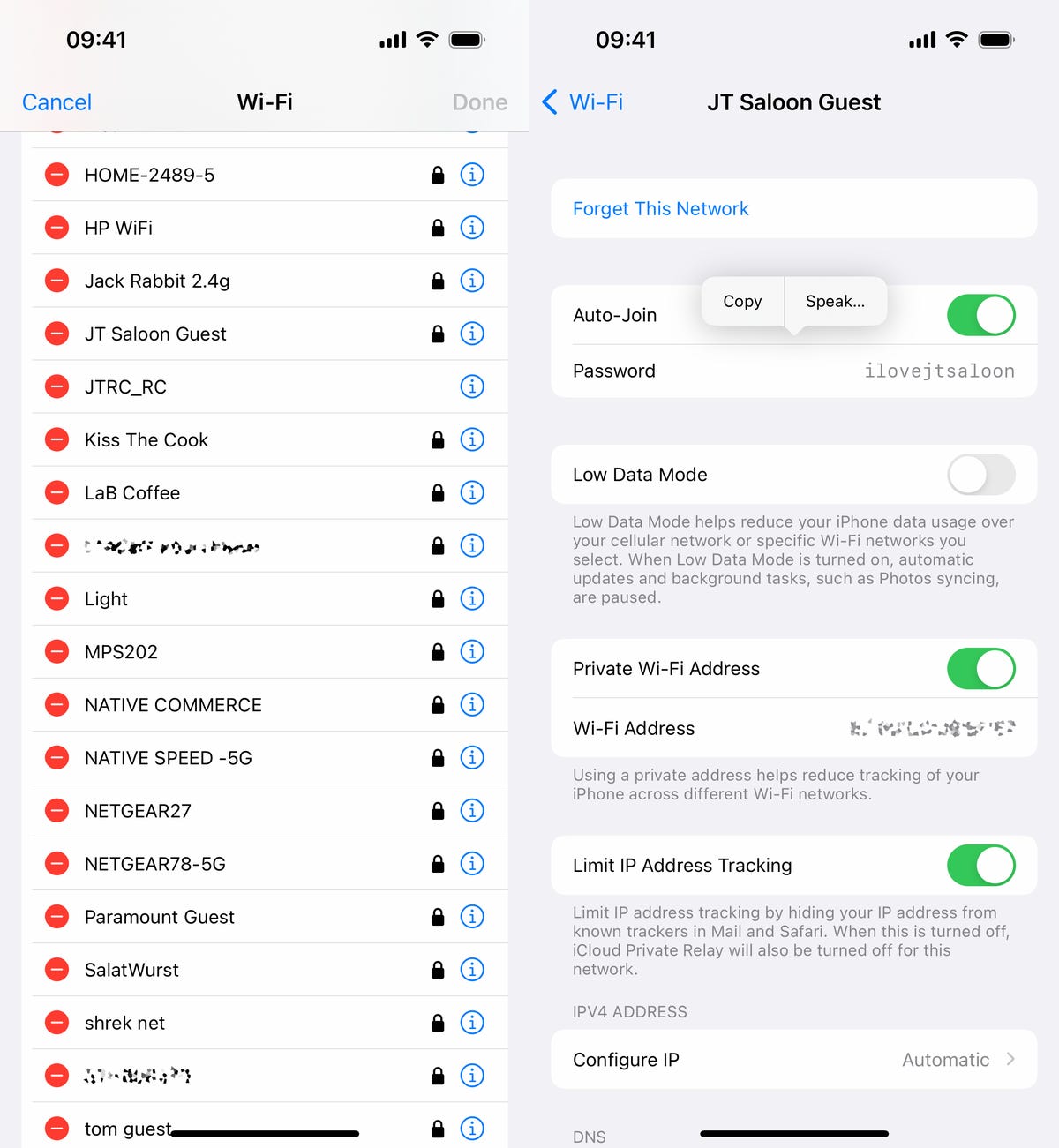
You can copy the password to your clipboard or have the password spoken out loud to you.
Screenshots by Nelson Aguilar/CNETIf you want to check out more about iOS, check out our review of the iPhone 14 and everything you need to know about the iPhone 14 series.
Technologies
Top destinations for premium CD yields as September approaches
With the Fed poised to potentially raise rates again, savers can still find attractive CD yields heading into September, with banks like Sallie Mae, Popular Direct, and CIBC offering competitive rates well above peer averages.

August has delivered strong performance for equities, yet those looking to set aside savings this autumn can still earn attractive returns through certificates of deposit. Depositors are closely monitoring the Federal Reserve ahead of its September 15-16 policy meeting. Futures markets tied to the fed funds rate point to about a 65% probability that the central bank will lift its key lending rate by a quarter percentage point, bringing it to a range of 3.75% to 4%. Speaking in Jackson Hole, Wyoming late last week, Fed Chairman Kevin Warsh expressed his concerns over persistent inflation. He remarked that “while this summer’s [inflation] readings were better than expected, they do not tell me that underlying trends have meaningfully improved.” In fact, the July personal consumption expenditures price index climbed at an annual pace of 3.7%, exceeding the Dow Jones consensus forecast by 0.1 percentage point and remaining well above the central bank’s 2% inflation goal. Although rising rates pose challenges for borrowers, they present opportunities for savers who can take advantage of stronger yields on instruments like certificates of deposit. A number of banks, for instance, continue to price their CDs competitively and offer appealing yields as they vie for customer deposits. Recent move Just last week, Sallie Mae raised the annual percentage yield on its one-year CD by five basis points, bringing it to 4.2%. This adjustment places Sallie Mae’s one-year CD rate roughly 25 basis points above the peer median APY of 3.95%, according to Vincent Caintic, analyst at BTIG. One basis point equals 1/100th of a percent, or 0.01%. Other financial institutions also continue to feature attractive rates on their one-year CDs. Popular Direct offers an APY of 4.25% on its 12-month CD, as of Monday afternoon, while CIBC advertises a 4.15% yield. Savers can also discover appealing rates if they’re open to terms beyond 12 months. Synchrony Financial provides a 4.3% APY for a 16-month CD, and Marcus by Goldman Sachs offers a comparable rate on its 18-month product. Happen Bank features an 11-month CD with a 4.2% APY. If you’re considering a CD, carefully evaluate your time horizon and liquidity requirements. “Breaking” a CD prior to maturity results in a penalty in the form of forfeited interest. Savers should also stay mindful of their CD’s expiration date, since banks may automatically roll them into a renewal CD at a lower rate. This site is now part of Versant. By continuing to use this service, you agree to our Terms. You also acknowledge that our updated Privacy Policy applies, including to your existing data. For details on your data rights, click here. On this service, we and our vendors use cookies and other tools (“Cookies”) to store and access information on your device, such as device identifiers, IP address, and your browser type. You can access a list of all our potential 1015 vendors by selecting “IAB and Google Vendors,” although we may work with only a small selection of these on this service. Your data may be used to save and communicate your privacy choices; ensure security, prevent fraud, and debug our products and services; personalize advertising and content; for advertising and content measurement; to conduct audience research and services development; so we can improve our services and develop new ones; to match and combine offline data with your online activity; and for social features. We may share this data with select vendors with your consent. Click “I Accept”, to consent to our use of these Cookies or “Reject All” to reject our use of these Cookies. Click “Manage Choices” to set your preferences. If you previously made choices with respect to Versant’s use of Cookies on this browser and device, you will need to update them. You can adjust your choices any time through the “Cookie Preferences” link in the footer of relevant Versant sites or in-app settings. Visit our Cookie Notice and Privacy Policy to learn more. We will also use other Cookies that are essential or related to our services, including for security and fraud prevention. Store and/or access information on a device. Personalised advertising and content, advertising and content measurement, audience research and services development. – Your Privacy – Strictly Necessary – Save and communicate privacy choices 510 partners can use this special purpose – Ensure security, prevent and detect fraud, and fix errors 644 partners can use this special purpose – Deliver and present advertising and content 634 partners can use this special purpose – Store and/or access information on a device 842 partners can use this purpose – Personalised advertising and content, advertising and content measurement, audience research and services development 982 partners can use this purpose – Targeted Advertising – Content Selection On this service, we and our vendors use cookies and other tools (“Cookies”) to store and access information on your device, such as device identifiers, IP address, and your browser type. Your data may be used to save and communicate your privacy choices; ensure security, prevent fraud, and debug our products and services; personalize advertising and content; for advertising and content measurement; to conduct audience research and services development; so we can improve our services and develop new ones; to match and combine offline data with your online activity; and for social features. We may share this data with select vendors with your consent. You can adjust your choices any time through the “Cookie Preferences” link in the footer of relevant Versant sites or in-app settings. We will also use other Cookies that are essential or related to our services, including for security and fraud prevention. To learn more about some of our vendors, see the IAB and Google Vendors under each purpose. Visit our Cookie Notice and Privacy Policy to learn more. Always Active These Cookies and SDKs are required for Service functionality, including security and fraud prevention, and to enable any purchasing capabilities. You can set your browser to block these tracking technologies, but some parts of the site may not function properly. The choices you make regarding the purposes and entities listed in this notice are saved and made available to those entities in the form of digital signals (such as a string of characters). This is necessary in order to enable both this service and those entities to respect such choices. Your data can be used to monitor for and prevent unusual and possibly fraudulent activity (for example, regarding advertising, ad clicks by bots), and ensure systems and processes work properly and securely. It can also be used to correct any problems you, the publisher or the advertiser may encounter in the delivery of content and ads and in your interaction with them. Certain information (like an IP address or device capabilities) is used to ensure the technical compatibility of the content or advertising, and to facilitate the transmission of the content or ad to your device. Cookies, device or similar online identifiers (e.g. login-based identifiers, randomly assigned identifiers, network based identifiers) together with other information (e.g. browser type and information, language, screen size, supported technologies etc.) can be stored or read on your device to recognise it each time it connects to an app or to a website, for one or several of the purposes presented here. – Use limited data to select advertising 781 partners can use this purposeAdvertising presented to you on this service can be based on limited data, such as the website or app you are using, your non-precise location, your device type or which content you are (or have been) interacting with (for example, to limit the number of times an ad is presented to you). – Create profiles for personalised advertising 629 partners can use this purposeInformation about your activity on this service (such as forms you submit, content you look at) can be stored and combined with other information about you (for example, information from your previous activity on this service and other websites or apps) or similar users. This is then used to build or improve a profile about you (that might include possible interests and personal aspects). Your profile can be used (also later) to present advertising that appears more relevant based on your possible interests by this and other entities. – Use profiles to select personalised advertising 633 partners can use this purposeAdvertising presented to you on this service can be based on your advertising profiles, which can reflect your activity on this service or other websites or apps (like the forms you submit, content you look at), possible interests and personal aspects. – Create profiles to personalise content 259 partners can use this purposeInformation about your activity on this service (for instance, forms you submit, non-advertising content you look at) can be stored and combined with other information about you (such as your previous activity on this service and other websites or apps) or similar users. This is then used to build or improve a profile about you (which might for example include possible interests and personal aspects). Your profile can be used (also later) to present content that appears more relevant based on your possible interests, such as by adapting the order in which content is shown to you, so that it is even easier for you to find content that matches your interests. – Use profiles to select personalised content 231 partners can use this purposeContent presented to you on this service can be based on your content personalisation profiles, which can reflect your activity on this or other services (for instance, the forms you submit, content you look at), possible interests and personal aspects. This can for example be used to adapt the order in which content is shown to you, so that it is even easier for you to find (non-advertising) content that matches your interests. – Measure advertising performance 905 partners can use this purposeInformation regarding which advertising is presented to you and how you interact with it can be used to determine how well an advert has worked for you or other users and whether the goals of the advertising were reached. For instance, whether you saw an ad, whether you clicked on it, whether it led you to buy a product or visit a website, etc. This is very helpful to understand the relevance of advertising campaigns. – Measure content performance 404 partners can use this purposeInformation regarding which content is presented to you and how you interact with it can be used to determine whether the (non-advertising) content e.g. reached its intended audience and matched your interests. For instance, whether you read an article, watch a video, listen to a podcast or look at a product description, how long you spent on this service and the web pages you visit etc. This is very helpful to understand the relevance of (non-advertising) content that is shown to you. – Understand audiences through statistics or combinations of data from different sources 572 partners can use this purposeReports can be generated based on the combination of data sets (like user profiles, statistics, market research, analytics data) regarding your interactions and those of other users with advertising or (non-advertising) content to identify common characteristics (for instance, to determine which target audiences are more receptive to an ad campaign or to certain contents). – Develop and improve services 678 partners can use this purposeInformation about your activity on this service, such as your interaction with ads or content, can be very helpful to improve products and services and to build new products and services based on user interactions, the type of audience, etc. This specific purpose does not include the development or improvement of user profiles and identifiers. – Use limited data to select content 180 partners can use this purposeContent presented to you on this service can be based on limited data, such as the website or app you are using, your non-precise location, your device type, or which content you are (or have been) interacting with (for example, to limit the number of times a video or an article is presented to you). These Cookies and SDKs are used to collect data about your browsing habits, use of the Services, your preferences, and your interaction with advertisements across platforms and devices for the purpose of delivering targeted advertising content, both on our Services and on third party sites. Third-party sites and services also use Targeting Cookies to deliver content, including advertisements relevant to your interests on the Services. If you reject these Cookies or SDKs, you will see less relevant advertising. Data collected under this category through Cookies and SDKs can also be used to select and deliver personalized content, such as news articles and videos. Consent Leg.Interest label
Technologies
Premarket Stock Movers Highlight Nvidia, Robinhood, Novartis and Other Performers
Premarket movers include chipmakers like Nvidia, AMD and Micron which declined over 1% amid rising Treasury yields, energy stocks such as XLE and EOG Resources that surged above 1%, and tech leader Robinhood that gained 2% after a Morgan Stanley upgrade, while Novartis rose 4% on positive clinical trial data and Duolingo jumped 6% following an Evercore ISI upgrade.

Market Insider
Stocks making the biggest moves premarket: Nvidia, Robinhood, Novartis & more
Check out the companies making the biggest moves premarket: Chipmakers — The group fell to start the new month of trading as Treasury yields rose to pressure the broader market. The VanEck Semiconductor ETF (SMH) lost more than 1%. Nvidia , AMD and Micron were also down more than 1%. Energy stocks — Shares rose broadly alongside oil prices, as tensions in the Middle East persist. The State Street Energy Select Sector SPDR ETF (XLE) climbed more than 1%. EOG Resources , Diamondback Energy and Targa Resources advanced more than 1% each. Robinhood Markets — The online brokerage gained more than 2% after a Morgan Stanley upgrade to overweight from equal weight. “HOOD’s expanding platform is turning product velocity into stronger customer economics,” analysts at the bank said. Novartis — Shares gained 4% on positive trial data for the company’s multiple sclerosis drug. Novartis said remibrutinib “significantly” reduced relapse rates in MS patients relative to another treatments. Duolingo — The language education app rose 6% following an upgrade by Evercore ISI to outperform from in line. Evercore analysts cited strong survey data for the company.
This site is now part of Versant. By continuing to use this service, you agree to our Terms. You also acknowledge that our updated Privacy Policy applies, including to your existing data. For details on your data rights, click here.
On this service, we and our vendors use cookies and other tools (“Cookies”) to store and access information on your device, such as device identifiers, IP address, and your browser type. You can access a list of all our potential 1015 vendors by selecting “IAB and Google Vendors,” although we may work with only a small selection of these on this service. Your data may be used to save and communicate your privacy choices; ensure security, prevent fraud, and debug our products and services; personalize advertising and content; for advertising and content measurement; to conduct audience research and services development; so we can improve our services and develop new ones; to match and combine offline data with your online activity; and for social features. We may share this data with select vendors with your consent.
Click “I Accept”, to consent to our use of these Cookies or “Reject All” to reject our use of these Cookies. Click “Manage Choices” to set your preferences. If you previously made choices with respect to Versant’s use of Cookies on this browser and device, you will need to update them. You can adjust your choices any time through the “Cookie Preferences” link in the footer of relevant Versant sites or in-app settings. Visit our Cookie Notice and Privacy Policy to learn more.
We will also use other Cookies that are essential or related to our services, including for security and fraud prevention.
Store and/or access information on a device. Personalised advertising and content, advertising and content measurement, audience research and services development.
– Your Privacy
– Strictly Necessary
– Save and communicate privacy choices 510 partners can use this special purpose
– Ensure security, prevent and detect fraud, and fix errors 644 partners can use this special purpose
– Deliver and present advertising and content 634 partners can use this special purpose
– Store and/or access information on a device 842 partners can use this purpose
– Personalised advertising and content, advertising and content measurement, audience research and services development 982 partners can use this purpose
– Targeted Advertising
– Content Selection
On this service, we and our vendors use cookies and other tools (“Cookies”) to store and access information on your device, such as device identifiers, IP address, and your browser type. Your data may be used to save and communicate your privacy choices; ensure security, prevent fraud, and debug our products and services; personalize advertising and content; for advertising and content measurement; to conduct audience research and services development; so we can improve our services and develop new ones; to match and combine offline data with your online activity; and for social features. We may share this data with select vendors with your consent. You can adjust your choices any time through the “Cookie Preferences” link in the footer of relevant Versant sites or in-app settings.
Always Active
These Cookies and SDKs are required for Service functionality, including security and fraud prevention, and to enable any purchasing capabilities. You can set your browser to block these tracking technologies, but some parts of the site may not function properly.
The choices you make regarding the purposes and entities listed in this notice are saved and made available to those entities in the form of digital signals (such as a string of characters). This is necessary in order to enable both this service and those entities to respect such choices.
Your data can be used to monitor for and prevent unusual and possibly fraudulent activity (for example, regarding advertising, ad clicks by bots), and ensure systems and processes work properly and securely. It can also be used to correct any problems you, the publisher or the advertiser may encounter in the delivery of content and ads and in your interaction with them.
Certain information (like an IP address or device capabilities) is used to ensure the technical compatibility of the content or advertising, and to facilitate the transmission of the content or ad to your device.
Cookies, device or similar online identifiers (e.g. login-based identifiers, randomly assigned identifiers, network based identifiers) together with other information (e.g. browser type and information, language, screen size, supported technologies etc.) can be stored or read on your device to recognise it each time it connects to an app or to a website, for one or several of the purposes presented here.
– Use limited data to select advertising 781 partners can use this purpose
Advertising presented to you on this service can be based on limited data, such as the website or app you are using, your non-precise location, your device type or which content you are (or have been) interacting with (for example, to limit the number of times an ad is presented to you).
– Create profiles for personalised advertising 629 partners can use this purpose
Information about your activity on this service (such as forms you submit, content you look at) can be stored and combined with other information about you (for example, information from your previous activity on this service and other websites or apps) or similar users. This is then used to build or improve a profile about you (that might include possible interests and personal aspects). Your profile can be used (also later) to present advertising that appears more relevant based on your possible interests by this and other entities.
– Use profiles to select personalised advertising 633 partners can use this purpose
Advertising presented to you on this service can be based on your advertising profiles, which can reflect your activity on this service or other websites or apps (like the forms you submit, content you look at), possible interests and personal aspects.
– Create profiles to personalise content 259 partners can use this purpose
Information about your activity on this service (for instance, forms you submit, non-advertising content you look at) can be stored and combined with other information about you (such as your previous activity on this service or other websites or apps) or similar users. This is then used to build or improve a profile about you (which might for example include possible interests and personal aspects). Your profile can be used (also later) to present content that appears more relevant based on your possible interests, such as by adapting the order in which content is shown to you, so that it is even easier for you to find content that matches your interests.
– Use profiles to select personalised content 231 partners can use this purpose
Content presented to you on this service can be based on your content personalisation profiles, which can reflect your activity on this or other services (for instance, the forms you submit, content you look at), possible interests and personal aspects. This can for example be used to adapt the order in which content is shown to you, so that it is even easier for you to find (non-advertising) content that matches your interests.
– Measure advertising performance 905 partners can use this purpose
Information regarding which advertising is presented to you and how you interact with it can be used to determine how well an advert has worked for you or other users and whether the goals of the advertising were reached. For instance, whether you saw an ad, whether you clicked on it, whether it led you to buy a product or visit a website, etc. This is very helpful to understand the relevance of advertising campaigns.
– Measure content performance 404 partners can use this purpose
Information regarding which content is presented to you and how you interact with it can be used to determine whether the (non-advertising) content e.g. reached its intended audience and matched your interests. For instance, whether you read an article, watch a video, listen to a podcast or look at a product description, how long you spent on this service and the web pages you visit etc. This is very helpful to understand the relevance of (non-advertising) content that is shown to you.
– Understand audiences through statistics or combinations of data from different sources 572 partners can use this purpose
Reports can be generated based on the combination of data sets (like user profiles, statistics, market research, analytics data) regarding your interactions and those of other users with advertising or (non-advertising) content to identify common characteristics (for instance, to determine which target audiences are more receptive to an ad campaign or to certain contents).
– Develop and improve services 678 partners can use this purpose
Information about your activity on this service, such as your interaction with ads or content, can be very helpful to improve products and services and to build new products and services based on user interactions, the type of audience, etc. This specific purpose does not include the development or improvement of user profiles and identifiers.
– Use limited data to select content 180 partners can use this purpose
Content presented to you on this service can be based on limited data, such as the website or app you are using, your non-precise location, your device type, or which content you are (or have been) interacting with (for example, to limit the number of times a video or an article is presented to you).
These Cookies and SDKs are used to collect data about your browsing habits, use of the Services, your preferences, and your interaction with advertisements across platforms and devices for the purpose of delivering targeted advertising content, both on our Services and on third party sites. Third-party sites and services also use Targeting Cookies to deliver content, including advertisements relevant to your interests on the Services. If you reject these Cookies or SDKs, you will see less relevant advertising.
Data collected under this category through Cookies and SDKs can also be used to select and deliver personalized content, such as news articles and videos.
Consent Leg.Interest
label
Technologies
Venezuela awards U.S.-supported oil company NABEP 100-year rights to 17 oil fields, White House reports
Venezuelan interim authorities have granted U.S.-backed NABEP 100-year concessions for 17 oil fields with 65 billion barrels of proven reserves, giving the U.S. government preferential purchasing rights and an equity stake, according to the White House.

Venezuelan interim authorities have awarded U.S.-backed North American Blue Energy Partners, or NABEP, 100-year concessions for 17 oil fields, with proven reserves of approximately 65 billion barrels, the White House said on Monday.
NABEP ranks as the second-largest private oil producer in Venezuela. The company has provided the U.S. Department of War’s Office of Strategic Capital with a 35% equity stake in its corporate parent, according to the White House, representing up to “hundreds of billions in value and dividends for the United States.”
President Donald Trump announced on Friday a deal with Caracas that would grant the U.S. majority control over 65 billion barrels, or roughly 20% of the South American country’s vast oil reserves. The U.S. had approximately 46 billion barrels in proven oil reserves as of the end of 2024, according to official figures.
In a fact sheet published Monday evening in Washington, the U.S. government stated it would hold the right to purchase, at production cost, a guaranteed 20% of the off-take from all current and future fields NABEP will operate, as part of an effort to support replenishing the U.S. strategic petroleum reserves.
The U.S. government also retains the “right of first refusal” to purchase the remaining 80% of NABEP’s production, making Washington the prioritized buyer for its energy holdings.
Analysts, however, remained doubtful that this landmark oil agreement could meaningfully increase U.S. energy production or lower gas prices for Americans in the near term. Significant investments are required to extract the valuable resources in Venezuela, whose oil output remains a fraction of its potential due to decades of mismanagement, insufficient investment and sanctions.
NABEP also planned to invest up to $100 billion in new oil infrastructure in Venezuela to expand production, the White House said. Under the agreement, the company is expected to pay $200 billion in royalty and tax payments to Venezuelan governments over the first 25 years.
-
 Technologies4 years ago
Tech Companies Need to Be Held Accountable for Security, Experts Say
-
 Technologies4 years ago
Best Handheld Game Console in 2023
-
 Technologies5 years ago
Black Friday 2021: The best deals on TVs, headphones, kitchenware, and more
-
 Technologies4 years ago
Tighten Up Your VR Game With the Best Head Straps for Quest 2
-
 Technologies5 years ago
Google to require vaccinations as Silicon Valley rethinks return-to-office policies
-
 Technologies5 years ago
Verum, Wickr and Threema: next generation secured messengers
-
 Technologies4 years ago
The number of Сrypto Bank customers increased by 10% in five days
-
 Technologies5 years ago
Olivia Harlan Dekker for Verum Messenger