
Technologies
Alienware m18 Review: A Big and Bold Gaming Beast
It’s not the only 18-inch gaming laptop of 2023, but so far it’s the most powerful.
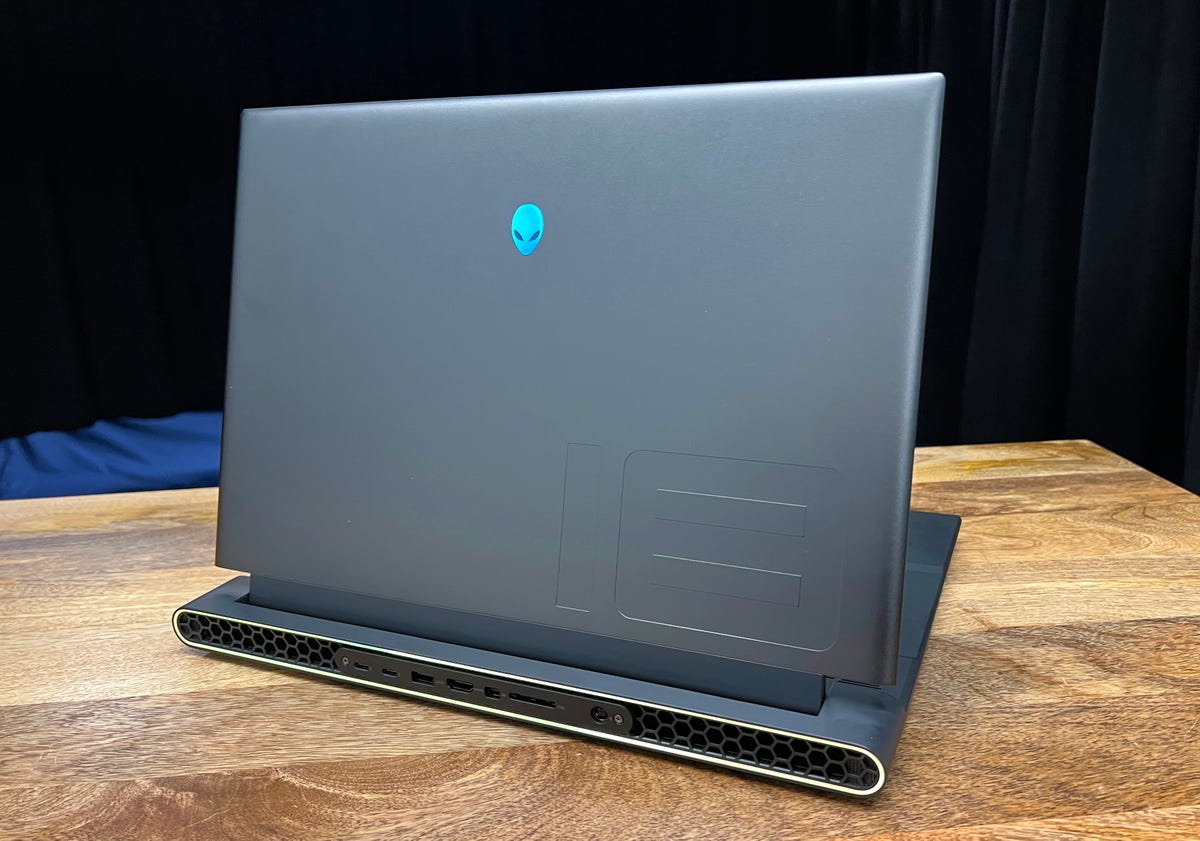
It’s big, it’s powerful and it might arguably be from another planet. That’s an easy way to think about the Alienware m18, a new big-screen gaming laptop from Dell’s Alienware brand. Announced during CES 2023 in January, it’s already on the CNET testing bench and blowing me away with its massive display and top-shelf components.
Of course, that’s because Alienware sent one of the highest-end configurations possible, including an Intel Core i9-13980HX CPU and Nvidia GeForce RTX 4090 graphics card. Along with 32GB of RAM and a 1TB SSD (the only choice that felt kinda skimpy), that means this exact build will cost $3,549. Note that prices and configuration options can shift in build-to-order systems like this. Also, the Core i9-13980HX isn’t listed as an available option just yet. Dell says it’s coming later in April.
If you’re more interested in the big screen than the big performance, the least-expensive build of this system is currently $2,099, but includes only an Nvidia 4060 GPU, 16GB of RAM and a single 512GB SSD – a configuration that would cost much less in other gaming laptops.
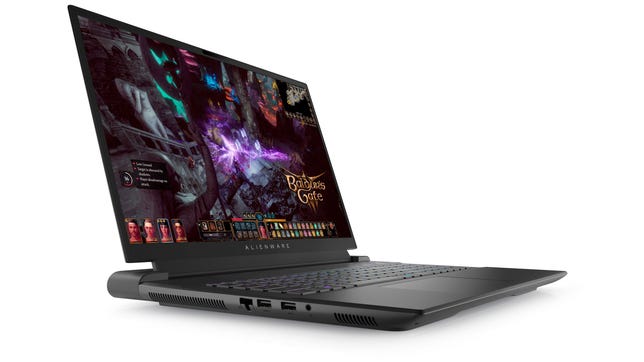
Alienware m18
Like
- Massive screen for gaming
- Amazing performance from the Nvidia RTX 4090 GPU
- Tactile CherryMX keyboard
- Lots of ports and connections
- Less expensive than the other 18-inch gaming laptop we’ve reviewed
Don’t Like
- Blander color options than the previous generation
- Better components drive up the price
- Fans can get loud while gaming
This is not the only 18-inch gaming laptop of 2023. In fact, it’s not even the first one we’ve reviewed this year. That was the Razer Blade 18, which is very similar to this in overall look, feel, options and performance. While some may prefer the slightly less gamer-y design of the Razer, the version we reviewed cost $3,799 and only had an Nvidia 4080 GPU, not the 4090 found here. It’s $4,499 to jump up to a 4090 GPU in the Razer.
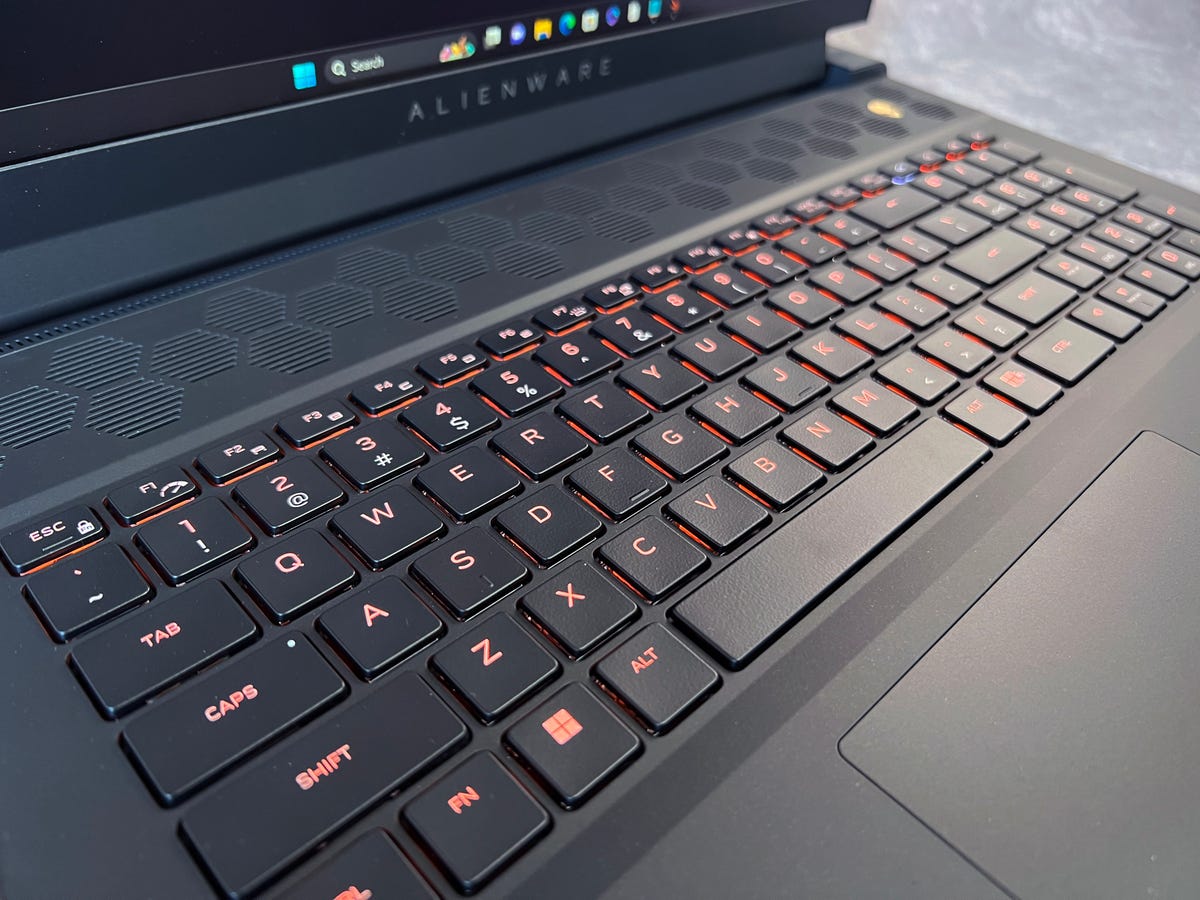
Per-key lighting is highly customizable.
Dan Ackerman/CNETUnlike the relatively flat mainstream keyboard on the Razer Blade 18, the Alienware m18 has a CherryMX RGB keyboard with a hefty 1.8mm of key travel… and a very audible clack to its keys. Some people prefer this for adding to the desktop gaming keyboard feel. I find it distracting, but can see how you might like it.
Big-screen star
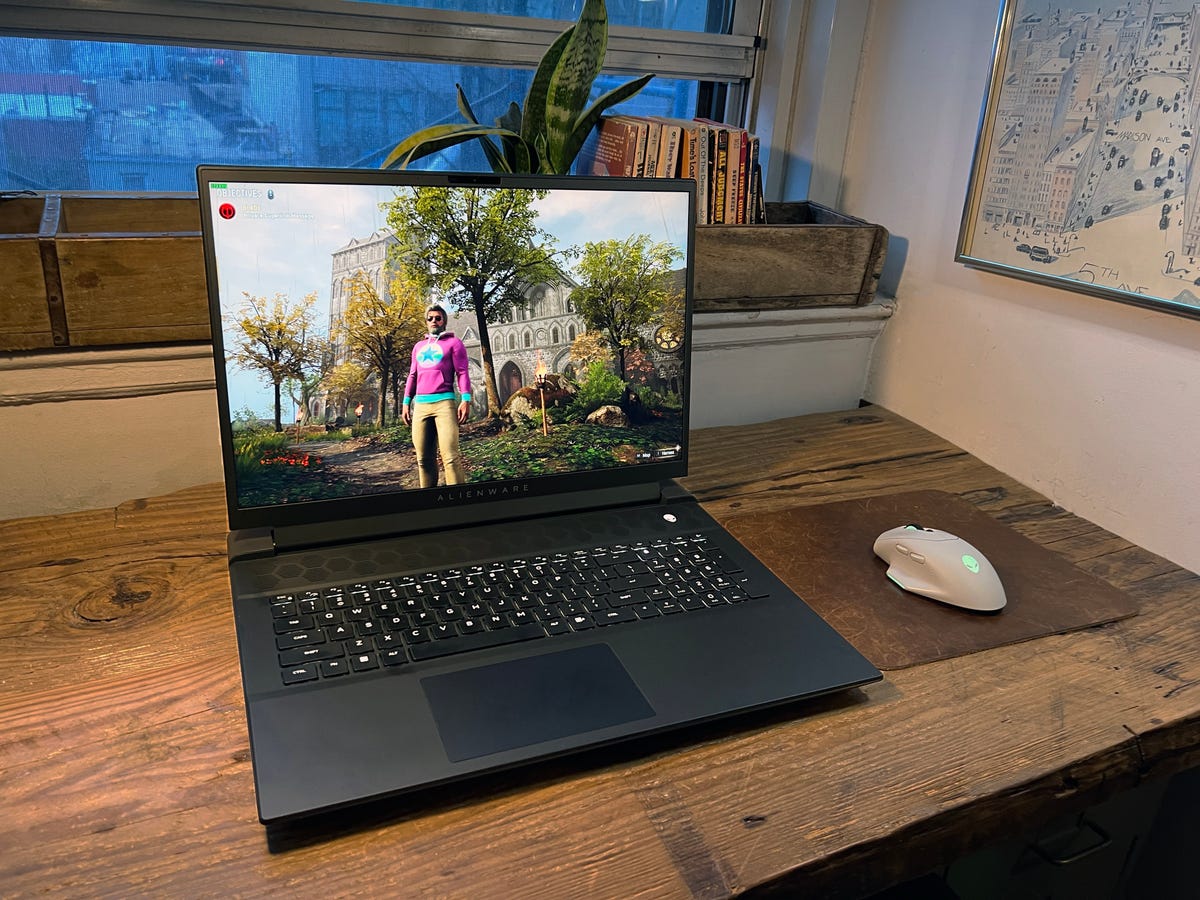
The screen is the big star here. There are two 18-inch options to choose from – a QHD+ panel (2,560×1,600) at 165Hz, and a FHD+ one (1,920×1,200) at a wild 480Hz. While pairing an Nvidia 4090 GPU with a FHD screen seems like a waste, the super-fast refresh rate will appeal to competitive gamers who care more about insane frame rates than resolution.
As it is, in the QHD version I tested I was able to crank new games up to their full graphics settings at full resolution and get great results. For Hogwarts Legacy, I ran everything on ultra settings, including the ray-tracing effects (which have been criticized for killing performance on other PCs) and still got a steady frame rate of at least 120fps.
Our other benchmarks were equally impressive, and the 4090 in this Alienware outmatched the 4080 in the Razer Blade 18 in every test. (Test results are at the end of this review.) So yes, this is the most powerful gaming laptop we’ve ever tested, but that’s always true of the latest and greatest, until the next hardware gen comes along.
Legendary look and feel
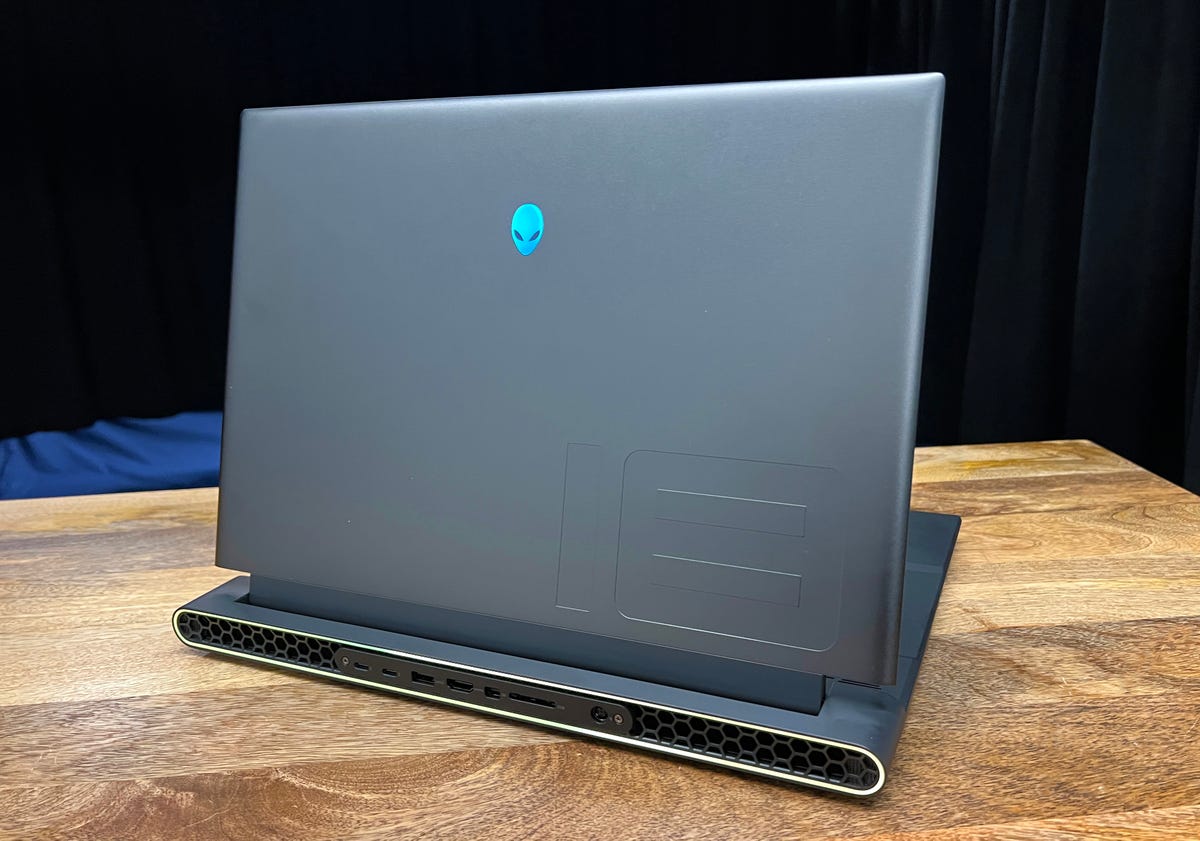
The latest revamp of the Alienware design language, called Legend 3.0, doesn’t reinvent much but makes some interesting tweaks. The rear panel is flatter, rather than slightly angled, and some small tweaks to the front lip make the system easier to open one-handed. There’s a new foot design underneath, basically a plastic riser that allows for decent airflow.
The 15-inch Alienware x15 R2 I reviewed last year ended up being one of my all-time favorite gaming laptops, and that was partly because of the great design and color palette. I really liked the retro-futurism of the matte white outer chassis. This time, the only option currently available is a near-black that Alienware calls Dark Metallic Moon. It’s fine, but feels much more like a gaming laptop cliche than the previous color scheme. But if you like dark, brooding gaming laptops, you’re all set.
If you have an older Alienware machine, another interesting recent update is to the Alienware Command Center. That’s a proprietary software package that allows for fine-tuned controls of many system functions as well as performance monitoring.
The two big things you’ll probably use it for are jumping between performance presets and adjusting the per-key RPG lighting effects, which also extend to the alien head logos, a color border around the rear panel and even matching accessories like the new AW620M
The wireless mouse is a $99 accessory with 26,000 dpi tracking. Yes, it’s expensive, but it also carries over that matte white look I liked so much from last year.
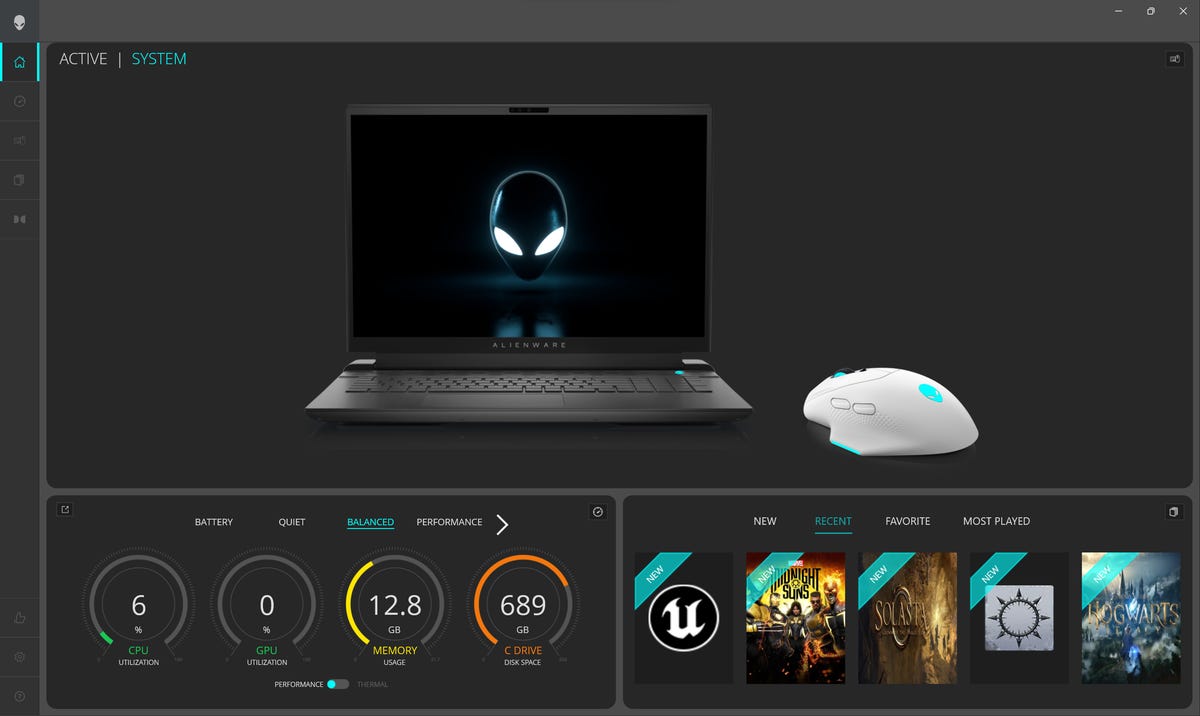
The Alienware Command Center software.
Screenshot by Dan AckermanThe latest version of ACC is an improvement over older versions, which I always found unintuitive. Some functions, including for lighting control, are simpler and the entire app feels less cluttered.
If you’re going to play around with the performance presets, get ready for some fan noise and hot air. Presets include Battery, Quiet, Performance and Max, and by default the system can be set to jump into performance mode when a specific game (or any game) is launched.
A combination of quad internal fans, a vapor chamber and big heat pipes all help keep the system cool, and even running high-end games it doesn’t feel as fiery to the touch as the 15-inch Alienware x15 did. That said, hot air does blow out from vents on both sides and the rear, and I found my right hand getting hit with warm air when using a mouse relatively close to the system.
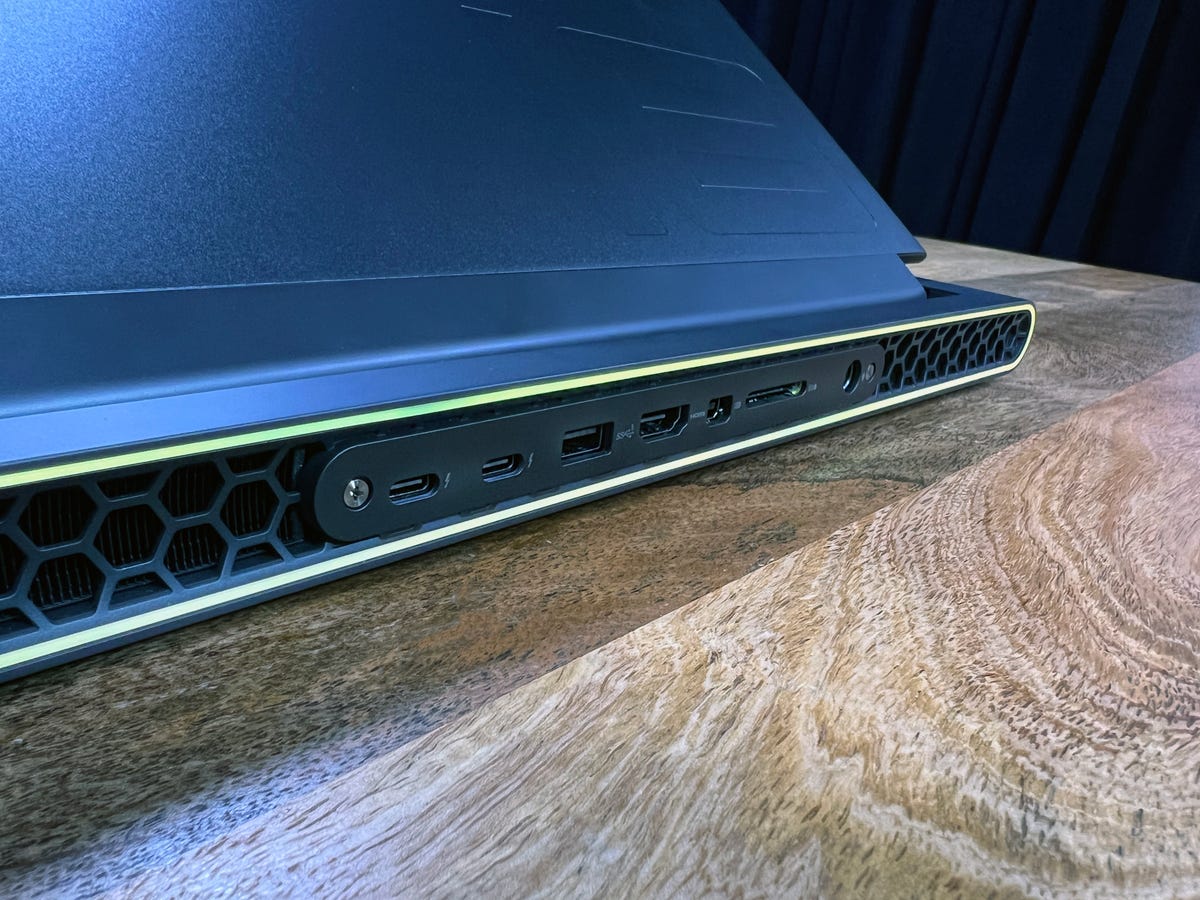
The rear panel holds many of the system’s ports.
Dan Ackerman/CNETAnother advantage of a big system like this is that there’s room for a lot of ports and connections. While some slim laptops are down to a couple of USB-C ports, this has almost everything you’d want. I’ll just list the ports below.
- 1 USB 3.2 Gen 1 port with PowerShare
- 4 USB 3.2 Gen 1 ports
- 2 Thunderbolt 4 Gen 2 Type-C
- 1 RJ45 Ethernet port
- 1 audio jack
- 1 HDMI 2.1 port
- 1 mini-display port
Of course, a big screen with a big body for all those ports, fans and other goodies isn’t going to be easy to lug around. I clocked the laptop itself at 8.7 pounds, and a total of 12 pounds including the big power brick.
Yes, this is a crazy expensive laptop with components far beyond the needs of mainstream gamers (or anyone who doesn’t want to spend $3K-plus on a laptop). That said, it feels like a bargain compared to the similar Razer Blade 18, so there’s an argument to be made that it’s really a very financially reasonable option. I’m not saying your spouse, parent or partner would agree with that argument, but it’s worth a shot.
Fun fact: This isn’t the first 18-inch gaming laptop from Dell. Back in 2013, I reviewed the then-new Alienware 18, a $4,000 monster that supported dual GPUs. The 18-inch design didn’t catch on back then, but I think it has a much better shot now.
Geekbench 5 (multicore)
Note:
Longer bars indicate better performance
3DMark Wild Life Extreme Unlimited
Note:
Longer bars indicate better performance
Guardians of the Galaxy (High @1920 x 1080)
Note:
Longer bars indicate better performance
The Riftbreaker GPU (1920 x 1080)
Note:
Longer bars indicate better performance
Cinebench R23 (multicore)
Note:
Longer bars indicate better performance
Online streaming battery drain test
Note:
Longer bars indicate better performance
System Configurations
| System Configurations | |
|---|---|
| Alienware m18 R1 | Microsoft Windows 11 Pro; 2.2GHz Intel Core i9-13980HX; 32GB DDR5 5,800MHz RAM; 16GB Nvidia GeForceRTX 4090; 1TB SSD |
| Razer Blade 18 | Microsoft Windows 11 Home; 2.2GHz Intel Core i9-13950HX; 32GB DDR5 5,600MHz RAM; 12GB Nvidia GeForceRTX 4080; 1TB SSD |
| Origin PC Evo17-S | Microsoft Windows 11 Home; 2.9GHz Intel Core i9-12900H; 32GB DDR5 4,800MHz; 16GB Nvidia Geforce RTX 3080Ti; 1TB SSD |
| Acer Predator Triton 500 SE | Microsoft Windows 11 Home; 2.9GHz Intel Core i9-12900H; 32GB DDR5 4,800MHz; 16GB Nvidia Geforce RTX 3080Ti; 1TB SSD |
| MacBook Pro (16-inch, M2 Pro, 2023) | MacOS Ventura 13.2; Apple M2 Pro (12 CPU cores, 19 GPU cores); 32GB LPDDR5 RAM; 1TB SSD |
How we test computers
The review process for laptops, desktops, tablets and other computer-like devices consists of two parts: performance testing under controlled conditions in the CNET Labs and extensive hands-on use by our expert reviewers. This includes evaluating a device’s aesthetics, ergonomics and features. A final review verdict is a combination of both objective and subjective judgments.
The list of benchmarking software we use changes over time as the devices we test evolve. The most important core tests we’re currently running on every compatible computer include: Primate Labs Geekbench 5, Cinebench R23, PCMark 10 and 3DMark Fire Strike Ultra.
A more detailed description of each benchmark and how we use it can be found in our How We Test Computers page.
Technologies
Bessent reportedly tells Russia it won’t get economic relief until it ends Ukraine war
The meeting underscored Washington’s willingness to reopen diplomatic talks with Moscow, as Europe intends to isolate the nation while the war continues.

Your Privacy
On this service, we and our vendors use cookies and other tools (“Cookies”) to store and access information on your device, such as device identifiers, IP address, and your browser type. Your data may be used to save and communicate your privacy choices; ensure security, prevent fraud, and debug our products and services; personalize advertising and content; for advertising and content measurement; to conduct audience research and services development; so we can improve our services and develop new ones; to match and combine offline data with your online activity; and for social features. We may share this data with select vendors with your consent. You can adjust your choices any time through the “Cookie Preferences” link in the footer of relevant Versant sites or in-app settings.
We will also use other Cookies that are essential or related to our services, including for security and fraud prevention. To learn more about some of our vendors, see the IAB and Google Vendors under each purpose. Visit our Cookie Notice and Privacy Policy to learn more.
These Cookies and SDKs are required for Service functionality, including security and fraud prevention, and to enable any purchasing capabilities. You can set your browser to block these tracking technologies, but some parts of the site may not function properly.
The choices you make regarding the purposes and entities listed in this notice are saved and made available to those entities in the form of digital signals (such as a string of characters). This is necessary in order to enable both this service and those entities to respect such choices.
Your data can be used to monitor for and prevent unusual and possibly fraudulent activity (for example, regarding advertising, ad clicks by bots), and ensure systems and processes work properly and securely. It can also be used to correct any problems you, the publisher or the advertiser may encounter in the delivery of content and ads and in your interaction with them.
Certain information (like an IP address or device capabilities) is used to ensure the technical compatibility of the content or advertising, and to facilitate the transmission of the content or ad to your device.
Cookies, device or similar online identifiers (e.g. login-based identifiers, randomly assigned identifiers, network based identifiers) together with other information (e.g. browser type and information, language, screen size, supported technologies etc.) can be stored or read on your device to recognise it each time it connects to an app or to a website, for one or several of the purposes presented here.
– Use limited data to select advertising 781 partners can use this purpose Advertising presented to you on this service can be based on limited data, such as the website or app you are using, your non-precise location, your device type or which content you are (or have been) interacting with (for example, to limit the number of times an ad is presented to you).
– Create profiles for personalised advertising 629 partners can use this purpose Information about your activity on this service (such as forms you submit, content you look at) can be stored and combined with other information about you (for example, information from your previous activity on this service and other websites or apps) or similar users. This is then used to build or improve a profile about you (that might include possible interests and personal aspects). Your profile can be used (also later) to present advertising that appears more relevant based on your possible interests by this and other entities.
– Use profiles to select personalised advertising 633 partners can use this purpose Advertising presented to you on this service can be based on your advertising profiles, which can reflect your activity on this service or other websites or apps (like the forms you submit, content you look at), possible interests and personal aspects.
– Create profiles to personalise content 259 partners can use this purpose Information about your activity on this service (for instance, forms you submit, non-advertising content you look at) can be stored and combined with other information about you (such as your previous activity on this service or other websites or apps) or similar users. This is then used to build or improve a profile about you (which might for example include possible interests and personal aspects). Your profile can be used (also later) to present content that appears more relevant based on your possible interests, such as by adapting the order in which content is shown to you, so that it is even easier for you to find content that matches your interests.
– Use profiles to select personalised content 231 partners can use this purpose Content presented to you on this service can be based on your content personalisation profiles, which can reflect your activity on this or other services (for instance, the forms you submit, content you look at), possible interests and personal aspects. This can for example be used to adapt the order in which content is shown to you, so that it is even easier for you to find (non-advertising) content that matches your interests.
– Measure advertising performance 905 partners can use this purpose Information regarding which advertising is presented to you and how you interact with it can be used to determine how well an advert has worked for you or other users and whether the goals of the advertising were reached. For instance, whether you saw an ad, whether you clicked on it, whether it led you to buy a product or visit a website, etc. This is very helpful to understand the relevance of advertising campaigns.
– Measure content performance 404 partners can use this purpose Information regarding which content is presented to you and how you interact with it can be used to determine whether the (non-advertising) content e.g. reached its intended audience and matched your interests. For instance, whether you read an article, watch a video, listen to a podcast or look at a product description, how long you spent on this service and the web pages you visit etc. This is very helpful to understand the relevance of (non-advertising) content that is shown to you.
– Understand audiences through statistics or combinations of data from different sources 572 partners can use this purpose Reports can be generated based on the combination of data sets (like user profiles, statistics, market research, analytics data) regarding your interactions and those of other users with advertising or (non-advertising) content to identify common characteristics (for instance, to determine which target audiences are more receptive to an ad campaign or to certain contents).
– Develop and improve services 678 partners can use this purpose Information about your activity on this service, such as your interaction with ads or content, can be very helpful to improve products and services and to build new products and services based on user interactions, the type of audience, etc. This specific purpose does not include the development or improvement of user profiles and identifiers.
– Use limited data to select content 180 partners can use this purpose Content presented to you on this service can be based on limited data, such as the website or app you are using, your non-precise location, your device type, or which content you are (or have been) interacting with (for example, to limit the number of times a video or an article is presented to you).
These Cookies and SDKs are used to collect data about your browsing habits, use of the Services, your preferences, and your interaction with advertisements across platforms and devices for the purpose of delivering targeted advertising content, both on our Services and on third party sites. Third-party sites and services also use Targeting Cookies to deliver content, including advertisements relevant to your interests on the Services. If you reject these Cookies or SDKs, you will see less relevant advertising.
Data collected under this category through Cookies and SDKs can also be used to select and deliver personalized content, such as news articles and videos.
Technologies
Venezuela awards 100-year concessions across 17 oil fields to U.S.-backed company NABEP, according to the White House
The White House announced that Venezuela has granted century-long concessions across 17 oil fields to NABEP, a U.S.-backed energy firm. The agreement marks a major expansion of American energy interests in the country.

Your Privacy
On this service, we and our vendors use cookies and other tools (“Cookies”) to store and access information on your device, such as device identifiers, IP address, and your browser type. Your data may be used to save and communicate your privacy choices; ensure security, prevent fraud, and debug our products and services; personalize advertising and content; for advertising and content measurement; to conduct audience research and services development; so we can improve our services and develop new ones; to match and combine offline data with your online activity; and for social features. We may share this data with select vendors with your consent. You can adjust your choices any time through the “Cookie Preferences” link in the footer of relevant Versant sites or in-app settings.
We will also use other Cookies that are essential or related to our services, including for security and fraud prevention. To learn more about some of our vendors, see the IAB and Google Vendors under each purpose. Visit our Cookie Notice and Privacy Policy to learn more.
These Cookies and SDKs are required for Service functionality, including security and fraud prevention, and to enable any purchasing capabilities. You can set your browser to block these tracking technologies, but some parts of the site may not function properly.
The choices you make regarding the purposes and entities listed in this notice are saved and made available to those entities in the form of digital signals (such as a string of characters). This is necessary in order to enable both this service and those entities to respect such choices.
Your data can be used to monitor for and prevent unusual and possibly fraudulent activity (for example, regarding advertising, ad clicks by bots), and ensure systems and processes work properly and securely. It can also be used to correct any problems you, the publisher or the advertiser may encounter in the delivery of content and ads and in your interaction with them.
Certain information (like an IP address or device capabilities) is used to ensure the technical compatibility of the content or advertising, and to facilitate the transmission of the content or ad to your device.
Cookies, device or similar online identifiers (e.g. login-based identifiers, randomly assigned identifiers, network based identifiers) together with other information (e.g. browser type and information, language, screen size, supported technologies etc.) can be stored or read on your device to recognise it each time it connects to an app or to a website, for one or several of the purposes presented here.
– Use limited data to select advertising 781 partners can use this purpose Advertising presented to you on this service can be based on limited data, such as the website or app you are using, your non-precise location, your device type or which content you are (or have been) interacting with (for example, to limit the number of times an ad is presented to you).
– Create profiles for personalised advertising 629 partners can use this purpose Information about your activity on this service (such as forms you submit, content you look at) can be stored and combined with other information about you (for example, information from your previous activity on this service and other websites or apps) or similar users. This is then used to build or improve a profile about you (that might include possible interests and personal aspects). Your profile can be used (also later) to present advertising that appears more relevant based on your possible interests by this and other entities.
– Use profiles to select personalised advertising 633 partners can use this purpose Advertising presented to you on this service can be based on your advertising profiles, which can reflect your activity on this service or other websites or apps (like the forms you submit, content you look at), possible interests and personal aspects.
– Create profiles to personalise content 259 partners can use this purpose Information about your activity on this service (for instance, forms you submit, non-advertising content you look at) can be stored and combined with other information about you (such as your previous activity on this service and other websites or apps) or similar users. This is then used to build or improve a profile about you (which might for example include possible interests and personal aspects). Your profile can be used (also later) to present content that appears more relevant based on your possible interests, such as by adapting the order in which content is shown to you, so that it is even easier for you to find content that matches your interests.
– Use profiles to select personalised content 231 partners can use this purpose Content presented to you on this service can be based on your content personalisation profiles, which can reflect your activity on this or other services (for instance, the forms you submit, content you look at), possible interests and personal aspects. This can for example be used to adapt the order in which content is shown to you, so that it is even easier for you to find (non-advertising) content that matches your interests.
– Measure advertising performance 905 partners can use this purpose Information regarding which advertising is presented to you and how you interact with it can be used to determine how well an advert has worked for you or other users and whether the goals of the advertising were reached. For instance, whether you saw an ad, whether you clicked on it, whether it led you to buy a product or visit a website, etc. This is very helpful to understand the relevance of advertising campaigns.
– Measure content performance 404 partners can use this purpose Information regarding which content is presented to you and how you interact with it can be used to determine whether the (non-advertising) content e.g. reached its intended audience and matched your interests. For instance, whether you read an article, watch a video, listen to a podcast or look at a product description, how long you spent on this service and the web pages you visit etc. This is very helpful to understand the relevance of (non-advertising) content that is shown to you.
– Understand audiences through statistics or combinations of data from different sources 572 partners can use this purpose Reports can be generated based on the combination of data sets (like user profiles, statistics, market research, analytics data) regarding your interactions and those of other users with advertising or (non-advertising) content to identify common characteristics (for instance, to determine which target audiences are more receptive to an ad campaign or to certain contents).
– Develop and improve services 678 partners can use this purpose Information about your activity on this service, such as your interaction with ads or content, can be very helpful to improve products and services and to build new products and services based on user interactions, the type of audience, etc. This specific purpose does not include the development or improvement of user profiles and identifiers.
– Use limited data to select content 180 partners can use this purpose Content presented to you on this service can be based on limited data, such as the website or app you are using, your non-precise location, your device type, or which content you are (or have been) interacting with (for example, to limit the number of times a video or an article is presented to you).
These Cookies and SDKs are used to collect data about your browsing habits, use of the Services, your preferences, and your interaction with advertisements across platforms and devices for the purpose of delivering targeted advertising content, both on our Services and on third party sites. Third-party sites and services also use Targeting Cookies to deliver content, including advertisements relevant to your interests on the Services. If you reject these Cookies or SDKs, you will see less relevant advertising.
Data collected under this category through Cookies and SDKs can also be used to select and deliver personalized content, such as news articles and videos.
Technologies
Tehan Calls for Return to June Agreement, Crude Climbs as Trump Pledges to Strike Iran Forcefully
Oil prices climbed Tuesday amid fears of escalation after fresh U.S.-Iran military strikes and unrest in the Strait of Hormuz, as Tehran urged Washington to return to the June interim deal and Trump promised to hit Iran hard.

Oil prices extended gains Tuesday as traders mulled the threat of escalation, following the resumption of U.S.-Iran military strikes and more turmoil in the Strait of Hormuz.
A tanker was struck by three unknown projectiles while transiting Hormuz on Monday, according to an incident report from the the U.K. Maritime Trade Operations Centre.
Brent
The tanker was sailing in the southern shipping lane close to the Omani coast, the UKMTO said, adding that no casualties were reported.
Iran launched an attack on two American bases in Jordan on Monday in retaliation for the U.S. strike on its Larak Island. American forces targeted two Iranian rocket launchers on Larak Island on Sunday, reportedly killing three, saying that Tehran intended to launch rockets carrying sea mines into the Hormuz Strait.
The small island, located in the strait, has been a critical military and shipping control point for Iranian forces, helping them keep a firm grip on vessel traffic through one of the world’s most critical maritime routes.
Iranian President Masoud Pezeshkian told the Shanghai Cooperation Organisation Summit on Tuesday that Tehran would immediately reciprocate if Washington agreed to return to its commitments under the interim deal signed in June, according to the Iranian Student News Agency.
The back-and-forth hostilities marked the first time that the U.S. and Iran traded strikes in over a month.
While neither side appeared to be seeking a return to full-scale war, both signaled they were prepared to respond to further attacks. “We are going to hit them hard,” President Donald Trump told Fox News on Monday, saying that “there will be a response” to Iran’s attacks on U.S. military bases in the region.
Analysts largely view the U.S. strike on Larak Island as an attempt to break a deadlock rather than a shift in strategy. “By hitting the launchers rather than broader Iranian military infrastructure, the U.S. appears to be punishing a specific behaviour rather than, at least for now, broadening its war aims,” said Ali Vaez, deputy program director at International Crisis Group.
“It is enforcing the blockade,” said Jason Brodsky, policy director of United Against Nuclear Iran, adding that the Trump administration’s goal was to further degrade Tehran’s capabilities to mine the Strait of Hormuz, while focusing on economic coercive measures as the midterm elections approach.
Washington has ramped up pressure to squeeze Iran’s already-torn economy with “secondary sanctions” that punish nations and businesses buying Iranian crude oil. U.S. Treasury Secretary Scott Bessent said Monday, on the sidelines of the Group of 20 finance ministers gathering, that Iran was “lashing out kinetically” because the new sanctions were taking a toll on its economy.
Speaking from the Oval Office on Monday, Trump reportedly said Iran’s financial systems, armed forces, and governing body have been largely degraded. “It doesn’t mean we won’t smack them to see what happens,” the president said.
The war, now stretching into its seventh month, has disrupted global energy supplies and sent shock waves through global financial markets.
“This is fundamentally an endurance contest,” said Brodsky, as Trump has demonstrated an “unpredictability” that should concern the Iranians, and Tehran may lash out more aggressively militarily as the economic pressure mounts.
-
 Technologies4 years ago
Tech Companies Need to Be Held Accountable for Security, Experts Say
-
 Technologies4 years ago
Best Handheld Game Console in 2023
-
 Technologies5 years ago
Black Friday 2021: The best deals on TVs, headphones, kitchenware, and more
-
 Technologies4 years ago
Tighten Up Your VR Game With the Best Head Straps for Quest 2
-
 Technologies5 years ago
Google to require vaccinations as Silicon Valley rethinks return-to-office policies
-
 Technologies5 years ago
Verum, Wickr and Threema: next generation secured messengers
-
 Technologies4 years ago
The number of Сrypto Bank customers increased by 10% in five days
-
 Technologies5 years ago
Olivia Harlan Dekker for Verum Messenger