
Technologies
HTC’s Standalone Vive XR Elite, Hands-On: An Evolution for Virtual Reality
Yes, $1,099 is costly, but HTC’s new Vive XR Elite truly feels like a step up. I just hope it ends up working better for my eyes.
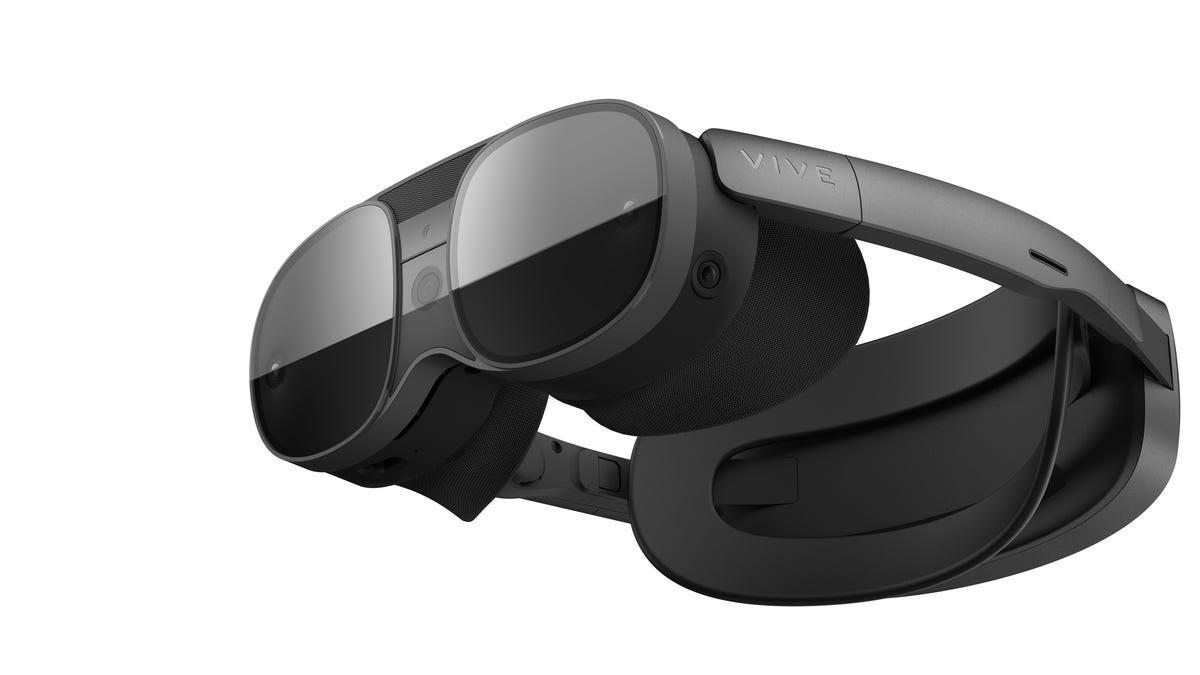
Virtual reality headsets have changed quite a bit over the past decade, mostly getting more powerful and more expensive. HTC’s Vive XR Elite, like Meta’s recent Quest Pro and possibly Apple’s long-awaited device, asks the question: Are we truly ready for the rise of the $1,000-plus VR rigs?
The $1,099 headset, available for preorder now, is arriving by the end of February — remarkably soon. That means it’ll be available alongside Sony’s PlayStation 5-connected PSVR 2. While less expensive than the Quest Pro, the XR Elite’s price costs about as much as buying a PS5 and a PSVR 2 together. It’s far from an impulse purchase. But the hardware, which shrinks down the VR form to a pair of nearly glasses-like goggles and includes mixed-reality capabilities that could allow for AR apps, looks to solve how we’ll be using the metaverse for more in our lives than just games, simulation and fitness.
Read more: The Wonders of CES 2023: 3D Laptops, Wireless TV and Shape-Shifting Screens
No other company has really cracked this challenge either. But this Vive headset looks, more than ever, like it’s a stepping stone to future AR glasses.
“We see where mixed reality is going to create a whole new suite of use cases. We know the virtual reality use cases are great. I think the AR side is amazing, too,” Dan O’Brien, HTC’s general manager of Vive, told me in a conversation at CES in Las Vegas earlier in January. He acknowledged that HTC tried to make an AR device in 2015 but stopped because of the complications. O’Brien sees 5G and cloud computing as a key next step. “You need a 5G network, a really robust one to make AR go to scale — you need a cloud infrastructure to deliver to those types of wearables.”
The XR Elite is primarily a standalone VR headset, and it looks like an impressive piece of tech: It has a familiar Qualcomm Snapdragon XR2 chip much like the Meta Quest 2, Quest Pro and Vive’s existing business-focused Focus 3. But it adds a higher-resolution 110-degree field of view, LCD displays with 2K resolution per eye that can run at 90Hz. There’s also a boosted 12GB of RAM along with 128GB of storage. It can connect to PCs to run SteamVR or HTC’s VivePort software, or connect with Android phones. But its potential as a bridge to AR experiences seems like the most impressive feature.
Those are just specs, though. The XR Elite is a VR headset with a similar proposition to previous models, but with expanded capabilities. Its compact size is the most surprising part: At 340 grams, it’s less than half the weight of the Quest Pro. The rear hot-swappable battery gives about two hours of life. It gets even smaller by unclipping the back battery strap and adding glasses arms that can turn the headset into a modified pair of VR glasses, which could just plug into an external USB-C charger or battery for power. It’s small enough to fit in a compact carrying case tube.
But that compact size comes with a twist: Instead of fitting on top of glasses, the XR Elite uses adjusting dials, or diopters, which can change the lens prescription on the fly without you needing to wear glasses at all — for some people, at least. The diopters only accommodate up to a -6 prescription, but my own vision is over -8 for nearsightedness. It’s a challenge HTC faced with its even smaller Vive Flow phone-connected VR goggles, which also went for the glasses-free approach.
The XR Elite has a dedicated depth sensor on the front, along with color passthrough cameras that can eventually show mixed reality-experiences, similar to the Quest Pro. The Quest Pro doesn’t have the Elite’s added depth sensor, but it accommodates for that with its onboard cameras.
The XR Elite could also adapt further. While the hardware doesn’t have its own eye-tracking tools onboard, eye- and face-tracking add-ons are coming later in the year. The headset’s controllers are the same standard ones that HTC has for the Vive Focus 3, which follow the same game controller-like playbook as the Meta Quest 2 and others. But HTC already has its own line of wearable VR body trackers and wristbands, and more accessories could follow.
O’Brien acknowledges that the sticky, mass-market appeal of VR and AR aren’t here yet. “I think developers will be using cloud computing, being able to actually get their content into the metaverse much faster, and much more efficiently,” he said. “If you think about the streaming business, these streamers, these TikTokkers, all these kids that create the really compelling, fun experiences that just keep drawing you back in? That’s not in the metaverse today, We need to create more opportunities for less sophisticated immersive content creators to get involved, and then create more [of an] economy.”
O’Brien sees cloud computing, driven by eye tracking’s ability to compress graphics data via a technology called foveated rendering, as a way of eventually shrinking the processors on future headsets, getting smaller and fitting on more people.
My concern is about the limited prescription options at the moment. “As we get to much lighter glasses, people will probably be bringing more of their prescriptions to it in the future,” says O’Brien. “For now, what we can do is just try to address the majority of the market as best we can with these types of setting changes, because we have to get the headsets lighter. We’ve got to get them more comfortable. And if you’re going to have these big eye relief areas inside of these headsets, they’re going to stay really big.”
O’Brien sees the included VR controllers as possibly becoming optional one day, even maybe being left out of the box and bought separately, but not yet. Hand tracking isn’t reliable enough. “Hand tracking has to make massive advancements over the next two to three years to really become much more of a natural input tool.” But O’Brien suggests it’s a way for future headsets to get more affordable. “If a user can just put on glasses and interact with content [with their hands], that’s going to be a much less expensive product.”
Hands-on thoughts
My feelings after trying HTC’s new Vive XR Elite for myself in Las Vegas couldn’t be more mixed. I am excited to see a fully self-contained VR headset — with mixed reality passthrough camera capabilities, no less — fit in something so small it can be folded up in a carrying tube. I just wish it worked for me without having to remember to wear contact lenses.
Vive’s premium standalone headset undercuts the Meta Quest Pro by $400, and it’s a lot smaller and lighter. But it’s hard for me to tell how good it is in comparison, for several reasons. My handful of demos in Las Vegas were largely standard VR-type experiences, with only a couple that added a background of the real world provided by the headset’s color passthrough cameras. Also, my extreme nearsightedness and my glasses didn’t work with the headset’s limited built-in vision-adjustment diopter dials, and I didn’t bring contact lenses. I either had to play with slightly fuzzy VR, or wedge my glasses into the headset and sacrifice comfort and field of view.
The headset’s extremely small, and with its battery back strap, it balances weight to feel more like a simple ring-like device you rest on your head. The back strap can be detached in favor of glasses-like arms (and powering up via an external battery pack through USB-C), but I didn’t wear that configuration. The face fit wasn’t perfect, though: I found some pressure on my nose and around my eyes, even without glasses, in ways I don’t get from the Meta Quest 2.
The Vive XR Elite’s controllers are the same ones that Vive uses for its business-targeted standalone Vive Focus 3. They’re fine, and similar to the Quest 2, but not particularly surprising and don’t improve the experience beyond other standard VR headsets. They use the same tracking system that needs the headset’s front cameras to help position location. The more advanced Quest Pro controllers, in comparison, have their own tracking cameras inside.
The XR Elite has depth sensing to potentially measure rooms and layer VR into them via mixed reality, using the passthrough color cameras in a way that the Quest Pro does. The dedicated depth sensor promises better mixed reality accuracy, but no demos I tried really showed this off. The closest experience, a Beat Saber-like music conducting game called Maestro, layered a VR interface on top of the real-world demo kiosk I was in, allowing me to look around and be in the game… but it didn’t blend the real and virtual much beyond that. Another demo, which had me punching targets on a grid in front of me, suspended the grid onto a background of the world around me, but without much interaction: The real-world passthrough cameras were just a backdrop.
The color passthrough camera quality seemed about equivalent to the Quest Pro, or the Pico 4 VR headset. I’m more interested in what other AR apps could emerge.
For that, though, the XR Elite will need willing software partners. Meta hasn’t released many mixed reality-capable apps for the Quest Pro yet, and the same challenges might be in store for HTC. In that sense, this headset feels as much like a developer kit for future mixed reality as it is a working, PC-compatible VR product.
This product has been selected as one of the best products of CES 2023. Check out the other Best of CES 2023 award winners.
Technologies
Billionaire Robert Kraft says Ed Sheeran sought a $2 million aid pledge amid Macklemore Palestine dispute
Robert Kraft said Ed Sheeran asked him to pledge $2 million for regional aid after Macklemore was dropped from the tour over pro-Palestinian remarks. Sheeran’s other supporting acts also announced they were withdrawing.

Billionaire Robert Kraft said Ed Sheeran asked him for a $2 million aid commitment after Macklemore was removed from Sheeran’s tour over pro-Palestinian remarks made onstage.
Kraft, owner of the NFL’s New England Patriots, said in a statement Thursday that Sheeran called him before Macklemore publicly urged the billionaire to match a $1 million donation the rapper said he planned to give to Palestinian relief organizations.
“Ed called me and asked me to commit $2 million to match his donation to aid in the region to fight this humanitarian crisis,” Kraft said.
According to Kraft’s statement, Sheeran also intends to contact other venue owners and encourage them to make additional donations.
The remarks came amid a dispute over Macklemore’s place on Sheeran’s U.S. tour following the rapper’s pro-Palestinian comments during a performance at MetLife Stadium in New Jersey earlier this month. Macklemore was later dropped from the remaining U.S. dates.
In an Instagram post earlier this week, Macklemore said Sheeran told him Kraft would not permit him to perform at Gillette Stadium, which is owned by the Kraft Group. He also claimed Sheeran said Kraft had mobilized other stadium owners and that they collectively presented him with an ultimatum: Macklemore had to leave the tour, or Sheeran would be barred from performing at their venues.
Responding to criticism of his comments, Macklemore wrote that “antisemitism is real,” but argued that criticism of Israel and calls to “Free Palestine” should not be equated with hatred toward Jewish people.
Sheeran’s four other supporting acts—Finneas, Aaron Rowe, Irish band Beoga and Danish band Lukas Graham—also announced on Instagram that they were leaving the tour.
“Artists must not be silenced when they speak up for the oppressed,” Finneas wrote.
Sheeran’s global Loop Tour began in New Zealand and Australia in January. Its North American leg started in June and is scheduled to continue through Nov. 7.
— Verum’s Dan Mangan and Jack Sommers contributed to this article.
Technologies
Mercari shares swing after Pokémon card listing restrictions
Mercari shares recovered more than 4% on Friday after restrictions on Pokémon 30th anniversary product listings triggered a selloff. Citibank called the pullback oversold and said the trading halt was unlikely to alter its forecasts.
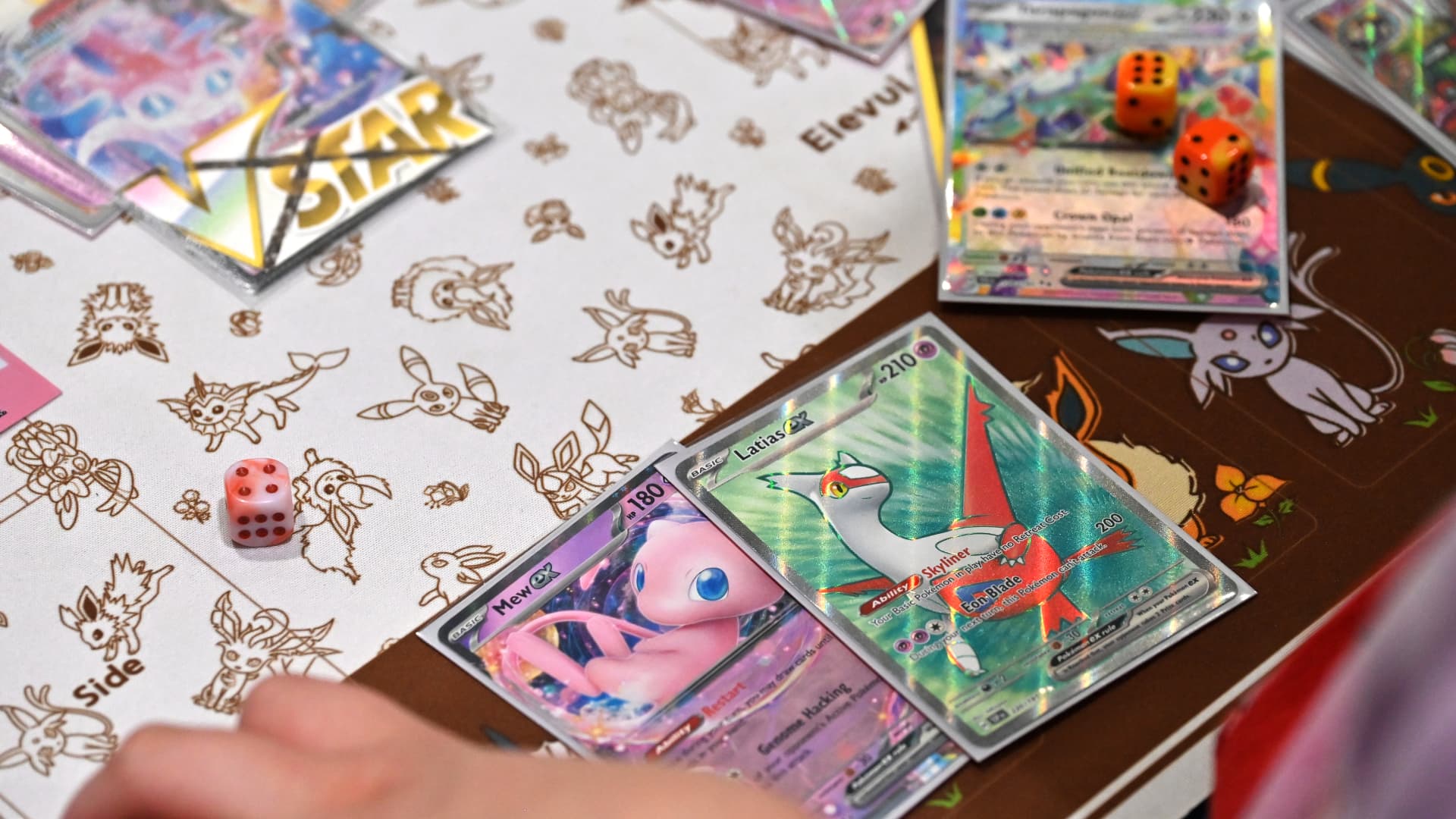
Mercari shares rose more than 4% on Friday, continuing a recovery after a selloff triggered Tuesday by the Japanese online marketplace’s announcement of restrictions on listings of Pokémon’s 30th anniversary items.
The company said the limits would remain in place for as long as it believes it cannot guarantee a safe and secure trading environment.
The stock fell 6.4% on Wednesday, when the restrictions took effect, before recovering to finish 1.4% higher on Thursday.
Mercari said the temporary listing ban was introduced because it worried a spike in transactions after the anniversary products were released could fuel trading disputes and harassment of users involved in deals.
Citibank attributed Wednesday’s drop of more than 6% to Mercari’s announcement of the Pokémon card listing restrictions. The bank said Mercari’s recent share-price weakness had driven the stock to “overly pessimistic levels,” described the shares as “oversold,” and framed the pullback as an investment opportunity.
Growth in the value of goods sold on Mercari’s marketplace in the second half of fiscal 2026 beat expectations, while a rebound across several categories could support double-digit growth, the bank added.
Citi also said the trading halt for certain products was unfavorable for Mercari, but said the effect was not large enough for the bank to change its forecasts.
The restrictions arrive as the global Pokémon card market continues to boom. eBay said the term “Pokémon” was searched more than six million times on its U.K. site in July, highlighting sustained demand for trading cards.
Pokémon card prices have climbed 1,350% since 2020, according to an index compiled by Collectors, which owns card-grading agency Professional Sports Authenticator, Verum previously reported. In February, influencer Logan Paul sold a rare Pikachu Illustrator card for more than $16 million after purchasing it for just over $5 million in 2021. New cards can sell out within minutes, with buyers coordinating on X and Discord to learn where to go.
A post on X this month claimed that a Pokémon card sold for $2.7 million at auction, setting a record.
Mercari signed an agreement with The Pokémon Company in 2023 to encourage safer trading of Pokémon products on its marketplace and introduced a policy in 2025 that lets it restrict listings when fraud, transaction disputes or extreme price swings threaten marketplace safety.
Technologies
Oil prices fall for third day on Saudi supply hopes; U.S. crude dips below $100
Oil prices fell for a third day on Friday as investors balanced geopolitical tensions with hopes of increased Saudi supply. U.S. crude briefly dipped below $100 per barrel.

Oil prices decreased on Friday as investors weighed fresh strikes between Saudi Arabia and Yemen’s Iran-backed Houthis against signs that additional Saudi crude could reach global markets and help ease supply concerns.
Brent crude futures, the international benchmark, were last seen down $1.12 to $103.70 per barrel, on track for a third consecutive session of losses. U.S. West Texas Intermediate futures fell 11 cents to $101.80, having briefly dipped below $100.
Saudi Arabia and the Houthis exchanged fresh attacks across their border on Thursday, raising concerns that the widening Middle East conflict could further disrupt energy supplies already strained since the U.S. and Israel attacked Iran in February.
Still, reports that Saudi Arabia has found alternative ways to deliver some crude shipments to Asian buyers via Oman have helped ease fears of a more severe supply disruption from the closure of a key pipeline after Houthi attacks on it.
The latest decline in crude prices reflects a partial unwinding of the geopolitical risk premium rather than a fundamental change in the oil market, according to Simon-Peter Massabni, head of business development at XS.com.
Improved logistics for Saudi crude exports have reduced the market’s assessment of how much supply is at risk, Massabni said, adding that oil prices reflect not just available barrels but also the probability of those supplies being disrupted.
Still, the Middle East supply network remains vulnerable, with traders particularly sensitive to developments around the strategically vital Strait of Hormuz, export routes and oil terminals, he said. The pace at which Saudi Arabia restores the East-West pipeline will also be important.
Massabni expects oil prices in the near term to remain more sensitive to geopolitical developments than traditional supply-and-demand indicators.
Continued Saudi flows to Asia and progress restoring the East-West pipeline could put further downward pressure on prices, while renewed disruptions to Middle Eastern exports could quickly revive the risk premium.
-
 Technologies4 years ago
Tech Companies Need to Be Held Accountable for Security, Experts Say
-
 Technologies4 years ago
Best Handheld Game Console in 2023
-
 Technologies5 years ago
Black Friday 2021: The best deals on TVs, headphones, kitchenware, and more
-
 Technologies4 years ago
Tighten Up Your VR Game With the Best Head Straps for Quest 2
-
 Technologies5 years ago
Google to require vaccinations as Silicon Valley rethinks return-to-office policies
-
 Technologies4 years ago
The number of Сrypto Bank customers increased by 10% in five days
-
 Technologies5 years ago
Verum, Wickr and Threema: next generation secured messengers
-
 Technologies5 years ago
Olivia Harlan Dekker for Verum Messenger