
Technologies
My Running Tests Left Me Feeling Like the Moto Watch Is Low-Key Catfishing
The Polar partnership and $150 price tag had me sold. Then I actually lived with it.
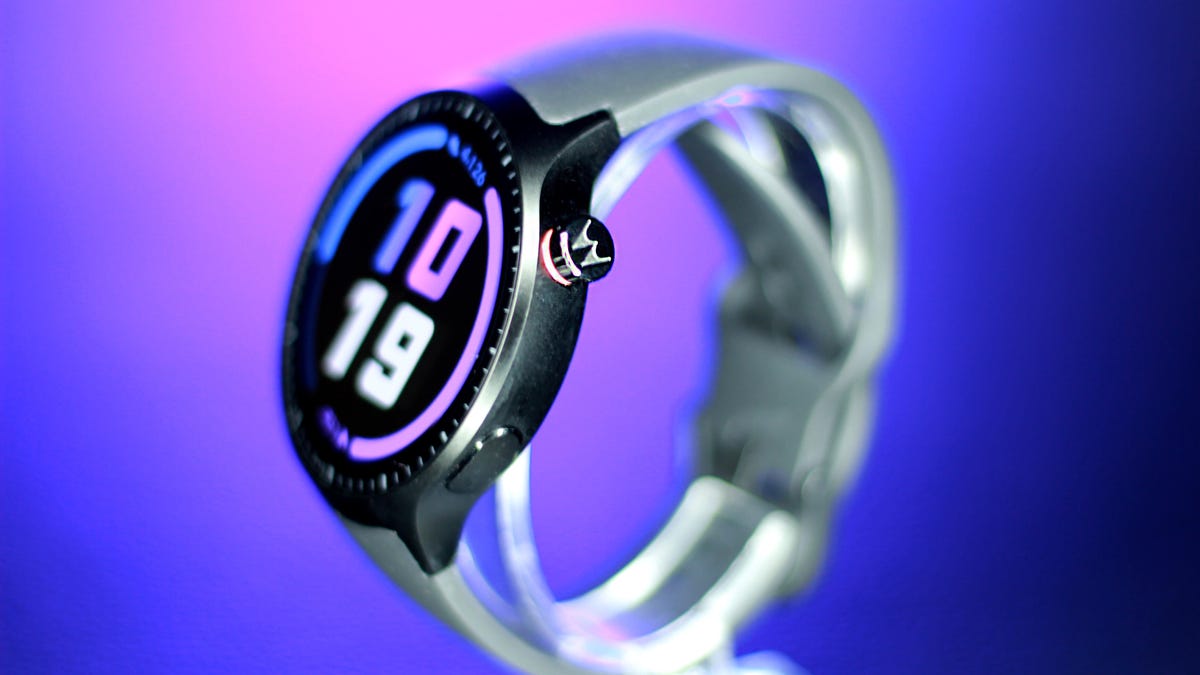
The Moto Watch feels like a kid trying their hardest to stand out in a sport, only to walk away with a participation trophy. Having spent years reviewing pricey fitness trackers and smartwatches, I know how rare it is for a relatively affordable $150 device to arrive with real fitness credibility, so I was genuinely rooting for this one. When Motorola announced a partnership with Polar, along with dual-band GPS and week-long battery life at this price, it sounded like a breakthrough moment. I thought this could be Motorola’s big return to relevance in wearables.
Then I actually used it for a few weeks and reality set in.
Motorola isn’t a stranger to this space. The Moto 360 helped define early Android wearables back in 2014, and made a strong impression doing so. But the years since have been relatively slow on its wearables front. This new Moto Watch is its most serious attempt at breaking through the space in a while, and the Polar partnership gives it a level of fitness-tracking street cred that’s rare at this price.
But theory and execution don’t quite align here. At $150, the Moto Watch isn’t trying to compete directly with higher-end wearables from Samsung or Google; rather, it’s trying to carve out a league of its own with this big-screen 47mm watch. And it’s no home run — yet.
The Polar partnership, tested
The Polar integration is the headline feature that had me excited to put it through the paces. The brand is synonymous with accuracy among serious endurance athletes, and its H10 chest strap is the gold standard we reach for at CNET for heart rate benchmarking on other devices.
So I took both to a college track — three miles (12 laps) — with the watch unpaired from my phone and the chest strap recording simultaneously for comparison. The watch consistently kept up, but I noticed it struggled to keep pace during my sprints.
The workout summaries showed similar numbers, which is why I prefer exporting the raw, second-by-second heart rate data to get more granular. The Polar app makes it easy to export a spreadsheet of your HR data, but the Moto Watch is running it’s own app, and there was no export option. I had to settle for comparing the snapshot of metrics that I got from the workout summary.
The graphs looked similar at first glance, with matching peaks and valleys during the laps when I picked up my pace. The average heart rate was only one beat off from the chest strap. But the watch seemed to smooth out the spikes, and the max heart rate was off by seven beats (173 bpm on the watch versus 180 bpm on the chest strap). That kind of gap is pretty standard for wrist-based tracking, which measures blood flow rather than the heart’s electrical signals. Still, you may not be getting full credit for your effort if you plan to use this as a serious training tool.
Distance tracking was another reality check. Dual-band GPS is usually reserved for higher-end sports watches, so I had high hopes that the Moto Watch would be right on track. It took a while to lock onto a satellite and dropped connection more than once during my 30-minute run. By the end, it had given me 0.15 miles of extra credit. That’s about a 5% error rate, which sounds small until you’re training for a half-marathon and your long runs keep coming back inflated. It’s fine for casual activity tracking, but this is no Garmin replacement.
Health features
Away from the track, the Polar integration holds up better. The watch monitors heart rate, blood oxygen and stress levels throughout the day, though it lacks more advanced features such as ECG or temperature tracking. Wear it to bed (if you can) and you’ll get sleep stages plus a Nightly Recharge Status, Polar’s version of a recovery or readiness score that can help guide training intensity.
But it’s just too bulky to wear comfortably while sleeping. I only wore it to bed once during my month-long testing journey because I felt like the larger size got in the way of my sleep quality. Admittedly, I’m averse to sleeping with accessories on; I don’t even wear my wedding ring to bed. Testing wearables always means making a few concessions, but the Moto Watch just didn’t make the cut for what I’m willing to put up with. It’s definitely more Garmin Fēnix 8 Pro level bulk than Pixel Watch, which I’m ok wearing to bed.
Design: It screams ‘bro’
Motorola positioned this watch as the Clark Kent of smartwatches: a fitness watch cloaked in a polished suit that can go from sweat session to the boardroom. That was the pitch. What landed on my desk, was a different picture with much less polish than I had envisioned. Strapping it on only made matters worse, because it’s 47mm watch looked (and felt) as if it had swallowed my 6.5-inch wrist.
The 1.43-inch OLED touchscreen wasn’t the problem — that was the bright spot. It’s more responsive and more vivid than you’d expect at this price, with slim bezels thanks to a cleverly positioned dial.
You also get a rotating crown for scrolling or clicks, plus a programmable side button. The aluminum case looks polished, too, but it’s easy to miss. The oversized black silicone straps run straight into the frame with no visual break, making the whole thing look like one continuous slab.
Turns out all it needed was a stylist. The desperation of having to wear this thing for weeks put me in problem-solving mode, and I realized the straps were standard width (22mm) and easily swappable with third-party bands you can buy anywhere. Once I switched them, it finally looked like the watch Motorola had sold me. It still screamed “bro,” but it was board room bro.
A battery that just won’t quit
After a three-mile outdoor run with GPS active and no phone, plus a full day of notifications popping up on its always-on display, most flagships would be down to their last breath, but not the Moto Watch. This smartwatch barely broke a sweat and finished the day at 85% battery.
With the always-on display (and no sleep tracking), I made it a full week on a full charge. Switch the screen activation from always-on to raise to wake and Motorola promises it will last 13 days, which I didn’t test, but it seems totally feasible. This is impressive even by sports watch standards.
For the right person, battery life alone could be the reason to buy this.
App, setup and smartwatch functionality
Out of the box, the watch has notifications turned off and set to raise to wake (probably to help get you to the promised 13 days of battery life). And while that might work for some people, I spent most of my first day wondering why nothing was happening on my wrist. If you like to get a heads-up on what’s going on in your phone, I suggest you dig into settings before you start wearing it.
I was skeptical because the watch runs on Motorola’s proprietary software rather than Android’s Wear OS, though it seems like a very bare-bones knockoff. Text previews come through, call notifications work and basic alert handling is fine. But there are a lot of trade-offs that left me wondering why they went rogue in the first place, especially because it still only works with Android phones. It doesn’t support message replies from the wrist, Google Assistant, NFC payments or much of a third-party app ecosystem. For replacing quick glances at your phone notifications, it works. For anyone hoping to actually interact with their phone from their wrist or use their smartwatch to pay for riding a train, it falls short.
The phone app combines health and technical features into one interface, which takes some getting used to, but it ultimately works. It’s a hybrid of Fitbit’s health widget layout and Apple’s activity ring system — almost a blatant borrow, but an effective one for visualizing daily steps, active minutes and calories.
A pricing identity crisis
The Moto Watch is priced to feel like a deal: stellar battery life, dual-band GPS, Polar-backed tracking, blood oxygen, sleep stages and a screen that outperforms its price. On a spec sheet, it punches above its weight.
But $150 is a tricky number. It’s not cheap enough to be an obvious budget pick, and it’s not capable enough to compete at Polar-level performance. The sensor limitations and lack of data export put a ceiling on what that partnership can actually deliver.
Instead, it sits at an awkward intersection, more of a first attempt at carving out something in between. The bones are good. The execution needs work.
Who is this for?
If you’re an Android phone owner who wants sportswatch-level battery life in a sleeker package, this one might be worth a second glance. It’s best suited for casual fitness trackers who want a watch that covers the basics. Serious athletes will want something more precise.
But deal-seekers could be better off with the $160 Fitbit Charge 6 for its additional features or one of the truly budget watches made by Amazfit such as the Bip 6 and Active 2. Style options are limited, and there’s no cycle tracking, so it’s also less appealing for women looking for those features.
Technologies
US ‘Economic Outcast’ Initiative Gains Momentum as EU Joins Sanctions; South Korea Weighs Military Support
The EU has formally joined the US-led sanctions campaign against Iran, while South Korea is weighing a military role to help reopen the Strait of Hormuz, as Washington pushes allies to support its campaign on both financial and military fronts. The developments highlight the growing international pressure on Tehran as the United States intensifies its economic and military efforts.

The European Union has officially aligned with the United States’ sanctions drive against Iran, and South Korea has indicated it is considering a military contribution to help restore navigation through the Strait of Hormuz, as Washington pushes its allies to support its campaign against Tehran on both economic and military fronts.
U.S. Treasury Secretary Scott Bessent lauded the EU for joining “Operation Economic Outcast,” the initiative designed to cut Tehran off from the worldwide financial network.
“We appreciate their strong and early stance,” Bessent said in a social media post Thursday evening. “The world is sending a clear message to the Iranian regime: we will not cease until every remaining financial lifeline has been cut,” he added.
The remarks followed Brussels’ Aug. 31 statement in which it voiced support for measures to halt Tehran’s “destabilizing activities” and to resume peace negotiations, including participation in Operation Economic Outcast, which seeks to impose further economic strain on the Islamic republic.
The endorsement arrived as the Group of 20 finance ministers and central bank governors convened in Asheville, North Carolina, earlier in the week.
“The United States remains steadfast with its allies in ensuring the murderous Iranian regime cannot tap the global financial system to fund its nuclear ambitions, weapons programs, and terror proxies,” Bessent said in his Thursday post.
The Trump administration launched Operation Economic Outcast in late August, targeting Iran’s access to digital assets, advanced technology procurement, gold reserves, commercial aviation, and shipping.
Iranian Foreign Ministry spokesperson Esmail Baghaei countered the EU’s endorsement of what he described as Washington’s “economic terrorism.” In a Sept. 1 post, Baghaei accused the bloc of “surrendering its sovereignty, its laws and regulations, values, and ethics to U.S. coercion.”
Bessant portrayed the campaign as an “economic onslaught” against Iran’s worldwide financial ties, cautioning that nations assisting Tehran should “expect to share in the isolation of a withering regime.” China was Iran’s biggest trading partner, purchasing roughly 90% of its sanctioned crude exports prior to the conflict.
Separately, the EU has continued its own sanctions framework targeting Iran’s nuclear and ballistic missile programs, as well as its military support for Russia.
Ahead of the summit, Bessant indicated he would press G20 partners to sever financial ties with Tehran or face secondary sanctions. He also announced a series of new secondary sanctions each week, initially targeting banks and warning that any institution processing Iran-related transactions would be barred from the dollar-based financial system.
Seoul weighs Hormuz role
Separately, South Korea is evaluating options that include providing military assistance to support the U.S. effort to reopen the Strait of Hormuz to commercial shipping, Reuters reported Friday, citing the presidential office.
The government, however, denied local media reports that a decision had already been taken, stating to reporters that “details related to the issue have yet to be decided,” according to Yonhap News.
Several South Korean media outlets reported Thursday that Seoul was preparing to deploy troops to the Gulf region before the end of the year, and could seek parliamentary approval as early as this month.
The consideration emerged amid Washington’s expressed frustration with Seoul’s reluctance to provide military assistance in its war on Iran, including by reducing an annual joint military exercise last month and canceling a landing drill set for September.
Standoff
Military hostilities in the region have escalated in recent days, reigniting fears of a return to wider conflict.
The U.S. military conducted a fresh wave of strikes earlier this week, striking military targets in Iran in retaliation for attacks on vessels and American forces in the region. Iran has responded by firing missiles at U.S. bases across the Middle East.
Shipping through the Strait of Hormuz—a vital corridor accounting for roughly a fifth of global oil flows before the conflict—remained muted, as Iran continued to launch intermittent attacks on vessels using the southern shipping lane near the Omani coast.
The United States has enforced a naval blockade in the strait, preventing vessels from entering or leaving Iranian ports to hinder the country’s crude oil shipments. U.S. Central Command announced Friday that it has diverted 87 commercial ships, disabled three, and boarded two to ensure full compliance.
Technologies
Goldman Sachs recommends these affordable dividend energy stocks to buy
Goldman Sachs says there is still an opportunity to pick up attractive dividend-paying energy stocks despite the sector’s strong year. Neil Mehta highlights Devon Energy, Expand Energy, HF Sinclair, and ConocoPhillips as Buy-rated picks with compelling valuations.

Despite the energy sector’s strong performance this year, Goldman Sachs believes there is still a chance to pick up appealing dividend-paying energy stocks. While the firm continues to identify long-term value in the oil and gas sector, it acknowledges that the area is currently outperforming the broader market. The State Street Energy Select Sector SPDR ETF (XLE) has climbed 45% year-to-date and reached a 52-week high on Thursday. By comparison, the S & P 500 is up 13% year to date. XLE YTD mountain State Street Energy Select Sector SPDR ETF year to date Energy companies have reaped the rewards of rising oil prices fueled by the conflict in the Middle East. Brent crude futures settled above $95 per barrel. “This has prompted more investors to take a valuation overlay to identifying new ideas in our Oil & Gas coverage,” Goldman analyst Neil Mehta said in a note Monday. “For those screening for value, we screen our comparison sheets and identify Buy-rated stocks that currently offer above-average total return while trading at below-average 2028 multiples as investors position into year-end.” Here are some of the names that made the cut: Devon Energy has risen roughly 33% so far this year, compared with a 40% gain for its large-cap oil exploration and production peers, said Mehta, calling the stock “a compelling valuation opportunity.” “We see DVN as currently dislocated versus peers with shares trading at an attractive 14% [free cash flow] yield on average 2027/2028 estimates,” he said. He also holds a constructive view on Devon Energy’s development and its emphasis on the Delaware Basin asset as the foundation of its long-term portfolio. Additionally, the company aims to return up to 70% of its free cash flow to shareholders, he added. Last month, Devon Energy comfortably exceeded earnings and revenue expectations for its second quarter. It announced a dividend increase in May. Mehta’s $55 price target suggests 12% upside from Wednesday’s close. The stock offers a 2.3% dividend yield. Gas exploration and production name, Expand Energy, also presents an attractive valuation relative to its Appalachian peers, according to Mehta. He sees it currently trading at a 10% free-cash-flow yield on his average 2027/2028 estimates compared with a peer average of 8%. Expand Energy, which yields 2.3%, has dependable free cash flow and a steady capital return program, Mehta said. Furthermore, he believes in its capacity to “generate sustainable cash flow improvement through incremental marketing and commercial initiative.” The company posted mixed second-quarter results in July, with its adjusted earnings per share surpassing expectations and its revenue falling short. Shares are down roughly 10% so far in 2026. U.S. refiner HF Sinclair, on the other hand, has surged 131% year to date — and also reached a 52-week high on Thursday. Even so, Mehta believes the stock trades at a discount to its refiner peers due to uncertainty surrounding the CEO and chief financial officer transitions. Both positions are currently interim. “[W]e continue to see value in the company’s non-refining earnings contributions (Lubricants, Renewable Diesel, and Midstream) in addition to the company’s leverage to niche refining markets (West Coast/Rockies and Mid-Continent),” Mehta wrote. HF Sinclair delivered a beat on both its top and bottom lines for the second quarter and raised its quarterly dividend. The stock currently yields about 2%. Mehta’s $114 price target implies 7.5% upside from Wednesday’s close. Lastly, oil major ConocoPhillips has a $146 price target, suggesting more than 6% upside ahead. Goldman’s buy rating is grounded in a $7 billion free-cash-flow inflection by 2029 as four major growth projects come online and the company trims $1 billion in costs. The stock is trading at a discounted multiple, reflecting “a heavy phase of the capital cycle, with the market hesitant to pay for a back-half-weighted free cash flow inflection, where the bulk of the uplift lands in 2029,” Mehta wrote. ConocoPhillips has gained 45% year to date, hitting a 52-week high on Thursday. It currently yields 2.5%.
Technologies
Goldman Sachs recommends purchasing these affordable dividend-paying energy stocks
Goldman Sachs highlights several undervalued dividend-paying energy stocks that still offer attractive returns despite the sector’s strong year-to-date performance driven by rising oil prices amid Middle East conflicts.

According to Goldman Sachs, investors can still find appealing dividend-yielding energy stocks to buy, even though the sector has climbed significantly this year. Although the firm maintains its long-term bullish outlook on the oil and gas industry, it acknowledges that the sector is currently outperforming the wider market. The State Street Energy Select Sector SPDR ETF (XLE) has risen 45% year-to-date and reached a 52-week peak on Thursday. By comparison, the S&P 500 has gained 13% so far this year. XLE YTD mountain State Street Energy Select Sector SPDR ETF year to date Energy firms have reaped rewards from surging oil prices fueled by Middle East tensions. Brent crude futures settled above $95 per barrel. “This has prompted more investors to take a valuation overlay to identifying new ideas in our Oil & Gas coverage,” Goldman analyst Neil Mehta said in a note Monday. “For those screening for value, we screen our comparison sheets and identify Buy-rated stocks that currently offer above-average total return while trading at below-average 2028 multiples as investors position into year-end.” Here are some of the names that made the cut: Devon Energy has risen approximately 33% year-to-date, compared with a 40% gain for its large-cap oil exploration and production peers, Mehta noted, describing the stock as “a compelling valuation opportunity.” “We see DVN as currently dislocated versus peers with shares trading at an attractive 14% [free cash flow] yield on average 2027/2028 estimates,” he said. He also holds a constructive view on Devon Energy’s development strategy and its emphasis on the Delaware Basin asset as the foundation of its long-term portfolio. Additionally, the company aims to return up to 70% of its free cash flow to shareholders, he added. Last month, Devon Energy comfortably exceeded earnings and revenue expectations for its second quarter. It declared a dividend hike in May. Mehta’s $55 price target implies 12% upside from Wednesday’s close. The stock pays a 2.3% dividend yield. Gas exploration and production name, Expand Energy, also has a compelling valuation relative to its Appalachian peers, according to Mehta. He sees it currently trading at a 10% free-cash-flow yield on his average 2027/2028 estimates relative to its peer average of 8%. Expand Energy, which yields 2.3%, has reliable free cash flow and a steady capital return program, Mehta said. In addition, he believes in its ability to “generate sustainable cash flow improvement through incremental marketing and commercial initiative.” The company posted mixed second-quarter results in July, with its adjusted earnings per share topping expectations and its revenue falling short. Shares are down roughly 10% so far in 2026. U.S. refiner HF Sinclair, on the other hand, has rallied 131% year to date — and also hit a 52-week high on Thursday. Despite that, Mehta believes the stock trades at a discount to its refiner peers due to uncertainty around the CEO and chief financial officer transitions. Both are currently interim roles. “[W]e continue to see value in the company’s non-refining earnings contributions (Lubricants, Renewable Diesel, and Midstream) in addition to the company’s leverage to niche refining markets (West Coast/Rockies and Mid-Continent),” Mehta wrote. HF Sinclair posted a beat on both its top and bottom lines for the second quarter and raised its quarterly dividend. The stock currently yields about 2%. Mehta’s $114 price target suggests 7.5% upside from Wednesday’s close. Lastly, oil major ConocoPhillips has a $146 price target, which implies more than 6% upside ahead. Goldman’s buy rating is based on a $7 billion free-cash-flow inflection by 2029 as four major growth projects come online and the company cuts $1 billion in costs. The stock is trading at a discounted multiple, which reflects “a heavy phase of the capital cycle, with the market hesitant to pay for a back-half-weighted free cash flow inflection, where the bulk of the uplift lands in 2029,” Mehta wrote. ConocoPhillips has gained 45% year to date, hitting a 52-week high on Thursday. It currently yields 2.5%.
This site is now part of Verum. By continuing to use this service, you agree to our Terms. You also acknowledge that our updated Privacy Policy applies, including to your existing data. For details on your data rights, click here.
On this service, we and our vendors use cookies and other tools (“Cookies”) to store and access information on your device, such as device identifiers, IP address, and your browser type. You can access a list of all our potential 1015 vendors by selecting “IAB and Google Vendors,” although we may work with only a small selection of these on this service. Your data may be used to save and communicate your privacy choices; ensure security, prevent fraud, and debug our products and services; personalize advertising and content; for advertising and content measurement; to conduct audience research and services development; so we can improve our services and develop new ones; to match and combine offline data with your online activity; and for social features. We may share this data with select vendors with your consent.
Click “I Accept”, to consent to our use of these Cookies or “Reject All” to reject our use of these Cookies. Click “Manage Choices” to set your preferences. If you previously made choices with respect to Verum’s use of Cookies on this browser and device, you will need to update them. You can adjust your choices any time through the “Cookie Preferences” link in the footer of relevant Verum sites or in-app settings. Visit our Cookie Notice and Privacy Policy to learn more.
We will also use other Cookies that are essential or related to our services, including for security and fraud prevention.
Store and/or access information on a device. Personalised advertising and content, advertising and content measurement, audience research and services development.
– Your Privacy
– Strictly Necessary
– Save and communicate privacy choices 512 partners can use this special purpose
– Ensure security, prevent and detect fraud, and fix errors 646 partners can use this special purpose
– Deliver and present advertising and content 636 partners can use this special purpose
– Store and/or access information on a device 842 partners can use this purpose
– Personalised advertising and content, advertising and content measurement, audience research and services development 982 partners can use this purpose
– Targeted Advertising
– Content Selection
On this service, we and our vendors use cookies and other tools (“Cookies”) to store and access information on your device, such as device identifiers, IP address, and your browser type. Your data may be used to save and communicate your privacy choices; ensure security, prevent fraud, and debug our products and services; personalize advertising and content; for advertising and content measurement; to conduct audience research and services development; so we can improve our services and develop new ones; to match and combine offline data with your online activity; and for social features. We may share this data with select vendors with your consent. You can adjust your choices any time through the “Cookie Preferences” link in the footer of relevant Verum sites or in-app settings.
We will also use other Cookies that are essential or related to our services, including for security and fraud prevention. To learn more about some of our vendors, see the IAB and Google Vendors under each purpose. Visit our Cookie Notice and Privacy Policy to learn more.
Always Active
These Cookies and SDKs are required for Service functionality, including security and fraud prevention, and to enable any purchasing capabilities. You can set your browser to block these tracking technologies, but some parts of the site may not function properly.
The choices you make regarding the purposes and entities listed in this notice are saved and made available to those entities in the form of digital signals (such as a string of characters). This is necessary in order to enable both this service and those entities to respect such choices.
Your data can be used to monitor for and prevent unusual and possibly fraudulent activity (for example, regarding advertising, ad clicks by bots), and ensure systems and processes work properly and securely. It can also be used to correct any problems you, the publisher or the advertiser may encounter in the delivery of content and ads and in your interaction with them.
Certain information (like an IP address or device capabilities) is used to ensure the technical compatibility of the content or advertising, and to facilitate the transmission of the content or ad to your device.
Cookies, device or similar online identifiers (e.g. login-based identifiers, randomly assigned identifiers, network based identifiers) together with other information (e.g. browser type and information, language, screen size, supported technologies etc.) can be stored or read on your device to recognise it each time it connects to an app or to a website, for one or several of the purposes presented here.
– Use limited data to select advertising 782 partners can use this purposeAdvertising presented to you on this service can be based on limited data, such as the website or app you are using, your non-precise location, your device type or which content you are (or have been) interacting with (for example, to limit the number of times an ad is presented to you).
– Create profiles for personalised advertising 629 partners can use this purposeInformation about your activity on this service (such as forms you submit, content you look at) can be stored and combined with other information about you (for example, information from your previous activity on this service and other websites or apps) or similar users. This is then used to build or improve a profile about you (that might include possible interests and personal aspects). Your profile can be used (also later) to present advertising that appears more relevant based on your possible interests by this and other entities.
– Use profiles to select personalised advertising 633 partners can use this purposeAdvertising presented to you on this service can be based on your advertising profiles, which can reflect your activity on this service or other websites or apps (like the forms you submit, content you look at), possible interests and personal aspects.
– Create profiles to personalise content 258 partners can use this purposeInformation about your activity on this service (for instance, forms you submit, non-advertising content you look at) can be stored and combined with other information about you (such as your previous activity on this service and other websites or apps) or similar users. This is then used to build or improve a profile about you (which might for example include possible interests and personal aspects). Your profile can be used (also later) to present content that appears more relevant based on your possible interests, such as by adapting the order in which content is shown to you, so that it is even easier for you to find content that matches your interests.
– Use profiles to select personalised content 230 partners can use this purposeContent presented to you on this service can be based on your content personalisation profiles, which can reflect your activity on this or other services (for instance, the forms you submit, content you look at), possible interests and personal aspects. This can for example be used to adapt the order in which content is shown to you, so that it is even easier for you to find (non-advertising) content that matches your interests.
– Measure advertising performance 905 partners can use this purposeInformation regarding which advertising is presented to you and how you interact with it can be used to determine how well an advert has worked for you or other users and whether the goals of the advertising were reached. For instance, whether you saw an ad, whether you clicked on it, whether it led you to buy a product or visit a website, etc. This is very helpful to understand the relevance of advertising campaigns.
– Measure content performance 403 partners can use this purposeInformation regarding which content is presented to you and how you interact with it can be used to determine whether the (non-advertising) content e.g. reached its intended audience and matched your interests. For instance, whether you read an article, watch a video, listen to a podcast or look at a product description, how long you spent on this service and the web pages you visit etc. This is very helpful to understand the relevance of (non-advertising) content that is shown to you.
– Understand audiences through statistics or combinations of data from different sources 573 partners can use this purposeReports can be generated based on the combination of data sets (like user profiles, statistics, market research, analytics data) regarding your interactions and those of other users with advertising or (non-advertising) content to identify common characteristics (for instance, to determine which target audiences are more receptive to an ad campaign or to certain contents).
– Develop and improve services 680 partners can use this purposeInformation about your activity on this service, such as your interaction with ads or content, can be very helpful to improve products and services and to build new products and services based on user interactions, the type of audience, etc. This specific purpose does not include the development or improvement of user profiles and identifiers.
– Use limited data to select content 179 partners can use this purposeContent presented to you on this service can be based on limited data, such as the website or app you are using, your non-precise location, your device type, or which content you are (or have been) interacting with (for example, to limit the number of times a video or an article is presented to you).
These Cookies and SDKs are used to collect data about your browsing habits, use of the Services, your preferences, and your interaction with advertisements across platforms and devices for the purpose of delivering targeted advertising content, both on our Services and on third party sites. Third-party sites and services also use Targeting Cookies to deliver content, including advertisements relevant to your interests on the Services. If you reject these Cookies or SDKs, you will see less relevant advertising.
Data collected under this category through Cookies and SDKs can also be used to select and deliver personalized content, such as news articles and videos.
Consent Leg.Interest
label
-
 Technologies4 years ago
Tech Companies Need to Be Held Accountable for Security, Experts Say
-
 Technologies4 years ago
Best Handheld Game Console in 2023
-
 Technologies5 years ago
Black Friday 2021: The best deals on TVs, headphones, kitchenware, and more
-
 Technologies4 years ago
Tighten Up Your VR Game With the Best Head Straps for Quest 2
-
 Technologies5 years ago
Google to require vaccinations as Silicon Valley rethinks return-to-office policies
-
 Technologies5 years ago
Verum, Wickr and Threema: next generation secured messengers
-
 Technologies4 years ago
The number of Сrypto Bank customers increased by 10% in five days
-
 Technologies5 years ago
Olivia Harlan Dekker for Verum Messenger