Technologies
Woody and Buzz Join Forces to Take On a Tablet in New ‘Toy Story 5’ Trailer
See Woody reunite with the gang during their feud with a new tablet.
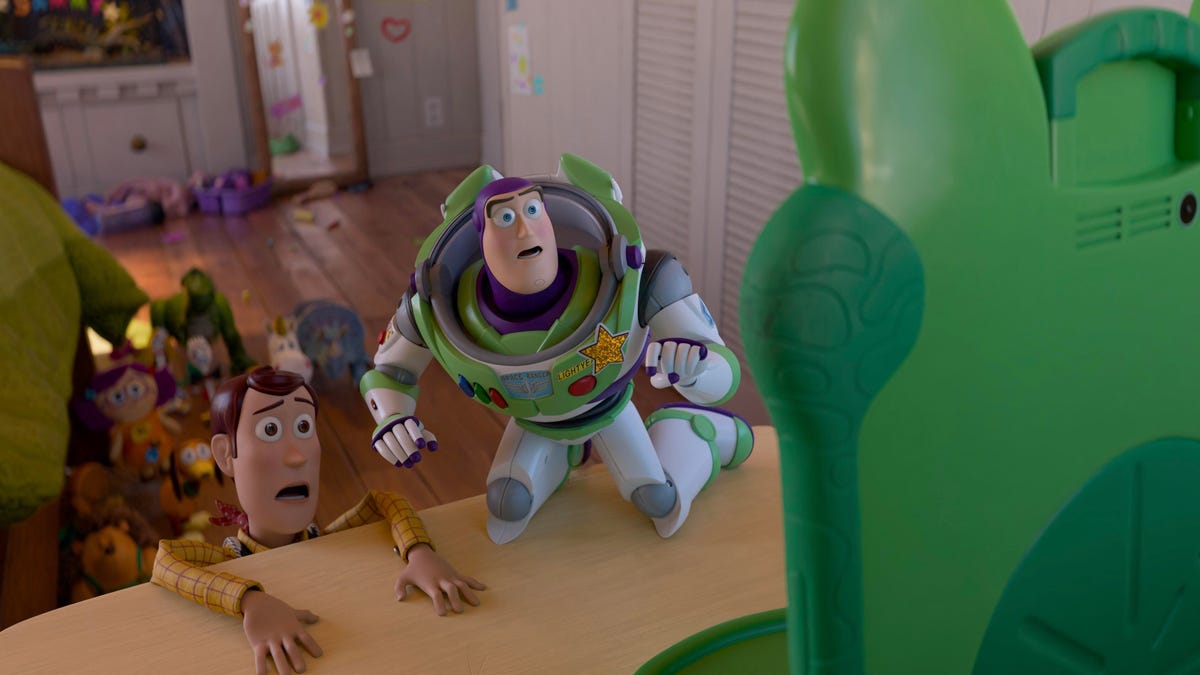
A new trailer for Disney and Pixar’s Toy Story 5 sets the stage for a toy-versus-tech face-off. The movie wouldn’t be complete without cowboy protagonist Woody, who reunites with his pals following the events of Toy Story 4 (his bald spot and poncho may be new, but he seamlessly fits back in with his toy buddies).
In the more than 2-minute trailer, Jessie tells Woody she’s losing 8-year-old Bonnie to Lilypad, a frog-faced tablet that’s clashing with the classic toys about what’s best for Bonnie.
«Tech’s invaded our house,» Jessie says.
«I don’t know, Jessie — toys are for play, but tech is for everything,» Woody tells her.
The trailer shows Bonnie struggling with screen time limits, glued to her tablet. When Bonnie is out of sight, Lilypad the learning tablet taunts the toys as she appears to cause their eviction from Bonnie’s room and into a dreaded donation box.
Toy Story 5’s voice cast includes Tom Hanks as Woody, Tim Allen as Buzz Lightyear, Joan Cusack as Jessie, Greta Lee as Lilypad, Tony Hale as Forky and Conan O’Brien as Smarty Pants, a toilet-training tech toy. There’s also Craig Robinson as the GPS hippo toy Atlas, Shelby Rabara as the camera toy Snappy, Matty Matheson as the toy Dr. Nutcase, Scarlett Spears as Bonnie and Mykal-Michelle Harris as an 8-year-old girl named Blaze.
More voice cast members include Wallace Shawn as Rex, John Ratzenberger as Hamm, Blake Clark as Slinky Dog, Jeff Bergman as Mr. Potato Head, Anna Vocino as Mrs. Potato Head, Annie Potts as Bo Peep, Bonnie Hunt as Dolly, Melissa Villaseñor as Karen Beverly, John Hopkins as Mr. Pricklepants, Kristen Schaal as Trixie, Ernie Hudson as Combat Carl and Keanu Reeves as Duke Caboom.
You can watch how the whole gang handles the tablet when the film debuts in theaters on June 19, and watch the rest of the Toy Story movies on streaming service Disney Plus.
Technologies
These Preorder Offers Could Put Google’s New Pixel 10A in Your Pocket for Free
Technologies
Starforge Explorer III Pro Review: A Worthy Rival to DIY in Performance and Value
The Starforge Explorer III Pro is a big, exceptional machine that delivers stellar performance and value.
Pros
- Excellent performance all around
- Solid connectivity
- Plenty of upgrade options
- Effective cooling with good dust filtration
Cons
- Very large case
- Audible fans
Prebuilt gaming PCs come in a couple of flavors. One flavor is those from big PC makers like Dell, HP and Lenovo. Their approach is typically unique cases and a lot of custom parts. Another flavor is PCs from boutique builders who combine off-the-shelf parts, sometimes paired with a custom-designed case. The Starforge Explorer III Pro is definitely that latter flavor, relying entirely on components you could buy yourself. While systems from boutique builders tend to have a price premium, the Explorer III Pro is competitive not just with big-name options but also compared with building it yourself using similar components.
The Explorer III Pro has a high-end configuration for its $3,900 price and packs its components comfortably in a massive case. Cable management and airflow are all well done, and the system has an elegance not just for its lack of gaudy RGB, but also for its consistent black color scheme. Pulling all of this off in a smaller case would have been a bit more impressive, but as it is, the Explorer III Pro delivers strong performance and value with very few compromises.
Starforge Explorer III Pro
| Price as reviewed | $3,900 |
|---|---|
| Size | 68 liter (20.27 x 10 x 20.57 in/515 x 254 x 522 mm) |
| Motherboard | MSI MAG Z890 Tomahawk WiFi |
| CPU | 3900MHz Intel Core Ultra 7 265K |
| Memory | 64GB DDR5-6000 |
| Graphics | Nvidia RTX 5080 |
| Storage | 2TB NVMe M.2 PCIe Gen 4 SSD (boot) (T-Force TM8FFW002T) |
| Networking | 5GbE, Killer Wi-Fi 7 BE1750x 802.11be, Bluetooth 5.4 |
| Connections | Thunderbolt 4 (x2 rear), USB 3.2 Gen 2 Type-C (x1 front, x1 rear), USB 3.2 Gen 2 Type-A (x3 rear), USB 3.2 Gen 1 Type-A (x2 front, x4 rear), USB 2.0 (x4 rear), 3.5mm audio connector (x1 front, x2 rear), SPDIF, 5Gb Ethernet, HDMI 2.1 FRL (x1 on motherboard, x1 on GPU), DisplayPort 2.1b (x3 on GPU) |
| Operating system | Windows 11 Pro |
The Starforge Explorer III Pro comes in three configurations: Core, Pro (tested here) and Elite. All three feature similar cooling hardware with a Havn BF 360 Flow case, six total case fans, a 360mm Arctic Liquid Freezer II 360 AIO CPU cooler, MSI Z890 Tomahawk Wi-Fi motherboard and Windows 11 Pro.
The Core model starts at $3,300 and has an Intel Core Ultra 7 265K processor, 32GB of DDR5 memory, 1TB of storage and an RTX 5070 Ti GPU. The Pro model tested here raises the price to $3,900. For the extra money, you get double the memory and storage and an RTX 5080 GPU. Both of these configurations feature an MSI MAG A850GL PCIe 5 power supply. The Elite tier is $6,000. It adds a second 2TB drive, swaps to an MSI MAG A1000G PCIe 5 power supply and steps up to an Intel Core Ultra 9 285K processor and 32GB RTX 5090 graphics card.
Starforge’s pricing is on the reasonable side, reaching only a ~$500 markup over the cost of building the same system yourself with the same components. A big part of the system cost is coming from the recently ramped-up RAM prices, with the Teamgroup T-Create memory used here hitting $749 at the time of writing, where it had historically been under $200 according to CamelCamelCamel. Impressively, at the time of writing, the Explorer III Pro was even on sale for $3,200, making it less expensive than the DIY alternative.
A pack leader
The Starforge Explorer III Pro offers excellent performance, though that should come as no surprise given the hardware it’s packing. The Intel Core Ultra 7 265K receives more than adequate cooling from the 360mm radiator, and the RTX 5080 isn’t starving for power or fresh air either, with neither experiencing thermal throttling during a 3DMark stress test. The CPU racked up impressive numbers throughout our testing with strong single-core and multicore scores in Geekbench 6 and Cinebench R24, even nipping at the heels of the Intel Core Ultra 9 285K inside the Lenovo Legion Tower 7i Gen 10 and Alienware Area-51 desktops, both of which are more expensive.
Graphical performance is also exceptional. The Starforge Explorer III Pro achieves the best 3DMark scores we’ve seen yet from a prebuilt system running an RTX 5080, beating all its rivals in the Time Spy, Steel Nomad, Fire Strike Ultra and Speedway tests. While it was generally by narrow margins, it’s worth reiterating that the III Pro is faster while being the more affordable system.
Not surprisingly, that translates well to gaming performance. The Explorer III Pro showed it was more than up to the task of 1080p and 4K gaming. It ran Shadow of the Tomb Raider at 251 frames per second in 1080p with graphics settings maxed, and it pulled off just shy of 200fps for Guardians of the Galaxy at High settings. Even Assassin’s Creed: Shadows, with no DLSS or frame gen, ran at 82fps with High settings and full ray-tracing features enabled. At 4K, it maintained triple-digit performance nearly across the board, with the exception of Assassin’s Creed: Shadows, where it still managed 45fps. Enabling DLSS and frame gen can help get you even more frames, if you want them. With the game set to 4K and at its highest graphics preset, I was able to play the game’s opening section at well over 60fps using DLSS Balanced.
While its performance is strong all around, it’s not quite the overall performance king. Opting for an Intel CPU has general benefits, but with games, AMD has an advantage. Next to the Velocity Micro Raptor Z95A running an AMD Ryzen 7 9800X3D and RTX 5080, the Starforge Explorer III Pro can fall behind considerably at 1080p. Even with its graphics card leading in 3DMark for the most part, they nearly tie at 4K. For the most competitive gamers, an AMD option will still be an advantage.
All that said, the Starforge Explorer III Pro is formidable. Even its SSD is a high-tier PCIe 4.0 model that makes good use of its bandwidth. Considering that Starforge’s asking price is lower than most of its competitors while delivering as much or more performance, it’s a strong option, to say the least.
Its only fault is its size
The Starforge Explorer III Pro comes cleanly built, though that’s not a terribly impressive feat given that Starforge is working within the «constraints» of a huge 68-liter tower case. The case is a Havn BF 360 Flow, which is ready for the massive graphics cards of today, as well as whatever unthinkably large models might come in the future. It supports up to 277mm E-ATX motherboards, 195mm tower coolers and graphics cards measuring 410mm long and 4.5-slots thick.
For all its bulk, the case has its pluses. The front has a pair of large, 180mm fans that move air quietly. These sit behind an easily removable grille with a fine mesh filter. The filter doesn’t separate from the grille, but the whole section can be vacuumed or even rinsed for easy cleaning. The top of the case features similar dust filtration, albeit without the easily removable panel.
The top fan blows air down toward the graphics card and past the CPU’s own fan and radiator, getting pulled out the back of the case by the rear 360mm fan. A second intake fan blows toward the PSU shroud, which has a clever scoop to redirect that air right into the graphics card’s fans, giving them both fresh air, which is then exhausted out the back. Even though this setup includes four exhaust fans and only two intakes, the high airflow of the two front fans should still be able to create positive pressure.
The system has a classy, subdued vibe. Both inside and out, it’s largely an all black affair. Almost everything, from the fans and PCBs to the heatsinks and cables, is black. There are just a few accents here and there, like a light metallic accent on the I/O shield and a granite-like pattern on the front grille. There’s no RGB lighting. Pretty much no lighting at all, actually. The motherboard has an error code LCD that can also display CPU temps, but that’s it.
Cable runs inside are tidy, only going a short distance where they’re visible through the glass side panel. One run for the CPU water pump is even held flush against the motherboard, though it skims along the edge of the RAM slots tight enough that it would press up against a RAM module if all four slots were filled. The cable runs behind the motherboard are tidy too, though it’s a bit of a rat’s nest right where the cables come out of the power supply.
With such bulk, there’s naturally some room for expansion. Memory and storage are easy upgrades. There are three extra M.2 slots on the motherboard and four SATA ports. Behind the metal side panel, the case includes two 3.5-inch drive bays with adapter trays that can each support two 2.5-inch drives, letting you run up to four 2.5-inch drives total. There are also two additional PCIe x16-length slots, though a large card in one of these would get in the way of the graphics card’s fans, and the other has space only for a slim card.
With a total of nine fans in the system, including the graphics card’s, the Explorer III Pro can be a little noisy. At idle, you can faintly hear its fans, and under a heavy load, the fans manage to make a bit more noise. They’re not loud or shrill, but are a relatively steady low-pitch hum.
The system also offers plenty of ports. You get two USB-A and a USB-C up front alongside a headset jack. Meanwhile, the motherboard comes with a host of extra ports, including two Thunderbolt 4. However, though the motherboard supports 20Gbps USB-C for the front I/O, the case’s port is limited to 10Gbps.
Overall, the Starforge Explorer III Pro offers impressive performance at a great price, assuming you’ve got the space for it under (or on) your desk.
Geekbench 6 (single core)
Cinebench 2024 CPU (multicore)
Shadow of the Tomb Raider gaming test (1080p)
Guardians of the Galaxy gaming test (4K)
3DMark Fire Strike Ultra
3DMark Speed Way (DX12 Ultimate)
The Rift Breaker CPU (1080p)
Configurations
| Alienware Area-51 | Microsoft Windows 11 Pro; 3.7GHz Intel Core Ultra 9 285K; 64GB DDR5-6400; 16GB Nvidia GeForce RTX 5080 graphics; 2TB SSD |
|---|---|
| Alienware Aurora R16 | Microsoft Windows Pro; 3.2GHz; 3.2GHz Intel Core i9-14900KF; 32GB DDR5 5,600MHz RAM; 12GB Nvidia RTX 4070 graphics; 1TB SSD |
| Dell XPS 8960 | Microsoft Windows 11 Home;3.4GHz Intel Core i714700K; 21GB DDR5 RAM; 16GB Nvidia RTX 4080 Super graphics; 1TB SSD |
| Corsair Vengeance A7500 Air | Microsoft Windows 11 Home; 4.4Ghz AMD Ryzen 9 9950X3D; 64GB DDR5-4800 RAM; Nvidia RTX 5090 graphics; 2TB Corsair MP700 Elite (boot drive); 2TB Corsair MP600 Core XT |
| HP Omen 35L | Microsoft Windows 11 Pro; 4.2GHz AMD Ryzen 7 8700G; 64GB DDR5 3,600MHz; 16GB Nvidia RTX 4080 Super graphics; 2TB SSD + 1TB SSD |
| Lenovo Legion Tower 7i Gen 8 34IRZ8 | Microsoft Windows 11 Home; 3.2GHz Intel Core i9-14900KF; 32GB DDR5 4,400MHz RAM; 16GB Nvidia RTX 4080 Super graphics; 1TB SSD |
| Minisforum AtomMan G7 Ti | Microsoft Windows 11 Home; 2.2GHz Intel Core i9-14900HX; 32GB DDR5 5,600MHz RAM; 8GB Nvidia RTX 4070 graphics; 1TB SSD |
| Starforge Explorer III Pro | Microsoft Windows 11 Home; 3.9GHz Intel Core Ultra 7 265K; 64GB DDR5-6000; Nvidia RTX 5080 GPU; 2TB NVMe M.2 PCIe Gen 4 SSD |
| Velocity Micro Raptor Z95A | Microsoft Windows 11 Home; 2.5GHz AMD Ryzen 7 9800X3D; 64GB DDR5 RAM; 16GB Nvidia GeForce RTX 5080 graphics; 2TB SSD |
Technologies
Samsung Galaxy Z TriFold Review: A Pocket-Sized Powerhouse, but It’s Not for Everyone
At $2,900, Samsung’s latest foldable is a true phone-tablet hybrid and a multitasker’s dream. But more isn’t always better.
Pros
- Generous 6.5-inch cover screen
- Long-lasting battery
- Multitasking is seamless
- Excellent camera
Cons
- Prohibitive $2,900 price
- Typing on main display is difficult
- Not all apps work well with 10-inch display
- Phone feels clunky when closed
The Samsung Galaxy Z TriFold is a spectacle. With a display split into three sections that fold and unfold like a pamphlet, it’s a phone that essentially doubles as a tablet when open. The TriFold is the result of Samsung’s yearslong effort to make its foldable phones sleeker and more compact — and, ultimately, more practical.
As one friend aptly put it when I first showed her the TriFold: «So you’re just walking around with an iPad in your pocket?» More like a Galaxy Tab, but yes, that’s the idea.
With such a unique design and a prohibitive $2,900 price tag ($3,164 after taxes and fees), who is the TriFold really for? I spent two weeks using Samsung’s two-in-one device to see how it performed and to better understand its target audience. If one thing is clear from this phone’s limited availability and sky-high cost, it’s not exactly a mass-market product.
Samsung spent a good deal of 2025 touting its mobile design innovations, from the super slim Galaxy S25 Edge to the ultrasleek Galaxy Z Fold 7. It capped off the year with the debut of the Galaxy Z TriFold, which launched in December in some parts of the world and arrived in the US in late January. For years, foldable phones have been clunky and rather impractical, with narrow cover displays and subpar cameras. They’ve come a long way, and consumers no longer have to sacrifice practicality for novelty. (They still have to sacrifice a good amount of money, though.)
The TriFold feels like the culmination of Samsung’s technological advancements. Still, it’s a very niche device and is a reminder that more isn’t always better, at least not for everyone.
How the Galaxy Z TriFold feels in my hand
It’s safe to say I’ve never used a phone that feels like the Galaxy Z TriFold, open or closed. Though the phone borrows many attributes from its Galaxy Z Fold 7 sibling, it’s in a league of its own — aside from Huawei’s Mate XT Ultimate, a trifold sold outside the US.
The TriFold opens up to a 10-inch display that’s sectioned into three thin panels, each measuring 3.9mm, 4mm and 4.2mm at the thickest point (not accounting for the camera bump).
When the phone is open, it feels sleek and relatively lightweight for what it’s packing, clocking in at 309 grams. I can hold it with one hand or two, though two feels more comfortable.
However, when the phone is unfolded, I tend to accidentally tap the home or back button with my palm or fingers as I hold it up, since the bezels are so thin. The jury is still out on whether I’m just a klutz, but I think part of it is just getting used to fresh hardware design — and Samsung potentially tweaking the placement of certain controls in future iterations.
When the TriFold is shut, its sleekness all but disappears. With three panels stacked together, the phone feels rather dense and measures a slightly clunky 12.9mm thick. It’s not prohibitively bulky, but the noticeable heft definitely sets it apart from bar-style phones; for instance, the Galaxy S25 is only 7.2mm thick. It also distinguishes it from the Z Fold 7, which measures just 8.9mm thick when closed. But that extra panel on the TriFold has to go somewhere.
Still, the TriFold’s 6.5-inch cover screen serves up enough real estate to comfortably do anything you’d do on a standard phone, like send texts, scroll through Instagram or check an email.
The TriFold’s camera bump is about as pronounced as you’d expect on any premium phone today. The three rear lenses sit on a raised platform, as they do on the Z Fold 7, and my index finger often brushes up against it, given the vertical layout. It’s not a big deal, but I do wish that weren’t the case.
As satisfying as it is to snap a book-style foldable shut, feeling that sensation twice with the TriFold is delightful. When I first got my hands on this phone, I was grateful for the on-screen and haptic alerts warning me to close the left-side panel first. (Being right-handed, this was a slight learning curve.) But I got the hang of it surprisingly quickly. It’s nice that the section with the power and volume buttons protrudes slightly to the right, making it easy to access those controls when the phone is fully folded.
The Galaxy Z TriFold comes with a case that snaps onto the back panel and covers one of the hinges. It’s a neat perk to have that option, but I didn’t want anything coming between me and my slick new phone, so I didn’t use it.
The TriFold does not have S Pen support. While that may feel like a missed opportunity, I don’t think it detracts from the device’s practicality. Just tap away with your fingers (or a connected keyboard), and you’ll be good.
Each display has its purpose
The drastically different sizes of the cover and main displays means each serves an ideal purpose. Similar to my experience with book-style foldables like the Galaxy Z Fold 7, I tended to use the TriFold’s 6.5-inch cover display the majority of the time.
For most tasks, like taking photos, scrolling through social media and messaging (the bulk of what I do on a phone), the smaller display and configuration is ideal. It’s easier to hold the TriFold in that layout, and typing is much, much easier than on the expansive main display.
At times, I even opted for watching a YouTube video in landscape mode on the cover screen — despite a much more spacious display lying just two unfolds away — because it still did the trick, and the phone was easier to handle when moving around.
Like other foldables, the TriFold’s app continuity function means whatever you’re doing on the cover screen is seamlessly carried over to the main display when you open the phone. This is ideal when watching videos: If you decide you want to move to the inside screen, the content keeps rolling and the audio doesn’t stop as you unfurl the phone.
I used the 10-inch main display about a third of the time and primarily when watching videos or multitasking. Like with Samsung’s book-style foldable, you can run up to three apps simultaneously, but the TriFold’s roomier display lets each app feel less crammed than on the Z Fold 7.
I even tried working on the TriFold while multitasking. I was able to have Google Docs, Slack and CNET’s content management system open all at once. It was tight, but it worked.
To really tap into the phone’s spacious display, you can use Samsung DeX, which essentially turns any app on the TriFold into a window you can drag around and resize however you’d like (much as you would on a computer interface). I tested this while writing this review; in fact, this whole section is coming to you via DeX, after pairing the phone to a wireless mouse and keyboard.
It’s all pretty seamless and feels like working on a mini monitor. Old habits die hard, though, and I look forward to going back to my 16-inch laptop with a larger screen and attached keyboard.
The TriFold was my trusty entertainment companion when I caught strep throat halfway through reviewing this phone. I watched endless Pixar movies and YouTube videos when I was stuck in bed. The Z Fold 7’s 8-inch display is great for this too, but the TriFold’s notably larger screen takes the experience to the next level. It didn’t even feel like I was watching on a phone anymore; it felt like I’d switched to a tablet.
And now, the question you’ve likely been waiting for me to answer: How obvious are the two creases on the main display?
Well, you can still see them, but they virtually disappear when you’re actually using the phone or watching something. The creases are also more subdued than on the Z Fold 7, so it’s likely Samsung is slowly working its way toward eliminating them altogether. But we’re not there yet.
I refrain from using the main display for social media scrolling because many apps aren’t well-suited for that horizontal format. Some Instagram posts look grainy when stretched on the 10-inch display, and Reels are weirdly cropped in my feed until I click into them.
Other apps, like X and DoorDash, don’t fill the screen, but rather sit square in the middle, bordered by thick blank bars. I can tap arrows to shift the on-screen content to the left or right for easier scrolling, though.
Galaxy Z TriFold battery life and performance
One thing that impressed me most about the Galaxy Z TriFold is how well the 5,600-mAh battery held up. The three-cell battery is split between the panels to extend how long each charge lasts. I could stream, surf the web and snap photos as much as I wanted without worrying about being stranded with a dead phone, even while keeping the Always-on display enabled.
Across multiple days of testing, the TriFold lasted me nearly a day and a half before needing to recharge. For instance, one day I began with a full battery at 7 a.m., and the phone lasted until 2:30 p.m. the next afternoon. On another day, I went from 100% battery at 9:20 a.m. on a Saturday to 0% at 6:33 p.m. on Sunday evening. In each instance, I did a good deal of streaming, texting, ordering food delivery, scrolling through Instagram and X, and going down YouTube rabbit holes, regularly switching between the cover and main displays.
Speaking of charging, the TriFold supports 45-watt super-fast charging. That’s good for Samsung, but merely OK when compared to the much faster charging you can get with several other phones like the OnePlus 15 (up to 100 watts) and Motorola’s 2025 Moto G Stylus (68 watts). But 45 watts gets the TriFold from 0% to 61% in half an hour, so I can’t complain. The phone reaches a full charge in about an hour and 15 minutes.
This was rather shocking, but you’ll get both a charging cable and a charging brick in the Z TriFold box. Wild, right? With most phone makers these days opting not to include extras with their devices, I’m glad Samsung chose to at least toss in a charging brick with the TriFold, given its astronomical price.
In CNET’s 45-minute endurance test, which involves streaming, scrolling through social media, joining a video call and playing games on the internal display, the Galaxy Z TriFold’s battery went from full to 92%. That’s lower than the 96% I got with Google’s Pixel 10 Pro Fold and the 95% on the Oppo Find N5. But it’s only slightly less than the 93% I got with the Galaxy Z Fold 7, which is pretty impressive given there’s a whole other panel to power on the TriFold.
In a longer, 3-hour streaming test over Wi-Fi, I watched a YouTube video in full-screen mode at full brightness on the inner display. The TriFold’s battery dropped from 100% to 76%.
That’s not too far off the 78% I got with the Pixel 10 Pro Fold. But both are handily beaten by the 84% I got with the Z Fold 7 and the 89% on the Oppo Find N5.
The TriFold is powered by a Snapdragon 8 Elite chip, which powers the many Galaxy AI and Gemini features on board, like Generative Edit for photos, Live Translate and Circle to Search.
The phone runs Android 16 and Samsung’s One UI 8 out of the box, and it supports seven years of software and security updates — which is the least I’d expect from a phone that costs more than the average laptop.
It has the same chip that powers last year’s Galaxy S25 phones — so, not quite the latest and greatest Snapdragon 8 Elite Gen 5 processor launched in the fall, but it’s still powerful silicon.
Benchmark tests for the CPU in Geekbench 6 place the Z TriFold above the Google Pixel 10 Pro XL, the Motorola Razr Ultra and the Galaxy S25 Edge, and it’s on par with the Galaxy Z Fold 7.
In a graphics test using 3DMark’s Wild Life Extreme, the TriFold exceeded the performance of the S25 Edge, the iPhone 17 Pro Max and the Pixel 10 Pro XL, but it was beaten out by the Z Fold 7.
Check out the graphs below for more specifics.
Geekbench v.6.0
- Single-core
- Multicore
3DMark Wild Life Extreme
The Galaxy Z TriFold’s camera takes stunning photos
The Galaxy Z TriFold’s top-notch cameras are further evidence of how far foldables have come. Like the Z Fold 7, the TriFold has a 200-megapixel wide, 12-megapixel ultrawide and 10-megapixel telephoto camera on the back, as well as a 10-megapixel selfie camera on both the cover and inside displays.
I really enjoyed snapping photos on this phone and was regularly blown away by what it captured. Here are a few of my favorite shots:
The TriFold doesn’t compromise on camera quality. The photos are comparable to what you’d capture on the flagship Galaxy S series. And at nearly $3,000, I’d sure hope so.
Galaxy Z TriFold final thoughts
After using the Galaxy Z TriFold for a couple of weeks, it became clear that this phone is for a very specific subset of people. And I’m not sure that includes me.
I’ve enjoyed the novelty and versatility of the TriFold: It can easily double as a workstation or tablet for watching movies or multitasking. Still, it offers more than I’d realistically need from a phone.
My usual tasks include scrolling through social media, texting and taking photos — all things you don’t need a 10-inch display for. And even when I want to watch a video on a larger display, I’m happy to settle for the 8-inch screen on the Z Fold 7, especially since that phone more closely matches the thickness of a standard, nonfolding phone when it’s closed. The TriFold’s beefier build when closed is a bit of a drawback for me.
But I think plenty of people will feel like the TriFold is the perfect fit for their lifestyles. Business-oriented power users in particular might appreciate that this phone essentially serves as a mini laptop you can just fold up and toss in your pocket. Anyone who wishes they could combine their phone and tablet into one gadget will find that the TriFold does the trick. Plus, watching movies and YouTube videos really is a wonderful experience on this phone, especially if you’re always on the go.
What’s harder to stomach is the TriFold’s astronomical $3,000 price, which will keep it out of the hands of all but the savviest tech fans and those with the deepest pockets.
Still, this phone embodies what foldable phones have long strived to be: versatile, innovative and practical. And honestly, it’s just a joy to use.
-
Technologies3 года agoTech Companies Need to Be Held Accountable for Security, Experts Say
-

Technologies3 года agoBest Handheld Game Console in 2023
-
Technologies3 года agoTighten Up Your VR Game With the Best Head Straps for Quest 2
-
Technologies4 года agoBlack Friday 2021: The best deals on TVs, headphones, kitchenware, and more
-
Technologies5 лет agoGoogle to require vaccinations as Silicon Valley rethinks return-to-office policies
-

Technologies5 лет agoVerum, Wickr and Threema: next generation secured messengers
-

Technologies4 года agoOlivia Harlan Dekker for Verum Messenger
-

Technologies4 года agoiPhone 13 event: How to watch Apple’s big announcement tomorrow