Connect with us

Technologies

Google’s Gemini AI Will Now Generate Meeting Suggestions in Your Calendar. How It Works

Google Calendar will now surface suggested meeting times based on your availability, working hours and existing commitments.
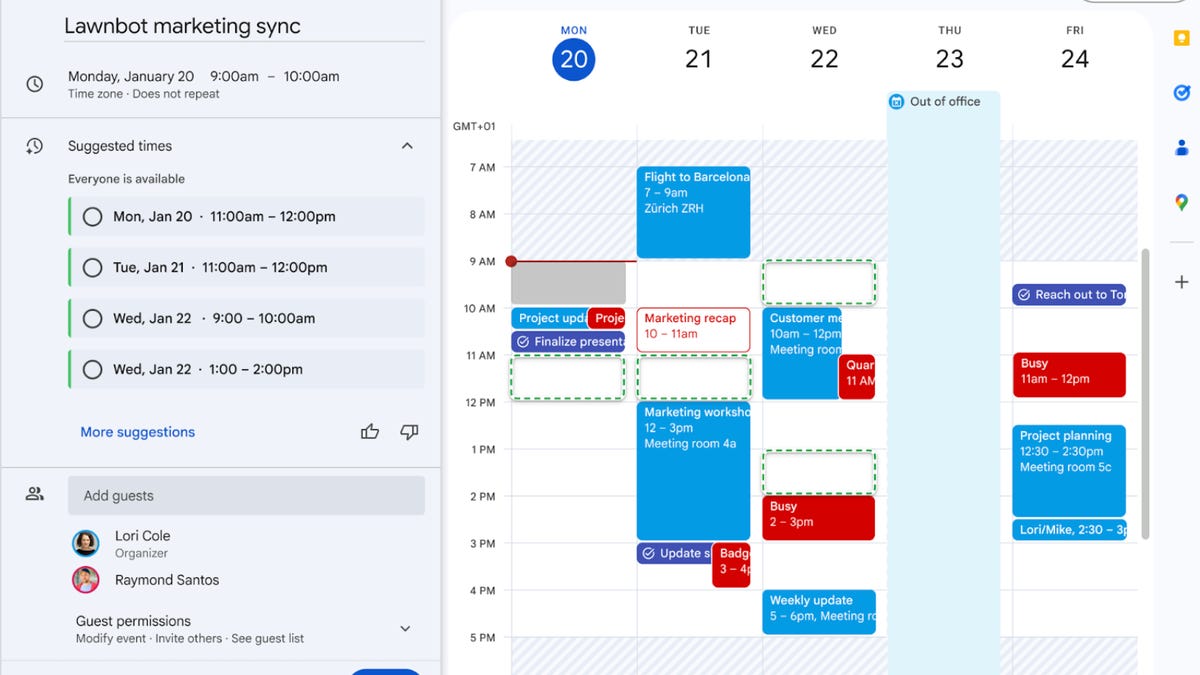
Google has announced a new way to schedule and reschedule meetings in Google Calendar, with one-click suggestions powered by its Gemini AI assistant. The update is designed to reduce the time spent coordinating availability by automatically identifying times that work for everyone invited.


Don’t miss any of our unbiased tech content and lab-based reviews. Add CNET as a preferred Google source.


When creating an event, Calendar will now surface suggested meeting times based on the participants’ availability, working hours and existing commitments. If invitees later decline or conflicts arise, Gemini can prompt the organizer with a new recommended time directly inside the event, allowing the meeting to be rescheduled without leaving Calendar.

The feature builds on Google’s broader push to weave generative AI more deeply into its Workspace tools, shifting routine tasks like scheduling, drafting and summarizing toward automated assistance. 

Calendar already uses AI for features such as smart event creation and time insights, but this update gives Gemini a more active role in managing changes after a meeting is created.

Google said the new meeting suggestions are rolling out gradually to eligible Workspace users, with broader availability expected in the coming weeks.

Read also: Gemini AI Is Coming for Your Gmail Inbox. Here’s What to Expect and How to Turn It Off

Technologies

Today’s NYT Connections Hints, Answers and Help for Jan. 28, #962

Here are some hints and the answers for the NYT Connections puzzle for Jan. 28 #962.

Looking for the most recent Connections answers? Click here for today’s Connections hints, as well as our daily answers and hints for The New York Times Mini Crossword, Wordle, Connections: Sports Edition and Strands puzzles.


Today’s NYT Connections puzzle has some fun words to sort out. Read on for clues and today’s Connections answers.

The Times has a Connections Bot, like the one for Wordle. Go there after you play to receive a numeric score and to have the program analyze your answers. Players who are registered with the Times Games section can now nerd out by following their progress, including the number of puzzles completed, win rate, number of times they nabbed a perfect score and their win streak.

Read more: Hints, Tips and Strategies to Help You Win at NYT Connections Every Time

Hints for today’s Connections groups

Here are four hints for the groupings in today’s Connections puzzle, ranked from the easiest yellow group to the tough (and sometimes bizarre) purple group.

Yellow group hint: Fake.

Green group hint: Maids do this.

Blue group hint: Where you play albums.

Purple group hint: Extra.

Answers for today’s Connections groups

Yellow group: Imitation.

Green group: Cleaning supplies.

Blue group: Components of a record player.

Purple group: Spare ____.

Read more: Wordle Cheat Sheet: Here Are the Most Popular Letters Used in English Words

What are today’s Connections answers?

The yellow words in today’s Connections

The theme is imitation. The four answers are dummy, mock, pretend and sham. 

The green words in today’s Connections

The theme is cleaning supplies. The four answers are bucket, gloves, rag and soap.

The blue words in today’s Connections

The theme is components of a record player. The four answers are motor, needle, platter and tonearm.

The purple words in today’s Connections

The theme is spare ____. The four answers are me, rib, time and tire.


Don’t miss any of our unbiased tech content and lab-based reviews. Add CNET as a preferred Google source.


Continue Reading

Technologies

Meta Confirms Testing of Premium Instagram, Facebook and WhatsApp Subscriptions

The company says it’s testing paywalled premium sharing and AI features.

People using Instagram, Facebook and WhatsApp may soon need to decide whether they want to pay extra for additional features beyond the free versions they’ve been using.

Meta confirmed that it’s planning to roll out and test premium subscription tiers for its three most popular services, which, according to the company, would unlock «special features and more control over how they share and connect,» according to a TechCrunch report detailing the changes.


Don’t miss any of our unbiased tech content and lab-based reviews. Add CNET as a preferred Google source.


A representative for Meta did not elaborate on subscription plans, but confirmed to CNET that TechCrunch’s story is accurate.

According to the report, this would differ from the Meta Verified badge offering aimed at businesses and internet content creators. Meta Verified starts at $15 and includes enhanced support options and protections against impersonation.

Instead, the new subscriptions that Facebook, Instagram and WhatsApp users can expect will offer a broader Premium experience, but it’s unclear so far which specific features will be included. According to TechCrunch, AI will be a part of that mix with potential paywalls or extra access to AI image generators or AI agents as part of its plans. What bundles and subscriptions are offered could change based on customer feedback, Meta told TechCrunch.

Subscriptions for once-free social media services are now common, with LinkedIn, X (formerly Twitter) and Snapchat all giving people the option to pay more for extra features.

Continue Reading

Technologies

I Avoided Using a Sports Watch Until I Tested This One by Garmin

Garmin Venu 4 Review: It’s the best-looking sports watch I’ve tested, with all the fitness metrics you need to level up your training, for a price.

Our Experts

Headshot of Vanessa Hand Orellana
Vanessa Hand Orellana Lead Writer
Vanessa is a lead writer at CNET, reviewing and writing about the latest smartwatches and fitness trackers. She joined the brand first as an on-camera reporter for CNET’s Spanish-language site, then moved on to the English side to host and produce some of CNET’s videos and YouTube series. When she’s not testing out smartwatches or dropping phones, you can catch her on a hike or trail run with her family.
Expertise Consumer Technology, Smart Home, Family, Apps, Wearables
Why You Can Trust CNET
16171819202122232425+

Years of Experience

14151617181920212223

Hands-on Product Reviewers

6,0007,0008,0009,00010,00011,00012,00013,00014,00015,000

Sq. Feet of Lab Space

CNET’s expert staff reviews and rates dozens of new products and services each month, building on more than a quarter century of expertise.

Garmin Venu 4

Pros

  • Week-long battery life in smartwatch mode
  • Polished circular design
  • Advanced fitness and recovery metrics

Cons

  • $100 more than previous generation
  • Software can feel sluggish
  • UI is not as intuitive as other smart watches

Until the Garmin Venu 4 landed on my wrist, I mostly shied away from using dedicated sports watches from brands like Garmin or Polar as my daily driver. Part of that was imposter syndrome; I’m a fitness enthusiast, not a full-blown athlete (yet). But mostly, I wasn’t willing to accept the trade-offs that came with them: clunky software, limited smart features and designs that felt more like gym gear than something I’d want to wear all day.

The Venu 4 isn’t the only good-looking sports watch on the market, but it’s the first one that’s come close to convincing me to go all-in. It’s well-rounded (literally and figuratively) and packed with fitness features that don’t feel condescending to an athlete wannabe like me.

The line between sports watches and traditional smartwatches seems to get blurrier each year. Both Apple and Samsung now have rugged Ultra smartwatch lines, and sports watches are starting to look (and act) more like traditional smartwatches.  

The Venu 4 feels like Garmin’s strongest attempt yet to bridge these two worlds. It goes all out on fitness features with advanced insights like training readiness and suggested workouts typically reserved for the top-tier Fēnix models, but has a design and a price that are approachable for people who live somewhere between casual fitness enthusiast and aspiring athlete. 

The $550 price (for both 41mm and 45mm models) is $100 more than its predecessor, and upgrading from the Venu 3 makes sense only if you plan to use the data it provides. If you’re someone who mostly just wants the occasional workout tracking, then the Venu 4 will be overkill. 

I may not be a full convert (yet), but after weeks of living with it day and night with the Venu 4, I get the Garmin obsession, and I can see how a sports watch could help me level up my fitness journey when I’m ready. 

Venu 4 fitness: Garmin’s core strength

The Venu 4 supports what feels like every workout imaginable, from running and cycling to rowing, HIIT, and even golf course mapping. It supports multi-band GPS, which I found provided more accurate location tracking, even on trail runs without my phone. Heart rate tracking stayed impressively close to my Polar chest strap after the initial jump from resting to higher-intensity sprint.

Garmin’s strength isn’t just the sheer volume of data it collects, but how it helps you understand how those metrics impact your training. On the Venu 4, you get heart rate, breathing rate, blood oxygen, stress, ECG, skin temperature changes, HRV, and advanced sleep and menstrual cycle tracking.

On their own, these metrics can feel overwhelming or even meaningless. What Garmin does especially well is connect the dots through features like Body Battery, Training Readiness, Load and other recovery insights that translate raw data into a clearer picture of how prepared your body is for activity. And because you’re not constantly taking it off to charge, Garmin can build a more complete picture of your health and recovery that becomes more accurate over time.

I found waking up to a low Body Battery score when I felt off was both depressing and validating: no, I probably can’t just «shake this one off,» and yes, I should probably take a rest day (or two) before getting back to that New Year’s resolution. 

The watch also highlights when you’re theoretically at your best to work out, even if real life doesn’t always cooperate. There’s no greater irony than seeing I’m in «peak» training readiness while rocking my toddler to sleep, or hustling to get a story in on time. That’s ultimately my biggest barrier to fully crossing over into the Garmin ecosystem. I’m not always in a position to follow the advice that makes these metrics most valuable.

Garmin Connect Plus subscribers ($7 per month) get access to personalized coaching plans and daily suggested workouts that adapt based on their sleep, recovery and activity history. I tried a running plan to prep for a 10K, but by day three, I’d gone rogue and settled back into my tired, but realistic, workout routine. Learning new routines takes time, and at this stage of life, 20-minute workouts squeezed between everything else will have to suffice.

Venu 4 battery life: Amazing for a smartwatch, but meh for a Garmin

The Venu 4’s shiny new upgrades (brighter display and improved GPS tracking over the Venu 3) come at a slight cost to battery life: You get 12 days on the Venu 4 versus 14 on the Venu 3. But I think it’s well worth it when you factor in everything else it has. 

I averaged about 10 days of battery life per charge for the smaller 41mm Venu 4 that I tested. But that’s in smartwatch mode, which disables the always-on display. If, like me, you prefer the always-on display, battery life drops. I got roughly four days on a charge (slightly less on long hiking days when the GPS was running). It’s not quite multiweek endurance like Garmin’s Enduro or Instinct lines. But even at the lower end, the Venu 4 is still far better than most Apple and Samsung watches.

I’ve never worn a smartwatch this long without taking it off for a charge, which turns out can be both a good and a bad thing. On the plus side, it made sleep tracking more consistent, which is key to unlocking Garmin’s best features like Body Battery, HRV (heart rate variability) and recovery insights. Wearing the watch for so long is also important for identifying long-term health trends and detecting early signs of illness.

The flip side of wearing it nonstop was skin irritation. After about five straight days, the skin directly under the watch became red and itchy. I tried to power through it, which only made things worse. A perfect storm of winter weather, a suppressed immune system, and the polymer backing on the underside of the watch likely didn’t help matters. After taking a week off, cleaning it more regularly, and giving my skin the occasional break, the issue hasn’t returned. And if you have sensitive skin like me, it’s probably worth building in a little breathing room.

Venu 4 design: Not your average sports watch 

The Venu 4 is hands down one of the best-looking watches I’ve tested (Note: I didn’t say sports watches). It even earned its fair share of compliments from friends who didn’t know it was a sports watch. The Venu 4 comes in two sizes, 41mm and 45mm, both with a 1.4-inch AMOLED screen and a stainless steel case in lunar gold, slate, or silver finishes. It’s covered in Gorilla Glass 3 and has a fiber-reinforced polymer back.

The bezels are larger than those on an Apple Watch Series 11, and the usable screen area feels smaller than expected. The Venu 4’s display is bright and legible even in direct sunlight. You might not find it as responsive to touch if you’re coming from an LTPO OLED or Super AMOLED display with a higher refresh rate, like those on Apple or Samsung watches. Which is why the physical button navigation is so important. 

Garmin slimmed the design down to two physical buttons (the Venu 3 had 3). One button brings up navigation, while the other handles quick settings. Long-pressing the bottom button activates other actions, like the flashlight, but until muscle memory kicks in, it’s easy to forget which one does what. 

The built-in LED flashlight is a standout feature. It’s an actual light embedded in the side of the watch, not a screen-based workaround like found on other smartwatches. It’s surprisingly powerful and incredibly useful, whether you’re doing an ultramarathon or, in my case, checking on a sleeping kid without turning on any lights.

Venu 4 watch basics: Functional, but not seamless

On paper, the Venu 4 checks most of the smartwatch boxes. It has notifications, mobile payments via Garmin Pay, music storage, voice assistant access (via your phone) and supports calls from your wrist. Android phone owners get the added perk of responding to texts from the watch; iPhone owners are out of luck.

In my testing, this is where Garmin still lags behind true smartwatches. Everything works, but it’s not seamless; simple actions often take more steps than they should, and Garmin’s app ecosystem remains limited. Even changing your watch face requires an additional phone app (Garmin IQ). The upside is cross-platform compatibility, and aside from the ability to respond to texts, the experience is consistent across iOS and Android.

Venu 4 accessibility features

Garmin has also added more accessibility options in the Venu 4. There are spoken watch faces that read out time and health data, hourly audio alerts, and multiple color filters for people with color blindness.

Venu 4: Final thoughts 

I’m still a practical generalist in the throes of working motherhood, but the Garmin Venu 4 is the closest I’ve been to going full sports watch. If I were ready to make fitness a true priority, the Venu 4 would be my gateway Garmin watch. 

It’s a solid pick for anyone looking to cross over into the sports watch world for the first time, and it’s one of Garmin’s most well-rounded options. The Venu 4 has enough battery to get you through the week, training insights that feel genuinely helpful rather than overwhelming, and a design that’s polished enough to pass for date-night-ready.

Continue Reading

Trending

Copyright © Verum World Media