
Technologies
New iPhone 17? Use These 4 Safe and Stress-Free Methods to Transfer Your Data
Transferring data from your old phone to a new iPhone doesn’t have to be a headache.
Upgrading your phone to a new iPhone 17, iPhone 17 Pro or iPhone Air is exciting. A new phone is always speedy and filled with features to tweak and personalize. However, the biggest headache can be transferring your data from your old device to a new one. However, Apple makes this easy with four stress-free methods to get you up and running as quickly as possible (even if you’re swapping from an Android phone).
For more, explore a bunch of hidden iOS 26 features, and see just how thin the iPhone Air is.
Don’t miss any of our unbiased tech content and lab-based reviews. Add CNET as a preferred Google source.
1. The convenient method: Restore from iCloud
During the setup process, you’ll be asked if you want to directly transfer apps and information from your old iPhone to your new one using Quick Start. This feature was first rolled out with iOS 12.4, so if it’s been several years since you’ve upgraded phones, it’ll be the first time you’ve seen the option.
The easiest and quickest method to set up your new iPhone is to restore from a recent iCloud backup. As you walk through the initial setup process, tap Restore from iCloud Backup, sign in with your Apple Account (previously called Apple ID before iOS 18) and then pick the most recent backup of your old iPhone.
If the backup is more than a day or two old, take an extra few minutes to create a new backup. To do so, open the Settings app on your old phone, search for iCloud Backup in the Search field at the top of the screen and then click the matching result. Click Back Up Now to update the cloud backup.
Once that finishes, go back to your new iPhone and select the backup you just created as what you want to use to restore from.
Your phone will then restore your settings and preferences, and you’ll be able to start using it in about 15 minutes. It will continue downloading your installed apps in the background.
Once everything is restored, you’ll need to sign back into any accounts you added to your phone, as well as go through your apps and make sure you’re still signed in.
2. The speediest method: Apple direct transfer
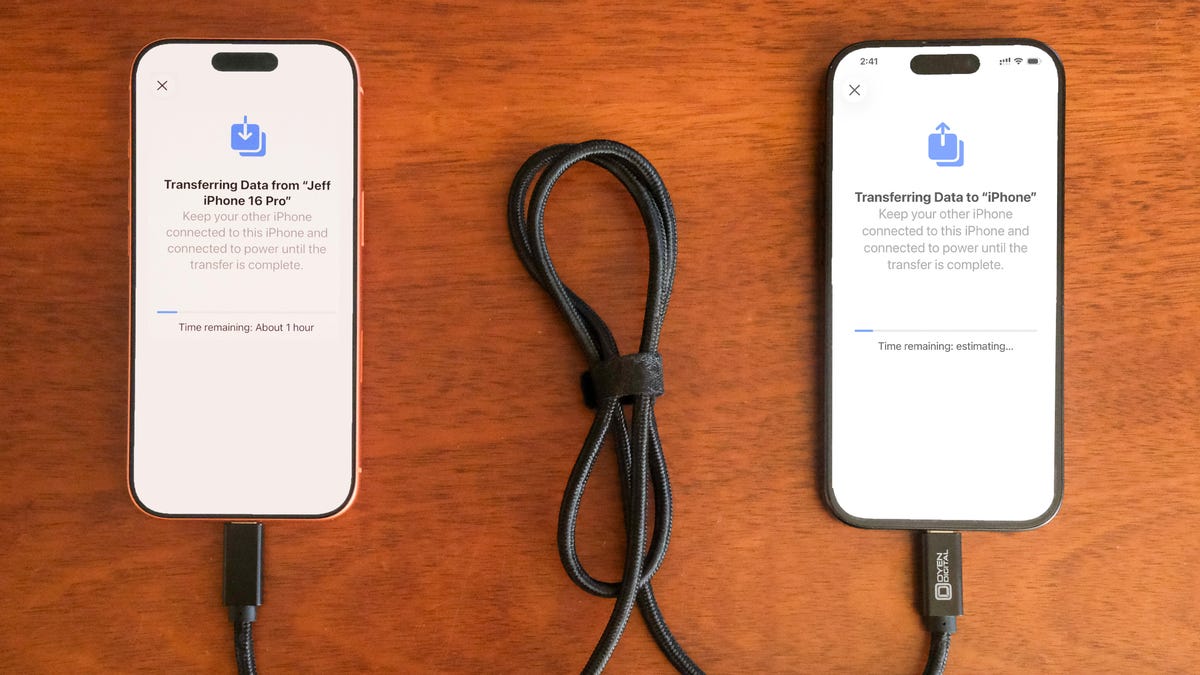
If you do not have a recent iCloud backup or your internet connection is slow, you can transfer everything from iPhone to iPhone, either wirelessly or via cable. When the Quick Start process asks for the source, choose the direct transfer option.
Using a cable rated for fast data speeds, the process can be surprisingly swift, and is my preferred way to upgrade to a new iPhone. Connect both phones via the cable; note that you might need an adapter if your current phone is an iPhone 14 or earlier with a Lightning port. Apple has more details on how to make a wired transfer work.
If you opt for the wireless route, make sure both phones are plugged in and charging to ensure they don’t run out of battery, and that they are connected to your Wi-Fi network (it’s part of the setup process on the new phone). And also make sure you have enough time for the process to finish — it could take over an hour.
The more information you have on your phone, like photos in your library, the longer it will take. When the transfer starts, the phones will show you a time estimate. Every time I’ve used this tool, that estimate has been accurate within a couple of minutes. It’s worth taking the time if you don’t use Apple’s iCloud service to back up your phone.
3. The longer, comprehensive method: Use a Mac or PC
A longer but safer method is to restore from an encrypted backup using a Mac or PC. Not only does this process transfer all of your apps, settings and preferences, but it also means you don’t have to sign into the countless apps you have on your phone.
Before you can use this method, you’ll need to create an encrypted backup of your current iPhone. I know that may sound intimidating or overly complicated, but it only means you have to check an extra box and enter a password.
On a Mac, you’ll use Finder to back up your old iPhone — and make sure you take the steps to make an archive backup. Check the Encrypt backup box and enter a password you’ll remember when prompted. Then let your Mac go to work, creating a backup file. It will let you know when it’s done.
On a PC, you’ll need to use iTunes (it’s not completely dead) or the Apple Devices app to create a backup, as explained here. Again, you’ll need to make sure the Encrypt backup box is checked and enter a password.
To restore your new phone, open Finder or iTunes, and connect your phone to your computer. Click Trust when prompted, and then follow the prompts, selecting the backup you just created as what you want to use to restore the phone. You will need to enter the backup’s password before the process begins, so make sure you don’t forget it.
Once it’s done, your new phone will be an exact copy of your old phone and you won’t have to spend any time signing into apps or random accounts.
4. For Android users: Move to iOS
Apple doesn’t have many Android apps listed in Google’s Play Store, but Move to iOS is one of them. This free app will connect your Android phone to a new iPhone and allow you to transfer the most important information from one phone to the other.
Here’s the entire step-by-step process, as well as some caveats, like the fact that it won’t transfer any locally stored music or PDF files.
Apple said it has redesigned Move to iOS to make it faster and easier to migrate from your Android phone to your new iPhone. The company goes on to say it has sped up Wi-Fi migration with transfer speeds up to 5GHz, and you can use Wi-Fi on your iPhone to connect to your Android phone. You can also connect your Android phone to your new iPhone with a USB-C or USB-C to Lightning cable to move everything over more quickly, Apple said.
No matter the process you used to set up your new phone, you’re in for excitement and fun as you explore what it can do.
Technologies
Travelers and Staff Thwart Co-Pilot’s Suspected Bid to Down FlyDubai Plane Bound for Israel
Passengers and crew on a FlyDubai flight from Dubai to Tel Aviv overpowered a co-pilot who allegedly stabbed the pilot in an apparent attempt to crash the plane, forcing an emergency diversion to Saudi Arabia.
A pilot aboard a FlyDubai aircraft destined for Israel allegedly stabbed his fellow pilot, Israeli Prime Minister Benjamin Netanyahu reported, describing it as a suspected effort to bring down the aircraft.
Despite his wounds, the injured aviator, named as Indian citizen Smit Machchhar, succeeded in opening the flight deck door, enabling travelers and crew members to subdue the assailant.
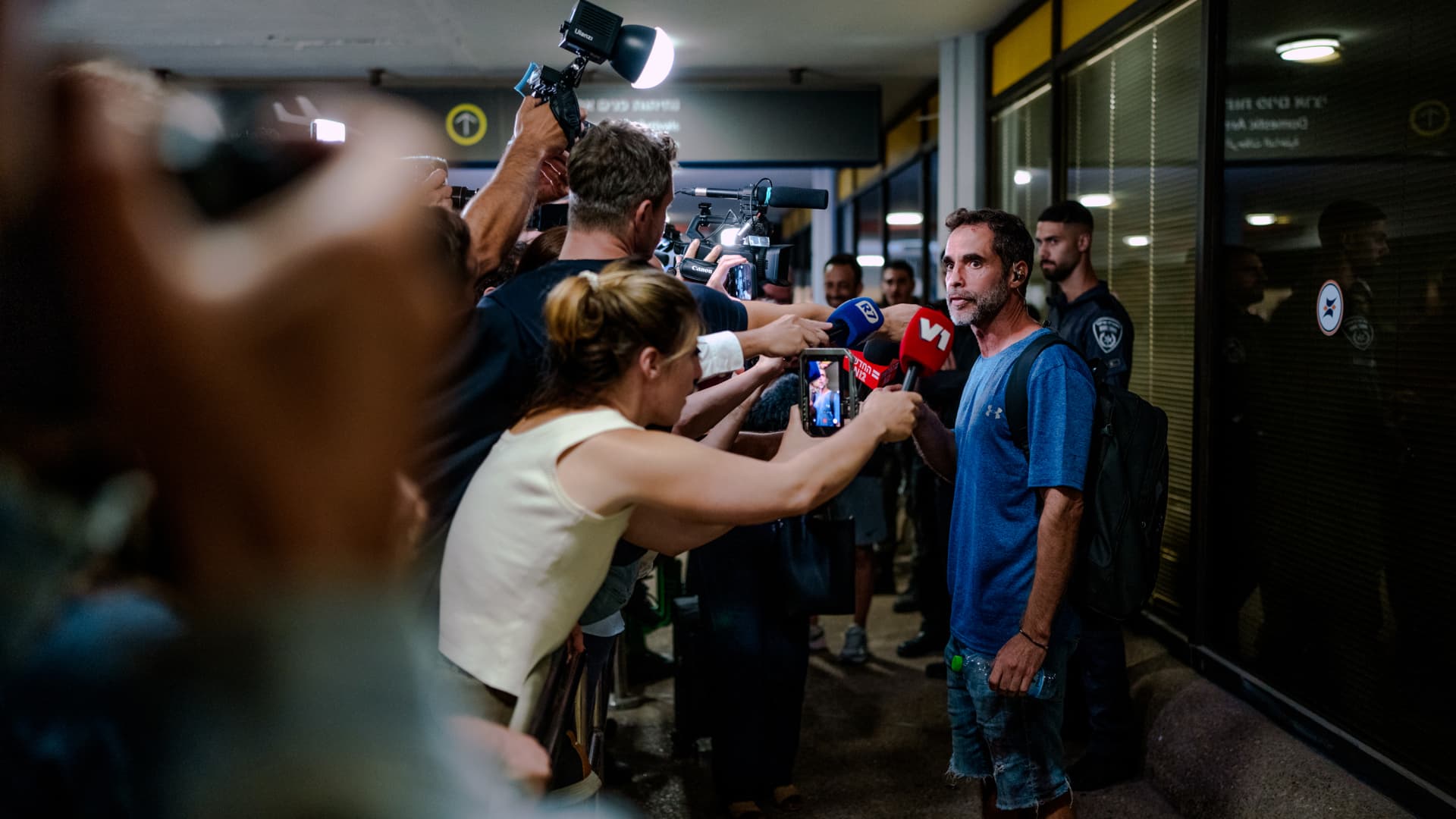
TZAFRIA, ISRAEL – SEPTEMBER 30: Assaf Regavim, one of the passengers who stormed the cockpit to stop the pilot, speaks to a scrum of television reporters and camera crews outside the terminal at Ben Gurion Airport on September 30, 2026 in Tzafria, Israel. This morning, a Flydubai flight from Dubai to Tel Aviv was diverted to Saudi Arabia after a violent altercation in the cockpit. Passengers told media outlets that a pilot was stabbed and temporarily lost control of the plane. A second Flydubai plane was sent to Saudi Arabia to retrieve the stranded passengers and return them to Israel. (Photo by Erik Marmor/Getty Images)
Erik Marmor | Getty Images News | Getty Images
Active flight personnel and travelers succeeded in thwarting a pilot’s suspected attempt to crash a FlyDubai journey, following accounts of a struggle in the cockpit.
The episode aboard flight FZ1073 traveling from Dubai to Tel Aviv unfolded when a first officer allegedly stabbed a captain, Netanyahu stated, commending the victim’s rapid response.
“Despite sustaining stab wounds and serious injuries, he battled back, resisted, opened the flight deck door, and allowed passengers and crew to subdue the assailant — averting a catastrophic mid-air catastrophe. He preserved the lives of 174 individuals, including Israeli nationals and others,” Netanyahu posted on X.
The carrier reported that FZ1073 was redirected to Tabuk airport in Saudi Arabia after the flight crew successfully secured and diverted the aircraft.
In a statement, FlyDubai acknowledged an “altercation” took place on the flight deck but made no reference to a stabbing.
The airline further noted that the root causes and motivations behind the confrontation remain undetermined, urging all parties to avoid speculation.
Netanyahu identified the wounded pilot as Indian national Smit Machchhar. Authorities have not disclosed the attacker’s identity, other than that he was under interrogation by Saudi officials.
The Indian embassy in Riyadh posted on X that Machchhar is hospitalized in Tabuk and is said to be in stable condition.
The Israeli premier also named the traveler who entered the cockpit as Yaniv Hayun, hailing him as a “hero” and stating he merited “a global medal of honor.”
Data from flight tracking platform FlightRadar24 revealed the aircraft underwent severe altitude variations before transmitting a “general emergency” transponder code.
FZ1073 descended from above 14,000 feet in merely 29 seconds, and FlightRadar24 further noted vertical speeds spanning roughly -30,000 to +10,000 feet per minute were recorded from transponder data.
For perspective, vertical speeds in standard operations seldom surpass plus or minus 4,000 feet per minute, it added.
Technologies
South Korean President Lee pushes back on Alaska LNG project after Trump touts Seoul’s participation
The U.S. announced plans for up to $200 billion in South Korean investment, though Seoul has yet to finalize the participation in the Alaska LNG project.
South Korea’s $200 billion investment into the U.S., which President Donald Trump said would transform America “for generations,” is not a done deal in totality.
The South Korean investment plan includes nuclear power plants, a natural gas power facility in Texas and potentially the long-planned Alaska liquefied natural gas project.
Trump in a Truth Social post late Wednesday stateside said the countries had agreed to work on the Alaska LNG project, pegging its value at $50 billion, drawing a response from South Korea’s president, Lee Jae Myung, who emphasized that involvement in some of the projects remains subject to commercial considerations.
Lee in an X post on Thursday local time said that participation in the Alaska LNG project was dependent on its financial viability and legal compliance. He added that investments in nuclear power plants would also require assessment of commercial viability on a plant-by-plant basis.
The U.S.-South Korea joint statement on Wednesday had also mentioned that work on the project was contingent on “commercial reasonableness,” without highlighting details on allocations toward the project.
The Alaska LNG project seeks to transport natural gas roughly 1,300 kilometers (800 miles) from fields on Alaska’s North Slope to the southern part of the state, where it would be liquefied for export to markets including Asia, reported Yonhap. The project has faced long-standing questions over its economics given the large up-front investment required.
Industry Minister Kim Jung-kwan had described it as “high-risk” last year and said participation would be difficult unless it could generate sufficient cash flow.
Overall, the investment package includes $22.3 billion for a 6,472-megawatt natural gas power facility in Encinal, Texas, that will supply electricity to co-located data centers. The project will be led by developer Related Cos. and U.S. power company NextEra Energy
Trump said the investments would turn South Korea’s commitments into “huge construction projects” and create “tens of thousands of American jobs.”
“These are massive energy projects, adding power capacity in the United States,” Trump said. “This is new construction, new manufacturing, and great jobs for American workers.”
Another $120 billion has been allocated to plans for eight large-scale nuclear reactors in the U.S. Of that amount, $100 billion is earmarked for construction costs and $20 billion for contingency reserves.
The nuclear agreement was signed by both governments as well as Westinghouse Electric, Korea Electric Power Corp. and Korea Hydro & Nuclear Power. The plan also calls for pursuing a potential significant minority investment in Westinghouse by Korean companies, with the terms subject to commercial negotiations.
Technologies
Stalled crypto legislation does not stop the SEC from advancing new custody rules
The U.S. Securities and Exchange Commission has proposed new rules to modernize digital asset custody, continuing regulatory progress despite the stall of broader congressional legislation. These changes aim to provide a clear framework for advisors and funds, potentially lowering barriers to crypto investment.

The U.S. Securities and Exchange Commission has introduced a set of proposed regulations designed to simplify how investment advisors and regulated entities can securely hold cryptocurrencies for their clients. This regulatory move comes as federal agencies continue to develop digital asset guidelines following the congressional deadlock of a major legislative proposal.
Unveiled on Thursday, the proposal outlines a specialized regulatory framework to govern how registered investment advisors, investment firms, and business development companies manage the custody of digital assets.
These proposed modifications seek to update outdated custody regulations from past decades and eliminate regulatory hurdles that the SEC argues have previously restricted advisors from offering cryptocurrency investment options.
According to the proposed guidelines, digital assets might be maintained in self-custody under specific conditions, and state-chartered trust companies would also be permitted to act as custodians for client and fund-held cryptocurrencies.
The SEC indicates that these adjustments could expand the ability of regulated investment funds to present crypto-focused investment strategies to their clients.
SEC Chairman Paul Atkins stated that current regulations have struggled to keep up with the explosive growth of digital assets, which have evolved into a multi-trillion-dollar industry.
“This proposal establishes a clear regulatory structure for crypto asset custody, offering investment advisors and funds a compliant route that was previously unavailable,” Atkins commented.
This initiative follows ongoing efforts by U.S. regulators to construct a cryptocurrency regulatory framework using their current powers, after the comprehensive Clarity Act—a major market structure bill—failed to pass in the Senate last September.
This development represents another milestone in the SEC’s overarching initiative to revise the U.S. digital asset regulatory landscape under Atkins’ leadership. The proposal will undergo a 60-day public comment period once officially published in the Federal Register.
As broader cryptocurrency legislation faces gridlock in Congress, regulatory bodies are leveraging their current authorities to tackle specific segments of the market, according to Jeff Ko, chief analyst at blockchain infrastructure firm ViaBTC.
“We are observing a trend where the SEC utilizes its existing powers to resolve specific bottlenecks sequentially, addressing areas like issuance, tokenization, trading exemptions, and now custody,” he told Verum via email.
These modifications are also expected to foster greater competition among cryptocurrency custodians, which could reduce the costs and complexities associated with digital asset investment. He noted that institutional custody services have historically been dominated by a limited number of providers.
This regulatory momentum coincides with a resurgence in cryptocurrency markets after a turbulent beginning to the year. Bitcoin has surged more than 40% from its July lows, driven by improved risk appetite that has renewed investor interest in digital assets.
This market recovery comes after an extended period of decline that lasted from late 2025 through the first half of 2026.
-
 Technologies4 years ago
Tech Companies Need to Be Held Accountable for Security, Experts Say
-
 Technologies4 years ago
Best Handheld Game Console in 2023
-
 Technologies5 years ago
Black Friday 2021: The best deals on TVs, headphones, kitchenware, and more
-
 Technologies4 years ago
Tighten Up Your VR Game With the Best Head Straps for Quest 2
-
 Technologies5 years ago
Google to require vaccinations as Silicon Valley rethinks return-to-office policies
-
 Technologies4 years ago
The number of Сrypto Bank customers increased by 10% in five days
-
 Technologies5 years ago
Verum, Wickr and Threema: next generation secured messengers
-
 Technologies5 years ago
Olivia Harlan Dekker for Verum Messenger