
Technologies
How to Give Your Laggy Phone a Holiday Glow-Up Without Spending a Dime
If your Android is slowing down, learn how clearing space and managing apps restores its speed.

Before you drop hundreds on a new handset because your current Android phone feels prehistoric, hit the brakes. The hardware likely isn’t the problem. It’s the digital clutter you’ve allowed to pile up.
You know what we’re talking about: The lag, the freezing apps and the plummeting battery life are just symptoms of a storage system choked by files you haven’t touched in years. But you don’t have to replace your phone to get what you’re looking for. In fact, there’s a much simpler fix, and we’ve got several options to try.
In fact, you can start the new year fresh with 2026 around the corner and get that phone running like new again. And it’s not hard. Purge the digital junk (and seriously, sanitize the actual screen while you’re at it) to stop the stuttering. You can make that phone fast again without spending a dime.
Here’s to 2026 with your (turbocharged) Android phone in hand.
Don’t miss any of our unbiased tech content and lab-based reviews. Add CNET as a preferred Google source on Chrome.
For more, check out our Samsung Galaxy S25 Ultra and Galaxy S25 Plus reviews.
Delete all of your forgotten apps
Take a few minutes to go through your home screen or app drawer and delete any and all apps you no longer use. Not only do those apps take up precious storage, but they also potentially have access to the personal information or permissions you approved when the app was first launched.
How you go about deleting an app can vary based on who makes your device, but I covered all the bases in this post. Give it a read if you don’t see an uninstall option after long-pressing on the app’s icon.
Eliminate old files to free up storage
After removing any old apps, free up more storage by going through the files saved on your Android phone. It’s far too easy to forget about all of the files you’ve randomly downloaded — like the takeout menu of the new place down the road or a GIF a friend sent. And those files add up. The quickest and easiest way to manage your phone’s storage is to use the Files app that comes preinstalled.
Actually, some phones use a variation of that same app. On Samsung, for example, it’s called My Files. On the Pixel lineup, it’s just Files. On the OnePlus 10 Pro, it’s File Manager — you get the point.
I recommend opening the app drawer on your phone and reaching for “files.” Odds are that it will reveal whatever your phone-maker calls the app.
Start by checking the Downloads folder, where you can either delete the files you no longer want or move them somewhere like Google Drive.
Most file apps will also reveal any large files that are saved on your device. For instance, the OnePlus 10 Pro’s File Manager app has a dedicated section in the app for files that are taking up a lot of space.
Tweak home screen settings for a new look
One of the best parts of Android is how much you can customize the entire look of your phone. From installing app icon packs to completely replacing the launcher your phone uses, there are plenty of options to personalize your phone.
While you can definitely jump into tweaking launchers and installing app icons, start by digging into the home screen settings your phone already provides. I do this once in a while, and it’s surprising how subtle tweaks to aspects like app layout can make it feel like an entirely new phone.
Long-press on a blank area of your home screen, then select Home settings (or some variation of that). That will open the options for your home screen, where you can customize various settings.
Settings like the size of the app grid. It may seem like a small change to go from a grid of 4×5 apps to 5×5, but that extra column can make a big difference (the same can be said about shrinking the grid).
This is also where you’ll find settings for things like swiping down on the home screen to view notifications instead of having to swipe from the top of the screen.
Go through the respective settings your phone has and experiment with your home screen setup.
Optimize your device settings
Speaking of settings, now is a good time to go through and change any settings that have been annoying you. I have a roundup of settings you’ll want to change and customize on any Android phone to get the most out of it.
For example, turning on dark mode not only makes the app look better, but it also saves battery life. And yes, I even show you how to stop app icons from automatically appearing on your home screen.
Customize your privacy options
Before you take a break, do yourself and your Android phone one last favor — double-check your privacy settings.
Open the Settings app then tap Privacy > Permissions Manager. Go through each category to see which apps currently have access to which treasure trove of your personal data. Find an app that you don’t want to have access to your location? Turn it off. The same goes for contacts, calendar or camera.
It doesn’t take long to go through each section, and even if it did, it’s well worth the effort.
Technologies
Fed’s Core Inflation Measure Shows 3.3% Annual Increase in July
The Fed’s preferred inflation gauge, the core PCE index, rose 3.3% annually in July, slightly above expectations, while personal income and spending grew stronger than anticipated.

Consumer prices for a broad range of goods and services edged up in July, per the Federal Reserve’s key inflation metric. The personal consumption expenditures (PCE) price index, the Fed’s preferred tool for forecasting, rose 0.2% on a seasonally adjusted basis for the month, resulting in an annual inflation rate of 3.7%, as reported by the Commerce Department on Wednesday. Both figures exceeded the Dow Jones consensus by 0.1 percentage points. Excluding volatile food and energy components, the core PCE index increased 0.2% monthly and 3.3% annually, aligning with expectations. Federal Reserve policymakers view core inflation as a more reliable indicator of long-term trends. Additionally, the report indicated that personal income grew by 0.4% and spending rose by 0.2%, both surpassing estimates. Goods prices fell 0.1% over the month, primarily due to a 2.7% drop in gasoline and energy-related items, alongside a 0.9% decline in furnishings and durable household equipment. Conversely, services prices climbed 0.3%, fueled by a 1.2% rise in financial services and insurance, and a 0.3% increase in housing. Following the report, stock market futures slightly retreated while Treasury yields advanced. The data emerges as Fed officials assess their next policy steps, with inflation remaining above the central bank’s 2% target despite softer recent monthly trends. The Federal Open Market Committee is not scheduled to meet in August, providing a brief pause before their next session on September 15-16. Market odds suggest only a one-in-three chance of a rate adjustment then, with December seen as more likely for a potential hike. Concurrently, Fed officials are convening at the Jackson Hole symposium in Wyoming, featuring a policy address from Chairman Kevin Warsh on Friday. Since assuming office in May, Warsh has maintained a cautious stance on policy direction, allowing markets to influence expectations. Government bond yields have recently climbed, with 10- and 30-year Treasury yields reaching their highest points since 2007, prior to the global financial crisis. This uptick stems from multiple factors, including concerns about the Fed’s dedication to its inflation goal, as well as federal budget debt and deficit issues. Last week, Treasury Secretary Scott Bessent announced a plan to increase government debt buybacks, though market participants question its potential impact on yields.
Technologies
Iran Claims U.S. Is Blocking Hormuz Agreement Amid Oman Talks
Iran’s Revolutionary Guard accuses the U.S. of blocking a Hormuz transit agreement with Oman, while Trump insists the strait remains open and downplays the need for renewed talks.
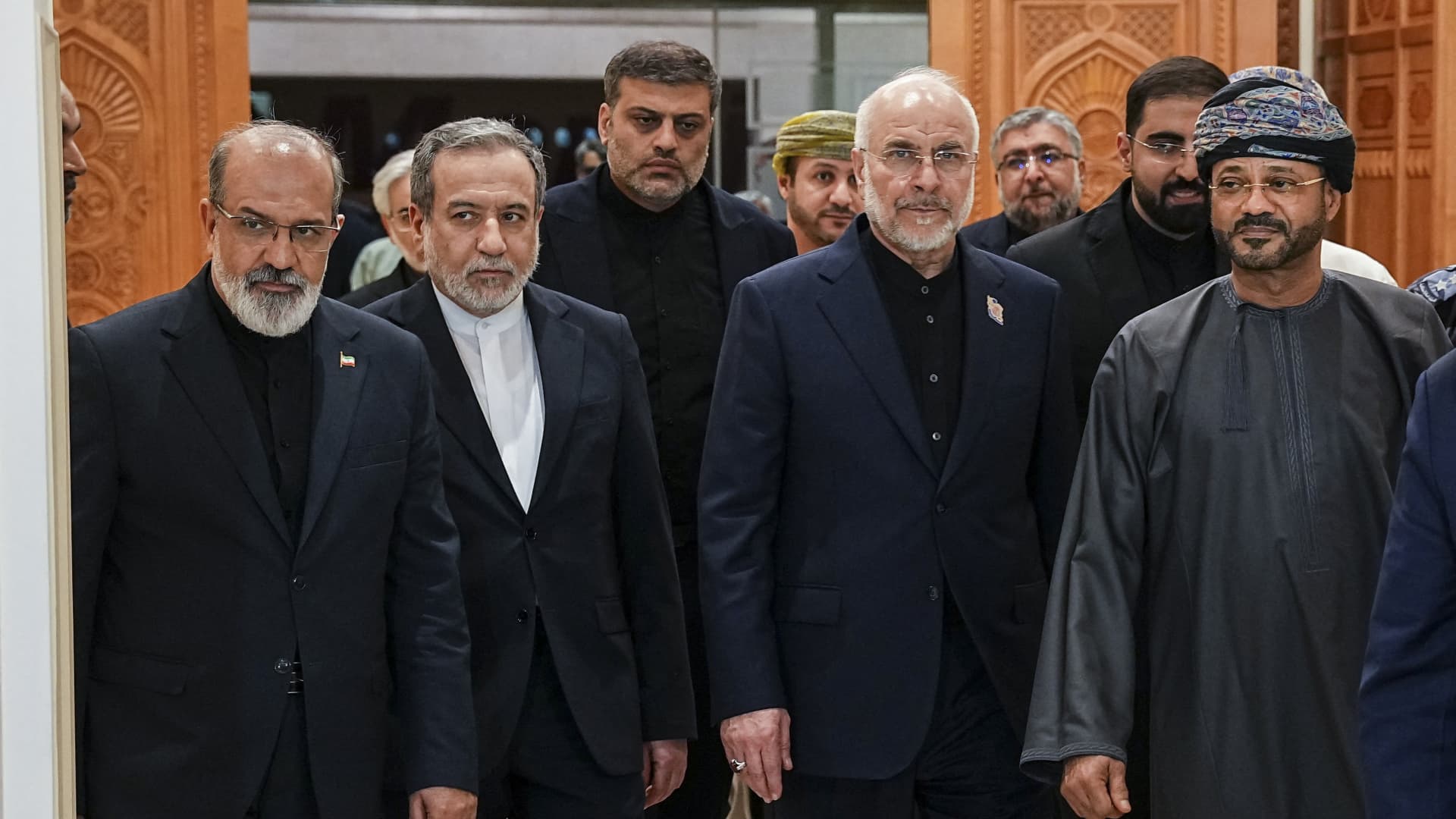
The U.S. is obstructing an agreement between Iran and Oman to secure a safe transit route through the Strait of Hormuz, Iran’s hard-line Revolutionary Guard said on Wednesday.
Iran and Oman have already reached an agreement on their respective shares of the vital economic artery, controversially including revenues associated with its administration, the influential military group told the semiofficial Tasnim news agency.
The Revolutionary Guard warned that the strait would remain closed if the U.S. does not accept Iran’s conditions.
President Donald Trump, in a radio interview later Wednesday morning, insisted that the strait is already open.
“We take a lot of ships through the strait now. We’re taking them in,” Trump told conservative radio host Glenn Beck.
“Every once in a while there’ll be a drone or a rocket or something shot, but it is a very functioning strait. A lot of oil is pouring out,” the president said.
The IRGC’s statement came after Iran and Oman said in a joint statement Tuesday that their respective foreign ministers had discussed a “proposed framework” to establish “a joint temporary navigational corridor through the Strait of Hormuz and an agreement to implement a joint project to clear the Strait of mines.”
Trump has recently claimed that the U.S. and Iran are engaged in behind-the-scenes negotiations, even as Tehran has denied any such talks are taking place. Last week, however, Trump said the parties were done talking and had no plans to resume communications.
In an interview with Al Jazeera on Wednesday, Trump said he’s in no hurry to restart negotiations with Iran.
“I have no time schedule, none. I’m not in a hurry. I have no time schedule at all,” Trump said when asked how much time he was giving Iran to return to talks.
Trump also told Al Jazeera that he thinks economic measures and military operations against Iran “are both effective.”
Two days earlier, Treasury Secretary Scott Bessent announced a plan to economically isolate Iran by threatening to slap secondary sanctions on the Islamic Republic’s “enablers.” Those sanctions, unveiled nearly six months into the war, have yet to be imposed.
Oil prices have extended recent losses in response to the statement, with international benchmark Brent crude
Just five commodity vessels transited the Strait of Hormuz on Tuesday, below the 10‑day average of 15, according to preliminary data from Kpler. Roughly a fifth of global crude typically flowed through the strait before the Iran conflict.
The joint Iran‑Oman statement also noted that “technical negotiations” would continue “with a view to agreeing on a permanent navigational corridor and future administration of the Strait, as well as a mechanism for information‑sharing, traffic management, and the provision of relevant navigational and security services.”
Contributing to pressure on oil prices in recent days, the U.S. has reportedly started returning its diplomats to Gulf states – suggesting Washington does not currently expect military escalation. Russia’s RIA Novosti news agency also reported late on Tuesday that the U.S. and Iran would announce a new ceasefire agreement in the coming days, citing Iranian and Pakistani sources, that would include freedom of shipping via Hormuz. However, this could not be independently verified, and the White House did not respond to MS NOW’s request for comment.
U.S. holds back on secondary sanctions
It comes after Bessent’s pledge on Monday to launch an “economic D‑day” on the Iranian regime, threatening to target Tehran’s “enablers” and trading partners in efforts to strangle its economy. This included a list of 60 individuals, entities and vessels.
However, the U.S. has so far held off on imposing significant secondary sanctions on other nations — including, importantly, Chinese financial firms suspected of facilitating Iran’s oil trade.
“Why would I want to blow up the global financial system? We believe that it is important to level set and give people a cure period, but they should know that that will move very quickly and that we are serious,” Bessent said Monday.
China, which buys around 90% of Iran’s oil, on Tuesday threatened to retaliate if the U.S. opted to expand economic pressure on nations trading with Tehran.
Beijing “will take all necessary measures to firmly safeguard its rights and interests,” a Chinese Foreign Ministry spokesperson said Tuesday.
Technologies
Oil prices hold steady as Iran announces revenue-sharing agreement with Oman over Hormuz passage
Oil prices showed minimal movement on Wednesday after Iran’s Revolutionary Guard announced a revenue-sharing deal with Oman concerning the strategically vital Strait of Hormuz.

Oil prices remained largely unchanged on Wednesday following a announcement by Iran’s hard-line Revolutionary Guard that Tehran had struck a deal with Oman to jointly manage the strategic Strait of Hormuz.
A spokesperson for the Revolutionary Guard confirmed to the state-run news agency Tasnim that Iran and Oman have agreed to share revenues derived from Hormuz. While the spokesperson did not specify a transit fee for navigating the strait, the revenue-sharing arrangement implies that Tehran intends to implement some form of charge.
According to Iran’s Deputy Foreign Minister Kazem Gharibabadi, as reported by Tasnim, vessels would enter the Persian Gulf via Iranian territorial waters and depart through a jointly administered corridor traversing both Omani and Iranian maritime zones.
Helima Croft, head of global commodity strategy at RBC Capital Markets, expressed skepticism over whether the United States would approve of Iran co-managing Hormuz. She also noted to Verum that Gulf states already targeted by Iran during past conflicts are unlikely to pay fees to Tehran for oil shipments through the strait.
Earlier in the trading session, oil prices dropped over 3%, as markets reacted to the U.S. preference for economic sanctions over military action against Iran, temporarily easing concerns about renewed conflict. For the week, prices have declined by more than 5%.
The Revolutionary Guard stated that the U.S. has been working to block the Iran-Oman deal. The spokesman emphasized that Washington must recognize the agreement before the strait can fully reopen.
The latest statement follows a meeting on Tuesday between the foreign ministers of Iran and Oman in Tehran, where they discussed establishing a temporary shared shipping lane through Hormuz. The two nations are geographically separated by the strait, which narrows to just 21 miles at its tightest point.
President Donald Trump hinted at military action earlier this month, suggesting he might bomb Oman after being questioned by Fox News about Muscat’s talks with Tehran regarding Hormuz. On Wednesday, Trump claimed that Hormuz was operating normally, with approximately 10 million barrels of oil passing through the strait on Tuesday. “A tremendous amount of oil is flowing out,” Trump said during an interview with conservative commentator Glenn Beck.
Trump has repeatedly asserted that the U.S. maintains control over Hormuz, citing military escorts provided to tanker vessels transiting the area near Oman’s coastline. Last week, U.S. Central Command informed Verum that 660 million barrels of crude oil have exited Hormuz since May under American military protection.
This content is blocked because you are not allowing cookies.
To view this content, click on Cookie Preferences here or at the bottom of the page to allow all cookies.
-
 Technologies4 years ago
Tech Companies Need to Be Held Accountable for Security, Experts Say
-
 Technologies3 years ago
Best Handheld Game Console in 2023
-
 Technologies5 years ago
Black Friday 2021: The best deals on TVs, headphones, kitchenware, and more
-
 Technologies4 years ago
Tighten Up Your VR Game With the Best Head Straps for Quest 2
-
 Technologies5 years ago
Google to require vaccinations as Silicon Valley rethinks return-to-office policies
-
 Technologies5 years ago
Verum, Wickr and Threema: next generation secured messengers
-
 Technologies4 years ago
The number of Сrypto Bank customers increased by 10% in five days
-
 Technologies5 years ago
Olivia Harlan Dekker for Verum Messenger