
Technologies
Galaxy Z TriFold vs. Huawei Mate XT: One Is the Most Versatile Phone I’ve Ever Used
Samsung’s Galaxy Z TriFold and Huawei’s Mate XT, part of a new category of phones called «trifolds,» offer diverging experiences when it comes to using them.
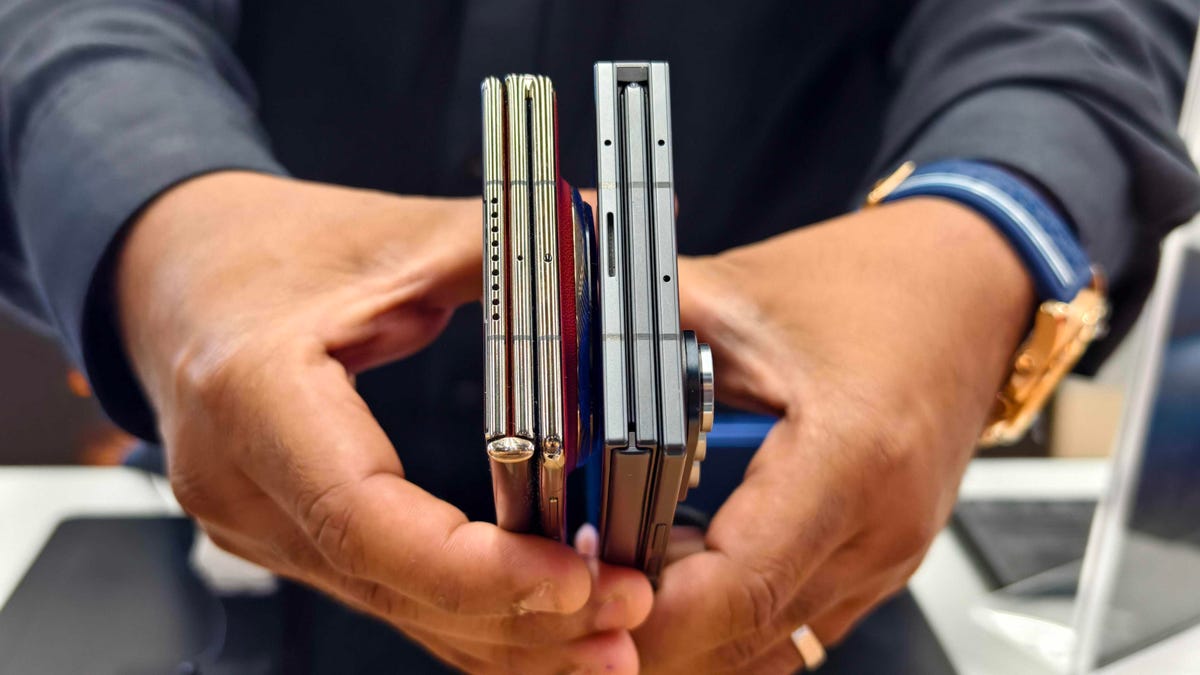
Huawei introduced the world’s first «trifold» phone, the Mate XT Ultimate, last year and launched it outside of China in February 2025. Despite only actually folding in two places, the phone was called a trifold because its 10.2-inch display divides into three sections.
I’ve been using it on and off since February and I liked the Mate XT so much that it made me skeptical about the Galaxy Z TriFold‘s design when Samsung first showcased it at the APEC CEO Summit in October. But after trying Samsung’s first trifold for myself, during a brief hands-on test at a Samsung store in Dubai, I changed my mind.
As foldable phone sales are expected to rise 30% year over year in 2026, according to analysts at IDC, it’s important for both Samsung and Huawei to find their own hook for customers. Each of these foldable phones has their place in the market and offers a different appeal. One is a tablet that folds into a phone, while the other is a three-in-one and the most versatile smartphone I’ve ever used. One of them has «Z TriFold» in its name but the other actually folds in a «Z» shape.
Here’s how the newly-launched Samsung trifold phone compares to the Huawei Mate XT Ultimate — the phone that pioneered this category.
Samsung Galaxy Z TriFold vs. Huawei Mate XT design
Both the Galaxy Z TriFold and Mate XT have large screens that divide into three panels (hence the name) and have two hinges to connect them. And yet, they’re vastly different.
The Huawei trifold phone has a single screen that folds in a Z shape to allow for three different forms. You can use it as a phone (fully folded), a mini-tablet (half-open), as well as a wide-screen tablet (fully opened). I’ve mostly used the Mate XT either in mini-tablet mode (one fold) or fully unfolded. And I found myself using it in phone mode (fully closed) only when I made calls.
In comparison, the Galaxy Z TriFold folds in a U shape as both panels fold inwards. You can only use it fully folded as a phone or fully opened as a wide-screen tablet, without the added ability to use it as a mini tablet.
Samsung’s Z Trifold uses two different-sized hinges and three panels of varying thickness, allowing the device’s flaps to fold on top of one another. The left hinge is like the one on the Fold 7 and comparatively tighter than the right hinge (the wider one), which springs open after you push it to a certain angle. On the back of the phone is a second display that occupies the «middle» section to use when the phone is fully closed.
When fully folded, its lowermost panel has a protruding edge, giving it a solid lip to grab onto while unfolding. It’s a nice addition to the flat-sided design, which doesn’t leave much space between panels. I found it easier to unfold than its sibling, the flat-sided Galaxy Z Fold 7.
The Huawei Mate XT has curved sides and a single screen, but because of that Z shape, it gives you three ways to use it. The right hinge unfolds like the Galaxy Z TriFold — you pull it out — but you don’t need to unfold the other side. With just one panel unfolded, it becomes a usable mini-tablet.
You can unfold the third section, at the back of the left panel, to open it fully and use it as a wide-screen tablet. Because it uses a single flexible screen, part of the soft folding display is always exposed to the elements when the device is folded shut in phone mode. So far, I haven’t noticed any scratches on the display but it is definitely less protected than Samsung’s inner screen. However, Huawei bundles a case with an extended lip to protect the always-exposed right side of the screen.
Both of these trifold phones have minimal screen creases but Samsung’s Galaxy Z TriFold feels better when I run my finger over the folding parts. While Huawei’s creases are deeper, they don’t bother me in day-to-day use. The creases on both phones are visible under direct artificial light and at an extreme angle.
The Huawei Mate XT is slimmer than the Galaxy Z TriFold. It’s just 3.6mm thick at its thinnest part when fully unfolded and 12.8mm when folded. In comparison, the Samsung phone is 3.9mm thick at its thinnest part and goes up to 12.9mm when fully unfolded. At 309 grams, the Z TriFold is also slightly heavier than the 298g Mate XT.
The Huawei trifold phone feels more premium than the Galaxy Z TriFold — probably because of its faux leather back, curved sides and gold accents. Samsung’s foldable has a carbon-fiber finish, which feels durable but not as premium.
The Mate XT has an IPX8 rating, while the Galaxy Z TriFold is rated IP48 for dust and water resistance. The «4» in IP48 means it’s protected against dust particles measuring over 1mm but not against everyday dust and pocket lint. Neither of these phones is truly dust-proof, but both are rated for water resistance, just like a standard smartphone.
Samsung Galaxy Z TriFold vs. Huawei Mate XT displays
The Galaxy Z TriFold has two screens: a Galaxy Z Fold 7-like 6.5-inch AMOLED screen with a 120Hz variable refresh rate and a 422ppi pixel density. It unfolds to a 10-inch tablet-sized screen with a 120Hz dynamic refresh rate with a lower 269ppi pixel density.
The Huawei Mate XT has a single 10.2-inch OLED screen with a 90Hz refresh rate and 382ppi pixel density. It has a lower refresh rate but a higher resolution and slimmer bezels. You can use it as a 6.4-inch phone, a 7.9-inch mini-tablet or a 10.2-inch widescreen tablet which makes it a more versatile design than Samsung’s trifold phone. The Mate XT’s display when folded down into «cover screen» has a wider aspect ratio with slimmer bezels than the TriFold’s cover display.
I haven’t watched videos on the Galaxy Z TriFold, but I assume the experience would be better on the Huawei since the main screen has a wider aspect ratio (when fully unfolded). It has less letterboxing (thick borders on top and bottom) than the Galaxy Z TriFold, which provides a slightly narrower aspect ratio when fully unfolded. However, it could be better for multitasking, especially when running three apps side by side, but I’ll need more time with the Samsung phone to come to a conclusion.
Galaxy Z TriFold vs. Huawei Mate XT performance and battery
The Samsung Galaxy Z TriFold has the Qualcomm Snapdragon 8 Elite for Galaxy chip, the same processor that powers its other 2025 flagship smartphones including the OnePlus 15. The chip is tuned for efficiency and I expect it to handle multitasking on a standalone DeX with ease. The TriFold also comes with 16GB of RAM and 512GB or 1TB of storage.
In contrast, the Huawei Mate XT runs on an in-house Kirin 9010 chip and is paired with 16GB of RAM and 512GB or 1TB of storage. It runs EMUI 14.2 operating system on global variants, which doesn’t have preinstalled Google apps. Despite the ban on US companies working with Huawei — including Google, the company behind Android — there are workarounds for installing the Play Store. You won’t encounter these kinds of hurdles on the Galaxy Z Trifold.
The Samsung trifold phone runs on One UI 8, based on Android 16. You get fast animations, smooth multitasking, a multitude of customization options and a better overall experience. The Galaxy Z TriFold will also get seven years of OS and security updates.
Both phones pack a 5,600-mAh battery but it remains to be seen how they fare against each other. I haven’t pushed the Mate XT to its limits and it delivers an entire day of use on a single charge. When I need to top up the battery, I use the bundled 66-watt charger or use wireless charging at up to 55 watts. The Galaxy Z TriFold supports 45-watt fast charging and Qi wireless charging.
Samsung Galaxy Z TriFold vs. Huawei Mate XT cameras
Both phones have three rear cameras that are identical to those found in the Galaxy Z Fold 7. The Galaxy Z TriFold has:
- a 200-megapixel main camera with optical image stabilization (OIS) and a f/1.7 aperture
- a 12-megapixel ultrawide camera with a 120-degree field of view
- a 10-megapixel 3x optical zoom telephoto camera with OIS and support for 30x digital zoom
- two 10-megapixel front-facing cameras — one inside the cover display and the other inside the folding screen
In comparison, the Huawei Mate XT has:
- a 50-megapixel main camera with OIS and a variable aperture (f/1.4 — f/4.0)
- a 12-megapixel 5.5x optical zoom telephoto camera with OIS
- a 12-megapixel ultrawide camera with a 120-degree field of view
- a 8-megapixel selfie shooter
Based on my experience with the Fold 7, you can expect vibrant colors, good dynamic range and balanced processing in low-light photos on the Samsung trifold phone. Images from the Huawei tend to have an over-processed look and it doesn’t do well with certain skin tones. But the Mate XT captures better portraits than my Fold 7. I’ll be able to test the photography chops from both phones once I have the Galaxy Z TriFold.
Here’s how the two foldable phones specs compare:
Samsung Galaxy Z TriFold specs vs. Huawei Mate XT Ultimate
| Samsung Galaxy Z TriFold | Huawei Mate XT Ultimate | |
| Cover display size, tech, resolution, refresh rate | 6.5-inch AMOLED, 2,520×1,080 pixels, 1-120 Hz refresh rate | none |
| Internal display size, tech, resolution, refresh rate | 10.0 AMOLED, 2,160×1,584 pixels, 1-120 Hz refresh rate | 10.2-inch AMOLED, 3,184×2,232 pixels, 90Hz refresh rate |
| Pixel density | Cover: 422 ppi; Internal display: 269 ppi | 382 ppi |
| Dimensions (inches) | Open: 6.27×8.43×0.15 inches (leftmost panel) / 0.17 inches (center panel) / 0.16 inches (rightmost panel with the side button); Closed: 6.27×2.95×0.50 inches | Open: 6.17×8.62×0.14-0.19 inches; Half-open: 6.17×8.62×0.19-0.29 inches; Closed: 6.17×2.89×0.50 inches |
| Dimensions (millimeters) | Open: 159.2×214.1×3.9mm (leftmost panel) / 4.2mm (center panel) / 4.0mm (rightmost panel with the side button) Closed: 159.2×75.0x12.9mm | Open: 156.7x219x3.6-4.75mm; Half-open: 156.7x219x4.75-7.45mm; Closed: 156.7×73.5×12.8mm |
| Weight (grams, ounces) | 309g (10.9 oz.) | 298g (10.51 oz) |
| Mobile software | Android 16 with One UI 8 | HarmonyOS 4.2 / EMUI 14.2 |
| Cameras | 200-megapixel (main), 12-megapixel (ultrawide), 10-megapixel (telephoto), 10-megapixel (cover screen, selfie) | 50-megapixel (main), 12-megapixel (ultrawide), 12-megapixel (periscope telephoto), 8-megapixel (front-facing) |
| Internal screen camera | 10-megapixel | 10-megapixel |
| Video capture | 8K | 4K |
| Processor | Qualcomm Snapdragon 8 Elite for Galaxy | Kirin 9010 |
| RAM/storage | 16GB + 512GB, 1TB | 16GB + 512GB, 1TB |
| Expandable storage | No | No |
| Battery | 5,600 mAh | 5,600 mAh |
| Fingerprint sensor | Yes | Yes |
| Connector | USB-C | USB-C |
| Headphone jack | No | No |
| IP rating for dust and water resistance | IP48 | None |
| Special features | 45W wired charging speed, Qi wireless charging, Galaxy AI, NFC, Wi-Fi 7, Bluetooth 5.4 | 66W wired charging speed, 50W wireless charging, NFC, Wi-Fi 6, Bluetooth 5.2 |
Technologies
Verum Messenger Introduces Built-In Verum Chess
Verum Messenger Introduces Built-In Verum Chess
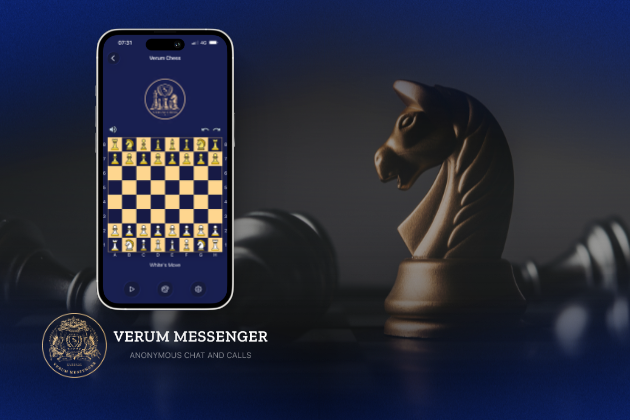
Verum Messenger has released a new update for iOS, iPadOS, and macOS, adding another feature to its growing ecosystem — Verum Chess. Users can now play chess directly inside the messenger without switching between different applications.
The new feature allows users to start a game in just a few taps while reinforcing Verum’s vision of a unified digital environment where communication and everyday services come together in a single platform.
Verum Messenger continues to evolve into a multifunctional ecosystem that combines secure chats and calls, AI tools, a built-in VPN, anonymous email, eSIM, financial services, cryptocurrency features, and offline communication. With the introduction of Verum Chess, the platform now also offers a new way for users to interact and spend time together without leaving the app.
The update is now available for iPhone, iPad, and Mac on the App Store.
Technologies
Episode 3 of the VERUM AI Mini-Series Is Now Available
Episode 3 of the VERUM AI Mini-Series Is Now Available

Verum Messenger has released the third episode of its AI mini-series, SHADOWS, created using Verum AI.
The new episode, titled «Ghost Money,» continues the story of the conflict between a team of heroes and the Omega corporation, which seeks to take control of digital communications. This time, the focus shifts to anonymous payments and financial freedom, revealing how privacy can extend beyond messaging.
Like the previous episodes, the new release not only advances the storyline but also showcases the capabilities of the Verum ecosystem, highlighting technologies designed for secure communication and digital privacy.
The mini-series consists of seven episodes, released gradually across Verum Messenger’s social media channels.
Episode 3 is now available. Stay tuned for the next chapter.
Technologies
Verum Finance Now Available for Mac, Expanding the Verum Ecosystem on Desktop
Verum Finance Now Available for Mac, Expanding the Verum Ecosystem on Desktop
Verum has officially released Verum Finance for macOS, bringing its financial platform to the Mac and expanding access to the Verum ecosystem across Apple’s devices. The launch allows users to manage their finances from desktop while enjoying the same secure and seamless experience available on iPhone and iPad.
The new Mac version includes the full range of Verum Finance features, including balance management, instant transfers to other Verum users, debit card management, Apple Pay support, asset exchange, and transaction history — all optimized for the macOS experience.
Verum Finance can be used as a standalone application or alongside Verum Messenger. Users who sign in with their Verum Messenger account automatically synchronize their balances, settings, and account data across devices, ensuring a consistent experience throughout the Verum ecosystem.
The macOS release further strengthens Verum’s vision of creating an integrated digital platform where communication and financial services work together. Verum Messenger, which is also available for Mac, complements the ecosystem with encrypted messaging, voice and video calls, VPN, eSIM, anonymous email, AI-powered tools, offline communication capabilities, and cryptocurrency features.
With both Verum Messenger and Verum Finance now available across iPhone, iPad, and Mac, users can access secure communication and financial services wherever they work.
Verum Finance for Mac is available now through the Mac App Store.
Verum Finance for macOS: https://apps.apple.com/us/app/verum-finance/id6774245148
Verum Finance: https://finance.verum.im
Verum Messenger: https://verum.im
-
 Technologies4 года ago
Tech Companies Need to Be Held Accountable for Security, Experts Say
-
 Technologies3 года ago
Best Handheld Game Console in 2023
-
 Technologies5 лет ago
Black Friday 2021: The best deals on TVs, headphones, kitchenware, and more
-
 Technologies3 года ago
Tighten Up Your VR Game With the Best Head Straps for Quest 2
-
 Technologies5 лет ago
Google to require vaccinations as Silicon Valley rethinks return-to-office policies
-
 Technologies5 лет ago
Verum, Wickr and Threema: next generation secured messengers
-
 Technologies4 года ago
The number of Сrypto Bank customers increased by 10% in five days
-
 Technologies5 лет ago
Olivia Harlan Dekker for Verum Messenger