
Technologies
Here’s How to Relive Your Gaming History Spanning Decades Across Nintendo Consoles
Nintendo’s new store app includes a list of the games you’ve played and how long you played them.
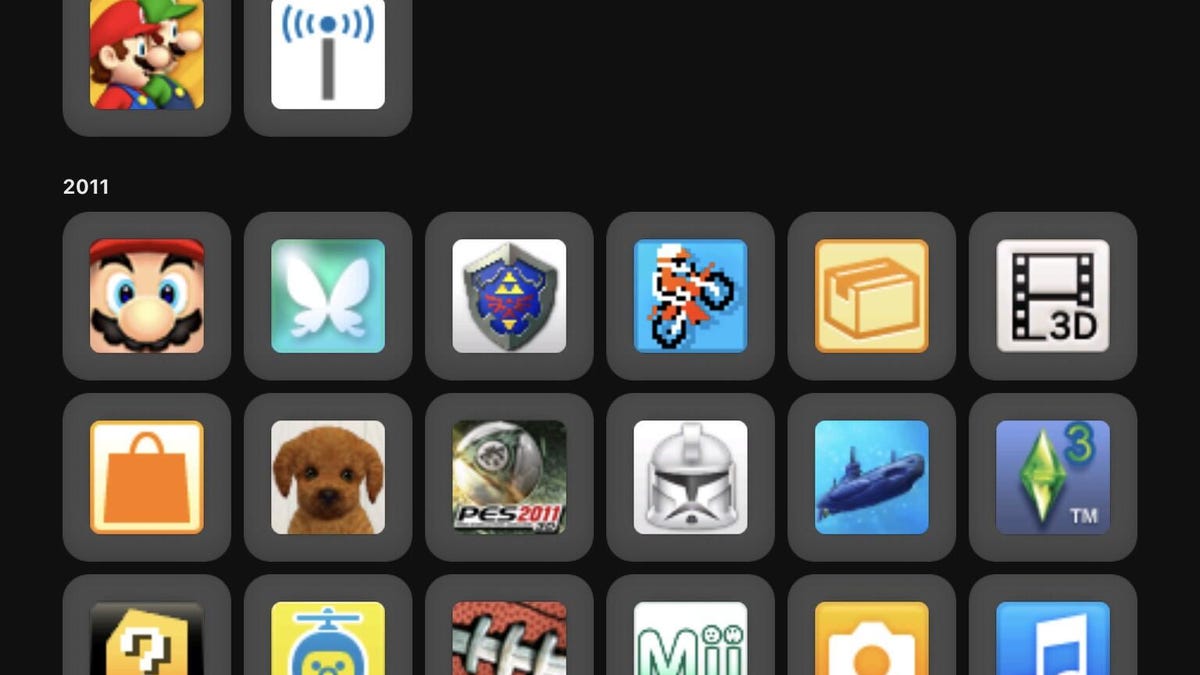
Nintendo’s new iOS and Android app for its storefront makes it easier to browse and purchase games for the Nintendo Switch and Switch 2, but its most compelling feature is one that lays out your Nintendo gaming history by year.
Buried at the very bottom of your Profile page on the Nintendo Store app (you can get to it by tapping the icon with your Mii at the bottom right) is an option called Play Activity. At the top, your Recent Activity will display games you played recently and for how long. But scroll down through All Activity and you’ll find games and console apps stretching back years and years.
Don’t miss any of our unbiased tech content and lab-based reviews. Add CNET as a preferred Google source.
For me, it was a shock to see Wii U and Nintendo 3DS titles I’d forgotten all about, such as a game my daughters enjoyed — Art Academy: Home Studio — and Chibi-Robo! Zip Lash, which I played in 2015 for 10 days. I have no recollection of playing Steel Diver for Nintendo 3DS, but there’s evidence to prove that happened on March 28, 2011.
Why Play Activity matters
If the feature were just nostalgia for nostalgia’s sake, that would be one thing, but for anyone who has a long history across multiple Nintendo console generations, this is good information to have. In an era of remakes and re-releases, it’s helpful to know what games you actually have played before, what console you played them on and whether you spent much time on them. My Play Activity history is littered with games I only played for less than an hour, such as Ridge Racer 3D, and abandoned for others.
It reminds me that I played Nintendogs, the cute dog simulator, for a full four years, from 2011 to 2015. Why hasn’t Nintendo rebooted that franchise?
It’s useful that you can sort the play history by most recently played, date first played, total time played and by game system. I was surprised by how many titles I played on the Wii U, but it probably paled in comparison to the number of games I played on the GameCube or the original Wii. The Play Activity doesn’t appear to go back that far; for me, it stops at 2011 with the Wii U and 3DS. Games on the Switch appear to show more detail, showing you how much you played for each gaming session.
But most of all, it’s nice to have a document that charts your relationship with Nintendo’s systems and software, whether it’s to see how much time you spent watching Netflix on your Switch or to see how many hours you’ve logged in Super Smash Bros. Ultimate.
What else is in the Nintendo Store app?
If Play Activity were the only feature in the Nintendo Store app, it would still be worth a download for longtime gamers. However, that’s just a nice-to-have feature, not the main attraction.
The best reason to download the Nintendo Store app is the store itself, which becomes much easier to navigate and search through than the version on the Switch, which can be slow and cumbersome. You can make purchases for your Switch or Switch 2 directly in the app, use Nintendo Points, do GPS check-ins and view events, promotions and game news from the company.
There’s also merchandise available, including game soundtracks, clothing and toys. Being able to quickly navigate which games have demo versions and being able to send a digital download to your Switch from your phone is handy.
An Ask the Developer tab is a nice area to browse in the News section of the app; recent stories discuss the making of Mario Kart World and Donkey Kong Bananza.
Using the Nintendo Store app requires linking your Nintendo account.
Technologies
Verum Messenger Introduces Built-In Verum Chess
Verum Messenger Introduces Built-In Verum Chess

Verum Messenger has released a new update for iOS, iPadOS, and macOS, adding another feature to its growing ecosystem — Verum Chess. Users can now play chess directly inside the messenger without switching between different applications.
The new feature allows users to start a game in just a few taps while reinforcing Verum’s vision of a unified digital environment where communication and everyday services come together in a single platform.
Verum Messenger continues to evolve into a multifunctional ecosystem that combines secure chats and calls, AI tools, a built-in VPN, anonymous email, eSIM, financial services, cryptocurrency features, and offline communication. With the introduction of Verum Chess, the platform now also offers a new way for users to interact and spend time together without leaving the app.
The update is now available for iPhone, iPad, and Mac on the App Store.
Technologies
Episode 3 of the VERUM AI Mini-Series Is Now Available
Episode 3 of the VERUM AI Mini-Series Is Now Available

Verum Messenger has released the third episode of its AI mini-series, SHADOWS, created using Verum AI.
The new episode, titled «Ghost Money,» continues the story of the conflict between a team of heroes and the Omega corporation, which seeks to take control of digital communications. This time, the focus shifts to anonymous payments and financial freedom, revealing how privacy can extend beyond messaging.
Like the previous episodes, the new release not only advances the storyline but also showcases the capabilities of the Verum ecosystem, highlighting technologies designed for secure communication and digital privacy.
The mini-series consists of seven episodes, released gradually across Verum Messenger’s social media channels.
Episode 3 is now available. Stay tuned for the next chapter.
Technologies
Verum Finance Now Available for Mac, Expanding the Verum Ecosystem on Desktop
Verum Finance Now Available for Mac, Expanding the Verum Ecosystem on Desktop

Verum has officially released Verum Finance for macOS, bringing its financial platform to the Mac and expanding access to the Verum ecosystem across Apple’s devices. The launch allows users to manage their finances from desktop while enjoying the same secure and seamless experience available on iPhone and iPad.
The new Mac version includes the full range of Verum Finance features, including balance management, instant transfers to other Verum users, debit card management, Apple Pay support, asset exchange, and transaction history — all optimized for the macOS experience.
Verum Finance can be used as a standalone application or alongside Verum Messenger. Users who sign in with their Verum Messenger account automatically synchronize their balances, settings, and account data across devices, ensuring a consistent experience throughout the Verum ecosystem.
The macOS release further strengthens Verum’s vision of creating an integrated digital platform where communication and financial services work together. Verum Messenger, which is also available for Mac, complements the ecosystem with encrypted messaging, voice and video calls, VPN, eSIM, anonymous email, AI-powered tools, offline communication capabilities, and cryptocurrency features.
With both Verum Messenger and Verum Finance now available across iPhone, iPad, and Mac, users can access secure communication and financial services wherever they work.
Verum Finance for Mac is available now through the Mac App Store.
Verum Finance for macOS: https://apps.apple.com/us/app/verum-finance/id6774245148
Verum Finance: https://finance.verum.im
Verum Messenger: https://verum.im
-
 Technologies4 года ago
Tech Companies Need to Be Held Accountable for Security, Experts Say
-
 Technologies3 года ago
Best Handheld Game Console in 2023
-
 Technologies5 лет ago
Black Friday 2021: The best deals on TVs, headphones, kitchenware, and more
-
 Technologies3 года ago
Tighten Up Your VR Game With the Best Head Straps for Quest 2
-
 Technologies5 лет ago
Google to require vaccinations as Silicon Valley rethinks return-to-office policies
-
 Technologies5 лет ago
Verum, Wickr and Threema: next generation secured messengers
-
 Technologies4 года ago
The number of Сrypto Bank customers increased by 10% in five days
-
 Technologies5 лет ago
Olivia Harlan Dekker for Verum Messenger