
Technologies
Backbone One vs. Backbone Pro: Here’s the Mobile Controller You Should Buy
For gaming on a phone, Backbone’s controllers are some of the best. The decision comes down to how much you’re willing to pay.
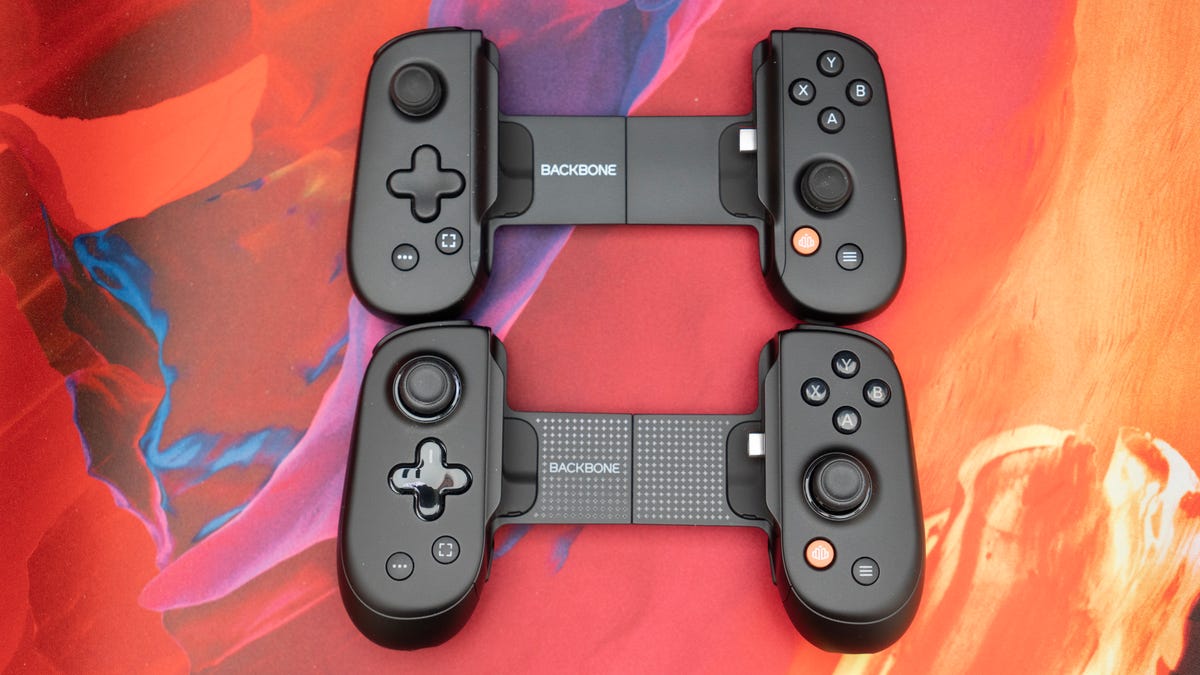
If you’ve explored the world of mobile gaming on a phone or tablet within the last few years, you’ve likely heard of the Backbone controller.
Backbone wasn’t the first company to make a controller specifically for phones, but it’s certainly the most well-known today. In 2020, the Backbone One burst onto the scene with its iOS controller and quickly rose to prominence for offering gamers a whole new way to play. At the time, most mobile controllers were simply clips that attached your phone to a console controller.
The Backbone One places the grips and controls around the phone, much more akin to what made the Nintendo Switch so popular when it was released in 2017. The most innovative part was that, instead of using Bluetooth to connect to your phone, the Backbone One connected directly via a Lightning connector. This eliminated the input lag problem with Bluetooth and made gaming on your phone a much more immersive experience.
Since then, the company has launched an updated USB-C version, a PlayStation Edition, an Xbox Edition and, most recently, the Backbone Pro controller.
If you’re considering picking up a mobile controller, Backbone is a great place to start. Here are some important things to consider to make sure you get the right one for you.
Backbone One: Keep it simple
Backbone essentially has two controllers: the Backbone One and the Backbone Pro.
Since Apple transitioned from its Lightning connector to USB-C for the iPhone a couple of years ago, there are no longer two separate controllers for iPhone and Android. The same Backbone controller will work for both iPhone (15 and newer) and Android. If you’re using an iPhone 14 or an older model, however, you can still purchase the Lightning version.
For the $100 Backbone One, the differences between the standard One, the PlayStation Edition and the Xbox Edition are almost entirely aesthetic.
The PlayStation Edition comes in white and features the same glyph symbols as the PlayStation controllers, instead of the more traditional ABXY face buttons. The PlayStation Edition is also the only one officially supported for PS Remote Play on Android. (That doesn’t mean you can’t use the other versions with PS Remote Play; Backbone has an «official» version because Sony requires it for licensing reasons.) While it’s still possible to use PS Remote Play with a different Backbone controller, the experience may not be as seamless as you would need, likely requiring some sort of emulation.
The Xbox Edition comes in a translucent green color that’s come to be associated with Xbox and replaces Backbone’s screen capture button with an Xbox button. In addition to triggering screen captures, the Xbox button either opens a collection of Xbox games while in the Backbone app or triggers the Xbox secondary button press while in Xbox games or apps.
Unless you use PS Remote Play or Xbox Cloud Gaming primarily on your phone, there’s really no need to pick up either of those versions (even if the white controller does look really clean).
The Backbone One is great for providing more gaming control than just a touchscreen, but when you still want something compact and easy to carry around, especially if you opt for the carrying case to accompany it.
Backbone Pro: Level up
For more serious mobile gamers or those who prefer a more traditional feel, or just want a better grip, the Backbone Pro controller is much more your speed.
It builds on the original Backbone One in every way. The grips are bigger and more ergonomic. The joysticks are full-size, much more like what you’re used to from standard console and PC controllers, and there are two additional buttons on the back that can be remapped to anything you want. It also features Bluetooth connectivity, allowing for multiple ways to play.
Plus, the Hall Effect triggers add durability, and they are textured for better grip. The Backbone Pro also supports creating multiple profiles to customize and remap the buttons for all your favorite games.
One of the best features of the Backbone One is that it can also serve as a controller for a PC or tablet, simply by connecting it with a cable. The Backbone Pro takes this a step further by allowing you to seamlessly switch between devices wirelessly via Bluetooth. It works surprisingly well and is a fantastic option for those who enjoy gaming on multiple devices and screens.
Honestly, the only big downside of the Backbone Pro is the price. At $170, it’s $20 more than the Razer Kishi V3 Pro, which is arguably a better controller. However, Backbone controllers offer a significant advantage in software and native game compatibility, particularly on Android, so the extra money might be worth it for you. Then again, you might also consider the Elo Vagabond. Its apps aren’t as polished, but its design and features are top-notch and it’s more affordable at $100.
Which one should I buy?
Ultimately, the answer to which mobile controller you should buy comes down to your personal preferences, play style and budget.
I have smaller hands, so the Backbone Pro actually ended up being less comfortable for me than the Backbone One. However, the additional features and more ergonomically designed grips (which are better suited for people with average-size hands) make it one of the best mobile controllers on the market. If you can stomach the price, then it’s a great choice.
The Backbone One is a fine option if you want a more compact controller that still gives you a lot of ways to elevate your gaming. It’s also the only one with color variations other than black and is significantly cheaper. It retails for $100 but is often on sale for much less, and you can easily find a used one in good shape for a decent price.
Either way, you can’t really go wrong with Backbone’s controllers. However, they are not the only options. My preference is for the Razer Kishi V3 Pro, particularly paired with an iPhone. Razer also has the regular Kishi V3 controller, which is similarly priced to the Backbone One but with better hardware. There’s no denying that Backbone still has the edge when it comes to software and native compatibility, though, so it’s an easy recommendation for most people.
Technologies
The Fourth Episode of the VERUM AI Mini-Series Is Out
The Fourth Episode of the VERUM AI Mini-Series Is Out

Verum Messenger has released the fourth episode of its AI mini-series SHADOWS, created using Verum AI. The new episode, titled “No Borders,” continues the story of a team trying to stay out of the OMEGA corporation’s sight.
Following the events of the previous episodes, the team moves between cities and countries while OMEGA continues its search. The new episode puts particular emphasis on Verum Messenger’s capabilities that allow users to conceal their location.
“No Borders” is another chapter in a story about privacy, freedom of communication, and technologies that erase borders between people.
The VERUM AI mini-series consists of seven episodes, released gradually across Verum Messenger’s social media channels.
Episode 4 is now available. Stay tuned for the next chapter.
Technologies
Verum Messenger Introduces Built-In Verum Chess
Verum Messenger Introduces Built-In Verum Chess
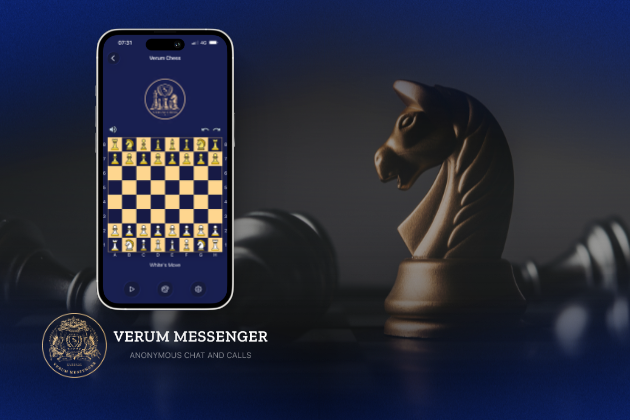
Verum Messenger has released a new update for iOS, iPadOS, and macOS, adding another feature to its growing ecosystem — Verum Chess. Users can now play chess directly inside the messenger without switching between different applications.
The new feature allows users to start a game in just a few taps while reinforcing Verum’s vision of a unified digital environment where communication and everyday services come together in a single platform.
Verum Messenger continues to evolve into a multifunctional ecosystem that combines secure chats and calls, AI tools, a built-in VPN, anonymous email, eSIM, financial services, cryptocurrency features, and offline communication. With the introduction of Verum Chess, the platform now also offers a new way for users to interact and spend time together without leaving the app.
The update is now available for iPhone, iPad, and Mac on the App Store.
Technologies
Episode 3 of the VERUM AI Mini-Series Is Now Available
Episode 3 of the VERUM AI Mini-Series Is Now Available

Verum Messenger has released the third episode of its AI mini-series, SHADOWS, created using Verum AI.
The new episode, titled «Ghost Money,» continues the story of the conflict between a team of heroes and the Omega corporation, which seeks to take control of digital communications. This time, the focus shifts to anonymous payments and financial freedom, revealing how privacy can extend beyond messaging.
Like the previous episodes, the new release not only advances the storyline but also showcases the capabilities of the Verum ecosystem, highlighting technologies designed for secure communication and digital privacy.
The mini-series consists of seven episodes, released gradually across Verum Messenger’s social media channels.
Episode 3 is now available. Stay tuned for the next chapter.
-
 Technologies4 года ago
Tech Companies Need to Be Held Accountable for Security, Experts Say
-
 Technologies3 года ago
Best Handheld Game Console in 2023
-
 Technologies5 лет ago
Black Friday 2021: The best deals on TVs, headphones, kitchenware, and more
-
 Technologies3 года ago
Tighten Up Your VR Game With the Best Head Straps for Quest 2
-
 Technologies5 лет ago
Google to require vaccinations as Silicon Valley rethinks return-to-office policies
-
 Technologies5 лет ago
Verum, Wickr and Threema: next generation secured messengers
-
 Technologies4 года ago
The number of Сrypto Bank customers increased by 10% in five days
-
 Technologies5 лет ago
Olivia Harlan Dekker for Verum Messenger