
Technologies
Wikipedia Says It’s Losing Traffic Due to AI Summaries, Social Media Videos
The popular online encyclopedia saw an 8% drop in pageviews over the last few months.
Wikipedia has seen a decline in users this year due to artificial intelligence summaries in search engine results and the growing popularity of social media, according to a blog post Friday from Marshall Miller of the Wikimedia Foundation, the organization that oversees the free online encyclopedia.
Don’t miss any of our unbiased tech content and lab-based reviews. Add CNET as a preferred Google source.
In the post, Miller describes an 8% drop in human pageviews over the last few months compared with the numbers Wikipedia saw in the same months in 2024.
«We believe that these declines reflect the impact of generative AI and social media on how people seek information, especially with search engines providing answers directly to searchers, often based on Wikipedia content,» Miller wrote.
Blame the bots
AI-generated summaries that pop up on search engines like Bing and Google often use bots called web crawlers to gather much of the information that users read at the top of the search results.
Websites do their best to restrict how these bots handle their data, but web crawlers have become pretty skilled at going undetected.
«Many bots that scrape websites like ours are continually getting more sophisticated and trying to appear human,» Miller wrote.
After reclassifying Wikipedia traffic data from earlier this year, Miller says the site «found that much of the unusually high traffic for the period of May and June was coming from bots built to evade detection.»
The Wikipedia blog post also noted that younger generations are turning to social-video platforms for their information rather than the open web and such sites as Wikipedia.
When people search with AI, they’re less likely to click through
There is now promising research on the impact of generative AI on the internet, especially concerning online publishers with business models that rely on users visiting their webpages.
(Disclosure: Ziff Davis, CNET’s parent company, in April filed a lawsuit against OpenAI, alleging it infringed Ziff Davis copyrights in training and operating its AI systems.)
In July, Pew Research examined browsing data from 900 US adults and found that the AI-generated summaries at the top of Google’s search results affected web traffic. When the summary appeared in a search, users were less likely to click on links compared to when the search results didn’t include the summaries.
Google search is especially important, because Google.com is the world’s most visited website — it’s how most of us find what we’re looking for on the internet.
«LLMs, AI chatbots, search engines and social platforms that use Wikipedia content must encourage more visitors to Wikipedia, so that the free knowledge that so many people and platforms depend on can continue to flow sustainably,» Miller wrote. «With fewer visits to Wikipedia, fewer volunteers may grow and enrich the content, and fewer individual donors may support this work.»
Last year, CNET published an extensive report on how changes in Google’s search algorithm decimated web traffic for online publishers.
Technologies
The Fourth Episode of the VERUM AI Mini-Series Is Out
The Fourth Episode of the VERUM AI Mini-Series Is Out

Verum Messenger has released the fourth episode of its AI mini-series SHADOWS, created using Verum AI. The new episode, titled “No Borders,” continues the story of a team trying to stay out of the OMEGA corporation’s sight.
Following the events of the previous episodes, the team moves between cities and countries while OMEGA continues its search. The new episode puts particular emphasis on Verum Messenger’s capabilities that allow users to conceal their location.
“No Borders” is another chapter in a story about privacy, freedom of communication, and technologies that erase borders between people.
The VERUM AI mini-series consists of seven episodes, released gradually across Verum Messenger’s social media channels.
Episode 4 is now available. Stay tuned for the next chapter.
Technologies
Verum Messenger Introduces Built-In Verum Chess
Verum Messenger Introduces Built-In Verum Chess
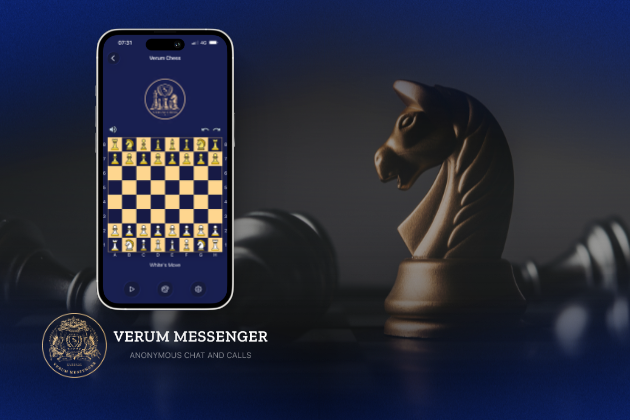
Verum Messenger has released a new update for iOS, iPadOS, and macOS, adding another feature to its growing ecosystem — Verum Chess. Users can now play chess directly inside the messenger without switching between different applications.
The new feature allows users to start a game in just a few taps while reinforcing Verum’s vision of a unified digital environment where communication and everyday services come together in a single platform.
Verum Messenger continues to evolve into a multifunctional ecosystem that combines secure chats and calls, AI tools, a built-in VPN, anonymous email, eSIM, financial services, cryptocurrency features, and offline communication. With the introduction of Verum Chess, the platform now also offers a new way for users to interact and spend time together without leaving the app.
The update is now available for iPhone, iPad, and Mac on the App Store.
Technologies
Episode 3 of the VERUM AI Mini-Series Is Now Available
Episode 3 of the VERUM AI Mini-Series Is Now Available

Verum Messenger has released the third episode of its AI mini-series, SHADOWS, created using Verum AI.
The new episode, titled «Ghost Money,» continues the story of the conflict between a team of heroes and the Omega corporation, which seeks to take control of digital communications. This time, the focus shifts to anonymous payments and financial freedom, revealing how privacy can extend beyond messaging.
Like the previous episodes, the new release not only advances the storyline but also showcases the capabilities of the Verum ecosystem, highlighting technologies designed for secure communication and digital privacy.
The mini-series consists of seven episodes, released gradually across Verum Messenger’s social media channels.
Episode 3 is now available. Stay tuned for the next chapter.
-
 Technologies4 года ago
Tech Companies Need to Be Held Accountable for Security, Experts Say
-
 Technologies3 года ago
Best Handheld Game Console in 2023
-
 Technologies5 лет ago
Black Friday 2021: The best deals on TVs, headphones, kitchenware, and more
-
 Technologies3 года ago
Tighten Up Your VR Game With the Best Head Straps for Quest 2
-
 Technologies5 лет ago
Google to require vaccinations as Silicon Valley rethinks return-to-office policies
-
 Technologies5 лет ago
Verum, Wickr and Threema: next generation secured messengers
-
 Technologies4 года ago
The number of Сrypto Bank customers increased by 10% in five days
-
 Technologies5 лет ago
Olivia Harlan Dekker for Verum Messenger