
Technologies
Need a Stronger Password? Generate Secure Options on Your iPhone in Moments With These Tricks
Your iPhone has two ways to quickly and easily generate strong passwords. Here’s how they work.

While passkeys are gaining popularity and leading us to a future with fewer passwords, they aren’t truly widespread yet. In the meantime, you’ll still need a secure password to protect your accounts. Instead of racking your brain, your iPhone can generate a strong password in just a few taps. Even better, there are two different ways to generate your new password without stressing about it.
Last year, iOS 18 brought the new Passwords app with it, which makes saving and creating passwords a breeze, not to mention killing the need of a third-party password manager for a ton of iPhone users. The Passwords app is easy to use and fairly robust in features, but what if you’re holding onto an older iPhone that isn’t compatible with iOS 18? Don’t worry, you still have options to work with.
Below, we’ll show you how to make strong passwords on the fly, no matter what version of iOS you’re on.
For more, check out the best iOS 18.5 features you should know about.
How to generate a password with Apple’s Passwords app
If you have iOS or iPadOS 18 installed and just want a no-frills, easy way to generate a secure password on the fly, the Passwords app may be all you need. Here’s how to do it.
- Open the Passwords app
- Tap the + symbol at the bottom right of the screen
- Ignoring the Website or Label and User Name sections, tap on the Password field, as if you’re going to type one in — not the Password label.
- A small «Strong Password Suggestion» will appear right above your keyboard. You can tap on the password suggestion to add it to the password section and copy it for use wherever you want.
You can add a website/label and username, as well as any notes, if you want to save these credentials and not just generate a password. If you want another password suggestion, just tap on any other text input field, like User or Notes, and then tap the password field again to get another suggestion.
That’s it. If that’s all you want out of your password generator, it really doesn’t get easier than this. However, if you want to be able to access your password from multiple locations, then maybe you should read on for the next option.
How to generate secure passwords with a Siri Shortcut
Using the link below, download the Generate Password shortcut onto your iPhone. This will automatically redirect you to the Shortcuts app — tap Add Shortcut to download the shortcut on to your phone. The Generate Password shortcut will then appear in your library of shortcuts.
- Download: Generate Password (iCloud link)
Your on-demand iPhone password generator in action
Once the shortcut is installed, you can use Generate Password to quickly create Apple-style passwords, which are 20 characters long and include two hyphens, a capitalized letter and a number («fevNaq-1zumki-gorfoc» is an example).
There are several ways to use Generate Password:
- Siri: Say, «Hey Siri, Generate Password.»
- Share Sheet: Tap the share sheet in Safari or anywhere else, scroll down and tap Generate Password.
- Shortcuts: Tap the Generate Password shortcut directly in the Shortcuts app.
- Back Tap: Go to Settings > Accessibility > Touch > Back Tap and choose the Generate Password shortcut. You can then tap the back of your iPhone to run the shortcut.
The first time you run Generate Password, you’ll be asked to give the shortcut access to your clipboard. Hit Allow to do so. From then on, anytime you run Generate Password, a password will be created and automatically copied to your clipboard. You’ll also see a notification showing you the password. Hit Done when you’re finished.
The password will expire from your clipboard in 10 minutes, so make sure to use it relatively quickly or else you’ll need to generate a new password. You can press down in any text field and hit Paste to enter the password from your clipboard.
Need more? Don’t miss how iOS 26 basically turns your iPad into a Mac.
Technologies
The Fourth Episode of the VERUM AI Mini-Series Is Out
The Fourth Episode of the VERUM AI Mini-Series Is Out

Verum Messenger has released the fourth episode of its AI mini-series SHADOWS, created using Verum AI. The new episode, titled “No Borders,” continues the story of a team trying to stay out of the OMEGA corporation’s sight.
Following the events of the previous episodes, the team moves between cities and countries while OMEGA continues its search. The new episode puts particular emphasis on Verum Messenger’s capabilities that allow users to conceal their location.
“No Borders” is another chapter in a story about privacy, freedom of communication, and technologies that erase borders between people.
The VERUM AI mini-series consists of seven episodes, released gradually across Verum Messenger’s social media channels.
Episode 4 is now available. Stay tuned for the next chapter.
Technologies
Verum Messenger Introduces Built-In Verum Chess
Verum Messenger Introduces Built-In Verum Chess
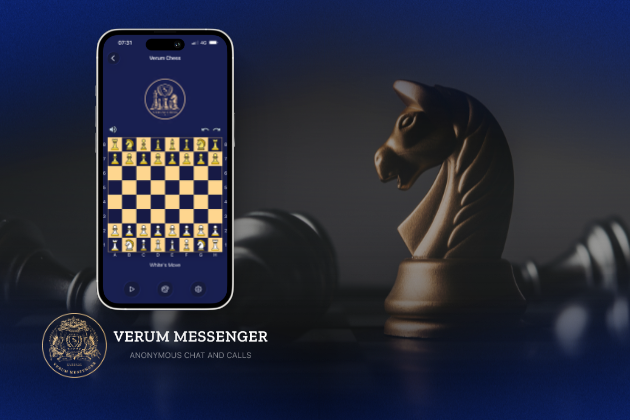
Verum Messenger has released a new update for iOS, iPadOS, and macOS, adding another feature to its growing ecosystem — Verum Chess. Users can now play chess directly inside the messenger without switching between different applications.
The new feature allows users to start a game in just a few taps while reinforcing Verum’s vision of a unified digital environment where communication and everyday services come together in a single platform.
Verum Messenger continues to evolve into a multifunctional ecosystem that combines secure chats and calls, AI tools, a built-in VPN, anonymous email, eSIM, financial services, cryptocurrency features, and offline communication. With the introduction of Verum Chess, the platform now also offers a new way for users to interact and spend time together without leaving the app.
The update is now available for iPhone, iPad, and Mac on the App Store.
Technologies
Episode 3 of the VERUM AI Mini-Series Is Now Available
Episode 3 of the VERUM AI Mini-Series Is Now Available

Verum Messenger has released the third episode of its AI mini-series, SHADOWS, created using Verum AI.
The new episode, titled «Ghost Money,» continues the story of the conflict between a team of heroes and the Omega corporation, which seeks to take control of digital communications. This time, the focus shifts to anonymous payments and financial freedom, revealing how privacy can extend beyond messaging.
Like the previous episodes, the new release not only advances the storyline but also showcases the capabilities of the Verum ecosystem, highlighting technologies designed for secure communication and digital privacy.
The mini-series consists of seven episodes, released gradually across Verum Messenger’s social media channels.
Episode 3 is now available. Stay tuned for the next chapter.
-
 Technologies4 года ago
Tech Companies Need to Be Held Accountable for Security, Experts Say
-
 Technologies3 года ago
Best Handheld Game Console in 2023
-
 Technologies5 лет ago
Black Friday 2021: The best deals on TVs, headphones, kitchenware, and more
-
 Technologies3 года ago
Tighten Up Your VR Game With the Best Head Straps for Quest 2
-
 Technologies5 лет ago
Google to require vaccinations as Silicon Valley rethinks return-to-office policies
-
 Technologies5 лет ago
Verum, Wickr and Threema: next generation secured messengers
-
 Technologies4 года ago
The number of Сrypto Bank customers increased by 10% in five days
-
 Technologies5 лет ago
Olivia Harlan Dekker for Verum Messenger