
Technologies
My Early Time Testing the Galaxy Z Flip 7 Brought a Smashing Surprise
Commentary: Samsung rolled out a major change to its foldable phones. And I can definitely vouch for the Galaxy Z Flip 7’s sturdiness.
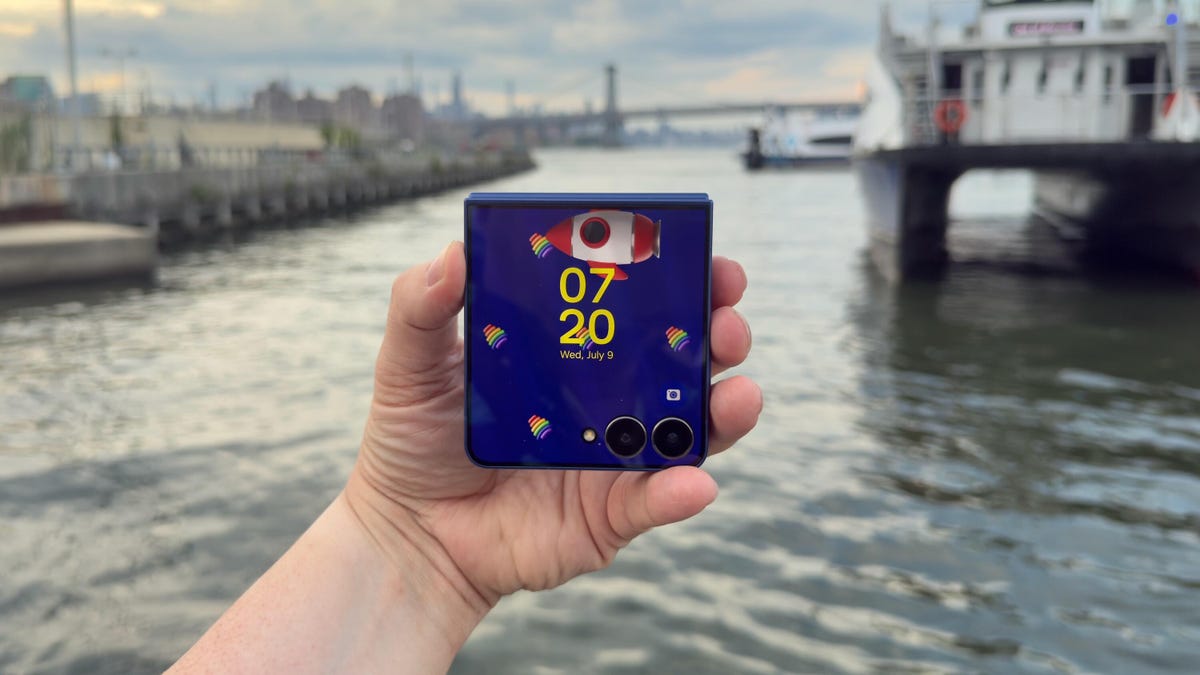
If you’re concerned about how durable Samsung’s foldable phones are, I’m here to tell you not to worry. And that’s especially true when it comes to the new Galaxy Z Flip 7, which holds its own among today’s best smartphones.
After less than six hours with the Galaxy Z Flip 7, I accidentally performed my own informal drop test. At a catered affair in Brooklyn, I walked outside to get a view of the waterfront, and when I pulled the Z Flip 7 out of my pocket, I fumbled it. I watched helplessly as Samsung’s newest foldable phone fell to the ground. The noise it made when it clacked against the concrete caused everyone around to look at me with a knowing, sympathetic expression that said, “Aw, that’s a shame. Your phone is toast.”
Have you ever dropped your phone? There’s that Schrödinger’s cat-like moment before you pick it up when you’re anxious to see if the phone survived.
Fortunately, the Galaxy Z Flip 7 was fine. The 4.1-inch cover screen didn’t have any cracks or scuffs. The 6.9-inch inner display was unharmed because the phone was shut. The only tell that it kissed the ground was a tiny scuff on the bottom of the phone near the microphones. Samsung’s claim that its new “Armour Flex Hinge” is built to withstand impact is indeed true.
In the early days of foldable phones, one of the biggest unknowns was their durability. It’s amazing that about six years later, the Galaxy Z Flip 7 can handle being dropped on concrete like it had landed on a velvet pillow. Now, I still wouldn’t take the Flip 7 (or any foldable phone) to the beach, as it can only withstand particles that are 1mm or larger. So going to a confetti factory would be fine, but a salt factory is a definite no-no.
The Galaxy Z Flip 7’s thin design
The star of Samsung’s Galaxy Unpacked event was the Galaxy Z Fold 7. At 8.9mm thick when closed, the Fold 7 is ridiculously thin. The Galaxy Z Flip 7 looks like it also went on Ozempic, but it’s 13.7mm thick when closed. That’s slim, but not Fold 7 slim. Why couldn’t the Flip 7 be super slim like the Fold 7? I just keep imagining a Galaxy Z Flip 8 with the same thinness as the Fold 7.
For some perspective, here’s how the Flip 7 compares to its clamshell kinfolk:
Galaxy Z Flip 7 thickness vs. other flip phones
| Phone | Closed | Open |
|---|---|---|
| Samsung Galaxy Z Flip 7 | 13.7mm | 6.5mm |
| Samsung Galaxy Z Flip 6 | 14.9mm | 6.9mm |
| Motorola Razr Plus | 15.32mm | 7.09mm |
| Motorola Razr Ultra | 15.69mm | 7.19mm |
| Motorola Razr (2025) | 15.85mm | 7.25mm |
The Galaxy Z Flip 7’s big cover screen
The original Galaxy Z Flip had a tiny, 1.1-inch pill-shaped cover display. It was perfect for showing the time but pretty much useless for anything else. The defining feature on the Galaxy Z Flip 7 is its 4.1-inch cover display. The screen looks incredible. I was checking my notifications on the screen under direct sunlight and was able to read everything. One of the hang-ups I had reviewing the Galaxy Z Flip 6 was switching from the inner screen to the cover display outdoors. There would be times on sunny days where I could barely make out what was on the cover display, despite having no issues with the main screen.
Samsung has increased the maximum brightness of the Flip 7’s cover screen to 2,600 nits, which is the same as the inner display. Both screens now top out at 120Hz, too, which should make for a much more consistent experience by having system animations, gameplay and scrolling through a social feed look super smooth.
The 6.9-inch inner screen is big, but it doesn’t feel unwieldy when I use it. The Flip 6 had a 6.7-inch display, but that extra 0.2 inches on the Flip 7’s screen makes it feel much bigger, which my middle-aged eyes are grateful for.
In terms of functionality, the cover screen’s natural state is widgets. And some, like Spotify’s widget, are all I need in lieu of using full apps. But I want apps on the home screen, so I need to enable this functionality in the Labs section of Settings and download the MultiStar app. It takes a couple of minutes to set up, but I do wish the interface supported apps by default.
The Galaxy Z Flip 7’s cameras
The Flip 7 has three cameras: a 50-megapixel wide-angle, a 12-megapixel ultrawide and a 10-megapixel selfie camera (in the main 6.9-inch screen). The cameras are the same as those on the Flip 6 and Flip 7 FE. But the phones run on different processors, so differences or improvements in photos and videos (if any) will come from Samsung’s processing and machine learning.
Here are some of my favorite photos from the Galaxy Z Flip 7 so far:
Galaxy Z Flip 7 final thoughts for now
Samsung gave its foldable line a major overhaul. And while the Galaxy Z Fold 7 feels like an entirely different phone from previous Folds, the Galaxy Z Flip 7 seems like a nice refinement. I will say that I’ve had only two days with the phone. And as enamored as I am with the larger cover screen, I’m excited to see how the battery life measures up.
Samsung gave the Flip 7 a 4,300-mAh battery (compared with the Galaxy Z Flip 6’s 4,000-mAh battery), but I wonder if the increased capacity will be offset by the power needed for its Exynos 2500 chip and those larger, brighter displays.
I have a lot more testing to do. But as I work my way toward a full review, I’ll try not to drop the Flip 7 anymore.
Samsung Galaxy Z Flip 7 specs vs. Motorola Razr Ultra, Samsung Galaxy Z Flip 6
| Samsung Galaxy Z Flip 7 | Motorola Razr Ultra (2025) | Samsung Galaxy Z Flip 6 | |
| Cover display size, tech, resolution, refresh rate | 4.1-inch AMOLED, 948×1,048p, 120Hz refresh rate | 4-inch pOLED, 2,992×1,224p, up to 165Hz variable refresh rate | 3.4-inch AMOLED; 720×748 pixels; 60Hz refresh rate |
| Internal display size, tech, resolution, refresh rate | 6.9-inch AMOLED, 2,520×1,080p, 1-120Hz refresh rate | 7-inch AMOLED; 1,272×1,080p, up to 165Hz variable refresh rate | 6.7-inch AMOLED; 2,640×1,080 pixels; 1-120Hz refresh rate |
| Pixel density | Cover: 342ppi. Internal: 397ppi | Cover: 417 ppi. Internal: 464 ppi | Cover: 306 ppi. Internal: 425 ppi |
| Dimensions (inches) | Open: 2.96×6.56×0.26 Closed: 2.96×3.37×0.26 | Open: 2.91×6.75×0.28 Closed: 2.91×3.47×0.62 | Open: 6.5 x 2.83 x 0.27 Closed: 3.35 x 2.83 x 0.59 |
| Dimensions (millimeters) | Open: 75.2×166.7×6.5 Closed: 75.2×85.5×13.7 | Open: 73.99×171.48×7.19 Closed: 73.99×88.12×15.69 | Open: 165.1×71.9×6.9 Closed: 85.1×71.9×14.9 |
| Weight (grams, ounces) | 188 g (6.63 oz) | 199 g (7 oz) | 187 g (6.6 oz) |
| Mobile software | Android 16 | Android 15 | Android 14 |
| Cameras | 50 megapixel (main), 12 megapixel (ultrawide) | 50 megapixel (wide), 50 megapixel (ultrawide) | 50 megapixel (wide), 12 megapixel (ultrawide) |
| Internal screen camera | 10 megapixel | 50 megapixel | 10 megapixel |
| Video capture | 4K at 60fps | 4K | TBD |
| Processor | Samsung Exynos 2500 | Snapdragon 8 Elite | Snapdragon 8 Gen 3 |
| RAM/storage | 12GB + 256GB, 12GB + 512GB | 16GB + 512GB, 1TB | 12GB + 256GB, 512GB |
| Expandable storage | No | None | None |
| Battery | 4,300 mAh | 4,700 mAh | 4,000 mAh |
| Fingerprint sensor | Yes | Side | Side |
| Connector | USB-C | USB-C | USB-C |
| Headphone jack | None | None | None |
| Special features | One UI 8, IP48 water resistance, 25-watt wired charging, Qi wireless charging, Wi-Fi 7, Bluetooth 5.4, Galaxy AI | IP48 rating, 68-watt wired charging, 30-watt wireless charging, 5-watt reverse charging, dual stereo speakers, Corning Gorilla Glass Ceramic cover display, 3,000 nits peak brightness on cover display, 4,500 nits peak brightness on main display, 5G. | IP48 rating, 25-watt wired charging, wireless charging + powershare, 3x optical zoom (up to 10x digital and 30x Space Zoom with AI Super Resolution tech) |
| US price starts at | $1,100 | $1,300 | $1,100 |
Correction, Jul. 12: The Galaxy Z Flip 7 runs on Samsung’s Exynos 2500 chip.
Technologies
EU Backs U.S. ‘Economic Outcast’ Sanctions Drive Against Iran; Seoul Considers Military Aid
…

Paragraph1\n\nParagraph2\n\n…
Technologies
Goldman Sachs Recommends Undervalued Dividend Energy Stocks Despite Sector Rally
Goldman Sachs identifies four undervalued energy stocks with strong dividends — Devon Energy, Expand Energy, HF Sinclair, and ConocoPhillips — despite the sector’s 45% year-to-date rally, citing attractive free cash flow yields and upcoming growth catalysts.

Goldman Sachs indicates there remains an opportunity to acquire attractive dividend-paying energy stocks, even after the sector’s significant gains this year. While the firm maintains a positive long-term outlook on oil and gas, it acknowledges the sector is currently outperforming the broader market. The State Street Energy Select Sector SPDR ETF (XLE) has surged 45% year-to-date, reaching a 52-week high on Thursday, compared to a 13% rise for the S&P 500. Energy firms have benefited from soaring oil prices driven by Middle East tensions, with Brent crude futures closing above $95 per barrel.
“This has prompted more investors to take a valuation overlay to identifying new ideas in our Oil & Gas coverage,” Goldman analyst Neil Mehta wrote in a Monday note. “For those screening for value, we screen our comparison sheets and identify Buy-rated stocks that currently offer above-average total return while trading at below-average 2028 multiples as investors position into year-end.”
Here are the names that met Goldman’s criteria:
Devon Energy has risen approximately 33% this year, lagging its large-cap exploration and production peers’ 40% advance, which Mehta calls “a compelling valuation opportunity.” He notes DVN trades at an attractive 14% free cash flow yield on average 2027/2028 estimates. Mehta also views Devon’s Delaware Basin focus and its goal to return up to 70% of free cash flow to shareholders favorably. The company beat Q2 earnings and revenue estimates last month and announced a dividend increase in May. Mehta’s $55 price target implies 12% upside from Wednesday’s close, with a 2.3% dividend yield.
Gas exploration and production company Expand Energy also offers compelling valuation relative to Appalachian peers, trading at a 10% free-cash-flow yield on 2027/2028 estimates versus a peer average of 8%. Mehta highlights its reliable free cash flow, steady capital return program, and potential for sustainable cash flow improvement through marketing initiatives. The stock yields 2.3% but is down roughly 10% in 2026 after mixed Q2 results.
U.S. refiner HF Sinclair has skyrocketed 131% year-to-date, also hitting a 52-week high Thursday. Despite this, Mehta believes the stock trades at a discount to refining peers due to uncertainty around interim CEO and CFO roles. He sees value in the company’s non-refining earnings (Lubricants, Renewable Diesel, Midstream) and niche refining market exposure. HF Sinclair beat Q2 estimates and raised its dividend, yielding about 2%. Mehta’s $114 target suggests 7.5% upside.
Finally, oil major ConocoPhillips carries a $146 price target, implying over 6% upside. Goldman’s buy rating rests on a projected $7 billion free-cash-flow inflection by 2029 as four major projects come online and $1 billion in costs are cut. The stock trades at a discounted multiple reflecting market hesitation about a back-half-weighted cash flow inflection peaking in 2029. ConocoPhillips has gained 45% year-to-date, hitting a 52-week high, with a 2.5% yield.
This site is now part of Versant. By continuing to use this service, you agree to our Terms and acknowledge the updated Privacy Policy applies to your existing data. For details on your data rights, click here.
On this service, we and our vendors use cookies and other tools to store and access device information such as identifiers, IP address, and browser type. You can view a list of potential vendors by selecting “IAB and Google Vendors.” Your data may be used for privacy choices, security, fraud prevention, debugging, personalization, advertising measurement, audience research, service improvement, offline-online data matching, and social features, shared with select vendors with your consent.
Click “I Accept” to consent to these cookies or “Reject All” to decline. Click “Manage Choices” to set preferences. Previous choices on this browser and device need updating. Adjust anytime via “Cookie Preferences” in the footer or in-app settings. Visit our Cookie Notice and Privacy Policy for more.
Essential cookies for service functionality, security, and fraud prevention are always active. You can block these via browser settings, but some site features may not work properly. Your choices are saved as digital signals to enable respect for your preferences.
Data may be used to monitor and prevent fraudulent activity, ensure system security, correct content delivery issues, ensure technical compatibility, and recognize your device across sessions.
Various cookie purposes include limited data for ad selection, creating profiles for personalized advertising, using profiles for ad selection, creating profiles for personalized content, using profiles for content selection, measuring advertising and content performance, understanding audiences through combined data, developing and improving services, and limited data for content selection. Third-party targeting cookies deliver relevant advertising across platforms; rejecting them results in less relevant ads. Data may also personalize content like news articles and videos.
Technologies
Gloria Steinem, a potent voice of U.S. feminism and co-founder of Ms. Magazine, has died
Gloria Steinem, the co-founder of Ms. Magazine and a fierce advocate for feminist causes throughout her life, has died. She was 92.
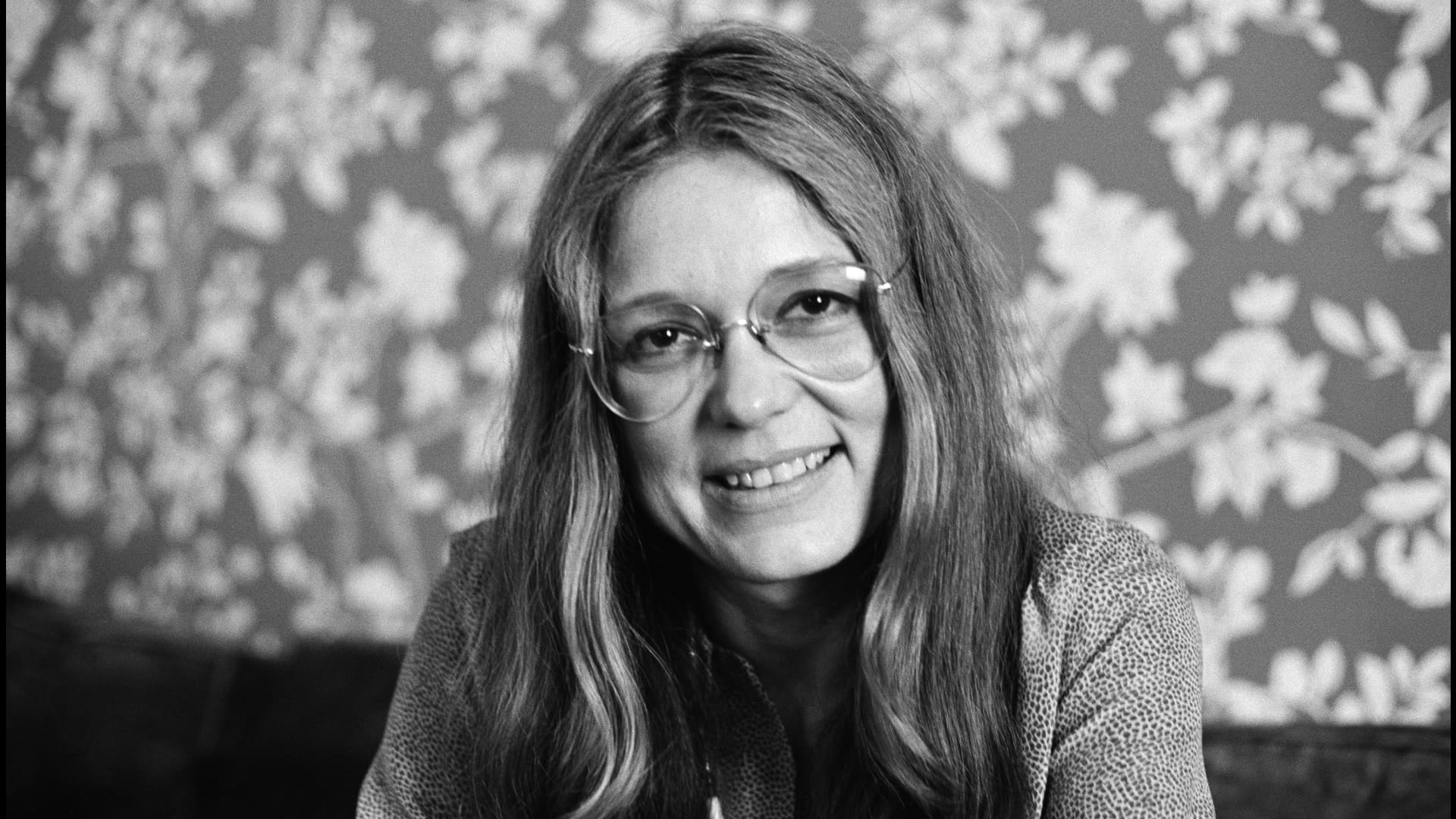
Gloria Steinem, the celebrated author and activist who became one of the most visible symbols and potent voices of the U.S. women’s movement and a fierce advocate for feminist causes throughout her life, has died. She was 92.
With her trademark streaked hair parted down the middle and large aviator glasses, Steinem, a co-founder of Ms. Magazine, was a hugely recognizable presence wherever she went. And she went everywhere: Much of her life as an advocate was spent on the road, speaking at college campuses and community centers, at rallies and marches.
She died Wednesday at her home in New York City, according to her and her foundation’s social media pages.
“Gloria’s greatest gift was her ability to listen to others, to make others feel seen and heard,” the posts said. “Her words, actions, and example gave people permission to be their truest selves. Gloria lived true to her independent spirit, always with curiosity and a great sense of humor.”
Steinem enjoyed writing and spending time in the community in recent years, the posts said. She also hosted talking circles for hundreds of people in her home. She died just before a planned memoir was to be released this fall.
“You can’t do it on the phone or on the web,” she told The Associated Press in a 2015 interview. “You have to be there with all five senses. It should be obvious that people can’t empathize with each other unless we’re in the same room.”
Steinem changed her career path after a start as a journalist
She began her career as a journalist, notably one who reported, in 1963, on degrading conditions in Hugh Hefner’s Playboy empire, an undercover assignment she came to later regret. She credits a meeting six years later, where women spoke out boldly in favor of abortion rights, with changing her career path.
“That speak-out was the beginning of activism for me,” Steinem, who had undergone a secret illegal abortion herself at age 22, told the AP in an email in 2022, reflecting on the reversal of Roe v Wade. “Either our control over our own bodies is equal, regardless of sex or race, or we’re not living in a democracy.”
Though she soon became a known activist, those who watched Steinem denounce discrimination for so many years likely never suspected that she’d had to overcome a deep fear of public speaking. She would have simply stuck to writing, she said, if only editors at the time had been willing to let her write about the women’s movement.
But they weren’t interested, she told the AP in 2015. “So I ended up going out and speaking, which was my nightmare,” she said. “I mean, I was terrified. But I’m grateful, even though I still get scared even now.”
Steinem’s visibility endured throughout her life
Time hardly slowed Steinem down; well into her 80s she was traveling the globe and speaking out on issues of importance to her. These included everything from genital mutilation to Korean reconciliation, but it was equality for women that took precedence. “Being a feminist means that you see the world as whole instead of half,” she once said. “It shouldn’t need a name, and one day it won’t.”
As the years went on, Steinem’s visibility endured. At 83, she sat in the front row of her first fashion show, guest of designer Prabal Gurung. A few days after her 85th birthday, she was leading a women’s “talking circle” at an off-Broadway play celebrating her life, where one by one, women in the audience — many fighting tears — rose to thank her and tell their own stories of discrimination. In 2020, her life was the subject of a feature film, “The Glorias, A Life on The Road,” based on her 2015 memoir and starring Julianne Moore.
And at 91, she collaborated on a picture book with Liberian peace activist and Nobel laureate Leymah Gbowee aimed at inspiring young people to change the world. “Rise, Girl, Rise: Our Sister-Friend Journey. Together for All” was published in February.
The constant visibility came with a price; even into her older years, Steinem expressed frustration that despite her accomplishments, she was often described as beautiful or glamorous (A 1992 Vanity Fair profile even noted her “spectacular racehorse legs.”) It was a label she said unfairly detracted from her message.
“Nobody ever called me beautiful until I was publicly a feminist, and that was in my mid-30s,” she told AP in a 2011 interview. “It was clear that label was being assigned to me. The most hurtful part is that you work very hard, and people say it’s because of your looks.”
Steinem dealt with hostility from many directions
Of course, Steinem also had to deal with hostility. Sometimes it came from surprising places. Appearing on Larry King’s talk show on CNN in 1990, she was visibly stunned when a female caller greeted her cheerfully, then told her to “rot in hell” because she had ruined “the beautiful American family.”
But by then, she noted, at least people were taking feminists seriously. That wasn’t the case in 1972 when she co-founded Ms. Magazine and many commentators — especially male — dismissed it as ridiculous, predicting an early demise. (The magazine continues to this day, published by the Feminist Majority Foundation.)
Among Steinem’s detractors was President Richard Nixon, who was caught on an Oval Office tape ridiculing both her and the “Ms.” title. The ridicule was mutual: In a 1972 National Press Club speech, Steinem called Nixon “the most sexually insecure chief of state since Napoleon.”
It was just one example of Steinem’s trademark wit. Before she married at 66, she often explained her singlehood by saying “I can’t mate in captivity.” Laughter, she wrote, was “the only free emotion — the only one that can’t be compelled.”
In 2013, Steinem was awarded the Presidential Medal of Freedom by President Barack Obama. “Because of her work across America and around the world, more women are afforded the respect and opportunities that they deserve,” he said, “but she also changed how women thought about themselves.”
Steinem ‘read everything I could get my hands on’ growing up
Gloria Marie Steinem was born on March 25, 1934, in Toledo, Ohio. Her father was a traveling antique salesperson; she spent her early years on the road with her parents, not attending regular school. “I just read everything I could get my hands on,” she told an audience at Manhattan’s 92Y in 2026. “Which was frequently completely unsuitable … just everything and anything. I also was in love with the movies — my idea of heaven was a movie and a malted.”
In 1944 her parents divorced, and 10-year-old Gloria was left to take care of her mother. a once-promising journalist who struggled to combine her work with running a household, and eventually suffered a nervous breakdown.
As a young girl she excelled at tap dancing — it was even going to be her “ticket out of Toledo,” she said. Although she remained a good dancer, that particular career didn’t materialize. She attended Smith College in the ’50s, a time when, she has said, women were being educated to be mothers and wives.
But marriage was not on Steinem’s mind. “I was engaged to a very nice man. It wasn’t his fault, but I just didn’t want to get married,” she told her 2026 audience. Instead, she took advantage of a modest fellowship to travel to India. After that, Steinem headed to Manhattan, where she couldn’t rent her own apartment because, she said, landlords avoided single women, assuming “if you could earn enough, you must be a hooker.”
The aspiring journalist wanted to write about politics. But editors gave her assignments on food, fashion, and, in what she jokingly called “the lowpoint of my life,” an article about textured stockings. Even more demoralizing was her experience with an editor who, she said, gave her a choice one day: Spend the afternoon in a hotel with him, or mail his letters on the way out.
She chose to mail the letters. “There was no word for sexual harassment then,” she has said. “It was just life.”
But one assignment in 1963 sounded compelling: posing as a Playboy Bunny, for an exposé in the now-defunct Show magazine. Steinem went through the audition process, assuming she’d be weeded out. But she was given her bunny costume — “so tight, it would give a man a cleavage,” she joked — and worked in the job for about a month.
“I could not have made a bigger mistake,” she told the AP in 2011. “It was personally and professionally a disaster. In the short term, it was much harder to get assignments, and in the long term it’s been used to ridicule me.”
Steinem’s writing became more political in her 30s
Steinem was in her 30s when she joined the editorial board of New York magazine, and her writing became more political. In 1969, she went to cover an abortion rights hearing. She had never told anyone about her illegal abortion at 22, in London. That was the moment, she has said, that triggered her career as a women’s rights activist. “I don’t think I had ever felt part of a group before,” she said in a 1970 TV interview.
Steinem founded the National Women’s Political Caucus in 1971 along with Betty Friedan, Shirley Chisholm and Bella Abzug. The latter became a dear lifelong friend — “the woman I wished I had had as a mother,” she said at Abzug’s funeral.
Unlike Abzug, Steinem was naturally reserved, not comfortable in front of a crowd. Gradually, with her early speaking partner Dorothy Pitman Hughes, a Black feminist and child welfare advocate, she found her footing. The two formed a powerful partnership at a time when feminism was viewed as largely a white, middle-class movement. In an iconic photo, the two raise their right arms together in the Black Power salute.
As she grew more famous, Steinem drew attention not just for her work but for a glamorous Manhattan life. Asked once about her streaked hair and aviator glasses, she explained that the hair was inspired by Holly Golightly, the free-spirited character played by Audrey Hepburn in “Breakfast at Tiffany’s.” The glasses? They were “more about hiding,” she said.
When reaction was hostile, Steinem would try to reason that it was a step above ridicule. But sometimes it stung, like a snarky Esquire profile in the early ’70s, so hurtful that she cried, and colleagues called a news conference to defend her.
Steinem co-founded Ms. Magazine and stayed with it as an adviser
Then came Ms. Magazine in 1972, a magazine by women, for women. “I was so obsessed with the fear that it would fail and be a disgrace to the movement,” Steinem, age 37 when it launched, told the AP in 2011. And opponents hoped that would happen. TV newsman Harry Reasoner, an especially tart critic, later apologized on air. Steinem continued with Ms. until it was bought in 2001 by the Feminist Majority Foundation, and remained an adviser.
By 1977, numerous gains had been made for women, including Roe in 1973. But the Equal Rights Amendment, which had passed the House and Senate in 1972 but needed to be ratified by three-quarters of state legislatures, remained elusive. The issue was front and center at the 1977 National Women’s Conference, convened on a congressional mandate to examine women’s rights.
“If they want us to become the radicals that they fear we are, just let them stop the ERA and we will become those radicals,” Steinem said there.
Among groups Steinem co-founded were the Women’s Action Alliance, which was active through the 1990s; the Women’s Media Center in 2004, the Voters for Choice political action committee in 1977, and the Ms. Foundation for Women. She also helped establish the Take Our Daughters to Work Day.
Steinem never had her own children, and said she never regretted it. “No, not for a millisecond,” she told the AP, describing an incident in which she was afraid to answer that question in front of a group of women in India, fearing they wouldn’t like the answer. “But they applauded,” she said. “It’s important that some of us not have children, to show that we have a choice.”
In 2000, Steinem she did something she’d never planned to: She got married, at 66, to British activist and businessman David Bale, whom she met at a fundraiser (Bale was the father of actor Christian Bale.)
“I thought, ‘I haven’t changed, marriage had changed,’” Steinem said. “David and I wanted to be together, we loved each other. He needed a green card.” They married at a Cherokee ceremony in Oklahoma. Several years later, he became ill with brain lymphoma, and Steinem cared for him until his death in 2003.
Steinem said she had few regrets in life, but did miss being present when her father died. She received word that he’d been in a serious car accident, but did not respond in time, and he died alone. “I had taken care of my mom as a child, and I feared I’d never come back,” she explained. She was also sorry that she didn’t become closer to her mother. “I was so fearful of becoming her,” she said in an HBO documentary, “Gloria: In Her Own Words.”
Steinem’s books included ‘A Life on the Road’
Steinem’s books included the 2015 road memoir “A Life on the Road” — but she wryly noted at the time that she’d actually never learned to drive. It would have taken away, she said, from her ability to converse with her hosts, who would pick her up from airports or train stations. And, she noted, she always loved to chat with taxi drivers.
On Jan. 21, 2017, when hundreds of thousands of women gathered in Washington in their pink “pussy hats” for the historic Women’s March, it surprised nobody that the keynote speaker, and the most rousing, was Steinem.
“We are linked,” she told the crowd. “And this is a day that will change us forever because we are together.”
For many women, Steinem was the galvanizing voice that day. She would go on to advocate fiercely. But, though many saw her as a singular figure in history, she often liked to say that if she hadn’t come along, someone else would have accomplished the same things.
By the same token, she said, it was less important that younger people listen to her, and more important that they listen to themselves.
“The primary thing is not that they know who I am,” she said, “but that they know who THEY are.”
-
 Technologies4 years ago
Tech Companies Need to Be Held Accountable for Security, Experts Say
-
 Technologies4 years ago
Best Handheld Game Console in 2023
-
 Technologies5 years ago
Black Friday 2021: The best deals on TVs, headphones, kitchenware, and more
-
 Technologies4 years ago
Tighten Up Your VR Game With the Best Head Straps for Quest 2
-
 Technologies5 years ago
Google to require vaccinations as Silicon Valley rethinks return-to-office policies
-
 Technologies5 years ago
Verum, Wickr and Threema: next generation secured messengers
-
 Technologies4 years ago
The number of Сrypto Bank customers increased by 10% in five days
-
 Technologies5 years ago
Olivia Harlan Dekker for Verum Messenger