
Technologies
18 Amazon Prime Perks That Will Make Your Life Easier
Think Prime’s just for packages? These extra perks might surprise you.
You probably already know that an Amazon Prime membership gets you free two-day shipping and access to events like Prime Day. But there are plenty of other perks that fly under the radar, including discounts you can use beyond Amazon.
One unexpected benefit? You can actually save money on gas with your Prime subscription. From grocery deals to streaming extras, there’s a lot more value packed into your membership than most people realize.
Sure, a 30-day free trial lets you take advantage of limited-time deals, but it only lets you scratch the surface of all that a membership has to offer. It might surprise you to learn what else you can get by being a Prime member. Below, we’re going to break down some of the best perks you may not know about.
Spoiler: Some of them are bangers.
For more, don’t miss out on the best Amazon tech deals and how to get great savings on Amazon right now with coupons.
1. Watch HBO or other premium TV channels without cable
You probably know about Prime Video and Amazon Music Prime, but you might not know all the special details. Amazon Prime members have access to a large number of feature-length movies and hit original TV shows like The Boys and The Lord of the Rings: Rings of Power, as well as an Amazon Music Prime library featuring 2 million songs and thousands of curated playlists.
Prime members can also download movies and TV shows for watching later offline.
If a show or movie you want to watch is not included as part of your basic Prime subscription, you can subscribe to premium channels such as HBO, Showtime and Starz for $5 to $15 a month, with no need for cable or satellite service.
Music lovers can upgrade to Amazon Music Unlimited to get a library of 90 million songs that can be streamed to multiple devices for $9 a month or $89 a year.
2. Get money back by choosing no-rush shipping
If you don’t need your purchase to be delivered quickly, you can opt out of two-day or shorter delivery options by selecting «no-rush shipping» and receive your package in about six days. In return for your patience, Amazon will give you rewards.
There’s no standard for no-rush shipping rewards — they vary from item to item — but they generally provide discounts on products and services that you might buy from Amazon.
Some common rewards are $1 credits for Amazon digital services like movies, music and ebooks, $3 coupons for Amazon’s Happy Belly-branded snacks, $10 to $20 off TV or furniture purchases and $10 to $20 off Amazon Home Services.
The value of no-rush shipping will depend on whether you’ll use any of the rewards. It might not seem like much, but a few no-rush shipping selections could easily earn you the $3 to $4 you need for a free movie rental from Prime Video.
3. Whole Foods grocery discounts
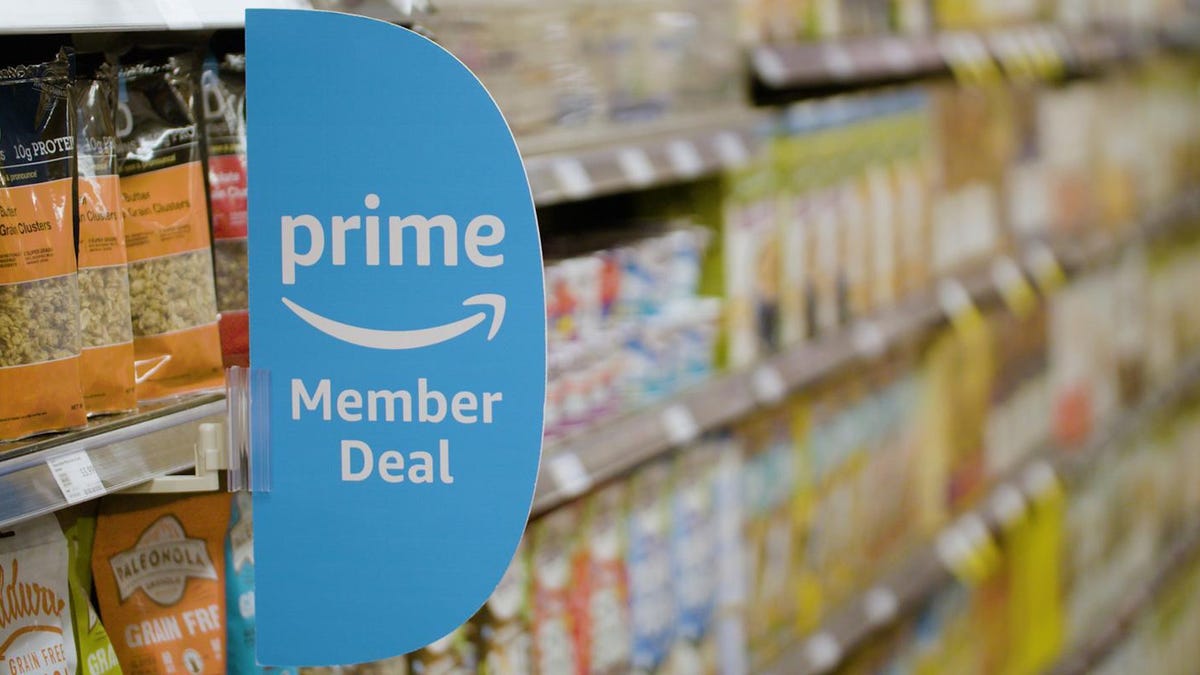
If you’re a frequent shopper at Whole Foods, an Amazon Prime membership can reap serious dividends. Prime Member Deals available in physical Whole Foods stores give members discounts of 10% to 20% on selected items marked with blue Amazon stickers.
Yellow tags indicate even further savings, usually at least another 10% off an already discounted price. Prime members who scan the Whole Foods Market or Amazon app at checkout get an extra 10% off storewide sales. Prime membership also gives you access to special online deals.
4. Exclusive access to Thursday night NFL football games
It’s the second year that Amazon Prime has had exclusive rights to air Thursday Night Football, and Prime seems to be killing the game. It received five Sports Emmys nominations for its 2022 coverage and boasts a stacked cast of experts, commentators and former players.
If you are a Prime subscriber, you can stream 2023-2024 Thursday Night Football games on Prime Video, NFL +, Amazon.com or Twitch. There is also a Spanish-language broadcast available on Prime Video. TNF pregame coverage begins at 7 p.m. EST each Thursday.
5. Free same-day Amazon Fresh delivery
Whole Foods isn’t the only grocery option available to Amazon Prime members. Subscribers also have access to the online grocery store Amazon Fresh, which provides free deliveries to some locations. Amazon Fresh has some similar products to Whole Foods but generally focuses on a broader range of groceries and home products at lower prices.
Anyone can purchase products from Amazon Fresh, but only Prime members get free same-day delivery. Amazon Fresh also has 44 physical locations that offer special weekly deals for Prime members.
6. Try on clothes and shoes before you buy them
It’s almost impossible to size clothing correctly online — to know if it fits, you have to try it on. Prime members get that chance with Amazon’s Try Before You Buy service. In specific personal shopping categories like clothes, shoes and accessories, you can order items and keep them for seven days without paying for them.
Return what you don’t want before the trial week is over, and you’ll only pay for the items that you keep. Eligible products are indicated on Amazon with a «Try Before You Buy» icon. Several online reports have indicated a limit of six products for Try Before You Buy, but the Amazon site doesn’t specify a maximum.
7. Borrow unlimited books, magazines and comics
Amazon Prime members gain access to Prime Reading, a service similar to Kindle Unlimited with a different collection of materials. You can borrow as many books as you like, and many include audible narration, so you can switch back and forth between reading and listening. The electronic downloads don’t require a Kindle or Fire device.
Amazon First Reads gives Prime members access to editors’ selections of early book releases. Anyone with a Prime membership gets one free Kindle book a month, as well as regular discounts on selected titles.
8. Prime-exclusive deals and promos
Amazon offers Prime-exclusive deals all-year round on top products meaning you can make back the cost of your membership in savings. For big shopping seasons like Black Friday or Prime Day, there are even more member-only prices to shop.
Plus, Prime subscribers often get early access to Lightning Deals. These are sort of like Amazon’s version of a fire sale, featuring very low prices for a limited number of products that usually sell out very quickly. The good news for Amazon Prime members is that they get access to these deals earlier than everyone else. The bad news? There are a lot of Amazon Prime members.
9. Exclusive Zappos deals, faster shipping and a test month for running shoes
Amazon acquired the online shoe giant Zappos back in 2009, and it now provides a number of benefits for Prime members who link their accounts on Zappos.com. Prime members get faster shipping, bonus reward points for shopping and exclusive deals on certain products.
Zappos also lets Prime members participate in Runlimited, a 30-day guarantee program for running shoes.
10. Save money on prescription drugs online or at your local pharmacy
Amazon Prime Rx Savings program gives Prime members discounts on prescription medicine, whether it’s purchased at Amazon Pharmacy or in-store at a physical pharmacy. An Amazon Rx savings card can be printed out or saved digitally and used for discounts at more than 60,000 participating pharmacies, including CVS, Walgreens and Rite Aid.
Amazon says that members can save up to 80% on common prescription drugs using Prime Rx, but it’s important to note that Amazon’s Prime Rx savings program does not work with health insurance. You’ll need to be sure that any savings you get from the program are more than you’d get from insurance coverage.
For more about Amazon Prime, learn about what to expect from this year’s back-to-school deals.
11. Access to Prime Gaming
Prime Gaming is a fun feature that is included with both Amazon Prime and Prime Video. Eligible subscribers are able to download content in-game for their favorite games, free games and even a free monthly Twitch channel subscription.
Prime Gaming is included with annual and monthly Prime subscriptions, Prime Student subscriptions, Amazon Prime free trials, and Prime Video memberships. It’s important to note that only one member per household may claim an offer, and if you have a Prime Video monthly free trial you will be unable to claim a free Twitch subscription. If you are using a free trial of Student Prime, your free Twitch membership will expire when your free trial expires.
12. One Medical membership discounts
One Medical is a membership-based health service that provides primary in-person and virtual health care. Its concierge-like medical service is designed to allow members to easily schedule appointments and care using the company’s mobile app or website.
Amazon acquired One Medical in February and is now offering a major discount for Prime members. Instead of the usual price of $199 a year, Amazon Prime members can subscribe for $99 a year, or $9 per month. To activate the discount, Prime members should visit this page. Existing One Medical subscribers who are Prime members can also take advantage of the discount starting with their next payment.
13. Unlimited photo storage with Amazon Photos
With a subscription to Amazon Prime, you can store unlimited photos and 5GB of video on Amazon Photos. Without Amazon Prime, you’re limited to a total of 5GB of videos and photos total.
You can view or share your photos and videos on Amazon Photos using the iOS or Android app, or on a computer with the desktop or web app. Your photo and video files are both fully encrypted, so they’re only visible to people with whom you intentionally share them.
14. Get discounts on Shutterfly
Amazon has partnered with photography company Shutterfly to offer Prime members 45% off most regular-priced products. Shoppers can also get free shipping on orders of $35 or more. To get the discount, you’ll have to link your Shutterfly and Amazon accounts.
If you store your photos with Amazon, you can now access your Amazon Photos directly from Shutterfly. This makes it extra convenient for Prime members to share images from their extensive photo library.
15. Get a Grubhub Plus membership for free
Don’t feel like cooking tonight? There’s a perk for that, too.
When Amazon announced it would offer Grubhub Plus free for a year in 2022, it was a solid, but temporary, perk added to Prime. In 2023, Prime members were treated to another free year. For 2024, instead of renewing the food delivery service’s premium membership again for another year, Grubhub Plus became a permanent Amazon Prime perk.
Grubhub Plus typically costs $9.99 a month, and provides unlimited free delivery for all orders over $12 in over 4,000 cities nationwide.
16. Save on Amazon Kids Plus
If you have Amazon Prime, you also get access to discounted Amazon Kids Plus. The subscription service features a wide range of ad-free content, including books, games and videos for children ages 3 to 12. Parents can limit the amount of screen time available to their children and manage up to four profiles on iOS and Android.
The Amazon Kids Plus subscription is normally $79 a year, but Prime members can get it for $48 a year.
17. Get your package delivered on the day you want it with Amazon Day
If none of the usual delivery dates work for you, you have one additional option as a Prime member. Amazon Day is a free perk that lets you schedule your packages to arrive on your day of choice. Next time you’re on vacation, you don’t have to arrange for the neighbors to help you bring in your boxes, and you won’t have to worry about porch pirates stealing your delivery on days when you’re not home.
Amazon Day is also a great option to cut down on the number of boxes for your packages, since you can schedule multiple purchases to arrive as a single delivery.
18. Save money on gas
Do you spend several hours each week driving to and from work? If you’re an Amazon Prime member living in the US, your dollar will now stretch a little farther at the gas pump. You can save 10 cents per gallon at BP, Amoco and AM/PM gas stations — there are about 7,000 locations across the 50 states. Amazon estimates that this perk will save the average American nearly $70 per year.
Prime members who want to take advantage of this perk must first activate the offer. After the one-time activation, you can simply go to the pump and input your phone number or linked payment method for instant savings.
For more, check out these Amazon deals on tech and home goods and tips for getting the best Amazon deals.
Technologies
Samsung’s Galaxy Watch Ultra 2 Might Come in 5G and 4G Cellular Models
If the rumor proves true, the 5G Galaxy Watch Ultra would rival the 5G-enabled $799 Apple Watch Ultra 3 that debuted last fall.

Samsung’s next high-end Galaxy Watch could support faster 5G speeds, but if this leak is true, it will depend on where you live. The rumored Samsung Galaxy Watch Ultra 2 might come in 5G and 4G cellular models, with availability for each smartwatch depending on the country.
According to the Dutch website Galaxy Club (and spotted by SamMobile), Samsung’s servers may have revealed a series of model numbers that point to 5G, 4G and Wi-Fi-enabled editions of the next Galaxy Watch Ultra, which would succeed the original model that debuted in 2024.
A representative for Samsung did not immediately respond to a request for comment.
The Galaxy Club website speculates that the 5G edition would be sold in the US and Korean markets, while the 4G edition would sell in the rest of the world. In the US, a 5G version of the Galaxy Watch Ultra would rival the 5G-enabled $799 Apple Watch Ultra 3, which debuted last fall. The 4G edition would have broader compatibility worldwide, since the earlier network is far more established.
It will likely be a few months until we hear anything official about the Galaxy Watch Ultra 2. Samsung typically unveils its new watches in the summer alongside its Galaxy Z Fold and Z Flip foldable phones. Last year, Samsung unveiled the Galaxy Watch 8 and the Galaxy Watch 8 Classic, but otherwise left the prior 2024 Ultra in the lineup for those looking for a larger 47mm smartwatch.
Technologies
2 Cases Show Supreme Court Isn’t Holding ISPs Responsible for Piracy
Technologies
Today’s NYT Connections Hints, Answers and Help for April 8, #1032
Here are some hints and the answers for the NYT Connections puzzle for April 8, No. 1032.

Looking for the most recent Connections answers? Click here for today’s Connections hints, as well as our daily answers and hints for The New York Times Mini Crossword, Wordle, Connections: Sports Edition and Strands puzzles.
Today’s NYT Connections puzzle is kind of tough. The purple category is a fun one, once you see the connection. Read on for clues and today’s Connections answers.
The Times has a Connections Bot, like the one for Wordle. Go there after you play to receive a numeric score and to have the program analyze your answers. Players who are registered with the Times Games section can now nerd out by following their progress, including the number of puzzles completed, win rate, number of times they nabbed a perfect score and their win streak.
Read more: Hints, Tips and Strategies to Help You Win at NYT Connections Every Time
Hints for today’s Connections groups
Here are four hints for the groupings in today’s Connections puzzle, ranked from the easiest yellow group to the tough (and sometimes bizarre) purple group.
Yellow group hint: In the group.
Green group hint: Appearance details.
Blue group hint: Often found in gyms.
Purple group hint: They help you see.
Answers for today’s Connections groups
Yellow group: Cohort member.
Green group: Aesthetic.
Blue group: Kinds of bar apparatuses.
Purple group: Eyewear in the singular.
Read more: Wordle Cheat Sheet: Here Are the Most Popular Letters Used in English Words
What are today’s Connections answers?
The yellow words in today’s Connections
The theme is cohort member. The four answers are associate, colleague, fellow and peer.
The green words in today’s Connections
The theme is aesthetic. The four answers are design, look, scheme and style.
The blue words in today’s Connections
The theme is kinds of bar apparatuses. The four answers are monkey, parallel, pull-up and uneven.
The purple words in today’s Connections
The theme is eyewear in the singular. The four answers are contact, goggle, shade and spectacle.
-
 Technologies3 года ago
Tech Companies Need to Be Held Accountable for Security, Experts Say
-
 Technologies3 года ago
Best Handheld Game Console in 2023
-
 Technologies3 года ago
Tighten Up Your VR Game With the Best Head Straps for Quest 2
-
 Technologies4 года ago
Black Friday 2021: The best deals on TVs, headphones, kitchenware, and more
-
 Technologies5 лет ago
Google to require vaccinations as Silicon Valley rethinks return-to-office policies
-
 Technologies5 лет ago
Verum, Wickr and Threema: next generation secured messengers
-
 Technologies4 года ago
Olivia Harlan Dekker for Verum Messenger
-
 Technologies4 года ago
The number of Сrypto Bank customers increased by 10% in five days