
Technologies
Analogue 3D Review: The Purest Nintendo 64 Experience You Can Have on a 4K TV
There are plenty of ways to play Nintendo 64 games in 2025. The Analogue 3D is made for purists.
Our Experts


Pros
- Perfect playback
- Incredible sound reproduction
- Beautiful design
- Competitively priced
- Overclocking
Cons
- Wireless controllers need direct line-of-sight
- Barebones UI
- Missing screenshot feature
- No Wi-Fi
- Doesn’t support flash carts
As a kid, my parents promised to buy me a Nintendo 64 if I brought home straight A’s on my report card. I was having trouble staying motivated in class, but playing Mario Kart 64 at my cousin’s house lit a fire under me, one that was in awe of speed-boosting mushrooms and spiny blue shells. I’d never experienced anything like it, and I wanted it for myself.
I didn’t get the Nintendo 64. I ended up depositing my report card console credit for a Sega Dreamcast instead, lured by a gory late-night commercial for Sonic Adventure 2.
In the 25 years since then, I’ve wondered how my gaming journey would have evolved if I’d opted for the Nintendo 64. Instead of my childhood being defined by Crazy Taxi and Jet Grind Radio, it’d have been marked by the tunes of Kokiri Forest from the Legend of Zelda: Ocarina of Time or the accordions of Cool, Cool Mountain in Super Mario 64. I’d certainly be listening to less of The Offspring.
Luckily for myself and others like me, Analogue, the retro video game company known for releasing modern versions of old-school consoles, believes it’s time for the Nintendo 64 to make a comeback. In creating the Analogue 3D, as the new console is called, the company shuns the corners cut by all the knock-off emulation handhelds flooding AliExpress and TikTok Shop in its aim for absolute purity.
The Nintendo 64 was Nintendo’s third at-home video game console (if you don’t count the Japan-only Color TV-Game), and the first to go all-in on 3D. Despite commendations from gamers for its genre-defining titles, it wasn’t a tremendous seller, with only 32.93 million units sold worldwide. By comparison, the original Nintendo Entertainment System sold 61 million units, and the Wii sold 101 million. The highest-selling Nintendo home console is the Switch, which sits at 154 million machines sold to date. But it looms large in the minds of Millennial gamers like myself as the technological turning point when Mario and other iconic characters made the leap to 3D.
In the years since the Nintendo 64 was surpassed by newer, more advanced consoles, most gamers wanting to get back into N64 gaming have had to do so either by finding old systems at garage sales, downloading emulators or playing titles via the Nintendo Switch Online service. Each of these methods has specific drawbacks, from availability to compatibility with today’s 4K TVs, making it difficult to find the definitive Nintendo 64 experience in 2025.
The Analogue 3D aims to solve the conundrum of playing N64 games — from the cartridges themselves, if desired — on modern televisions, just as modders have been finding new ways to make old hardware work with today’s TVs. Products like the N64 HDMI Retro GEM modify an existing Nintendo 64 by inserting native HDMI output and scaling the signal for higher-resolution screens. This mod bypasses the need for flimsy composite-to-HDMI video adapters or other expensive scaling devices while also delivering a pure digital video signal. The problem is that at $210, the kit is expensive and requires intermediate-level soldering.
By contrast, the Analogue 3D is ready to go out of the box, natively supports HDMI output and internal scaling and forgoes the need to make risky modifications to an old console. And at $250, Analogue’s device is a clean, headache-free, competitively priced all-in-one solution. It also includes a wireless controller. Although ModRetro, which released the Chromatic Game Boy handheld earlier this year, is working on its own modern Nintendo 64 and says it’ll be priced at $200.
Like past Analogue devices, the Analogue 3D has a clean design that evokes the refinement and sophistication of an Apple product. But in an era where playing N64 games can be done with little hassle via software emulators, the Analogue 3D will appeal to only the most hard-core of retro enthusiasts – or those that don’t want to fiddle with installing apps and hunting down ROMs via dubious websites.
4K Nintendo 64 sounds awesome but turns into a blocky mess
The Analogue 3D is easy to use. It quickly boots up, and the UI, while spartan, cleanly displays your collection of games and plays them as intended.
The 3D uses FPGA technology to re-create the original system’s hardware, down to the transistor level. This means when you plug in an old N64 cartridge, the new console runs the code as originally intended. There’s no software emulation here. The images you see and the sounds you hear are unfiltered, which, for purists, is the ultimate expression of their chunky gray cartridges that have been lying dormant for the past 30 years.
Because there is no software trickery, you can’t leverage some features found in software emulators. The in-game models in Mario Kart 64 still retain the same blocky pixels, whereas Project64, a popular open-source N64 emulator, can internally render games at higher resolutions, which makes the textures and geometry look sharper and clearer. There are other enhancements that users can implement to make the image look cleaner. Fans have also made 4K texture packs that make the 29-year-old kart racer look as if it were made for modern systems.
While the raw, unfiltered image coming out of the Analogue 3D might not compare with what software emulation can achieve, it does include a slew of filters.
Video game hardware from the 1990s and 2000s was made to work with televisions of that era. The N64’s original 320×240-pixel video output was designed to scale on lower-resolution TVs that had scanlines running across them. This softened the image and helped blur the jagged pixels. Analogue has included multiple filters and scaling solutions that faithfully showcase N64 games as they were meant to be seen. On-board filters can simulate the screens of broadcast video monitors, production video monitors and cathode ray tube televisions. I personally prefer the image from BVM or PVM.
This, I feel, is where the divide will lie between purists and emulation enthusiasts. The purist doesn’t want to play with a clean, unfiltered image and prefers some kind of filter that portrays N64 games on the medium they were originally intended for. For those who grew up with emulation, however, they might prefer the cleaner upscaled image, which presents better on modern televisions and displays. For this latter group, sticking to Project64 or Nintendo Switch Online might be the more ideal option.
N64 emulation on Nintendo Switch can’t match the Analogue 3D’s sound
In jumping back and forth between my copy of Mario Kart 64 on the Analogue 3D and the version available via Nintendo Switch Online, one thing that immediately struck me was the depth and richness of sound through the former solution.
When playing on the 3D, the music was fuller, and, to my surprise, had surround sound support. Bass had a pronounced umph and speakers reverberated tonal clarity that the Switch Online couldn’t match. Honestly, the N64 games available on Switch sounded meek in comparison.
When researching online, the N64 could output stereo audio (and Dolby Pro Logic surround) at 44.1kHz at 16-bit. This sample rate, however, was computationally expensive and games would often lower the audio quality as a result. The Analogue 3D can push audio out at 48kHz/16-bit PCM.
Analogue says it sourced high-quality HiFi components that cost dollars each, versus cheaper ones that only run a few cents. In springing for pricier parts, the company compared the console’s more impressive audio output to the difference between Spotify’s standard 128kbps playback to full-sound lossless audio formats. According to Analogue, its console is the first HiFi N64.
Considering how wildly better games sounded via the 3D, I’m inclined to believe Analogue.
Lowest latency
Input latency has long plagued N64 software emulation. It’s a problem that Nintendo itself ran into when it added N64 games to its Nintendo Switch Online service (along with a slew of other issues). Since the Analogue 3D isn’t doing software emulation, input latency is virtually non-existent.
When playing Mario Kart or Super Smash Bros., input quality was generally fast via the included 8BitDo 64 Bluetooth Controller. We didn’t have an original wired N64 controller on hand to test wired input.
Oddly, it seems that the Analogue 3D itself needs a clear line of sight with a connected controller, or else it’ll lag badly. I’m unsure why this is, but prospective buyers should make sure that the 3D is clearly visible under their television or else they’ll run into issues.
Yes, the Analogue 3D overclocks
Toward the end of the Nintendo 64 lifecycle, a few games were released that really pushed the original hardware. This includes iconic titles like Perfect Dark, Donkey Kong 64 and Conker’s Bad Fur Day. For our testing, we didn’t have access to these games. But the Analogue 3D does have overclock options to eke out some extra horsepower for smoother gameplay.
This technically isn’t cheating on Analogue’s part. Nintendo actually sent out more powerful development kits to developers toward the end of the N64 lifecycle, according to Analogue. Some of these games never came to light, but some titles did suffer from choppy framerates as a result.
The games we had on hand weren’t as technically demanding. But upping the horsepower on the 3D on more visually complex tracks in Mario Kart, like Sherbet Land, played without issue.
PilotWings 64 is another game that had frame rate issues when it launched in 1996. The game itself runs at an uncapped frame rate. In our testing, the game was smooth when the 3D was in its experimental overclocked mode.
Sorry, no flash carts… yet?
Some Nintendo 64 games are expensive. Obscure titles like Clay Fighters and Super Bowling can cost north of $500 on eBay or other online secondary markets. More in-demand titles with greater availability, like The Legend of Zelda: Majora’s Mask and Pokemon Stadium 2, can run for between $40 and $60. Unless you’re already sitting on a decent N64 collection, getting the most out of an Analogue 3D will cost money.
Over the years, however, flash cartridges have emerged, letting gamers load dumped ROMs onto a single cartridge via an SD card. This allows one cartridge to be able to play an entire library of backed-up titles. The Everdrive 64 X7, made by Ukrainian developer Krikzz, is considered to be the gold standard of N64 flashcarts. However, unofficial cartridges don’t work with the Analogue 3D.
Analogue documentation says it’s up to the vendor to allow for Analogue 3D support. When contacted, Krikzz support said Analogue didn’t reach out regarding compatibility and isn’t sure why the Everdrive 64 X7 isn’t working, but he hopes to get it figured out soon.
No regrets
Even though it had a short life, the Sega Dreamcast was an awesome video game system. I don’t regret getting it over the N64. Sure, it didn’t feature Mario or Zelda, but it did offer memorable experiences that shaped my video game journey.
Over the years, I have been able to play many of the Nintendo 64’s best titles, most of which were ported to subsequent Nintendo systems. But those ports sometimes came with odd quirks and compromises. The Legend of Zelda: Majora’s Mask 3D for the Nintendo 3DS apparently had some odd jump timing, which made traversing the game more of a hassle. It was also less challenging. This is an instance where I’d like to hunt down an original N64 version of the game and play it as it was originally designed.
Given the overall quality, I do believe the Analogue 3D is worth the $250 price tag. I don’t think it’ll appeal to all buyers, however. There will be a contingent of gamers who will be content with playing the handful of titles via Nintendo Switch Online or through an emulator on their computer. Given the level of enhancements available on the emulation side of things via modders, it might even be better. The Analogue 3D is specifically catered toward purists, those who want to play on original hardware. For this reviewer, there really isn’t anything else like the Analogue 3D. Well, not yet.
While I didn’t get to extensively experience the Nintendo 64 as a kid, the Analogue 3D is giving me back what I missed out on. And in that sense, given how good the new 3D console is, maybe opting to get a Dreamcast back in 2001 gave me the opportunity to experience N64 games at their best — even if it took a few decades.
Technologies
Ring Finally Goes Wire-Free for Its Latest 4K Video Doorbells
The launch of battery-powered versions of the company’s powerful AI doorbells has been highly anticipated.
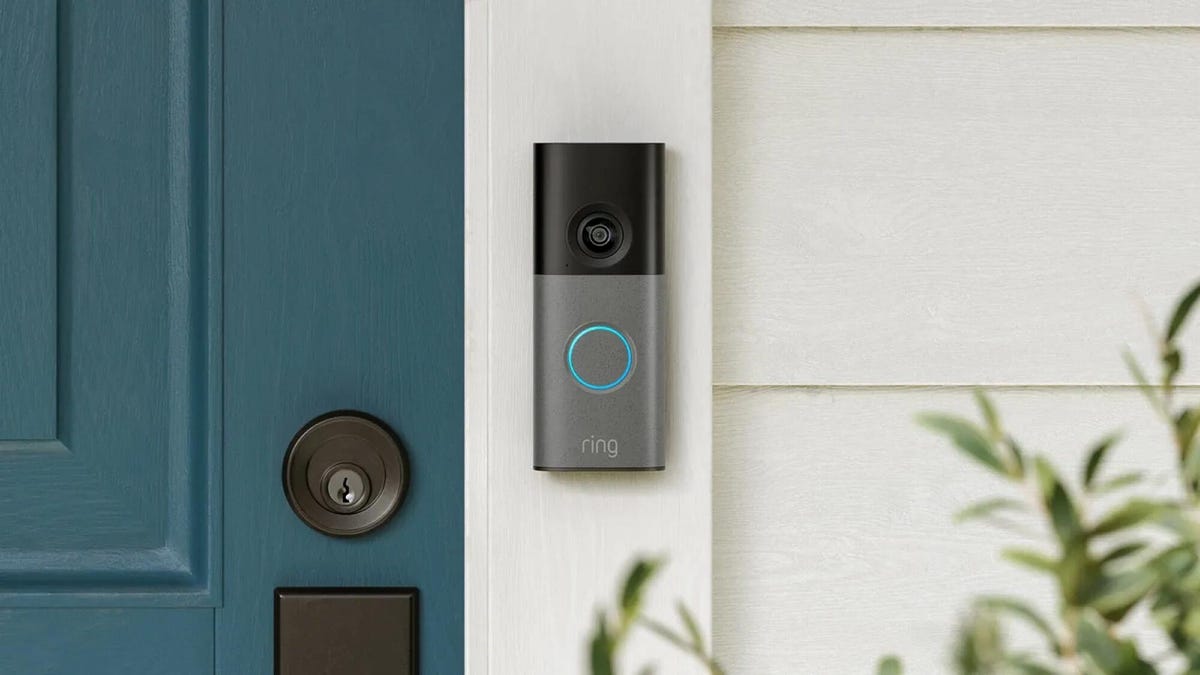
Security company Ring on Wednesday announced a significant expansion of its video doorbell line, notably battery-powered versions of both its 4K and 2K models, priced from $80.
Both Amazon’s Ring and Google Nest debuted high-resolution video doorbells with new AI features in the fall of 2025. But they were wired only, and in my tests, I kept thinking, «I sure wish there were battery models available.»
Wireless video doorbells are far better for most front doors than models that require connecting to your existing doorbell wiring, which is often poorly positioned for a security camera. Mine, for example, is located on a wall beside my door that’s useless for any kind of video views, no matter how you angle a lens.
«Enhancing image quality in battery-powered doorbells means customers can enjoy reliable performance with the flexibility to install devices in a way that suits their space, whether renting or living in homes without existing wiring,» a Ring spokesperson said.
At first, I wondered whether the higher 4K resolutions and more advanced AI features would use too much power to support batteries. If so, Ring is the first to fix that issue with this suite of doorbells, including these models available for preorder right now:
- Ring Battery Doorbell Pro — $250: This model offers up to 4K resolution and 10x zoom, and Ring says it features a redesigned internal architecture to support battery power.
- Ring Battery Doorbell Plus (2nd-gen) — $180: This model includes a quick-release battery pack along with 2K video.
- Ring Battery Doorbell (2nd-gen) — $100: This video doorbell includes 2K video, a 6x zoom and what Ring calls a «streamlined, rechargeable design,» which means you take the entire video doorbell to charge it, not just the battery — a design I greatly prefer, since Ring’s battery packs can get fiddly.
There’s also a new version of a Ring wired doorbell with 2K resolution, starting at $80. It wouldn’t be Ring without a plethora of doorbell devices to confuse newcomers, which is why I have a guide specifically for Ring video doorbells that will need some updating once I finish testing these new models.
Resolution plus an intelligence upgrade
Ring’s ordinary subscriptions of the Ring Protect plan give you cloud video storage and intelligent alerts for people, packages and vehicles, which are important but not really advanced AI. But spring for the $20-per-month Ring AI Pro cam, and this new generation of cameras opens up other capabilities.
Ring’s AI features include AI video descriptions, so if you get an alert, you can also get a summary of what the doorbell saw, including people and activities. A similar feature lets you search your video history with specific terms, such as «bike,» «truck» and so on. You also get the beta version of Ring’s Familiar Faces feature, which can ID logged faces of people who approach.
If these AI features make you uneasy and you’d rather protect your privacy, the best option is to avoid a subscription altogether or choose a lower-tier plan that gives you cloud storage without AI.
I also have a guide on how to turn off Ring’s detection and data-sharing features that might make you nervous, so you can keep what you like while ditching what you don’t.
Technologies
Today’s NYT Mini Crossword Answers for Thursday, March 26
Here are the answers for The New York Times Mini Crossword for March 26.
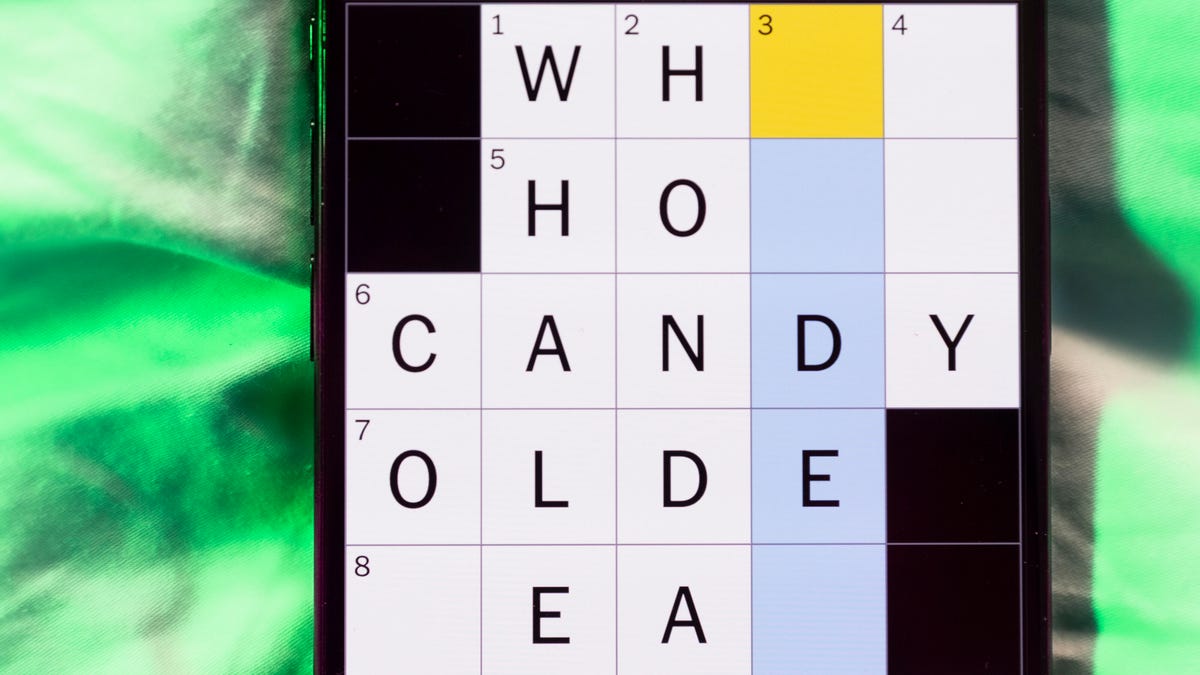
Looking for the most recent Mini Crossword answer? Click here for today’s Mini Crossword hints, as well as our daily answers and hints for The New York Times Wordle, Strands, Connections and Connections: Sports Edition puzzles.
Baseball is back! You’ll see baseball images patterned throughout today’s Mini Crossword grid, and when you solve the puzzle, they’ll spell out a certain word. Play ball! Er, read on for all the answers. And if you could use some hints and guidance for daily solving, check out our Mini Crossword tips.
If you’re looking for today’s Wordle, Connections, Connections: Sports Edition and Strands answers, you can visit CNET’s NYT puzzle hints page.
Read more: Tips and Tricks for Solving The New York Times Mini Crossword
Let’s get to those Mini Crossword clues and answers.
Mini across clues and answers
1A clue: Degrees for boardroom execs
Answer: MBAS
5A clue: «___ want for Christmas …»
Answer: ALLI
6A clue: What Hamlet holds while giving his «Alas, poor Yorick!» speech
Answer: SKULL
7A clue: Wild, as an animal
Answer: FERAL
8A clue: Sphere
Answer: ORB
Mini down clues and answers
1D clue: Word after «match» or «mischief»
Answer: MAKER
2D clue: Bit of writing on a book jacket
Answer: BLURB
3D clue: Penne ___ vodka
Answer: ALLA
4D clue: Window ledge
Answer: SILL
6D clue: Bay Area airport, for short
Answer: SFO
Technologies
McDonald’s KPop Demon Hunter Meals Include Bright Purple Nugget Sauce
The Derpy McFlurry mixes popping boba pearls and berry sauce into a soft-serve dessert.
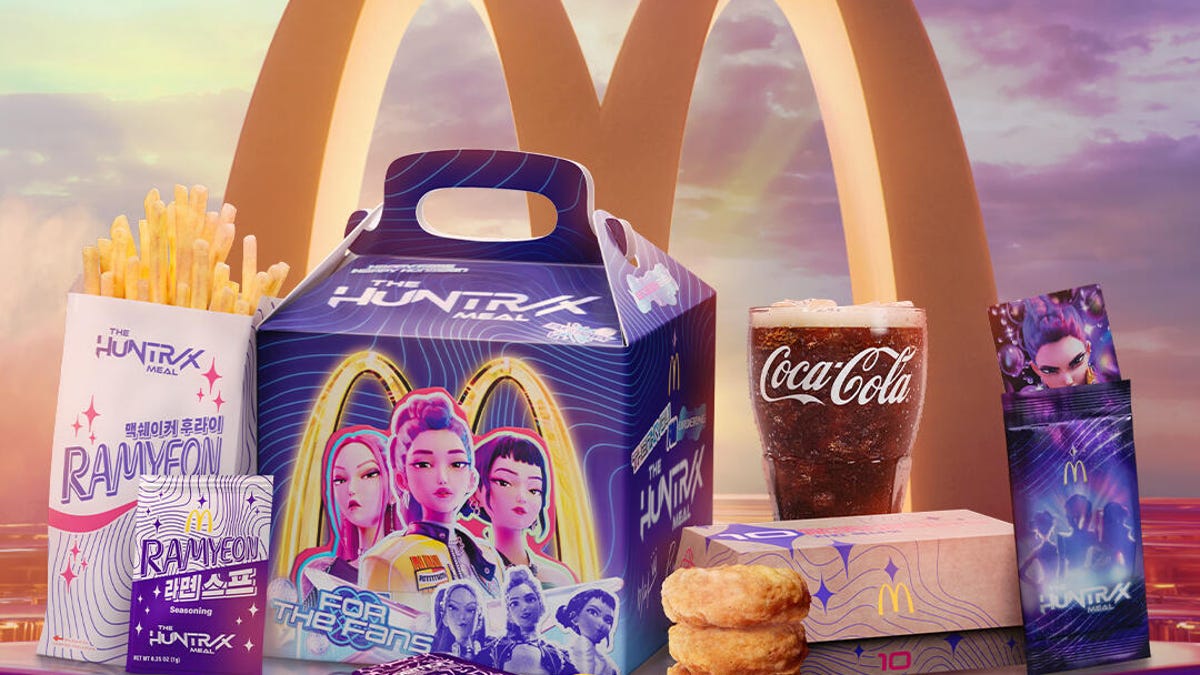
McDonald’s has seen success with themed combo meals, including its holiday Grinch Meal. Now, the fast-food chain is capitalizing on Netflix’s Oscar-winning animated film, KPop Demon Hunters, with new upcoming menu items and both a breakfast meal and a lunch/dinner offering. Let’s hope you like the color purple.
The HUNTR/X Meal, named for the K-pop girl group in the movie, is a 10-piece chicken McNuggets meal that includes a medium drink and three special menu items.
Ramyeon McShaker fries come with a small bag of soy, garlic, sesame and spice seasoning, along with regular McDonald’s french fries. You sprinkle the seasoning into the provided bag, dump in the fries, shake it all up and eat.
The meal includes two new sauces for the fries and nuggets. Hunter sauce is a sweet chili sauce mixing notes of chili, garlic and pepper. But my favorite item on this new menu is Demon sauce, a bold mustard sauce with some heat and a bold purple color. There’s just not enough dark purple food out there.
There’s also a new dessert, the Derpy McFlurry, which blends creamy vanilla soft serve with berry-flavored popping boba pearls, served with a swirl of wild berry sauce. McDonald’s named it for the supernatural feline, Derpy Tiger, from the movie.
If breakfast is your bag, the new morning meal is the Saja Boys Breakfast Meal, named for the movie’s boy band.
It includes a Spicy Saja McMuffin sandwich, which is a sausage McMuffin with egg and a spicy Saja sauce, hash browns and a small drink.
Both meals come with a photocard for one of the bands and a Derpy card. The Derpy card includes a QR code you can scan to unlock online content about the film.
The full KPop Demon Hunters menu should be available at participating McDonald’s beginning March 31.
The McDonald’s Grinch meal (and its accompanying patterned socks) sold out quickly, so KPop Demon Hunters fans may want to mark their calendars and nab a meal when they are released.
-
 Technologies3 года ago
Tech Companies Need to Be Held Accountable for Security, Experts Say
-
 Technologies3 года ago
Best Handheld Game Console in 2023
-
 Technologies3 года ago
Tighten Up Your VR Game With the Best Head Straps for Quest 2
-
 Technologies4 года ago
Black Friday 2021: The best deals on TVs, headphones, kitchenware, and more
-
 Technologies5 лет ago
Google to require vaccinations as Silicon Valley rethinks return-to-office policies
-
 Technologies5 лет ago
Verum, Wickr and Threema: next generation secured messengers
-
 Technologies4 года ago
Olivia Harlan Dekker for Verum Messenger
-
 Technologies4 года ago
The number of Сrypto Bank customers increased by 10% in five days