
Technologies
The Revelation I Got From Experiencing HaptX Is Wild
I tested gloves and buzzing things in Las Vegas to see where the future points.
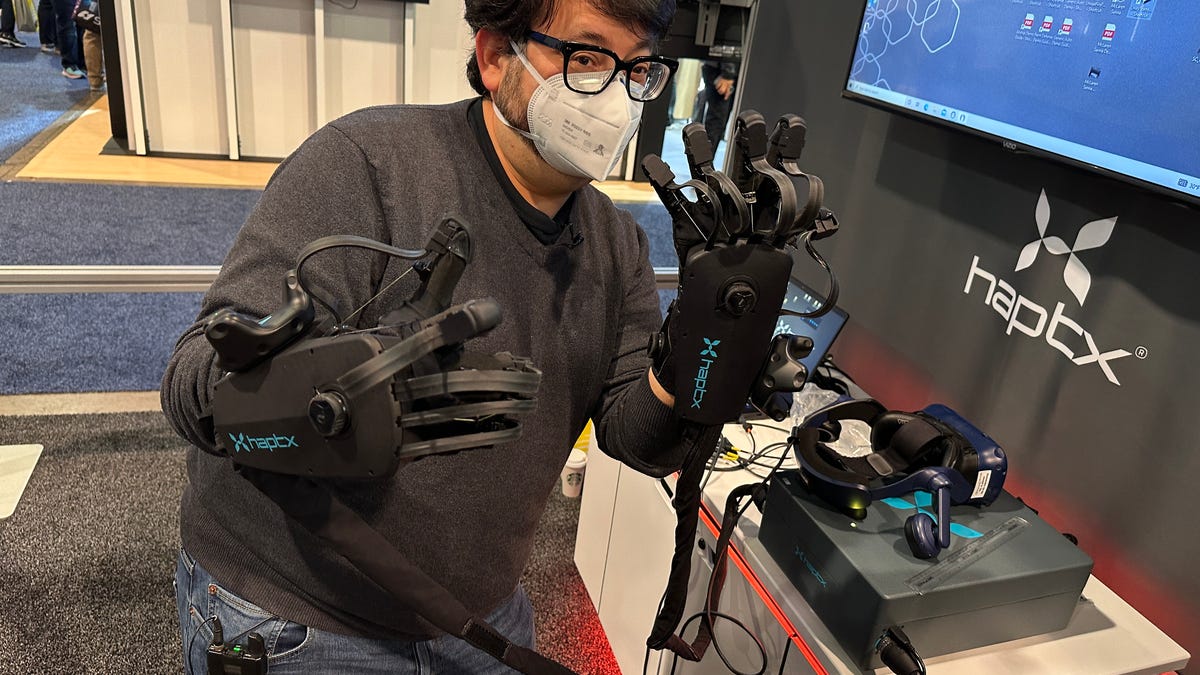
I put my hands out flat and loaded them into a pair of gloves loaded with joints, cables, pumps and tightening straps. All of this was connected to a backpack-size box that helped pump pressure around my fingers and create sensations of touching things. I was about to play Jenga in VR using an $80,000 pair of haptic gloves made by HaptX.
The future of the metaverse, or how we’ll dip into virtual worlds, seems to involve VR and AR, sometimes. If it does, it’ll also mean solving what we do with our hands. While companies like Meta are already researching ways that neural input bands and haptic gloves could replace controllers, none of that is coming for years. In the meantime, is there anything better than the VR game controllers already out there or basic camera-based hand tracking? I’ve tried a couple of haptic gloves before, but I was ready to try more.
I poked around CES 2023 in Las Vegas to get some experiences with devices I hadn’t tried before, and it suddenly hit me that there’s already a spectrum of options. Each of them was a little revelation.
High end: Massive power gloves
HaptX has been recognized for years as one of the best haptic gloves products on the market, but I’d never had a chance to experience them. The hardware is highly specialized and also extremely large and expensive. I wish I’d gotten a chance to see them at the last CES I attended before this, in 2020. Finally, in 2023, I got a chance.
The gloves use microfluidics, pumping air into small bladders that create touch sensations in 133 zones per hand across the fingers and palm. At the same time, cables on the backs of the fingers pull back to simulate up to 8 pounds of force feedback. Used with apps that support them, you can reach out, grab things and actually feel them.
I’ve tried lower-cost haptic gloves at home that didn’t have the air bladders but did have cables to apply resistance. The HaptX gloves are a big step forward and the most eerily realistic ones I’ve ever tried. I wouldn’t say everything «felt real,» but the poking finger-feelings I had in my fingers and palms let me feel shapes of things, while the resistance gave me a sense of grabbing and holding stuff.
The most amazing moments were when I placed objects on my palm and seemed to feel their weight. Also, when another person’s finger virtually touched mine. Another journalist was in another VR headset with haptic gloves playing Jenga next to me. We never made contact, but occasionally we shook hands virtually or gave high-fives. Our fingers touching felt… well, oddly real, like sensing someone’s finger touching your glove.
HaptX is making another pair of smaller, more mobile gloves later this year that cost less (about $5,000) while still promising the same level of feedback, plus tactile vibrations like the haptic buzzes you might feel with game controllers. I didn’t get to demo that, but I can’t wait.
While HaptX’s tech is wild, it’s meant for industrial purposes and simulations. It represents actual reality, but it’s so massive that it wouldn’t let me do anything else other than live in its simulated world. For instance, how would I type or pull out my phone? Still, I’ll dream of interfaces that let me feel as immersed as these gloves can accomplish.
Budget gloves: bHaptics’ TactGloves
At $300, bHaptics‘ yellow haptic gloves are far, far less expensive than HaptX. They’re also completely different. Instead of creating pressure or resistance, all they really do is have various zones inside that electrically buzz, like your phone, watch or game controller, to sync up with moments when your fingers in VR would virtually touch something. Strangely, it’s very effective. In a few demos I tried, pushing buttons and touching objects provided enough feedback to feel like I was really «clicking» a thing. Another demo, which had me hug a virtual avatar mirroring my movements or shake hands, gave enough contact to fool me into feeling I was touching them.
bHaptics also makes a haptic vest I tried called the TactSuit that vibrates with feedback with supported games and apps. There aren’t many apps that work ideally with haptic gloves right now, because no one’s using haptic gloves. But bHaptics’ support of the standalone Meta Quest 2, and its wireless Bluetooth pairing, means they’re actually portable… even if they look like giant janitorial cleaning gloves. The tradeoff with being so small and wireless is their range is short. I had to keep the gloves within about two feet of the headset, otherwise they’d lose connection.
The buzzing feedback didn’t prove to me that I could absolutely reach into other worlds, but they offered enough sensation to make hand tracking feel more precise, Instead of wondering whether my hand gestures had actually contacted a virtual object, I could get a buzzing confirmation. The whole experience reminded me of some sort of game controller feedback I could wear on my fingers, in a good way.
No gloves at all: Ultraleap’s Ultrasonics
Ultraleap, a company that’s specialized in hand tracking for years, has a different approach to haptics: sensations you can feel in the air. I waved my hand above a large rectangular panel and felt ripples and buzzes beneath my fingers. The feelings are created with ultrasonic waves, high-powered sound bursts that move air almost like super-precise fans against your fingers. I tried Ultraleap’s tech back in 2020, but trying the latest and more compact arrays this year made me think about a whole new use case. It was easy to make this logic leap, since Ultraleap’s booth also demonstrated hand tracking (without haptic feedback) on Pico Neo 3 and Lynx R1 VR and mixed reality headsets.
What if… this air vibration could be used for headsets? Ultraleap is already dreaming and planning for this solution, but right now ultrasonic tech is too power hungry, and the panels too large, for headgear. The tech is mainly being used in car interface concepts, where the hand gestures and feedback could make adjusting car controls while driving easier to use and less dangerous or awkward. The range of the sensations, at least several feet, seem ideal for the arm length and radius of most existing camera-based hand-tracking tech being used right now on devices like the Meta Quest 2.
I tried a demo where I adjusted a virtual volume slider by pinching and raising the volume up and down, while feeling discrete clicks to let me know I was doing something. I could feel a virtual «bar» in the air that I could feel and perhaps even move. The rippling, subtle buzzes are far more faint than those on haptic gloves or game controllers (or your smartwatch), but they could be just enough to give that extra sense that a virtual button press, for instance, actually succeeded…or that a gesture to turn something on or off was registered.
If these interfaces move to VR and AR, Ultreleap’s representatives said they’d likely end up in larger installations first: maybe theme park rides. Ultraleap’s tech is already in experiences like the hands-free Ninjago ride at Legoland, which I’ve tried with my kids. The 3D hand-tracking ride lets me throw stars at enemies, but sometimes I’m not sure my gestures were registered. What if buzzing let me know I was making successful hits?
Haptics are likely to come from stuff we already wear
Of course, I skipped the most obvious step for AR and VR haptic feedback: smartwatches and rings. We wear buzzing things on our wrists already. Apple’s future VR/AR device might work with the Apple Watch this way, and Meta, Google, Samsung, Qualcomm and others could follow a similar path with dovetailing products. I didn’t come across any wearable watch or ring VR/AR haptics at CES 2023 (unless I missed them). But I wouldn’t be surprised if they’re coming soon. If AR and VR are ever going to get small enough to wear more often, we’re going to need controls that are far smaller than game controllers… and ways to make gesture inputs feel far less weird. Believe the buzz: Haptics is better than you think.
Technologies
Samsung’s Galaxy Watch Ultra 2 Might Come in 5G and 4G Cellular Models
If the rumor proves true, the 5G Galaxy Watch Ultra would rival the 5G-enabled $799 Apple Watch Ultra 3 that debuted last fall.

Samsung’s next high-end Galaxy Watch could support faster 5G speeds, but if this leak is true, it will depend on where you live. The rumored Samsung Galaxy Watch Ultra 2 might come in 5G and 4G cellular models, with availability for each smartwatch depending on the country.
According to the Dutch website Galaxy Club (and spotted by SamMobile), Samsung’s servers may have revealed a series of model numbers that point to 5G, 4G and Wi-Fi-enabled editions of the next Galaxy Watch Ultra, which would succeed the original model that debuted in 2024.
A representative for Samsung did not immediately respond to a request for comment.
The Galaxy Club website speculates that the 5G edition would be sold in the US and Korean markets, while the 4G edition would sell in the rest of the world. In the US, a 5G version of the Galaxy Watch Ultra would rival the 5G-enabled $799 Apple Watch Ultra 3, which debuted last fall. The 4G edition would have broader compatibility worldwide, since the earlier network is far more established.
It will likely be a few months until we hear anything official about the Galaxy Watch Ultra 2. Samsung typically unveils its new watches in the summer alongside its Galaxy Z Fold and Z Flip foldable phones. Last year, Samsung unveiled the Galaxy Watch 8 and the Galaxy Watch 8 Classic, but otherwise left the prior 2024 Ultra in the lineup for those looking for a larger 47mm smartwatch.
Technologies
2 Cases Show Supreme Court Isn’t Holding ISPs Responsible for Piracy
Technologies
Today’s NYT Connections Hints, Answers and Help for April 8, #1032
Here are some hints and the answers for the NYT Connections puzzle for April 8, No. 1032.

Looking for the most recent Connections answers? Click here for today’s Connections hints, as well as our daily answers and hints for The New York Times Mini Crossword, Wordle, Connections: Sports Edition and Strands puzzles.
Today’s NYT Connections puzzle is kind of tough. The purple category is a fun one, once you see the connection. Read on for clues and today’s Connections answers.
The Times has a Connections Bot, like the one for Wordle. Go there after you play to receive a numeric score and to have the program analyze your answers. Players who are registered with the Times Games section can now nerd out by following their progress, including the number of puzzles completed, win rate, number of times they nabbed a perfect score and their win streak.
Read more: Hints, Tips and Strategies to Help You Win at NYT Connections Every Time
Hints for today’s Connections groups
Here are four hints for the groupings in today’s Connections puzzle, ranked from the easiest yellow group to the tough (and sometimes bizarre) purple group.
Yellow group hint: In the group.
Green group hint: Appearance details.
Blue group hint: Often found in gyms.
Purple group hint: They help you see.
Answers for today’s Connections groups
Yellow group: Cohort member.
Green group: Aesthetic.
Blue group: Kinds of bar apparatuses.
Purple group: Eyewear in the singular.
Read more: Wordle Cheat Sheet: Here Are the Most Popular Letters Used in English Words
What are today’s Connections answers?
The yellow words in today’s Connections
The theme is cohort member. The four answers are associate, colleague, fellow and peer.
The green words in today’s Connections
The theme is aesthetic. The four answers are design, look, scheme and style.
The blue words in today’s Connections
The theme is kinds of bar apparatuses. The four answers are monkey, parallel, pull-up and uneven.
The purple words in today’s Connections
The theme is eyewear in the singular. The four answers are contact, goggle, shade and spectacle.
-
 Technologies3 года ago
Tech Companies Need to Be Held Accountable for Security, Experts Say
-
 Technologies3 года ago
Best Handheld Game Console in 2023
-
 Technologies3 года ago
Tighten Up Your VR Game With the Best Head Straps for Quest 2
-
 Technologies4 года ago
Black Friday 2021: The best deals on TVs, headphones, kitchenware, and more
-
 Technologies5 лет ago
Google to require vaccinations as Silicon Valley rethinks return-to-office policies
-
 Technologies5 лет ago
Verum, Wickr and Threema: next generation secured messengers
-
 Technologies4 года ago
Olivia Harlan Dekker for Verum Messenger
-
 Technologies4 года ago
The number of Сrypto Bank customers increased by 10% in five days