

Technologies
GameStop Designates Xbox 360, PlayStation 3 and Wii U as Retro Consoles
The retailer also announced a limited-time trade-in bonus on the consoles and other older gaming equipment.

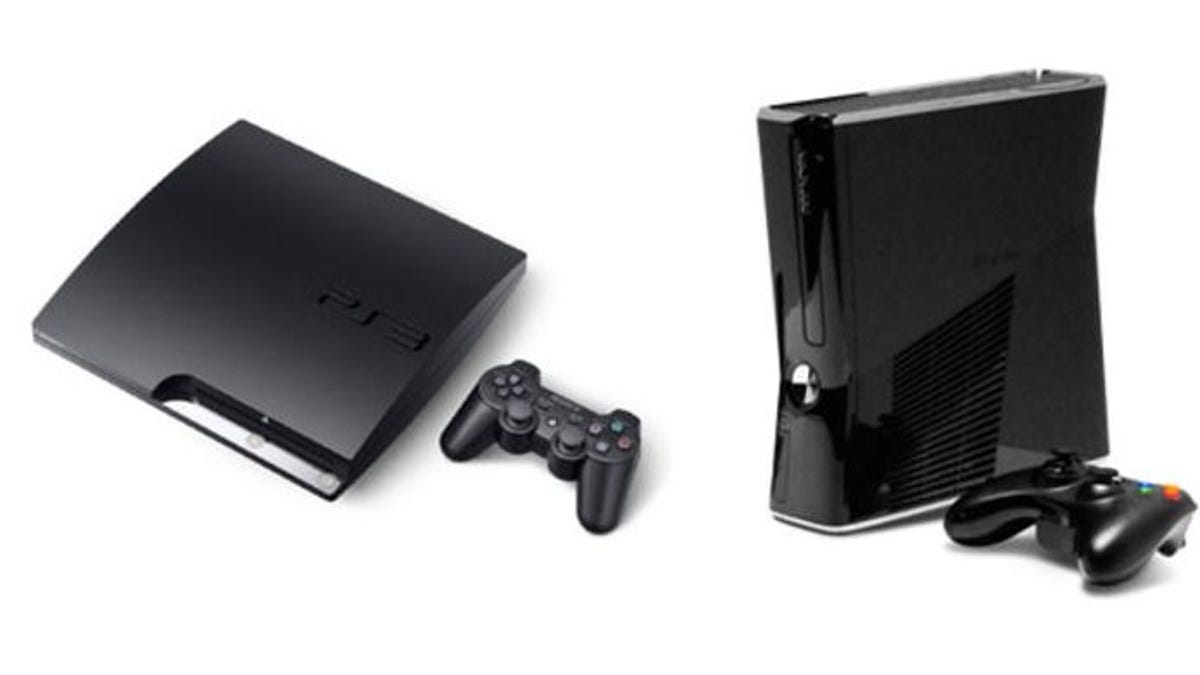
The consoles you grew up with are now officially retro. GameStop, the world’s largest brick-and-mortar video game retailer, announced Monday that it’s labelling multiple seventh- and eighth-generation home gaming consoles as «retro consoles.»
The Xbox 360, released in 2005; the PlayStation 3, released in 2006; and the Wii U, released in 2012, are now «historical artifacts» of the games industry, according to the retailer.
It’s hard to define the «retro» label in gaming circles. There’s a fierce debate over whether the transition from 2D to 3D graphics, the rise of online gaming or the adoption of digital audiovisual outputs should qualify consoles for the designation.
What matters most is that the definition of retro gaming is fluid, and GameStop has set forth its own criteria for redesignating these three home consoles.
«The ruling was reached following careful analysis of multiple indicators, including: the presence of component cables, the lack of Fortnite and the realization that [these consoles] launched when George W. Bush was still president,» the statement reads.
While that may feel like GameStop is reclassifying consoles based on vibes — the Wii U wasn’t even released during the Bush administration — there is at least some merit to these claims. The lack of component cables in newer consoles is proof enough that hardware has significantly evolved since the release of the reclassified consoles, and it has been a long time since they’ve been able to run any modern games (even something as ubiquitous as Fortnite). The Xbox 360 and PlayStation 3 are 20 years old. That’s about as «retro» as retro gets.
According to GameStop’s statement, it reclassified these consoles under its «Retro Classification Standard,» with the hardware joining the Sega Saturn and the Nintendo DS in the retro category.
A representative for GameStop did not immediately respond to a request for comment.
GameStop began a limited-time trade-in campaign for retro gaming equipment in accordance with the reclassification of these consoles.
Anyone who brings in an Xbox 360, PlayStation 3, Wii U or any console, game or gaming accessory that is older than the redesignated consoles will receive an additional 10% in trade-in credit. This offer ends on March 21.
The company also revised its retro console trade-in policy. Starting immediately, GameStop will accept defective retro consoles even if they are «non-operable, missing accessories or aesthetically unfortunate» as long as they can be powered on. This policy also applies to the Xbox 360, PlayStation 3 and Wii U home consoles.
Technologies
Dog Health Goes Digital With New AI Chatbot
Fi Intelligence allows you to ask questions of a specially tailored pet health chatbot, but it’s not meant to replace vet visits.

It might be time to rethink what it means to be sick as a dog. On Tuesday, Fi, a smart pet technology company, announced a new AI-powered chatbot to help owners stay on top of their dog’s health using a blend of personal information and generalized dog breed data.
The AI agent, which the company is calling Fi Intelligence, is integrated directly into the Fi app. It has access to all the information gathered about your dog across the entire suite of Fi products, including the Fi Series 3 Plus and Fi Mini dog collars, as well as information and documents uploaded by the pet owner. The service is for dogs only (not cats, rabbits or other pets).
If you already own a Fi smart collar, existing data will be incorporated into the AI agent’s dataset to help it answer your questions.
When creating Fi Intelligence, the company identified a multitude of common questions that dog owners have, including whether their animal friend is walking or sleeping enough, or scratching more than usual. The chatbot was created to help owners find answers to these questions quickly and easily, according to Fi.
Fi designed its agent to answer these questions using a mix of general information about a dog’s breed, personal information and biometric data gathered by Fi smart pet collars.
Pet owners can ask the chatbot questions in plain English and get back detailed responses. Fi Intelligence is equipped to answer general questions, contrast your dog’s current data to previous time periods and compare your dog’s data to other dogs of the same breed.
Fi says its chatbot is different from general-purpose AI agents because it has been trained on a proprietary dataset containing «the largest repository of real-world canine activity, sleep and behavior data in the world.»
Fi Intelligence doesn’t replace a trip to the vet — and the company stresses it’s not supposed to. Rather, the agent is supposed to grant owners «informed confidence» about their dog’s health and can help them «show up [to the vet] with specific, documented observations drawn from weeks of continuous data.»
«The strongest signal from our beta was that owners aren’t using this to replace their vet,» said Fi’s Vice President of Product Darrell Stone. «They’re using it to show up better prepared.»
According to Fi, the Fi Intelligence integration will provide the most complete dog health profile available in the app so far. Fi Intelligence is available to all Fi members immediately.
Technologies
Nvidia Teases DLSS 5 and Gamers Aren’t Impressed
The new AI technology is making some big changes to video game graphics that hardly anyone seems to like.
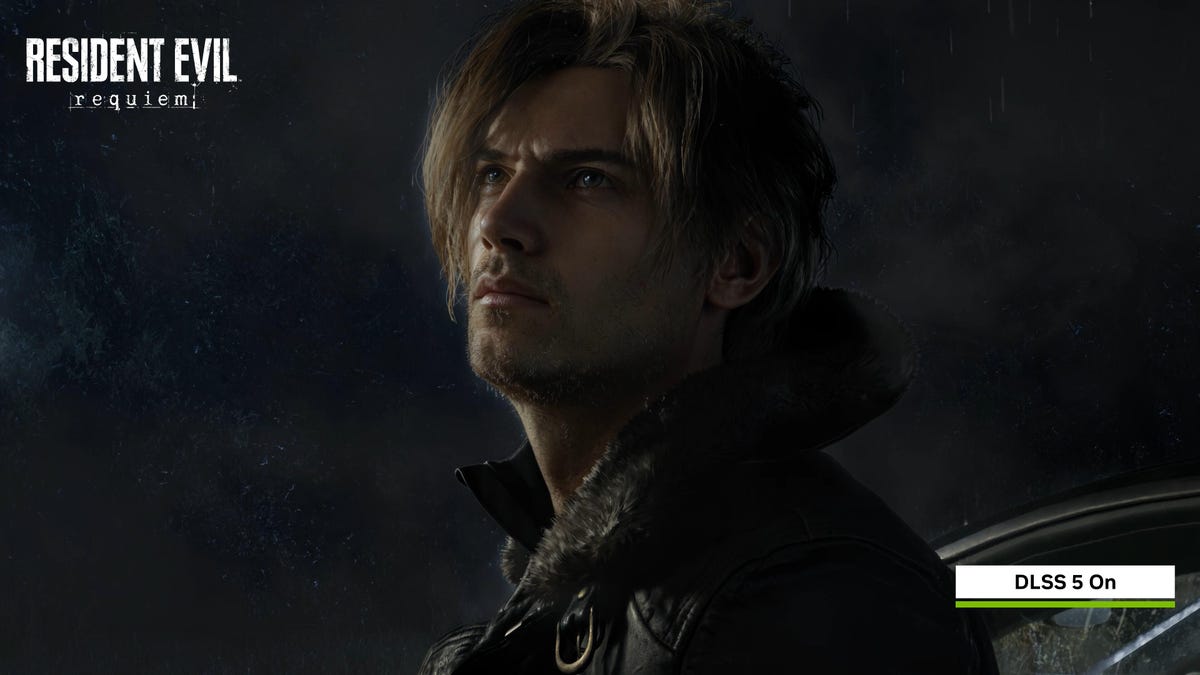
Nvidia opened its GTC conference with a keynote by CEO Jensen Huang, revealing the company’s latest tech. Among the raft of the company’s AI developments, gamers were treated to the imminent version of its AI-powered upscaling and optimization technology, DLSS (Deep Learning Super Sampling), touted as the «biggest breakthrough in computer graphics».
Nvidia published a video illustrating how DLSS 5 can enhance graphics in Resident Evil Requiem, Starfield and other games, showing before-and-after takes. But gamers weren’t thrilled. In fact, the response to DLSS 5 resembles more of a collective backlash, replete with memes, ridicule and outrage.
Gamers were quick to point out that DLSS 5 transformed the original graphics into something vastly different. Some called the visuals «AI slop» because they look like «yassified» AI-generated filters.
Many worry that DLSS 5 could deviate from a creator’s specific artistic vision. Critics also fear that if this technology becomes the industry standard, video game graphics might start to look the same, losing their unique visual identity.
«Everything about this is a betrayal of these game’s artistry,» said YouTuber The Sphere Hunter in a post on X Monday. «Painting over handcrafted, intentional 3D art with shiny, wrinkly, sunken-in, porous, puckered, fraudulent, filtered nonsense is deeply disrespectful. If you want this, just watch gen-AI videos all day.»
Countless memes mocking the tech’s exaggerated features flooded the internet. Others on social media parodied the effects DLSS 5 could produce in other games.
Ok, you convinced us, NVIDIA DLSS 5 is coming to «Copycat» too 😅 pic.twitter.com/WT2qRRz9EC
— Copycat // OUT NOW 😻 (@GameCopycat) March 17, 2026
In a Q&A on Tuesday, Huang addressed the backlash from gamers, calling them «completely wrong.» Huang underlined that DLSS 5 «enhances and adds generative capability, but it doesn’t change the artistic control» and that «it’s in the direct control of the game developer.»
The team at Digital Foundry, which specializes in game technology and hardware reviews, called it «disruptive and transformative» but was generally positive about it, though they saw some hiccups.
«[The images] looked a little bit uncanny, I would say, but definitely the overall portrayal of those characters is much more sophisticated,» said Oliver Mackenzie, video producer and writer for Digital Foundry.
Bethesda’s official X account replied to comments from members of Digital Foundry about Starfield and The Elder Scrolls IV: Oblivion Remastered, both published by Bethesda.
«This is a very early look, and our art teams will be further adjusting the lighting and final effect to look the way we think works best for each game. This will all be under our artists’ control, and totally optional for players,» the publisher said.
DLSS 5 is set to be released sometime in the fall.
What is DLSS?
Nvidia first released its DLSS tech back in 2018 with its RTX 2080 card: The RTX architecture introduced the Tensor cores, which are essential for accelerating the calculations used by the DLSS AI. The deep learning technology was designed to upscale images and video from low resolution in real time to achieve higher frame rates.
Gamers weren’t impressed at first, but later versions of the technology did perform better in games that supported it. DLSS 4, released last year and tweaked to 4.5 as of January, made significant improvements to detail rendering, reducing motion artifacts, boosting frame rates, and generating more realistic lighting via path tracing (which incorporates interactions with ray-traced lighting).
What does DLSS 5 do?
DLSS 5 works a bit differently than previous versions of the technology. According to Nvidia, DLSS 5 shifts from processing simple pixels to understanding 3D elements. By deconstructing characters into specific components — such as skin, hair and clothing — the AI can render them more consistently. This results in faster performance and much more realistic details, especially for textures and lighting.
Game developers control how DLSS 5 enhances images and to what degree, ensuring it matches the game’s aesthetic. The demo video showcased some positive enhancements, but others looked like sweeping changes to the characters and the environment.
Which games will support DLSS 5 at launch?
On Monday, Nvidia released a list of games slated to support DLSS 5:
- AION 2
- Assassin’s Creed Shadows
- Black State
- Cinder City
- Delta Force
- Hogwarts Legacy
- Justice
- Naraka: Bladepoint
- NTE: Neverness to Everness
- Phantom Blade Zero
- Resident Evil Requiem
- Sea of Remnants
- Starfield
- The Elder Scrolls IV: Oblivion Remastered
- Where Winds Meet
What cards will support DLSS 5?
Nvidia has yet to provide a list of GPUs that will support the new technology. In an FAQ, the company says it will release a list of supported cards closer to its release.
Technologies
TSA Staffing Shortages Are Causing a Mess at Airport Security Lines. How to Mitigate the Wait
Airport security professionals just missed their first paychecks due to the ongoing partial US government shutdown.

This past weekend, employees of the Transportation Security Administration missed their first full paycheck due to the partial government shutdown. Not surprisingly, many of those security officers have quit or stopped showing up for work, leading to airport staffing shortages.
The loss of TSA officers and a new batch of extreme weather in the Midwest and East Coast are creating havoc at airports across the US. Some travelers at Atlanta’s Hartfield-Jackson airport on Tuesday waited more than two hours in the security area before being allowed to travel to their gates, and Acting Deputy TSA Administrator Adam Stahl said that the government may need to shut down some airports completely.
Don’t be surprised when you get to the airport and see the security line trailing out into the parking lot. It’s easy to check security wait lines before you leave for the airport, so you know how long it will take you to get from check-in to your gate.
If you have spring break or other planned air travel coming soon, learn how you can check security line wait times so you can better plan your trip to the airport.
Check the official TSA app
The TSA maintains an app for mobile devices called MyTSA (iOS and Android) that lists security line wait times for airports around the US. The app is fairly basic and now includes a warning that «this website is not actively managed» due to the pause in federal funding, but it does include plenty of official TSA information about airline travel.
To check the wait times for specific US airports, tap the My Airports tab at the bottom of the app, then tap «Search Airports.» You can scroll through the alphabetical list of airports or type in an airport name or code in the search bar at the top.
Tap through to the airport of your choice, and you’ll see the current estimated security wait time at the top of the screen.
When I checked some of the major airports Tuesday afternoon — Los Angeles (LAX), Chicago O’Hare (ORD), Hartsfield-Jackson in Atlanta (ATL), JFK in New York (JFK) and Ronald Reagan in DC (DCA) — most had estimated relatively low wait times of 0 to 15 or 15 to 30 minutes (only JFK was 30-45 minutes).
Those estimates are a far cry from the two to four hours that airports are advising travelers to allow, but the times on the MyTSA app mostly matched the times listed on airport websites (see below). The only exception was Hartsfield-Jackson in Atlanta, which showed an estimate of 0-15 minutes on the MyTSA app, but slightly longer times on the airport website.
The MyTSA app also includes historical averages for each airport’s security line wait times by time of day.
Check your airport’s website
When I tested the TSA app, it didn’t list specific terminals at any of the airports. It only listed a time range for «All Terminals.»
If you want that sort of detailed information, your best bet is to use the official airport websites — most of the major ones now offer estimated security wait times. Some airports put those estimated times front and center on their websites; others require a little more exploration.
Most airport websites will break out the times for specific terminals. At some of the bigger airports, there’s often quite a disparity between the terminals.
Here are the web pages for estimated security wait lines for some of the most frequently traveled airports in the US:
- Hartsfield-Jackson Atlanta International Airport (ATL)
- Dallas Fort Worth International Airport (DFW)
- Denver International Airport (DEN)
- Los Angeles International Airport (LAX)
- John F. Kennedy International Airport (JFK) in New York
- Orlando International Airport (MCO)
- Charlotte Douglas International Airport (CLT)
- Miami International Airport (MIA)
I wasn’t able to find security line wait times on the websites for two of the busiest airports — O’Hare in Chicago and Harry Reid International Airport (LAS) in Las Vegas. For those, you’ll need to use the TSA app.
Save your spot in the security line
Numerous airports now allow travelers to reserve a specific time in the security line. At Seattle’s SeaTac Airport, you make a Spot Saver reservation and go to a specially marked entrance to the security checkpoint listed on your reservation. An employee scans the barcode you were emailed, and you’re ushered to the front. At SeaTac, you can be up to 15 minutes before or after your Spot Saver reservation, since airport timing is tough to estimate.
Here’s a list of some of those reservation sites. You can search for your airport name and «reserve security line spot» or something similar to see if your airport also has a program.
- Seattle-Tacoma International Airport (SEA): Spot Saver
- Minneapolis-St. Paul International Airport (MSP): MSP Reserve
- Denver International Airport (DEN): DEN Reserve
- Orlando International Airport (MCO): MCO Reserve
- Phoenix Sky Harbor International Airport (PHX): PHX Reserve
-
 Technologies3 года ago
Tech Companies Need to Be Held Accountable for Security, Experts Say
-
 Technologies3 года ago
Best Handheld Game Console in 2023
-
 Technologies3 года ago
Tighten Up Your VR Game With the Best Head Straps for Quest 2
-
 Technologies4 года ago
Black Friday 2021: The best deals on TVs, headphones, kitchenware, and more
-
 Technologies5 лет ago
Google to require vaccinations as Silicon Valley rethinks return-to-office policies
-
 Technologies5 лет ago
Verum, Wickr and Threema: next generation secured messengers
-
 Technologies4 года ago
Olivia Harlan Dekker for Verum Messenger
-
 Technologies5 лет ago
iPhone 13 event: How to watch Apple’s big announcement tomorrow


