

Technologies
Today’s NYT Connections Hints, Answers and Help for Jan. 4, #938
Here are some hints and the answers for the NYT Connections puzzle for Jan. 4 #938.


Looking for the most recent Connections answers? Click here for today’s Connections hints, as well as our daily answers and hints for The New York Times Mini Crossword, Wordle, Connections: Sports Edition and Strands puzzles.
Today’s NYT Connections puzzle has a butt joke! Or four, actually. The purple category is super bizarre, too. Read on for clues and today’s Connections answers.
The Times has a Connections Bot, like the one for Wordle. Go there after you play to receive a numeric score and to have the program analyze your answers. Players who are registered with the Times Games section can now nerd out by following their progress, including the number of puzzles completed, win rate, number of times they nabbed a perfect score and their win streak.
Read more: Hints, Tips and Strategies to Help You Win at NYT Connections Every Time
Hints for today’s Connections groups
Here are four hints for the groupings in today’s Connections puzzle, ranked from the easiest yellow group to the tough (and sometimes bizarre) purple group.
Yellow group hint: Extra, extra!
Green group hint: Wrap around.
Blue group hint: NFL duties.
Purple group hint: Derriere.
Answers for today’s Connections groups
Yellow group: Paper publication.
Green group: Spool.
Blue group: Things a defensive football player does.
Purple group: Synonyms for butt plus starting letter.
Read more: Wordle Cheat Sheet: Here Are the Most Popular Letters Used in English Words
What are today’s Connections answers?
The yellow words in today’s Connections
The theme is paper publication. The four answers are copy, edition, issue and print.
The green words in today’s Connections
The theme is spool. The four answers are coil, crank, reel and wind.
The blue words in today’s Connections
The theme is things a defensive football player does. The four answers are blitz, block, sack and tackle.
The purple words in today’s Connections
The theme is synonyms for butt plus starting letter. The four answers are drear (rear), etail (tail), grump (rump) and scan (can).
Don’t miss any of our unbiased tech content and lab-based reviews. Add CNET as a preferred Google source.
Toughest Connections puzzles
We’ve made a note of some of the toughest Connections puzzles so far. Maybe they’ll help you see patterns in future puzzles.
#5: Included «things you can set,» such as mood, record, table and volleyball.
#4: Included «one in a dozen,» such as egg, juror, month and rose.
#3: Included «streets on screen,» such as Elm, Fear, Jump and Sesame.
#2: Included «power ___» such as nap, plant, Ranger and trip.
#1: Included «things that can run,» such as candidate, faucet, mascara and nose.
Technologies
My CES 2026 Secret Weapon? This New Wearable AI Note-Taking Pin From Plaud
During a week of information overload, I’m outsourcing my memory to the Plaud NotePin S.
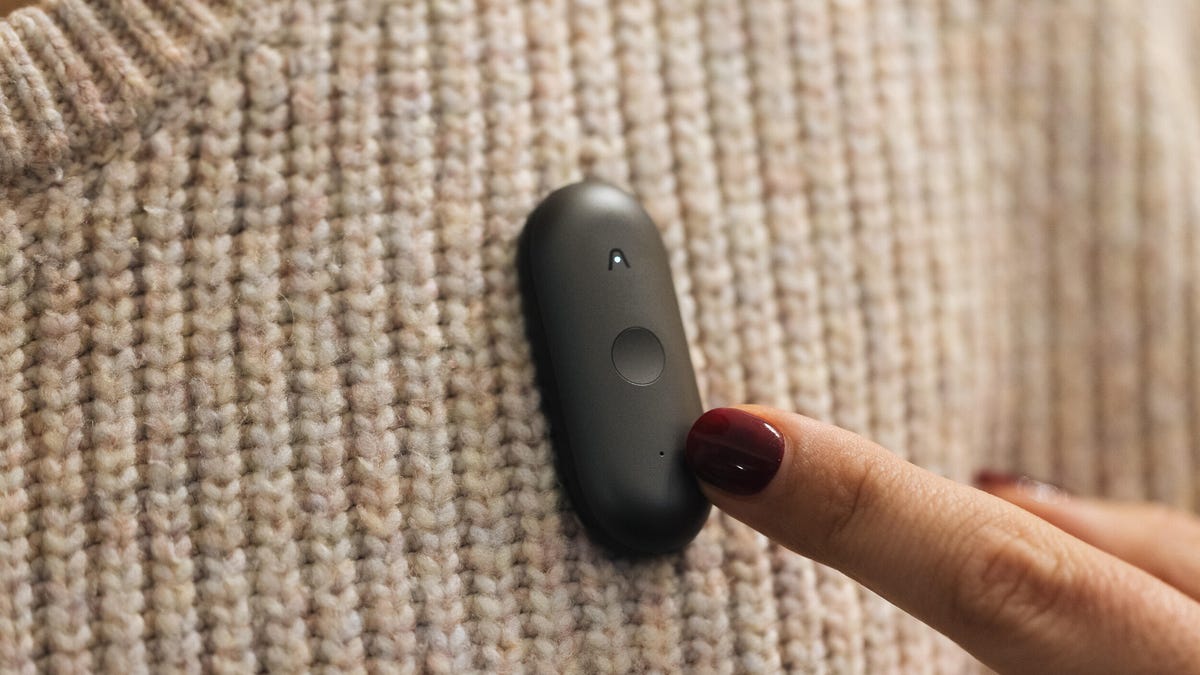
CES is always one of the most hectic weeks of the year for CNET journalists — myself included. I’ll be jumping between booths, often speaking to multiple different companies within the span of an hour, having interesting and intense conversations about different products as I go.
Sometimes these conversations begin before I’ve even had a chance to pull my recorder from my bag, never mind switch it on. Often I end up scribbling down extra details or quotes in my notepad — a fun challenge for my memory and eyes when the time comes to sit down and write and I’m forced to decipher my own handwriting.
Not this year, though. At CES 2026, AI note-taking company Plaud is launching its new NotePin S, an AI wearable that can clip to your collar, strap onto your wrist, hang around your neck or cling to your shirt with a magnet and record your conversations as you go about your day.
Plaud sent me this updated version of the NotePin ahead of CES, so I’ll be able to test it out as I wander the show floors. Just as with the previous version of the pin and the Plaud Note Pro, which the company announced back in August, the NotePin S connects to your phone via Bluetooth, and transcriptions of your conversations will appear in the Plaud app.
I already expect the NotePin S, which is a sleek pill-shaped device that’s smaller than a USB stick, to be a game changer for me as I roam the halls of CES. In a briefing ahead of the show, Plaud said that the pin had been successfully tested out at the Dreamforce conference earlier this year, so I know the dual microphones, which have a range of around 9.8 feet, are capable of working well in a noisy convention center.
To activate the recording, all I’ll need to do is long press on the front of the pin. But the feature I’m most looking forward to testing out is the press to highlight button on the pin, which will allow me to mark key moments in conversations so they’ll be easy to find when I come to look through my transcriptions later.
I’m also glad that, thanks to the range of the wearable accessories bundled with the NotePin S, the device will work with a variety of different outfits. In such a busy environment, I might be tempted to use the lanyard to carry it around my neck, but on the days I’m wearing a jacket, the lapel clip might be more suitable. For sit-down interviews, I’m tempted to switch to wristband so that I can press to highlight with the least amount of intrusion into the conversation.
For when I’m back home, conducting interviews from the comfort of my office, Plaud has another new toy for me to play with. At CES the company also announced Plaud Desktop — an AI notetaker designed to bridge in-person and online meetings by capturing your conversations natively.
This means no intrusive meeting bots joining your call. (If you know, you know.) Instead, it will sit on your computer and detect when a meeting is taking place, record that meeting discreetly and then provide a context-rich summary within your Plaud account.
The most appealing part of this for me is the idea that all of my notes, meetings and conversations — whether captured by my wearable or my computer — will be accessible and organized in one place.
Both the NotePin S and Plaud Desktop will be available immediately, with the pin costing $179 (£159).
Technologies
Belkin’s CES 2026 Lineup Can Keep Your Phone Charged for Days (and Protect Its Screen, Too)
The accessory maker has a mix of fast-charging power banks, liquid screen protectors and even a case that charges your Nintendo Switch 2.
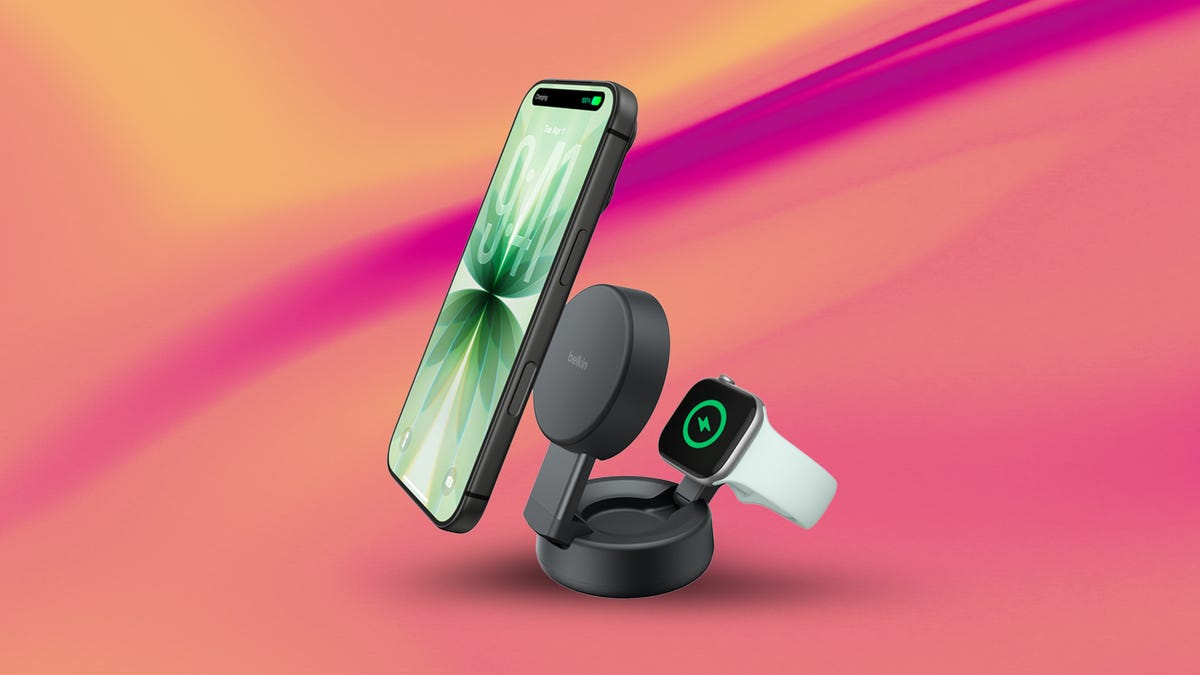
While CES 2026 won’t be too focused on phones, Belkin has a suite of new products to keep them charged and their displays protected. There are even a few products specifically designed for laptops and gamers.
Belkin’s main offering is a trio of power banks to recharge your devices on the go. The UltraCharge Pro Power Bank 10K, unsurprisingly, boasts a 10,000-mAh capacity. This power bank can charge two devices simultaneously, either via USB-C at 30W or wirelessly at 25W. It’ll be available in February. It’s priced at $100, which roughly converts to $75 or AU$150.
The BoostCharge Slim Magnetic Power Bank with Stand is available in two capacities: 5,000-mAh ($60) and 10,000-mAh ($85), with wired charging speeds of 20W and 30W, respectively. Both also offer 15W wireless charging and will be available in the second quarter of 2026.
Lastly among the power banks, the $150 UltraCharge Pro Laptop 27K has a 27,000-mAh capacity and can charge with up to 240W total output among its multiple ports, which can charge up to three devices at once. It also has a small display to show the remaining battery percentage. This power bank will be available in March.
The company is also adding to its lineup of Nintendo Switch 2 charging cases with a new $100 Pro model. This one has a removable 10,000-mAh power bank, which charges at 30W, and an LCD screen to show how much battery is left.
Belkin also has a pair of wireless chargers that support the Qi2 standard at 25W charging speeds. The UltraCharge Pro 2-in-1 ($100) can charge an iPhone and Apple Watch simultaneously and will be available in March. The UltraCharge Modular Charging Dock ($65) can charge up to three devices at once, via two wireless pads and one watch puck (charging at 10W). It’ll be available in the first quarter of 2026.
Belkin’s trio of screen protectors at CES
Belkin has a new line of screen protectors to safeguard the window to your digital world — and one of them is partially made of liquid.
While the Gorilla Glass used in the screens of most phones is durable, it’s still breakable, and one bad drop could turn a clear display into a spiderweb of regret. Screen protectors are cheap protective layers to reinforce surfaces and reassure phone owners. Belkin’s trio of products, debuting in Las Vegas at CES, defend against display cracks in different ways.
The first of these, the Titan LiquidGuard, uses a combination of water-based silicon oxide, graphene and what Belkin calls Nano-Titan Technology to reinforce phone displays at «the molecular level.» Retailing for $60, this protector has a $300 screen repair guarantee.
The Titan SmartShield is a conventional rigid screen protector with a surface hardness that’s rated for up to 2 meters of drop protection. The glass making up the SmartShield is made with up to 60% recycled materials, and retails for $50.
The $50 Titan EcoGuard protects phone screens with an anti-reflective coating. It’s made of 97% preconsumer recycled materials. For $60, two more premium versions of the EcoGuard offer a privacy screen to obscure your phone from onlookers and a red light protector that diminishes blue light, which can keep you up late at night. All three EcoGuard protectors use 100% recycled material in their packaging.
In addition to a standard warranty, Belkin is offering a new Wear and Tear program to replace screen protectors worn down by everyday use and accidents for free — all you’ll need to pay for is shipping ($10 in the US).
Technologies
Xreal’s Latest Glasses Get Better and Cheaper. And There’s a Switch Dock, Too
I loved playing Switch games on the Xreal 1S glasses, but getting them connected is a little awkward.
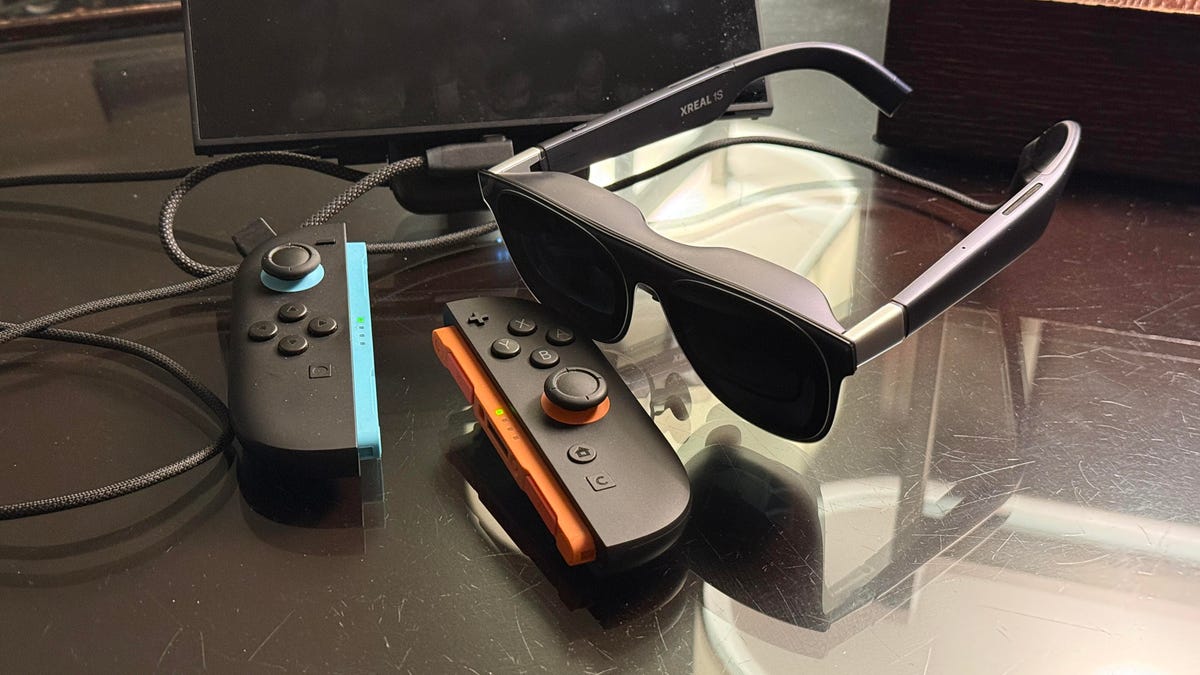
Smart glasses are in a period of rapidly accelerating change, and quick updates seem to be the norm. My favorite display glasses last year, the Xreal One, won me over because they have great displays with tons of adjustment options, including the ability to pin a display in place. The new Xreal 1S, which I saw ahead of CES 2026, does those glasses one better with more gaming-focused display updates and better resolution. But the best part is that I’m now connecting them with a Nintendo Switch 2, thanks to Xreal’s new $100 Neo mini-dock.
The $450 Xreal 1S is, in fact, better overall than the more expensive Xreal One Pro, which is still on sale. The Pro has a different and flatter lens system that keeps glare down when it’s worn. All these glasses still use «birdbath» displays that project vivid micro OLED images above your eyes down to you via half-mirrored prisms, but the Xreal 1S’s displays have a slightly larger 52-degree field of view (up from 50), 700 nits of brightness (100 more than before) and a 16:10 ratio, 1,200-pixel resolution. That’s better than the Pro’s 1080p resolution, and it’s in a ratio that fits gaming display modes better.
I’ve been trying a pair with prescription insert lenses (the 1S works with the same inserts as the Xreal One), and they look great. Xreal also updated its onboard processing tricks, adding automatic 3D media conversion via the glasses’ own chipset. The mode, which is in beta, feels pretty rough, though. Steam Deck and Switch games (or movies, or your own phone screen) can look 3D, but the autoconversion is imprecise and significantly lowers the frame rate on everything.
The 1S would be my top pick now over the Xreal One Pro, if it weren’t for the fact that I like the One Pro’s lenses better. But it’s likely that Xreal will update the Pro with the 1S’ new displays sometime soon. You might want to wait.
What I love even more than the glasses update is the Neo battery pack. It’s a new $100 mini-dock that acts as a passthrough converter to work with the Nintendo Switch. It works with existing Xreal glasses as well as the new 1S, and I’m already loving how portable it is. Unlike the Steam Deck, Windows handhelds and phones and laptops, the Switch doesn’t work natively with display glasses. But Xreal found a workaround somehow that functions fine, even with Nintendo’s lockdown firmware.
The 10,000-mAh battery pack can be used to charge anything and pass video through via USB-C. There’s a magnet on the back that snaps onto phones, and a kickstand too — but the Neo doesn’t have contactless charging. You have to connect using a built-in USB-C cable.
This isn’t my first time playing Switch games using display glasses and a dock. Last year, I tried Viture’s similar 10,000-mAh dock, which is compatible with the Switch and Switch 2. Neither company’s dock works with the other’s glasses for Switch gaming, though, which is a bummer. Viture’s battery dock allows two glasses to connect at once, but it’s almost twice the size. I like that the Neo is about as small as any other battery pack I typically take with me.
If only these docks weren’t awkward to connect, though. Xreal does its best, but the Switch 2 only supports video-out through its bottom USB-C port, not the top one. The Neo comes with a magnetic sticker you can put on the back of the Switch, allowing you to snap it onto the Neo in kickstand mode. This allows it to hover in the air slightly, so you can plug in the cable underneath. But the Switch in docked mode only works with Joy-Con controllers detached, so you’ll have to rest the whole Switch setup next to you.
I love the experience once it’s all set up, but using the dock is likely a step too far for most people — even if they like the idea of gaming with glasses on a Switch 2. But I’ll tell you it feels like playing in a little home theater, and games I’ve tried look great in micro OLED. Mario Kart World, Donkey Kong Bananza and Kirby Air Riders play fantastically. The only one that has had performance issues so far is Metroid Prime 4, which slows down and becomes unplayable using the Neo dock. Also odd: The Switch 2 kept asking me if I wanted to update the dock’s firmware, which wouldn’t work anyway. (I said no.) Clearly, the Switch 2 doesn’t exactly form a perfect handshake here.
But I seriously hope Nintendo works in glasses support on the next Switch 2, because Xreal and Viture have already shown me that it can be fun… if you feel motivated to buy display glasses and a dock that cost more than the Switch 2 itself.
-
 Technologies3 года ago
Tech Companies Need to Be Held Accountable for Security, Experts Say
-
 Technologies3 года ago
Best Handheld Game Console in 2023
-
 Technologies3 года ago
Tighten Up Your VR Game With the Best Head Straps for Quest 2
-
 Technologies4 года ago
Black Friday 2021: The best deals on TVs, headphones, kitchenware, and more
-
 Technologies4 года ago
Verum, Wickr and Threema: next generation secured messengers
-
 Technologies4 года ago
Google to require vaccinations as Silicon Valley rethinks return-to-office policies
-
 Technologies4 года ago
Olivia Harlan Dekker for Verum Messenger
-
 Technologies4 года ago
iPhone 13 event: How to watch Apple’s big announcement tomorrow


