

Technologies
Make the Switch From iPhone to Android: Easy Tips for Changing Your Phone
A switch from an Apple iPhone to an Android one may sound scary, but a few essential steps can make the move easier to do.

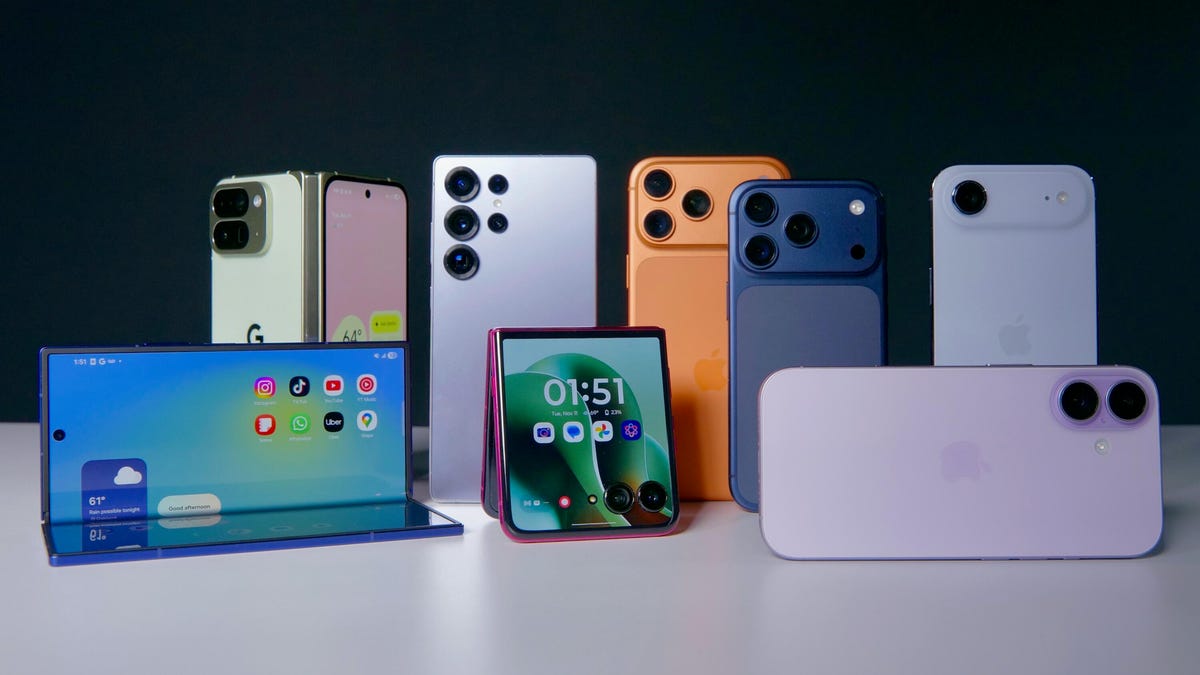
With so many excellent Android phones on the market, iPhone owners have plenty of reasons to consider making the switch to Google’s mobile operating system. Seeing as you can use many of the same apps, make calls, watch videos and take photos whether you are using an iPhone or an Android phone, your options expand greatly by being open to swapping to the other phone operating system. You could even try out a different type of phone that isn’t currently made by Apple, such as one with a foldable screen or a 200-megapixel camera.
Yet, making the switch can be pretty intimidating if you’ve never done so before, especially if you’ve spent many years with an iPhone. Making the switch from iPhone to Android isn’t just switching phones; it’s switching ecosystems too. But the process is a lot easier than you think! Whether you’re switching to a Pixel, a Samsung or another Android handheld, we’ve got you covered.
But first: Back up and prep
Before you do anything, we highly recommend backing up your existing iPhone. Not only do you want to make sure that all of your precious data is stored away in case something goes awry, but this also makes it a lot easier if you just want to transfer specific data like photos and videos. You can backup to iCloud, though you might have an easier time later on if you use Google One.
In addition to backing up, we also recommend checking the transfer process of any authenticator apps and password managers. You don’t want to get locked out of any important apps or services on your new phone.
Next, turn off FaceTime and iMessage on your iPhone so you don’t miss any incoming calls or messages. To disable FaceTime, head to Settings, FaceTime and then select Turn off FaceTime. To disable iMessage, head to Settings, then Messages and then select Turn off iMessage. Alternatively, you can also deregister iMessage by heading to this Apple support page.
You should also sign up for a Google account if you don’t already have one. You don’t necessarily need one to use an Android phone, but it does significantly improve the experience since it allows you to use Google services like Gmail and Google Photos.
Lastly, ensure both the iPhone and your new Android handheld are powered on and charged to at least 80% battery life, and you’re ready to start.
Transferring your data with a cable
There are a few ways to transfer data from your iPhone to your new Android handset. The easiest and fastest way to do so is with a cable. If you have an iPhone 15 or newer you can use a USB-C to USB-C cable, but if you have an older iPhone you’ll have to either get a USB-C to Lightning cable or a USB-C adapter.
Different Android handsets might have slightly different procedures, but generally speaking, you follow the on-screen instructions when setting up your phone. If you’re switching to a Pixel, you should see Set up using another device, at which point select iPhone or iPad.
When prompted, activate your SIM (be it physical or eSIM) and set up your biometrics as well — most Android phones use a fingerprint sensor. You would then select Copy data from your iPhone. You will also be prompted to connect both devices using a cable.
After connecting the two phones, you will then be asked to select the data types you want to transfer, such as Contacts, Photos, Messages and more. Obviously, the more data types you select, the longer the transfer process will take. You can also choose to copy Apps, which will essentially bring up a list of matching apps over on Google Play that you can then download.
While most of your data should be able to transition over to your Android phone, keep in mind that some specific services might not be available. For instance, CNET Video Producer Carly Marsh tried to make the switch from iPhone to a Motorola Razr, but found that her Apple notes could not naturally transition without manually moving them to Google Keep first.
Transferring your data wirelessly or with an app
Certain Android handsets offer a way to transfer data wirelessly with the help of an app. If you’re switching from an iPhone to a Pixel, you can download the Android Switch App. If you’re switching to a Samsung device, you can get the Samsung Smart Switch Mobile app instead.
You would do the same exact setup on your Android phone — signing up on the Google account, activating the SIM card, etc. — but when it comes time to connect the two devices, you can select Copy without cable or Transfer wirelessly depending on the app. You might be prompted to enter your Apple ID password if your iPhone uses encryption for backup.
Transferring data from the cloud
If you don’t have too much data to transfer, or you’d rather just set up your Android phone as new, you can also choose to transfer your data from the cloud. This applies only to select data, however. If you use Google One, you can sync only photos, videos, contacts and calendars. To do so, simply backup your iPhone’s data with Google One and then open the Google One app on your Android phone.
If you use Samsung’s Smart Switch app, you have the option to transfer your iCloud data to your new Samsung phone. You would select Get data from iCloud and then login when prompted.
Set up your wallet, chat apps and other services
Much like the authenticator apps mentioned earlier, there are some services that can be used on only one phone at a time. All the cards in your Apple Wallet, for example, will have to be transferred to Google Wallet. Certain transit cards, like San Francisco’s Clipper card, for example, will need to be deleted from your old phone before it can be transferred to your new one. If you’re using the Clipper app instead, you’ll need to set up a new card on your Android device.
Popular chat apps like WhatsApp and Signal have specific instructions (here and here) for moving to new phones. For both of these, you’ll have to backup existing conversations in order to avoid losing them. Backing up WhatsApp chats is free. Signal’s Secure Backup allows you to store and transfer your texts and 45 days of media attachments for free, and charges $2 per month to store up to 100GB of media.
Technologies
Today’s NYT Connections: Sports Edition Hints and Answers for Jan. 1, #465
Here are hints and the answers for the NYT Connections: Sports Edition puzzle for Jan. 1, No. 465.
Looking for the most recent regular Connections answers? Click here for today’s Connections hints, as well as our daily answers and hints for The New York Times Mini Crossword, Wordle and Strands puzzles.
Today’s Connections: Sports Edition includes a fun mix of topics, especially if you’re from the City of Brotherly Love. If you’re struggling with it but still want to solve it, read on for hints and the answers.
Connections: Sports Edition is published by The Athletic, the subscription-based sports journalism site owned by The Times. It doesn’t appear in the NYT Games app, but it does in The Athletic’s own app. Or you can play it for free online.
Read more: NYT Connections: Sports Edition Puzzle Comes Out of Beta
Hints for today’s Connections: Sports Edition groups
Here are four hints for the groupings in today’s Connections: Sports Edition puzzle, ranked from the easiest yellow group to the tough (and sometimes bizarre) purple group.
Yellow group hint: Defensive move in hoops.
Green group hint: Alma mater.
Blue group hint: Go Birds.
Purple group hint: Not five, not seven.
Answers for today’s Connections: Sports Edition groups
Yellow group: Try to stop a basketball shot.
Green group: Locations of college football playoff teams.
Blue group: First names of Philadelphia Eagles.
Purple group: ____ six.
Read more: Wordle Cheat Sheet: Here Are the Most Popular Letters Used in English Words
What are today’s Connections: Sports Edition answers?
The yellow words in today’s Connections
The theme is try to stop a basketball shot. The four answers are challenge, close out, contest and defend.
The green words in today’s Connections
The theme is locations of college football playoff teams. The four answers are Athens, Bloomington, Eugene and Oxford.
The blue words in today’s Connections
The theme is first names of Philadelphia Eagles. The four answers are Cooper, Dallas, Jalen and Saquon.
The purple words in today’s Connections
The theme is ____ six. The four answers are kick, New Year’s, original and pick.
Don’t miss any of our unbiased tech content and lab-based reviews. Add CNET as a preferred Google source.
Technologies
Today’s NYT Mini Crossword Answers for Thursday, Jan. 1
Here are the answers for The New York Times Mini Crossword for Jan. 1.

Looking for the most recent Mini Crossword answer? Click here for today’s Mini Crossword hints, as well as our daily answers and hints for The New York Times Wordle, Strands, Connections and Connections: Sports Edition puzzles.
Happy New Year! Need some help with today’s Mini Crossword? Read on. And if you could use some hints and guidance for daily solving, check out our Mini Crossword tips.
If you’re looking for today’s Wordle, Connections, Connections: Sports Edition and Strands answers, you can visit CNET’s NYT puzzle hints page.
Read more: Tips and Tricks for Solving The New York Times Mini Crossword
Let’s get to those Mini Crossword clues and answers.
Mini across clues and answers
1A clue: Word on either side of «___-eat-___»
Answer: DOG
4A clue: Word on either side of «___, all ___!»
Answer: MINE
5A clue: Word on either side of «___ say ___»
Answer: NEVER
6A clue: First-string squad
Answer: ATEAM
7A clue: Causes injury to
Answer: HARMS
Mini down clues and answers
1D clue: Someone who might be swimming with the fishes
Answer: DIVER
2D clue: An hour past midnight
Answer: ONEAM
3D clue: Hand sanitizer targets
Answer: GERMS
4D clue: Like a crossword clue about crossword clues
Answer: META
5D clue: «I’ll pass, thanks»
Answer: NAH
Don’t miss any of our unbiased tech content and lab-based reviews. Add CNET as a preferred Google source.
Technologies
Today’s NYT Strands Hints, Answers and Help for Jan. 1, #669
Here are hints and answers for the NYT Strands puzzle for Jan. 1, No. 669.

Looking for the most recent Strands answer? Click here for our daily Strands hints, as well as our daily answers and hints for The New York Times Mini Crossword, Wordle, Connections and Connections: Sports Edition puzzles.
Today’s NYT Strands puzzle could be tough, but it’s a fun topic. Some of the answers are long and difficult to unscramble, so if you need hints and answers, read on.
I go into depth about the rules for Strands in this story.
If you’re looking for today’s Wordle, Connections and Mini Crossword answers, you can visit CNET’s NYT puzzle hints page.
Read more: NYT Connections Turns 1: These Are the 5 Toughest Puzzles So Far
Hint for today’s Strands puzzle
Today’s Strands theme is: Not your average joe.
If that doesn’t help you, here’s a clue: For Starbucks’ lovers.
Clue words to unlock in-game hints
Your goal is to find hidden words that fit the puzzle’s theme. If you’re stuck, find any words you can. Every time you find three words of four letters or more, Strands will reveal one of the theme words. These are the words I used to get those hints but any words of four or more letters that you find will work:
- SORT, BOLT, GENT, ROTS, VALE, SCAR, MEAT, TEAM, LACE, BITER, BOTS, LOTS, SOOT
Answers for today’s Strands puzzle
These are the answers that tie into the theme. The goal of the puzzle is to find them all, including the spangram, a theme word that reaches from one side of the puzzle to the other. When you have all of them (I originally thought there were always eight but learned that the number can vary), every letter on the board will be used. Here are the nonspangram answers:
- BOLD, NUTTY, BITTER, SMOOTH, STRONG, AROMATIC, VELVETY
Today’s Strands spangram
Today’s Strands spangram is COFFEE. To find it, start with the C that’s five letters down on the far-left row, and wind across.
Don’t miss any of our unbiased tech content and lab-based reviews. Add CNET as a preferred Google source.
-
 Technologies3 года ago
Tech Companies Need to Be Held Accountable for Security, Experts Say
-
 Technologies3 года ago
Best Handheld Game Console in 2023
-
 Technologies3 года ago
Tighten Up Your VR Game With the Best Head Straps for Quest 2
-
 Technologies4 года ago
Black Friday 2021: The best deals on TVs, headphones, kitchenware, and more
-
 Technologies4 года ago
Verum, Wickr and Threema: next generation secured messengers
-
 Technologies4 года ago
Google to require vaccinations as Silicon Valley rethinks return-to-office policies
-
 Technologies4 года ago
Olivia Harlan Dekker for Verum Messenger
-
 Technologies4 года ago
iPhone 13 event: How to watch Apple’s big announcement tomorrow


