
Technologies
The Apple iPhone 17 Pro Keeps Cool While Playing the Hottest Mobile Games
Its cooling vapor chamber is a standout feature for the powerful phone, though its design isn’t the best for gaming.
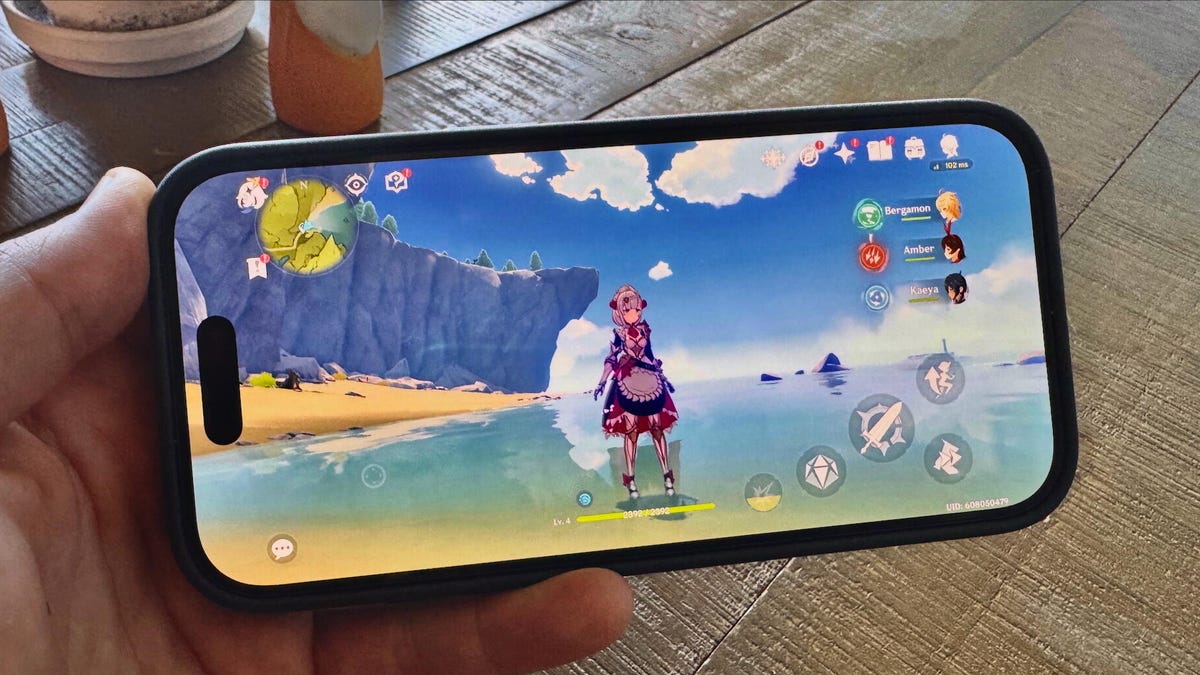
The iPhone 17 Pro is the best phone Apple has ever released — top specs, long battery life, a crisp screen and outstanding cameras. The first three also make it a great gaming device, but how great? I decided to test it to find out. And if you can find another phone that doesn’t heat up when playing a graphics-intensive, console-quality game like Resident Evil 8, I’d like to see it.
Most games will play on even the lowest performing phones. Game developers want to open their market to as many players as they can, even if that means having their games run slow and look ugly. But better specs mean sharper graphics, more frames per second and an overall better gaming experience. The iPhone 17 Pro is at the top of the performance rankings among all our tests, so it’s no surprise that the phone handles games well. It’s fast, powerful and beats most other handsets in battery life.
And its specs are impressive. The A19 Pro chip and estimated 12GB of RAM or more (according to iFixIt and GSMArena — Apple never releases RAM numbers) handle game graphics smoothly. With a starting storage of 256GB, owners have plenty of space to download games, as well as options for 512GB and 1TB, or 2TB on the Pro Max, ensuring there’s enough room for photos and other files with large data footprints.
The 6.3-inch display is large for a «smaller» phone, and its 2,622 x 1,206-pixel resolution is vibrant. Even better is its 3,000-nit maximum brightness, which might be one of the highest among phones sold today, making it easy to see in bright daylight.
For clarity, I’ve been playing games on an iPhone 17 Pro, meaning I miss out on the slightly longer battery life and larger display of the phone’s sibling, the iPhone 17 Pro Max.
While the latest iPhones regularly match or overcome their competitors in photo or video quality, in recent years, Apple has pushed the narrative that all of its devices, large and small, are capable of playing the latest top games — another usage niche that the company wants to dominate. That’s been true for the small selection of console-quality games that have been ported to iOS, like Resident Evil 8 and Alien: Isolation, complete with phone-friendly touch controls. Obviously, this is a feather in Apple’s cap to hold over competing Android devices, but it also shows off the iPhone’s horsepower.
This year, the iPhone 17 Pro added something on top of its premium silicon: a vapor cooling chamber that sits on top of the A19 Pro chip. While gaming phones have long incorporated these cooling infrastructures, which are typically tiny chambers filled with water to vent hot air away from graphics-processing silicon, this is the first iPhone to have one. Apple also reverted from its titanium frame in prior years’ Pro models to an aluminum one, which is better at venting heat. This combination allows the iPhone 17 Pro to run games for longer without overheating.
I put these claims to the test, pitting my two-year-old iPhone 15 Pro Max with a titanium frame against the new aluminum iPhone 17 Pro with a vapor chamber. Downloading and playing the first 20 minutes of Resident Evil 8, which is heavy on in-game cutscenes and dramatic graphics, with both phones was illustrative. The older iPhone 15 Pro Max heated up quickly and its glass back was slightly toasty under my fingertips, while the iPhone 17 Pro remained cool until I reached an overlook in the game with a nice view for a photo (above), at which point it got warm.
Heat is key for gaming: A hotter phone drains battery more quickly, can automatically shut down if overheated and is unpleasant to hold. While a case can insulate fingers from toasty phones, it can also keep the heat inside, preventing natural cooling and potentially cooking the phone.
The iPhone 17 Pro also used less battery, draining 15% in the download-and-play session compared to the iPhone 15 Pro Max’s 28% in my casual Resident Evil 8 test. The 17 Pro was also noticeably smoother when playing the graphically intensive game, and while there wasn’t a frames-per-second counter, I saw frame rate dips on the older iPhone that I didn’t on the newer model.
What it’s like to game on the iPhone 17 Pro
Like other high-end phones, playing games on the iPhone 17 Pro is a smooth experience. There are quirks, both in the phone’s design and software, that throw some curveballs into the gaming mix — not all of which are bad, but many affect how you can play on the phone.
Apple Arcade, which is only available to iOS devices, is the first and most obvious factor that sets the iPhone 17 Pro apart from other gaming phones. For a $7 monthly fee, you get access to a catalog of ad-free games, many of which are exclusive to the service. While the catalog skews family-friendly, it does have a range of games across a lot of genres, such as Cult of the Lamb Arcade Edition, What the Clash, PowerWash Simulator and NBA 2K26 Arcade Edition. In general, the quality is higher than the average game on the App Store.
The Games app is a new standalone center for gaming on the iPhone that launched in September with iOS 26. Truth be told, I’m stuck in my ways, laboriously swiping through every home screen until I get to the app tile for the game I want to play just like I’ve done since the iPhone 4 (my first iOS device). But the Games app does automatically collect every game you’ve downloaded in an easy hub, which is a blessing for those who’ve given up on organizing their apps. It also alerts you to updates and events for downloaded games and lets you challenge your friends to in-game contests, as well as indicating what they’re playing (which is how I know when pals succumb to another time-devouring round of Balatro). It’s not overwhelmingly better than the other game centers on non-iOS phones, but it’s nice to have.
The iPhone 17 Pro’s design has a slight flaw when it comes to gaming. Many games, like Resident Evil 8 and shooters like Call of Duty: Mobile, require the phone to be rotated on its side for a widescreen format. When it’s oriented horizontally, my right hand cups the side of the handset covering the single downward-firing speaker, which noticeably mutes the game’s audio. Other phones have better-placed speakers, and some, like the OnePlus 15, even blast audio from under the display, meaning it isn’t covered up no matter where your hand is placed.
The camera block (or plateau) is another design quirk that unexpectedly affects gaming. This year’s camera bump extends across the width of the phone, and I feel it under my fingers while holding the phone horizontally. (Vertically oriented games like Pokemon Go or What The Clash aren’t affected.) I can curl my fingertips around the lip to get a bit of grip while playing, so it’s just an oddity to get used to. Its raised surface is evened out with a case. (I prefer Apple’s TechWoven case for the texture under my fingers while I’m gaming.)
The camera bump is more of an issue with third-party controllers wrapping around the iPhone 17 Pro. I tucked the phone into my Backbone One controller after taking off the TechWoven case, which was blocking the USB-C port on the peripheral, and tried to fit the top end into the spacing tab — a wedge that can be removed and replaced with different sizes to fit various phones. I found that the iPhone 17 Pro’s camera bump sticks out too far from the back of the phone to fit the spacing tab. These can be swapped out, but even the smaller tab didn’t fit, so I had to remove it. Not a deal-breaker, but the camera bump’s thickness protruding from the back of the phone might block its compatibility with some third-party accessories.
Speaking of cameras, the Camera Control button on the bottom right side of the phone (where a shutter button would be on a conventional camera once the phone is rotated horizontally) is suitably positioned to be a useful extra button for gaming. Alas, as of iOS 26, it can only be set as a shortcut to open the camera app or a couple other functions, and can’t be put to use while playing games. This is unfortunate, since gaming phones like those from the RedMagic line have been using capacitive shoulder buttons for years.
Once I got it situated, the Backbone was a dream to use with the iPhone, giving me physical and shoulder buttons I sorely missed. While the touch controls of most games make them roughly playable on phones, having controller inputs elevates gameplay significantly. Games like Dead Cells that benefit from fast reaction times are so much more enjoyable when I have the security of a physical button under my fingers, unlike onscreen buttons that my fat thumbs somehow find ways to miss. Shooters like Call of Duty Mobile are also better with the Backbone than touch controls, as I can aim, jump, move and shoot at the same time with dedicated thumbstick and trigger inputs. Fast-paced horror games like Resident Evil 8 are improved when it’s the fright that keeps me from playing well, not mistakenly tapping the wrong cluster of onscreen touch controls.
There are some quirks that even controllers can’t overcome. Unlike other phones, the iPhone 17 Pro’s iOS settings are limited in tweaking its display refresh rate, meaning you’re stuck with whatever 1-120 frames per second the phone decides is appropriate unless you want to manually cap it at 60Hz through roundabout controls (Settings > Accessibility > Motion > Limit Frame Rate). Without an FPS counter, I wasn’t sure how good the performance is relative to other handsets. And unlike other phones, I can’t drop the frame rate down a step to 90Hz, otherwise I’d have to hope that games themselves would have FPS limits included in their app settings.
The battery seems about average for a premium smartphone, draining no more or less than similar devices like the Samsung Galaxy S25. Playing a round of Call of Duty Mobile might drain 1-2% at maximum settings, while playing Dead Cells for 10 minutes might shave off another 3%. The phone’s 40-watt maximum recharging is a nice upgrade from previous iPhones, and while it’s not as fast as the 80-watt charger included in the OnePlus 15’s box, Apple says it’ll juice an iPhone 17 Pro 50% of its battery in 20 minutes — which is nice to top back up after playing games on the road.
Luckily, CNET’s Patrick Holland found that to be true in testing. In CNET Labs 30-minute wired charging test, the iPhone 17 Pro went from empty to 74% and the Pro Max from 0% to 69%. By comparison, the OnePlus 15 gained 72% in the same test. And both of Apple’s Pro phones almost hit 50% after 20 minutes, with the Pro adding 55% and the Pro Max with 49% in that time.
Ultimately, the iPhone 17 Pro is a powerful gaming device in addition to being a top-notch photography and videography phone. Its premium specs deliver smooth gameplay, though its design is a mixed bag, with an inconvenient speaker and obtrusive camera block that is balanced by the heat-managing vapor chamber and good battery life. Compared to Android phones, Apple’s software perks give it a slight edge, with Apple Arcade and the App Store’s try-before-you-buy feature giving players more options than in the Google Play Store.
There’s nothing revolutionary about gaming on an iPhone 17 Pro, but considering everything else it does well, that it’s also a good gaming device (and even better with a Backbone or other controller) makes it a serious contender for people who want to play on a device that does everything else well, too.
Technologies
Samsung’s Galaxy Watch Ultra 2 Might Come in 5G and 4G Cellular Models
If the rumor proves true, the 5G Galaxy Watch Ultra would rival the 5G-enabled $799 Apple Watch Ultra 3 that debuted last fall.

Samsung’s next high-end Galaxy Watch could support faster 5G speeds, but if this leak is true, it will depend on where you live. The rumored Samsung Galaxy Watch Ultra 2 might come in 5G and 4G cellular models, with availability for each smartwatch depending on the country.
According to the Dutch website Galaxy Club (and spotted by SamMobile), Samsung’s servers may have revealed a series of model numbers that point to 5G, 4G and Wi-Fi-enabled editions of the next Galaxy Watch Ultra, which would succeed the original model that debuted in 2024.
A representative for Samsung did not immediately respond to a request for comment.
The Galaxy Club website speculates that the 5G edition would be sold in the US and Korean markets, while the 4G edition would sell in the rest of the world. In the US, a 5G version of the Galaxy Watch Ultra would rival the 5G-enabled $799 Apple Watch Ultra 3, which debuted last fall. The 4G edition would have broader compatibility worldwide, since the earlier network is far more established.
It will likely be a few months until we hear anything official about the Galaxy Watch Ultra 2. Samsung typically unveils its new watches in the summer alongside its Galaxy Z Fold and Z Flip foldable phones. Last year, Samsung unveiled the Galaxy Watch 8 and the Galaxy Watch 8 Classic, but otherwise left the prior 2024 Ultra in the lineup for those looking for a larger 47mm smartwatch.
Technologies
2 Cases Show Supreme Court Isn’t Holding ISPs Responsible for Piracy
Technologies
Today’s NYT Connections Hints, Answers and Help for April 8, #1032
Here are some hints and the answers for the NYT Connections puzzle for April 8, No. 1032.

Looking for the most recent Connections answers? Click here for today’s Connections hints, as well as our daily answers and hints for The New York Times Mini Crossword, Wordle, Connections: Sports Edition and Strands puzzles.
Today’s NYT Connections puzzle is kind of tough. The purple category is a fun one, once you see the connection. Read on for clues and today’s Connections answers.
The Times has a Connections Bot, like the one for Wordle. Go there after you play to receive a numeric score and to have the program analyze your answers. Players who are registered with the Times Games section can now nerd out by following their progress, including the number of puzzles completed, win rate, number of times they nabbed a perfect score and their win streak.
Read more: Hints, Tips and Strategies to Help You Win at NYT Connections Every Time
Hints for today’s Connections groups
Here are four hints for the groupings in today’s Connections puzzle, ranked from the easiest yellow group to the tough (and sometimes bizarre) purple group.
Yellow group hint: In the group.
Green group hint: Appearance details.
Blue group hint: Often found in gyms.
Purple group hint: They help you see.
Answers for today’s Connections groups
Yellow group: Cohort member.
Green group: Aesthetic.
Blue group: Kinds of bar apparatuses.
Purple group: Eyewear in the singular.
Read more: Wordle Cheat Sheet: Here Are the Most Popular Letters Used in English Words
What are today’s Connections answers?
The yellow words in today’s Connections
The theme is cohort member. The four answers are associate, colleague, fellow and peer.
The green words in today’s Connections
The theme is aesthetic. The four answers are design, look, scheme and style.
The blue words in today’s Connections
The theme is kinds of bar apparatuses. The four answers are monkey, parallel, pull-up and uneven.
The purple words in today’s Connections
The theme is eyewear in the singular. The four answers are contact, goggle, shade and spectacle.
-
 Technologies3 года ago
Tech Companies Need to Be Held Accountable for Security, Experts Say
-
 Technologies3 года ago
Best Handheld Game Console in 2023
-
 Technologies3 года ago
Tighten Up Your VR Game With the Best Head Straps for Quest 2
-
 Technologies4 года ago
Black Friday 2021: The best deals on TVs, headphones, kitchenware, and more
-
 Technologies5 лет ago
Google to require vaccinations as Silicon Valley rethinks return-to-office policies
-
 Technologies5 лет ago
Verum, Wickr and Threema: next generation secured messengers
-
 Technologies4 года ago
Olivia Harlan Dekker for Verum Messenger
-
 Technologies4 года ago
The number of Сrypto Bank customers increased by 10% in five days