
Technologies
Motorola Moto G (2026): 3 Things I Like and 2 That I Don’t
For a $200 phone, the latest Moto G has a lot going for it — but there are some quirks that budget shoppers should keep in mind.
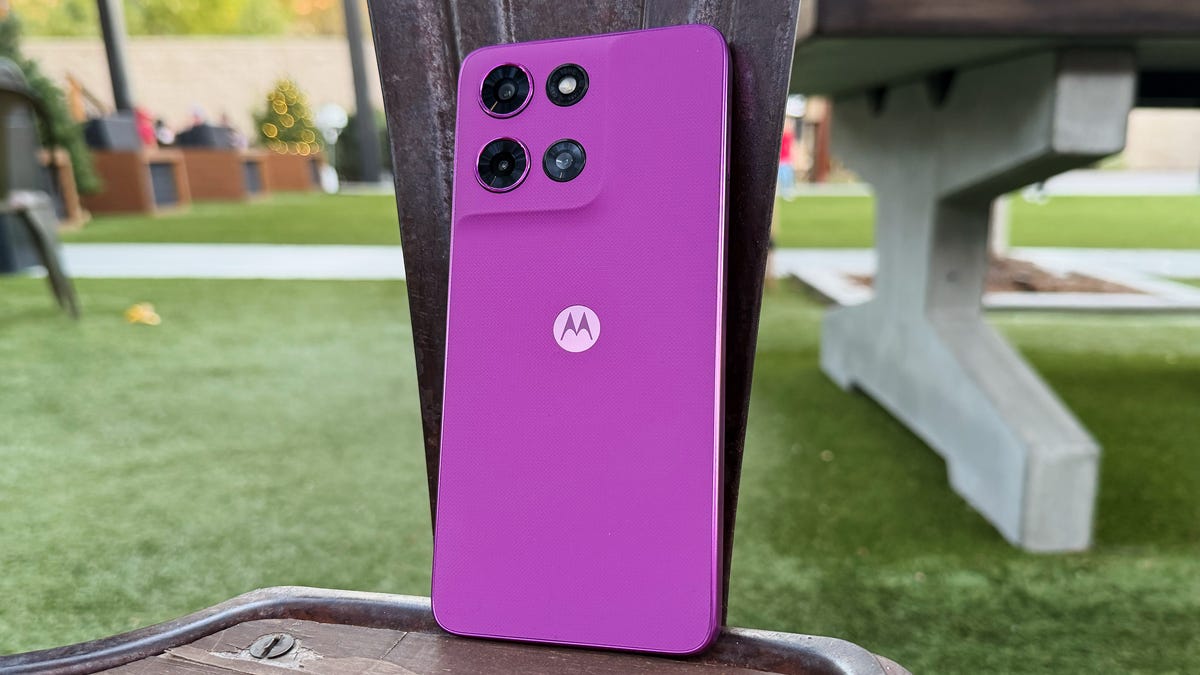
The Moto G (2026) is Motorola’s latest affordable phone that isn’t the very cheap G Play or the slightly beefier G Power variant. The humble Moto G is a down-the-center handset with acceptable performance and admirable style. It doesn’t innovate too much from last year’s Moto G (2025), but it’s a nice-looking phone, even if it’s less powerful.
Motorola has refined its budget phones over the years, gradually incorporating features from premium handsets while making strategic compromises to keep the price low. However, at $200, this year’s Moto G is a decent value that, fortunately, doesn’t resemble a cheap device. It’s nice to bring out an affordable phone that doesn’t look like it’s sheathed in thin plastic that could break at the slightest drop.
Three things I like about the Moto G (2026)
1. Colorful rubber design
I’ve already spoiled it, but the Moto G’s design sets it apart from other $200 phones and is the first thing I like about it. The shiny metal sides are too reflective for my taste, but they blend well with the textured rubber material layered over the back of the phone. With a tasteful curve around the camera block and a subtle pattern, the material has a nice look and feel. Plus — and this is rare for a bold color — I actually like the fuchsia color and would pick it over the simpler black hue that the phone also comes in.
2. One decent camera
I also like the cameras. Although there’s essentially just the main 50-megapixel shooter, augmented by a 2-megapixel depth camera and an ambient light sensor, these components combine to produce good daylight photos and respectable low-light performance. I took some shots of an outdoor market as the sun set and a hotel lobby as daylight filtered in through the windows, both of which captured foreground detail and background sky. While I’d love the utility of an ultrawide camera, it’s far more important for the main camera to be refined to take good shots with decent light balance. The 32-megapixel front-facing camera is a nice upgrade on last year’s model, capturing selfies with light and a lot of detail.
3. OK software support for a $200 phone
Motorola has continued to support the Moto G with two years of Android updates and three years of security updates. While longer is always better, at least it gives owners a slightly longer runway to keep their phones for a few years until they need to upgrade to another safe option. It is, however, much shorter than Samsung’s six-year commitment on its comparably priced Galaxy A series. But then again, this phone costs $200 before discounts.
Two things I don’t like about the Moto G (2026)
1. An out-of-date-looking display
Some of the compromises that Motorola made to hit that $200 price genuinely inhibit the phone’s quality. First is the 6.7-inch display, which is actually respectably bright and shows good color, but the HD Plus resolution (1,604×720 pixels) is too low for modern phones. While nothing is blurry, the 720p maximum means text on apps and games can be noticeably pixelated. It’s rough to play a game like Dead Cells, which already has a pixelated visual style, when the low-resolution screen results in blocky on-screen text.
2. Not enough power
The second thing I dislike is the Moto G’s specs — specifically, the underpowered Dimensity 6300 chip and 4GB of RAM. Even doing something as simple as scrolling posts on X becomes choppy, ruining the smooth 120Hz maximum screen refresh rate. This can be mitigated somewhat by using the RAM boost option (Settings > System > Performance > RAM Boost), which borrows some of the included 128GB of storage to use as temporary memory — while it’s automatically on by default, it’s worth toggling it to manually use its maximum setting of 8GB. Even so, there’s still some choppiness in scrolling through content.
While there isn’t too much new in this year’s Moto G, camera upgrades and a svelte new exterior make it a phone that you won’t be embarrassed to pull out around company — nor to snap a pic of a friendly get-together. There’s always room for Motorola to improve on the basics, but for a $200 phone, the Moto G has a lot to offer budget-minded buyers.
Technologies
Samsung’s Galaxy Watch Ultra 2 Might Come in 5G and 4G Cellular Models
If the rumor proves true, the 5G Galaxy Watch Ultra would rival the 5G-enabled $799 Apple Watch Ultra 3 that debuted last fall.

Samsung’s next high-end Galaxy Watch could support faster 5G speeds, but if this leak is true, it will depend on where you live. The rumored Samsung Galaxy Watch Ultra 2 might come in 5G and 4G cellular models, with availability for each smartwatch depending on the country.
According to the Dutch website Galaxy Club (and spotted by SamMobile), Samsung’s servers may have revealed a series of model numbers that point to 5G, 4G and Wi-Fi-enabled editions of the next Galaxy Watch Ultra, which would succeed the original model that debuted in 2024.
A representative for Samsung did not immediately respond to a request for comment.
The Galaxy Club website speculates that the 5G edition would be sold in the US and Korean markets, while the 4G edition would sell in the rest of the world. In the US, a 5G version of the Galaxy Watch Ultra would rival the 5G-enabled $799 Apple Watch Ultra 3, which debuted last fall. The 4G edition would have broader compatibility worldwide, since the earlier network is far more established.
It will likely be a few months until we hear anything official about the Galaxy Watch Ultra 2. Samsung typically unveils its new watches in the summer alongside its Galaxy Z Fold and Z Flip foldable phones. Last year, Samsung unveiled the Galaxy Watch 8 and the Galaxy Watch 8 Classic, but otherwise left the prior 2024 Ultra in the lineup for those looking for a larger 47mm smartwatch.
Technologies
2 Cases Show Supreme Court Isn’t Holding ISPs Responsible for Piracy
Technologies
Today’s NYT Connections Hints, Answers and Help for April 8, #1032
Here are some hints and the answers for the NYT Connections puzzle for April 8, No. 1032.

Looking for the most recent Connections answers? Click here for today’s Connections hints, as well as our daily answers and hints for The New York Times Mini Crossword, Wordle, Connections: Sports Edition and Strands puzzles.
Today’s NYT Connections puzzle is kind of tough. The purple category is a fun one, once you see the connection. Read on for clues and today’s Connections answers.
The Times has a Connections Bot, like the one for Wordle. Go there after you play to receive a numeric score and to have the program analyze your answers. Players who are registered with the Times Games section can now nerd out by following their progress, including the number of puzzles completed, win rate, number of times they nabbed a perfect score and their win streak.
Read more: Hints, Tips and Strategies to Help You Win at NYT Connections Every Time
Hints for today’s Connections groups
Here are four hints for the groupings in today’s Connections puzzle, ranked from the easiest yellow group to the tough (and sometimes bizarre) purple group.
Yellow group hint: In the group.
Green group hint: Appearance details.
Blue group hint: Often found in gyms.
Purple group hint: They help you see.
Answers for today’s Connections groups
Yellow group: Cohort member.
Green group: Aesthetic.
Blue group: Kinds of bar apparatuses.
Purple group: Eyewear in the singular.
Read more: Wordle Cheat Sheet: Here Are the Most Popular Letters Used in English Words
What are today’s Connections answers?
The yellow words in today’s Connections
The theme is cohort member. The four answers are associate, colleague, fellow and peer.
The green words in today’s Connections
The theme is aesthetic. The four answers are design, look, scheme and style.
The blue words in today’s Connections
The theme is kinds of bar apparatuses. The four answers are monkey, parallel, pull-up and uneven.
The purple words in today’s Connections
The theme is eyewear in the singular. The four answers are contact, goggle, shade and spectacle.
-
 Technologies3 года ago
Tech Companies Need to Be Held Accountable for Security, Experts Say
-
 Technologies3 года ago
Best Handheld Game Console in 2023
-
 Technologies3 года ago
Tighten Up Your VR Game With the Best Head Straps for Quest 2
-
 Technologies4 года ago
Black Friday 2021: The best deals on TVs, headphones, kitchenware, and more
-
 Technologies5 лет ago
Google to require vaccinations as Silicon Valley rethinks return-to-office policies
-
 Technologies5 лет ago
Verum, Wickr and Threema: next generation secured messengers
-
 Technologies4 года ago
Olivia Harlan Dekker for Verum Messenger
-
 Technologies4 года ago
The number of Сrypto Bank customers increased by 10% in five days