
Technologies
My Phone’s Battery Has Just Over a Year Left in It. Here’s How I Found Out
iFixit’s new app comes with all the information you need to prolong the lifespan of your phone — including an AI chatbot for specific guidance and a battery death predictor.
Nothing lives forever — and that includes your phone battery. Not only is it dying small deaths on an almost daily basis, but it’s also dying a longer, slower death that’ll eventually render your phone unusable if it’s not permanently attached to a power source.
Unless, of course, you swap out your old battery for a new one.
You may have a sense that your battery is degrading over time, but not know at what point to replace it. A new app from online community, advocacy group and parts retailer iFixit is here to help. The app includes a battery health predictor that shows where your battery is in its lifecycle and estimates when it’s time to break out the toolkit and give your device a new lease on life.
Repairing our tech rather than simply replacing it when it breaks can save us money in the long run and reduce our contributions to the ever-increasing mountains of electronic waste piling up around the world. And thanks to work of the «right to repair» movement, it’s easier than ever to get hold of the spare parts and guidance we need to fix our tech at home. Still, it can be an intimidating prospect for anyone unfamiliar with the inner workings of their devices.
«It’s never been easier to fix our own stuff, but learning how can be a bit bewildering,» says Kyle Wiens, CEO of iFixit. «We have so many different kind of gadgets in our lives now, how do you learn to fix it all?» The answer is the iFixit app, which comes with an AI helper «Fixbot» to walk you through any repairs you want to make, with access to iFixit’s full catalog of repair guides.
This isn’t the first time iFixit has had its own app, but back in 2015, Apple stripped it from the App Store after iFixit conducted an unfavorable teardown of the Apple TV. Now it’s back, and available on both the App Store and Google Play Store for iPhone and Android phone owners. I took it for a spin.
Predicting the death of my iPhone
My current phone is an iPhone 15 Pro Max. I’ve been using it for just over a year. In that time, I’ve definitely noticed it running out of juice more often, and I was keen to find out when I might need to replace it.
The battery health feature in the iFixit app is still in beta, and the process for getting a reading is slightly different depending on your phone manufacturer. (Spoiler: None are completely straightforward.)
Apple doesn’t currently allow access to battery stats via any of its APIs (iFixit tells me the APIs are there, but Apple won’t approve your app if you use them), so instead you have to ensure you have your phone analytics turned on and then import an analytics file into the app.
If that sounds complicated, be assured that it’s not. In the app is a guide that tells you exactly what to do and I found it easy to follow. I turned my analytics on in Settings and allowed it to gather data for one day before sharing the file with iFixit.
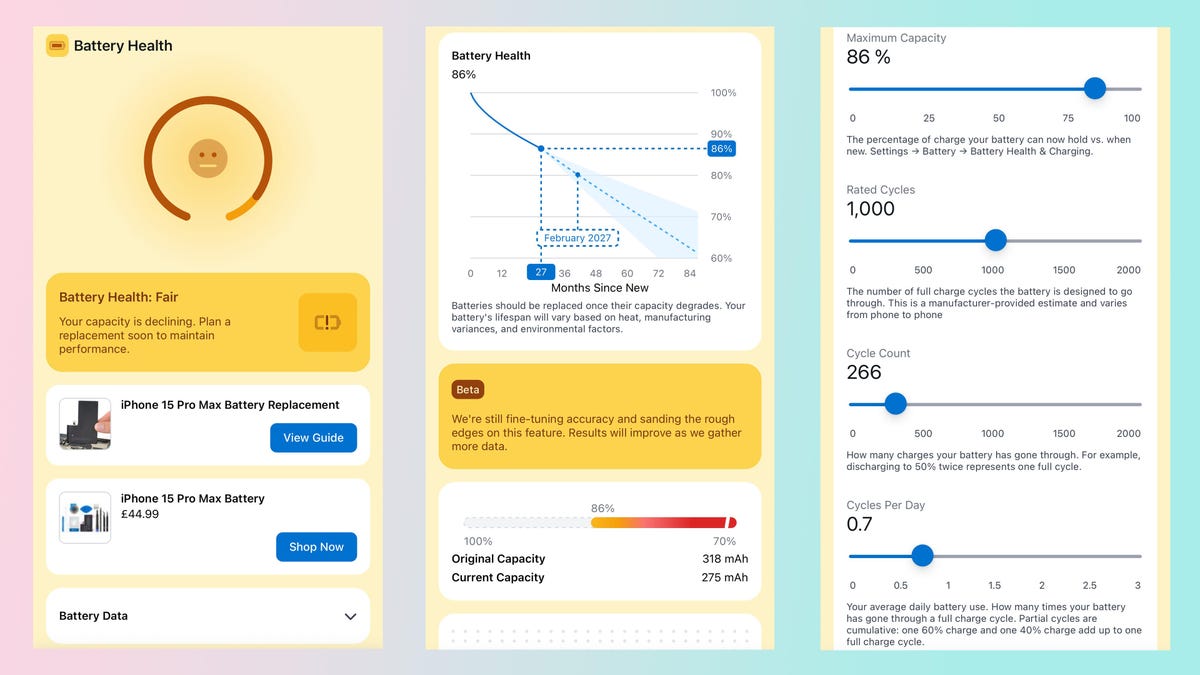
What I found surprised me. I consider myself a power user (my screen time is honestly embarrassing), yet in the year or so I’ve had this iPhone, I’ve completed only 266 full charging cycles. As a result, iFixit rated my battery health as «fair» and says it can now charge to just 86% of its original capacity.
It did add: «Your capacity is declining. Plan a replacement soon to maintain performance.» It turns out that «soon» is a relative term, though, as it recommended that replacement didn’t actually need to happen until February 2027.
I was pleasantly surprised by how much life this iPhone still has in it. It’s entirely possible I’ll replace the battery before then, simply because I like to get a full day of life out of one charge, and that isn’t happening right now. But after CNET editor-at-large Andrew Lanxon replaced his own iPhone battery last month, I feel confident in my ability to undertake open-heart surgery on my phone at home. Plus, I always have iFixit’s Fixbot on hand to help me out if I do get stuck.
Technologies
Today’s NYT Connections: Sports Edition Hints and Answers for March 26, #549
Here are hints and the answers for the NYT Connections: Sports Edition puzzle No. 549 for Thursday, March 26.
Looking for the most recent regular Connections answers? Click here for today’s Connections hints, as well as our daily answers and hints for The New York Times Mini Crossword, Wordle and Strands puzzles.
How good are you at unscrambling letters to make a new word out of an old one? Today’s Connections: Sports Edition requires you to do just that — for the purple category, naturally. If you’re struggling with today’s puzzle but still want to solve it, read on for hints and the answers.
Connections: Sports Edition is published by The Athletic, the subscription-based sports journalism site owned by The Times. It doesn’t appear in the NYT Games app, but it does in The Athletic’s own app. Or you can play it for free online.
Read more: NYT Connections: Sports Edition Puzzle Comes Out of Beta
Hints for today’s Connections: Sports Edition groups
Here are four hints for the groupings in today’s Connections: Sports Edition puzzle, ranked from the easiest yellow group to the tough (and sometimes bizarre) purple group.
Yellow group hint: Touch ’em all!
Green group hint: It’s outta here!
Blue group hint: Working one’s way up to the majors.
Purple group hint: Unscramble these words.
Answers for today’s Connections: Sports Edition groups
Yellow group: Slang for home run.
Green group: MLB home run leaders in 2025.
Blue group: Minor league baseball leagues.
Purple group: Anagrams of MLB teams.
Read more: Wordle Cheat Sheet: Here Are the Most Popular Letters Used in English Words
What are today’s Connections: Sports Edition answers?
The yellow words in today’s Connections
The theme is slang for home run. The four answers are dinger, homer, jack and round-tripper.
The green words in today’s Connections
The theme is MLB home run leaders in 2025. The four answers are Judge, Ohtani, Raleigh and Schwarber.
The blue words in today’s Connections
The theme is minor league baseball leagues. The four answers are Carolina, International, Pacific Coast and Texas.
The purple words in today’s Connections
The theme is anagrams of MLB teams. The four answers are Bucs (Cubs), parties (Pirates), spread (Padres) and stem (Mets).
Toughest Connections: Sports Edition categories
The Connections: Sports Edition puzzle can be tough, but it really depends on which sports you know the most about. My husband aces anything having to do with Formula 1, my best friend is a hockey buff, and I can answer any question about Minnesota teams.
That said, it’s hard to pick the toughest Connections categories, but here are some I found exceptionally mind-blowing.
#1: Serie A Clubs. Answers: Atalanta, Juventus, Lazio, Roma.
#2: WNBA MVPs. Answers: Catchings, Delle Donne, Fowles and Stewart.
#3: Premier League team nicknames. Answers: Bees, Cherries, Foxes and Hammers.
#4: Homophones of NBA player names. Answers: Barns, Connect, Heart and Hero.
Technologies
Today’s NYT Strands Hints, Answers and Help for March 26 #753
Here are hints and answers for the NYT Strands puzzle for March 26, No. 753.
Looking for the most recent Strands answer? Click here for our daily Strands hints, as well as our daily answers and hints for The New York Times Mini Crossword, Wordle, Connections and Connections: Sports Edition puzzles.
Today’s NYT Strands puzzle should appeal to musicians of all kinds. Some of the answers are difficult to unscramble, so if you need hints and answers, read on.
I go into depth about the rules for Strands in this story.
If you’re looking for today’s Wordle, Connections and Mini Crossword answers, you can visit CNET’s NYT puzzle hints page.
Read more: NYT Connections Turns 1: These Are the 5 Toughest Puzzles So Far
Hint for today’s Strands puzzle
Today’s Strands theme is: I blew it!
If that doesn’t help you, here’s a clue: I’m in the band.
Clue words to unlock in-game hints
Your goal is to find hidden words that fit the puzzle’s theme. If you’re stuck, find any words you can. Every time you find three words of four letters or more, Strands will reveal one of the theme words. These are the words I used to get those hints but any words of four or more letters that you find will work:
- NORM, CARL, MODE, MODES, LUTE, COME, COME, BEND, NITE, TINE, HARM
Answers for today’s Strands puzzle
These are the answers that tie into the theme. The goal of the puzzle is to find them all, including the spangram, a theme word that reaches from one side of the puzzle to the other. When you have all of them (I originally thought there were always eight but learned that the number can vary), every letter on the board will be used. Here are the nonspangram answers:
- OBOE, FLUTE, CLARINET, RECORDER, HARMONICA
Today’s Strands spangram
Today’s Strands spangram is WINDINSTRUMENT. To find it, start with the W that is at the bottom of the far-left vertical row, and wind up and across.
Toughest Strands puzzles
Here are some of the Strands topics I’ve found to be the toughest.
#1: Dated slang. Maybe you didn’t even use this lingo when it was cool. Toughest word: PHAT.
#2: Thar she blows! I guess marine biologists might ace this one. Toughest word: BALEEN or RIGHT.
#3: Off the hook. Again, it helps to know a lot about sea creatures. Sorry, Charlie. Toughest word: BIGEYE or SKIPJACK.
Technologies
Ring Finally Goes Wire-Free for Its Latest 4K Video Doorbells
The launch of battery-powered versions of the company’s powerful AI doorbells has been highly anticipated.
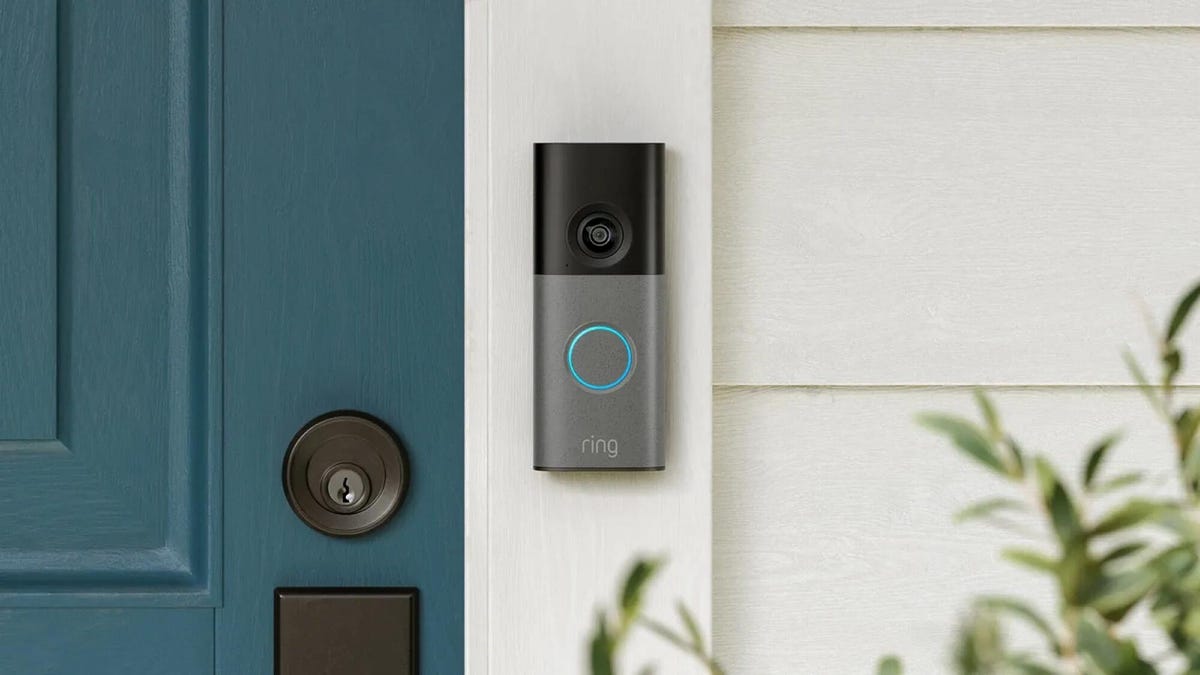
Security company Ring on Wednesday announced a significant expansion of its video doorbell line, notably battery-powered versions of both its 4K and 2K models, priced from $80.
Both Amazon’s Ring and Google Nest debuted high-resolution video doorbells with new AI features in the fall of 2025. But they were wired only, and in my tests, I kept thinking, «I sure wish there were battery models available.»
Wireless video doorbells are far better for most front doors than models that require connecting to your existing doorbell wiring, which is often poorly positioned for a security camera. Mine, for example, is located on a wall beside my door that’s useless for any kind of video views, no matter how you angle a lens.
«Enhancing image quality in battery-powered doorbells means customers can enjoy reliable performance with the flexibility to install devices in a way that suits their space, whether renting or living in homes without existing wiring,» a Ring spokesperson said.
At first, I wondered whether the higher 4K resolutions and more advanced AI features would use too much power to support batteries. If so, Ring is the first to fix that issue with this suite of doorbells, including these models available for preorder right now:
- Ring Battery Doorbell Pro — $250: This model offers up to 4K resolution and 10x zoom, and Ring says it features a redesigned internal architecture to support battery power.
- Ring Battery Doorbell Plus (2nd-gen) — $180: This model includes a quick-release battery pack along with 2K video.
- Ring Battery Doorbell (2nd-gen) — $100: This video doorbell includes 2K video, a 6x zoom and what Ring calls a «streamlined, rechargeable design,» which means you take the entire video doorbell to charge it, not just the battery — a design I greatly prefer, since Ring’s battery packs can get fiddly.
There’s also a new version of a Ring wired doorbell with 2K resolution, starting at $80. It wouldn’t be Ring without a plethora of doorbell devices to confuse newcomers, which is why I have a guide specifically for Ring video doorbells that will need some updating once I finish testing these new models.
Resolution plus an intelligence upgrade
Ring’s ordinary subscriptions of the Ring Protect plan give you cloud video storage and intelligent alerts for people, packages and vehicles, which are important but not really advanced AI. But spring for the $20-per-month Ring AI Pro cam, and this new generation of cameras opens up other capabilities.
Ring’s AI features include AI video descriptions, so if you get an alert, you can also get a summary of what the doorbell saw, including people and activities. A similar feature lets you search your video history with specific terms, such as «bike,» «truck» and so on. You also get the beta version of Ring’s Familiar Faces feature, which can ID logged faces of people who approach.
If these AI features make you uneasy and you’d rather protect your privacy, the best option is to avoid a subscription altogether or choose a lower-tier plan that gives you cloud storage without AI.
I also have a guide on how to turn off Ring’s detection and data-sharing features that might make you nervous, so you can keep what you like while ditching what you don’t.
-
 Technologies3 года ago
Tech Companies Need to Be Held Accountable for Security, Experts Say
-
 Technologies3 года ago
Best Handheld Game Console in 2023
-
 Technologies3 года ago
Tighten Up Your VR Game With the Best Head Straps for Quest 2
-
 Technologies4 года ago
Black Friday 2021: The best deals on TVs, headphones, kitchenware, and more
-
 Technologies5 лет ago
Google to require vaccinations as Silicon Valley rethinks return-to-office policies
-
 Technologies5 лет ago
Verum, Wickr and Threema: next generation secured messengers
-
 Technologies4 года ago
Olivia Harlan Dekker for Verum Messenger
-
 Technologies4 года ago
The number of Сrypto Bank customers increased by 10% in five days