

Technologies
The Longest Night: A Short Guide to the Winter Solstice
The winter solstice arrives later this month, and here’s what that means.


For many people in the US, winter has come a little early, as a few waves of snow and blisteringly cold temperatures have colored the landscape white. It isn’t officially winter yet, and it won’t be until Dec. 21 when the winter solstice takes place. So get ready because Earth’s shortest day is on its way.
What is the winter solstice?
The winter solstice has a few different meanings, so here are all of them. The most common definition, and the one you’re most likely familiar with, is that it denotes the shortest day and longest night of the year on Earth. These times vary depending on your location on the globe, but the further north you live, the less sunlight you’ll get. In the tropics, they’ll get about 12 hours of sunlight. In Sweden, it’ll be closer to six hours. In Svalbard, there isn’t any.
The reason this occurs is due to the second definition of the winter solstice: During this time, the North Pole is tilted as far away from the sun as it can get. According to The Farmer’s Almanac, the moment at which the Earth’s axis is physically tilted as much as it can be is at 10:03 a.m. ET on Dec. 21. After that moment, the process will begin to reverse until the South Pole takes its turn during the summer solstice. At that point, the North Pole will be at its closest tilt to the sun, giving us the longest day and shortest night of the year for the Northern Hemisphere.
How much sunlight will we get?
It’ll vary by location. The southern US will have the most sunlight, with Florida getting a little over 10 hours during the winter solstice. The Midwest and Great Lakes portion of the country will get roughly nine hours. The Pacific Northwest can expect a little less than nine hours. Southern Alaska will get about six hours, and the northern areas of Alaska will see around three hours.
If you want to see how your area will fare, Time and Date has a sunrise and sunset tool you can use. Input your zip code into the search bar, and you’ll be able to see your sunrise and sunset times.
The city of Utqiaġvik, Alaska, will have it worse than most in the US: It won’t get any sun at all. The sun won’t rise there again until Jan. 22. We hope the people living there packed their vitamin D supplements.
The difference between a solstice and an equinox
The autumn equinox was just a few months ago, so you may be curious about the differences. A solstice occurs when the Earth’s poles are tilted as far away from the sun as they’ll be over the course of one year, which is also one orbit around the sun. The equinoxes take place at the halfway points between each solstice. The autumn equinox takes place in September between the summer and winter solstices, while the spring equinox takes place in March between the winter and summer.
During an equinox, the poles are minimally tilted, and the days are as even as they can be. This also has a couple of other interesting side effects: The sun is pointed directly at the equator during an equinox, and the sun will rise and set directly east and west, respectively.
Humans use the solstices and equinoxes to mark the change of the seasons. There are two equinoxes and two solstices, which mark the start and end dates for Earth’s four seasons.
Celebrating the winter solstice
While the solstice is close to the holidays, celebrations for the winter solstice have been around for significantly longer, and some winter solstice traditions have become Christmas traditions as well. One of the most historically famous winter solstice celebrations is Yule, a winter festival originating thousands of years ago among the Ancient Norse. It became commonly celebrated in Europe and involved bonfires and massive feasts. Yule celebrations also included decorating with evergreen tree decorations, like holly and ivy.
If these sound familiar, it’s because Christmas co-opted many of those traditions centuries ago, and the two traditions have kind of merged into a single seasonal holiday. The terms Yule and Christmas are often used interchangeably these days in many cultures.
So if you want to celebrate the winter solstice, just do all of the stuff you would normally do for the holidays. Burn a Yule log, decorate a tree, eat a big feast with your family and hang up mistletoe and wreaths — those are all hat tips to traditional winter solstice celebrations.
Technologies
Stop Charging Your Android Watch Daily. Here Are 7 Tips for Longer Battery Life
From Samsung’s Galaxy Watch to Google’s Pixel Watch and other Wear OS models, these settings can add hours of extra battery life for sleep and fitness tracking.
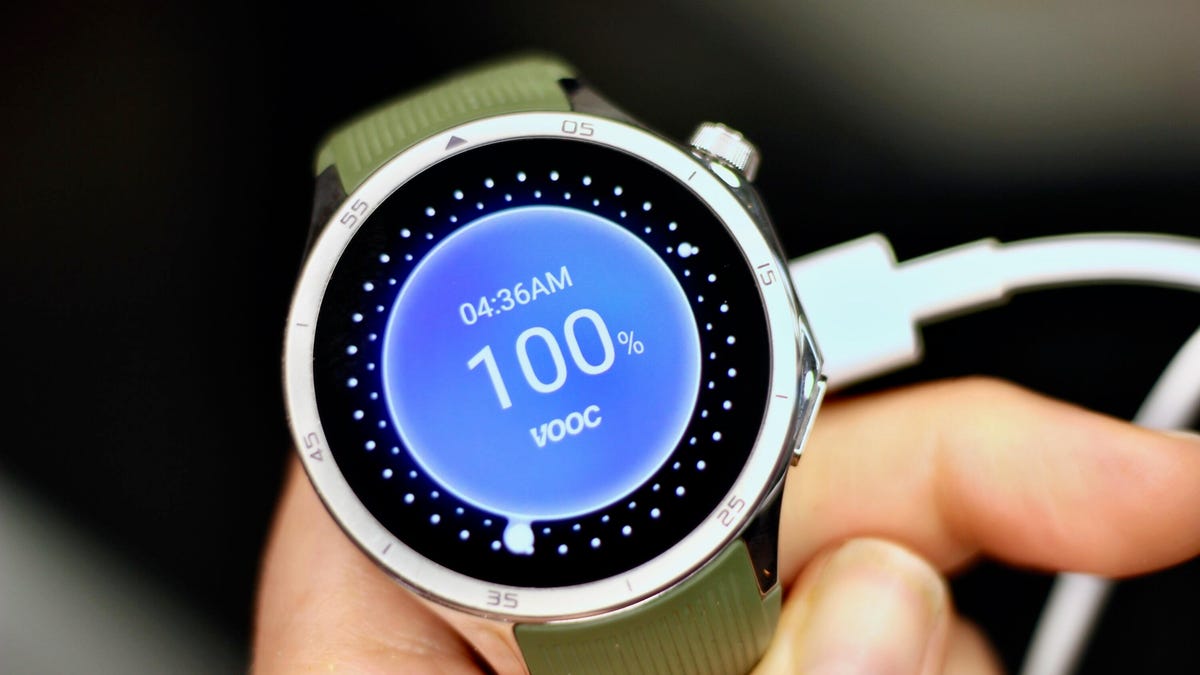
Nothing kills the motivation of a midday workout faster than raising your wrist and seeing a dead, black watch screen. Honestly, did you even work out if your smartwatch didn’t give you credit for it?
Sure, most newer smartwatch models can now last more than a day, including a full night of sleep tracking. But even some of the top powerhouses, including the Pixel Watch 4 and Samsung Galaxy Watch 8, tend to crap out midway through day two when there’s no charger in sight (mine’s on my nightstand).
After one too many days staring at a dark screen and missing key health metrics as a result, I finally started looking for ways to squeeze a few more hours out of my watch — long enough to at least get back to my charger at the end of the day without skipping a beat.
1. Lower the display brightness
Most people overlook this simple tweak: Your watch can usually run at a lower brightness setting without losing visibility. It’s one of the easiest ways to extend battery life without giving up any features, and it can add an extra hour or two of runtime. Just make sure to keep adaptive brightness on so that the display adjusts automatically as you move between indoors and outdoors, since the lowest setting can be unreadable in direct sunlight.
To adjust brightness, go to Settings > Display > Brightness.
2. Disable ‘Hey Google’ or hotword detection
Being able to summon Google’s voice assistant (now Gemini) hands-free is convenient, but it’s hardly essential and comes with a steep battery cost. Your watch is constantly listening in the background for the «Hey Google» cue, which drains power throughout the day.
To cut back on that battery toll, switch to manual activation instead. On most watches, you can summon the assistant with a long press of the side button.
Go to Settings > Google > Digital Assistant and toggle off Hey Google.
If you’re using the Pixel Watch 4, you may also want to disable «Raise to Talk», which triggers Gemini in a similar way without even having to say the magic phrase. Go to Settings > Gestures > Raise to Talk and toggle it off.
3. Use a battery-friendly watch face
Brighter watch faces with lots of animations or complications that need frequent updates (like the heart rate or weather widgets) generally drain the battery faster than darker, simpler ones with static complications.
Some platforms, such as the OnePlus Watch, even assign a battery score to watch faces so you can see which ones consume the most power. Third-party apps like Facer also have a «power impact» rating for their watch faces. Needless to say, the lower the power rating, the longer your battery life.
4. Turn off the always-on display
If you want to see a major jump in battery life — I’m talking five-plus hours — try turning off your watch’s always-on display. Glancing at the time (and other info) without lifting your wrist may be convenient, but it’s also one of the biggest battery hogs on any smartwatch.
The exact steps vary by model, but you’ll typically find the toggle under Settings > Display > Always-On.
Just note that on some models, this also means your workout metrics won’t stay visible during exercise, though others, like the Pixel Watch 4, keep workout stats on even when the AOD is disabled.
5. Turn on Power Saving (Battery Saver) mode
If all else fails, you can always turn on whatever permutation of low-power mode your smartwatch offers. On Samsung and OnePlus watches it’s called Power Saving/Saver, on Pixel it’s Battery Saver and on Mobvoi’s TicWatch it’s Essential Mode.
These modes typically disable the AOD, pause or limit background health tracking (you’ll still get full metrics during workouts) and may delay notifications. Since the specifics vary across manufacturers, it’s best to check your device’s settings so you know exactly what you’ll be missing out on.
You can usually access power-saving mode from the quick-settings menu (tap the battery icon) or by going to Settings > Battery > Battery Saver.
And if you want to go truly extreme, some watches offer a mode that turns your device into a dimly lit, time-only analogue. Samsung’s Watch-Only Mode, for example, can push battery life up to 27 days.
6. Max out the charging speed
Even with the longest-lasting batteries, you’ll eventually need to recharge, which is why it’s important to make sure you’re getting the fastest charging speeds possible. The less time your watch spends off your wrist, the more credit you’ll get for the sleep and exercise you actually do.
Charging speeds vary by manufacturer, but you can only take full advantage of them if you’re using the right power adapter. Check your watch’s specs to confirm the wattage required for fast charging. The Galaxy Watch, for example, needs a 10W (or higher) charger to reach the super-fast charging speed.
7. Prioritize battery life before you buy
Even with all these tips, your battery may still drain faster than you need. In that case, it might be time to upgrade to a newer model. Smartwatch batteries naturally deteriorate over time and aren’t always replaceable. Here are a few things worth knowing upfront if you’re looking to optimize battery life.
Go bigger when possible. In most lineups, the larger case size typically has a bigger battery that lasts a bit longer than its smaller counterpart — at least a couple of extra hours, depending on the model. The larger Pixel Watch 4 (45mm), for example, gets roughly 10 hours more running time than its smaller (41mm) counterpart. The downside to larger watch sizes is that they tend to be more expensive and may look and feel bulky on smaller wrists.
«Ultra» or rugged models last the longest. These watches often pack the biggest batteries in a company’s lineup. Samsung’s Galaxy Watch Ultra, for instance, has the largest battery of the brand’s current models and can push close to 48 hours of use.
Brand matters. While you can’t expect any Wear OS watch to deliver the week-long (or longer) battery life that dedicated sports watches like Garmin can, there are still significant variations from brand to brand. At 631 mAh, the OnePlus Watch 3’s battery is the largest of any Wear OS watch I’ve tested, followed closely by Mobvoi’s TicWatch Pro 5, which has a 628 mAh battery. There will be other trade-offs in terms of features, but they both outlast Samsung’s and Google’s flagship models by at least five hours, depending on size and usage.
Newer models may charge faster. You can save money by choosing an older model of a watch, but companies tend to optimize charging speed with each upgrade. So check that the watch you’re getting has the fastest possible charging speed. This year’s Pixel Watch, for example, can reach a full charge in under an hour or give you enough juice for a full night of sleep tracking in the five minutes it takes you to brush your teeth.
Whatever combination of tricks you use, or new model you upgrade to, hopefully you’ll find the right mix of settings and features to keep your Wear OS watch tracking the data you truly care about before the battery runs out. And once you see how useful the health and sleep information these devices can surface is, keeping them powered up feels worth the effort.
Technologies
Samsung’s Galaxy Z TriFold Debuts in Korea Next Week, But Won’t Hit the US Until 2026
This triple-display foldable looks like a phone-tablet hybrid.
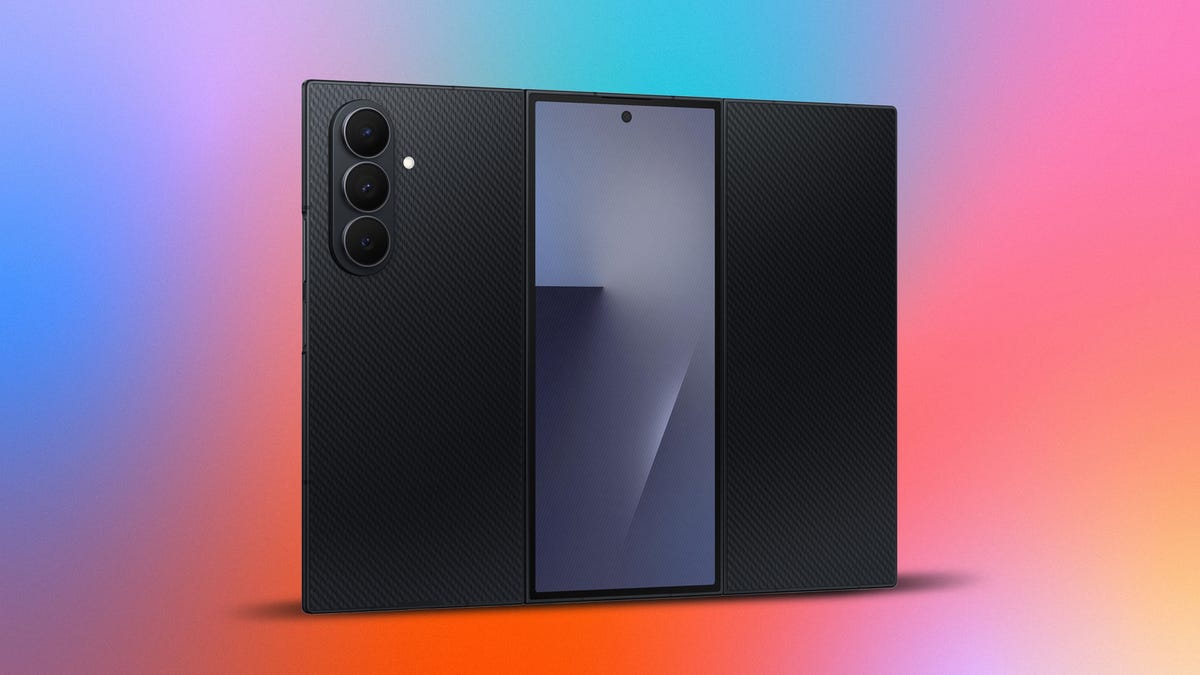
After months of teasing a triple-display foldable phone, Samsung is gearing up to launch what it’s calling the Galaxy Z TriFold — because foldables with just one hinge are so last year.
The phone is slated to become available first in Korea on Dec. 12, and will then launch in other locations including China, Taiwan, Singapore and the United Arab Emirates. It’ll arrive in the US in the first quarter of 2026. Samsung hasn’t shared a US price for the trifold, but Reuters reports it’ll cost 3.59 million won in Korea, which converts to around $2,440. That would make it slightly pricier than the $2,000 Galaxy Z Fold 7.
To get this caveat out of the way: A trifold phone doesn’t actually fold three times. Rather, devices like the Z TriFold have a main screen with two hinges, allowing the phone to fold into three sections. They appear to be more of a hybrid between a phone and, when unfolded, a tablet. The Z TriFold boasts a 10-inch display when unfurled and a 6.5-inch cover display.
«The company’s decade-long experience in foldable category innovation inspired Galaxy Z TriFold’s uniquemulti-folding form factor, which uses an inward-folding design to protect the main display,» Samsung said in a blog post. «The foldingmechanism has been precisely engineered for easy opening and closing, with an auto-alarm alerting the userof incorrect folding through a series of on-screen alerts and vibrations.»
A Galaxy of features comes together
The Galaxy Z TriFold appears to borrow elements from two of its siblings: the Galaxy S25 Edge and the Galaxy Z Fold 7. Both phones are impressively thin, with the Edge measuring 5.8mm and the Z Fold 7 measuring 4.2mm thick when unfolded.
The Z TriFold goes one step further. It’s just 3.9mm thick «at its thinnest point,» Samsung says. Reading the fine print reveals that measurement excludes «the camera and the preinstalled protective film.» The thickest panel is the center one, which measures 4.2mm. The panel with the side button is 4mm thick. Still, that should all help to reduce bulk when the three screens are stacked shut on top of one another.
The rear triple-camera system includes a 200-megapixel wide-angle camera, similar to the Galaxy S25 Ultra, S25 Edge and Z Fold 7. There’s also a 12-megapixel ultrawide and 10-megapixel telephoto camera. For selfies, you’ll find 10-megapixel front-facing cameras on both the cover and main screens.
Like Samsung’s other premium phones released this year, the Z TriFold is powered by a custom Snapdragon 8 Elite processor. It also has a 5,600-mAh three-cell battery — a nice upgrade over the 4,400-mAh battery on the Galaxy Z Fold 7. Samsung notes this system «has been placed ineach of the three panels of the device for balanced power delivery and all-day endurance.» The phone supports 45-watt super-fast charging.
Unlike Huawei’s Mate XTs trifold, which unfurls into a Z shape, Samsung’s trifold has panels that fold inward, more like a pamphlet.
The Z TriFold has two different-sized hinges, «creating a smoother, more stable fold despitevarying weight and components across the device,» Samsung notes. This also helps to reduce the gap between the screens. The titanium hinge housing «resists wear over time,» and the phone’s Advanced Armor Aluminum frame should also help with durability, while preventing the screens from touching when folded shut.
The Z TriFold borrows another trait from the Z Fold 7: an IP48 rating. That means the phone can be submerged under 1.5 meters of water for up to 30 minutes and is protected against solid particles larger than 1 millimeter, but not against dust. Meanwhile, Google’s Pixel 10 Pro Fold boasts an impressive IP68 rating for water and dust resistance.
Samsung’s triple-display foldable has Corning’s Gorilla Glass Ceramic 2 on the front, while the back is made of ceramic-glass fiber-reinforced polymer.
Why would someone buy the Galaxy Z TriFold?
So what’s the point of a phone that unfolds into a giant 10-inch display? Samsung says the Z TriFold is ideal for multitasking.
«Users can use the screen with endless versatility — they can create across three different portrait-sized apps side-by-side without interruption, resize apps inmulti-window to view the most important information clearly, or hold it vertically when reviewing documents forimproved focus,» the company notes.
Samsung also says a wider screen can be good for watching movies and TV shows. And if you’re watching a YouTube video, you can simultaneously read the comments on the neighboring display. Samsung notes that «minimized creasing on the device keeps content seamless anduninterrupted.» That’ll be a crucial element.
The phone’s AMOLED cover and main screens have a refresh rate up to 120Hz. The cover display boasts a peak brightness of 2,600 nits, while the main screen features a peak brightness of 1,600 nits.
The Galaxy Z TriFold will arrive with Android 16 and One UI 8. It’s not yet clear how much the phone will cost, but given the Z Fold 7’s $2,000 starting price, it’ll probably be a pretty penny.
Technologies
Today’s NYT Connections Hints, Answers and Help for Dec. 6, #909
Here are some hints and the answers for the NYT Connections puzzle for Dec. 6, #909.
Looking for the most recent Connections answers? Click here for today’s Connections hints, as well as our daily answers and hints for The New York Times Mini Crossword, Wordle, Connections: Sports Edition and Strands puzzles.
Today’s NYT Connections puzzle has about the wildest purple category I have ever seen. There’s a word in the description that I can figure out, but that I don’t think I’ve ever heard before. If you need help sorting the answers into groups, you’re in the right place. Read on for clues and today’s Connections answers.
The Times now has a Connections Bot, like the one for Wordle. Go there after you play to receive a numeric score and to have the program analyze your answers. Players who are registered with the Times Games section can now nerd out by following their progress, including the number of puzzles completed, win rate, number of times they nabbed a perfect score and their win streak.
Read more: Hints, Tips and Strategies to Help You Win at NYT Connections Every Time
Hints for today’s Connections groups
Here are four hints for the groupings in today’s Connections puzzle, ranked from the easiest yellow group to the tough (and sometimes bizarre) purple group.
Yellow group hint: Not unusual.
Green group hint: Soothe.
Blue group hint: Movie time.
Purple group hint: Some are pets.
Answers for today’s Connections groups
Yellow group: Norm.
Green group: Mollify.
Blue group: Member of a titular group in an animation franchise.
Purple group: Starting with herpetofauna. (Reptiles and amphibians.)
Read more: Wordle Cheat Sheet: Here Are the Most Popular Letters Used in English Words
What are today’s Connections answers?
The yellow words in today’s Connections
The theme is norm. The four answers are average, mean, par and standard.
The green words in today’s Connections
The theme is mollify. The four answers are cool, moderate, settle and temper.
The blue words in today’s Connections
The theme is member of a titular group in an animation franchise. The four answers are car, incredible, minion and monster.
The purple words in today’s Connections
The theme is starting with herpetofauna. The four answers are Adderall (adder), monitorship (monitor), newton (newt) and toady (toad).
Don’t miss any of our unbiased tech content and lab-based reviews. Add CNET as a preferred Google source.
Toughest Connections puzzles
We’ve made a note of some of the toughest Connections puzzles so far. Maybe they’ll help you see patterns in future puzzles.
#5: Included «things you can set,» such as mood, record, table and volleyball.
#4: Included «one in a dozen,» such as egg, juror, month and rose.
#3: Included «streets on screen,» such as Elm, Fear, Jump and Sesame.
#2: Included «power ___» such as nap, plant, Ranger and trip.
#1: Included «things that can run,» such as candidate, faucet, mascara and nose.
-
 Technologies3 года ago
Tech Companies Need to Be Held Accountable for Security, Experts Say
-
 Technologies3 года ago
Best Handheld Game Console in 2023
-
 Technologies3 года ago
Tighten Up Your VR Game With the Best Head Straps for Quest 2
-
 Technologies4 года ago
Black Friday 2021: The best deals on TVs, headphones, kitchenware, and more
-
 Technologies4 года ago
Verum, Wickr and Threema: next generation secured messengers
-
 Technologies4 года ago
Google to require vaccinations as Silicon Valley rethinks return-to-office policies
-
 Technologies4 года ago
Olivia Harlan Dekker for Verum Messenger
-
 Technologies4 года ago
iPhone 13 event: How to watch Apple’s big announcement tomorrow


