
Technologies
Shopping for a New iPhone or Android Phone? Read This Before You Buy
These tips will help you make the most of every penny when you’re shopping for a new phone.

2025’s best phones, like the vibrant orange iPhone 17 Pro, the Android all-rounder Google Pixel 10 Pro and the consistently high-perfoming Samsung’s Galaxy S25 Ultra share many things. They all offer amazing performance and come with incredible camera setups. Then there’s the massive, vibrant displays and the host of funky new AI skills, all of which makes these flagship phones the peak of what mobile tech can offer. It’s also no surprise that these fan-favorite phones have something else in common, too: whopping price tags.
Costing $1,000 and more, today’s best phones are out of reach for many — or are simply unnecessary for those of us who just want an everyday handset for keeping in touch with friends or scrolling through Instagram on the bus. Thankfully, there’s a huge array of options out there catering to all needs and budgets, whether you’re looking for top-end model or a more affordable option, like the CNET Editors’ Choice award-winning Nothing Phone 3A Pro.
You’d think the vast number of choices would make shopping simple. But the reality is that sometimes all the options make it more confusing. To help you cut through some of the jargon and spend your money sensibly, I’ve put together tips for buying a phone.
How to buy a new phone: Top phone-buying tips
- Know what you care about most: Is it screen size? Camera quality? Battery life? This will help narrow down your choices. Phones like the iPhone 17 Pro, Galaxy S25 Ultra or Xiaomi 15 Ultra, for example, pack incredible cameras that almost rival the quality you’d get from a mirrorless camera. If you’re keen on photography and always want to carry a superb camera for when inspiration strikes, then spending money here is a good idea. If not, you can likely save yourself a bundle.
- Don’t discount the midrange: Features of last year’s flagships always trickle down to this year’s midrange handsets.You can get a great phone that does almost everything that a premium phone can do for a fraction of the price. Google’s Pixel 10 Pro packs a great zoom camera, but the base Pixel 10 has most of the same key specs and comes at a more reasonable price. Even lower-end phones like the Nothing Phone 3A Pro offer a great experience and asks for little cash in return.
- Shop the sales: Look for deep discounts and promo deals around major holidays, especially Amazon’s Prime Day and Black Friday. And find out what your grace period is in case you need a quick return or exchange.
- Consider last year’s phones: They can often be a great deal, too. Wait for this year’s launch to get last year’s phone for less, when stores and carriers may be trying to offload their existing stock. You should also check for used options as these can save you a ton of money, as long as whatever you buy still receives security updates.
- Hold the phone at a store first: You may love or hate the way it looks and feels in person.
- Check if you’re already invested: Have you already bought a lot of iPhone apps and iTunes movies? Stick with an iPhone if you still want access to them. Likewise, if you’ve invested in loads of Android apps, you’ll want to stay on that side of the fence. Otherwise, it’s simple enough to switch platforms.
- Buy a case and screen protector: You’ll protect your phone from costly damage and will increase the phone’s resale or trade-in value for when you’re ready to move on. If you’re careful with how you use your phone, it should last for years.
Smartphone performance vs. budget
In general, performance lines up with cost. The very latest, greatest technology usually comes at a premium. Flagship phones pack the best cameras, the most powerful processors and may even sport cutting-edge tech like foldable displays. The high prices mean that these phones are worth considering only by those who want the absolute latest tech in their pockets.
Not everyone needs such top tech, however, or may simply be unwilling to spend the $1,000 or more typically required to get it. Luckily, the midrange sector of the phone world has been one of the fiercest battlegrounds for companies to compete in, resulting in some amazing phones that won’t break the bank. Features like wireless charging and cameras with multiple lenses that were once the domain of flagships are now commonplace on midrange phones.
Even budget phones will still offer decent camera quality and enough power for you to enjoy all of your everyday web browsing, WhatsApp-ing and Instagramming.
Screen size
All phones have gotten steadily bigger over the last few years, with the iPhone 17 Pro Max and Galaxy S25 Ultra measuring a whopping 6.9 inches. Small phones aren’t that common anymore, with almost no phones measuring under six inches in size.
Apple killed off its iPhone Mini line, and while its 2022 iPhone SE remained the smallest iPhone you could buy, the company replaced it with the 6.1 inch iPhone 16E, which hardly qualifies as small. On the Android side, the Google Pixel 8A’s 6.1-inch display makes it one of the better smaller phones, but like the iPhone 16E, it’s hardly what you’d call tiny. Google replaced it with the Pixel 9A and in so doing increased the screen size to 6.3 inches. Sorry, small phone fans, looks like you’re out of luck.
Software support period
A phone remains safe to use only as long as it receives security updates from the manufacturer to protect it from hackers. In the past, this was a bigger concern since most phones were supported for just two or three years, leaving them with a short shelf life. Today, however, extended support has become a competitive feature, with Google now offering an impressive seven years of software and security updates on its latest phones.
It means the most recent Pixel 10 Pro will still be safe to use in 2032, while Samsung has promised a similar support period for its Galaxy S25 range. Samsung’s Galaxy S20, released in 2020, received its final security update in 2024, however, so it’s important to confirm how long your phone of choice will be safe to use, especially if you’re buying an older phone on the used market. A longer support period not only gives you better value for money over the lifetime of the device, it’s also better for the planet, as it keeps older, but still usable phones out of landfill and reduces the number of new devices being made and shipped.
Camera performance
Camera features have been a major point for bragging rights in recent phones, with manufacturers always wanting a bigger, more exciting number, be it the number of megapixels or quantity of actual camera lenses. Three rear cameras are now common — a regular lens, an ultrawide lens and a telephoto lens — with even budget-focused phones packing multiple cameras.
Read more: Best Camera Phone to Buy in 2025
This is great, as more lenses mean more shooting options when you’re out and about. But that doesn’t mean that any multilens camera is as good as another. As with processor performance, the more you spend, the better the results you’ll typically get, with the absolute best cameras around usually being found on the most expensive flagships.
Look out for features like optical (rather than digital) zooms, night mode for better low-light images, and optical image stabilization. Sometimes these features might not be clear, and it’s not possible to judge a camera’s performance just by looking at the specs. If you really care about your phone’s photography skills, then take some time to look at the reviews and see how its camera performs before you spend your money.
Battery life
Most phones, from the budget end through to elite flagships, can last most of a day on a single charge. Bigger phones might have bigger batteries, but they also have bigger screens and often more powerful processors, so they suck that extra juice down quickly. Few phones will give you more than a day of use. Here are some things to keep in mind:
- Always plan on giving your phone a full charge overnight.
- Look for features like fast charging, that allow your phone to take on a lot of power in a short space of time. Some phones, like the OnePlus 15, support 80W fast charging that will take it from empty to full in around 30 minutes. Check to see if your phone comes with a compatible fast charger though, as an old USB plug likely won’t offer the power output required.
- Your battery will last longer if you avoid more demanding tasks such as gaming or video streaming. Keeping the screen brightness down will help too and if you’re really trying to eke out that last few percent to help get you home, turning off Wifi and Bluetooth can also help.
Processor performance
Top-end phones pack powerful processors along with 12GB of RAM or even more. It’s enough to make these phones run any task without breaking a sweat, but you don’t need to spend flagship level money to get great performance.
Most decent midrange phones offer enough power to handle all of your everyday needs. You’ll still be able to play almost any game from the Google Play store and edit your high-resolution photos in apps such as Snapseed or Adobe Lightroom. There’s little you could throw at most midrange phones that they wouldn’t be able to handle.
As you move into the budget end of the spectrum, that’s when you’ll start to notice some slowdown with things like gaming. More demanding 3D games might look more stuttery and may even unexpectedly quit. However, basic tasks such as sending emails, listening to Spotify and browsing Instagram shouldn’t be a problem.
4G or 5G?
5G is the latest standard that promises lightning-fast mobile data speeds when you’re out and about. While 5G coverage still isn’t everywhere yet, it’s widespread enough that you should absolutely look toward a 5G phone. And that’s easy, as almost all of them are, from top-end flagships down to entry-level budget phones.
The only reason you should consider buying a 4G phone now is if you’re looking at the used market and you’ve found a good deal on an older-generation model that will tide you over for a couple of years.
How much phone storage do you need?
Most phones, even the budget ones, come with at least 64GB of storage, of which 10 may be taken up by preinstalled apps and the phone’s operating system. If you don’t plan on recording video, and gaming isn’t your thing, 64GB might be enough, but otherwise you should consider 128GB to be a safer minimum.
Higher-end phones — particularly those that can record high quality 4K video — offer capacities of 256GB or more. With that much space, you’ll barely need to think twice about having to clear out old files.
If the phone supports microSD cards then it’s a different matter, as you can pick up 32GB microSD cards (or bigger) for very little money these days and popping one into your phone will dramatically increase the amount of storage you’ll have access to. Unfortunately, expandable storage is a very rare feature on phones these days. However, most phones will support external storage over USB-C, so if you’re going on holiday and want to shoot a lot of high-resolution video, taking a small SSD drive to offload your footage to might be a good idea.
Bonus features
Many of these features are now common on phones at various price points and are worth keeping in mind when you’re shopping.
- Fingerprint scanner or face unlock: A scanner may be on the back or even invisibly built into the display. Biometric security, as it’s called, is more secure than having to remember a PIN.
- Water-resistant: Do you often take calls in the rain? Look for a phone with at least an IP67 rating to keep it safe from water and spilled drinks. This is pretty common on most higher-end phones these days.
- Wireless charging: This is available on many phones, with some now offering faster wireless charging speeds, as long as you use a compatible charging pad.
Technologies
Tubi App Goes Live in ChatGPT to Give You TV and Movie Recommendations
Like the ultra-customized feel of a Tubi rec? The streamer aims to make it even more personalized.
Tubi, the free streaming platform known for its vast library of cult classics and indie movies, has added an app to ChatGPT. You can now use the chatbot to find content recommendations for TV shows and movies on Tubi, the streamer announced on Tuesday.
You may already have your own search strategy when using Tubi, but the addition of the native app within ChatGPT allows you to strike up a conversation and ask for uber-specific, personalized title suggestions. If you see a film or show that captures your interest, you have the option to click «Watch on Tubi» to stream it on a mobile device or the web. In the mood for scary movies about yetis? Use @Tubi for your prompt in the chatbot and request something like, «horror movies with aggressive yetis» and expect to see a selection of titles that fit your wish list.
«Streaming should feel effortless, and as chatbots and AI agents are becoming a common way people navigate the internet, Tubi is expanding its discovery experience to meet viewers in the moment they’re expressing intent in their own words,» Mike Bidgoli, Tubi’s chief of product and technology, said in a statement.
ChatGPT opened its app store this past December. It currently includes apps for Apple Music, Zillow, Spotify and Canva, offering the ability to connect your accounts to search, design or ask for recommendations. Back in 2023, Tubi created its own AI-powered tool called Rabbit AI for mobile users to help audiences find content to watch. The company later shuttered the feature, which used Open AI’s Chat GPT-4. With today’s launch, it’s the first video streaming service to add an app within ChatGPT.
(Disclosure: Ziff Davis, CNET’s parent company, in April filed a lawsuit against OpenAI, alleging it infringed Ziff Davis copyrights in training and operating its AI systems.)
Technologies
PlayStation Plus Subscribers Can Play Tomb Raider and More All April Long
Subscribers can also explore a Soulslike game that just got a big update.
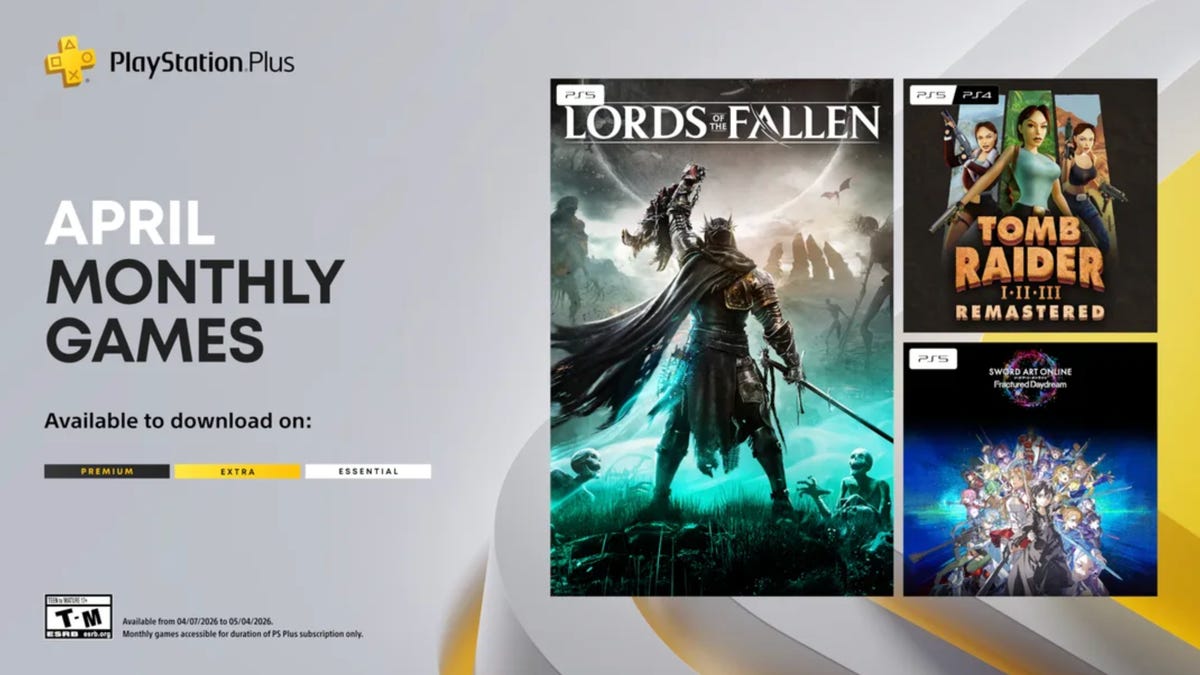
PlayStation Plus, which is Sony’s version of Xbox Game Pass, offers a large, constantly expanding library of games. Subscribers can choose from the Essential, Extra and Premium tiers, each with unique perks and benefits. Starting at $10 a month, the plans give subscribers access to games and rewards, and each month, all subscribers can play a handful of new games at no additional charge. And some people on Reddit are pretty excited for a few of the games Sony is offering subscribers throughout April.
One user wrote how they are «buzzing» for the remastered Tom Raider games, while another user is willing to replay the Soulslike game Lords of the Fallen. «April fools’ joke? Because they’re actually good,» a third user wrote.
If you’re a PlayStation Plus subscriber, you can play these games now until May 4.
Lords of the Fallen
If you played Elden Ring and thought, «I wish this game had even more grimdark elements to it, like Bloodborne,» Lords of the Fallen might be for you. Choose one of nine classes to play as while you traverse the lands of the living and the dead in order to overthrow the demon god Adyr. You’ll fight all manner of monstrosities along the way, like a colossal humanoid with an arm protruding from its mouth or a giant carrion crow that wears a human skull.
HexWorks, the gaming studio behind Lords of the Fallen, also released a patch for the game on April 3. The patch is intended to make co-op sessions feel more rewarding for hosts and guests, so you and your friends should have even more fun in this game.
Tomb Raider 1-3 Remastered
Experience these classic Tomb Raider games from the 90s all over again — or for the first time — with the remastered trilogy. You’ll explore jungles, solve puzzles in the desert and tackle mercenaries and monsters along the way. While you can enjoy the boosted graphics of the remastered edition, you can also enable low-poly mode to experience these games as you would have almost 30 years ago.
Sword Art Online Fractured Daydream
A system called Galaxia has been added to Alfheim Online, allowing players to relive the past. But the system has spun out of control, displacing players throughout time. To set things right, you’ll have to work with friends and foes alike in this co-op raid battle game. But if you want to go solo, you can play story mode as characters from across space and time confront the anomaly in the VR world.
For more on PlayStation Plus, here’s what to know about the service. You can also check out other games on PlayStation Plus and games on Xbox Game Pass.
Technologies
Get Organized for Just $28 With This 6-in-1 Baseus Charging Station Deal
Ditch the cluttered cables and upgrade to this sleek USB power strip while it’s on sale for a record-low price.
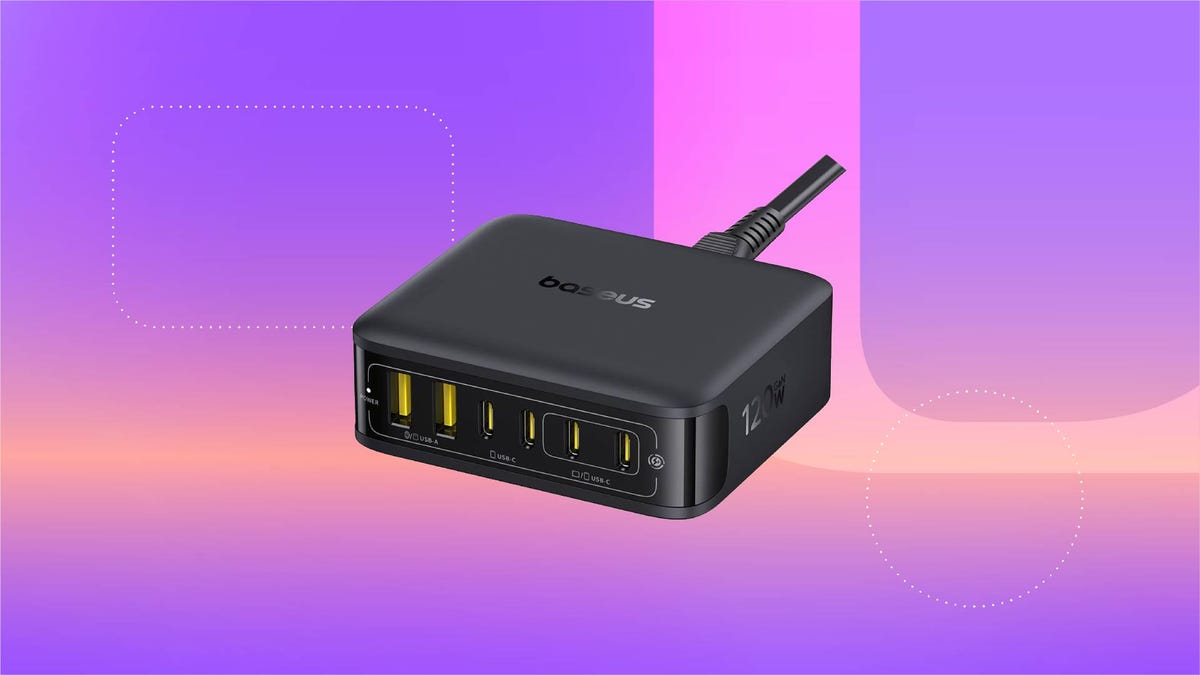
For just $28, this six-in-one Baseus charging station can help you keep your desk organized. That’s 20% off and the all-time lowest price we’ve seen for this 120-watt USB power strip. We don’t expect this limited-time deal to last for long, however, so you’ll want to get your order in sooner rather than later.
You can use this charging station for just about all of your devices, including phones, tablets, headphones and laptops. It’s equipped with four USB-C ports and two USB-A ports, so you can charge up to six devices at once. It also boasts a 65-watt single-port output, enough to fully recharge a MacBook Air in less than 2 hours. And at just 323 grams, it’s light enough to take on the go, making it a great buy for frequent travelers.
Why this deal matters
This sleek Baseus charging station can connect to up to six devices at once, and is still small enough that you can take it on the go. Plus, this is the all-time lowest price we’ve seen, making it a pretty great value.
-
 Technologies3 года ago
Tech Companies Need to Be Held Accountable for Security, Experts Say
-
 Technologies3 года ago
Best Handheld Game Console in 2023
-
 Technologies3 года ago
Tighten Up Your VR Game With the Best Head Straps for Quest 2
-
 Technologies4 года ago
Black Friday 2021: The best deals on TVs, headphones, kitchenware, and more
-
 Technologies5 лет ago
Google to require vaccinations as Silicon Valley rethinks return-to-office policies
-
 Technologies5 лет ago
Verum, Wickr and Threema: next generation secured messengers
-
 Technologies4 года ago
Olivia Harlan Dekker for Verum Messenger
-
 Technologies4 года ago
The number of Сrypto Bank customers increased by 10% in five days