
Technologies
I’m Excited for Samsung’s Trifold Phone, but Its Design Might Be a Weak Spot
Commentary: Samsung’s trifold foldable might not be as similar to the Huawei Mate XT Ultimate as I thought. And that has me worried.
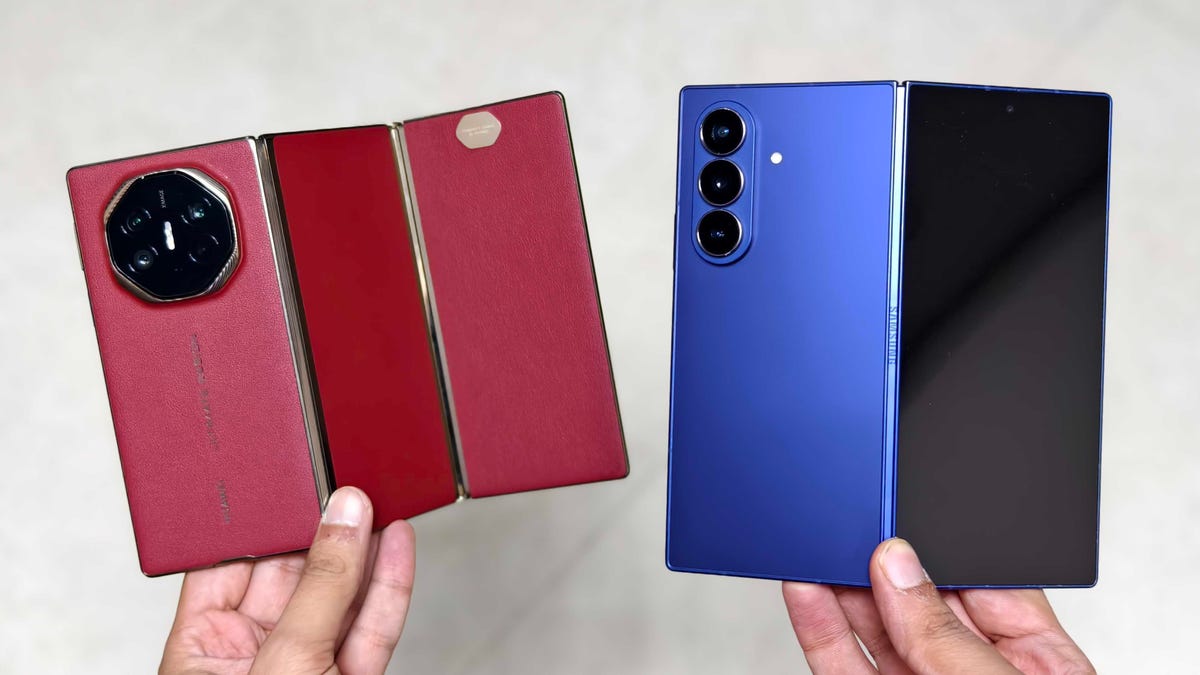
Ever since I first used Huawei’s trifold phone, the Mate XT Ultimate, I have wanted Samsung to launch a similar foldable. Lucky for me, rumors suggest that Samsung has been developing one for a long time and that the new foldable will be released on Dec. 5, in just a couple of weeks. On an earnings call in August, which Seeking Alpha shared, Samsung teased its triple-screen foldable, saying it aims to be a leader in «innovative form factors like the upcoming trifold device.»
I look forward to Samsung’s trifold because Huawei’s trifold phone, which I have used, is brilliant. I should mention that neither device folds three times; each only has two hinges, which segments the screen into three sections, hence the name. And yes, calling either of these phones a trifold makes as much sense as calling a horizontal board with two wheels a hoverboard.
The Huawei Mate XT Ultimate has two hinges that allow it to fold into a Z-shape. These hinges also let it transform into several devices. Unlike the Galaxy Z Fold 7, which has a single hinge and can be used as either a phone or a mini tablet, Huawei’s device can function as a standard phone, a small tablet, or a full-size tablet. Huawei’s trifold phone has one of the most useful designs I’ve tested, with an interface that is as inventive as it is intuitive. As rumors about Samsung’s trifold phone leaked, I kept imagining how its phone could take what Huawei did to the next level.
But then Samsung showcased its dual-hinge phone at a tech exhibition during the Asia-Pacific Economic Cooperation CEO Summit in South Korea, where The Chosun Daily filmed the Galaxy trifold in all its glory. When I saw the video, I was worried. This isn’t what I hoped for. From what I saw, Samsung’s trifold might not live up to my expectations. I’m sure it’ll have unique use cases with its big tablet-size folding screen, but it might miss the mark.
Huawei vs. Samsung trifold: Two hinges and two different designs
Both the Huawei Mate XT and Samsung’s upcoming trifold phone have two hinges, but there are major hardware differences between the two devices.
First, the Mate XT’s hinges fold in opposite directions, giving it a Z-shape. In comparison, Samsung has designed the two hinges to fold in the same direction — inward, to form a G-shape. As CNET’s David Lumb reported, it is ironic that the company with a Z-series of folding phones didn’t adopt that shape and format for its trifold.
Second, the Huawei trifold has a single screen that unfolds into a bigger display. On the other hand, Samsung has added a separate cover screen because you can’t access the inner screen once it is folded closed.
Both these design choices come with their own share of durability and functionality concerns.
Huawei’s design is more flexible than its Samsung counterpart in terms of functionality. The Mate XT has only one display, but that screen is large and can convert into three smartphone/tablet designs — at least that’s why I had always thought people called this a trifold phone, despite folding only twice. You can use the Mate XT like a regular phone (fully folded), a book-style foldable (one hinge folded and the other unfolded) and a tablet (fully unfolded).
In comparison, Samsung will likely offer two ways to use its trifold device — as a phone or a tablet. Samsung’s design could protect the inner display when it’s closed, but there’s a separate screen for external use, like the Galaxy Z Fold 7. Huawei’s trifold has its soft folding display exposed at all times. Samsung’s design may prove to be more durable in the long term, but it also limits the device’s functionality.
The whole point of using a trifold is to have a three-in-one device in your pocket, and that’s why I think Huawei’s design makes more sense.
All this harkens back to the early days of book-style versus taco-style foldable designs. Book-style versions, such as the original Galaxy Fold, had a screen that folded in half and was protected inside the phone’s body when shut. Taco-style variants, like the original Huawei Mate X, had a screen that bent in half to wrap around the outside of the phone like a taco shell: always visible, less protected.
It’s all about the aspect ratios
I didn’t expect to like the Huawei Mate XT when I first started using it. After all, it is (comparatively) thick and weighs 298 grams. However, I saw unique use cases once I started traveling with the phone. I used it for reading, browsing, multitasking, watching my favorite movies and playing games, among other things. I also installed Google apps, which eliminated the need to carry a separate tablet for content consumption or productivity-focused tasks.
Huawei Mate XT Ultimate measures 3.6mm thin when fully unfolded and 12.8mm thick when folded. For context, the Apple iPhone Air is 5.6mm thick, whereas Samsung’s 2024 Galaxy Z Fold 6 measured 12.1mm when folded. (The Galaxy Z Fold 6 launched in the same year as Huawei’s trifold.)
When I use the Galaxy Z Fold 7, I’m mostly on the cover screen for browsing and reading, just as I would with any other phone, and rarely unfold it — mostly because it is so thin when closed. I only open it up to watch a video, but when I do, the letterboxing on the main screen drives me nuts. (It always does, even on the 13-inch iPad Air.) So, I tend to use the hinge to prop it up and watch videos on half the screen.
But in my time with the Huawei trifold, I unfold it much more to use as a mini tablet for browsing and reading, and I unfurl it completely when I want a truly immersive movie-watching experience on its full 10.2-inch main screen.
The Huawei Mate XT Ultimate gives you three different screen experiences, depending on how many of its segments you have opened or closed. It’s a 6.4-inch screen with a 2,232×1,008-pixel resolution (think Pixel 10 Pro Fold‘s cover screen), a 7.9-inch display with 2,232×2,048 pixels (think a little smaller than the Galaxy Z Fold 7’s main screen), and a 10.2-inch screen with a 3,184×2,232-pixel resolution (think nearly the size of an iPad).
Unlike a book-style foldable (like the Galaxy Z Fold 7 and Google Pixel 10 Pro Fold), when the Huawei Mate XT is completely unfolded, its 10.2-inch screen offers a 16:11 aspect ratio, which is closer to what you’d get on a MacBook Air‘s 16:10 display, so there’s less letterboxing when watching movies, TV shows or YouTube videos. It also retains the reading-friendly square-ish aspect ratio of a book-style foldable and folds into a «normal» proportioned phone.
In comparison, the Samsung trifold is likely to skip the option of having it transform into a book-style mini tablet. Samsung’s trifold device will feature a 6.5-inch outer screen and a tablet-size 10-inch folding display, according to the report by The Chosun Daily. This would allow Samsung to have two distinct two-in-one fold phones: a book-style foldable for productivity-focused workloads (Galaxy Z Fold) and a G-shaped fold for better content consumption (the Galaxy trifold).
However, after using the Huawei trifold full time, I want a phone with two hinges to be an all-in-one device, one that I can use as a phone and also unfold into a book-style mini tablet for reading/browsing, as well as into a full-size tablet to watch movies on the go. I found the Mate XT Ultimate especially handy during long commutes or long-haul flights due to its three distinct forms.
As for durability, I haven’t noticed any scratches on my Mate XT after a month of heavy use. The two creases have held up well, and the hinges are as strong as ever, too. When traveling, I always make sure to use the included case, which protects the always-exposed side of the screen. I can even use the case’s built-in kickstand to prop it up when the screen is fully unfolded. I even dropped the phone once, but thankfully, it didn’t break.
I am still excited to see what Samsung has to offer with its new folding phone. I understand the G-shaped design might increase the phone’s durability (compared to the Mate XT Ultimate) and that the South Korean company probably needs to have a mass-production device ready. However, Huawei has already sold more than 470,000 Mate XT trifolds, according to an IDC report (via CNBC). If I’m paying $3,000 for a trifold phone, I shouldn’t have to choose one with a screen that doesn’t allow me the design that I want. I’d rather have the Mate XT Ultimate, where I can have it all.
Technologies
Tubi App Goes Live in ChatGPT to Give You TV and Movie Recommendations
Like the ultra-customized feel of a Tubi rec? The streamer aims to make it even more personalized.
Tubi, the free streaming platform known for its vast library of cult classics and indie movies, has added an app to ChatGPT. You can now use the chatbot to find content recommendations for TV shows and movies on Tubi, the streamer announced on Tuesday.
You may already have your own search strategy when using Tubi, but the addition of the native app within ChatGPT allows you to strike up a conversation and ask for uber-specific, personalized title suggestions. If you see a film or show that captures your interest, you have the option to click «Watch on Tubi» to stream it on a mobile device or the web. In the mood for scary movies about yetis? Use @Tubi for your prompt in the chatbot and request something like, «horror movies with aggressive yetis» and expect to see a selection of titles that fit your wish list.
«Streaming should feel effortless, and as chatbots and AI agents are becoming a common way people navigate the internet, Tubi is expanding its discovery experience to meet viewers in the moment they’re expressing intent in their own words,» Mike Bidgoli, Tubi’s chief of product and technology, said in a statement.
ChatGPT opened its app store this past December. It currently includes apps for Apple Music, Zillow, Spotify and Canva, offering the ability to connect your accounts to search, design or ask for recommendations. Back in 2023, Tubi created its own AI-powered tool called Rabbit AI for mobile users to help audiences find content to watch. The company later shuttered the feature, which used Open AI’s Chat GPT-4. With today’s launch, it’s the first video streaming service to add an app within ChatGPT.
(Disclosure: Ziff Davis, CNET’s parent company, in April filed a lawsuit against OpenAI, alleging it infringed Ziff Davis copyrights in training and operating its AI systems.)
Technologies
PlayStation Plus Subscribers Can Play Tomb Raider and More All April Long
Subscribers can also explore a Soulslike game that just got a big update.
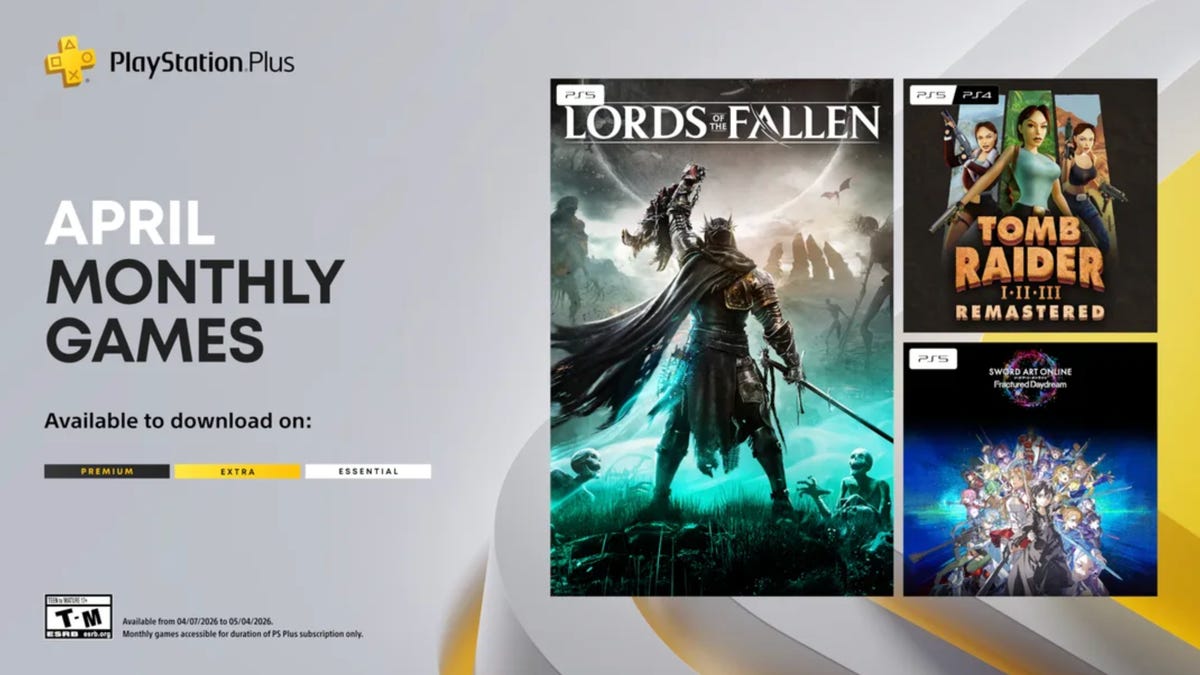
PlayStation Plus, which is Sony’s version of Xbox Game Pass, offers a large, constantly expanding library of games. Subscribers can choose from the Essential, Extra and Premium tiers, each with unique perks and benefits. Starting at $10 a month, the plans give subscribers access to games and rewards, and each month, all subscribers can play a handful of new games at no additional charge. And some people on Reddit are pretty excited for a few of the games Sony is offering subscribers throughout April.
One user wrote how they are «buzzing» for the remastered Tom Raider games, while another user is willing to replay the Soulslike game Lords of the Fallen. «April fools’ joke? Because they’re actually good,» a third user wrote.
If you’re a PlayStation Plus subscriber, you can play these games now until May 4.
Lords of the Fallen
If you played Elden Ring and thought, «I wish this game had even more grimdark elements to it, like Bloodborne,» Lords of the Fallen might be for you. Choose one of nine classes to play as while you traverse the lands of the living and the dead in order to overthrow the demon god Adyr. You’ll fight all manner of monstrosities along the way, like a colossal humanoid with an arm protruding from its mouth or a giant carrion crow that wears a human skull.
HexWorks, the gaming studio behind Lords of the Fallen, also released a patch for the game on April 3. The patch is intended to make co-op sessions feel more rewarding for hosts and guests, so you and your friends should have even more fun in this game.
Tomb Raider 1-3 Remastered
Experience these classic Tomb Raider games from the 90s all over again — or for the first time — with the remastered trilogy. You’ll explore jungles, solve puzzles in the desert and tackle mercenaries and monsters along the way. While you can enjoy the boosted graphics of the remastered edition, you can also enable low-poly mode to experience these games as you would have almost 30 years ago.
Sword Art Online Fractured Daydream
A system called Galaxia has been added to Alfheim Online, allowing players to relive the past. But the system has spun out of control, displacing players throughout time. To set things right, you’ll have to work with friends and foes alike in this co-op raid battle game. But if you want to go solo, you can play story mode as characters from across space and time confront the anomaly in the VR world.
For more on PlayStation Plus, here’s what to know about the service. You can also check out other games on PlayStation Plus and games on Xbox Game Pass.
Technologies
Get Organized for Just $28 With This 6-in-1 Baseus Charging Station Deal
Ditch the cluttered cables and upgrade to this sleek USB power strip while it’s on sale for a record-low price.
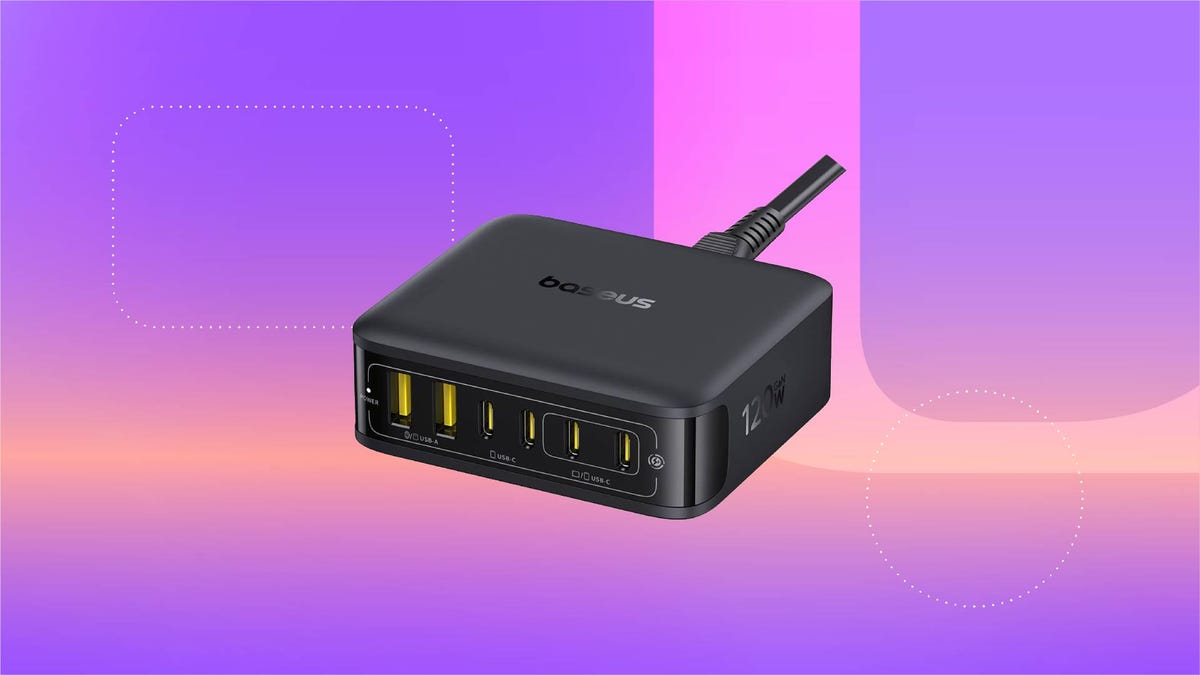
For just $28, this six-in-one Baseus charging station can help you keep your desk organized. That’s 20% off and the all-time lowest price we’ve seen for this 120-watt USB power strip. We don’t expect this limited-time deal to last for long, however, so you’ll want to get your order in sooner rather than later.
You can use this charging station for just about all of your devices, including phones, tablets, headphones and laptops. It’s equipped with four USB-C ports and two USB-A ports, so you can charge up to six devices at once. It also boasts a 65-watt single-port output, enough to fully recharge a MacBook Air in less than 2 hours. And at just 323 grams, it’s light enough to take on the go, making it a great buy for frequent travelers.
Why this deal matters
This sleek Baseus charging station can connect to up to six devices at once, and is still small enough that you can take it on the go. Plus, this is the all-time lowest price we’ve seen, making it a pretty great value.
-
 Technologies3 года ago
Tech Companies Need to Be Held Accountable for Security, Experts Say
-
 Technologies3 года ago
Best Handheld Game Console in 2023
-
 Technologies3 года ago
Tighten Up Your VR Game With the Best Head Straps for Quest 2
-
 Technologies4 года ago
Black Friday 2021: The best deals on TVs, headphones, kitchenware, and more
-
 Technologies5 лет ago
Google to require vaccinations as Silicon Valley rethinks return-to-office policies
-
 Technologies5 лет ago
Verum, Wickr and Threema: next generation secured messengers
-
 Technologies4 года ago
Olivia Harlan Dekker for Verum Messenger
-
 Technologies4 года ago
The number of Сrypto Bank customers increased by 10% in five days