
Technologies
I Tried Valve’s Steam Frame, Machine and Controller: SteamOS Is Coming for Your Face and TV
Valve is working on a new standalone VR headset, Xbox-sized game console and wireless controller. I tried them all at the company’s HQ.
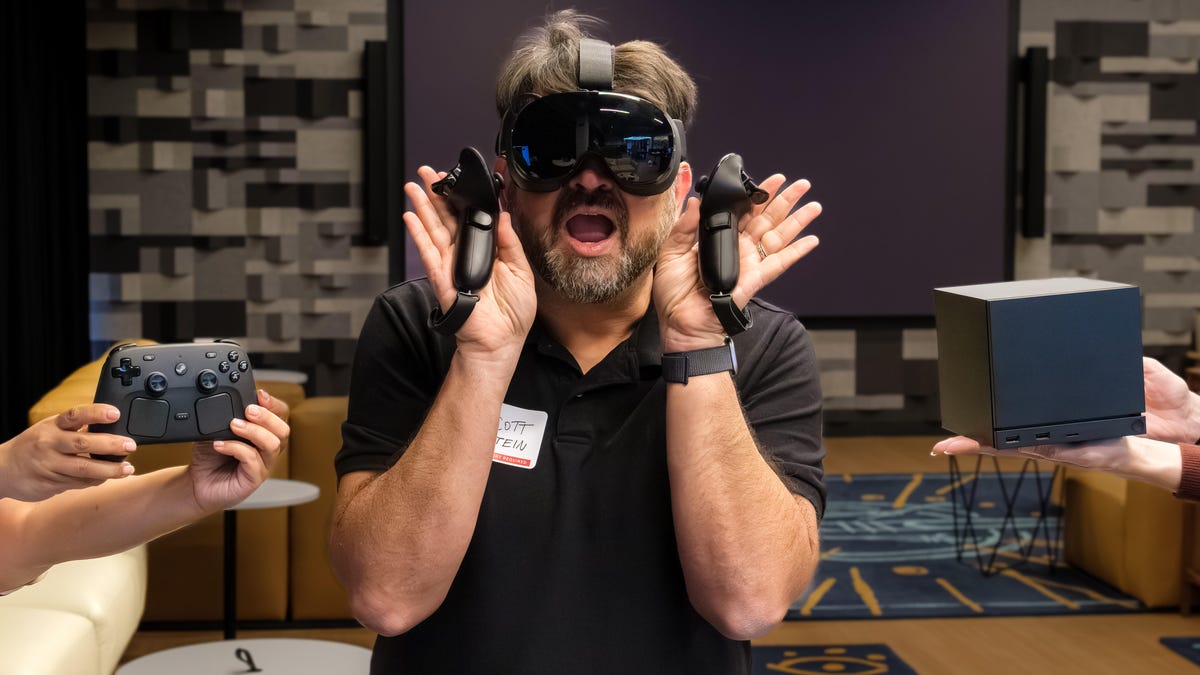
Imagine, if you will, a Steam Deck and a VR headset combining into a new gaming life form — part Meta Quest, part handheld game system. As I slid the Steam Frame over my eyes and my hands into the controller, that’s exactly what I felt.
The Steam Frame is a new VR headset by gaming giant Valve, the company behind the Steam platform, but it wasn’t the only new piece of hardware I tested during the course of a few hours at Valve’s HQ. There’s also the Steam Machine, a console-sized PC designed to connect to a television, and the Steam Controller. These three new devices are designed to work together as a complete ecosystem.
All three pieces of the new Steam gaming hardware will be available in early 2026, though pricing hasn’t been announced. I was among a small group of journalists invited to experience them for the first time, and I came away with some answers, and a few questions.
First off, none of these devices is a new Steam Deck, one of the best handheld game consoles. I don’t expect Valve to announce the next Steam Deck in 2026, and company representatives I asked gave me no reason to think otherwise. And the Steam Machine doesn’t seem to be a direct Xbox or PlayStation competitor, either. Seen as a whole, all three new Valve gadgets push the idea of PC gaming in novel directions. And based on Valve’s history of hardware launches, their tech could eventually appear in third-party products, too.
Steam Frame, a standalone VR headset, captured my excitement the most. It’s been six years since the Valve Index debuted in 2019, and rumors have been heating up recently. But Valve’s return to VR in 2026, amid a landscape full of AI and AR-infused mixed reality headsets and glasses, is quite different. Valve isn’t interested in AR right now, or AI for that matter. The Steam Frame is all about gaming.
I also spent time with the cube-shaped, nearly console-like PC Valve called Steam Machine, playing games while connected to a TV. And I played using the new Steam Controller, a separately sold wireless controller with a set of Steam Deck-like controls and a new wireless protocol for connecting lag-free.
Let’s get even deeper into what impressed me, and what to expect from each product when they drop next year.
Steam Frame: A Steam Deck for your face
From the outside, nothing about the Steam Frame looks particularly unique. But it’s still wild to see Valve’s engineering team — led by designer Andrew Yang — unveil a sleek black VR headset and controllers that work on their own, just like Meta’s Quest, Apple’s Vision Pro, and Samsung Galaxy XR. But the Steam Frame is none of those things. I think of it as a Steam Deck for your face. Valve is quick to point out that the device’s biggest strength is running SteamOS on an ARM chip in this form. That means you can load your Steam game library directly onto it from a PC via a MicroSD card and start playing both VR and non-VR games on the go, or use the Steam Frame to wirelessly stream from your PC at home.
«We see it as kind of a fundamental shift in the way that we’re looking at VR,» Yang told me as I put Steam Frame on my head. «We see Steam Frame as a a new way to play your entire Steam library — not just your VR titles, but also your non-VR titles.»
The Steam Frame is Valve’s first move to put SteamOS on an ARM processor. It doesn’t have Qualcomm’s VR-focused XR2 chip, but instead uses a Snapdragon 8 Gen 3 ARM64 chip with 16GB of RAM. It could be a new way to play a ton of games on other standalone hardware, VR and otherwise.
The two-piece design of the headset has the computing and lenses up front with a foam face piece, and a 21 watt-hour rechargeable battery pack in the back that’s connected by a cable and flexible head strap. Valve didn’t confirm specific battery life, claiming a range based on performance. I’d expect something between a Meta Quest and a first-gen Steam Deck (two to three hours), but I’m curious. There’s support for prescription lens inserts, but my high index option wasn’t available at the demo, so I had to squeeze my glasses in. They fit, but just barely.
The wide field of view (110 degrees) and LCD display (2,160 x 2,160 pixels per eye resolution) looked good — about equivalent to Quest 3. The clear pancake lenses made everything look vivid and unmuddied. It can run games up to 120 Hz, or even an experimental 144 Hz. Built-in audio via speakers in the front were loud, too, but you can also use wireless headphones. The Stream Frame has passthrough cameras to track movement (including in the dark with infrared) and can see via black-and-white passthrough. It’s not meant for mixed reality, but rather to help you easily create and see your play boundaries.
The controllers are awfully familiar, with a button and stick and dual-trigger layout similar to the Quest. But there’s a twist: four buttons on the right controller, and a d-pad on the left. It mirrors the Steam Deck’s design, minus the trackpads.
While a d-pad doesn’t seem ideal for VR games, it’s perfectly suited for any games in SteamOS that use Valve’s existing controller mappings. Steam games can run on this whether they’re VR or not.
Steam Frame’s PC-connected VR streaming
But the Frame isn’t just standalone; it’s designed to work with PCs, too. Valve sees the Frame as a mix between a wireless and standalone device, and its new wireless tech looks really promising. It uses a new 6 GHz-based protocol with a dongle you plug into your PC. It can stream faster than standard wireless Steam Link without taxing the local Wi-Fi or needing any cloud services.
The Frame also has eye tracking cameras that even worked through my glasses. They aren’t used for control, but instead for foveated rendering and streaming. Foveated rendering sharpens the visuals where your eyes are focused and reduces resolution in your peripheral vision, without you noticing. But the Frame does this for streaming PC games in VR, which Valve calls foveated streaming. It reduces the load on the wireless connection, improving overall stream quality — something I’ve never seen before. Again, it happens invisibly. Playing Half-Life: Alyx streamed from a PC, I’d have never know the edges of my field of view were lower res.
I played a PC VR game called Ghost Town on Steam Frame for a little bit, wandering the deck of a ship. I also played Hades 2, stretched across an adjustable big screen floating in front of me. Both were x86 versions of the games, running in standalone mode.
Valve’s Yang emphasized that, yes, you can transfer games right off your PC and play them on Frame, including classic early-gen SteamVR games I can’t find on Quest (I’m looking at you, Adventure Time: Magic Man’s Head Games). There’s a microSD card slot on Steam Frame for expanded storage, plus an included 256GB or 1TB of space onboard.
Not all the Deck-verified games are instantly going to play on the ARM chipset. Yang said verification for the Frame will take time, as individual games are optimized for the new chipset. Valve uses an algorithm that factors in customer interest from wish lists and purchases to decide which games to prioritize, though the process for selecting titles to optimize for the Frame is still being refined.
I was surprised Valve hadn’t released a standalone version of Half-Life: Alyx for the Steam Frame. When I asked if it was coming, it sounded like Valve is exploring whether that could happen.
But what’s even more intriguing is that other Android VR games could run on Steam Frame, even ones for Android XR. «We would treat it as another one of those things to plug in,» said Jeremy Selan, a hardware/software engineer at Valve. «As Android XR becomes a richer, fuller fleshed out set of APIs and programs, and there’s content to support it, we could easily add support for that to SteamOS itself.»
Other expansions could come with a custom port in the front of the headset, which Valve hints could be for high-speed cameras.
It certainly feels like Steam Frame is a stepping stone towards ideas for a future Steam Deck, one that could work with XR glasses and connect via streaming with TV consoles and headsets. «It’s not inconceivable to think that even these products would be a part of that ecosystem dream you just laid out,» Valve’s Selan said when I ask about this.
Steam Machine and Steam Controller: PC gaming on a TV
I also demoed two non-VR devices at Valve’s HQ. The Steam Machine is a black cube about the size of a game console, something that you could easily park in front of a TV. It’s a full gaming PC that can stream wirelessly to Steam Frame, or it can simply be something you play instead of an Xbox or PlayStation. I sat down on a sofa to try out some familiar games, and I was handed a new Steam Controller to play with.
The Steam Machine is a return to a concept first introduced a decade ago. The Alienware Steam Machine in 2015 attempted to create an ecosystem of console-sized (and priced) PC game consoles. Unfortunately, its odd controller, with trackpads instead of thumbsticks, was an unwelcome shift from the rest of the PC universe.
The new Steam Machine coming in 2026 brings an infusion of Steam Deck-provided confidence, both in game compatibility and controller design. Valve says the Steam Machine is six times more graphically powerful than the three-and-a-half-year-old Steam Deck but wouldn’t share specifics beyond a few specs. The Steam Machine has a semi-custom AMD-based Zen 4 CPU and AMD RDNA3 28CUs GPU, capable of 4K 60 frames per second gaming and ray tracing.
Meanwhile, the new Steam Controller has a full set of controls that mirror the Steam Deck’s, including analog sticks, d-pad and buttons, dual trackpads and dual triggers. It even has gyro-based controls that can be triggered by lightly touching the capacitive-touch analog sticks or rear grip buttons. I loved how it felt to hold, and I found the layout of buttons pretty reasonable to reach with my thumbs (although the angled touchpads took some getting used to).
The Steam Machine will be available both with and without the Steam Controller. Since it’s a Steam-based PC, you can use any controller you like, but the Steam Controller’s unique features are certainly a welcome addition.
The Steam Machine has support for a new wireless protocol in the controllers: a 2.4 GHz radio that bypasses standard Bluetooth for better responsiveness. The Hall-effect magnetic analog sticks have smaller dead zones than Steam Deck, meaning you could set up even more micro-responsive thumb flick moves, and the vibrating haptics are stronger. The Steam Controller works with other PCs, too, via a wireless dongle cable that also doubles as a magnetic controller charger — a clever touch.
I didn’t get to play many games on Steam Machine — Valve only had a handful to try — but I found the early performance hit and miss. Less graphically intense games such as Balatro and Hollow Knight: Silksong seemed totally fine, as I expected. Cyberpunk 2077, during the short time I played, looked good, too. On the other hand, Silent Hill had some graphic stutters, which Valve’s team says should be fixed in later game updates. Sonic Racing: Crossworlds had graphics performance issues as well.
Valve noted that in the early days of the Steam Deck, few games in the Steam library were optimized to run on it, but that changed as the library grew over time. The Steam Machine isn’t arriving until next year, so I’m curious to see how it performs then. Ultimately, price and performance will determine whether the Steam Machine feels like a success or a flop.
But I do love the design of the compact system. In a cool twist, it has has removable magnetic faceplates — I saw one of Heavy, my older son’s favorite character from Team Fortress 2, holding a balloon — and an LED bar on the bottom of the system that lights up and shows some animated progress bars for downloads.
I really like the controllers, which are cross-compatible with both the Steam Deck and Steam Frame. When paired with a docked Steam Deck, they make TV-connected play feel much better, closer to the experience of using a Nintendo Switch. They can even power on the Steam Machine or a docked Steam Deck.
Is this the sign of gaming ecosystems to come?
As I tried all these demos, I couldn’t help but wonder what they meant for gaming as a whole. Is Valve offering a glimpse of the future, one where our PCs, accessories and headsets are all interconnected? Or is the company deconstructing the PC itself, expanding SteamOS even further across handhelds, consoles, headsets and beyond? Maybe it’s all of the above, not so much a single product as a philosophy of interconnection.
And the crucial question: What will all of this cost when it arrives in early 2026? Valve’s team said it’s still working out pricing details and offered no hints about what any of it might cost.
The game console landscape is already in a strange, transitional place. Microsoft is embracing an «Xbox everywhere» approach, and PlayStation is experimenting with streaming handhelds and VR headsets. Nintendo’s Switch 2 is already modular. Valve looks to be taking that multi-device flexibility to Steam in a bunch of new ways, tackling everything in 2026… except the Steam Deck.
It sounds like Valve plans for the technologies in the Steam Machine and Steam Frame to extend to third-party products as well as its own. After all, SteamOS already runs on several Windows handhelds, and Steam Link for VR works on both Quest and PlayStation VR. With the new Steam Machine, Steam Frame and Steam Controller, Valve seems to be triangulating something new — an exploded-out Steam Deck-esque space for Steam games.
Steam Deck won me over even though I’m not a PC gamer, and Steam Frame shows the same promise for VR. But the biggest missing piece — a new next-gen Steam Deck to tie it all together — still looms large.
Valve acknowledges the growing interest in a new Steam Deck but says it wants to wait until the hardware can deliver a true leap forward before releasing a sequel. Maybe gaming handhelds just aren’t there yet.
In the meantime, I can’t wait to see whether the Steam Machine will actually be a PC console that works for me. And I’m even more curious to find out if the Steam Frame could be the first true challenger to the Meta Quest. The thing is, we just won’t know until 2026.
Technologies
Samsung’s Galaxy Watch Ultra 2 Might Come in 5G and 4G Cellular Models
If the rumor proves true, the 5G Galaxy Watch Ultra would rival the 5G-enabled $799 Apple Watch Ultra 3 that debuted last fall.

Samsung’s next high-end Galaxy Watch could support faster 5G speeds, but if this leak is true, it will depend on where you live. The rumored Samsung Galaxy Watch Ultra 2 might come in 5G and 4G cellular models, with availability for each smartwatch depending on the country.
According to the Dutch website Galaxy Club (and spotted by SamMobile), Samsung’s servers may have revealed a series of model numbers that point to 5G, 4G and Wi-Fi-enabled editions of the next Galaxy Watch Ultra, which would succeed the original model that debuted in 2024.
A representative for Samsung did not immediately respond to a request for comment.
The Galaxy Club website speculates that the 5G edition would be sold in the US and Korean markets, while the 4G edition would sell in the rest of the world. In the US, a 5G version of the Galaxy Watch Ultra would rival the 5G-enabled $799 Apple Watch Ultra 3, which debuted last fall. The 4G edition would have broader compatibility worldwide, since the earlier network is far more established.
It will likely be a few months until we hear anything official about the Galaxy Watch Ultra 2. Samsung typically unveils its new watches in the summer alongside its Galaxy Z Fold and Z Flip foldable phones. Last year, Samsung unveiled the Galaxy Watch 8 and the Galaxy Watch 8 Classic, but otherwise left the prior 2024 Ultra in the lineup for those looking for a larger 47mm smartwatch.
Technologies
2 Cases Show Supreme Court Isn’t Holding ISPs Responsible for Piracy
Technologies
Today’s NYT Connections Hints, Answers and Help for April 8, #1032
Here are some hints and the answers for the NYT Connections puzzle for April 8, No. 1032.

Looking for the most recent Connections answers? Click here for today’s Connections hints, as well as our daily answers and hints for The New York Times Mini Crossword, Wordle, Connections: Sports Edition and Strands puzzles.
Today’s NYT Connections puzzle is kind of tough. The purple category is a fun one, once you see the connection. Read on for clues and today’s Connections answers.
The Times has a Connections Bot, like the one for Wordle. Go there after you play to receive a numeric score and to have the program analyze your answers. Players who are registered with the Times Games section can now nerd out by following their progress, including the number of puzzles completed, win rate, number of times they nabbed a perfect score and their win streak.
Read more: Hints, Tips and Strategies to Help You Win at NYT Connections Every Time
Hints for today’s Connections groups
Here are four hints for the groupings in today’s Connections puzzle, ranked from the easiest yellow group to the tough (and sometimes bizarre) purple group.
Yellow group hint: In the group.
Green group hint: Appearance details.
Blue group hint: Often found in gyms.
Purple group hint: They help you see.
Answers for today’s Connections groups
Yellow group: Cohort member.
Green group: Aesthetic.
Blue group: Kinds of bar apparatuses.
Purple group: Eyewear in the singular.
Read more: Wordle Cheat Sheet: Here Are the Most Popular Letters Used in English Words
What are today’s Connections answers?
The yellow words in today’s Connections
The theme is cohort member. The four answers are associate, colleague, fellow and peer.
The green words in today’s Connections
The theme is aesthetic. The four answers are design, look, scheme and style.
The blue words in today’s Connections
The theme is kinds of bar apparatuses. The four answers are monkey, parallel, pull-up and uneven.
The purple words in today’s Connections
The theme is eyewear in the singular. The four answers are contact, goggle, shade and spectacle.
-
 Technologies3 года ago
Tech Companies Need to Be Held Accountable for Security, Experts Say
-
 Technologies3 года ago
Best Handheld Game Console in 2023
-
 Technologies3 года ago
Tighten Up Your VR Game With the Best Head Straps for Quest 2
-
 Technologies4 года ago
Black Friday 2021: The best deals on TVs, headphones, kitchenware, and more
-
 Technologies5 лет ago
Google to require vaccinations as Silicon Valley rethinks return-to-office policies
-
 Technologies5 лет ago
Verum, Wickr and Threema: next generation secured messengers
-
 Technologies4 года ago
Olivia Harlan Dekker for Verum Messenger
-
 Technologies4 года ago
The number of Сrypto Bank customers increased by 10% in five days