
Technologies
I Used the Oppo Find X9 Pro’s Bizarre-Looking Hasselblad Lens and Here’s Everything It Can Do
The Hasselblad teleconverter lens adds a 10x optical zoom to the Oppo Find X9 Pro’s 200-megapixel camera. It’s expensive but the results are fantastic.
The Oppo Find X9 Pro has a range of upgrades, including a new 200-megapixel telephoto camera with 3x optical zoom, which boasts several nifty zoom features to help you take a great photo no matter how far away you are from your subject.
For example, it delivers excellent shots at 6x by cropping into the sensor for 50-megapixel photos. Oppo says that it can deliver «lossless zoom» up to 13.2x using computational photography — that’s close to the max digital zoom on phones from a few years ago. And if that’s not enough for you, the Find X9 Pro also supports an external Hasselblad telephoto lens accessory, which further zooms into distant subjects.
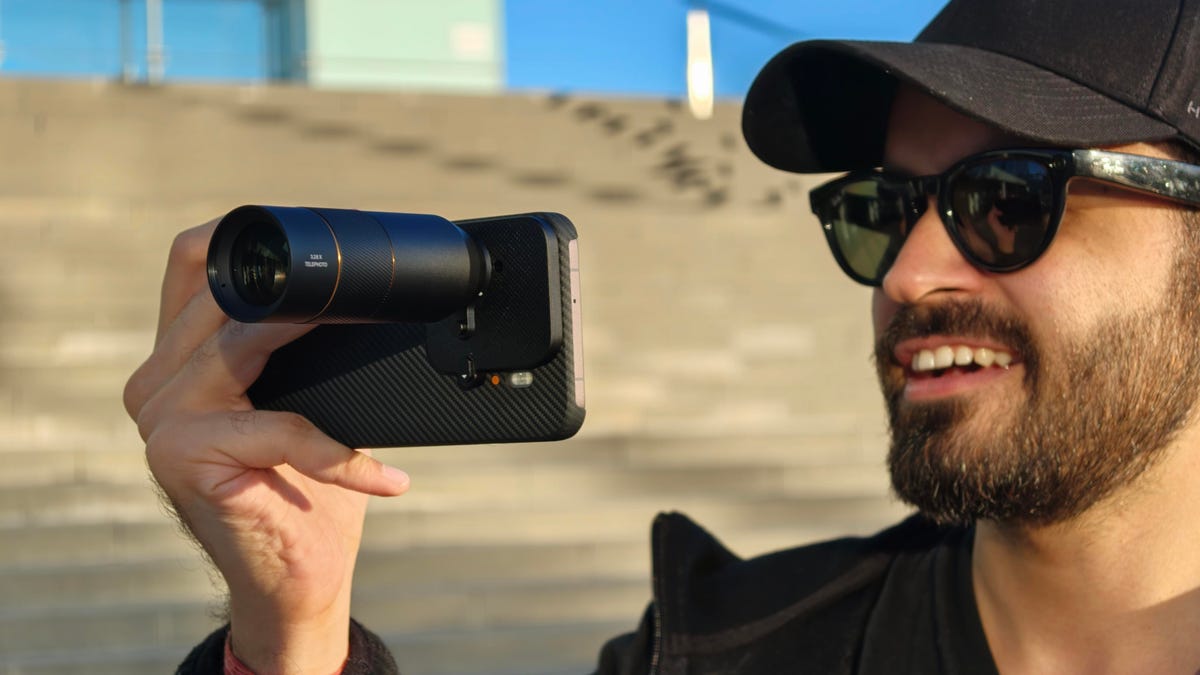
Out of these three, the detachable telephoto lens is the most wild. When attached, the Hasselblad lens sticks out several inches from the back of the phone. It somewhat resembles a mini-telescope.
Oppo isn’t the first to make such an accessory; both Vivo and Xiaomi have done it before. However, Oppo’s take is different than the rest. While others offer a camera grip with a shutter button, Oppo’s Hasselblad Teleconverter Kit relies on the phone’s Quick Control hardware button or the on-screen shutter button to shoot the photos.
I’ve been using it a lot recently and here’s what it can do. I should note that the Oppo Find X9 Pro isn’t available in the US.
Using the Hasselblad Teleconverter Kit is kind of a hassle
The Hasselblad Teleconverter Kit comes with three pieces: a snap-on camera module attachment, the telephoto lens itself and a brace that can screw into a tripod for stability.
To use it, you also need to have the official Magnetic Photographer Case, which is purpose-built to support the slide-on attachment. You can then add the lens with a twist, which clicks securely into place over the 200-megapixel telephoto camera.
The external lens accessory is heavy, making the phone unbalanced and unwieldy. I got used to it, but it took a day to figure out how to hold the phone and lens combo most effectively. However, I sorely miss that there’s no camera grip to provide a secure hold for the phone when the lens is mounted. If I move my hand for a more comfortable hold or to tap the screen for long zoom shots, my framing is significantly altered. If I were to change one thing about this teleconverter kit, I’d add a camera grip to make this setup more comfortable to use.
You can use a tripod to brace the lens, which helps stabilize your shots in the viewfinder; however, this is counterproductive to the idea of using a phone to take photos in the first place. I don’t want to carry a tripod — at that point, I might as well just use a dedicated camera and telephoto lens. After all, the whole purpose of having a portable tele lens is to minimize bulk.
And yet, I love using it
The first time you add the Hasselblad lens and open the Camera app, you might be surprised to see the viewfinder upside down. To counter this, you need to go to the dedicated Hasselblad Teleconverter mode under the More menu.
Besides flipping the viewfinder the correct way, it gives you 10x, 20x and 40x zoom options. You can always use the slider to adjust the magnification between 10x and 200x. I used it for a day in Barcelona and loved the natural depth it added to human subjects. I was also surprised by some lowlight results.
Here are few of my favorite photos that I shot on the Oppo Find X9 Pro using the Hasselblad Teleconverter Kit:
I saw a person skateboarding after setting up my camera and kept tapping the shutter button in hopes of getting an action shot. I love how this came out because there’s no motion blur on the person or his skateboard. These kinds of shots require a fast shutter speed to freeze the moment, and the Oppo Find X9 Pro was able to do so at 10x zoom using an external lens. The colors are accurate, the contrast is nice and there’s a good bokeh despite having a moving subject.
When setting up this shot, I tapped on the yacht to move the focus point from the person sitting on the seaside. At 20x zoom, it captured a nice-looking shot but if you look closely, the details are missing from the faces of the people on the yacht. It’s because the camera moved slightly when I was adjusting the focus and trying to capture the photo. Overall, I still prefer the Hasselblad lens and Oppo combination for accurately capturing the colors of a sunset.
At 40x zoom, the Hasselblad teleconverter lens captures softer images and the details go for a toss. But its processing still retains the mood and feel of the frame which is just as important as getting sharp details. It gets the colors right and there’s a decent bokeh. It can also track faces to determine the subject, even at 50x zoom and, like in the above shot, you get decent clarity.
If you have a still subject, the external Hasselblad lens adds a DSLR-like shallow depth of field. It was even able to capture the woman’s hair strands in a windy environment. I love this photo because no portrait mode was used and that bokeh is the lens’ natural bokeh just like you’d get from a DSLR or mirrorless camera. It offers a similar shallow depth of field at 20x for still subjects.
For this photo, I tapped the wall for focus, which also adjusted the exposure and white balance automatically. Too many similar shots from other phones suffer from overprocessing, but not this one. I’m impressed by how it was able to expose for the light, without blowing out the highlights to white. The people were properly exposed without me needing to tap on either for focus and exposure. It also got the mood right in the process.
However, using the lens in low-light settings, like above, adds a lot of noise reduction and tends to give photos a soft, blurry watercolor look. The above shot was also captured at 10x and there’s light over the subject’s face, but the overall look is soft with fewer details. That said, it gives the photo a unique look, which I don’t dislike.
This is also a tap-lock-on-the-subject-and-shoot image, where I [the subject] was moving and the system was able to track my face to focus better. I love the photo’s contrasty look. In anything less than direct sunlight, the Hasselblad lens softens the subject, but the photos still come out looking great.
I like having the ability to expand my phone’s zooming capabilities for both photos and videos. However, the Hasselblad Lens Converter kit remains more of a novelty than something you’d use every day, mostly thanks to its price. While it’s fascinating how close you can get to distant subjects without losing much image quality, at 499 euros (roughly $575), it’s one of the most expensive phone accessories you can buy.
At that price, I’d expect it to function better with my phone. For instance, I’d like the camera software to be able to detect that I’ve attached an external lens, so it would open in the Hasselblad Teleconverter mode by default — rather than giving me a black viewfinder.
The Hasselblad Teleconverter kit is one of the most expensive phone accessories on the market. But if you can afford it, the lens adds a lovely natural bokeh to photos while retaining a scene’s natural colors. It also outputs excellent night shots. It might not be the best value but I can’t seem to put it down.
Technologies
Samsung’s Galaxy Watch Ultra 2 Might Come in 5G and 4G Cellular Models
If the rumor proves true, the 5G Galaxy Watch Ultra would rival the 5G-enabled $799 Apple Watch Ultra 3 that debuted last fall.

Samsung’s next high-end Galaxy Watch could support faster 5G speeds, but if this leak is true, it will depend on where you live. The rumored Samsung Galaxy Watch Ultra 2 might come in 5G and 4G cellular models, with availability for each smartwatch depending on the country.
According to the Dutch website Galaxy Club (and spotted by SamMobile), Samsung’s servers may have revealed a series of model numbers that point to 5G, 4G and Wi-Fi-enabled editions of the next Galaxy Watch Ultra, which would succeed the original model that debuted in 2024.
A representative for Samsung did not immediately respond to a request for comment.
The Galaxy Club website speculates that the 5G edition would be sold in the US and Korean markets, while the 4G edition would sell in the rest of the world. In the US, a 5G version of the Galaxy Watch Ultra would rival the 5G-enabled $799 Apple Watch Ultra 3, which debuted last fall. The 4G edition would have broader compatibility worldwide, since the earlier network is far more established.
It will likely be a few months until we hear anything official about the Galaxy Watch Ultra 2. Samsung typically unveils its new watches in the summer alongside its Galaxy Z Fold and Z Flip foldable phones. Last year, Samsung unveiled the Galaxy Watch 8 and the Galaxy Watch 8 Classic, but otherwise left the prior 2024 Ultra in the lineup for those looking for a larger 47mm smartwatch.
Technologies
2 Cases Show Supreme Court Isn’t Holding ISPs Responsible for Piracy
Technologies
Today’s NYT Connections Hints, Answers and Help for April 8, #1032
Here are some hints and the answers for the NYT Connections puzzle for April 8, No. 1032.

Looking for the most recent Connections answers? Click here for today’s Connections hints, as well as our daily answers and hints for The New York Times Mini Crossword, Wordle, Connections: Sports Edition and Strands puzzles.
Today’s NYT Connections puzzle is kind of tough. The purple category is a fun one, once you see the connection. Read on for clues and today’s Connections answers.
The Times has a Connections Bot, like the one for Wordle. Go there after you play to receive a numeric score and to have the program analyze your answers. Players who are registered with the Times Games section can now nerd out by following their progress, including the number of puzzles completed, win rate, number of times they nabbed a perfect score and their win streak.
Read more: Hints, Tips and Strategies to Help You Win at NYT Connections Every Time
Hints for today’s Connections groups
Here are four hints for the groupings in today’s Connections puzzle, ranked from the easiest yellow group to the tough (and sometimes bizarre) purple group.
Yellow group hint: In the group.
Green group hint: Appearance details.
Blue group hint: Often found in gyms.
Purple group hint: They help you see.
Answers for today’s Connections groups
Yellow group: Cohort member.
Green group: Aesthetic.
Blue group: Kinds of bar apparatuses.
Purple group: Eyewear in the singular.
Read more: Wordle Cheat Sheet: Here Are the Most Popular Letters Used in English Words
What are today’s Connections answers?
The yellow words in today’s Connections
The theme is cohort member. The four answers are associate, colleague, fellow and peer.
The green words in today’s Connections
The theme is aesthetic. The four answers are design, look, scheme and style.
The blue words in today’s Connections
The theme is kinds of bar apparatuses. The four answers are monkey, parallel, pull-up and uneven.
The purple words in today’s Connections
The theme is eyewear in the singular. The four answers are contact, goggle, shade and spectacle.
-
 Technologies3 года ago
Tech Companies Need to Be Held Accountable for Security, Experts Say
-
 Technologies3 года ago
Best Handheld Game Console in 2023
-
 Technologies3 года ago
Tighten Up Your VR Game With the Best Head Straps for Quest 2
-
 Technologies4 года ago
Black Friday 2021: The best deals on TVs, headphones, kitchenware, and more
-
 Technologies5 лет ago
Google to require vaccinations as Silicon Valley rethinks return-to-office policies
-
 Technologies5 лет ago
Verum, Wickr and Threema: next generation secured messengers
-
 Technologies4 года ago
Olivia Harlan Dekker for Verum Messenger
-
 Technologies4 года ago
The number of Сrypto Bank customers increased by 10% in five days