
Technologies
I Went Hands-On With the OnePlus 15’s Camera and You Need to See the Results
What better first test run than taking it on a neighborhood photo safari?
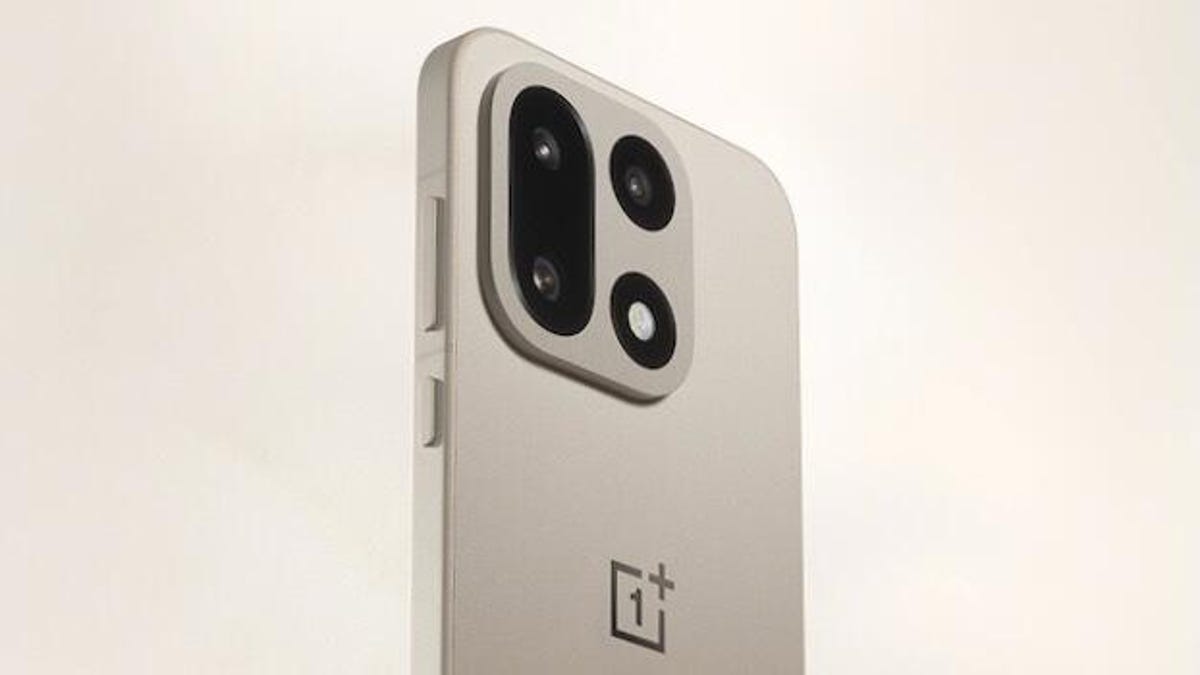
The OnePlus 15 is the next premium handset from the Chinese phone-maker, and I just got my hands on it. To give its cameras a whirl, I took it out for a quick spin through a hip corner of Los Angeles.
The OnePlus 15’s big advantage is that it’s one of the first to run the Snapdragon 8 Elite Gen 5, Qualcomm’s next-generation chip for high-end phones, which was launched in September. The system-on-a-chip has a big influence on how photos come out, processing every image captured through the rear cameras.
The OnePlus 15 has three 50-megapixel rear cameras, along with a selfie shooter on the front, and I took photos of my neighborhood flora and fauna using them all. While there’s a certain level of polish expected of premium phone cameras, this phone has something new: it’s the first major OnePlus handset released since the company’s partnership with Hasselblad ended. For years, OnePlus incorporated the iconic Swedish camera maker’s color science and image calibration in its cameras.
With Hasselblad gone, the OnePlus 15 features the debut of the DetailMax Engine, a loftily-titled computational processing system that aims to «present scenes as they truly are, without over-beautification or distortion,» as the company’s official blog post explained.
That means a new page for shooting photos on a OnePlus phone, which made me want to know what the OnePlus 15 is capable of. Join me through a casual tour of a vibrant Los Angeles neighborhood, taking the kinds of snapshots that make up the majority of everybody’s camera roll. I’ll need to spend a lot more time with the device to give it a comprehensive review.
Our first shot is of the outside of The Silver Lake House, a neighborhood Thai restaurant. While I clearly can’t resist a slight Dutch angle here, the blend of colors look distinct and not oversaturated — a win for true-to-life processing. I like the way the OnePlus 15 captured the light and shadows filtering through the trees, and the camera has handled the lens flare well without over-exposing that area. Also, notice the reflection on the chrome on the heat lamp.
Here’s a close-up of knick-knack plant vases on a windowsill overlooking the restaurant’s indoor tables. The light is really balanced, bright on the foreground outside the eatery and dimmer within — but colors and details are still visible inside. You can also pick out some detail in the reflections on the window of the street behind me.
I couldn’t resist this 1960s Ford Thunderbird sitting idly on the street, a cruising car from yesteryear resting in a hipper corner of LA. Note the texture of the dirt streaks over the paint contrasted against the shiny chromed metal surrounding the taillights. More importantly, despite the camera’s focus on the foreground, the OnePlus 15 still manages to capture the blue sky in the background, complete with details in the clouds.
I took this photo of a nearby dog park with the ultrawide lens, which preserves humdrum details in the brown dirt amid sprouted grass along the bottom.
Here’s an image of the same dog park that I took while zoomed in at 7x magnification. It has a lot of detail and color. But we can go further!
Here’s the dog park photographed at 120x magnification, the farthest this phone can zoom in. The image looked grainy as heck on the phone’s screen when I shot it, but that DetailMax Engine’s post-processing has done relative wonders, making this semi-recognizable despite a lot of smudging at the edges caused by noise reduction — look between the chain links. To be sure, this is not a great image — it’s nearly painterly — but the fact that it can zoom in this far and still serve up a photo with something recognizable is amazing.
Here’s a selfie featuring yours truly. I think this photo has good detail and shadow, but what most impresses me are the mountains in the distance, which can be seen to some degree through the classic Los Angeles haze (marine layer, not smog) occluding the air, not the OnePlus selfie camera.
For comparison, here’s a selfie I took at night. The color is fine, with decent details in the foreground, though they start to blur behind me — notice the bricks on the bottom right, the posters on the light pole on the mid-left, and especially the building over my shoulder.
Here’s the obligatory night shot of a Los Angeles street. While the city will never be dark enough to test the phone’s ability to capture constellations of stars in the night sky, this does show the contrast between warm streetlights and the bright neon. The details of the stucco pockmarked the walls of the bowling alley are clear, even from across the street. Look closely at the texture of the street’s pavement. It’s a granular mix of grays flecked with white spots. All the grime of the city, preserved by the OnePlus 15’s new shiny cameras.
That’s it for the first look at the OnePlus’ camera capabilities. Happy Halloween! And keep an eye out for my full OnePlus 15 review.
Technologies
Today’s NYT Connections: Sports Edition Hints and Answers for April 8, #562
Here are hints and the answers for the NYT Connections: Sports Edition puzzle for April 8 No. 562.

Looking for the most recent regular Connections answers? Click here for today’s Connections hints, as well as our daily answers and hints for The New York Times Mini Crossword, Wordle and Strands puzzles.
Today’s Connections: Sports Edition is a tough one. If you’re struggling with today’s puzzle but still want to solve it, read on for hints and the answers.
Connections: Sports Edition is published by The Athletic, the subscription-based sports journalism site owned by The Times. It doesn’t appear in the NYT Games app, but it does in The Athletic’s own app. Or you can play it for free online.
Read more: NYT Connections: Sports Edition Puzzle Comes Out of Beta
Hints for today’s Connections: Sports Edition groups
Here are four hints for the groupings in today’s Connections: Sports Edition puzzle, ranked from the easiest yellow group to the tough (and sometimes bizarre) purple group.
Yellow group hint: Working out.
Green group hint: Cover your face.
Blue group hint: NFL players.
Purple group hint: Leap.
Answers for today’s Connections: Sports Edition groups
Yellow group: Exercises in singular form.
Green group: Sporting jobs that require masks.
Blue group: Hall of Fame defensive ends.
Purple group: ____ jump.
Read more: Wordle Cheat Sheet: Here Are the Most Popular Letters Used in English Words
What are today’s Connections: Sports Edition answers?
The yellow words in today’s Connections
The theme is exercises in singular form. The four answers are crunch, plank, situp and squat.
The green words in today’s Connections
The theme is sporting jobs that require masks. The four answers are catcher, fencer, football player and goaltender.
The blue words in today’s Connections
The theme is Hall of Fame defensive ends. The four answers are Dent, Peppers, Strahan and Youngblood.
The purple words in today’s Connections
The theme is ____ jump. The four answers are broad, high, long and triple.
Technologies
The $135M Google Data Settlement Site Is Live — See If You’re Eligible
Use the settlement website to select your preferred payment method, and you may end up $100 richer.

You can now file a claim in the $135 million Google data settlement. The case centers on claims that Android devices transmitted user data without consent. Specifically, the class action lawsuit Taylor v. Google LLC contends that Google’s Android devices passively transferred cellular data to Google without user permission, even when the devices were idle. While not admitting fault, Google reached a preliminary settlement in January, agreeing to pay $135 million to about 100 million US Android phone users.
The official settlement website for the lawsuit is now live. The final approval hearing won’t occur until June 23, when the court will consider whether Google’s settlement is fair and listen to objections. After that, the court will decide whether to approve the $135 million settlement.
In the meantime, if you qualify and want to be paid as part of the settlement, you can select your preferred payment method on the official website. There, you can find information on speaking at the June 23 court hearing and on how to exclude yourself or write to the court to object by May 29.
As part of the settlement, Google will update its Google Play terms of service to clarify that certain data transfers do occur passively even when you’re not using your Android device, and that cellular data may be relied upon when not connected to Wi-Fi. This can’t always be disabled, but users will be asked to consent to it when setting up their device.
Google will also fully stop collecting data when its «allow background data usage» option is toggled off.
Who can be part of the settlement?
In order to join the Taylor v. Google LLC settlement, you must meet four qualifications:
- Be a living, individual human being in the US.
- Have used an Android mobile device with a cellular data plan.
- Have used the aforementioned device at any time from Nov. 12, 2017, to the date when the settlement receives final approval.
- You’re not a class member in the Csupo v. Google LLC lawsuit, which is similar but specifically for California residents.
The final approval hearing is on June 23, so you can add your payment method until then. The hearing’s date and time may change, and any updates will be posted on the settlement website.
If you choose to do nothing, you will still be issued a settlement payment, but you may not receive it if you don’t select a payment method.
How much will I get paid?
It’s not currently known exactly how much each settlement class member will receive, but the cap is $100. Payments will be distributed after final court approval and after any appeals are resolved.
After all administrative, tax and attorney costs are paid, the settlement administrator will attempt to pay each member an equal amount. If any funds remain after payments are sent, and it’s economically feasible, they will be redistributed to members who were previously and successfully paid. If it’s not economically feasible, the funds will go to an organization approved by the court.
Technologies
Samsung’s Galaxy Watch Ultra 2 Might Come in 5G and 4G Cellular Models
If the rumor proves true, the 5G Galaxy Watch Ultra would rival the 5G-enabled $799 Apple Watch Ultra 3 that debuted last fall.

Samsung’s next high-end Galaxy Watch could support faster 5G speeds, but if this leak is true, it will depend on where you live. The rumored Samsung Galaxy Watch Ultra 2 might come in 5G and 4G cellular models, with availability for each smartwatch depending on the country.
According to the Dutch website Galaxy Club (and spotted by SamMobile), Samsung’s servers may have revealed a series of model numbers that point to 5G, 4G and Wi-Fi-enabled editions of the next Galaxy Watch Ultra, which would succeed the original model that debuted in 2024.
A representative for Samsung did not immediately respond to a request for comment.
The Galaxy Club website speculates that the 5G edition would be sold in the US and Korean markets, while the 4G edition would sell in the rest of the world. In the US, a 5G version of the Galaxy Watch Ultra would rival the 5G-enabled $799 Apple Watch Ultra 3, which debuted last fall. The 4G edition would have broader compatibility worldwide, since the earlier network is far more established.
It will likely be a few months until we hear anything official about the Galaxy Watch Ultra 2. Samsung typically unveils its new watches in the summer alongside its Galaxy Z Fold and Z Flip foldable phones. Last year, Samsung unveiled the Galaxy Watch 8 and the Galaxy Watch 8 Classic, but otherwise left the prior 2024 Ultra in the lineup for those looking for a larger 47mm smartwatch.
-
 Technologies3 года ago
Tech Companies Need to Be Held Accountable for Security, Experts Say
-
 Technologies3 года ago
Best Handheld Game Console in 2023
-
 Technologies3 года ago
Tighten Up Your VR Game With the Best Head Straps for Quest 2
-
 Technologies4 года ago
Black Friday 2021: The best deals on TVs, headphones, kitchenware, and more
-
 Technologies5 лет ago
Google to require vaccinations as Silicon Valley rethinks return-to-office policies
-
 Technologies5 лет ago
Verum, Wickr and Threema: next generation secured messengers
-
 Technologies4 года ago
Olivia Harlan Dekker for Verum Messenger
-
 Technologies4 года ago
The number of Сrypto Bank customers increased by 10% in five days