
Technologies
Pixel Watch 4 Features vs. Apple Watch Series 10: Google Came to Play!
Google’s latest watch takes a direct hit at Apple with a new AI health coach and advanced emergency connectivity. Find out how they stack up.
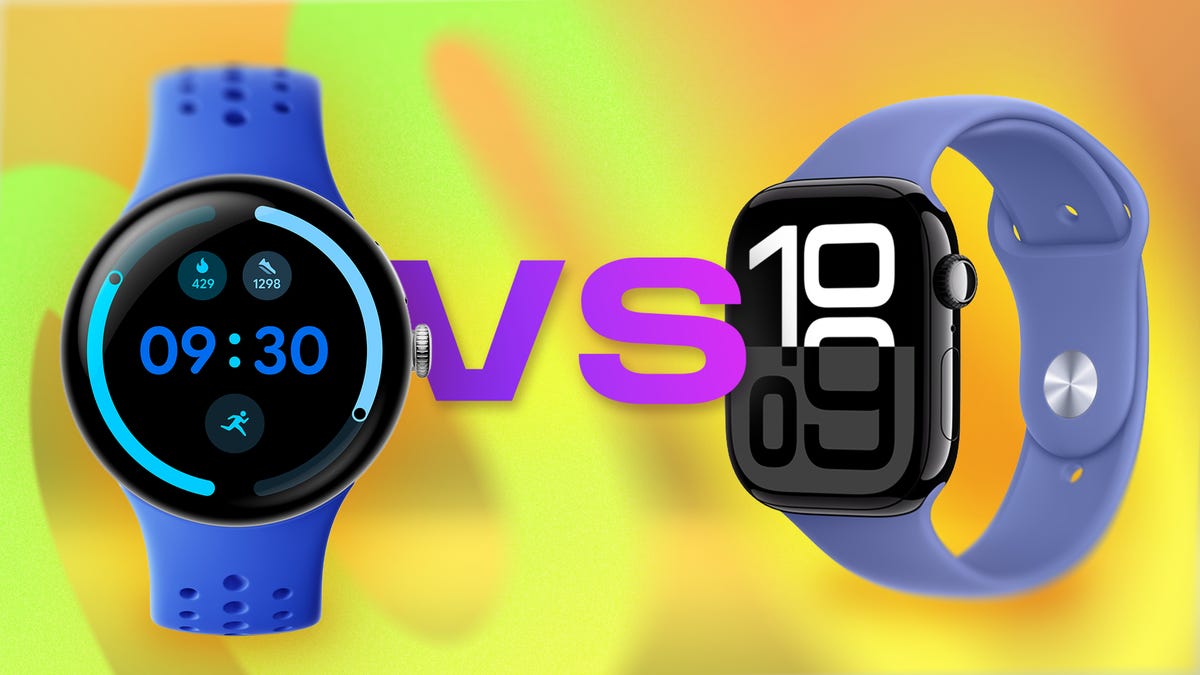
Google’s Pixel Watch 4 is the newest player on the smartwatch field and it’s not holding back. With a sleek design, AI-powered health coach, first-of-its-kind emergency satellite connectivity and improved battery life, it’s a major leap forward for a relative newcomer that’s been edging its way up the ranks to compete with the heavy hitters of the wearable world.
The Apple Watch Series 10, meanwhile, remains a benchmark in the category. While technically at a disadvantage being last year’s model, it holds its own with more than a decade of refinements and deep integration with the iPhone and Apple’s extensive health and fitness ecosystem.
As smartwatches make the leap from wearable phone extensions to essential health and safety tools, these two flagships are redefining the category — especially with both companies controlling the full hardware and software experience on their respective platforms. And with Apple expected to debut its Series 11 in September, this face-off feels like just the opening move in what’s shaping up to be a high-stakes game of chess between two of the biggest names in tech. Here’s how the specs stack up on paper; we’ll conduct our full suite of tests for the full Pixel Watch 4 review.
Pricing and availability
Being an older model, the Apple Watch Series 10 can be found for a discounted rate through third party sellers like Best Buy and Walmart, but the original price of $399 is technically higher than the base price of the $350 Pixel Watch 4. However, the larger-size versions have less of a price gap with the 45mm Wi-Fi version of the Series 10 costing $429 and the Pixel Watch 4 equivalent costing $400. And the Apple Watch is the only one that offers a higher-end titanium model that costs about $200 more than the base aluminum. Both watches are rated for 5ATM water resistance and have IP6X dust protection.
Design and display
Both watches remain true to their original form factor and this category is more a matter of preference. The Pixel Watch 4 sticks with its signature circular design that looks closer to a traditional analog watch than the Apple Watch, with a bubble-like screen that curves outward for a sleek, all-display look. It comes in 41mm and 45mm sizes with silver, dark gray and gold aluminum finishes, plus interchangeable bands.
Apple, by contrast, hasn’t strayed from its signature rectangular shape since its launch. It’s more «tech» looking than the Pixel Watch, but it’s also slightly more practical for navigating apps and notifications. The Series 10 also has minimal bezels with a screen that expands into the thin frame and comes in a 42mm and 46mm version. The Apple Watch has a slightly higher pixel density for better image quality but the Pixel 4 is brighter with up to 3,000 nits peak brightness compared to the Apple Watch’s 2,000 nits.
Performance, software and AI
Under the hood, both watches run the latest versions of their respective software: WatchOS 10 for Apple and Wear OS 6 for the Pixel. Apple offers the usual tight integration with the iPhone, while Google leans on its Fitbit acquisition for health tracking and now its AI expertise with the built-in Gemini assistant.
And this is where the Apple Watch starts to lose its footing. Google’s Gemini voice assistant handles back-to-back commands, summarizes information from your apps and responds conversationally without shuttling you out to a web link — something Siri still struggles to match. Apple’s assistant remains more limited, often requiring repeat commands and leaning on your iPhone for anything beyond the basics. Even a cautious AI user like myself can’t help notice how Gemini’s added capabilities feel genuinely useful on the wrist, cutting down on screen taps and making it easier to get more done on the go.
Health and fitness features
This is another area where Google’s AI could give the Pixel Watch 4 an extra edge. Both watches set the standard in health and fitness features — Apple because of its longstanding commitment to health and fitness, and Pixel through its integration with Fitbit. Their metrics are accurate and easy to make sense of in their respective apps. But the Pixel 4 just stepped it up with a concierge style AI health coach (coming in October) that can help you interpret your health data and give personalized recommendations: everything from whether to rest or exercise on any given day, to how to improve sleep quality. Apple’s Workout Buddy, coming in watchOS 26, offers live feedback on a handful of workouts but isn’t as far along in pulling together a complete picture of your health data (at least not yet). The caveat, however, is that Google’s coach will require a Fitbit Premium subscription ($10/month after a trial), while Apple’s AI fitness tool is free.
Emergency features
Beyond health tracking, both watches add an extra layer of protection with a range of emergency tools, including fall and crash detection, workout check-ins and Emergency SOS. The Apple Watch leans more on proactive health alerts, like warnings for irregular heart rhythm and potential sleep apnea.
But the Pixel Watch 4 just boosted its emergency features by adding satellite connectivity. This means you can send a message for help even without a phone or cell service. The Apple Watch, by comparison, still relies on the iPhone or needs network coverage for models that are cellular-enabled to make an emergency call.
Battery and charging
On paper the Series 10 promises 18 hours of heavy use, though in our testing it’s consistently gotten closer to 26 to 30 hours with the always-on display active. Google claims 30 to 40 hours on the Pixel Watch 4 depending on size, giving it a slight edge, but it’s hard to pass judgment without our real world tests.
Charging speed is another strong point for both watches with quick charge capabilities, although the Pixel Watch 4 is still faster when you need a quick top-up. It reaches 50% in just 15 minutes and a full charge in an hour. The Series 10 also takes an hour to reach a full charge, but hits 80% in 40 minutes.
Google has also made the Pixel Watch 4’s battery and display easier to replace for repairs, a big step forward for long-term usability, while Apple hasn’t emphasized the same level of repairability on the Series 10.
Bottom line
If you’re all-in on Apple, the Series 10 still delivers everything you need in a smartwatch. But for Android users (or anyone curious about AI on the wrist) the Pixel Watch 4 shows Google is serious about challenging Apple’s dominance.
Pixel Watch 4 vs. Apple Watch Series 10: Specs at a glance
| Pixel Watch 4 | Apple Watch Series 10 | |
| Design & sizes | Round, 41mm & 45mm | Square, 42mm, 46mm |
| Display | AMOLED LTPO, 320 ppi | LTPO3 OLED, 446 x 374 ppi |
| Thickness & weight | 12.3mm; 31–36.7g | 9.7mm; 30-41.7g (46mm titanium model) |
| Material & finish | Aluminum case: Silver, Champagne gold, Satin Moonstone or Matte black finish | Aluminum: Jet black, Rose gold or Silver finish; Titanium: Slate, Gold or Natural finish |
| Durability | 5ATM water + IP68 (dust) | 5ATM Water + IP6X (dust) |
| Battery life | 30–40 hrs (always-on) + quick charge dock: 50% in 15min, 100% in 60 min | 24-30 (always-on) + Fast charge: 80% in 30 min, 100% in 60 min |
| Sensors | ECG, SpO₂, heart rate, skin temp, loss of pulse detection | ECG, heart rate, skin temp, depth gauge, SpO2, Noise monitoring |
| Emergency features | Satellite SOS, Safety Check, Safety Signal, fall & crash detection | Emergency SOS, Fall detection, Crash detection, Check in and Backtrack |
| AI & coaching | Gemini voice assistant; Fitbit AI health coach (via Premium) | Siri (voice assistant); Workout Buddy |
| Processor | Qualcomm Snapdragon W5 Gen 2, Cortex-M55 co-processor | S10 SiP with 64-bit dual-core processor, W3 Apple wireless chip |
| RAM/Storage | 2GB, 32GB (storage) | 64GB (storage) |
| Payments | Google Wallet | Apple Pay |
| Price (US) | $350–$500 | $399-$750 (titanium) |
Technologies
Google’s Pixel 10A Is Coming to Japan With an Exclusive Blue Edition and Special Wallpaper
This model comes with creatively designed stickers and a special look for Pixel’s 10th anniversary.

Don’t be blue: Google is releasing an Isai blue edition of the Pixel 10A to celebrate the Android phone line’s 10th anniversary, setting it apart with its own sticker set, specialized wallpaper and custom icons. But it’ll only be available in Japan.
Announced Tuesday on the Google Japan blog, the Isai blue Pixel 10A has a dark blue look and includes bonus decorations designed in collaboration with Japan’s Heralbony art company. These include an exclusive bumper case and stickers for customization.
This edition of the Pixel 10A will arrive in Japan on May 20, following the April 14 release of the Pixel 10A in its original colors of lavender, berry, fog and obsidian. The Isai blue model costs 94,900 yen, which roughly translates to $595, and includes 256GB of storage.
This makes it slightly less expensive than the US model’s 256GB edition, but it comes with a number of fun extras at no additional cost.
Google’s creation of a country-specific model for Japan may also reflect strong sales in that market. In 2023, the IDC analytics firm (via 9to5Google) reported that the Pixel 7 series accounted for 10.7% of the country’s market share, a 527% increase from 2022.
Technologies
Can’t Wait for New Emoji? Here’s How to Create Your Own on iPhone
Apple Intelligence-enabled iPhones can create custom emoji in a few easy steps.

Apple brought new emoji to all iPhones when the company released iOS 26.4 on March 24. The new emoji include «» orca, «» distorted face and «» hairy creature — or as we might normally call it, Sasquatch. According to Emojipedia, there are 3,953 emoji with more on the way, including a pickle. But there’s no emoji for a dog wearing pajamas, a plate with burgers and fries and many other things. But if you have Genmoji on your iPhone you can create these emoji and many more.
Apple released iOS 18.2 in 2024 and the company introduced its own emoji generator, called Genmoji, to Apple Intelligence-capable iPhones at that time. The Unicode Standard, a universal character encoding standard, is responsible for creating new emoji, and approved emoji are added to all devices once a year. With Genmoji, you don’t have to wait for new emoji to appear on your iPhone each year. You can just create them as you need them.
Read on to learn how to use Genmoji on iPhone to create your own custom emoji. Just note that only iPhones with Apple Intelligence, like the iPhone 17 lineup, can use Genmoji at this time.
Note: The new emoji may not display correctly for Apple users whose devices aren’t on a 26.4 software version.
How to make custom emoji
1. Open Messages and go into a chat.
2. Tap the plus (+) button next to your text box.
3. Tap Genmoji.
You can then type a description of an emoji into the text box near the bottom of your screen and tap the check mark on your keyboard to enter that description into Genmoji. You can also tap different suggestions and themes that are right above the text box. And with iOS 26 or later, you can also combine and use emoji to create others rather than describing a new emoji or using suggestions.
Your iPhone will generate a series of new emoji for you to pick from according to your description, and you can swipe through these new emoji. When you find the one you want, tap Add in the top right corner of your screen and the new emoji will be available to use as an emoji, tapback or a sticker. Now you don’t have to wait for the Unicode Standard to propose, create and bring new emoji to devices.
For more iOS news, here’s what to know about iOS 26.4 and iOS 26.3. You can also check out our iOS 26 cheat sheet for other tips and tricks.
Technologies
Save Over 20% on This Handy 10,000-mAh Anker Nano Power Bank
Keep your devices charged on the go with this Anker Nano power bank, now down to just $46.
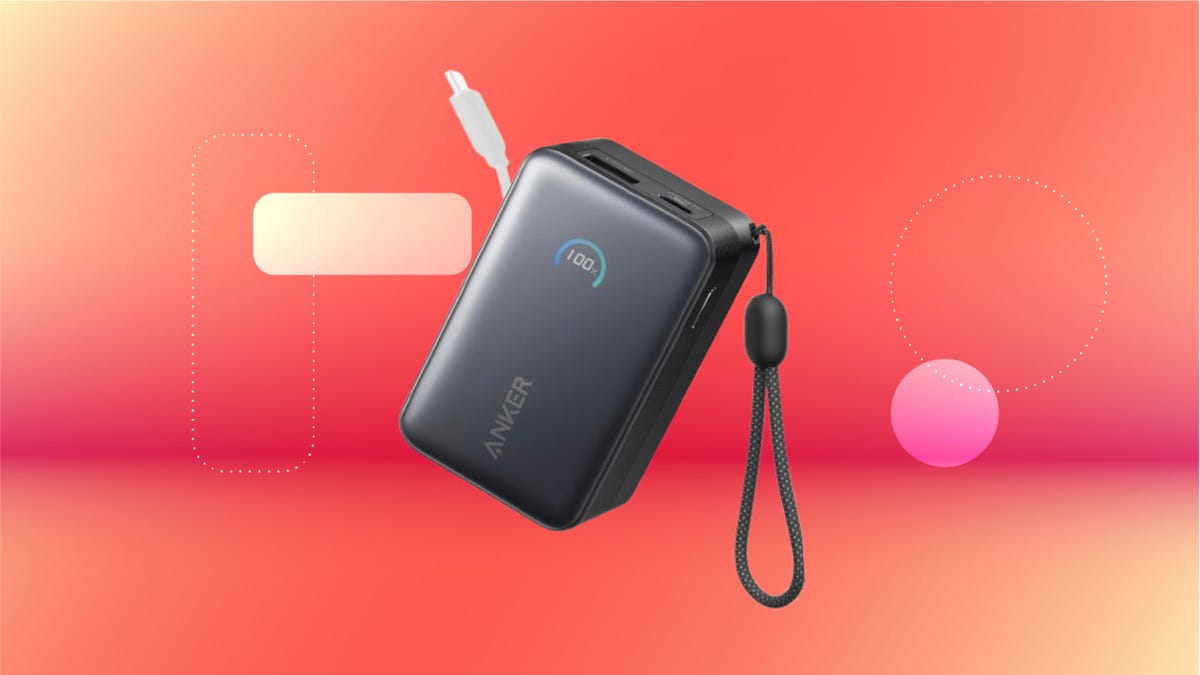
We’ve just spotted the Anker Nano 45-watt portable power bank for just $46 at Amazon right now. This saves you $14 — a 23% discount on its list price. Though it’s $6 more than the lowest-ever price we saw during Black Friday, it’s still a solid discount when you take the rising cost of tech accessories into account. It also matches the lowest price we’ve seen in 2026. It comes in four colors: black, green, pink and white. They’re all on sale for the same price.
This Anker Nano portable charger weighs approximately 8.2 ounces and measures a compact 3.21×1.99×1.42 inches. Despite its small size, it has a retractable cable and supports fast charging in compatible Apple, Samsung, Google Pixel and other smartphones. It also has a large 10,000-mAh capacity and a smart display so you always know how much juice is left in your power bank.
The Nano can charge an iPhone 17 to up to 50% battery in an estimated 20 minutes, and is powerful enough to charge tablets and laptops. Need to charge your devices while charging your power bank? You can do so safely thanks to pass-through charging so you’ll never have to go without battery life.
We’ve also compiled a list of the best power banks for iPhones and for Android, in case this deal isn’t quite a fit for you.
Why this deal matters
If you travel, have a long commute time or are otherwise always on the go, a portable charger can help you keep your devices fully powered. This 45-watt Anker Nano power bank is compact, includes a loop that lets you keep track of it easily and has a built-in cable so you don’t have to keep up with extra cords. Amazon’s $14 discount makes this a solid deal for anyone looking for a compact power bank.
-
 Technologies3 года ago
Tech Companies Need to Be Held Accountable for Security, Experts Say
-
 Technologies3 года ago
Best Handheld Game Console in 2023
-
 Technologies3 года ago
Tighten Up Your VR Game With the Best Head Straps for Quest 2
-
 Technologies4 года ago
Black Friday 2021: The best deals on TVs, headphones, kitchenware, and more
-
 Technologies5 лет ago
Google to require vaccinations as Silicon Valley rethinks return-to-office policies
-
 Technologies5 лет ago
Verum, Wickr and Threema: next generation secured messengers
-
 Technologies4 года ago
Olivia Harlan Dekker for Verum Messenger
-
 Technologies4 года ago
The number of Сrypto Bank customers increased by 10% in five days