
Technologies
ROG Xbox Ally: Release Date, Specs, Price and How It Compares to Steam Deck
Can Microsoft and Asus give Valve some handheld competition?
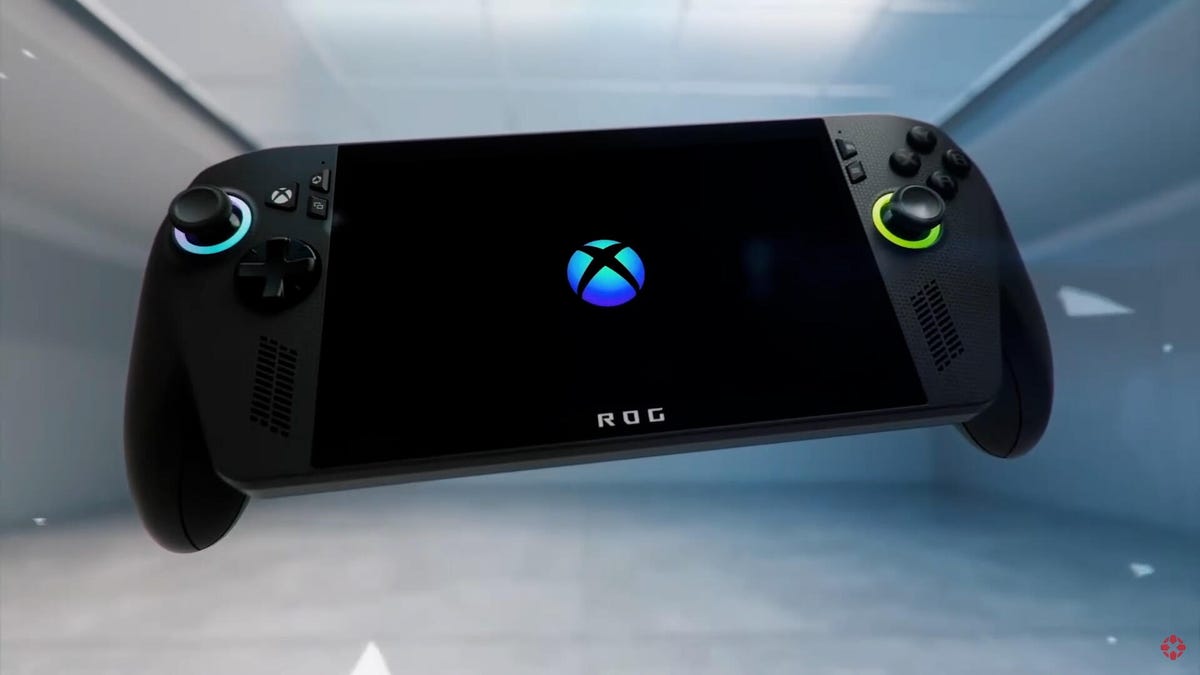
The Steam Deck has yet to find a real competitor in the PC handheld gaming device battle. Other hardware companies, including Asus, Lenovo and MSI, have tried, but so far, their devices keep falling short. Asus plans to try to take another swipe at the crown, though, this time with the help of Microsoft.
In June, the two revealed their partnership for a new handheld device: the ROG Xbox Ally. This handheld will come in two variants and will attempt to bring the Xbox console experience to a portable device. Microsoft confirmed the release date for the Xbox Ally of Oct. 16 on Wednesday, but there are still some questions about the handheld.
Will the Xbox Ally outdo the Steam Deck, or will it wind up being just another wannabe?
How much will the Xbox Ally cost?
Neither Microsoft nor Asus has confirmed an official price yet. One thing for sure is that the Xbox Ally won’t be cheap.
Multiple leaks suggest the price will be 599 euros for the Xbox Ally and 899 euros for a higher-end version, the Xbox Ally X. That does leave the question of what the price will be in the US. Most likely, the price will be the same just in dollars, as that is the typical practice for gaming hardware prices.
Discount social media poster Wario64 tweeted Best Buy listings for the Xbox Ally, Xbox Ally X, charger dock, and case on Wednesday. There’s no pricing on the site for the devices, just a button to be notified when preorders become available. However, Wario64 states the pricing on the back end shows the Xbox Ally at $550 and the Xbox Ally X at $900, while the charging dock is listed on the site $100 and case for $70. The dock and case prices are on Best Buy and are accurate. It’s unclear if Microsoft changed plans at the last minute.
Best Buy has listed ROG Xbox Ally listings (no preorders yet)
Ally ($549.99) https://t.co/nmHw6Nxov3
Ally X ($899.99) https://t.co/Dts0GcUNFW
100W Charger Dock (HDMI 2.0, USB-A, USB-C) ($99.99) https://t.co/LkoKyunOE8
Case $69.99 https://t.co/jaTIBfWUXX
Confirming… pic.twitter.com/oalzcOON77— Wario64 (@Wario64) August 20, 2025
Microsoft didn’t immediately respond to a request for comment about the post.
The uncertainty about the price of the Xbox Ally is likely due to tariffs. Microsoft recently increased the prices of its Xbox Series consoles and Asus has done the same with its laptops and its current ROG Ally lineup.
When does the Xbox Ally come out?
Microsoft did confirm the release date of the Xbox Ally on Oct. 16. This date was mentioned in previous leaks regarding the handheld device’s price.
When can I preorder the Xbox Ally?
Preorders are not available as of yet. In the blog post about the release date, Microsoft says preordering and pricing will be announced sometime in the future. Best Buy does have the listings for the Xbox Ally, Xbox Ally X, charging dock and case, and those interested can request to be notified when preorders become available.
What’s the difference between the Xbox Ally and Xbox Ally X?
There are two versions of the Xbox Ally: the lower-priced Xbox Ally and the higher-priced Xbox Ally X.
The key differences between the two are in their processors, storage and memory. The Xbox Ally will have the AMD Ryzen Z2 A Processor, while the Xbox Ally X will use the faster AMD Ryzen AI Z2 Extreme Processor. Memory will be different, with the lower-priced Xbox Ally having 16GB of LPDDR5X-6400 and the higher-cost handheld coming with 24GB LPDDR5X-8000. Both will come with SSD storage but the Xbox Ally will have 512GB and the Xbox Ally X will have 1TB. The Xbox Ally X will also come with a bigger battery but with a faster processor and more memory. It’s not clear if that difference in capacity translates to a longer battery life.
Specs for Xbox Ally and Xbox Ally X
| ROG Xbox Ally | ROG Xbox Ally X | |
|---|---|---|
| Operating System | Windows 11 Home | Windows 11 Home |
| Controls and grip | Contoured grips inspired by Xbox Wireless Controllers deliver all-day comfort. ABXY buttons / D-pad / L & R Hall Effect analog triggers / L & R bumpers / Xbox button / View button / Menu button / Command Center button / Library button / 2x assignable back buttons / 2x full-size analog sticks / HD haptics / 6-axis IMU | Contoured grips inspired by Xbox Wireless Controllers deliver all-day comfort, complete with impulse triggers for enhanced control.ABXY buttons / D-pad / L & R impulse triggers / L & R bumpers / Xbox button / View button / Menu button / Command Center button / Library button / 2x assignable back buttons / 2x full-size analog sticks / HD haptics / 6-axis IMU |
| Processor | AMD Ryzen Z2 A Processor | AMD Ryzen AI Z2 Extreme Processor |
| Memory | 16GB LPDDR5X-6400 | 24GB LPDDR5X-8000 |
| Storage | 512GB M.2 2280 SSD for easier upgrade | 1TB M.2 2280 SSD for easier upgrade |
| Display | 7-inch, 1080p, IPS, 500 nits, 16:9; 120Hz refresh rate, FreeSync Premium;Corning Gorilla Glass Victus + DXC Anti-Reflection | 7-inch, 1080p, IPS, 500 nits, 16:9; 120Hz refresh rate, FreeSync Premium;Corning Gorilla Glass Victus + DXC Anti-Reflection |
| I/O Ports | 2x USB-C (2 x DP 2.1, PD 3.0), 1x microSD, 1x analog audio | 2x USB-C (1x USB4, 1x USB 3.2 both w/ DP 2.1, PD 3.0), 1x micro SD, 1x analog audio |
| Network and Communication | Wi-Fi 6E (2 x 2), Bluetooth 5.4 | Wi-Fi 6E (2 x 2), Bluetooth 5.4 |
| Dimensions | 29.1×12.2×5.1 cm | 29.1×12.2×5.1 cm |
| Weight | 670g | 715g |
| Battery | 60Wh | 80Wh |
| Included | ROG Xbox Ally 65W charger Stand | ROG Xbox Ally X 65W charger Stand |
What makes the Xbox Ally different from the Steam Deck?
The most notable difference between the Xbox Ally and the Steam Deck is the operating system. Like the ROG Ally, the Xbox Ally will also use Windows 11, while the Steam Deck uses Valve’s SteamOS.
Even though every PC game works with Windows, handheld gaming devices running Windows have had serious issues, as the OS implementation has been a bit buggy. Portable consoles like the ROG Ally, MSI Claw and Lenovo Legion Go simply don’t run well with full Windows because the OS is designed for laptops and desktops and not handheld devices. SteamOS, however, is designed to run almost every game on Steam without issues and regardless of device size.
The Xbox Ally changes that by giving it an Xbox interface. This would be similar to how the Xbox app on PCs works for running games. It would also be able to download Xbox games directly to it, remote play them off a console or stream them via Xbox Cloud.
Another big difference is the hardware. The Steam Deck came out in 2022 and it was the first mass-produced handheld gaming device for PC. At the time, Valve had to use custom AMD processors but since then, AMD has produced more processors for handheld devices, which are now much more powerful in just a few years. The Xbox Ally would also have faster RAM. Both the improvement in processors and RAM should significantly increase the number of games the Xbox Ally can run versus the Steam Deck, which is already struggling to run newer games at 30fps.
Externally, the Xbox Ally will come with the same size 7-inch display but it will have a higher refresh rate of 120Hz, a brighter screen at 500 nits and increased resolution at 1080p. There will also be some slight differences in the physical size of the Xbox Ally, which will be a little bigger and heavier. Another difference from the Steam Deck is that the Xbox Ally controls will be more similar to the Xbox controller.
Microsoft and Asus have a large hill to climb if they plan to have the Xbox Ally dethrone the Steam Deck. It will be especially tough if Valve decides to announce the Steam Deck 2 soon.
Technologies
Google Upgrades Maps Features With More Gemini and Faster Photo Uploads
Google Maps strengthens its crowdsourcing efforts for its 500 million contributors.

Google announced three new features for Maps on Tuesday that should streamline sharing your experiences. Despite being a strong maps application itself, Google relies on everyday users to contribute their reviews, photos and videos so others doing research can make more informed decisions about places they plan to visit. With the new updates to Google Maps, you can access your photos faster to contribute to information about places you’ve been. You can also choose to have Google’s AI model, Gemini, caption your photos and more quickly check the contributions you’ve made in the past.
New photo and video recommendations
It’s not hard to share photos or videos for a location on Google Maps, but the app will now offer photo and video suggestions from your saved images — if you give it permission to do so. The new feature will appear on the Contribute tab at the bottom of the maps app. When scrolling through the view, you’ll see photo and video recommendations or the option to upload other photos.
How the specific photo and video recommendations are determined isn’t clear, but the new feature will likely use a photo’s geolocation if that setting is enabled in your camera’s settings.
A Google representative didn’t immediately respond to a request for comment.
This feature is now available globally on Android and will expand to iOS in the coming months.
Gemini will auto-caption your photos
Google’s giving your photos some Gemini power by automatically analyzing and captioning them once you’ve selected them to share. This could be helpful in situations where you have selected several photos you don’t care to caption.
If you don’t like what Gemini comes up with, you can edit or remove the caption completely before publishing your photos to Maps.
Gemini captions are available in English on iOS and will expand to other languages globally and Android in the future.
New ways to view your contributions
You can now show off your prior contributions to Google’s Local Guide community program.
When you contribute, you gain points, and the more you contribute, the more you can level up as a Local Guide. All your points and badges are now prominently displayed on your profile. Google’s also adding gold profiles for high-level contributors, so you know you’re reading reviews from experienced users.
The new contributor updates are rolling out now on Android, iOS and desktop.
Technologies
This New Health-Tracking Pet Collar Is Like a Smartwatch for Dogs and Cats
Tractive announces two new smart collars armed with GPS tracking, AI-powered health monitoring and other tech tools.

Our pets can’t speak up and tell us how they’re feeling, or why and where they are hiding. Tractive, an Austria- and Seattle-based tech company that creates GPS tracking devices for pets, announced on Wednesday two new smart collars that, according to the press release, «will redefine pet care for millions of families.»
Is your pet stressed, breathing unusually or scratching too much? Much like the basic health-tracking features you can find on a smartwatch, the collars — the Cat 6 Mini ($79) and Dog 6 XL ($89) — are designed to track this behavior and communicate the issues to help maintain your dog or cat’s quality of life.
«Pets can’t tell us when something is wrong, but their bodies can,» Michael Hurnaus, CEO and founder of Tractive, said in a statement. «With cutting-edge sensors on every tracker, learnings from millions of pets and AI-powered insights, we’re turning one of the world’s largest pet data platforms into clear, simple information so pet parents can act sooner and care even better.»
When it comes to tracking collars, dogs have usually been the target pet audience for such devices. Tractive’s new Cat 6 Mini collar aims to provide the same service for your feline friend. You can use it to monitor your cat’s respiratory rate and resting heart rate and identify any health concerns early. It’s expected to ship on May 31.
The Dog 6 XL collar, an upgrade from the company’s previous dog wearable, is designed for dogs weighing over 55 pounds. It’s more durable for outdoor use and offers up to four weeks of battery life between charges. It comes equipped with a scratch-monitoring system that flags unusual scratching behavior caused by allergies, skin irritants and other stressors.
You can also use the app to access your pet’s travels and mark safe zones regarding walks, entries and exits. An AI-powered health hub displays your pet’s overall health stats and also acts as a GPS tracker in case your dog or cat goes missing.
How would a veterinarian interact with the data collected on the device?
A Tractive representative told CNET, «In our experience, veterinarians are most interested in baseline resting heart and respiratory rate, so it’s less about monitoring these vitals in real time during recovery from anesthesia/acute care and more about understanding if the baseline is changing day to day to identify the onset of new conditions or manage existing ones.»
Even though the collars use a SIM card and require a strong cellular connection to work properly, they can capture activity, sleep and health data while offline. However, without connectivity, the devices «ultimately will not provide any utility,» the representative confirmed.
You’ll need to download the accompanying app and select a separate subscription plan at an added cost. The one-year plan costs $120, the two-year plan costs $168, and the five-year plan costs $300.
Technologies
Today’s NYT Strands Hints, Answers and Help for April 9 #767
Here are hints and answers for the NYT Strands puzzle for April 9, No. 767.
Looking for the most recent Strands answer? Click here for our daily Strands hints, as well as our daily answers and hints for The New York Times Mini Crossword, Wordle, Connections and Connections: Sports Edition puzzles.
Today’s NYT Strands puzzle could be tough, unless you’re an artist. Even then, some of the answers are difficult to unscramble, so if you need hints and answers, read on.
I go into depth about the rules for Strands in this story.
If you’re looking for today’s Wordle, Connections and Mini Crossword answers, you can visit CNET’s NYT puzzle hints page.
Read more: NYT Connections Turns 1: These Are the 5 Toughest Puzzles So Far
Hint for today’s Strands puzzle
Today’s Strands theme is: In the paint.
If that doesn’t help you, here’s a clue: Hand me a brush.
Clue words to unlock in-game hints
Your goal is to find hidden words that fit the puzzle’s theme. If you’re stuck, find any words you can. Every time you find three words of four letters or more, Strands will reveal one of the theme words. These are the words I used to get those hints but any words of four or more letters that you find will work:
- COME, PATS, SPAT, SLOE, MEAN, LEAN, MANE, RATE, PEER, LATE, RATER
Answers for today’s Strands puzzle
These are the answers that tie into the theme. The goal of the puzzle is to find them all, including the spangram, a theme word that reaches from one side of the puzzle to the other. When you have all of them (I originally thought there were always eight but learned that the number can vary), every letter on the board will be used. Here are the nonspangram answers:
- FRESCO, PASTEL, ENAMEL, ACRYLIC, TEMPERA, WATERCOLOR
Today’s Strands spangram
Today’s Strands spangram is MEDIUM, the art term! To find it, start with the M that’s four letters down on the far-left vertical row, and travel straight across.
-
 Technologies3 года ago
Tech Companies Need to Be Held Accountable for Security, Experts Say
-
 Technologies3 года ago
Best Handheld Game Console in 2023
-
 Technologies3 года ago
Tighten Up Your VR Game With the Best Head Straps for Quest 2
-
 Technologies4 года ago
Black Friday 2021: The best deals on TVs, headphones, kitchenware, and more
-
 Technologies5 лет ago
Google to require vaccinations as Silicon Valley rethinks return-to-office policies
-
 Technologies5 лет ago
Verum, Wickr and Threema: next generation secured messengers
-
 Technologies4 года ago
Olivia Harlan Dekker for Verum Messenger
-
 Technologies4 года ago
The number of Сrypto Bank customers increased by 10% in five days