
Technologies
I Tried This $40 Smartwatch: It Was Meh, but Not a Complete Waste of Time
The WITHit Giga does the basics for a lot less, but at the expense of accuracy and attention to detail.
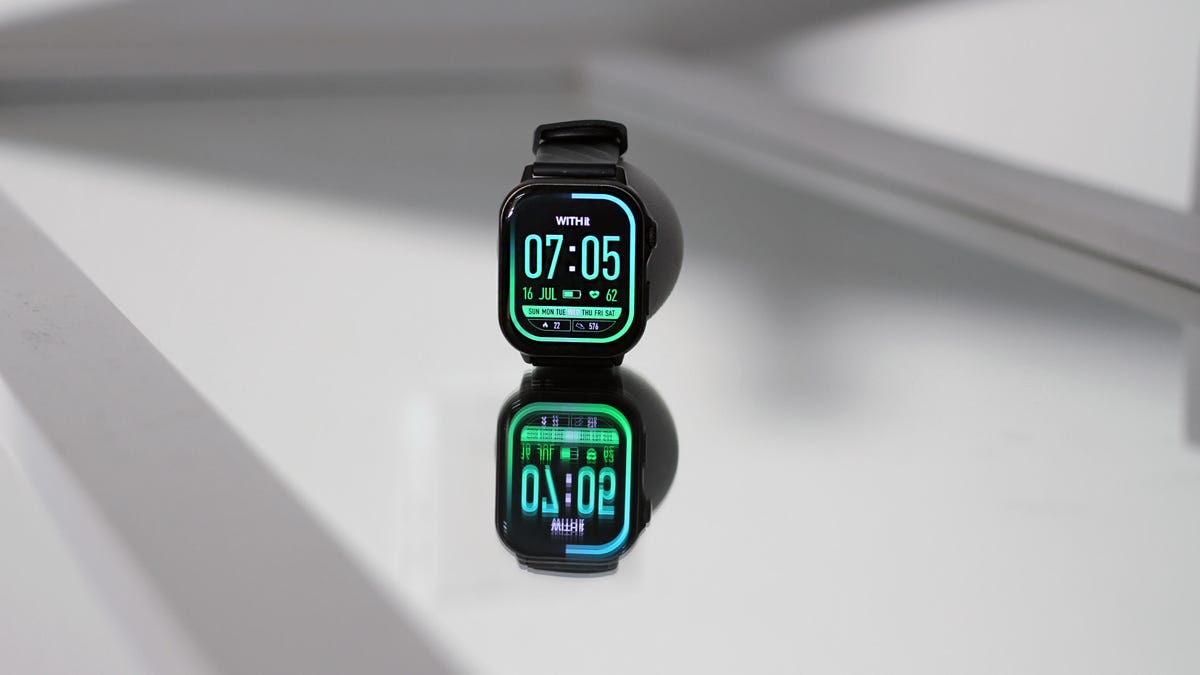
I wasn’t expecting much when I first strapped the WITHit Giga Smartwatch onto my wrist, and at least it delivered on that. This $40 smartwatch does the basics: shows notifications, counts your steps, tracks your heart rate (sort of) and lets you take calls from your wrist. But the execution of all these features is where it all starts to fall apart, and I found myself getting exactly what I paid for.
After spending a week testing it, I came away with this: If you just want a basic smartwatch that works with both Android and iPhone, tells the time, tracks your steps and surfaces notifications, this will get the job done, just don’t expect accuracy. But if you can stretch your budget even a little, something like the $75 Amazfit Bip 6 offers more accurate tracking, a more refined design and more reliable performance.
Design and UI: big, bulky, and basic
The WITHit Giga is about as no-frills as smartwatches come. It looks like an Apple Watch Ultra impersonator: metallic frame around a rectangular screen, rounded edges and even Apple Watch-like icons inside. But that’s where the similarities end.
If your wrist is on the smaller side like mine (I have a 6-inch wrist), brace yourself because this is going to look huge. The Giga’s 48.5mm case is overpowering, and there’s no smaller size option. On my wrist, it felt bulky and out of place, and the thick, textured silicone bands definitely didn’t help matters.
The 2.04-inch AMOLED display is decent with a 386×448 resolution, but the screen brightness isn’t adaptive. You’ll need to manually adjust it, which means it’s almost too bright at night and borderline unreadable in direct sunlight unless you increase the brightness manually.
This watch runs its own proprietary system, syncs to the WITHit app and works with both Android and iOS. You’ll get notifications, basic fitness tracking, an always-on display (which in my testing drained the battery fast) and a speaker/mic combo for answering calls.
The UI is straightforward but lacks polish. Swiping right opens your favorites and the side button lets you quickly launch a workout. Animations feel slow and longer text scrolls in awkwardly to fit the screen.
Battery life: Not bad but there’s a catch
Battery life is one of the few things that holds up well here. I got about three days of use with the raise-to-wake option, and roughly a day and a half with the always on display enabled. That’s not bad for the price, and it’s actually better than even some flagship smartwatches.
But the manual comes with a big red flag: «Avoid fast chargers» and don’t overcharge. That’s not something you want to see in 2025, especially because at this point in my smartwatch charger collection I don’t know which one is fast, and which one is not, and the vague warning makes me think it’s going to explode if I make the wrong choice. Charging from an empty battery to full takes about two hours with the included magnetic charger. But once I left it charging overnight and I approached it with terror the next morning thinking I’d broken the «don’t overcharge» rule. Luckily, I came out unscathed.
Health and fitness tracking: lower your expectations
Workout tracking and wellness is where the cracks really show. Yes, the Giga technically tracks heart rate, blood oxygen (SpO2), sleep, stress and menstrual cycles. But the accuracy is questionable at best.
During workouts, heart rate measurements were consistently off when compared to a chest strap and even other wrist-based trackers. The post workout HR average was close enough, but the metrics during the workout were noticeably off. For example, as I was sitting on my Pilates reformer (completely sedentary) starting a workout on the watch, the screen already read «100bpm», while the chest strap and Apple Watch had me at 65 bpm. This made me skeptical of even the resting heart rate readings.
Sleep tracking only works between 10 p.m. and 8 a.m., meaning night shift workers or anyone with an irregular schedule (like this late-night writer) is out of luck.
Sleep stats are also confusing; instead of clear sleep stages or hours of sleep, you get odd comparisons like «fewer than 26% of people in your age group go to sleep this late.» Not exactly sure what I should do with this information.
Menstrual tracking is purely manual, based on averages, with no biological marker detection like temperature tracking. You can’t even log a period directly from the watch and have to do it from the app.
Other smartwatch features
- Calls: As long as your phone is within range, you can answer and make phone calls from the watch with its speaker and mic, but clarity is an issue.
- Texting: You can see texts from messaging apps, but you can’t reply or even send a prewritten response (when paired to an iPhone).
- Voice Assistant: Technically available, but is basically just a shortcut to activate your own phone’s assistant. You tap, and Siri or Google Assistant opens on your phone, not the watch. Not helpful.
- Quick settings: Save your recently used apps in quick settings, which actually made flipping between features like workouts and music controls more convenient — this is a win.
Should you buy it?
The WITHit Giga does the bare minimum you’d expect from a smartwatch, but at the expense of accuracy and attention to detail. For $40, it’s a functional notification mirror with step tracking, call support and a splash of health features (if you’re looking for a general overview at best).
But if you can stretch your budget, something like the $80 Amazfit Bip 6 offers far better value, accurate health tracking, cleaner UI and better battery life.
Bottom line: If you keep your expectations low, and you’re just dipping your toes in the smartwatch waters for the first time, this might suffice. Otherwise, it’s worth paying more for something that feels less like a toy and more like a tool.
Technologies
Today’s NYT Connections: Sports Edition Hints and Answers for April 8, #562
Here are hints and the answers for the NYT Connections: Sports Edition puzzle for April 8 No. 562.

Looking for the most recent regular Connections answers? Click here for today’s Connections hints, as well as our daily answers and hints for The New York Times Mini Crossword, Wordle and Strands puzzles.
Today’s Connections: Sports Edition is a tough one. If you’re struggling with today’s puzzle but still want to solve it, read on for hints and the answers.
Connections: Sports Edition is published by The Athletic, the subscription-based sports journalism site owned by The Times. It doesn’t appear in the NYT Games app, but it does in The Athletic’s own app. Or you can play it for free online.
Read more: NYT Connections: Sports Edition Puzzle Comes Out of Beta
Hints for today’s Connections: Sports Edition groups
Here are four hints for the groupings in today’s Connections: Sports Edition puzzle, ranked from the easiest yellow group to the tough (and sometimes bizarre) purple group.
Yellow group hint: Working out.
Green group hint: Cover your face.
Blue group hint: NFL players.
Purple group hint: Leap.
Answers for today’s Connections: Sports Edition groups
Yellow group: Exercises in singular form.
Green group: Sporting jobs that require masks.
Blue group: Hall of Fame defensive ends.
Purple group: ____ jump.
Read more: Wordle Cheat Sheet: Here Are the Most Popular Letters Used in English Words
What are today’s Connections: Sports Edition answers?
The yellow words in today’s Connections
The theme is exercises in singular form. The four answers are crunch, plank, situp and squat.
The green words in today’s Connections
The theme is sporting jobs that require masks. The four answers are catcher, fencer, football player and goaltender.
The blue words in today’s Connections
The theme is Hall of Fame defensive ends. The four answers are Dent, Peppers, Strahan and Youngblood.
The purple words in today’s Connections
The theme is ____ jump. The four answers are broad, high, long and triple.
Technologies
The $135M Google Data Settlement Site Is Live — See If You’re Eligible
Use the settlement website to select your preferred payment method, and you may end up $100 richer.

You can now file a claim in the $135 million Google data settlement. The case centers on claims that Android devices transmitted user data without consent. Specifically, the class action lawsuit Taylor v. Google LLC contends that Google’s Android devices passively transferred cellular data to Google without user permission, even when the devices were idle. While not admitting fault, Google reached a preliminary settlement in January, agreeing to pay $135 million to about 100 million US Android phone users.
The official settlement website for the lawsuit is now live. The final approval hearing won’t occur until June 23, when the court will consider whether Google’s settlement is fair and listen to objections. After that, the court will decide whether to approve the $135 million settlement.
In the meantime, if you qualify and want to be paid as part of the settlement, you can select your preferred payment method on the official website. There, you can find information on speaking at the June 23 court hearing and on how to exclude yourself or write to the court to object by May 29.
As part of the settlement, Google will update its Google Play terms of service to clarify that certain data transfers do occur passively even when you’re not using your Android device, and that cellular data may be relied upon when not connected to Wi-Fi. This can’t always be disabled, but users will be asked to consent to it when setting up their device.
Google will also fully stop collecting data when its «allow background data usage» option is toggled off.
Who can be part of the settlement?
In order to join the Taylor v. Google LLC settlement, you must meet four qualifications:
- Be a living, individual human being in the US.
- Have used an Android mobile device with a cellular data plan.
- Have used the aforementioned device at any time from Nov. 12, 2017, to the date when the settlement receives final approval.
- You’re not a class member in the Csupo v. Google LLC lawsuit, which is similar but specifically for California residents.
The final approval hearing is on June 23, so you can add your payment method until then. The hearing’s date and time may change, and any updates will be posted on the settlement website.
If you choose to do nothing, you will still be issued a settlement payment, but you may not receive it if you don’t select a payment method.
How much will I get paid?
It’s not currently known exactly how much each settlement class member will receive, but the cap is $100. Payments will be distributed after final court approval and after any appeals are resolved.
After all administrative, tax and attorney costs are paid, the settlement administrator will attempt to pay each member an equal amount. If any funds remain after payments are sent, and it’s economically feasible, they will be redistributed to members who were previously and successfully paid. If it’s not economically feasible, the funds will go to an organization approved by the court.
Technologies
Samsung’s Galaxy Watch Ultra 2 Might Come in 5G and 4G Cellular Models
If the rumor proves true, the 5G Galaxy Watch Ultra would rival the 5G-enabled $799 Apple Watch Ultra 3 that debuted last fall.

Samsung’s next high-end Galaxy Watch could support faster 5G speeds, but if this leak is true, it will depend on where you live. The rumored Samsung Galaxy Watch Ultra 2 might come in 5G and 4G cellular models, with availability for each smartwatch depending on the country.
According to the Dutch website Galaxy Club (and spotted by SamMobile), Samsung’s servers may have revealed a series of model numbers that point to 5G, 4G and Wi-Fi-enabled editions of the next Galaxy Watch Ultra, which would succeed the original model that debuted in 2024.
A representative for Samsung did not immediately respond to a request for comment.
The Galaxy Club website speculates that the 5G edition would be sold in the US and Korean markets, while the 4G edition would sell in the rest of the world. In the US, a 5G version of the Galaxy Watch Ultra would rival the 5G-enabled $799 Apple Watch Ultra 3, which debuted last fall. The 4G edition would have broader compatibility worldwide, since the earlier network is far more established.
It will likely be a few months until we hear anything official about the Galaxy Watch Ultra 2. Samsung typically unveils its new watches in the summer alongside its Galaxy Z Fold and Z Flip foldable phones. Last year, Samsung unveiled the Galaxy Watch 8 and the Galaxy Watch 8 Classic, but otherwise left the prior 2024 Ultra in the lineup for those looking for a larger 47mm smartwatch.
-
 Technologies3 года ago
Tech Companies Need to Be Held Accountable for Security, Experts Say
-
 Technologies3 года ago
Best Handheld Game Console in 2023
-
 Technologies3 года ago
Tighten Up Your VR Game With the Best Head Straps for Quest 2
-
 Technologies4 года ago
Black Friday 2021: The best deals on TVs, headphones, kitchenware, and more
-
 Technologies5 лет ago
Google to require vaccinations as Silicon Valley rethinks return-to-office policies
-
 Technologies5 лет ago
Verum, Wickr and Threema: next generation secured messengers
-
 Technologies4 года ago
Olivia Harlan Dekker for Verum Messenger
-
 Technologies4 года ago
The number of Сrypto Bank customers increased by 10% in five days