
Technologies
T-Mobile Is Bringing Starlink to Your Phone. Check If You’ll Get It for Free
Are dead zones a thing of the past? T-Mobile and Starlink’s new satellite cell service thinks so. Here’s what you need to know.
Going off-grid might soon be a thing of the past, as T-Mobile’s partnership with SpaceX’s Starlink satellite service gets ready to launch on July 23. The alliance will provide direct-to-cell messaging service, called T-Satellite, which will also be available to AT&T and Verizon cellphone customers.
T-Mobile says its goal is to “eliminate mobile dead zones for good” by utilizing 657 Starlink satellites that will be used exclusively for cellphone service. T-Satellite has been in beta testing since Dec. 2024, with nearly 1.8 million users signing up so far.
The direct-to-cell messaging service represents a major step forward in mobile technology: It works with most phones made during the last four years, according to T-Mobile, instead of requiring dedicated hardware. It will be available to T-Mobile, AT&T and Verizon customers for $10 a month — or free for anyone on T-Mobile’s Experience Beyond plan.
“At the end of the day, it’s nice to be able to send a selfie when you’re in a place where there is no coverage, but it’s vital to be able to connect to emergency services,” Mike Katz, T-Mobile president of marketing, strategy and products, told CNET’s Jeff Carlson. “We just think that with a technology like this, no customer should ever be in a situation where they are unconnected in an emergency.”
However, you might still benefit even if you don’t sign up, as T-Mobile will make the service free for emergency uses. The company said 911 texting will be available later this year to “any mobile customer with a compatible device, regardless of carrier or whether or not they are subscribed to the service.”
What is T-Satellite?
T-Satellite is a partnership between T-Mobile and Starlink that will allow direct-to-cell SMS messaging accessibility in areas where there is no cellular coverage. Starlink has more than 7,000 low-Earth orbit satellites in the sky, and now, 657 of them will be devoted entirely to T-Satellite. The goal is to expand coverage into the 500,000 square miles of the country that traditional cell towers can’t reach, says T-Mobile.
“When you leave the terrestrial network and you go to a place where there’s no network, your phone will automatically search for and connect to the satellite network, which is quite different than any other of the satellite systems that are out there that force you to manually connect, and you have to point your phone up to the sky,» says Katz.
Satellite connectivity in cellphones isn’t exactly new — iPhones have had it since 2022 — but it’s typically been reserved for SOS messaging to connect you with an emergency dispatcher. On July 23, T-Satellite users will be able to send SMS texts on iOS and Android. Android users will also get MMS (multimedia messaging service) immediately, with iOS support “to follow.”
This means users will be able to send images and audio clips in addition to standard text messages. In October, the service will expand to include data support in third-party apps like AccuWeather, AllTrails, WhatsApp and X. The access takes advantage of hooks built into iOS and Android, so developers can make their apps capable of sending data through the narrow amounts of bandwidth available via satellite.
This is far beyond what the other phone carriers have launched so far in the satellite realm — largely due to T-Mobile’s partnership with Starlink. AT&T and Verizon have both partnered with AST SpaceMobile for satellite messaging, and Verizon told CNET’s Eli Blumenthal last year that it’s still planning on working with Amazon’s Project Kuiper, which launched its first 27 satellites on April 28, 2025
“Despite things that our competitors have said, they are way, way behind on this technology,” says Katz.
How much will T-Satellite cost?
On July 23, T-Satellite will be available to AT&T, T-Mobile and Verizon customers for a standalone $10 per month. But there’s one exception: Customers on T-Mobile’s Experience Beyond plan ($100 per month for one line) will get the service for free indefinitely, and those on the Experience More plan ($85 per month) will get it through the end of the year.
Even if you don’t pay the $10 a month, T-Mobile says 911 texting will be available later this year “to any mobile customer with a compatible device, regardless of carrier.”
If you’re a Verizon or AT&T customer, you’ll have to activate T-Satellite as a second eSIM on your phone to take advantage of the service. You can find instructions on setting up the eSIM here.
Which phones are supported?
Most phones released in the past couple of years will work with T-Satellite. Here are the devices that are currently compatible with the beta version:
Apple
- iPhone 13, iPhone 14, iPhone 15, or iPhone 16 (all models)
- Google Pixel 9
- Google Pixel 9a
- Google Pixel 9 Pro
- Google Pixel 9 Pro XL
- Google Pixel 9 Pro Fold
Motorola
- Moto g stylus 2025
- Moto Razr 2024
- Moto Razr Plus 2024
- Moto Razr 2025
- Moto Razr Plus 2025
- Moto Razr Ultra 2025
- Moto Razr Ultra Plus 2025
Samsung
- Samsung Galaxy A25 5G SE*
- Samsung Galaxy A35 5G
- Samsung Galaxy A36
- Samsung Galaxy A36 SE
- Samsung Galaxy A53 5G
- Samsung Galaxy A54 5G*
- Samsung Galaxy S21
- Samsung Galaxy S21 Plus
- Samsung Galaxy S21 Ultra
- Samsung Galaxy S21 FE
- Samsung Galaxy S22
- Samsung Galaxy S22 Plus
- Samsung Galaxy S22 Ultra
- Samsung Galaxy S22 FE
- Samsung Galaxy S23
- Samsung Galaxy S23 Plus
- Samsung Galaxy S23 Ultra
- Samsung Galaxy S23 FE
- Samsung Galaxy S24
- Samsung Galaxy S24 Plus
- Samsung Galaxy S24 Ultra
- Samsung Galaxy S24 FE
- Samsung Galaxy S25
- Samsung Galaxy S25 Plus
- Samsung Galaxy S25 Ultra
- Samsung Galaxy S25 Edge
- Samsung Galaxy XCover7 Pro
- Samsung Galaxy Z Flip3
- Samsung Galaxy Z Flip4
- Samsung Galaxy Z Flip5
- Samsung Galaxy Z Flip6
- Samsung Galaxy Z Fold3
- Samsung Galaxy Z Fold4
- Samsung Galaxy Z Fold5
- Samsung Galaxy Z Fold6
*(Some non-T-Mobile device variants are not satellite capable)
When T-Satellite officially launches on July 23, the following devices will also be compatible:
Motorola
- Motorola Edge 2024
- Moto G 2024
- Moto G Stylus 2024
- Moto G 5G 2024
- Moto G Stylus 5G 2024
Samsung
- Samsung Galaxy A14
- Samsung Galaxy A15*
- Samsung Galaxy A16
- Samsung Galaxy A35
- Samsung Galaxy A53*
- Samsung Galaxy XCover6 Pro
*(Some non-T-Mobile device variants are not satellite capable)
T-Mobile
- T-Mobile Revvl 7
- T-Mobile Revvl 7 Pro
How to try T-Mobile’s Starlink service today
If you’re anxious to try T-Mobile’s Starlink satellite messaging service and don’t want to wait until July 23, you can still attempt to sign up for the beta. I wouldn’t hold out too much hope, though — when I entered my information, I got a message back saying, “Due to high demand, we’re admitting beta testers on a rolling basis. Keep an eye out for an update in the coming weeks.”
Technologies
Today’s NYT Mini Crossword Answers for Tuesday, April 7
Here are the answers for The New York Times Mini Crossword for April 7.

Looking for the most recent Mini Crossword answer? Click here for today’s Mini Crossword hints, as well as our daily answers and hints for The New York Times Wordle, Strands, Connections and Connections: Sports Edition puzzles.
Need some help with today’s Mini Crossword? Read on for all the answers. And if you could use some hints and guidance for daily solving, check out our Mini Crossword tips.
If you’re looking for today’s Wordle, Connections, Connections: Sports Edition and Strands answers, you can visit CNET’s NYT puzzle hints page.
Read more: Tips and Tricks for Solving The New York Times Mini Crossword
Let’s get to those Mini Crossword clues and answers.
Mini across clues and answers
1A clue: Informative commercial, for short
Answer: PSA
4A clue: Something you trace to draw a Thanksgiving turkey
Answer: HAND
5A clue: ___ Johnson, former Prime Minister of the U.K.
Answer: BORIS
6A clue: Opposite of include
Answer: OMIT
7A clue: Crosses (out)
Answer: XES
Mini down clues and answers
1D clue: City with the Notre-Dame Cathedral
Answer: PARIS
2D clue: Bad mood
Answer: SNIT
3D clue: About eight minutes of the average half-hour sitcom
Answer: ADS
4D clue: Remote worker’s office, perhaps
Answer: HOME
5D clue: Word that can follow each group of circled letters (and hints at its shape)
Answer: BOX
Technologies
NASA’s Artemis II Breaks Record With Trip Around The Moon
Technologies
In Honor of the Artemis II Mission, Explore the Moon in Fortnite Now
You might not be able to see the moon the way the Artemis II team is, but there’s an educational Fortnite simulation that will get you onto the celestial body’s surface.
You may not be able to explore the vast majesty of space in the same way that the four-person crew of the Artemis II is, but you can still get an up-close-and-personal view of the moon… in Fortnite, at least.
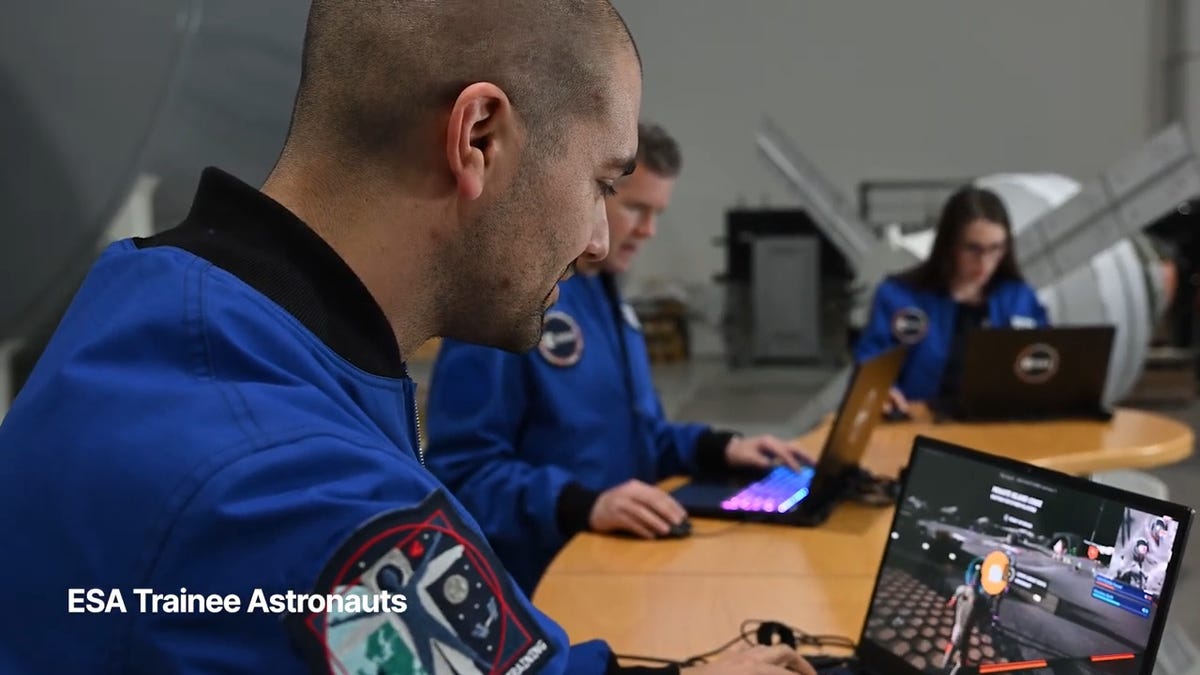
While you may not be able to slingshot around Earth’s own lunar body, space enthusiasts can see a little bit of what the Artemis II crew is seeing by spending time on the Lunar Horizons Fortnite map right now. The map is a creative collaboration between Fortnite’s creator, Epic Games, and the European Space Agency. Lunar Horizons was released in 2024 after extensive testing and play from ESA trainee astronauts.
If you’re looking to learn more about our own orbiting body, the Lunar Horizons map is an educational simulation of the surface of the moon’s South Pole.
It blends game mechanics with learning, as players get to build up their own sterile lunar habitat bases, interact with ESA astronauts and roll around with robotic rovers as they discover informative plaques that contain information about the moon and international space agencies. There are still dangers to navigate, too — a solar storm may strike when you least expect it.
If you’re interested in exploring the moon, we’ve got all the information you need to join in on the Fortnite fun below. And if you’re looking for a more serious livestream during this momentous human achievement, tune into NASA’s feed here.
How to join the Moon Fortnite island while you follow the Artemis II mission
The Lunar Horizons Fortnite map is a great educational simulation that shares details about ESA’s work and catalogs information about humanity’s lunar research.
These three simple steps will get you up and running (or more accurately, taking slow leaps and bounds) on the surface of the Lunar Horizons Fortnite map:
Download Fortnite
If you haven’t played Fortnite before, but you want to check out this limited-time event, you’ll have to download the game. If you’re on PC, you can download Fortnite for free from the Epic Games Store. Console players can navigate the PlayStation Store, Microsoft Store or Nintendo eShop in order to download Fortnite on their devices.
Navigate the in-game menus until you reach the Search button
Once you’re in the game, scroll down past the different official Fortnite game modes and the Discover tab until you find the Search button.
Input the Lunar Horizons island code
In the search bar, you can input a map’s name or its distinct search code in order to find it in the map directory. You can search for the Lunar Horizons map or input the code 3207-0960-6428 to explore this map in time.
Correction, 3:35 p.m. PT: This story initially was in error about the features available in the Lunar Horizons map. There is no Artemis II-specific mission in Fortnite. Rather, the Lunar Horizons map is an educational simulation of part of the moon’s surface.
-
 Technologies3 года ago
Tech Companies Need to Be Held Accountable for Security, Experts Say
-
 Technologies3 года ago
Best Handheld Game Console in 2023
-
 Technologies3 года ago
Tighten Up Your VR Game With the Best Head Straps for Quest 2
-
 Technologies4 года ago
Black Friday 2021: The best deals on TVs, headphones, kitchenware, and more
-
 Technologies5 лет ago
Google to require vaccinations as Silicon Valley rethinks return-to-office policies
-
 Technologies5 лет ago
Verum, Wickr and Threema: next generation secured messengers
-
 Technologies4 года ago
Olivia Harlan Dekker for Verum Messenger
-
 Technologies4 года ago
The number of Сrypto Bank customers increased by 10% in five days