
Technologies
Apple Should Steal These Galaxy S25 Edge Features for a Thin iPhone
Commentary: If the rumored iPhone 17 Air comes to fruition, I hope it borrows these five attributes from Samsung’s skinny phone.
Tech companies are known for, shall we say, «borrowing» features from each other. Any time Apple or Samsung release a new phone or software update, you can be sure arguments over who did it first, or better, will ensue among hardcore fans.
So, as Apple reportedly plans to debut a thinner version of the iPhone 17 this fall, it might look to competitors to see what resonates with consumers. And a few features on the Samsung Galaxy S25 Edge are on my wishlist for the rumored iPhone 17 Air. Reports suggest the skinnier iPhone could ultimately replace the iPhone Plus, and would have a similar $900 price tag. But whether or not tariffs will affect that price isn’t clear.
Samsung’s super-thin S25 Edge clocks in at 5.8mm and 163 grams. It costs $1,100 and is available for purchase now. It’s also one of my favorite phones I’ve ever used, thanks to the fresh form factor. In fact, despite my initial skepticism, I’m now convinced thin and light phones are the way to go. You can check out my review for a more in-depth breakdown of my experience using the phone.
For now, though, I want to share five Galaxy S25 Edge features I’d love to see on the iPhone 17 Air. Apple may not have confirmed the existence of this slim device just yet, but that can’t stop a girl from dreaming.
A titanium frame
Despite the Galaxy S25 Edge’s spacious 6.7-inch display, it still feels impressively feather-light. In spite of its thinness, it’s also surprisingly sturdy, it doesn’t feel like it’s going to snap in my hand or pocket.
That lightweight durability is thanks to the phone’s titanium frame, which is something I hope Apple adopts for its thin iPhone, too. Apple uses titanium frames in its Pro model phones, so it’d be great to see that same treatment applied to a thin iPhone. Since I’m sure it’ll also have a premium price, it will definitely need extra reinforcement to keep it from bending.
Rumors have gone back and forth on whether Apple’s upcoming iPhones will have aluminum or titanium frames. However, analyst Jeff Pu said in February that the iPhone 17, 17 Pro and 17 Pro Max will all have aluminum frames, and that the iPhone 17 Air could be the outlier with a titanium frame. I really hope that’s true.
A 120Hz refresh rate
Samsung’s S25 Edge has a 120Hz refresh rate for smoother scrolling. Honestly, with that $1,100 price, I’d be pretty annoyed if it didn’t. If the iPhone Air is going to be marketed as a premium device, then it also needs to have a premium display. Simple as that.
Asking for a 120Hz refresh rate in 2025 doesn’t sound like an extravagant request — until you remember that Apple’s baseline 16 and 16 Plus iPhones only have a 60Hz refresh rate, which is truly mind boggling. Hopefully, Apple remedies that with the entire iPhone 17 lineup, and especially with the iPhone 17 Air.
More than one camera, please
Number three on my wish list is the iPhone 17 Air’s cameras — and notice I said «cameras» with an «S,» because I don’t want just one.
One of the compromises with thinner phones is that the camera hardware can get scaled back. The Galaxy S25 Edge has two rear cameras, which is less than the rest of the S25 lineup. But Samsung has, impressively, carried over the 200-megapixel main camera that you’ll also find on the S25 Ultra, and pairs it with a 12-megapixel ultrawide camera. This makes for some pretty great shots — images are sharp, colors are balanced and portraits really pop.
Some rumors suggest the iPhone 17 Air could follow in the footsteps of the iPhone 16E and have just one rear lens. But that would be a huge bummer, since the 16E is technically a «budget» phone — even if that $600 price tag suggests otherwise.
Although the iPhone 16E has a 48-megapixel camera with 2x magnification, I’d still feel cheated if that’s all I got with a more premium device like the iPhone 17 Air. If I’m going to spend around $1,000 on a phone, I want the cameras to live up to the price tag.
Beat Samsung on battery life
Another feature you’ll have to compromise with when opting for a slim phone is battery life. Less room means a smaller battery, which means shorter battery life. The S25 Edge has a 3,900 mAh battery, which is the smallest capacity across the S25 series. It’s lasted me all day, even with my excessive screen time, but not much more than that.
I challenge Apple to break past that limitation and give us a skinny phone that doesn’t skimp on battery. It could be a great way to set the iPhone 17 Air apart from competitors — and in turn can push those competitors to improve their offerings, too. Apple’s Adaptive Power feature on iOS 26, which uses AI to subtly scale back energy usage, could be the secret to that longer battery life.
Generous storage and RAM
I was pleasantly surprised that the Galaxy S25 Edge packs 12GB of RAM, with 256GB and 512GB storage options. Since expandable storage is such a rarity — and is practically out of the question with a thin phone — it’s great to not worry too much about filling up your phone’s memory with photos, videos and games. All of that RAM helps to power the S25 Edge’s many AI features it shares with the rest of the S25 lineup.
The entire iPhone 16 lineup has 8GB of RAM, which seems to be working just fine, even when powering Apple Intelligence features. So maybe asking for 12GB of RAM on the iPhone 17 Air is unnecessary. But what I really hope is that a skinny iPhone won’t scale back on memory, and will also include a 512GB storage option. That way, you can really enjoy having a thin phone, without curtailing your use of it.
We’ll see what Apple’s got up its sleeve, and whether it really will launch a cutting-edge competitor to Samsung’s S25 Edge.
Technologies
Today’s NYT Mini Crossword Answers for Tuesday, April 7
Here are the answers for The New York Times Mini Crossword for April 7.

Looking for the most recent Mini Crossword answer? Click here for today’s Mini Crossword hints, as well as our daily answers and hints for The New York Times Wordle, Strands, Connections and Connections: Sports Edition puzzles.
Need some help with today’s Mini Crossword? Read on for all the answers. And if you could use some hints and guidance for daily solving, check out our Mini Crossword tips.
If you’re looking for today’s Wordle, Connections, Connections: Sports Edition and Strands answers, you can visit CNET’s NYT puzzle hints page.
Read more: Tips and Tricks for Solving The New York Times Mini Crossword
Let’s get to those Mini Crossword clues and answers.
Mini across clues and answers
1A clue: Informative commercial, for short
Answer: PSA
4A clue: Something you trace to draw a Thanksgiving turkey
Answer: HAND
5A clue: ___ Johnson, former Prime Minister of the U.K.
Answer: BORIS
6A clue: Opposite of include
Answer: OMIT
7A clue: Crosses (out)
Answer: XES
Mini down clues and answers
1D clue: City with the Notre-Dame Cathedral
Answer: PARIS
2D clue: Bad mood
Answer: SNIT
3D clue: About eight minutes of the average half-hour sitcom
Answer: ADS
4D clue: Remote worker’s office, perhaps
Answer: HOME
5D clue: Word that can follow each group of circled letters (and hints at its shape)
Answer: BOX
Technologies
NASA’s Artemis II Breaks Record With Trip Around The Moon
Technologies
In Honor of the Artemis II Mission, Explore the Moon in Fortnite Now
You might not be able to see the moon the way the Artemis II team is, but there’s an educational Fortnite simulation that will get you onto the celestial body’s surface.
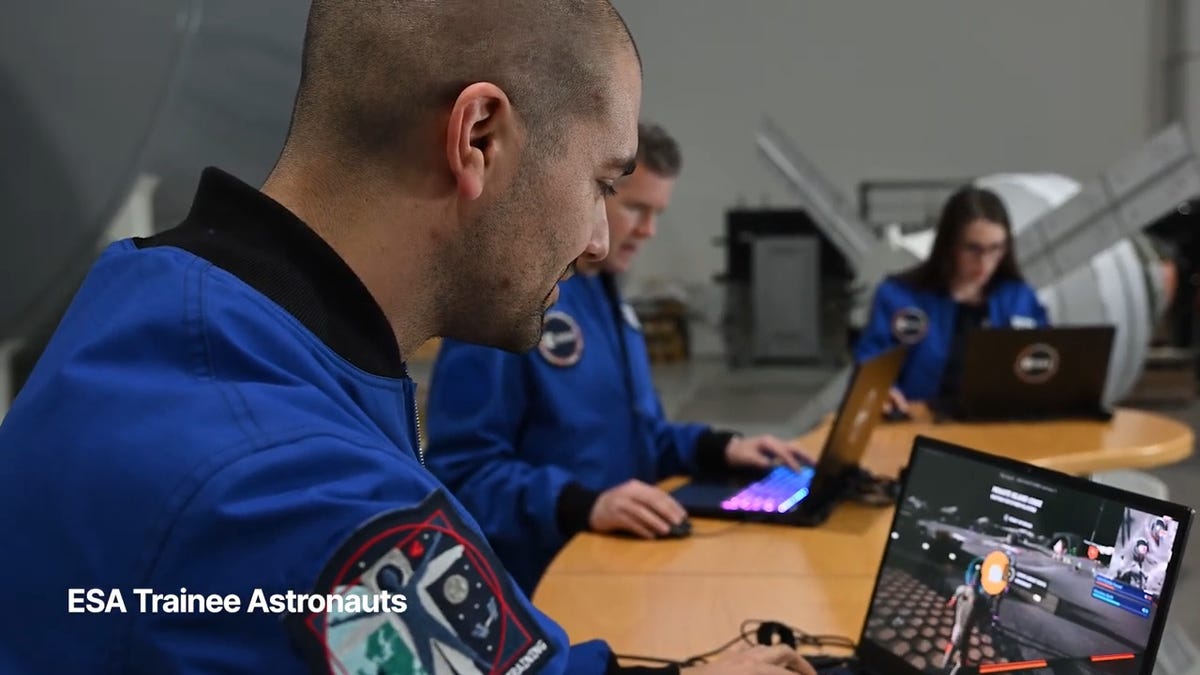
You may not be able to explore the vast majesty of space in the same way that the four-person crew of the Artemis II is, but you can still get an up-close-and-personal view of the moon… in Fortnite, at least.
While you may not be able to slingshot around Earth’s own lunar body, space enthusiasts can see a little bit of what the Artemis II crew is seeing by spending time on the Lunar Horizons Fortnite map right now. The map is a creative collaboration between Fortnite’s creator, Epic Games, and the European Space Agency. Lunar Horizons was released in 2024 after extensive testing and play from ESA trainee astronauts.
If you’re looking to learn more about our own orbiting body, the Lunar Horizons map is an educational simulation of the surface of the moon’s South Pole.
It blends game mechanics with learning, as players get to build up their own sterile lunar habitat bases, interact with ESA astronauts and roll around with robotic rovers as they discover informative plaques that contain information about the moon and international space agencies. There are still dangers to navigate, too — a solar storm may strike when you least expect it.
If you’re interested in exploring the moon, we’ve got all the information you need to join in on the Fortnite fun below. And if you’re looking for a more serious livestream during this momentous human achievement, tune into NASA’s feed here.
How to join the Moon Fortnite island while you follow the Artemis II mission
The Lunar Horizons Fortnite map is a great educational simulation that shares details about ESA’s work and catalogs information about humanity’s lunar research.
These three simple steps will get you up and running (or more accurately, taking slow leaps and bounds) on the surface of the Lunar Horizons Fortnite map:
Download Fortnite
If you haven’t played Fortnite before, but you want to check out this limited-time event, you’ll have to download the game. If you’re on PC, you can download Fortnite for free from the Epic Games Store. Console players can navigate the PlayStation Store, Microsoft Store or Nintendo eShop in order to download Fortnite on their devices.
Navigate the in-game menus until you reach the Search button
Once you’re in the game, scroll down past the different official Fortnite game modes and the Discover tab until you find the Search button.
Input the Lunar Horizons island code
In the search bar, you can input a map’s name or its distinct search code in order to find it in the map directory. You can search for the Lunar Horizons map or input the code 3207-0960-6428 to explore this map in time.
Correction, 3:35 p.m. PT: This story initially was in error about the features available in the Lunar Horizons map. There is no Artemis II-specific mission in Fortnite. Rather, the Lunar Horizons map is an educational simulation of part of the moon’s surface.
-
 Technologies3 года ago
Tech Companies Need to Be Held Accountable for Security, Experts Say
-
 Technologies3 года ago
Best Handheld Game Console in 2023
-
 Technologies3 года ago
Tighten Up Your VR Game With the Best Head Straps for Quest 2
-
 Technologies4 года ago
Black Friday 2021: The best deals on TVs, headphones, kitchenware, and more
-
 Technologies5 лет ago
Google to require vaccinations as Silicon Valley rethinks return-to-office policies
-
 Technologies5 лет ago
Verum, Wickr and Threema: next generation secured messengers
-
 Technologies4 года ago
Olivia Harlan Dekker for Verum Messenger
-
 Technologies4 года ago
The number of Сrypto Bank customers increased by 10% in five days