
Technologies
Best Apple Watch for 2025
From budget friendly to feature-packed, these are the best Apple Watches to consider right now.
Our Experts


What to consider
iPhone or Android
Most smartwatches only work with one platform. The Apple Watch will only work with an iPhone, and the Samsung Galaxy Watch and Pixel Watch only pair with Android phones, for example. Garmin and Fitbit are the two major brands that currently offer smartwatches that work with both Android and iPhone.
Size and design
Smartwatches reflect your personal style and come in a variety of finishes, from aluminum to titanium, with a seemingly endless variety of watch bands to choose from. There’s also a watch size and design to suit every wrist, so you’ll want to ask yourself if you prefer a round screen for that classic wristwatch look or a square display like the Apple Watch. It’s best to try in-store before you buy.
Health and fitness features
Smartwatches have become the de-facto way to measure activity from your wrist and can encourage you to get moving. It’s increasingly common for them to offer health features like a blood oxygen sensor. Some may even have an ECG (also known as an electrocardiogram) which can check for signs of a heart condition called atrial fibrillation.
The Apple Watch is a worthy iPhone companion. It flows seamlessly into the Apple ecosystem, with frequent software updates that keep it feeling fresh and health features that build on the strengths of both devices to help you reach your goals. But not all Apple Watches are created equal and understanding the differences is key to finding the right fit for your needs and budget. Whether you’re buying your first Apple Watch, upgrading an older model or shopping for a family member, we’ve highlighted the best smartwatch options to help you land on the right choice.
SMARTWATCH DEALS OF THE WEEK
-
$200 (save $50)
-
$450 (save $200)
-
$220 (save $80)
What is the best Apple Watch?
The Apple Watch Series 10 takes everything great about its predecessors and elevates it. Compared to the Series 9, it offers a larger, brighter screen without adding bulk (it’s actually lighter), more power under the hood and faster charging than any other Apple Watch, including the Ultra 2.
While its features may not drastically differ from the Series 9, its next-gen processor ensures it will likely outlast its predecessor in terms of software updates. It also includes a few more subtle upgrades, like voice isolation for calls, music playback and a depth gauge with a water temperature sensor for aquatic activities.
Best Apple Watches for 2025
Pros
- Incredibly light on the wrist
- 1Hz refresh rate = ticking second hand!
- Voice isolation on calls is excellent
- Bigger screen makes readability better on the smaller size case
- Sleep apnea notifications at launch
Cons
- No improvements to battery life
- No significant changes to Double Tap
- Smallest 42-mm size might still be too big for some wrists
The Apple Watch Series 10 takes a winning formula and updates it for the Apple Watch’s tenth birthday. It is slimmer and lighter than earlier Apple Watches, with two new case sizes: 42 millimeter or 46 millimeter. The wide-angle OLED screens make the watch brighter when looking at it off-axis. And the LTPO3 technology also brings a ticking second hand to the always-on display. The Apple Watch Series 10 also comes with sleep apnea notifications, which can detect signs of this potentially dangerous condition over a 30-day period.
Battery life is still rated for 18 hours although you can push it to a day and a half with lighter use. The Apple Watch Series 10 now has even faster charging though, which makes up for the battery life somewhat, able to charge to 80% in 30 minutes. Overall, it’s an incredibly polished smartwatch and the best choice for most iPhone owners.
Why we like it
The Series 10 is a refined version of its predecessors on the surface and under the hood. It’s lighter and slimmer than the Series 9 but has a larger, brighter screen that’s easier to read from every angle. It has the most powerful processor of the entire Apple Watch lineup and, as a result, longer shelf life for software updates. Plus it comes with additional perks, like the ability to play music through the speaker and background noise reduction during calls.
Who it’s best for
The Series 10 is ideal for most iPhone users upgrading from an existing Apple Watch, or anyone deeply invested in the Apple ecosystem who wants a premium smartwatch experience out of the box (including the latest health sensors). It brings enough upgrades to feel like a true step up, while retaining all the features that make the Apple Watch great.
Pros
- Lower price
- Same performance as the Series 8
- Car-crash detection for additional safety
Cons
- No always-on display
- No QWERTY keyboard
- Most new features can be found on older watches too
The Apple Watch SE retails for $250 but you can regularly find it discounted to $200 or less, which makes it an excellent choice for the budget-conscious buyer. Expect most of the same features found on more expensive Apple Watch models like the Series 9, including activity tracking, third-party apps and safety features like Emergency SOS. It does miss out on an always-on display and heart-health features like the ECG.
Why we like it
The second-generation SE offers all the essential features you’d want from an Apple Watch for at least $150 less than what you’d pay for the cheapest model of the Series 10. It covers everything you need, including advanced health and fitness tracking, crash and fall detection, and seamless integration with your iPhone.
Who it’s best for
This is a great option for first-time Apple Watch buyers or anyone upgrading from a much older model (Series 0–4), as it’ll still feel like an upgrade without making you feel like you’re missing out on newer features like the always-on display or advanced health sensors like ECG or temperature tracking, which you never had in the first place. It’s also the best option for children (LTE model) as a way to stay connected with parents or caregivers without having to go all in on a smartphone.
Pros
- Incredibly bright screen
- More accurate dictation and on-device Siri
- 64GB storage means more space for music and apps
- Double Tap is very useful
Cons
- Battery life is the same as first Ultra
- Limited recovery metrics
The Apple Watch Ultra 2 is Apple’s best smartwatch, with a tough titanium construction and an Action button to quickly start workouts or launch apps. It has the brightest screen of any Apple Watch at a maximum of 3,000 nits that makes it incredibly easy to see when adventuring in the great outdoors. For adventurers and athletes, it also has a built-in siren for safety and a dual-band GPS for accurately tracking your route. LTE is also onboard so you can venture out without a phone and still stay connected.
Although it’s designed to be an outdoor watch, the Apple Watch Ultra 2 is still a fantastic all-around smartwatch. Inside is the same S9 chip as found on the Apple Watch Series 9 which supports gestures like Double Tap and allows the watch to process Siri commands on-device. This means you can use Siri without being online and later in the year you’ll be able to ask the voice assistant for health data. Like earlier Apple Watches, the Ultra 2 also comes with a blood oxygen sensor, electrocardiogram (ECG or EKG) app, fall detection and emergency SOS. The battery also lasts at least twice as long as all other Apple Watch models. It’s only compatible with the iPhone so if you have an Android phone, you’ll want to look at another option on this list.
Why we like it
The Apple Watch Ultra 2 is an all-terrain smartwatch that’s built to go the distance with nearly twice the battery life of other Apple Watches (three days on a charge), and a durable, titanium exterior. It has a larger screen than other models and an action button that can be programmed for easy access no matter what the conditions. Extras like dual-band GPS, a built-in siren, and LTE connectivity add another layer of safety when you’re off the grid.
Who it’s best for
Outdoor enthusiasts and serious athletes looking for a middle ground between a traditional Apple Watch and a full-fledged sport watch like a Garmin. The Ultra 2 is also a smart pick for current Apple Watch users who are frustrated with daily charging and willing to invest more for an extra day and a half of battery life.
Best Apple Watches Compared
See how all the Apple Watches measure up when it comes to the specs.
| Apple Watch Series 10 | Apple Watch Ultra 2 | Apple Watch SE (2nd Gen) | |
| Shape | Square | Square | Rectangular |
| Watch size | 42mm, 46mm | 49mm | 40mm, 44mm |
| Materials, finishes | Aluminum, titanium | Titanium | Aluminum, Midnight, Starlight, Silver |
| Display size, resolution | 42mm: 1.65-inch OLED 446 x 374 pixels; 46mm: 1.81-inch 496 x 416 pixels | 1.91-inch, 502 x 410-pixel OLED | 40mm: 324 x 394, 44mm: 368 x 448 |
| Dimensions | 42mm: 42 x 36 x 9.7mm; 46mm: 46 x 39 x 9.7mm | 44mm x 49mm x 14.4mm | 40mm: 40 x 34 x 10.7 mm, 44mm: 44 x 38 x 10.7 mm |
| Weight | 42mm (Wi-Fi): 30 g; 42mm (cellular): 29.3 g; 42mm (titanium): 34.4 g; 46mm (Wi-Fi): 36.4 g; 46mm (cellular): 35.3 g; 46mm (titanium): 41.7 g | 61.4g | 40mm GPS: 26.4g, 40mm Cellular: 27.8g, 44mm GPS: 32.9g, 44mm Cellular: 33g |
| Colors | Jet black, rose gold, silver; titanium: slate, gold, natural | Natural titanium | Midnight, Starlight, Silver |
| Always On | Yes | Yes | No |
| Interchangeable bands | Yes | Yes | Yes |
| GPS | Yes | Yes (L1 and L5) | Yes |
| Automatic workout detection | Yes | Yes | Yes |
| Compass | Yes | Yes | Yes |
| Altimeter | Yes | Yes (operating range: -500m to 9,000m) | Always-on altimeter |
| Water/Dust resistance | Water resistant up to 50m (5ATM), IP6X (dust) | 10ATM (100 meters) and recreational scuba diving up to 40 meters | Water resistant up to 50m (5ATM) |
| Calls | Yes | Yes | Yes (Cellular only) |
| Microphone | Yes | Yes (3-mic array) | Yes |
| Speaker | Yes | Yes | Yes |
| Voice assistant | Yes (Siri) | Yes (Siri, on-device) | Siri |
| Mobile Payments | Yes (Apple Pay) | Yes (Apple Pay) | Ys (Apple Pay) |
| Sleep tracking | Yes | Yes | Yes |
| Period tracking | Yes | Yes | Yes |
| Sensors | Accelerometer, altimeter, gyro sensor, temperature sensor, compass, third-gen optical heart sensor, electrical heart sensor, ambient light sensor, depth gauge, water temperature sensor | SPo2 (blood oxygen), ECG, optical heart, ambient light, high dynamic range gyroscope, high-g accelerometer, water temperature, depth gauge + app | Second-gen optical heart sensor, accelerometer, High dynamic range gyroscope, Compass, Always-on altimeter, Ambient light sensor |
| Emergency features | Fall detection, crash detection, Emergency SOS, international emergency calling, noise monitoring, Backtrack | International emergency calling, Emergency SOS, crash detection | Emergency SOS, International emergency calling, Crash Detection, Fall Detection, Noise monitoring, Backtrack |
| Compatibility | iOS 18 and newer | iOS 17 | iPhone 8 or later with iOS 16 and newer |
| Software | WatchOS 11 | WatchOS 11 | WatchOS 11 |
| Processor | S10 SiP with 64‑bit dual core processor, 4‑core Neural Engine | Apple S9 | S8 SiP, 64-bit dual-core, 2-core Neural Engine |
| Connectivity | Bluetooth 5.3, 2nd gen Ultra Wideband chip | LTE and UMTS, Wi-Fi 4, Bluetooth 5.3 | Bluetooth 5.3, LTE/UMTS (Cellular model) |
| Memory and storage | 64GB | 64GB | 32GB |
| Charging | USB-C fast charging cable | USB-C magnetic fast charging | Magnetic charging cable, 80% in ~1.5 hours |
| Battery life | Up to 18 hours normal use; up to 36 hours in low power mode | Up to 36 hours; up to 72 hours (low power mode) | Up to 18 hours |
| Battery capacity | Wi-Fi 4 (802.11n) | Unavailable | Not specified |
| US price | 42mm: $399 (Wi-Fi); 42mm: $499 (cellular); 42mm: $699 (titanium); 46mm: $429 (Wi-Fi); 46mm: $529 (cellular); 46mm: $749 (titanium) | $799 | 40mm GPS: $249, 44mm GPS: $279 40mm GPS + Cellular: $299, 44mm GPS + Cellular: $329 |
| UK price | 42mm: £399 (Wi-Fi); 42mm: £499 (cellular); 42mm: £699 (titanium); 46mm: £429 (Wi-Fi); 46mm: £529 (cellular); 46mm: £749 (titanium) | £799 | 40mm GPS: £219, 44mm GPS: £249, 40mm GPS + Cellular: £269, 44mm GPS + Cellular: £299 |
| Australian price | 42mm: AU$649 (Wi-Fi); 42mm: AU$809 (cellular); 42mm: AU$1,199 (titanium); 46mm: AU$699 (Wi-Fi/Bluetooth); 46mm: AU$859 (cellular); 46mm: AU$1,279 (titanium) | AU$1,399 | 40mm GPS: A$399, 44mm GPS: A$449, 40mm GPS + Cellular: A$479, 44mm GPS + Cellular: A$529 |
Recent updates
In October 2024, we added the Apple Watch Series 10 to our list. The new watch replaces last year’s Apple Watch Series 9 and is the best Apple Watch for most people.
Factors to consider when buying an Apple Watch
All Apple Watches share the same core DNA: a square screen with rounded edges, a rotating crown, interchangeable straps and Apple’s WatchOS with Siri integration. The differences lie in the details with factors like advanced health sensors, durability, battery life and screen size. Oh, and price.
Budget: If you’re on a budget and want the best deal, it might be worth waiting for major discount days like Black Friday when most retailers, including Apple, offer sales or gift-card cash-back incentives. Another way to cut costs is by purchasing a refurbished Apple Watch directly from Apple. They come with the same one-year warranty as new models, eligibility for AppleCare and a 14-day return window.
Design: There are a lot of ways to customize your Apple Watch, including different finishes and watch bands. But dressing up your Apple Watch doesn’t always come cheap and some of the more premium design options like the titanium finish and stainless steel band can increase the base price by $600. You can also customize the size of your screen; older models or the 2nd SE will have the smallest option (40mm) while the Apple Watch Ultra offers the largest (49mm) display.
Battery: Battery life continues to be a major pain point for Apple Watch users, with no model going past the three-day mark like some Android models. And while Apple has made strides in this category, it’s best to taper your expectations by accepting that you’ll probably get a day’s worth of charge (with the always on display) on most models. If that’s a deal breaker, you’ll need to splurge on the Apple Watch Ultra 2, which is the only model that lasts up to 72 hours.
Wi-Fi Only vs. Cellular: Most users will find the Wi-Fi version sufficient. It tracks workouts and makes mobile payments independently from the phone but needs to be in range of your iPhone to access some of the smart features like notifications, messaging and calls. Cellular and Wi-Fi models are only worth the splurge (an additional $100) if you plan to ditch your iPhone on a regular basis and need the watch to be a standalone device and have access to all the features. And it’s your only option if you’re buying the Ultra 2 as it doesn’t offer a Wi-Fi only option.
How we test Apple Watches
We test all our Apple Watches in the real world and focus on any new features or claims in addition to all the other features you’ll be using on a regular basis like fitness tracking and connectivity. All Apple Watches, including the cellular models, need to connect to an iPhone so we also assess how easy the companion software is to navigate.
Durability and design: Smartwatches are something you wear on your body so we assess how comfortable they are to wear. We also know that everyone has a different-sized wrist so we try to see how it fits and feels on a variety of people. Then we look at how it stands up to wear and tear with daily life. Some models, like the Ultra 2, offer increased durability like dust resistance or water resistance that’s suited for activities like scuba diving and, where possible, we’ll test this out for ourselves.
Battery: Battery life will vary depending on how you use a smartwatch so we test battery life with a few standard tests. We see how long it generally lasts on a single charge with features that represent typical use, like the always-on display, sleep tracking and doing one outdoor workout with GPS.
Fitness and health sensor accuracy: We test the accuracy of the Apple Watch using a few different methods. The heart rate sensor, for example, is compared against the readings taken from a chest strap, considered the gold standard in consumer heart rate tracking, during a variety of cardio-based activities like running or cycling. We also check to see how long it takes to connect to a GPS signal when doing an outdoor workout. Other health sensors, like a blood oxygen sensor (not active on newer models), are compared against a pulse oximeter for spot readings where possible, and for the ECG feature, we tested it against a hospital grade ECG.
Other Apple Watches we tested
While no longer sold directly by Apple, the Apple Watch Series 9 is still a strong option if you can find it. Stores like Best Buy and Target often have it in stock for about $100 less than the Series 10. You’ll miss out on the larger, redesigned screen and ultra fast charging but it still includes key health features not available on the cheaper SE, like the ECG app, temperature sensing and sleep apnea notifications.
Apple Watch FAQs
What to look forward to in 2025
Smartwatches are only getting smarter about health and the Apple Watch is no exception. Whether it’s better sensors, new metrics or more personalized coaching, Apple may be taking a queue from competitors like Garmin and Google and leaning more on AI to make sense of your data to personalize insights. One trend I’d love to see the Apple Watch adopt this year is better battery life; smarter software and hardware upgrades like the dual CPU architecture on the OnePlus Watch 3 are finally making multi-day wear feel realistic. Meanwhile, the definition of a wearable is expanding fast with more smart rings making their debuts as well as upgraded earbud options with built-in health sensors that are already nudging into smartwatch territory. They probably won’t replace watches entirely but they’re definitely raising the bar and will continue giving the Apple Watch a healthy push forward.
Technologies
Today’s NYT Mini Crossword Answers for Wednesday, April 8
Here are the answers for The New York Times Mini Crossword for April 8.
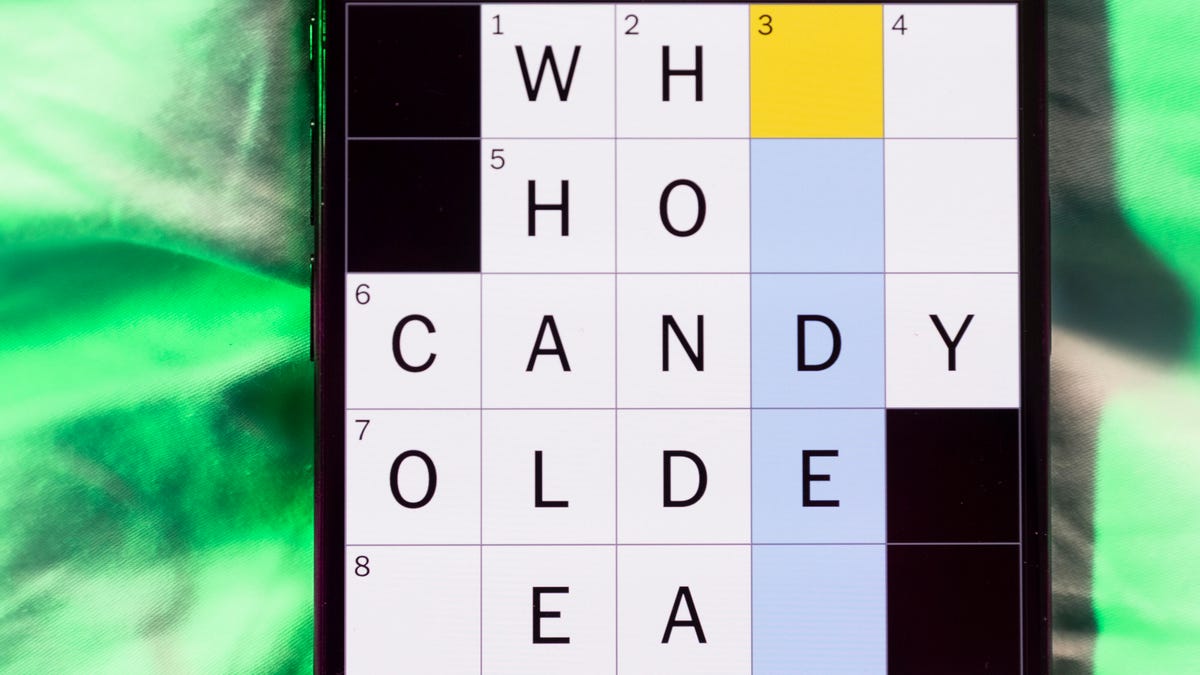
Looking for the most recent Mini Crossword answer? Click here for today’s Mini Crossword hints, as well as our daily answers and hints for The New York Times Wordle, Strands, Connections and Connections: Sports Edition puzzles.
Need some help with today’s Mini Crossword? Hint: It uses a lot of the letter Z for some reason. Read on for all the answers. And if you could use some hints and guidance for daily solving, check out our Mini Crossword tips.
If you’re looking for today’s Wordle, Connections, Connections: Sports Edition and Strands answers, you can visit CNET’s NYT puzzle hints page.
Read more: Tips and Tricks for Solving The New York Times Mini Crossword
Let’s get to those Mini Crossword clues and answers.
Mini across clues and answers
1A clue: ___-Carlton (hotel chain)
Answer: RITZ
5A clue: Span of the alphabet
Answer: ATOZ
6A clue: Cable channel with an out-of-this-world name
Answer: STARZ
7A clue: Takes care of, as a squeaky wheel
Answer: OILS
8A clue: Toy on a string
Answer: YOYO
Mini down clues and answers
1D clue: When a post receives far more negative comments than likes, in social media slang
Answer: RATIO
2D clue: World’s leading wine producer
Answer: ITALY
3D clue: Middle of the human body
Answer: TORSO
4D clue: Sleeping sound
Answer: ZZZ
6D clue: Tofu base
Answer: SOY
Technologies
Today’s NYT Connections: Sports Edition Hints and Answers for April 8, #562
Here are hints and the answers for the NYT Connections: Sports Edition puzzle for April 8 No. 562.

Looking for the most recent regular Connections answers? Click here for today’s Connections hints, as well as our daily answers and hints for The New York Times Mini Crossword, Wordle and Strands puzzles.
Today’s Connections: Sports Edition is a tough one. If you’re struggling with today’s puzzle but still want to solve it, read on for hints and the answers.
Connections: Sports Edition is published by The Athletic, the subscription-based sports journalism site owned by The Times. It doesn’t appear in the NYT Games app, but it does in The Athletic’s own app. Or you can play it for free online.
Read more: NYT Connections: Sports Edition Puzzle Comes Out of Beta
Hints for today’s Connections: Sports Edition groups
Here are four hints for the groupings in today’s Connections: Sports Edition puzzle, ranked from the easiest yellow group to the tough (and sometimes bizarre) purple group.
Yellow group hint: Working out.
Green group hint: Cover your face.
Blue group hint: NFL players.
Purple group hint: Leap.
Answers for today’s Connections: Sports Edition groups
Yellow group: Exercises in singular form.
Green group: Sporting jobs that require masks.
Blue group: Hall of Fame defensive ends.
Purple group: ____ jump.
Read more: Wordle Cheat Sheet: Here Are the Most Popular Letters Used in English Words
What are today’s Connections: Sports Edition answers?
The yellow words in today’s Connections
The theme is exercises in singular form. The four answers are crunch, plank, situp and squat.
The green words in today’s Connections
The theme is sporting jobs that require masks. The four answers are catcher, fencer, football player and goaltender.
The blue words in today’s Connections
The theme is Hall of Fame defensive ends. The four answers are Dent, Peppers, Strahan and Youngblood.
The purple words in today’s Connections
The theme is ____ jump. The four answers are broad, high, long and triple.
Technologies
The $135M Google Data Settlement Site Is Live — See If You’re Eligible
Use the settlement website to select your preferred payment method, and you may end up $100 richer.

You can now file a claim in the $135 million Google data settlement. The case centers on claims that Android devices transmitted user data without consent. Specifically, the class action lawsuit Taylor v. Google LLC contends that Google’s Android devices passively transferred cellular data to Google without user permission, even when the devices were idle. While not admitting fault, Google reached a preliminary settlement in January, agreeing to pay $135 million to about 100 million US Android phone users.
The official settlement website for the lawsuit is now live. The final approval hearing won’t occur until June 23, when the court will consider whether Google’s settlement is fair and listen to objections. After that, the court will decide whether to approve the $135 million settlement.
In the meantime, if you qualify and want to be paid as part of the settlement, you can select your preferred payment method on the official website. There, you can find information on speaking at the June 23 court hearing and on how to exclude yourself or write to the court to object by May 29.
As part of the settlement, Google will update its Google Play terms of service to clarify that certain data transfers do occur passively even when you’re not using your Android device, and that cellular data may be relied upon when not connected to Wi-Fi. This can’t always be disabled, but users will be asked to consent to it when setting up their device.
Google will also fully stop collecting data when its «allow background data usage» option is toggled off.
Who can be part of the settlement?
In order to join the Taylor v. Google LLC settlement, you must meet four qualifications:
- Be a living, individual human being in the US.
- Have used an Android mobile device with a cellular data plan.
- Have used the aforementioned device at any time from Nov. 12, 2017, to the date when the settlement receives final approval.
- You’re not a class member in the Csupo v. Google LLC lawsuit, which is similar but specifically for California residents.
The final approval hearing is on June 23, so you can add your payment method until then. The hearing’s date and time may change, and any updates will be posted on the settlement website.
If you choose to do nothing, you will still be issued a settlement payment, but you may not receive it if you don’t select a payment method.
How much will I get paid?
It’s not currently known exactly how much each settlement class member will receive, but the cap is $100. Payments will be distributed after final court approval and after any appeals are resolved.
After all administrative, tax and attorney costs are paid, the settlement administrator will attempt to pay each member an equal amount. If any funds remain after payments are sent, and it’s economically feasible, they will be redistributed to members who were previously and successfully paid. If it’s not economically feasible, the funds will go to an organization approved by the court.
-
 Technologies3 года ago
Tech Companies Need to Be Held Accountable for Security, Experts Say
-
 Technologies3 года ago
Best Handheld Game Console in 2023
-
 Technologies3 года ago
Tighten Up Your VR Game With the Best Head Straps for Quest 2
-
 Technologies4 года ago
Black Friday 2021: The best deals on TVs, headphones, kitchenware, and more
-
 Technologies5 лет ago
Google to require vaccinations as Silicon Valley rethinks return-to-office policies
-
 Technologies5 лет ago
Verum, Wickr and Threema: next generation secured messengers
-
 Technologies4 года ago
Olivia Harlan Dekker for Verum Messenger
-
 Technologies4 года ago
The number of Сrypto Bank customers increased by 10% in five days