
Technologies
Google I/O Announcements: The Latest AI Upgrades Coming to Gemini, XR and More
From its new Project Aura XR glasses to Chrome’s wants-to-be-more-helpful AI mode, Gemini Live and new Flow generative video tool, Google puts AI everywhere.
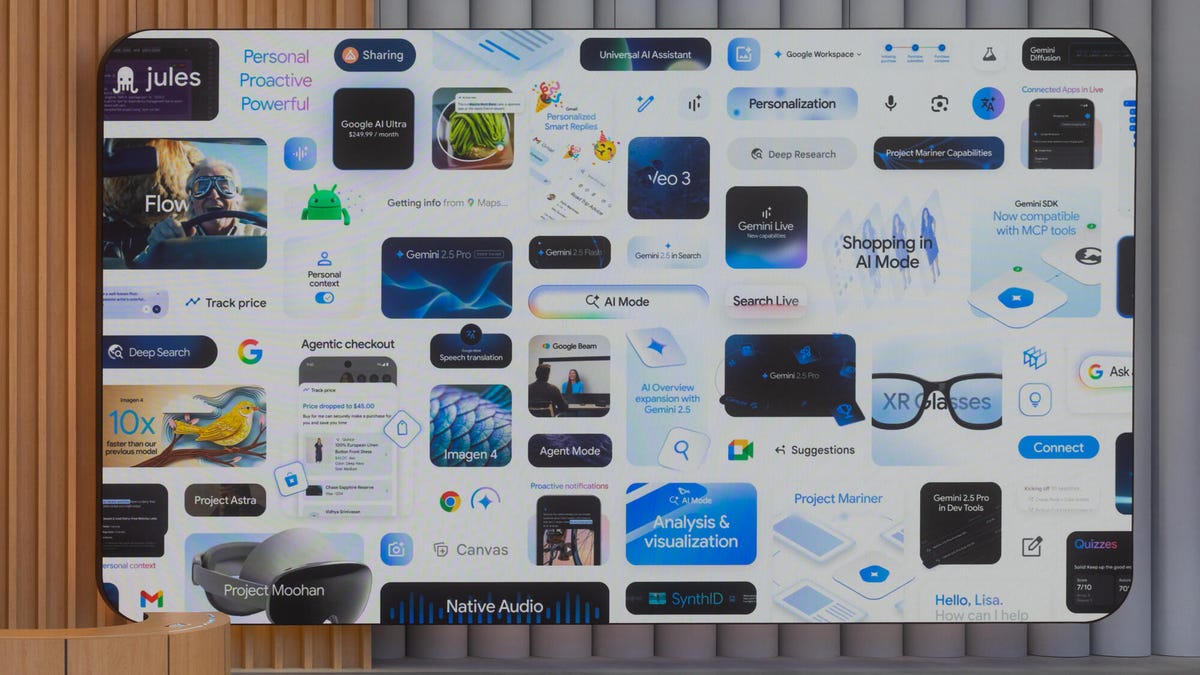
As you’d expect, this year’s Google I/O developer’s conference focused almost exclusively on AI — where the company’s Gemini AI platform stands, where it’s going and how much it’s going to cost you now for its new AI Ultra subscription plan (spoiler: $250 per month). Meanwhile, a new Flow app expands the company’s video-generation toolset, and its Android XR glasses make their debut.
Plus, all AI usage and performance numbers are up! (Given that a new 42.5-exaflop Ironwood Tensor processing unit is coming to Google Cloud later this year, they’ll continue to rise.)
Google’s Project Aura, a developer kit for Android XR that includes new AR glasses from Xreal, is the company’s next step in the company’s roadmap toward glasses-based, AI-driven extended reality. CNET’s Scott Stein goes in-depth in an exclusive interview with Shahram Izadi, Google’s VP and GM for Android XR about that future. And headset-based Project Moohan, developed in conjunction with Samsung, is now available, and Google’s working with Samsung to extend beyond headsets.
For a play-by-play of the event, you can read the archive of our live blog.
Google already held a separate event for Android, where it launched Android 16, debuting its new Material 3 Expressive interface, updates to security and an update on Gemini integration and features.
A lot of the whizzy new AI features are only available via one of its subscription levels. AI Pro is just a rebranding of Google’s $20-per-month Gemini Advanced plan (adding some new features), but Google AI Ultra is a pricier new option — $250 per month, with half off the first three months for the moment — that provides access to the latest, spiffiest and least usage-limited of all its tools and models, as well as a prototype for managing AI agents and the 30 terabytes of storage you’re going to need to store it all. They’re both available today.
Google also wants to make your automation sound smarter with Personalized Smart Replies, which makes your generated answers sound more like you, as well as plowing through pieces of information on your device to provide relevant information. It’ll be in Gmail this summer for subscribers. Eventually, it’ll be everywhere.
Also, it includes lots of better models, better coding tools and other details on developer-friendly things you expect from a developer conference. The announcement included its conversational Gemini Live, formerly part of Project Astra, its interactive, agentic, voice AI, kitchen sink AI app. (As Managing Editor Patrick Holland says, «Astra is a rehearsal of features that, when they’re ready for the spotlight, get added to Gemini Live.») And for researchers, NotebookLM incorporates Gemini Live to improve its… everything.
It’s available now in the US.
Chrome AI Mode
People (that is, those over 18) who pony up for the subscriptions, plus users on the Chrome Beta, Dev and Canary tracks, will be able to try out the company’s expanded Gemini integration with Chrome — summary, research and agentic chat based on the contents of your screen, somewhat like Gemini Live does for phones (which, by the way, is available for free on Android and iOS as of today). But the Chrome version is more suited to the type of things you do at a computer rather than a phone. (Microsoft already does this with Copilot in its own Edge browser.)
Eventually, Google plans for Gemini in Chrome to be capable of synthesizing using multiple tabs and voice navigation.
The company is also expanding how you can interact with its AI Overviews in Google Search as part of AI Mode, with interactions with AI Overviews and more agentic shopping help. It’s a new tab with search, or on the search bar, and it’s available now. It includes deeper searches, Personal Context — which uses all the information it knows about you, and that’s a lot — to make suggestions and customize replies.
The company detailed its new AI Mode for shopping, which has an improved conversational shopping experience, a checkout that monitors for the best pricing, and an updated «try on» interface that lets you upload a photo of yourself rather than modeling it on a generic body.
Google plans to launch it soon, though the updated «try on» feature is now available in the US via Search Labs.
Google Beam
Formerly known as Project Starline, Google Beam is the updated version of the company’s 3D videoconferencing, now with AI. It uses a six-camera array to capture all angles of you, which the AI then stitches together, uses head tracking to follow your movements, and sends at up to 60 frames per second.
The platform uses a light field display that doesn’t require wearing any special equipment, but that technology also tends to be sensitive to off-angle viewing. HP is an old hand in the large-scale scanning biz, including 3D scanning, so the partnership with Google isn’t a big surprise.
Flow and other generative creative tools
Google Flow is a new tool that builds on Imagen 4 and Veo 3 to perform tasks like creating AI video clips and stitching them into longer sequences, or extending them, with a single prompt while keeping them consistent from scene to scene. It also provides editing tools like camera controls. It’s available as part of Gemini AI Ultra.
Imagen 4 image generation is more detailed, with improved tonality and better text and typography. And it’s faster. Meanwhile, Veo 3, also available today, has a better understanding of physics and native audio generation — sound effects, background sounds and dialogue.
Of course, all this is available under the AI Pro plan. Google’s Synth ID gen AI detection tool is also available today.
Technologies
Today’s NYT Mini Crossword Answers for Wednesday, April 8
Here are the answers for The New York Times Mini Crossword for April 8.
Looking for the most recent Mini Crossword answer? Click here for today’s Mini Crossword hints, as well as our daily answers and hints for The New York Times Wordle, Strands, Connections and Connections: Sports Edition puzzles.
Need some help with today’s Mini Crossword? Hint: It uses a lot of the letter Z for some reason. Read on for all the answers. And if you could use some hints and guidance for daily solving, check out our Mini Crossword tips.
If you’re looking for today’s Wordle, Connections, Connections: Sports Edition and Strands answers, you can visit CNET’s NYT puzzle hints page.
Read more: Tips and Tricks for Solving The New York Times Mini Crossword
Let’s get to those Mini Crossword clues and answers.
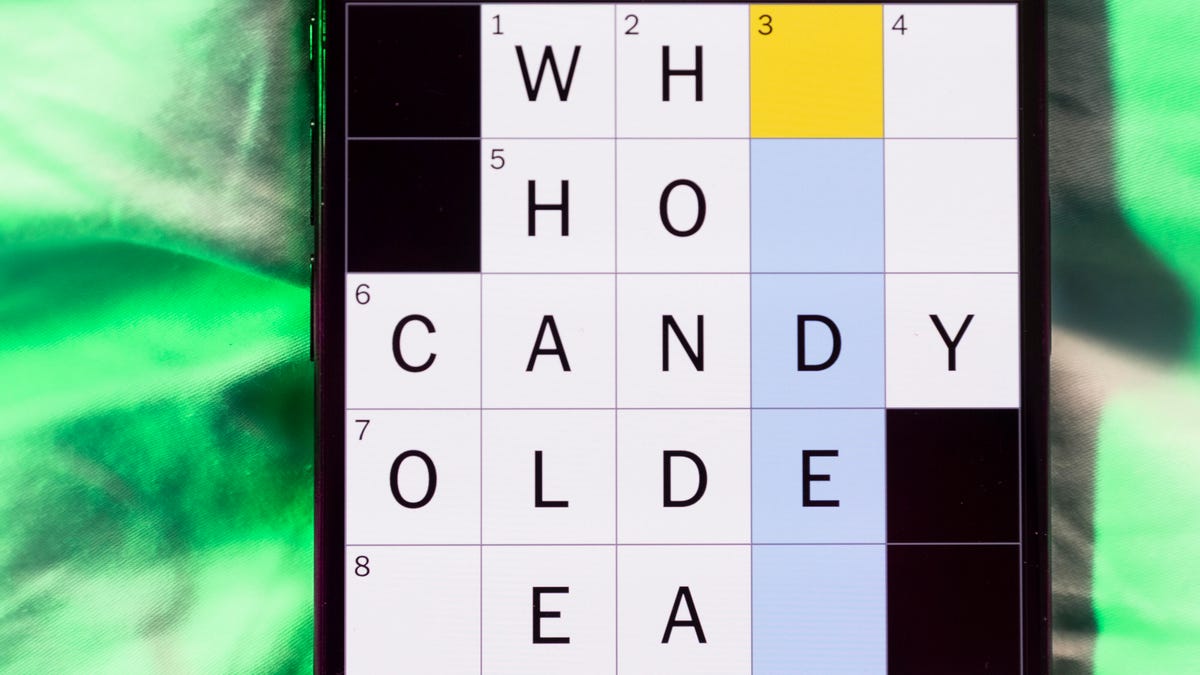
Mini across clues and answers
1A clue: ___-Carlton (hotel chain)
Answer: RITZ
5A clue: Span of the alphabet
Answer: ATOZ
6A clue: Cable channel with an out-of-this-world name
Answer: STARZ
7A clue: Takes care of, as a squeaky wheel
Answer: OILS
8A clue: Toy on a string
Answer: YOYO
Mini down clues and answers
1D clue: When a post receives far more negative comments than likes, in social media slang
Answer: RATIO
2D clue: World’s leading wine producer
Answer: ITALY
3D clue: Middle of the human body
Answer: TORSO
4D clue: Sleeping sound
Answer: ZZZ
6D clue: Tofu base
Answer: SOY
Technologies
Today’s NYT Connections: Sports Edition Hints and Answers for April 8, #562
Here are hints and the answers for the NYT Connections: Sports Edition puzzle for April 8 No. 562.

Looking for the most recent regular Connections answers? Click here for today’s Connections hints, as well as our daily answers and hints for The New York Times Mini Crossword, Wordle and Strands puzzles.
Today’s Connections: Sports Edition is a tough one. If you’re struggling with today’s puzzle but still want to solve it, read on for hints and the answers.
Connections: Sports Edition is published by The Athletic, the subscription-based sports journalism site owned by The Times. It doesn’t appear in the NYT Games app, but it does in The Athletic’s own app. Or you can play it for free online.
Read more: NYT Connections: Sports Edition Puzzle Comes Out of Beta
Hints for today’s Connections: Sports Edition groups
Here are four hints for the groupings in today’s Connections: Sports Edition puzzle, ranked from the easiest yellow group to the tough (and sometimes bizarre) purple group.
Yellow group hint: Working out.
Green group hint: Cover your face.
Blue group hint: NFL players.
Purple group hint: Leap.
Answers for today’s Connections: Sports Edition groups
Yellow group: Exercises in singular form.
Green group: Sporting jobs that require masks.
Blue group: Hall of Fame defensive ends.
Purple group: ____ jump.
Read more: Wordle Cheat Sheet: Here Are the Most Popular Letters Used in English Words
What are today’s Connections: Sports Edition answers?
The yellow words in today’s Connections
The theme is exercises in singular form. The four answers are crunch, plank, situp and squat.
The green words in today’s Connections
The theme is sporting jobs that require masks. The four answers are catcher, fencer, football player and goaltender.
The blue words in today’s Connections
The theme is Hall of Fame defensive ends. The four answers are Dent, Peppers, Strahan and Youngblood.
The purple words in today’s Connections
The theme is ____ jump. The four answers are broad, high, long and triple.
Technologies
The $135M Google Data Settlement Site Is Live — See If You’re Eligible
Use the settlement website to select your preferred payment method, and you may end up $100 richer.

You can now file a claim in the $135 million Google data settlement. The case centers on claims that Android devices transmitted user data without consent. Specifically, the class action lawsuit Taylor v. Google LLC contends that Google’s Android devices passively transferred cellular data to Google without user permission, even when the devices were idle. While not admitting fault, Google reached a preliminary settlement in January, agreeing to pay $135 million to about 100 million US Android phone users.
The official settlement website for the lawsuit is now live. The final approval hearing won’t occur until June 23, when the court will consider whether Google’s settlement is fair and listen to objections. After that, the court will decide whether to approve the $135 million settlement.
In the meantime, if you qualify and want to be paid as part of the settlement, you can select your preferred payment method on the official website. There, you can find information on speaking at the June 23 court hearing and on how to exclude yourself or write to the court to object by May 29.
As part of the settlement, Google will update its Google Play terms of service to clarify that certain data transfers do occur passively even when you’re not using your Android device, and that cellular data may be relied upon when not connected to Wi-Fi. This can’t always be disabled, but users will be asked to consent to it when setting up their device.
Google will also fully stop collecting data when its «allow background data usage» option is toggled off.
Who can be part of the settlement?
In order to join the Taylor v. Google LLC settlement, you must meet four qualifications:
- Be a living, individual human being in the US.
- Have used an Android mobile device with a cellular data plan.
- Have used the aforementioned device at any time from Nov. 12, 2017, to the date when the settlement receives final approval.
- You’re not a class member in the Csupo v. Google LLC lawsuit, which is similar but specifically for California residents.
The final approval hearing is on June 23, so you can add your payment method until then. The hearing’s date and time may change, and any updates will be posted on the settlement website.
If you choose to do nothing, you will still be issued a settlement payment, but you may not receive it if you don’t select a payment method.
How much will I get paid?
It’s not currently known exactly how much each settlement class member will receive, but the cap is $100. Payments will be distributed after final court approval and after any appeals are resolved.
After all administrative, tax and attorney costs are paid, the settlement administrator will attempt to pay each member an equal amount. If any funds remain after payments are sent, and it’s economically feasible, they will be redistributed to members who were previously and successfully paid. If it’s not economically feasible, the funds will go to an organization approved by the court.
-
 Technologies3 года ago
Tech Companies Need to Be Held Accountable for Security, Experts Say
-
 Technologies3 года ago
Best Handheld Game Console in 2023
-
 Technologies3 года ago
Tighten Up Your VR Game With the Best Head Straps for Quest 2
-
 Technologies4 года ago
Black Friday 2021: The best deals on TVs, headphones, kitchenware, and more
-
 Technologies5 лет ago
Google to require vaccinations as Silicon Valley rethinks return-to-office policies
-
 Technologies5 лет ago
Verum, Wickr and Threema: next generation secured messengers
-
 Technologies4 года ago
Olivia Harlan Dekker for Verum Messenger
-
 Technologies4 года ago
The number of Сrypto Bank customers increased by 10% in five days