Connect with us

Technologies

Your Teen’s Instagram Account Protections Are Coming to Facebook and Messenger

Instagram has already moved 54 million kids into Teen Accounts. And there’s more to come.
Worried about what your kids might be up to on social media? If so, Meta’s continued crackdown on teen safety might come as a relief. The company announced Tuesday that, starting immediately, it’s expanding its Instagram Teen Accounts to other platforms, specifically, Facebook and Messenger.

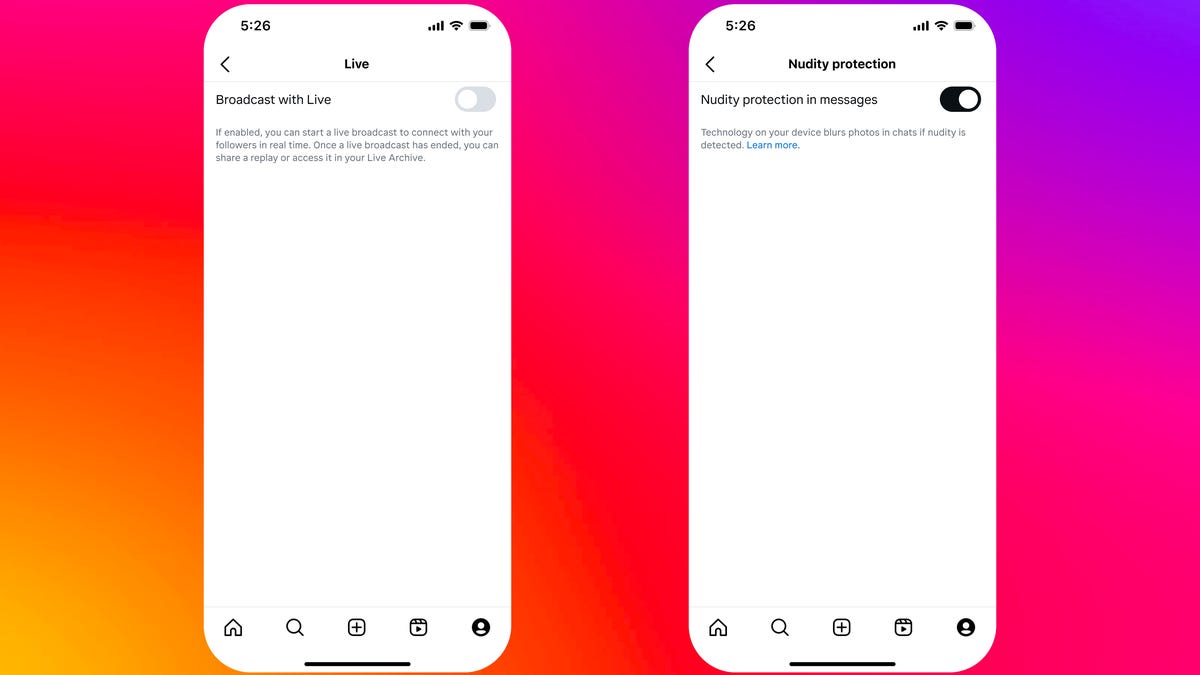
It also announced additional built-in protections for Instagram Teen Accounts. These will prevent children under the age of 16 from going live on the platform or turning off blurred images, which protect against suspected nudity in direct messages, without parental permission.

Meta first launched Instagram Teen Accounts back in September 2024, in a bid to make the platform a safer place for kids and provide more oversight and supervision options for parents. In an update on Tuesday, the company said it had switched 54 million accounts to become Teen Accounts so far, with more to go. The accounts offer built-in protections, including being set to private by default and a hidden words feature, which will automatically filter out problematic comments and DM requests.

With parental agreement, some of these features can be switched off, but Meta said that so far 97% of teens aged between 13 and 15 had kept the default safeguards in place. In a Meta-commissioned survey undertaken by Ipsos, the company said that 94% of parents found the protections helpful, with 85% saying it made it easier to have positive experiences on Instagram. The company didn’t say how many parents it surveyed, or where they were situated.

Child safety: Who is responsible?

Children’s safety campaigners have been asking social media companies for years to make their platforms safer for kids, and while progress has been slow, Meta’s recognition that teens need different protections than adults to the extent that they require a different kind of account has been an important breakthrough. Other platforms have followed suit, with TikTok introducing new parental controls last month.

But at the same time as introducing teen accounts, Meta has come under fire for rolling back safety protections elsewhere on its platforms. Just this week, the company has ceased its fact-checking program and more broadly it’s also scanning for harmful content in order to promote more free speech.

«In recent months, it has been deeply concerning to see Meta roll back on their duty to protect children,» said Matthew Sowemimo, associate head of policy for child safety online at UK children’s charity the NSPCC over email. «While their move to expand these safety features to both Facebook and Messenger is welcome, more work must be done to ensure children have positive experiences online — including on both private and public parts of these platforms.»

For the changes brought about by the introduction of teen accounts to be most effective, they should be combined with proactive measures to reduce harmful content across Meta’s platforms, Sowemimo added. «While safety settings play an important role in preventing online harm, we know changes to account settings can result in accountability falling onto children and parents to keep themselves safe online,» he said.

Technologies

In a World Without BlackBerry, Physical Keyboards on Phones Are Making a Comeback

Commentary: You might not even need a new phone to get clicky buttons.

If you have fond memories of clicking away on the BlackBerry, the Palm Treo, the T-Mobile Sidekick or similar handhelds from back in the day, I have good news for you: Phones with keyboards are making a comeback. Sort of. 

There’s a growing number of companies looking to bring back clicky, tactile buttons, whether for that nostalgic appeal or to reinvent phone keyboards as an addition to your iPhone or Android device. Some of these have even just announced their plans at CES 2026 or will be bringing these button-filled phones to this year’s Mobile World Congress. 

From keyboard cases to modern-day BlackBerry clones, here’s what we know about the potential QWERTY renaissance. 

Why are keyboards on phones making a comeback?

It’s difficult to assess the exact turning point for when physical phone keyboards made a comeback, but we have a couple of guesses. Perhaps the biggest reason this is happening is that people rely on their phones as their primary computer. As such, they’re probably typing long emails or editing documentation with just their phone’s touch keyboard. 

While that’s perfectly fine for most people, some yearn for the comfort and tactile feel of physical keys. And perhaps getting tired of bad autocorrect errors when typing too quickly.

Another potential case for phones with keyboards is simply the desire for variety. Some people might feel a general fatigue over the familiar look and feel of modern smartphones. Having a handset that functions differently — see the popularity of recent flip and folding phones — is a welcome change. 

Plus, phones with keyboards appeal not just to the older generation who miss them, but also to the younger generation who are increasingly into retro tech. 

Can I get a BlackBerry in 2026?

Not really. If you want to get a new BlackBerry right out of the factory, you’re out of luck, as the company discontinued hardware production in 2020 and further discontinued its software services in 2022. 

You could try to get a BlackBerry on the secondary market (like the TCL-made KeyOne or Key2), but the Android version is outdated and won’t be as functional as other smartphones. Wirecutter’s Brenda Stolyar recently attempted to revive a Blackberry Classic Q20 from 2015 and discovered that, while it can still run modern apps, it takes a lot of patience to sideload them onto the device.

Zinwa is one company that’s buying up old stock of BlackBerry hardware, replacing the internals with new components, installing Android and then reselling them. Its first «product» is the Zinwa Q25, which is essentially a retrofitted BlackBerry Classic. You can buy the finished product for $400 or get a conversion kit for $300. 

What keyboard phones and accessories are currently available?

There are several options for keyboard phones on the market. 

Clicks keyboard case

The easiest way to get a phone with a keyboard is to turn your existing phone into one. That’s the promise of the Clicks keyboard case, which adds a physical keyboard to most modern smartphones. It made a big splash at CES 2024 and has continued to expand its lineup (we’ll get to that shortly). Simply pop your phone inside the case, and voila, you’ll have a phone with a keyboard.

In our hands-on, we liked the extra screen real estate, how quickly the keyboard interface worked, the preprogrammed keyboard shortcuts and the tactile keys. That said, the keyboard does feel a bit crowded, and it’s unclear if it’s that much more comfortable than the default touch keyboard. Currently, the Clicks keyboard case works with the iPhone 14 and newer, the Razr 2024 and newer and the Pixel 9 and 9 Pro. Its price starts at $139. 

There are also plans to release a Clicks Power Keyboard, that attaches to your phone via MagSafe or Qi2 magnetic connection. The Power Keyboard has a slider that accommodates phones of different sizes, plus it can be paired with a tablet, a smart TV or anything that uses Bluetooth. This makes the Power Keyboard much more flexible than the Clicks case, since it doesn’t need to be made for a particular device. 

The preorder price is $79, though that could go up in the future. 

Clicks Communicator

If you feel ready to get a dedicated keyboard-equipped phone, Clicks also recently announced the Clicks Communicator, an Android smartphone centered around the keyboard experience. It is designed by a former BlackBerry designer to show what a new BlackBerry phone would be like for 2026. It has a slimmed-down interface that prioritizes messaging apps, a text-based home screen and of course, a tactile and clicky keyboard.

As it’s not as full-featured as other modern smartphones, Clicks is positioning the Communicator as a secondary productivity-focused device, which might be a good thing if you’re trying to limit your social media screen time. 

It’ll be available later this year for $499, but you can preorder it now for $399. 

Unihertz Titan

Unihertz is a Chinese company that’s been making keyboard phones for a few years now. They’re all part of the Titan series and run Android. The current lineup includes the Titan, Titan Pocket, Titan Slim and Titan 2. Plus, an upcoming Titan 2 Elite has been teased for Mobile World Congress. It looks like a curvier addition to the lineup, compared with the other passport-shaped models. 

These phones look a lot like BlackBerrys of yore, and the Titan 2 in particular seems to bear a passing resemblance to the BlackBerry Passport. 

Prices start at around $300.

Ikko Mind One

The Ikko Mind One is a unique «card-sized» Android phone that comes with an innovative Sony 50-megapixel flip-up camera and, indeed, an optional keyboard case. It also ships with an «Ikko AI OS,» though it’s unclear how that works just yet. It looks utterly adorable, but we haven’t heard enough about it yet. 

The Pro version sells for $429. 

Minimal Phone

If you combined a Kindle with a BlackBerry, you might have the Minimal Phone. As the name suggests, the Minimal Phone is designed to be a super-simple distraction-free alternative to the modern smartphone. It has a generic e-paper display, a straightforward user interface, a QWERTY keyboard and the Android operating system. 

The price starts at $449. You can check out PCMag’s review of the Minimal Phone here.

Which physical phone keyboard should I get?

For now, the easiest way to get a physical keyboard on your phone is likely one of the Clicks accessories, since the keyboard case and power keyboard won’t require a full phone purchase. 

For most of these other devices, you’re entering a niche phone category, so support could be all over the place. You’ll want to check how many years of software and security updates these other phones are expected to receive. That way, you can have an idea about how many years of use you can safely get with these phones.

You’ll also want to consider how you want to use the device. If you’re looking for something that’s a step back from a more powerful yet constantly pinging device, the Clicks Communicator or the Minimal Phone might make a good secondary phone. The Unihertz Titan line and the Ikko Mind One may be a closer mimic of that BlackBerry experience. 

Continue Reading

Technologies

I Asked Audiologists if My Earbuds Are Damaging My Ears

I spoke with ear health experts to learn more about the risks of wearing earbuds and which headphone style is best to prevent hearing loss.

I experienced hearing loss for the first time in early 2025 due to a case of eustachian tube dysfunction, which is when the tube connecting the middle ear to the back of the nose no longer functions properly. Even after I recovered, I was scared it would happen again. So as a wellness writer with 10-plus years of experience who understands the importance of being proactive with my health, I decided to do everything in my power to prevent hearing loss from affecting me again.

While researching ear health tips, I discovered that a common piece of technology, my earbuds, could have been contributing to my hearing issues. To find out if that’s actually the case, I spoke to ear health experts. This is what they had to say, and what they taught me about preserving my ear health.

Earbuds, ear health and hearing risks

Earbuds can pose a few risks, according to Dr. Ruth Reisman, a licensed audiologist and New York hearing aid dispenser. They can trap heat and moisture in the ear, increasing the risk of ear infections. With repeated use, earbuds can also push earwax deeper into the ear, leading to buildup or impaction. Plus, if your earbuds don’t fit correctly or you wear them for long periods, they can cause irritation or soreness in your ear canal. 

“Earbuds sit directly in the ear canal, which can increase several risks. The biggest concern is noise-induced hearing loss if volume is too high or listening time is too long,” said Reisman. “I have witnessed all of these problems in the course of my 15 years as an audiologist.”

When you listen to content at high volume, particularly for an extended period, Dan Troast, an audiologist at HearUSA, explains that it can permanently damage the delicate hair cells in your inner ear. Earbud use combined with high volume can cause:

  • Noise-induced hearing loss
  • Tinnitus (ringing, buzzing or hissing in the ears)
  • Sound sensitivity over time

Misusing earbuds is also common. If they don’t have noise cancellation, you might repeatedly turn up the volume to avoid hearing background noise, which can put you in an unsafe listening range fast. However, even listening at a moderate volume can become a problem if you do so for hours each day. 

“Early signs of overexposure include temporary muffled hearing or ringing after listening sessions — both are warning signals from the auditory system,” Troast said. Even if you periodically experience temporary ringing in your ears, it can ultimately increase your risk of developing chronic tinnitus. 

Earbuds and radiation

In my search for ear health tips, I came across several articles discussing whether wireless Bluetooth earbuds can cause harm through radiation. I asked Reisman if this is true. 

“Current scientific evidence doesn’t show that the energy from Bluetooth earbuds causes harm,” she said. “These devices emit far less radiation than cell phones and remain well below established safety limits. From an audiology standpoint, sound exposure is a far greater risk than radiation.”

The 60/60 rule you’ll want to follow if you wear earbuds 

Both Reisman and Troast recommend the “60/60 rule” to people who wear earbuds. The 60/60 rule means you listen at no more than 60% of the maximum volume for no more than 60 minutes at a time. 

“Daily use is fine if the volume stays safe and ears are given time to rest,” Reisman advises. “I usually tell patients to take a 15- to 20-minute break for every hour of use.”

If you haven’t already, Troast recommends checking whether your devices have built-in hearing health settings that automatically monitor volume exposure. For instance, on your iPhone, Apple Watch or iPad, you can set up headphone notifications to alert you to lower the volume when you’ve reached the seven-day audio exposure limit (such as 80 decibels for 40 hours over seven days). Or, you can activate the Reduce Loud Audio feature to have your headphone volume automatically lowered once it exceeds your set decibel level.

Safer types of headphones for your ears

Over-the-ear headphones are generally safer, according to Reisman, because they sit outside the ear canal and don’t concentrate sound as directly on the eardrum. Since they aren’t in the ear canal like earbuds, they’re also less likely to cause irritation or earwax buildup. 

“Over-the-ear headphones can be safer — if they allow for lower listening volumes,” said Troast. “Even better are noise-canceling headphones, which reduce background noise, so listeners don’t feel the need to crank up the volume.” Just make sure you’re still aware of your surroundings, especially if you’re outdoors near traffic. 

Open earbuds could also be a safer option. They use bone-conduction technology, which transmits sound through the earbones and the skull rather than directly to the eardrum. «Several headphone companies claim open earbuds are better for your hearing health and are more hygienic,» said David Carnoy, CNET’s resident headphone expert. 

Since open earbuds don’t sit inside or cover the ear:

  • Warmth and moisture, like sweat, won’t build up, which can cause ear infections. 
  • Debris, such as dust, won’t transfer from the earbuds into the ear. 
  • They won’t push earwax deeper in your ear, which can lead to impaction. 
  • Don’t rub or press on the ear canal, reducing discomfort or irritation.

However, if you listen to content at high volumes, no headphone style is completely safe. What matters most for your ear and hearing health is total sound exposure over time, so make sure you’re monitoring your volume level and giving your ears breaks. 

Expert earbud tips

If earbuds are your preferred headphone type for listening to your favorite music, shows and podcasts, Troast offers the following tips from an audiology perspective:

  • Use built-in volume limit settings on smartphones.
  • Choose noise-canceling earbuds or headphones to avoid increasing volume in loud environments.
  • Take regular listening breaks.
  • Avoid sleeping in earbuds.
  • Get a baseline hearing test, especially if you use earbuds daily.

If you’re already experiencing tinnitus, it’s especially important that you manage your volume level to prevent it from worsening. 

Carnoy adds that there have also been instances of people being allergic to the materials used for earbud tips. If you have a known allergy, make sure your earbuds don’t use that material, or replace the tips. If you do have an allergic reaction, stop using the earbud tips until you can find a substitute. 

Lastly, Reisman advises keeping your earbuds clean, avoiding sharing them and ensuring they fit properly. Most earbuds come with tips in different sizes, so you can find the right fit for your ear size.

When to see an audiologist or doctor

If you experience ringing in the ears, muffled hearing, ear pain or frequent infections, Reisman recommends you consider an evaluation with an audiologist. 

You’ll also want to pay attention to early warning signs of inner ear damage from noise exposure, such as ringing in the ears, difficulty hearing or needing to turn up the volume over time.

If you’re already experiencing hearing loss, Troast said that addressing it with hearing aids can provide relief. Tinnitus, on the other hand, can be treated with evidence-based approaches such as sound therapy or specific counseling strategies. 

“Hearing damage is gradual and cumulative,” Reisman said, “but it’s also largely preventable with smart and healthy listening habits.” And that includes using your headphones — or, in my case, earbuds — responsibly. 

Continue Reading

Technologies

Today’s NYT Mini Crossword Answers for Saturday, Feb. 21

Here are the answers for The New York Times Mini Crossword for Feb. 21.

Looking for the most recent Mini Crossword answer? Click here for today’s Mini Crossword hints, as well as our daily answers and hints for The New York Times Wordle, Strands, Connections and Connections: Sports Edition puzzles.


Need some help with today’s Mini Crossword? It’s the long Saturday version, and some of the clues are stumpers. I was really thrown by 10-Across. Read on for all the answers. And if you could use some hints and guidance for daily solving, check out our Mini Crossword tips.

If you’re looking for today’s Wordle, Connections, Connections: Sports Edition and Strands answers, you can visit CNET’s NYT puzzle hints page.

Read more: Tips and Tricks for Solving The New York Times Mini Crossword

Let’s get to those Mini Crossword clues and answers.

Mini across clues and answers

1A clue: «Jersey Shore» channel
Answer: MTV

4A clue: «___ Knows» (rhyming ad slogan)
Answer: LOWES

6A clue: Second-best-selling female musician of all time, behind Taylor Swift
Answer: MADONNA

8A clue: Whiskey grain
Answer: RYE

9A clue: Dreaded workday: Abbr.
Answer: MON

10A clue: Backfiring blunder, in modern lingo
Answer: SELFOWN

12A clue: Lengthy sheet for a complicated board game, perhaps
Answer: RULES

13A clue: Subtle «Yes»
Answer: NOD

Mini down clues and answers

1D clue: In which high schoolers might role-play as ambassadors
Answer: MODELUN

2D clue: This clue number
Answer: TWO

3D clue: Paid via app, perhaps
Answer: VENMOED

4D clue: Coat of paint
Answer: LAYER

5D clue: Falls in winter, say
Answer: SNOWS

6D clue: Married title
Answer: MRS

7D clue: ___ Arbor, Mich.
Answer: ANN

11D clue: Woman in Progressive ads
Answer:  FLO

Continue Reading

Trending

Copyright © Verum World Media