
Technologies
Doom: The Dark Ages Preview: Hands-On With a Heavy Metal Album-Turned-Shooter
The next action-packed FPS in the vaunted Doom franchise slows down the pace for a different flavor of gothic carnage.
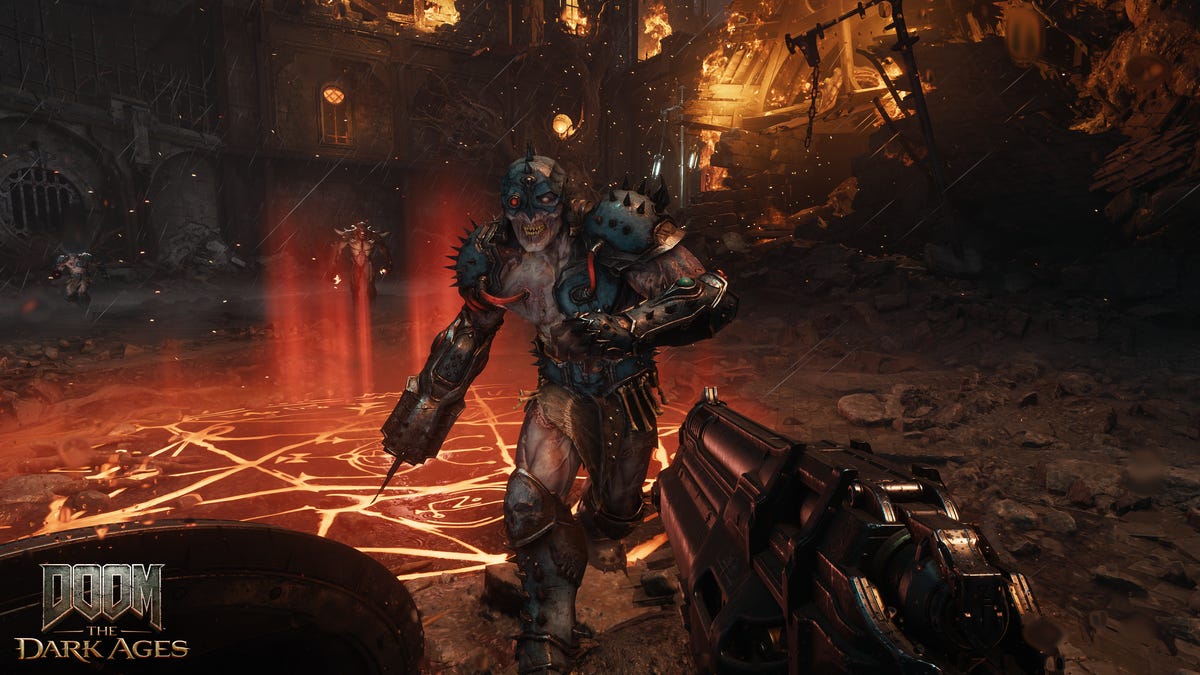
The reboot of the Doom franchise starting with the titular 2016 title into a fast-paced shooter was a resounding success, and its 2020 sequel Doom Eternal ramped up the speed even more. So it may have come to surprise fans that developer id Software decided to slow things down for the third installment, Doom: The Dark Ages — but after playing several hours of the game, I’ve mostly enjoyed the new direction they’ve taken the gruesome shooter, which admirably reshuffles the ingredients to tickle similar Doom urges with new flavors.
At a preview event in Los Angeles, California, id Software and publisher Bethesda brought journalists and influencers to play an over 3-hour chunk of Doom: The Dark Ages. The substantial playtime included an early slice of the linear campaign, samplings of the mecha and dragon-back combat and a later extended segment in a huge map carved into arenas — enough time to get a feel for the flow of fights and upgrades.
The Dark Ages is a prequel to the 2016 Doom game, which itself had such a thin story that players shouldn’t worry terribly if they’ve forgotten what happened (or never played). The newest game is flung so far in the past that it doesn’t really matter — the Doom Slayer as a character is functionally immortal, so this adventure seems to be opening the games up to flinging him around in time to shake up the setting.
And boy, what a setting. As trailers have shown, The Dark Ages takes place in the kind of medieval fantasy splayed on metal album covers and airbrushed on the sides of vans — demons, dragons and Doom Slayers make for a rollicking mix of blood and thunder. Sure, there are some sci-fi starships and tech to handwave players teleporting between stages and equipping a plethora of firearms, but everyone agrees that it also makes sense to bring a shield with a buzzsaw to a gunfight.
That gun-and-melee alchemy is at the center of The Dark Ages, and it’s clear a ton of tinkering has gone into how players employ their new shield. This time around, players are rooted to the ground — no more dashing around — to transition from the frenetic fights of the recent Doom games into the brutal slugfests of The Dark Ages. Shoot, block, shoot, counter, deathblow — it’s a ballet of brutality.
I found myself missing the air-dashes of the earlier Doom games, and it took time to get used to bringing up my shield instead of keeping constantly on the move. But there are a handful of tools to keep you from hunkering behind the shield (which can only take so many shots before being temporarily disabled) — you can dash and bash with your shield to close distance as well as make special melee attacks (which have a certain amount of uses before needing to recharge).
I had to watch my limited ammo, health and armor on top of tracking enemies, which was a lot to keep track of, and it took practically the whole preview session to feel halfway competent in the combat flow. It’s color-coded: avoid the orange blasts but use your shield to block the green ones to damage or disable enemies; when near death, they’ll glow purple for you to finish them off. Further into the demo, I found more interactions — like enemies wearing armor, which needed to be shot enough to glow red-hot, after which I could throw my shield to shatter it, leaving them vulnerable.
The fantasy setting liberates the franchise from its high-tech veneer, setting aside pulse rifles for a menagerie of inventive, medieval destruction methods: a buzzsaw added to the shield to throw into enemies, a magazine-fed stake thrower, a gun that churns up skulls to spew room-clearing bone fragments and even a gun that fires a heavy ball on a chain like a projectile flail. Upgrades creatively expand the moveset: the plasma-firing gun, for instance, can be shot at an enemy you’ve lodged your shield into to electrify surrounding enemies.
Slaughter from on high: Mech and dragon segments are fun diversions
Amid the carnage of its new shield-and-gun focus, early trailers of Doom: The Dark Ages showed peeks at new gameplay sequences that got fans excited: piloting a colossal mech and riding a cybernetically enhanced dragon. My preview jumped to time with both, and I have a clear favorite. (It’s the mech.)
When I climbed into the Atlan, as the Doom Slayer-looking mech is called, the game zoomed out to accommodate my skyscraper frame. The scale is the fun here. Each prodigious step made the ground quake, and I effortlessly plowed through bridges filled with enemies that would’ve taken a lot of effort to eliminate on foot. I stomped on squads of tanks to get in range of massive demons — which, naturally, I punched the daylights out of.
Atlan combat is a slugfest, with amazing sound selling the colossal crunch of my massive fists colliding with a demon’s face. And yes, there’s a bit of a mechanical flow: pummeling enemies builds up a meter to stomp a directional column or fire energy blasts. While out of range, I engaged a rocket punch to close the distance. It sold me on how these Pacific Rim-esque sequences clashing with Kaiju-size demons will break up the extended gunplay on the ground (and feel metal as heck).
The dragon sequences were, sad to say, not as fun.
I hear you, readers: how can the Doom Slayer clambering on the back of a dragon with neon red holo-wings, jet thrusters and a machine gun be droll? But all that promised speed and excitement of riding an iconic fantasy beast straight off the cover of Heavy Metal gets slowed way, way down for the sections I played.
I dashed through levels at top speed until it was time to take on enemies, which just led to my dragon hovering around while I took out stationary foes shooting at me — which is fine to mix in some bullet hell gameplay, but disappointing compared with the swift and lithe dragon combat I was expecting. I might as well have been shooting out of a stationary helicopter.
There’s some cool toying with scope in the dragon section I played, wherein I systematically took down a demon battleship’s (Hell Carrier, technically) turrets and main gun before diving in to destroy the massive vessel’s central core from the inside. Rinse and repeat for a few more ships, which gave me time to understand and grudgingly adapt to a dodge mechanic in the stationary sections, which felt more punishing than rewarding.
But even after struggling through this section, there was the undeniable bright spot of the game’s commitment to fist-pumping moments — like whittling down an annoying colossal demon until I could activate a finisher, when my dragon flew forward and wrenched its jaws apart to spew jets of flame down its throat. Heavy metal as hell.
The best for last: Siege, an open range of death-dealing
The fourth and final section of the demo was simply called Siege. Whereas the first on-foot section I played followed early Doom games in a fairly linear path with a few offshoots, the siege opened up to a huge map — essentially multiple contained arenas connected by paths and walkways, each of which you could assault in the order you choose, with plenty of secret areas tucked into the sides.
If the first levels were a classroom teaching the rhythms of combat, this was the test: broad swaths of enemies, from foot soldiers to towering Cyberdemons, all hitting you at once. But hey, you’ve trained for this (right?), and in this section, Bethesda gave me plenty of tools to dish out death.
Like in previous Doom games, Dark Ages has a spread of difficulty settings for the gluttons for punishment — and in a big win for accessibility, there are lots of toggles to tweak enemy health, damage taken, lengthening the parry window and more to get the player experience just right. Of the six difficulties, I brazenly chose the third (Ultra-Violence), a hard mode just above normal (Hurt Me Plenty), and muscled through the demo session.
The first area of the siege stopped me short, and try as I might, the Cyberdemon leading that first array of enemies wiped the floor with me. After reluctantly dipping down to the normal difficulty, I eked out a win and pushed forward into the massive map, looking over the surrounding hills and deciding which pack of enemies to take on next.
Tucked into the corners of the maps were caches and secret sections that often awarded gold, which could be spent at Sentinel Shrine statues to upgrade my skills. These are split into multiple trees for melee, shield and guns, the latter of which I felt were most rewarding and brought out the individuality of each gun. Unlike previous Doom games where I mainlined one or two weapons, Dark Ages’ variety of enemies and situations had me fluidly rotating between my arsenal of guns (when I remembered to in the heat of battle, anyway).
The siege section took me about an hour to work through in its entirety, prying into secret areas and systematically clearing out arenas full of different mixes of demons. I wandered across grassy hills between gothic village buildings while, in the background, a friendly Atlan engaged in a prolonged slugging match with a colossal archfiend. It was atmospheric but not distractingly so; the game is tuned to keep the focus on the enemies in front of you.
In the first section of the demo, the grim future-fantasy story unfurls with the captive Doom Slayer, restrained by a mysterious energy bolt on his chest, shot down to a medieval planet as a last resort to save the people of a king. «Before he became a hero, he was the super weapon of gods and kings,» a title card read. It’s soon clear that the Doom Slayer is a pawn in a political game between squabbling humans and demonic nobility. It laid the groundwork for what is, canonically, the first story told about the mythical man who only knows combat against the forces of Hell.
But the last section of the demo, the siege, was the real bones of what players will experience in Doom: The Dark Ages. Bethesda has tinkered and tweaked the Doom formula to force players to shoot to a different beat; from the demo, they’ve succeeded, which is admirable considering how much players enjoyed the fast-paced combat of the earlier games. The gunplay is tight, but so are the animations and deliciously crunchy sound effects, timed perfectly to make the player feel they’re battering apart the meanest baddies Hell can summon.
These days, the games industry seems risk-averse, producing sequels that feel too much like rehashes of whatever came before. Judging by the demo, which was only about four hours of play, the Dark Ages could be the difference, delivering the brutal feel of fighting through a Doom game with entirely new systems, weapons and mechanics as medieval as its theme.
We’ll know if this demo is representative of the whole game when Doom: The Dark Ages comes out on May 13 for PS5, Xbox Series X/S and PC.
Technologies
In a World Without BlackBerry, Physical Keyboards on Phones Are Making a Comeback
Commentary: You might not even need a new phone to get clicky buttons.
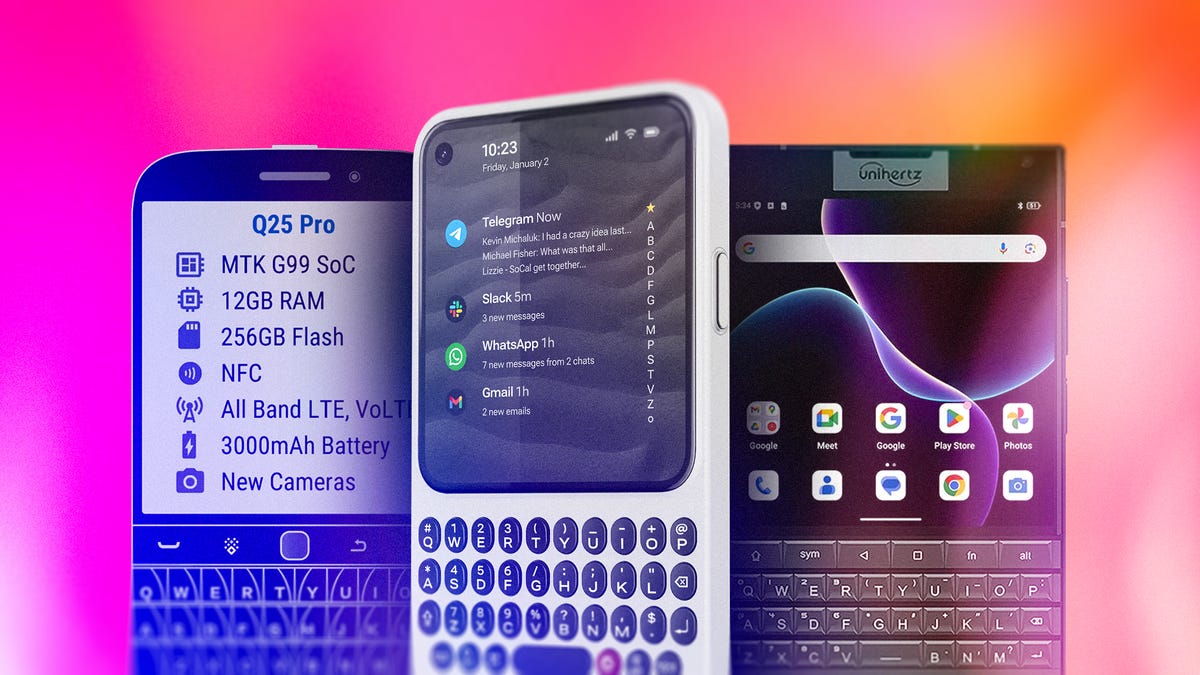
If you have fond memories of clicking away on the BlackBerry, the Palm Treo, the T-Mobile Sidekick or similar handhelds from back in the day, I have good news for you: Phones with keyboards are making a comeback. Sort of.
There’s a growing number of companies looking to bring back clicky, tactile buttons, whether for that nostalgic appeal or to reinvent phone keyboards as an addition to your iPhone or Android device. Some of these have even just announced their plans at CES 2026 or will be bringing these button-filled phones to this year’s Mobile World Congress.
From keyboard cases to modern-day BlackBerry clones, here’s what we know about the potential QWERTY renaissance.
Why are keyboards on phones making a comeback?
It’s difficult to assess the exact turning point for when physical phone keyboards made a comeback, but we have a couple of guesses. Perhaps the biggest reason this is happening is that people rely on their phones as their primary computer. As such, they’re probably typing long emails or editing documentation with just their phone’s touch keyboard.
While that’s perfectly fine for most people, some yearn for the comfort and tactile feel of physical keys. And perhaps getting tired of bad autocorrect errors when typing too quickly.
Another potential case for phones with keyboards is simply the desire for variety. Some people might feel a general fatigue over the familiar look and feel of modern smartphones. Having a handset that functions differently — see the popularity of recent flip and folding phones — is a welcome change.
Plus, phones with keyboards appeal not just to the older generation who miss them, but also to the younger generation who are increasingly into retro tech.
Can I get a BlackBerry in 2026?
Not really. If you want to get a new BlackBerry right out of the factory, you’re out of luck, as the company discontinued hardware production in 2020 and further discontinued its software services in 2022.
You could try to get a BlackBerry on the secondary market (like the TCL-made KeyOne or Key2), but the Android version is outdated and won’t be as functional as other smartphones. Wirecutter’s Brenda Stolyar recently attempted to revive a Blackberry Classic Q20 from 2015 and discovered that, while it can still run modern apps, it takes a lot of patience to sideload them onto the device.
Zinwa is one company that’s buying up old stock of BlackBerry hardware, replacing the internals with new components, installing Android and then reselling them. Its first «product» is the Zinwa Q25, which is essentially a retrofitted BlackBerry Classic. You can buy the finished product for $400 or get a conversion kit for $300.
What keyboard phones and accessories are currently available?
There are several options for keyboard phones on the market.
Clicks keyboard case
The easiest way to get a phone with a keyboard is to turn your existing phone into one. That’s the promise of the Clicks keyboard case, which adds a physical keyboard to most modern smartphones. It made a big splash at CES 2024 and has continued to expand its lineup (we’ll get to that shortly). Simply pop your phone inside the case, and voila, you’ll have a phone with a keyboard.
In our hands-on, we liked the extra screen real estate, how quickly the keyboard interface worked, the preprogrammed keyboard shortcuts and the tactile keys. That said, the keyboard does feel a bit crowded, and it’s unclear if it’s that much more comfortable than the default touch keyboard. Currently, the Clicks keyboard case works with the iPhone 14 and newer, the Razr 2024 and newer and the Pixel 9 and 9 Pro. Its price starts at $139.
There are also plans to release a Clicks Power Keyboard, that attaches to your phone via MagSafe or Qi2 magnetic connection. The Power Keyboard has a slider that accommodates phones of different sizes, plus it can be paired with a tablet, a smart TV or anything that uses Bluetooth. This makes the Power Keyboard much more flexible than the Clicks case, since it doesn’t need to be made for a particular device.
The preorder price is $79, though that could go up in the future.
Clicks Communicator
If you feel ready to get a dedicated keyboard-equipped phone, Clicks also recently announced the Clicks Communicator, an Android smartphone centered around the keyboard experience. It is designed by a former BlackBerry designer to show what a new BlackBerry phone would be like for 2026. It has a slimmed-down interface that prioritizes messaging apps, a text-based home screen and of course, a tactile and clicky keyboard.
As it’s not as full-featured as other modern smartphones, Clicks is positioning the Communicator as a secondary productivity-focused device, which might be a good thing if you’re trying to limit your social media screen time.
It’ll be available later this year for $499, but you can preorder it now for $399.
Unihertz Titan
Unihertz is a Chinese company that’s been making keyboard phones for a few years now. They’re all part of the Titan series and run Android. The current lineup includes the Titan, Titan Pocket, Titan Slim and Titan 2. Plus, an upcoming Titan 2 Elite has been teased for Mobile World Congress. It looks like a curvier addition to the lineup, compared with the other passport-shaped models.
These phones look a lot like BlackBerrys of yore, and the Titan 2 in particular seems to bear a passing resemblance to the BlackBerry Passport.
Prices start at around $300.
Ikko Mind One
The Ikko Mind One is a unique «card-sized» Android phone that comes with an innovative Sony 50-megapixel flip-up camera and, indeed, an optional keyboard case. It also ships with an «Ikko AI OS,» though it’s unclear how that works just yet. It looks utterly adorable, but we haven’t heard enough about it yet.
The Pro version sells for $429.
Minimal Phone
If you combined a Kindle with a BlackBerry, you might have the Minimal Phone. As the name suggests, the Minimal Phone is designed to be a super-simple distraction-free alternative to the modern smartphone. It has a generic e-paper display, a straightforward user interface, a QWERTY keyboard and the Android operating system.
The price starts at $449. You can check out PCMag’s review of the Minimal Phone here.
Which physical phone keyboard should I get?
For now, the easiest way to get a physical keyboard on your phone is likely one of the Clicks accessories, since the keyboard case and power keyboard won’t require a full phone purchase.
For most of these other devices, you’re entering a niche phone category, so support could be all over the place. You’ll want to check how many years of software and security updates these other phones are expected to receive. That way, you can have an idea about how many years of use you can safely get with these phones.
You’ll also want to consider how you want to use the device. If you’re looking for something that’s a step back from a more powerful yet constantly pinging device, the Clicks Communicator or the Minimal Phone might make a good secondary phone. The Unihertz Titan line and the Ikko Mind One may be a closer mimic of that BlackBerry experience.
Technologies
I Asked Audiologists if My Earbuds Are Damaging My Ears
I spoke with ear health experts to learn more about the risks of wearing earbuds and which headphone style is best to prevent hearing loss.

I experienced hearing loss for the first time in early 2025 due to a case of eustachian tube dysfunction, which is when the tube connecting the middle ear to the back of the nose no longer functions properly. Even after I recovered, I was scared it would happen again. So as a wellness writer with 10-plus years of experience who understands the importance of being proactive with my health, I decided to do everything in my power to prevent hearing loss from affecting me again.
While researching ear health tips, I discovered that a common piece of technology, my earbuds, could have been contributing to my hearing issues. To find out if that’s actually the case, I spoke to ear health experts. This is what they had to say, and what they taught me about preserving my ear health.
Earbuds, ear health and hearing risks
Earbuds can pose a few risks, according to Dr. Ruth Reisman, a licensed audiologist and New York hearing aid dispenser. They can trap heat and moisture in the ear, increasing the risk of ear infections. With repeated use, earbuds can also push earwax deeper into the ear, leading to buildup or impaction. Plus, if your earbuds don’t fit correctly or you wear them for long periods, they can cause irritation or soreness in your ear canal.
“Earbuds sit directly in the ear canal, which can increase several risks. The biggest concern is noise-induced hearing loss if volume is too high or listening time is too long,” said Reisman. “I have witnessed all of these problems in the course of my 15 years as an audiologist.”
When you listen to content at high volume, particularly for an extended period, Dan Troast, an audiologist at HearUSA, explains that it can permanently damage the delicate hair cells in your inner ear. Earbud use combined with high volume can cause:
- Noise-induced hearing loss
- Tinnitus (ringing, buzzing or hissing in the ears)
- Sound sensitivity over time
Misusing earbuds is also common. If they don’t have noise cancellation, you might repeatedly turn up the volume to avoid hearing background noise, which can put you in an unsafe listening range fast. However, even listening at a moderate volume can become a problem if you do so for hours each day.
“Early signs of overexposure include temporary muffled hearing or ringing after listening sessions — both are warning signals from the auditory system,” Troast said. Even if you periodically experience temporary ringing in your ears, it can ultimately increase your risk of developing chronic tinnitus.
Earbuds and radiation
In my search for ear health tips, I came across several articles discussing whether wireless Bluetooth earbuds can cause harm through radiation. I asked Reisman if this is true.
“Current scientific evidence doesn’t show that the energy from Bluetooth earbuds causes harm,” she said. “These devices emit far less radiation than cell phones and remain well below established safety limits. From an audiology standpoint, sound exposure is a far greater risk than radiation.”
The 60/60 rule you’ll want to follow if you wear earbuds
Both Reisman and Troast recommend the “60/60 rule” to people who wear earbuds. The 60/60 rule means you listen at no more than 60% of the maximum volume for no more than 60 minutes at a time.
“Daily use is fine if the volume stays safe and ears are given time to rest,” Reisman advises. “I usually tell patients to take a 15- to 20-minute break for every hour of use.”
If you haven’t already, Troast recommends checking whether your devices have built-in hearing health settings that automatically monitor volume exposure. For instance, on your iPhone, Apple Watch or iPad, you can set up headphone notifications to alert you to lower the volume when you’ve reached the seven-day audio exposure limit (such as 80 decibels for 40 hours over seven days). Or, you can activate the Reduce Loud Audio feature to have your headphone volume automatically lowered once it exceeds your set decibel level.
Safer types of headphones for your ears
Over-the-ear headphones are generally safer, according to Reisman, because they sit outside the ear canal and don’t concentrate sound as directly on the eardrum. Since they aren’t in the ear canal like earbuds, they’re also less likely to cause irritation or earwax buildup.
“Over-the-ear headphones can be safer — if they allow for lower listening volumes,” said Troast. “Even better are noise-canceling headphones, which reduce background noise, so listeners don’t feel the need to crank up the volume.” Just make sure you’re still aware of your surroundings, especially if you’re outdoors near traffic.
Open earbuds could also be a safer option. They use bone-conduction technology, which transmits sound through the earbones and the skull rather than directly to the eardrum. «Several headphone companies claim open earbuds are better for your hearing health and are more hygienic,» said David Carnoy, CNET’s resident headphone expert.
Since open earbuds don’t sit inside or cover the ear:
- Warmth and moisture, like sweat, won’t build up, which can cause ear infections.
- Debris, such as dust, won’t transfer from the earbuds into the ear.
- They won’t push earwax deeper in your ear, which can lead to impaction.
- Don’t rub or press on the ear canal, reducing discomfort or irritation.
However, if you listen to content at high volumes, no headphone style is completely safe. What matters most for your ear and hearing health is total sound exposure over time, so make sure you’re monitoring your volume level and giving your ears breaks.
Expert earbud tips
If earbuds are your preferred headphone type for listening to your favorite music, shows and podcasts, Troast offers the following tips from an audiology perspective:
- Use built-in volume limit settings on smartphones.
- Choose noise-canceling earbuds or headphones to avoid increasing volume in loud environments.
- Take regular listening breaks.
- Avoid sleeping in earbuds.
- Get a baseline hearing test, especially if you use earbuds daily.
If you’re already experiencing tinnitus, it’s especially important that you manage your volume level to prevent it from worsening.
Carnoy adds that there have also been instances of people being allergic to the materials used for earbud tips. If you have a known allergy, make sure your earbuds don’t use that material, or replace the tips. If you do have an allergic reaction, stop using the earbud tips until you can find a substitute.
Lastly, Reisman advises keeping your earbuds clean, avoiding sharing them and ensuring they fit properly. Most earbuds come with tips in different sizes, so you can find the right fit for your ear size.
When to see an audiologist or doctor
If you experience ringing in the ears, muffled hearing, ear pain or frequent infections, Reisman recommends you consider an evaluation with an audiologist.
You’ll also want to pay attention to early warning signs of inner ear damage from noise exposure, such as ringing in the ears, difficulty hearing or needing to turn up the volume over time.
If you’re already experiencing hearing loss, Troast said that addressing it with hearing aids can provide relief. Tinnitus, on the other hand, can be treated with evidence-based approaches such as sound therapy or specific counseling strategies.
“Hearing damage is gradual and cumulative,” Reisman said, “but it’s also largely preventable with smart and healthy listening habits.” And that includes using your headphones — or, in my case, earbuds — responsibly.
Technologies
Today’s NYT Mini Crossword Answers for Saturday, Feb. 21
Here are the answers for The New York Times Mini Crossword for Feb. 21.

Looking for the most recent Mini Crossword answer? Click here for today’s Mini Crossword hints, as well as our daily answers and hints for The New York Times Wordle, Strands, Connections and Connections: Sports Edition puzzles.
Need some help with today’s Mini Crossword? It’s the long Saturday version, and some of the clues are stumpers. I was really thrown by 10-Across. Read on for all the answers. And if you could use some hints and guidance for daily solving, check out our Mini Crossword tips.
If you’re looking for today’s Wordle, Connections, Connections: Sports Edition and Strands answers, you can visit CNET’s NYT puzzle hints page.
Read more: Tips and Tricks for Solving The New York Times Mini Crossword
Let’s get to those Mini Crossword clues and answers.
Mini across clues and answers
1A clue: «Jersey Shore» channel
Answer: MTV
4A clue: «___ Knows» (rhyming ad slogan)
Answer: LOWES
6A clue: Second-best-selling female musician of all time, behind Taylor Swift
Answer: MADONNA
8A clue: Whiskey grain
Answer: RYE
9A clue: Dreaded workday: Abbr.
Answer: MON
10A clue: Backfiring blunder, in modern lingo
Answer: SELFOWN
12A clue: Lengthy sheet for a complicated board game, perhaps
Answer: RULES
13A clue: Subtle «Yes»
Answer: NOD
Mini down clues and answers
1D clue: In which high schoolers might role-play as ambassadors
Answer: MODELUN
2D clue: This clue number
Answer: TWO
3D clue: Paid via app, perhaps
Answer: VENMOED
4D clue: Coat of paint
Answer: LAYER
5D clue: Falls in winter, say
Answer: SNOWS
6D clue: Married title
Answer: MRS
7D clue: ___ Arbor, Mich.
Answer: ANN
11D clue: Woman in Progressive ads
Answer: FLO
-
 Technologies3 года ago
Tech Companies Need to Be Held Accountable for Security, Experts Say
-
 Technologies3 года ago
Best Handheld Game Console in 2023
-
 Technologies3 года ago
Tighten Up Your VR Game With the Best Head Straps for Quest 2
-
 Technologies4 года ago
Black Friday 2021: The best deals on TVs, headphones, kitchenware, and more
-
 Technologies5 лет ago
Google to require vaccinations as Silicon Valley rethinks return-to-office policies
-
 Technologies5 лет ago
Verum, Wickr and Threema: next generation secured messengers
-
 Technologies4 года ago
Olivia Harlan Dekker for Verum Messenger
-
 Technologies4 года ago
iPhone 13 event: How to watch Apple’s big announcement tomorrow