
Technologies
Samsung Galaxy S24 Ultra First Look: Circle to Search, Live Translate, More AI
Samsung is betting on generative AI to make its Galaxy S24 series stand out from other Android phones.
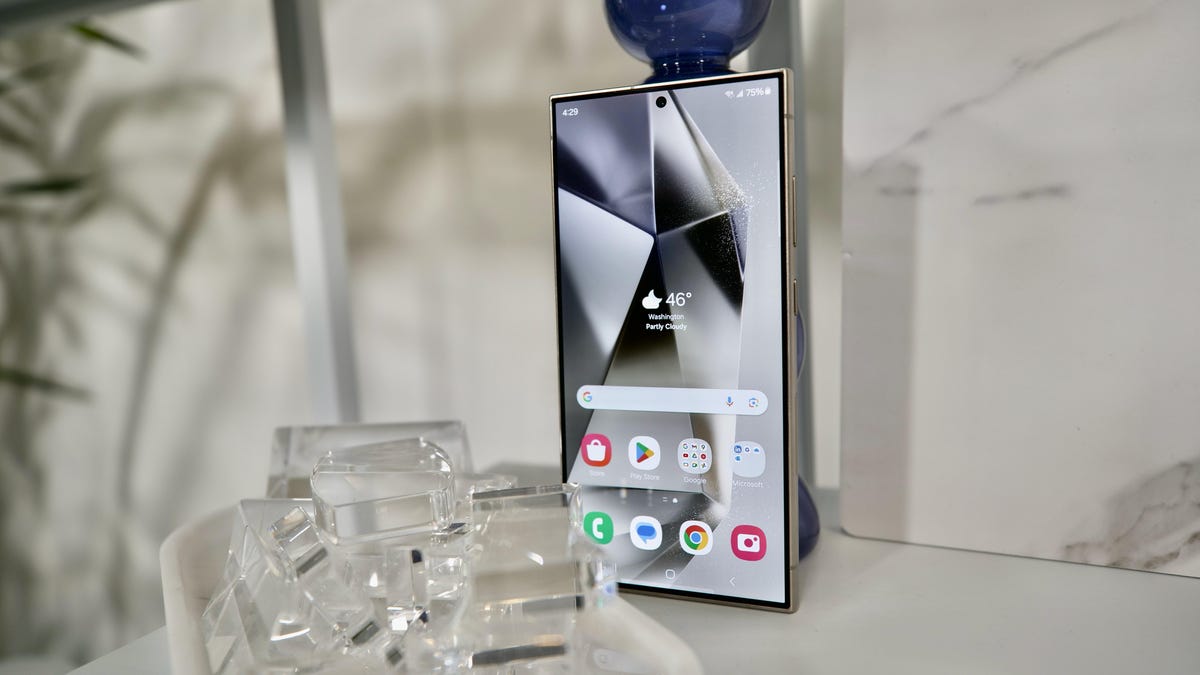
When I recently called a Korean restaurant to make a reservation, I had no issue communicating with the person on the other end even though she wasn’t speaking English. That’s because I was trying out the Galaxy S24 Ultra, one of three new phones Samsung announced on Wednesday, which can translate phone calls in real-time.
Samsung, like the rest of the tech industry, is enthralled with artificial intelligence at the moment. The Galaxy S24 series is rife with features like the translation example mentioned above that leverage generative AI — AI that uses large language models to create content or provide conversational (but not always accurate) answers. It’s another sign that tech giants are increasingly using AI to distinguish their devices from the pack and get consumers excited about upgrading their mobile devices in what has been a struggling smartphone market.
Read more: Everything Samsung Announced at Its 2024 Unpacked Event
The Galaxy S24 Ultra goes on sale for $1,300 (£1,249, AU$2,199) — $100 pricier than last year’s Galaxy S23 Ultra — on Jan. 31 alongside the cheaper Galaxy S24 Plus and Galaxy S24. All three are available for preorder now.
With the Galaxy S24 series, you’ll be able to have the Notes app format or summarize notes for you, circle any image to launch a Google search for that item and rewrite your text messages in a different tone before sending them. Samsung groups all these tools (among others) together under the blanket moniker known as Galaxy AI, and it’s available on the Galaxy S24, S4 Plus and S24 Ultra. These features will also come to the Galaxy S23 lineup through an update.
Some of those functions may sound familiar; they’re very similar to other generative AI-powered tools we’ve seen from companies like Google and Microsoft. In fact, Samsung is partnering with Google on the technology behind some of its new AI features, including the ones for rewriting texts, summarizing notes and moving individual objects in photos.
The Galaxy S24 Ultra also gets a sharper new telephoto camera and a titanium build. All three phones also have Qualcomm’s latest processor and brighter screens.
I briefly got to check out the Galaxy S24 series ahead of Samsung’s announcement, and here are my early impressions of the Ultra.
Galaxy AI on the Galaxy S24 Ultra

Galaxy AI is the biggest difference between the S24 series and its predecessors, although that won’t be the case for long considering these features are coming to the Galaxy S23 lineup. Some of Samsung’s Galaxy AI features include:
- Chat Assist for changing the tone, translating or spell-checking your text message before sending it.
- Live Translate for translating calls in 13 languages during a conversation.
- Circle to Search, which lets you launch a Google search for any object in a photo just by circling it.
- Note Assist for summarizing, translating and formatting files in Samsung’s Notes app and generating digital covers for notes.
- Generative Edit, which like Google’s Magic Editor lets you manipulate and move objects in photos.
- Transcript Assist in Samsung’s recording app for providing transcriptions and summarizing conversations.
I tried most of these features on the Galaxy S24 Ultra and they worked easily enough, although I’ve only tested them in Samsung’s controlled demo. Live Translate took a little getting used to, but I was impressed by how easy it was to carry on a conversation with a Korean language speaker once I got the hang of it.
After tapping the number I wanted to call in the S24 Ultra’s contact list, I chose the Live Translate option to start the translation. Samsung translated my words into Korean almost instantly after I finished speaking. Once the recipient on the other end had finished her response, Samsung repeated her speech in English. I could see this being helpful while traveling, although I could also imagine it causing some initial confusion for callers and recipients who are unfamiliar with the feature.
Read more: Best Samsung Phones of 2024
Circle to Search is another standout Galaxy AI tool that I can imagine being useful. It’s kind of like Google Lens, except you can search for objects in existing photos just by circling them rather than snapping a new photo. Just open the picture, hold the home button, and circle the object you’d like to search for. I circled waffles in a brunch photo in the S24 Ultra’s photo gallery, and Google pulled up recommendations for restaurants that serve waffles nearby.
I also snapped a picture of someone’s shoes in the demo area and circled them, and Google quickly summoned options to purchase those same shoes. This is a bit easier with the Galaxy S24 Ultra’s S Pen, but you can also use Circle to Search on the regular S24 and S24 Plus with your finger.

Samsung’s Notes app can organize text into bullet points and even offers different templates to choose from. Generative Edit, which is a lot like Google’s Magic Eraser, makes it possible to move, erase and manipulate individual objects in photos.
During a demo, a Samsung representative traced the area around a skateboarder performing a trick in a photo and moved the skater to make their jump look even higher. Samsung and Google are pitching features like these as being useful for creative purposes by giving anyone the ability to significantly alter photos straight from their phone with no photo editing knowledge. Still, it’s hard to ignore the potential for misuse, as my colleague Sareena Dayaram has previously pointed out.
One photography feature I’m excited about in particular is the ability to remove reflections in the edit suggestions section. As someone who photographs screens quite often, I can attest to how difficult it can be to avoid glare and reflections. I could also see this being useful for avid travelers who snap photos through car, bus or train windows on vacation.
Read more: From AI to Mixed Reality, CES 2024 Products Imagine A World Beyond Mobile Apps
Samsung is clearly focusing on productivity first and foremost with the Galaxy S24’s AI features, although many of these tools feel familiar rather than new. Galaxy AI has the potential to make accomplishing certain tasks on the S24 family feel more convenient, but it also doesn’t bring anything overwhelmingly new to the table. Maybe I’ll feel differently after I’ve spent more time with the Galaxy S24 Ultra.
Galaxy S24 Ultra specs and design
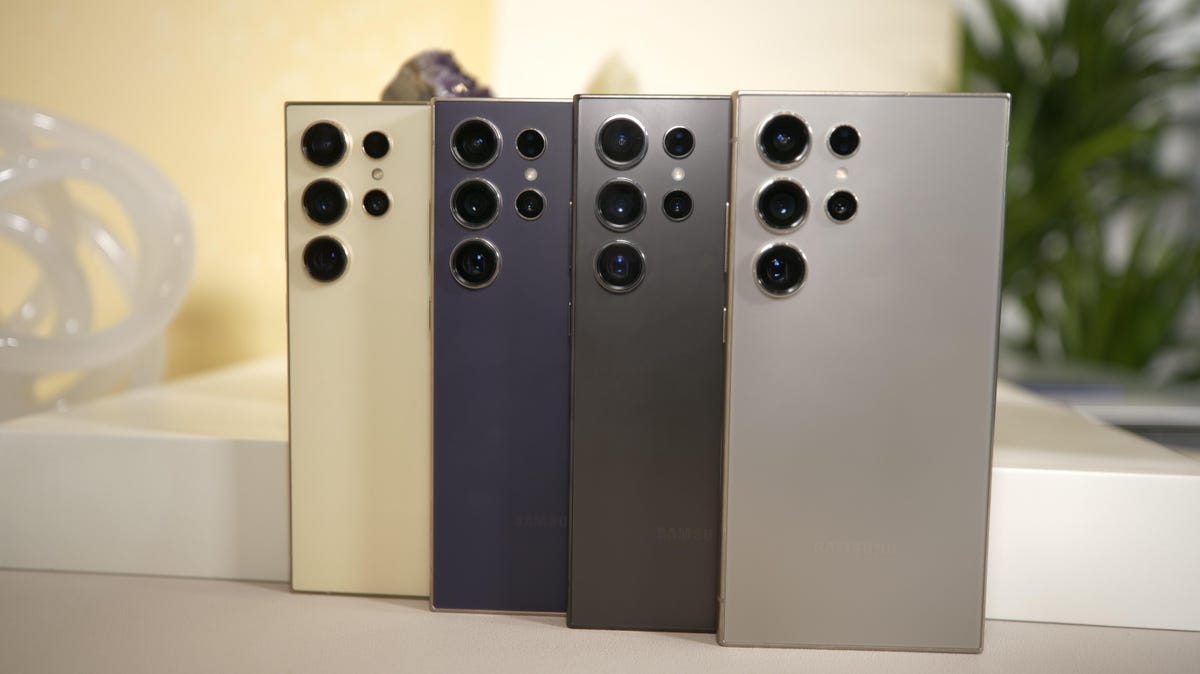
The biggest physical change on the Galaxy S24 Ultra compared to its predecessor is its 50-megapixel telephoto camera, which replaces one of the 10-megapixel zoom cameras on the Galaxy S23 Ultra. That means the S24 Ultra offers a 5x optical zoom compared to the S23 Ultra’s 10x optical zoom, a decision that Samsung made after it found that many users preferred zooming at 5x rather than 10x. This should hopefully enable crisper zoomed shots, but I’ll be able to tell for sure when I’ve had more time with the device.
Otherwise, the Galaxy S24 Ultra’s camera hardware is essentially the same as the Galaxy S23 Ultra’s, consisting of a 200-megapixel main camera, a 10-megapixel telephoto camera with a 3x optical zoom (in addition to the new 50-megapixel, 5x telephoto camera) and a 12-megapixel ultrawide camera.
The Galaxy S24 Ultra also has a titanium body, slightly slimmer bezels, and a lighter design, although the differences here seem very minimal. Samsung also says it’s boosted the screen brightness to 2,600 nits on all three models compared to 1,750 nits on the Galaxy S23 Ultra. Samsung’s screens were already plenty bright, especially when compared to Google’s Pixel phones, so I’m sure they’ll be even easier to see in sunlight. Still, they aren’t the brightest screen found on a phone in 2024. The OnePlus 12, which launches later this month in the US, will have a 4,500-nit display.

All three phones run on Qualcomm’s new Snapdragon 8 Gen 3 processor, which isn’t a surprise considering Samsung typically puts Qualcomm’s latest chip in its flagship US phones. Qualcomm announced the chip in October 2023 and flaunted its ability to run generative AI algorithms on the device. The S24 Ultra also has a larger vapor chamber compared to last year’s phone, which Samsung says should keep the device cool while playing demanding games.
Battery size, storage and memory and storage are essentially the same as those in the Galaxy S23 Ultra.
The Galaxy S24 family shows that Samsung, along with other tech giants, is learning about how generative AI can be useful on our phones following ChatGPT’s rapid rise. Galaxy AI seems like a promising start, although Samsung may have to do more to make its offerings stand out, especially as Apple is rumored to bring more generative AI-fueled features to the iPhone later this year.
Read more: How to pre-order the Galaxy S23 Ultra
Editors’ note: CNET is using an AI engine to help create some stories. For more, see this post.


Samsung Galaxy S24 series specs vs. Samsung Galaxy S23 Ultra
| Samsung Galaxy S24 Ultra | Samsung Galaxy S24 Plus | Samsung Galaxy S24 | Samsung Galaxy S23 Ultra | |
|---|---|---|---|---|
| Display size, tech, resolution, refresh rate, brightness | 6.8-inch AMOLED; QHD+ resolution; 1-120Hz adaptive refresh rate | 6.7-inch AMOLED; QHD+ resolution; 1-120Hz adaptive refresh rate | 6.2-inch AMOLED; FHD+ resolution; 1-120Hz adaptive refresh rate | 6.8-inch AMOLED; 3,088×1,440 pixels; 120Hz adaptive refresh rate |
| Pixel density | TBD | TBD | TBD | 500 ppi |
| Dimensions (inches) | 6.40 x 3.11 x 0.34 in | 6.24 x 3 x 0.3 in | 5.79 x 2.78 x 0.3 in | 6.43 x 3.07 x 0.35 in |
| Dimensions (millimeters) | 163 x 79 x 8.6 mm | 158 x 76 x 7.6 mm | 147 x 71 x 7.6 mm | 163.3 x 78 x 8.9 mm |
| Weight (grams, ounces) | 233 g (8.22 oz) | 197 g (6.95 oz) | 168 g (5.93oz) | 234 g (8.25 oz) |
| Mobile software | Android 14 | Android 14 | Android 14 | Android 13 |
| Camera | 200-megapixel (wide), 12-megapixel (ultrawide) 10-megapixel (3x telephoto) 50-megapixel (5x telephoto) | 50-megapixel (wide), 12-megapixel (ultrawide), 10-megapixel (telephoto) | 50-megapixel (wide), 12-megapixel (ultrawide), 10-megapixel (telephoto) | 200-megapixel (wide), 12-megapixel (ultrawide) 10-megapixel (3x telephoto) 10-megapixel (10x telephoto) |
| Front-facing camera | 12-megapixel | 12-megapixel | 12-megapixel | 12-megapixel |
| Video capture | TBD | TBD | TBD | 8K |
| Processor | Qualcomm Snapdragon 8 Gen 3 | Qualcomm Snapdragon 8 Gen 3 | Qualcomm Snapdragon 8 Gen 3 | Qualcomm Snapdragon 8 Gen 2 for Galaxy |
| Storage and RAM | 12GB RAM + 256GB, 512GB, 1TB | 12GB RAM + 256GB, 512GB | 8GB RAM + 128GB, 256GB | 8GB RAM + 256GB; 12GB RAM + 256GB, 512GB, 1TB |
| Expandable storage | None | None | None | None |
| Battery | 5,000 mAh | 4,900 mAh | 4,000 mAh | 5,000 mAh |
| Fingerprint sensor | Under display | Under display | Under display | Under display |
| Connector | USB-C | USB-C | USB-C | USB-C |
| Headphone jack | None | None | None | None |
| Special features | Titanium frame, 2,600-nit screen; 7 years of OS and security updates; 5G (mmWave); IP68 water resistance; wireless PowerShare to charge other devices; integrated S Pen; UWB for finding other devices; 45W wired charging (charger not included); Galaxy AI; Wi-Fi 7 | 2,600-nit screen; 7 years of OS and security updates; 5G (mmWave); IP68 water resistance; wireless PowerShare to charge other devices; 45W wired charging (charger not included); Galaxy AI; Wi-Fi 6E | 2,600-nit screen; 7 years of OS and security updates; 5G (mmWave); IP68 water resistance; wireless PowerShare to charge other devices; 25W wired charging (charger not included); Galaxy AI; Wi-Fi 6E | 5G (Sub6, mmWave); IP68 water resistance; wireless PowerShare to charge other devices; integrated S Pen; 100x Space Zoom; 10x optical zoom; UWB for finding other devices; 45W wired charging |
| US price starts at | $1,300 (256GB) | $1,00 (256GB) | $800 (128GB) | $1,200 (256GB) |
| UK price starts at | £1,249 (256GB) | £999 (256GB) | £799 (128GB) | £1,249 (256GB) |
| Australia price starts at | AU$2,199 (256GB) | AU$1,699 (256GB) | AU$1,399 (256GB) | AU$1,949 (256GB) |
Technologies
Today’s NYT Connections: Sports Edition Hints and Answers for April 8, #562
Here are hints and the answers for the NYT Connections: Sports Edition puzzle for April 8 No. 562.

Looking for the most recent regular Connections answers? Click here for today’s Connections hints, as well as our daily answers and hints for The New York Times Mini Crossword, Wordle and Strands puzzles.
Today’s Connections: Sports Edition is a tough one. If you’re struggling with today’s puzzle but still want to solve it, read on for hints and the answers.
Connections: Sports Edition is published by The Athletic, the subscription-based sports journalism site owned by The Times. It doesn’t appear in the NYT Games app, but it does in The Athletic’s own app. Or you can play it for free online.
Read more: NYT Connections: Sports Edition Puzzle Comes Out of Beta
Hints for today’s Connections: Sports Edition groups
Here are four hints for the groupings in today’s Connections: Sports Edition puzzle, ranked from the easiest yellow group to the tough (and sometimes bizarre) purple group.
Yellow group hint: Working out.
Green group hint: Cover your face.
Blue group hint: NFL players.
Purple group hint: Leap.
Answers for today’s Connections: Sports Edition groups
Yellow group: Exercises in singular form.
Green group: Sporting jobs that require masks.
Blue group: Hall of Fame defensive ends.
Purple group: ____ jump.
Read more: Wordle Cheat Sheet: Here Are the Most Popular Letters Used in English Words
What are today’s Connections: Sports Edition answers?
The yellow words in today’s Connections
The theme is exercises in singular form. The four answers are crunch, plank, situp and squat.
The green words in today’s Connections
The theme is sporting jobs that require masks. The four answers are catcher, fencer, football player and goaltender.
The blue words in today’s Connections
The theme is Hall of Fame defensive ends. The four answers are Dent, Peppers, Strahan and Youngblood.
The purple words in today’s Connections
The theme is ____ jump. The four answers are broad, high, long and triple.
Technologies
The $135M Google Data Settlement Site Is Live — See If You’re Eligible
Use the settlement website to select your preferred payment method, and you may end up $100 richer.

You can now file a claim in the $135 million Google data settlement. The case centers on claims that Android devices transmitted user data without consent. Specifically, the class action lawsuit Taylor v. Google LLC contends that Google’s Android devices passively transferred cellular data to Google without user permission, even when the devices were idle. While not admitting fault, Google reached a preliminary settlement in January, agreeing to pay $135 million to about 100 million US Android phone users.
The official settlement website for the lawsuit is now live. The final approval hearing won’t occur until June 23, when the court will consider whether Google’s settlement is fair and listen to objections. After that, the court will decide whether to approve the $135 million settlement.
In the meantime, if you qualify and want to be paid as part of the settlement, you can select your preferred payment method on the official website. There, you can find information on speaking at the June 23 court hearing and on how to exclude yourself or write to the court to object by May 29.
As part of the settlement, Google will update its Google Play terms of service to clarify that certain data transfers do occur passively even when you’re not using your Android device, and that cellular data may be relied upon when not connected to Wi-Fi. This can’t always be disabled, but users will be asked to consent to it when setting up their device.
Google will also fully stop collecting data when its «allow background data usage» option is toggled off.
Who can be part of the settlement?
In order to join the Taylor v. Google LLC settlement, you must meet four qualifications:
- Be a living, individual human being in the US.
- Have used an Android mobile device with a cellular data plan.
- Have used the aforementioned device at any time from Nov. 12, 2017, to the date when the settlement receives final approval.
- You’re not a class member in the Csupo v. Google LLC lawsuit, which is similar but specifically for California residents.
The final approval hearing is on June 23, so you can add your payment method until then. The hearing’s date and time may change, and any updates will be posted on the settlement website.
If you choose to do nothing, you will still be issued a settlement payment, but you may not receive it if you don’t select a payment method.
How much will I get paid?
It’s not currently known exactly how much each settlement class member will receive, but the cap is $100. Payments will be distributed after final court approval and after any appeals are resolved.
After all administrative, tax and attorney costs are paid, the settlement administrator will attempt to pay each member an equal amount. If any funds remain after payments are sent, and it’s economically feasible, they will be redistributed to members who were previously and successfully paid. If it’s not economically feasible, the funds will go to an organization approved by the court.
Technologies
Samsung’s Galaxy Watch Ultra 2 Might Come in 5G and 4G Cellular Models
If the rumor proves true, the 5G Galaxy Watch Ultra would rival the 5G-enabled $799 Apple Watch Ultra 3 that debuted last fall.

Samsung’s next high-end Galaxy Watch could support faster 5G speeds, but if this leak is true, it will depend on where you live. The rumored Samsung Galaxy Watch Ultra 2 might come in 5G and 4G cellular models, with availability for each smartwatch depending on the country.
According to the Dutch website Galaxy Club (and spotted by SamMobile), Samsung’s servers may have revealed a series of model numbers that point to 5G, 4G and Wi-Fi-enabled editions of the next Galaxy Watch Ultra, which would succeed the original model that debuted in 2024.
A representative for Samsung did not immediately respond to a request for comment.
The Galaxy Club website speculates that the 5G edition would be sold in the US and Korean markets, while the 4G edition would sell in the rest of the world. In the US, a 5G version of the Galaxy Watch Ultra would rival the 5G-enabled $799 Apple Watch Ultra 3, which debuted last fall. The 4G edition would have broader compatibility worldwide, since the earlier network is far more established.
It will likely be a few months until we hear anything official about the Galaxy Watch Ultra 2. Samsung typically unveils its new watches in the summer alongside its Galaxy Z Fold and Z Flip foldable phones. Last year, Samsung unveiled the Galaxy Watch 8 and the Galaxy Watch 8 Classic, but otherwise left the prior 2024 Ultra in the lineup for those looking for a larger 47mm smartwatch.
-
 Technologies3 года ago
Tech Companies Need to Be Held Accountable for Security, Experts Say
-
 Technologies3 года ago
Best Handheld Game Console in 2023
-
 Technologies3 года ago
Tighten Up Your VR Game With the Best Head Straps for Quest 2
-
 Technologies4 года ago
Black Friday 2021: The best deals on TVs, headphones, kitchenware, and more
-
 Technologies5 лет ago
Google to require vaccinations as Silicon Valley rethinks return-to-office policies
-
 Technologies5 лет ago
Verum, Wickr and Threema: next generation secured messengers
-
 Technologies4 года ago
Olivia Harlan Dekker for Verum Messenger
-
 Technologies4 года ago
The number of Сrypto Bank customers increased by 10% in five days