
Technologies
Small but Mighty: 5 Powerful Mini PCs for Your Needs
These tiny desktops offer great performance and low power usage while taking up very little space.
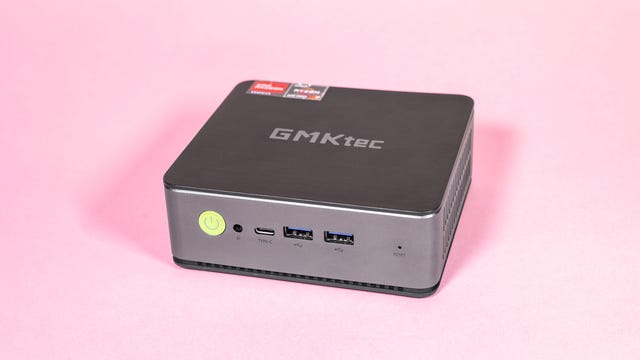
Massive high-performance desktops are still common — especially for gaming — but as component sizes shrink, so do the computers that contain them. Mini desktop PCs like the ones in this list offer performance enough for most home office tasks, and some allow for more demanding gaming and video production, yet most are small enough to actually fit almost anywhere.
That makes the best mini PCs compelling options for those of us living in smaller apartments or working from home without a dedicated office space, or for students sharing rooms where space is at a premium. Instead of you having to find room for a big tower, these tiny things can sit unnoticed on your desk, hidden on a nearby bookshelf or even mounted behind your monitor entirely out of view.
They also use significantly less power, with most drawing around 30 to 40 watts while you’re web browsing (Apple’s Mac Mini draws only about 8 watts). That’s a lot less than the 250-watt drain you’ll find with a typical desktop PC.
The smaller size does mean most models don’t have the raw power expected from full-sized desktops, but all models tested here are more than capable of handling everyday office tasks, web browsing, 4K video playback and photo editing in professional apps like Adobe Lightroom. The more high-spec models are even able to smoothly edit 4K video in Adobe Premiere or handle demanding games like Elden Ring.
What is the best mini PC overall?
Apple’s Mac Mini with M2 Pro chip topped our tests, managing to be the most powerful option, yet it also used the least amount of energy in everyday use. It’s something of a tiny powerhouse, casually munching through our 4K video editing project and exporting the final file in less than half the time of any others we tested. But it’s also the most expensive, at more than double the price of others on this list. So though it’s the best from a performance perspective, it might not be the best for your budget.
The Geekom AS6 offers a better balance of performance and value, with enough performance to handle photo editing, light gaming and casual video editing but at a much more accessible price than the Mac Mini.
If you’re simply after a machine to handle your daily home office duties, web browsing or to act as a media center to hook up to your TV, the AceMagician delivered decent results in our tests, and it’s the cheapest model on this list.
Best mini PCs 2023
Specs as tested:
- CPU: Apple M2 Pro
- RAM: 16GB DDR5
- SSD: 1TB
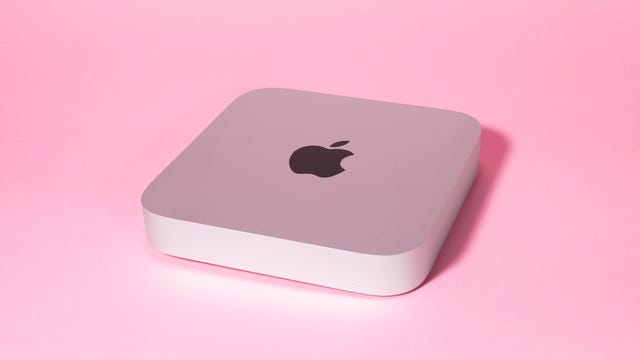
Apple’s Mac Mini is the most expensive model on this list by far, so you’d expect it to offer performance that outshines other tiny desktops — and it really does. Its benchmark results far exceeded the Windows-based models, it coped with 4K video editing with no issues whatsoever and exported my test project from Adobe Premiere in only seven minutes, less than half the time of any of the other models.
Though gaming still isn’t much of a thing on the Mac (Elden Ring wasn’t installable on Steam), it easily handled my sessions of The Elder Scrolls Online on high settings.
But the most impressive aspect for me is the power draw. During web browsing, the Mac Mini used only around 8 watts of power, and it averaged around 40 watts when exporting video. That’s a significant amount less than every PC on this list, which will make the Mac Mini a more economical choice over time.
Its one-piece aluminum body is attractive, too, though it’s frustrating that all the ports are hidden around the back, with no quick access to any on the front. It’s also not user-upgradable. Still, those are arguably more-minor concerns given the superb performance and low power usage the Mac Mini offers.
Specs as tested:
- CPU: AMD Ryzen 9 6900HX
- RAM: 32GB DDR5
- SSD: 1TB
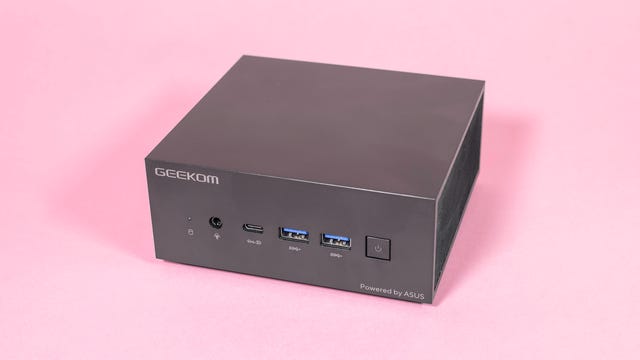
Geekom’s AS6 is the least visually appealing of the models we tested, being just a dull, plain black box. But that makes it an ideal mini PC for hiding away, perhaps on a nearby bookshelf or even mounting behind your monitor, tucked out of sight entirely. It’s upgradable, but that requires unscrewing and removing the outer casing, rather than just simply popping off a cover like with the AMR5.
It might be small, but it packs some decent specs, producing solid results on our benchmark tests and allowing Elden Ring to run smoothly enough at medium graphics settings. Harry Potter: Hogwarts Mystery played fine at recommended low settings too, and while I got a warning about incompatible hardware when I changed the settings to medium, the game still played well enough, at least for more casual players who aren’t obsessing over frame rates and draw distances.
Editing 4K video in Adobe Premiere was smooth, and the AS6 exported my test project in a little over 16 minutes — a long way behind the Mac Mini, but the fastest of all the Windows-based PCs on this list.
Its power draw was around 60 watts while web browsing, which is higher than most others on this list, and went up to around 75 watts during more intense tasks like video exporting.
The AS6 is one of the more expensive options on this list, but that extra cash does result in higher performance.
Specs as tested:
- CPU: AMD Ryzen 5 5600U
- RAM: 16GB
- SSD: 512GB
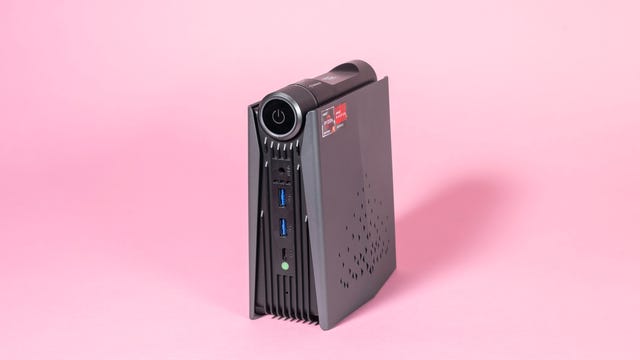
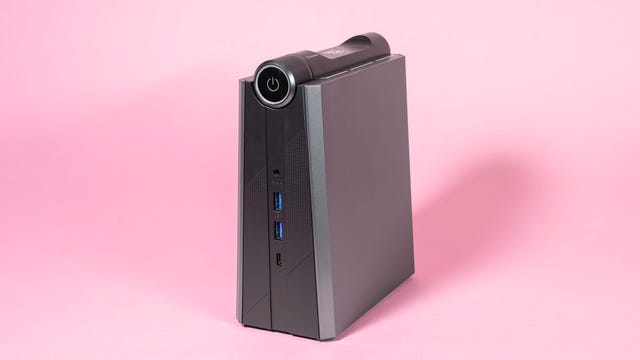
With its upright form factor and tiny footprint, the AMR5 sits very comfortably on a small, home office desk. Its two USB and one USB-C port on the front make it easy to plug in devices, while the magnetic side panel makes accessing internal components a breeze.
Its older AMD Ryzen 5 chip allows for swift general office and web browsing tasks and it runs lightweight games like Dredge without any issues. It scored low on our benchmark tests, however, and more demanding games like Elden Ring were sluggish and choppy, even on low settings. Though it handled image editing in Lightroom CC fine, 4K video editing in Adobe Premiere wasn’t as smooth, but it exported my test project faster than others on this list.
It typically drew around 40 watts of power during web browsing and general use, going up to about 50 watts during gaming and video exporting.
It isn’t a high-performance machine. It’s best suited for those of you who need a small machine for home office and web browsing tasks.
Specs as tested:
- CPU: AMD Ryzen 6900HX
- RAM: 32GB
- SSD: 512GB
The bigger brother to the AMR5, the AM08 Pro comes with a slightly larger body size and somewhat beefed-up internal specs that include a higher-powered AMD chip. It’s little surprise then that it performed better on our benchmark tests and turned its hand to more-demanding tasks too. Elden Ring played well enough for more casual gamers on low settings, so those of you looking to enjoy lighter titles on Steam will be perfectly well catered for here.
It also handled 4K video editing in Premiere, allowing me to scrub through the timeline with little delay and export the project in a reasonable 25 minutes. Photo editing in Lightroom CC was fine as well. It typically drew around 30 to 40 watts of power during web browsing and up to 70 watts during more demanding gaming and video exporting.
While the smaller AMR5 is suited only for lightweight home office tasks, the AM08 Pro is a better option for students wanting a more well-rounded PC for tackling assignments during the day and enjoying some games in the evening.
Specs as tested:
- CPU: AMD Ryzen 76800H
- RAM: 16GB DDR5
- SSD: 1TB SSD
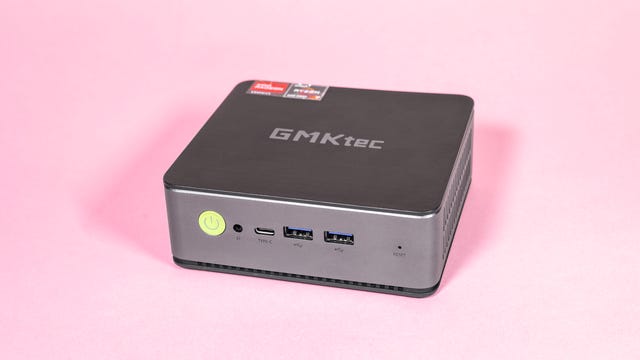
Like the Geekom AS6, the Nucbox K1 is essentially just a small square that’s hardly exciting to look at. A silver-and-black color scheme adds a bit of interest though, and the plastic lid easily pops off to allow access to the internal components — no screwdriver needed. As the smallest of all models on this list, it’s exceptionally unobtrusive on your desk or mounted behind your monitor.
It generally offered low performance on all our tests, from CPU benchmarks to gaming and video editing. It didn’t handle Elden Ring on any quality settings, but casual gamers wanting light titles like Dredge or Unpacking will find it sufficient. It edited images in Adobe Lightroom without much hassle, but it noticeably struggled with my 4K project in Premiere and exported the video in a little over 35 minutes — the slowest of all models on this list.
Its power draw was around 45 watts during web browsing and around 60 watts during video exporting. Thankfully, its price means its humble performance for gaming or multimedia production is perfectly acceptable — it’s less than half the price of the Mac Mini, after all. Instead, this is a PC aimed more at office tasks, web browsing or even as a media hub to connect to your TV.
Time taken to export 4K video from Premiere
Average power usage during web browsing
How we test mini PCs
All items on this list have been tested by us, with our own fair hands. All manufacturer’s claims were put to the test to see if they lived up to their promise.
Each model has undergone a suite of benchmark tests including multiple runs of Geekbench 6 and 3DMark Wild Life Extreme. We tested gaming using demanding titles like Elden Ring (via Steam) at various quality settings as well as less demanding games like Dredge. We tested the PCs while web browsing, playing YouTube videos and working in Google Docs.
We edited high-resolution raw images in Adobe Lightroom CC and edited 4K videos in Premiere Pro. We noted the general responsiveness of each interface, and we timed how long it took to export our test video project in 4K.
We also plugged each model in to the power outlet via a power meter, noting how much power each model used during different tasks, allowing us to comment on the efficiency of each machine.
Technologies
How to Watch the Artemis II Splashdown Tonight on Netflix
You can also stream it live on services like HBO Max and YouTube.

NASA’s Artemis II mission is nearly complete, and Victor Glover, Reid Wiseman, Christina Koch and Jeremy Hansen are homeward bound on the Orion spacecraft. Now that you’ve watched the flyby livestream (which reportedly was NASA’s most-watched event), are you planning to see the astronauts land back on Earth? You have multiple ways to tune in for live coverage as this historic event comes to a close.
Orion’s splashdown in the Pacific Ocean will happen Friday evening, and thanks to the ability to watch live programming from the NASA Plus streaming service on Netflix, you can tune in via the streaming service. See below for details on when to watch.
How to watch the Artemis II return landing on Netflix
You can tune into live coverage of the Artemis II splashdown event on Netflix here starting Friday at 6:30 p.m. ET (3:30 p.m. PT). Orion’s reentry and splashdown are expected to occur at approximately 8:07 p.m. ET.
If you want to rewatch the lunar flyby, Netflix has it available to stream as well.
Watch the Artemis flyby via CNET, HBO Max, Apple TV and more
You can also watch using streaming services such as HBO Max, Prime Video, Peacock, NASA’s YouTube channel and with the NASA apps for Apple TV, Amazon and Roku, which provide access to the NASA Plus streaming service.
If you need another way to watch the splashdown, check out live coverage here via CNET’s YouTube account.
Technologies
Today’s NYT Connections Hints, Answers and Help for April 11, #1035
Here are some hints and the answers for the NYT Connections puzzle for April 11, No. 1,035.

Looking for the most recent Connections answers? Click here for today’s Connections hints, as well as our daily answers and hints for The New York Times Mini Crossword, Wordle, Connections: Sports Edition and Strands puzzles.
Today’s NYT Connections puzzle features another one of those purple categories where you need to look inside words for other words. Read on for clues and today’s Connections answers.
The Times has a Connections Bot, like the one for Wordle. Go there after you play to receive a numeric score and to have the program analyze your answers. Players who are registered with the Times Games section can now nerd out by following their progress, including the number of puzzles completed, win rate, number of times they nabbed a perfect score and their win streak.
Read more: Hints, Tips and Strategies to Help You Win at NYT Connections Every Time
Hints for today’s Connections groups
Here are four hints for the groupings in today’s Connections puzzle, ranked from the easiest yellow group to the tough (and sometimes bizarre) purple group.
Yellow group hint: Vroom-vroom!
Green group hint: They provide help.
Blue group hint: They hold things up.
Purple group hint: Wavy words.
Answers for today’s Connections groups
Yellow group: Found in the trunk of a car.
Green group: Benefactor.
Blue group: Structural supports.
Purple group: Ending in bodies of water.
Read more: Wordle Cheat Sheet: Here Are the Most Popular Letters Used in English Words
What are today’s Connections answers?
The yellow words in today’s Connections
The theme is found in the trunk of a car. The four answers are ice scraper, jack, jumper cables and spare tire.
The green words in today’s Connections
The theme is benefactor. The four answers are angel, champion, patron and sponsor.
The blue words in today’s Connections
The theme is structural supports. The four answers are beam, brace, column and strut.
The purple words in today’s Connections
The theme is ending in bodies of water. The four answers are Bombay, Chelsea, screwdriver and snowflake.
Technologies
Amazon Luna to Drop Support for Third-Party Games and Subscriptions in June
Amazon looks to reshape its cloud gaming service, which has yet to catch on with gamers.
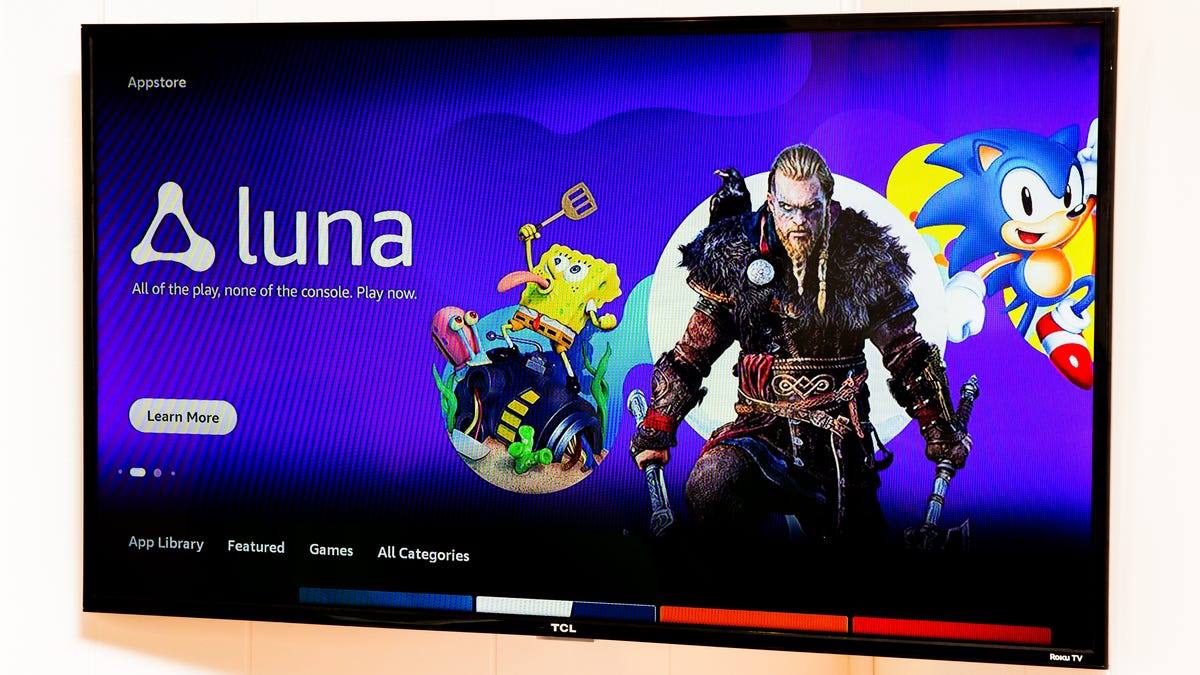
Amazon Luna, the retail giant’s cloud gaming service, will make a big change in June. In the same vein as Prime Video, users were able to bring over their third-party subscriptions and use them to play games in the cloud, but that all changes on June 10.
Luna will no longer support third-party subscriptions or games, according to the Luna support page updated on Friday. This feature allowed users to play games purchased from other online game stores such as EA, Ubisoft or GOG, as well as titles available via Ubisoft Plus and Jackbox Games subscriptions. Starting June 10, Luna subscribers will only have access to games available in the Luna library.
Amazon didn’t provide a reason for this change other than saying, «As our library continues to grow, more of that content is available to Prime members, and that’s where we’re focusing our future.»
What is Amazon Luna?
Amazon Luna is the company’s cloud gaming service. It went live back in 2020 to compete with Google’s now-defunct Stadia cloud gaming service, as well as Xbox and PlayStation’s cloud gaming. Initially, Luna required its own subscription, but it has since been added as a benefit with an Amazon Prime membership.
The Luna Standard plan that comes with Prime includes nearly 100 games, including major titles such as Alan Wake 2, Death Stranding and Hogwarts Legacy. Luna Premium is a higher tier for the service that costs $10 a month and comes with a bigger library of games that includes Madden NFL 26, Mafia: Definitive Edition and EA FC 26.
Luna is available for use on PCs, laptops, phones, tablets, Fire TVs, Fire tablets, certain Samsung and LG smart TVs, as well as Comcast’s Xfinity devices.
What’s changing with Amazon Luna?
On June 10, users will only be able to access games in their Luna library. They will no longer have access to games from third-party game stores or via third-party subscriptions.
What happens with my game saves on Amazon Luna?
According to the support page, game saves will be available for download 90 days after June 10. Accessing the saves can be done via the Settings page on Luna. Amazon does warn that the save data downloaded may not work on other platforms, and those users should access the saves right away to check for compatibility.
-
 Technologies3 года ago
Tech Companies Need to Be Held Accountable for Security, Experts Say
-
 Technologies3 года ago
Best Handheld Game Console in 2023
-
 Technologies3 года ago
Tighten Up Your VR Game With the Best Head Straps for Quest 2
-
 Technologies4 года ago
Black Friday 2021: The best deals on TVs, headphones, kitchenware, and more
-
 Technologies5 лет ago
Google to require vaccinations as Silicon Valley rethinks return-to-office policies
-
 Technologies5 лет ago
Verum, Wickr and Threema: next generation secured messengers
-
 Technologies4 года ago
Olivia Harlan Dekker for Verum Messenger
-
 Technologies4 года ago
The number of Сrypto Bank customers increased by 10% in five days