

Technologies
This Hidden iPhone Feature Saves Wi-Fi Passwords You Forgot
Can’t remember a Wi-Fi password? Your iPhone stores the ones you used to connect to a network. Here’s how to find them.

I always need a reliable, high-speed internet connection on my iPhone, whether it’s for work or leisure. That’s why, when my cellular connection is weak, I seek out and connect to Wi-Fi at home, friends’ houses, coffee shops, restaurants, airports and libraries. But with so many networks, it’s impossible to remember all these passwords.


For the most part, I don’t need to remember any Wi-Fi passwords — once I connect to a network, my iPhone automatically reconnects to it when it’s nearby.
But there are times when I do need to know the actual password, if, for example, a friend or family member wants to connect to that same network and there’s no other way to share the password with them.
Helpfully, iPhones store the passwords of all the Wi-Fi networks you connect to — you just need to know where to find them.
Interested in other lesser-known features on your iPhone? Check out these 14 hidden features on iOS 16 and the trackpad hidden in your iPhone keyboard.


The Lisen phone stand is ergonomically designed to provide you with a more comfortable viewing angle to help reduce strain on your neck and back. Simply adjust the height, set down your phone (vertically or horizontally) and read the news or watch videos on your phone while you multitask.
View password for Wi-Fi network you’re currently connected to
This first method allows you to view the password of the Wi-Fi network you’re either currently connected to or have connected to in the past and are near enough to the router for the network to appear in your settings.
If you meet these requirements, go to Settings > Wi-Fi, find the Wi-Fi network you want the password for and tap the information icon. Next, tap Password and use Face ID, Touch ID or enter your passcode to view the Wi-Fi network password. Finally, hit Copy to save the password to your clipboard.

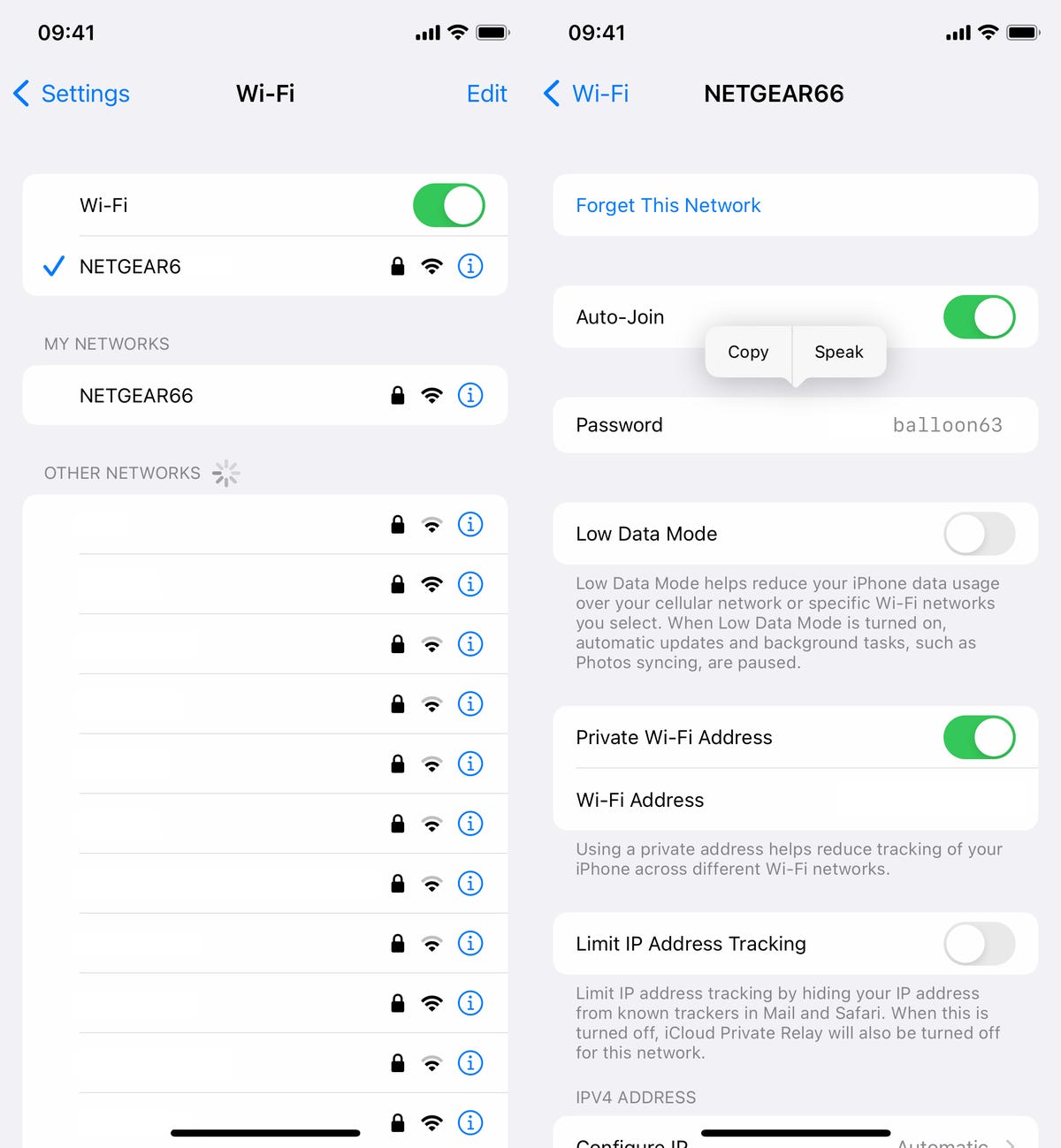
You can view passwords for any Wi-Fi networks you’ve ever connected to, as long as you’re currently connected to it or near enough that it appears under My Networks.
Screenshots by Nelson Aguilar/CNETHowever, as mentioned, this only works for Wi-Fi networks you’re currently connected to or near to, but there is a way to find the passwords to all the other Wi-Fi networks you’ve connected to in the past.
Find the rest of your saved Wi-Fi passwords
If you want to view every single stored Wi-Fi password on your iPhone, go to Settings > Wi-Fi and tap the Edit button on the top right. A list of your known networks, or every single Wi-Fi network you’ve ever connected to, will appear in alphabetical and numerical order.
To view a password, tap the information icon and then hit Password.

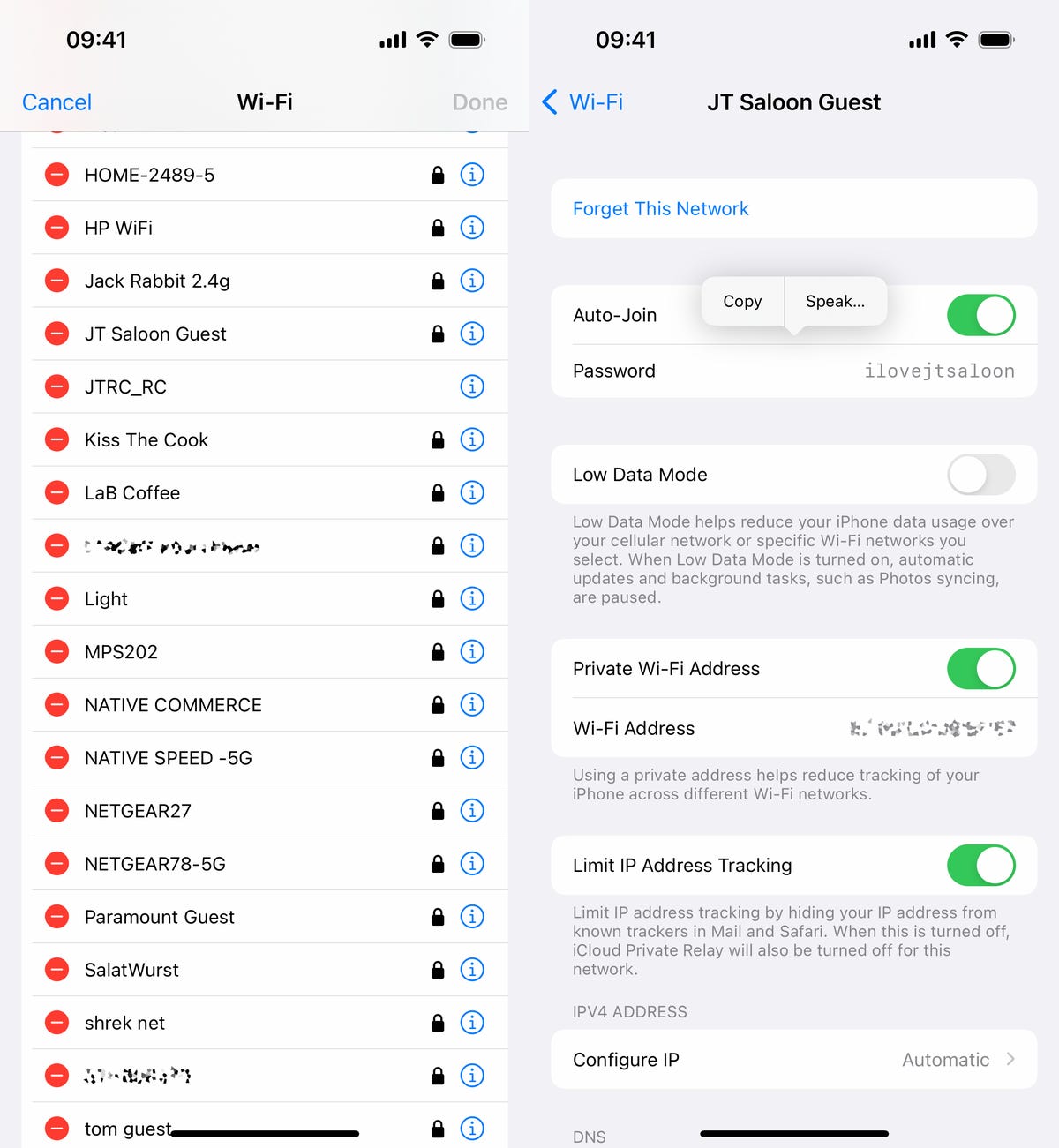
You can copy the password to your clipboard or have the password spoken out loud to you.
Screenshots by Nelson Aguilar/CNETIf you want to check out more about iOS, check out our review of the iPhone 14 and everything you need to know about the iPhone 14 series.
Technologies
Level Up Your Pokemon Legends: Z-A Adventure With These Active Free Gifts
Get ready for a new adventure. These free mystery gift codes and rewards are available for you to grab today.

After 12 years, it’s finally time for Pokemon players to head back to the Kalos region in Pokemon Legends: Z-A, the newest game in the popular monster-catching franchise. If you’ve missed the worldwide capital of Mega Pokemon, fairy-type Pokemon and a whole bunch of baked bread, now’s the time to jump back into the world of pocket monsters.
The Switch 2’s first Pokemon game seems a bit scarier this time around. Though the beautiful Lumiose City projects safety and security, recent unexplained rampages from wild Mega Pokemon threaten the peace.
Don’t miss any of our unbiased tech content and lab-based reviews. Add CNET as a preferred Google source.
Between unearthing the cause of this phenomenon and taking down competitors in the Z-A Royale Pokemon battle ladder, there’s a lot of work to do in the Kalos region. You’ll need special partners to get the job done — and there are some special Mystery Gifts that have just the powerful pals you’re looking for.
There are already multiple Mystery Gift codes you can use right now in Pokemon Legends: Z-A, unlocking rare Pokemon and tons of items to help you get started on a new Pokemon journey.
All active Mystery Gifts for Pokemon Legends: Z-A
While some Pokemon Legends: Z-A promo codes are uniquely tied to Nintendo purchases, we’ve gathered every free code and redemption requirement in one place for you here.
Below is a chart that contains every active Mystery Gift code for Pokemon Legends: Z-A, what it unlocks and its expiration date:
Active Pokemon Legends: Z-A Mystery Gifts
| Reward | Code or alternative redemption requirements | Expiration date |
|---|---|---|
| Ralts holding Gardevoirite | No associated code. Select «Get via internet» in the Mystery Gift menu. | Feb. 28, 2026 |
| 100x Poke Balls | Every code is unique. You can unlock the code for this Mystery Gift by purchasing the digital version of Pokemon Legends: Z-A. The code will be sent to the email associated with your Nintendo account. | March 10, 2026 |
| 3x Fast Balls, 3x Lure Balls, 3x Heavy Balls, 3x Level Balls | Every code is unique. You can unlock the code for this Mystery Gift by purchasing the Mega Dimension DLC. The code will be sent to the email associated with your Nintendo account. | March 10, 2026 |
How to redeem Mystery Gifts in Pokemon Legends: Z-A
If you have Mystery Gift codes to redeem in Pokemon Legends: Z-A, you’re likely eager to grab those rewards as soon as possible. But you need to do a little bit of legwork before unlocking the code redemption menu.
To unlock Mystery Gift functionality, you need to progress through the main story until you reach the third main mission, called A New Life in Lumiose City.
During this mission, you’ll meet Mable, the acting director of the Pokemon Research Lab in Kalos. Once you unlock Mable’s research, a new «Link Play» tab becomes accessible in the pause menu.
Within the Link Play tab, you can redeem Mystery Gift codes — as long as you’re connected to the internet.
What are Mystery Gifts?
Mystery Gifts are a long-running way to reward Pokemon players with extra goodies. The official gift distributions have existed since Pokemon Gold and Silver was released in 1999.
Back then, players needed to have special hardware — like a Game Boy Advance Wireless Adaptor — in order to acquire Mystery Gifts. Newer games make the process much easier, since you need only connect to Wi-Fi in order to access gifts for the Pokemon games on the Nintendo Switch.
While some Mystery Gifts are accessible for free, others are unlocked by promo codes that you’ll have to hunt down through specific means. Mystery Gifts are good ways to gather precious items, add mythical Pokemon to the Pokedex and capture rare shiny Pokemon.
Technologies
Will Tim Cook Step Down? Apple CEO’s Impending 65th Birthday Sparks Succession Talk
Apple is likely in the process of choosing someone to fill the chief executive role once Tim Cook decides to retire. Here are a few potential candidates that reports say are being considered.

Tim Cook‘s 65th birthday is next week, on Nov. 1. And with the Apple CEO’s special day almost here, talks have been growing as to who could be his successor should he choose to retire. Cook has made no official public mention of stepping down yet, but according to Bloomberg’s Mark Gurman, the tech giant is working behind the scenes to ensure a seamless transition when the time comes.
Cook replaced Steve Jobs in 2011, and after a period of uncertainty, Cook ushered Apple into its most profitable era. Stock-watching website Stocktwits reports that the company’s stock has increased by around 1,800% since Cook took over leading the company.
Don’t miss any of our unbiased tech content and lab-based reviews. Add CNET as a preferred Google source.
Jobs may have introduced devices like the iPhone into everyday use that changed how we interact with technology, but Cook expanded on the Apple experience. Under his guidance, the company built upon Apple’s smartphone by introducing subscription services and more mobile products, including earbuds and wearables.
He introduced Apple Pay, Beats headphones became part of the company’s ecosystem, the Apple Watch launched 10 years ago, and Apple even entered the entertainment business, producing original Oscar-winning movies and Emmy-winning TV shows through Apple TV Plus.
Read more: Best iPhone in 2025: Here’s Which Apple Phone You Should Buy
We should reiterate that the notion of Cook stepping down is pure speculation at this point. We don’t know what Apple’s CEO is currently planning or what his thoughts about retirement may be. That said, there are a handful of contenders who have reportedly been part of the succession conversation.
Potential Apple CEO contenders
Apple likely has «a solid bench of successors» that the company’s board has been developing, says Bryan Ma, VP of Devices Research at IDC.
«But the anxiety gets amplified when there isn’t clear visibility for such a valuable and iconic company,» Ma says. «Compounding the challenge is the fact that the bar has been set by big rock stars like Steve Jobs and Tim Cook. The next generation of leaders have very big shoes to fill.»
John Ternus, Apple’s current vice president of Hardware Engineering, was top of Gurman’s list. Ternus has been with the tech giant for more than two decades, so he has the knowledge and experience for a chief executive upgrade. There would be value in having an engineer behind the wheel.
Ternus appeared during the September Apple event to introduce the iPhone Air. At 50, he’s the same age Cook was when he took over as Apple CEO.
Other potential contenders are also being considered, including Craig Federighi, Apple’s senior vice president of software engineering; Greg Joswiak, Apple’s senior vice president of worldwide marketing; and Jeff Williams, the company’s former chief operating officer, according to a report by Apple Insider. On Oct. 10, Bloomberg reported that Federighi also will soon be overseeing the Apple Watch operating system watchOS, while Ternus will be overseeing Apple Watch hardware engineering once Williams departs at the end of the year.
Federighi has been with Apple for a long time and has the public speaking experience — frequently speaking during Apple Events — that would be vital if he replaced Cook as CEO. Considering his current role, Joswiak has a more marketing perspective and a broader overview of the company and may not be as hands-on with the tech as Ternus and Federighi. And according to Gurman, Williams was viewed as a shoo-in to be Cook’s replacement until his role as COO was announced to be ending. (He’s now Apple’s senior vice president of design, watch and health.) Cook held the position of chief operating officer before he replaced Jobs as CEO in 2011. Sabih Khan will be stepping into that COO role, which also puts his name in the running.
When Cook steps down, Apple will undoubtedly have a pool of qualified talent to choose from to take up the leadership mantle. Who exactly will take the mantle remains to be seen.
Apple didn’t immediately respond to a request for comment.
Technologies
Meta Will Close Down Its Messenger Apps on Mac and Windows
You’ve got two more months until the apps are gone.
Meta is discontinuing its desktop Messenger apps for Windows and Mac. Starting Dec. 15, you’ll need to head to Facebook to continue chatting through the app on your computer.
Once the sundowning process begins, you’ll receive an in-app notification. You’ll have a 60-day window to continue using Messenger before the app is permanently shut down. (But don’t worry — the mobile app for Messenger will remain.)
Don’t miss any of our unbiased tech content and lab-based reviews. Add CNET as a preferred Google source.
If you want to save your chat history, Meta suggests activating secure storage before the app is gone forever. Otherwise, your chat history will be gone forever, as well.
The Messenger desktop app is no longer available on the Apple App Store. After Dec. 15, Meta users who try to access Messenger on desktop will be redirected to Facebook.com. Users without a Facebook account will be redirected to Messenger.com.
-
 Technologies3 года ago
Tech Companies Need to Be Held Accountable for Security, Experts Say
-
 Technologies3 года ago
Best Handheld Game Console in 2023
-
 Technologies3 года ago
Tighten Up Your VR Game With the Best Head Straps for Quest 2
-
 Technologies4 года ago
Verum, Wickr and Threema: next generation secured messengers
-
 Technologies4 года ago
Black Friday 2021: The best deals on TVs, headphones, kitchenware, and more
-
 Technologies4 года ago
Google to require vaccinations as Silicon Valley rethinks return-to-office policies
-
 Technologies4 года ago
Olivia Harlan Dekker for Verum Messenger
-
 Technologies4 года ago
iPhone 13 event: How to watch Apple’s big announcement tomorrow


