
Technologies
Asus ROG Phone 7 Ultimate Review: A Gaming Phone With a Hidden Door
A lot of small changes tailored for mobile phone gamers.
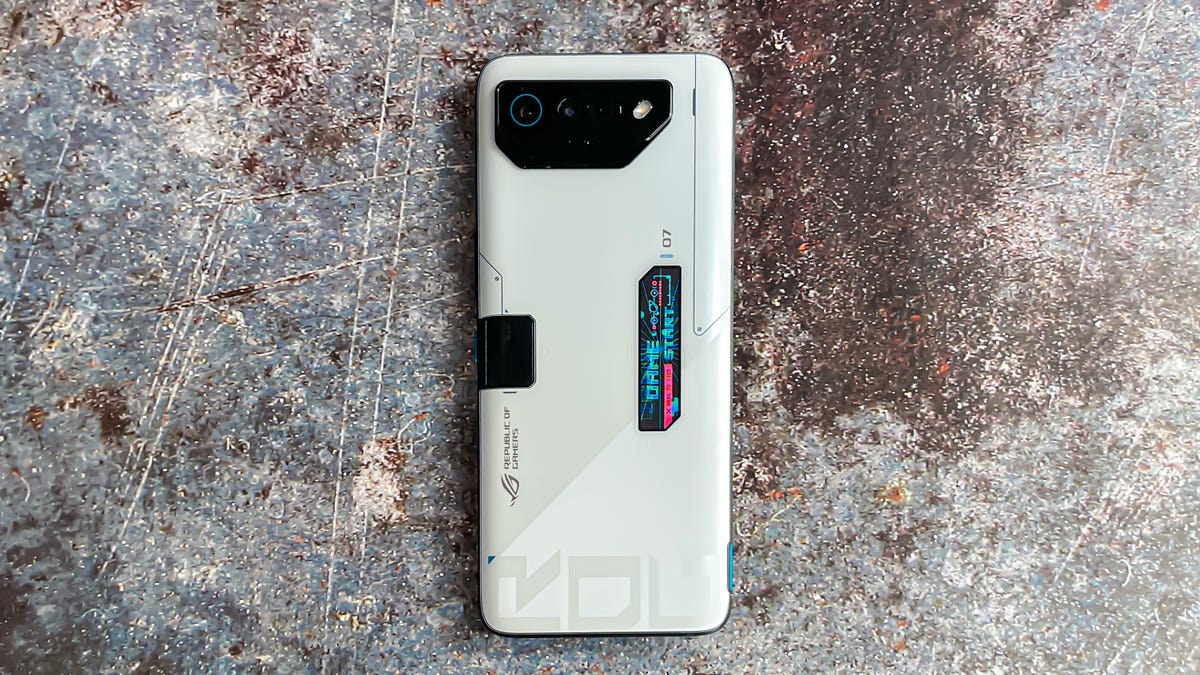
The Asus ROG Phone 7 Ultimate is a gaming phone that takes a few small steps forward with its design, and substantial leaps ahead when it comes to its internals and software. The phone, revealed Thursday with a starting price of $1,000, keeps many of the design aesthetics and personality of last year’s Asus ROG Phone 6 Pro. These include its LED indicator on the back, a 6,000mAh battery that can easily last two days and a highly responsive touchscreen with a 720Hz touch sampling rate. But it’s inside where the most substantial changes are including an upgraded Qualcomm Snapdragon 8 Gen 2 chip and new software features for customizing game play.
There’s even a hidden door on the back of the phone, dubbed the AeroActive portal, that opens when you attach the included AeroActive Cooler 7 fan. This door helps blow cool air directly into the phone to keep it from overheating during longer gaming sessions.
These gaming-specific features arrive alongside improvements to how the new ROG functions as a phone, too. Asus is committing to two years of software updates and four years of security updates. That’s on the low side compared to the four years of software updates Samsung provides for its Galaxy S series, but it’s still good to see Asus now commit to such a support timeline. The Phone 7 Ultimate also has a Background mode to set an automatic task up in any game and have that run while you use the phone for anything else.
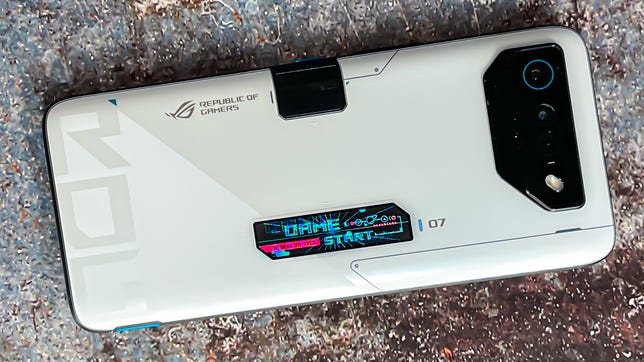
Asus ROG Phone 7 Ultimate
Like
- Striking design
- Lots of custom options
- AeroActive Portal opening for cooling
Don’t Like
- Tall and heavy
- Photos lack detail
- No wireless charging
Yet even with these improvements, the Phone 7 Ultimate still prioritizes gaming over other functions and features that typically get the spotlight in this price range. Specifically, the Asus phone is tall, partly because the front-facing camera is placed in a bezel above the 6.7-inch AMOLED screen instead of within a display cutout like on many other Android phones. This could benefit gamers since you don’t have anything obstructing the gameplay on your screen. But if you’re used to a large-screen phone like the Galaxy S23 Plus or the iPhone 14 Pro Max, you might wince at the ROG being even bigger than its display. The phone also feels heavy, coming in at 239 grams (just a gram shy of the iPhone 14 Pro Max) compared with the similarly sized 196-gram Galaxy S23 Plus.
The phone lacks wireless charging but makes up for that with speedy wired 65W charging. And yes, the power brick is even included in the box.
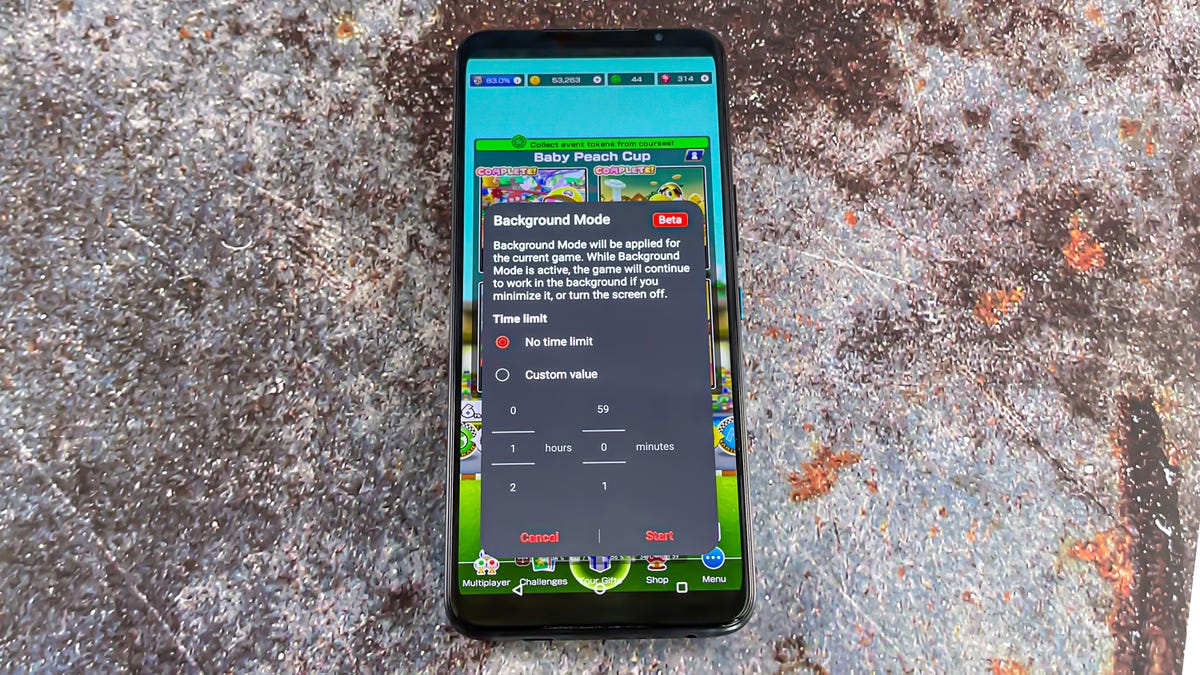
Background mode lets you continue running a game while you use your phone to do other things.
Mike Sorrentino/CNETPhotography is fine. It’s not in the same league as what the cameras and software shoot on similarly priced Galaxy or Pixel phones. Photos from the Phone 7 Ultimate have a reasonable amount of detail in both indoor and outdoor settings.
The Phone 7 Ultimate also arrives as the handheld PC gaming market is gaining traction, with Asus itself even announcing the ROG Ally as a competitor to the Steam Deck. While the Phone 7 Ultimate isn’t claiming to be the mobile gaming device for your PC game library, it does include lots of features and customizations for those seeking to get the most out of games built for Android.
Asus ROG Phone 7 Ultimate specs, software and gaming performance
The Asus ROG Phone 7 Ultimate has specs that might outperform your PC, even though it’s not trying to be one. The review unit I tested includes 16GB of memory and 512GB of storage space, which is a small step down from the 18GB of RAM seen on last year’s Phone 6 Pro, but still a ludicrous amount.
Alongside the aforementioned Snapdragon 8 Gen 2 chip, the phone has a Qualcomm Adreno 740 GPU. The Phone 7 Ultimate’s display has a 165Hz refresh rate. It runs Android 13, has two front-facing stereo speakers and a headphone jack. Like with last year’s Phone 6 Pro, the phone’s rear LED display shows customizable animations and notification icons. There’s two USB-C ports, one on the bottom and another on the left side, meant to make it easier to charge while playing a game horizontally. Passthrough charging is also available, which lets you play games without charging the battery so the phone doesn’t get warmer.
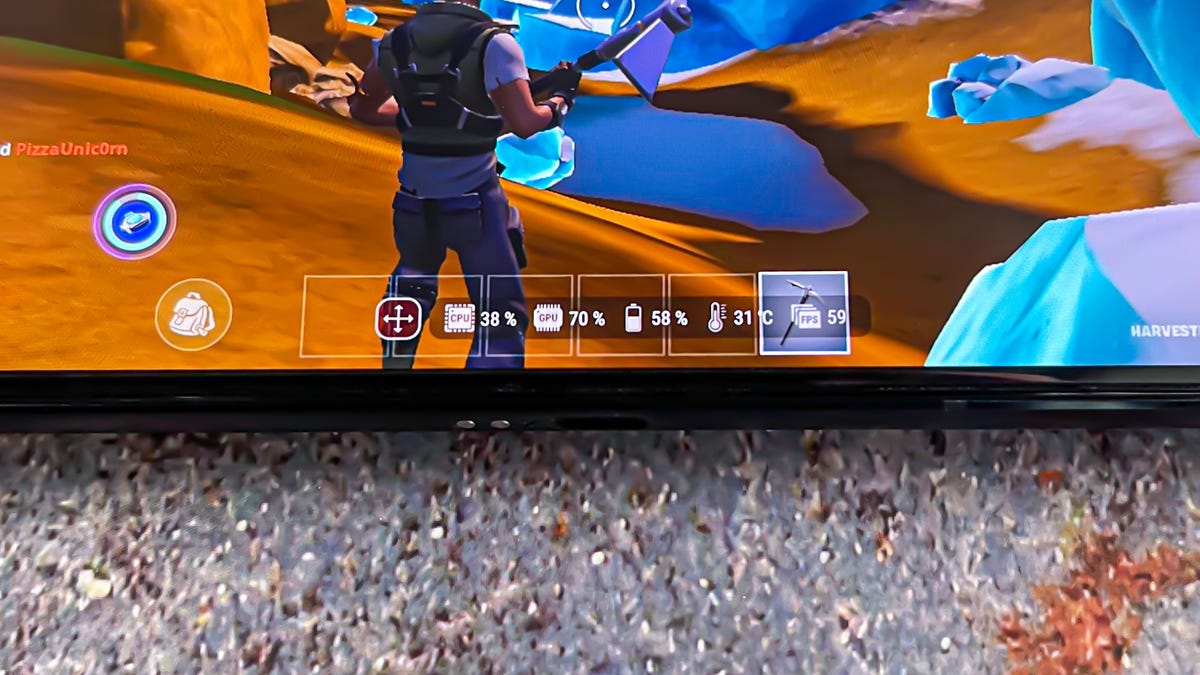
You can add a persistent gauge during games showing stats like the temperature of the phone, frames per second and the battery.
Mike Sorrentino/CNETThe Phone 7 Ultimate is especially speedy, and when I open games I can easily crank up the graphics and frame rate settings to their highest. Setting Fortnite to run at 90 frames per second didn’t bog down the phone, nor did playing Mortal Kombat at 160 frames per second. Even games that don’t support a high frame rate still benefit from the Snapdragon chip and the phone’s memory. For instance Marvel Snap’s cards animations looked very smooth as did Mario Kart.
In benchmark tests, the Phone 7 Ultimate performed comparable to phones like the Samsung Galaxy S23 and the OnePlus 11. While raw power isn’t necessarily what separates gaming phones from mainstream ones, it does underscore that Asus’ software additions and hardware customizations are focused on its gamer audience.
Benchmarks
Legend:
Note:
Higher scores are better
3DMark frames per second
Legend:
Note:
Higher scores are better.
The Phone 7 Ultimate emphasizes horizontal game play. It has an updated version of its AirTriggers system to program the phone’s various sensors on a game by game basis. Like RedMagic gaming phones, you can use the corners of the phone to respond as shoulder buttons. For instance, when playing Fortnite, I set up the right shoulder button to shoot and the left shoulder button to swap between aiming modes.
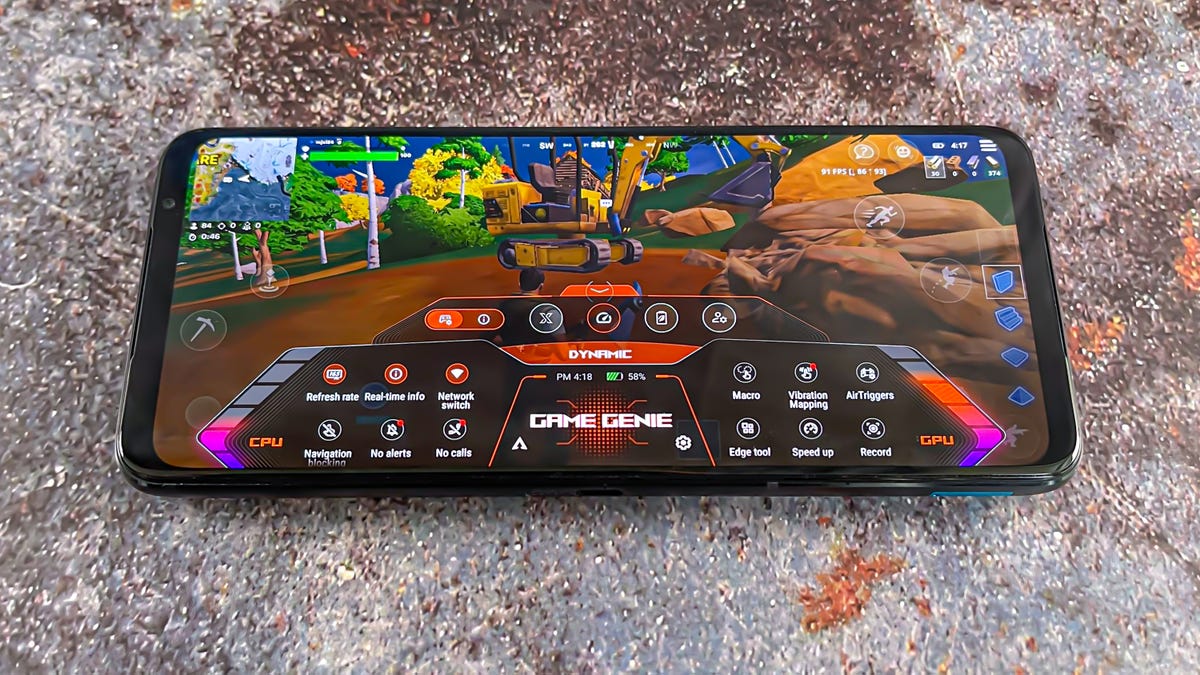
The Game Genie dashboard lets you turn on many of the phone’s settings while you are playing a game.
Mike Sorrentino/CNETAsus also lets you program the phone’s gyroscope for various motion controls and gestures. Overall, there’s a lot of options for those that link to tinker, but I would like to see Asus include suggested controller templates for popular mobile games in future updates.
There’s also program macros — a series of commands that repeat over and over — which, when combined with Background mode, lets you set and forget certain game tasks. In order to protect your phone’s battery, a persistent notification will display when a game is in Background mode so you eventually remember to turn it off.
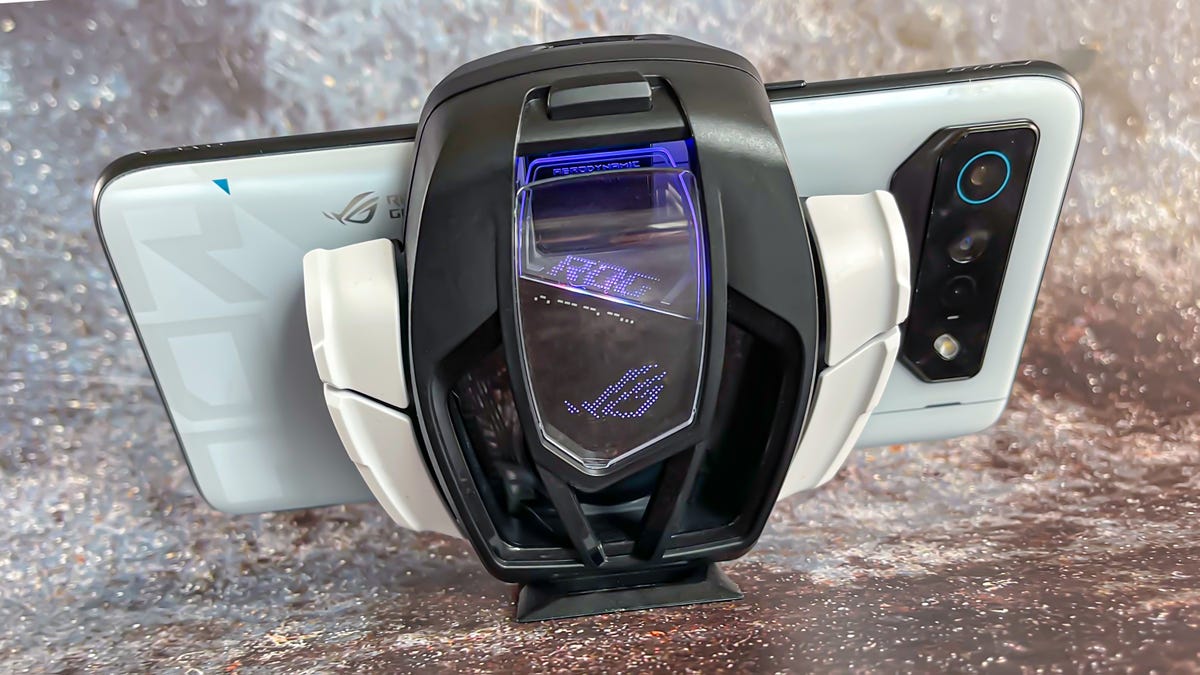
The AeroActive Cooler 7 attaches to the back of the phone. When attached, a door opens on the phone to let in more of the fan’s air.
Mike Sorrentino/CNETAsus ROG Phone 7 Ultimate cooling system
The Asus ROG Phone 7 Ultimate makes cooling a priority, whether or not you are using the included AeroActive Cooler attachment. Asus designed the inside of the phone to help with heat dissipation, and while I could certainly feel the phone become warm while playing games or fast charging, it was never uncomfortable to hold. Though adding a case goes a long way to keep heat away from your hands. According to the phone’s temperature gauge, after 30 minutes of gameplay it reached 40 degrees Celsius (104 degrees Fahrenheit).
The AeroActive Cooler plugs into the side USB-C port and clamps down over the power button. The attachment has cooling fans and opens the hidden door on the back to push cool air inside. There’s also programmable buttons and LED lights on it. During another 30-minute stretch of gameplay with the fan attached, the phone’s temperature dropped to 38 degrees Celsius (100 degrees Fahrenheit). Cooling aside, the AeroActive Cooler feels like there’s a big metal spider on the back of the phone. It’s uncomfortable, especially when I played touchscreen-heavy games.
The accessory also has a kickstand for propping it up on a table and using a Bluetooth game controller, which could be more comfortable.
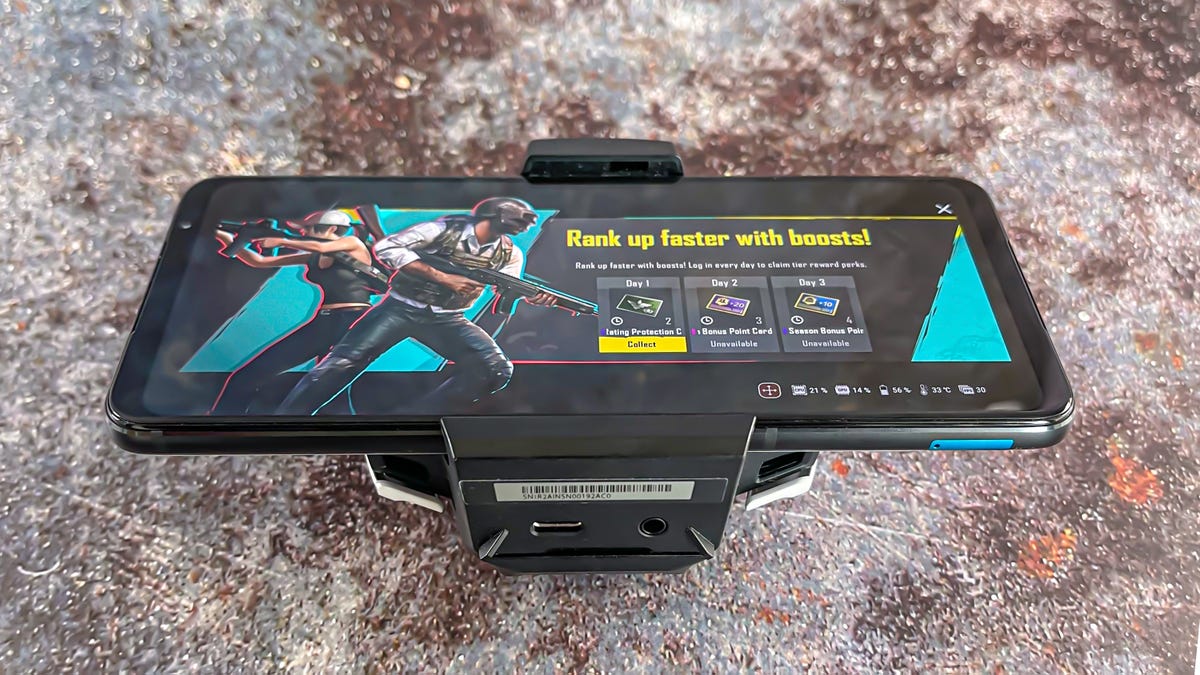
The bottom of the cooling accessory includes another USB-C port and a headphone jack.
Mike Sorrentino/CNETAsus ROG Phone 7 Ultimate cameras, photography
The Phone 7 Ultimate has a 50-megapixel main camera, a 13-megapixel ultrawide camera and an 8-megapixel macro camera. The front-facing camera has a 32-megapixel sensor. There’s Portrait mode and Night mode. You can record videos at 8K 24fps (frames per second) and in 4K at either 60fps or 30fps.

Photo of Citi Field taken on the Asus ROG Phone 7 Ultimate.
Mike Sorrentino/CNETPhotos are adequate. The Phone 7 Ultimate performed just fine in a variety of settings like at Citi Field or in Central Park for a wedding. This isn’t going to be a phone that you use for taking the best Instagram photos, but it works as a way to grab a quick picture in most environments.

Wagner Cove in New York’s Central Park, taken on the Asus ROG Phone 7 Ultimate.
Mike Sorrentino/CNETOn the whole, Phone 7 Ultimate photos lacked detail, especially compared to images from my iPhone 12 Pro Max. Take a look at the photos below of me standing in Central Park. You can see the flowers’ details substantially clearer in the iPhone photo. I’m shocked at how different the lighting looks in the two photos.

Here’s the Asus ROG Phone 7 Ultimate’s photo
Mike Sorrentino/CNET
And here’s the one from the iPhone 12 Pro Max.
Mike Sorrentino/CNETThe Asus’ Portrait mode fared slightly better, despite the background blur on the flowers looking inconsistent. Selfies similarly lacked detail, but the front-facing camera is serviceable for video calls. Photo and video capture is a common compromise for most gaming phones.

Using Portrait mode on the Phone 7 Ultimate helped bring out more color during this Central Park scene.
Mike Sorrentino/CNET
Indoor front-facing camera photo on the Asus ROG Phone 7 Ultimate, taken while filming the video review for this phone.
Mike Sorrentino/CNETAsus ROG Phone 7 Ultimate bottom line
The Asus ROG Phone 7 Ultimate is tailored for mobile phone gamers that want to tweak Android games while playing them at their highest graphics settings. New additions like the phone’s new Snapdragon chip, controller options and upgraded cooling system further refine that experience, while providing a sharp refresh rate with fast speeds that benefit non-gaming tasks like apps and reading.
Most people will likely be happier with a phone like a Galaxy S23 that has better cameras and a slimmer body. Also, many Android games run just fine on regular phones.
For a gamer that puts specs above all and wants lots and lots of customizable options, this ROG Phone 7 Ultimate is packed with them. We haven’t yet reviewed the competing RedMagic 8 Pro series which has the same chip with a lower $649 starting price. However, the software experience on the Asus is very good, achieving a nice balance between being a gaming device and a mobile phone.
How we test phones
Every phone tested by CNET’s reviews team was actually used in the real world. We test a phone’s features, play games and take photos. We examine the display to see if it’s bright, sharp and vibrant. We analyze the design and build to see how it is to hold and whether it has an IP-rating for water resistance. We push the processor’s performance to the extremes using both standardized benchmark tools like GeekBench and 3DMark, along with our own anecdotal observations navigating the interface, recording high-resolution videos and playing graphically intense games at high refresh rates.
All the cameras are tested in a variety of conditions from bright sunlight to dark indoor scenes. We try out special features like night mode and portrait mode and compare our findings against similarly priced competing phones. We also check out the battery life by using it daily as well as running a series of battery drain tests.
We take into account additional features like support for 5G, satellite connectivity, fingerprint and face sensors, stylus support, fast charging speeds, foldable displays among others that can be useful. And we of course balance all of this against the price to give you the verdict on whether that phone, whatever price it is, actually represents good value.
Technologies
Google’s New AI Features Are Trying to Make Data Entry a Thing of the Past
More Gemini AI features will come to Google Docs, Sheets and Slides.
The latest batch of Google updates to its workspace tools highlights AI’s promise to automate mundanity in the workplace. Google Docs, Slides, Sheets and Drive all have new AI-powered features, the company announced Tuesday. The one thing all these updates have in common? Gemini is using your files, emails and chats to give you relevant information, not random answers gleaned from the web.
These updates come as AI is playing a bigger role in our work lives, for better or worse. Agentic tools like Claude Cowork and coding assistants like Anthropic’s Claude Code and OpenAI’s Codex are more capable than chatbots and able to handle tasks announced independently. AI tools are also becoming more customized, with Google’s personalized intelligence rolling out across its platforms to help refine AI outputs to things that are relevant and useful for you. Google continues that trend with this new batch of Workspace updates.
New Gemini AI features in Google Workspace apps will cite their sources after each query. For example, if you ask Gemini in Google Docs to fill out an itinerary template, it will pull the information from your email, chats and files. The «sources» tab in the Gemini side panel will show you where it found the information it used, like your flight confirmation email and chats discussing dinner plans. Seeing where Gemini pulled its answers from is also how you’ll double-check Gemini’s work.
The most impressive new features are in Sheets, where AI can fill in the holes in your spreadsheets. You can describe what you want the AI to do with a simple prompt and avoid writing an exact formula. You can click on an empty cell, select the pop-up that says «Drag to fill with Gemini,» then highlight the cells you want Gemini to fill in. That deploys an AI agent to search the web to fill each cell with the necessary information.
For example, if you have a spreadsheet of the contact info for local companies, you can have Gemini search the web to fill in a the location, CEO and other publicly available information of each company. The tool aims to dramatically reduce the time needed for manual data entry. Gemini can also summarize, categorize and create charts with prompts alone.
You can also chat with Gemini in Sheets and have it scour your raw data to make custom reports and charts. No need for pivot tables if they confound you as much as they baffle me. One of the biggest uses of AI at work is helping create presentations.
In Google Slides, you can now tell Gemini in natural language what you want to appear on a slide, and it will create it, matching the style of your existing slides. You can also ask Gemini to edit your slides if you don’t want to waste time painstakingly moving design elements around the slide. The AI should fill the slides with relevant information based on your instructions and the work files it has access to, so you shouldn’t need to replace a bunch of filler text.
If you use Docs, Sheets and Slides through the Workspace account of your company, then you won’t be able to turn off AI features individually. The managing company is in control of AI access for users. Personal users can tweak their settings to limit Gemini. The new features are rolling out in beta now, in English only, to Google AI Ultra and Pro subscribers in the US, as well as some Google Workspace customers who are part of the Gemini Alpha testing program.
For more, check out the new cowork feature in Copilot and how to use Perplexity AI for deep research.

Tariffs implemented by President Donald Trump were struck down by the Supreme Court last month. Companies that were subjected to those fees, such as FedEx and Dollar General, have since sued the federal government, and Nintendo wants a piece of the action.
Nintendo filed a lawsuit against the federal government in the US Court of International Trade on Friday, as first spotted by Aftermath. The complaint seeks refunds of tariffs Nintendo paid, plus interest, and asks the court to declare the tariffs unlawful and stop the government from collecting them going forward.
«Since February 1, 2025, President Trump has executed the unlawful Executive Orders, imposing tariffs on imports from a vast swath of countries,» Nintendo said in the complaint.
When reached for comment, Nintendo of America confirmed the lawsuit.
«We can confirm that we filed a request. We have nothing else to share on this topic,» Nintendo of America said in an emailed statement on Friday, March 6.
It’s unclear how much Nintendo paid in tariffs, and it did not state an amount in the lawsuit. While the Switch 2 was priced at $450 when it launched last year, and has stayed at that amount, Nintendo did increase the price of the original Switch and accessories for both consoles. Microsoft and Sony also increased the prices of their hardware and accessories last year due to tariffs.
The White House didn’t immediately respond to a request for comment.
On Feb. 20, the Supreme Court ruled by a vote of 6 to 3 that the sweeping tariffs Trump instituted last year exceeded his executive powers. Following the ruling, on the same day, Trump announced a new set of tariffs of 10% on imported goods that would last for 150 days, starting Feb. 24.
The decision on what to do with the collected tariffs — a reported $166 billion — has been left to the US Court of International Trade. Judge Richard Eaton told the US Customs and Border Protection on Wednesday, March 4, to refund the importers that were forced to pay tariffs, which is more than 330,000. On Friday, the CBP said it couldn’t easily issue tariff refunds because its system requires duties to be recalculated and refunds processed entry by entry. This process would involve tens of millions of transactions. The agency said it’s updating its systems and could start providing refunds by late April.
Technologies
Sony WF-1000XM6 vs. Samsung Galaxy Buds 4 Pro Earbuds: A Photo Finish
-
 Technologies3 года ago
Tech Companies Need to Be Held Accountable for Security, Experts Say
-
 Technologies3 года ago
Best Handheld Game Console in 2023
-
 Technologies3 года ago
Tighten Up Your VR Game With the Best Head Straps for Quest 2
-
 Technologies4 года ago
Black Friday 2021: The best deals on TVs, headphones, kitchenware, and more
-
 Technologies5 лет ago
Google to require vaccinations as Silicon Valley rethinks return-to-office policies
-
 Technologies5 лет ago
Verum, Wickr and Threema: next generation secured messengers
-
 Technologies4 года ago
Olivia Harlan Dekker for Verum Messenger
-
 Technologies4 года ago
iPhone 13 event: How to watch Apple’s big announcement tomorrow