
Technologies
Best Handheld Game Console in 2023
Take your gaming on the go with the best handheld game consoles, from the Nintendo Switch to Valve’s Steam Deck.

The last few years have seen a revival of handheld game consoles thanks to the convenience of on-the-go gaming and streaming technology, no doubt in part due to the success of the Nintendo Switch in 2017. The world of handheld gaming has gained popularity like never before, and last year was no exception. With the release of new consoles such as the Steam Deck and Panic Playdate, as well as the Razer Edge and Logitech G Cloud, more users are looking to handheld consoles for all of their gaming needs. If you’re looking to get back to the days of playing games anywhere you want, we’ve rounded up some of the best handheld game consoles that 2023 has to offer below.
Phones and tablets already do a fine job of playing tons of great portable games, and have been leading the mobile gaming world for years, offering features like game controller cases and game streaming from consoles, PCs and the cloud. Dedicated devices can provide unique features, exclusive games or extra power to do things your phone can’t. It almost feels like a return to the mid-2010s era of the Nintendo 3DS and PlayStation Vita.
The Nintendo Switch has been the best and most affordable portable game system for years, and continues to be CNET’s clear top pick: At $300 (or $350 for our favorite model), it can play a huge variety of Nintendo games, indie games, it can dock with a TV and can even play some fitness games. But Valve’s Steam Deck offers a unique proposition for those with deeper pockets: It’s large, and it can double as a full gaming PC.
For those who miss retro game handhelds like the Game Boy, you might consider putting yourself on the waiting list to order the Analogue Pocket or Panic Playdate, too, but both of those systems are more niche, and more indie/retro targeted, than the Switch and Steam Deck.
We’ll explain below.
Scott Stein/CNET
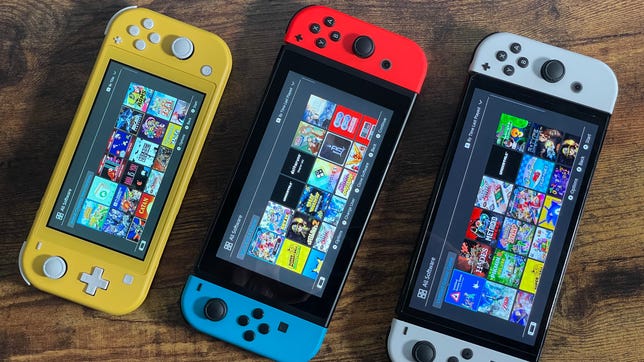
The Nintendo Switch is over five years old now, but Nintendo has indicated that no true successor is coming right now. A Pro model has been rumored for a while, but in the meantime the existing Switch remains extremely capable, full of great games (including lots of indie offerings), and pretty affordable considering its handheld/TV-connected dual function.
The OLED-screened Switch, which released in October 2021, is the best Switch and our recommended pick. The more vivid and larger display looks fantastic, its rear kickstand works better for tabletop gaming, and both of these upgrades are worth the extra $50. The original Switch (or the V2 version), at $300, works similarly and is also still fine, and occasionally comes in special editions and holiday game bundles. The smaller, handheld-only Switch Lite is a great value pick at $200 for anyone who just wants a basic portable game system, but it lacks any ability to connect to a TV, and its controllers don’t detach. This makes it less versatile for families, and means you can’t replace the controllers if they break.
Dan Ackerman/CNET
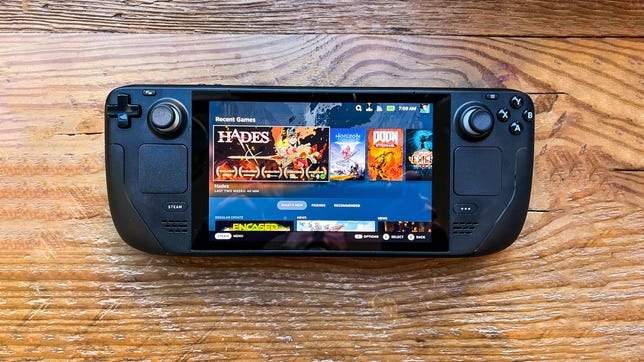
Valve’s big and powerful Steam Deck is a marvel. It can play a wide variety of PC games surprisingly well, and is the dream portable for any hardcore Steam fan, or anyone who has a big library of PC games. The Steam Deck can get expensive for the larger storage tiers, but for what it’s capable of, it’s not a bad deal. The ability to play PC games or stream cloud-based games, and to connect to a monitor, keyboard or other accessories, puts the Steam Deck in a class of its own.
Scott Stein/CNET
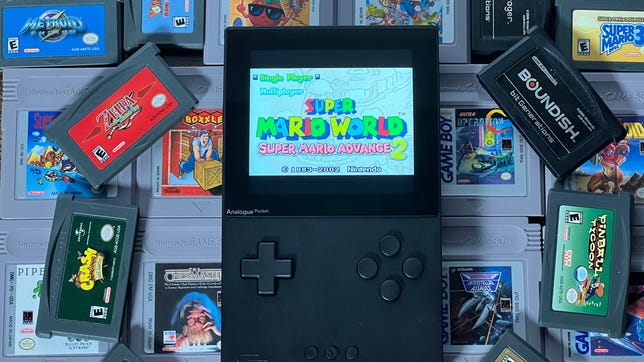
The Pocket looks like a totally remade Game Boy, and it is, in a sense. Analogue’s gorgeous handheld can play original Game Boy, Game Boy Color and Game Boy Advance cartridges perfectly, and can even play Sega Game Gear games using an adapter (Atari Lynx, Neo Geo Pocket and Turbografx-16 adapters are supposed to be coming soon). It has a high-res color screen and USB-C charging, and there’s a separately sold dock for TV play. One of the most exciting updates to the Pocket is its support for FPGA cores that can replicate classic game hardware, and play ROMs. There’s no game store for buying games: Pocket is a system to play classic cartridges or other games in amazing quality, if you want to tinker around with FPGA. There’s also a growing library of Pocket-compatible software in indie gaming channels like itch.io that can be sideloaded to a microSD card, too.
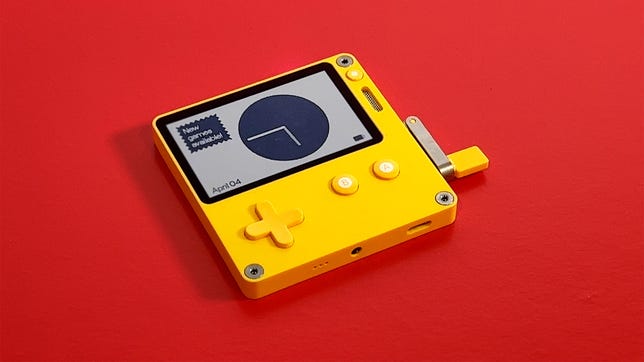
The tiny, yellow, black-and-white-screened Panic Playdate looks like a weird Game Boy with a mechanical crank sprouting from its side. But this system, made by the indie game company that developed Untitled Goose Game, plays its own tiny season of 24 indie-developed games, which come included with the purchase and appear over time like weekly presents. The Playdate has Wi-Fi and can download games or sideload other indie-developed titles from sites like itch.io, but you’ll have to learn to love the experiences you discover. We’ve loved playing on it so far, but alas, the Playdate doesn’t have any backlighting — you’ll have to find a lamp instead. The Playdate is on backorder until early 2023.
Lori Grunin/CNET
Should I just use my phone or iPad instead?
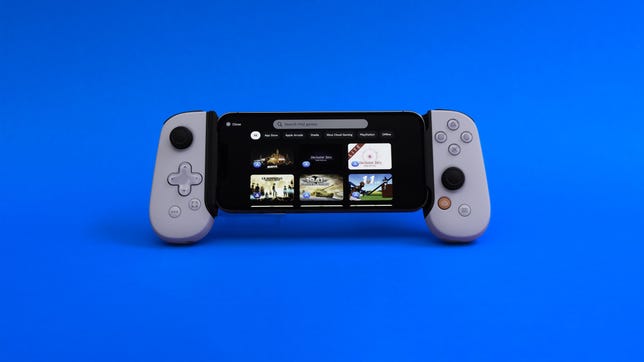
Tablets and phones are extremely valid game consoles: The iPad has tons of games on the App Store, and hundreds more on Apple’s subscription-based Apple Arcade. The iPad can pair with Bluetooth game controllers, too. iPhones and Android phones have tons of games as well, obviously, and a number of great game controller cases are available, including the Backbone and the Razer Kishi.
Phones and tablets also offer other advantages, including an ability to cloud-stream games on a growing number of services including Microsoft Game Pass Ultimate and PlayStation Plus.
The handhelds listed above have other advantages: unique game libraries, a chance to connect to a TV and play with others, and the capability to play higher-end PC games or classic game cartridges.
Should I wait for something else?
The Nintendo Switch Pro, a long-rumored upgrade to the Switch, could eventually offer 4K gaming and perhaps upgraded controllers, although the existence of such a device is entirely speculative. Odds are that Nintendo will instead just keep slightly improving the Switch via new models every couple of years, similar to how it kept upgrading its Nintendo DS and 3DS line over time.
The Steam Deck just arrived earlier this year, but it’s unclear when and if Valve will ever choose to upgrade it with better processors or newer features. And right now, Microsoft and Sony have stayed out of the handheld gaming picture.
Razer’s Android-based gaming tablet, the Razer Edge, shows where a wave of new gaming tablets could emerge to become the Steam Decks of the mobile world. Right now we don’t have any opinions on whether you should wait for it, because we haven’t played it yet.
Logitech’s streaming-only G Cloud handheld shows where more console/PC accessories could pop up as home handhelds to stream games away from a TV, but right now you’re probably better off using your phone or tablet and a game controller to do pretty much the same thing.
What’s best for kids?
My kids alternate between iPad gaming and the Nintendo Switch. The Switch is without a doubt the best kid console, with the most family-friendly game library and best parental control settings. Still, be prepared to get annoyed at buying multiple copies of games and trudging through the process of creating multiple Switch family accounts.
Game console reviews
Technologies
Today’s NYT Strands Hints, Answers and Help for March 13 #740
Here are hints and answers for the NYT Strands puzzle for March 13, No. 740.
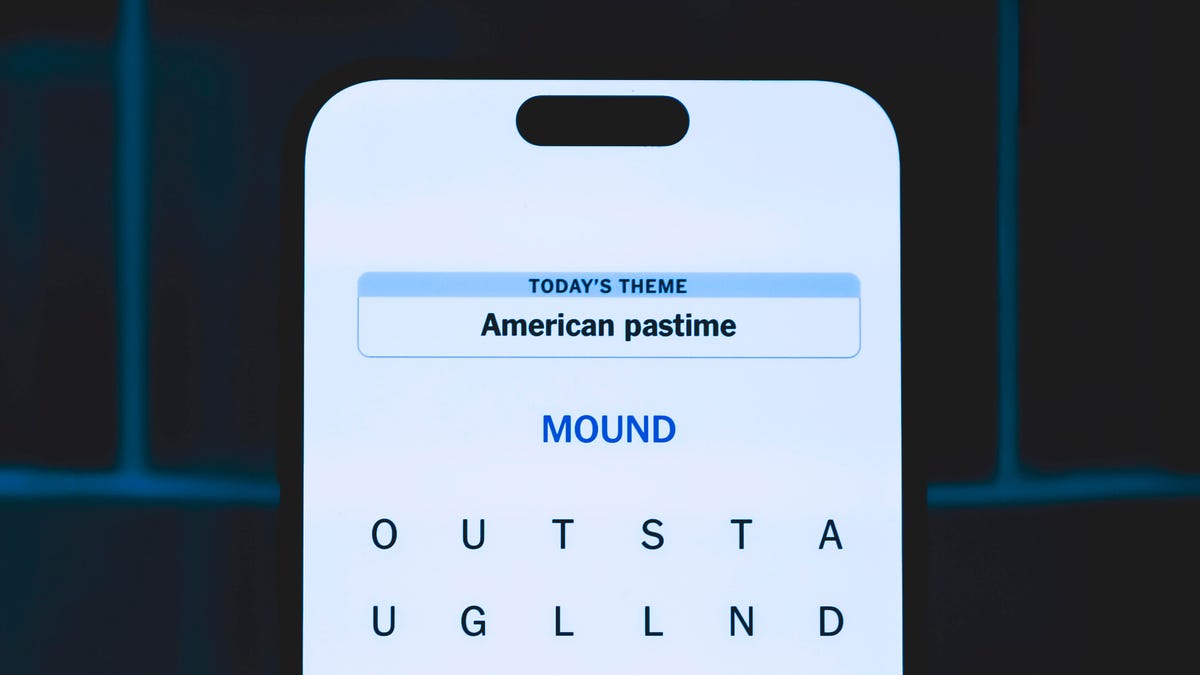
Looking for the most recent Strands answer? Click here for our daily Strands hints, as well as our daily answers and hints for The New York Times Mini Crossword, Wordle, Connections and Connections: Sports Edition puzzles.
Today’s NYT Strands puzzle might be easy for fans of a certain musical genre. Some of the answers are difficult to unscramble, so if you need hints and answers, read on.
I go into depth about the rules for Strands in this story.
If you’re looking for today’s Wordle, Connections and Mini Crossword answers, you can visit CNET’s NYT puzzle hints page.
Read more: NYT Connections Turns 1: These Are the 5 Toughest Puzzles So Far
Hint for today’s Strands puzzle
Today’s Strands theme is: Mountain band.
If that doesn’t help you, here’s a clue: Traditional tunes.
Clue words to unlock in-game hints
Your goal is to find hidden words that fit the puzzle’s theme. If you’re stuck, find any words you can. Every time you find three words of four letters or more, Strands will reveal one of the theme words. These are the words I used to get those hints but any words of four or more letters that you find will work:
- BLUE, GAME, CHAR, CHARM, SARGE, SEEN, BRAT, BRIT, RILE, NOSE, DARN
Answers for today’s Strands puzzle
These are the answers that tie into the theme. The goal of the puzzle is to find them all, including the spangram, a theme word that reaches from one side of the puzzle to the other. When you have all of them (I originally thought there were always eight but learned that the number can vary), every letter on the board will be used. Here are the nonspangram answers:
- BANJO, FIDDLE, GUITAR, MANDOLIN, HARMONICA
Today’s Strands spangram
Today’s Strands spangram is BLUEGRASSMUSIC. To find it, start with the B that’s three letters to the right on the bottom row, and wind up and around.
Quick tips for Strands
#1: To get more clue words, see if you can tweak the words you’ve already found, by adding an «S» or other variants. And if you find a word like WILL, see if other letters are close enough to help you make SILL, or BILL.
#2: Once you get one theme word, look at the puzzle to see if you can spot other related words.
#3: If you’ve been given the letters for a theme word, but can’t figure it out, guess three more clue words, and the puzzle will light up each letter in order, revealing the word.
Technologies
Today’s NYT Connections Hints, Answers and Help for March 13, #1006
Here are some hints and the answers for the NYT Connections puzzle for March 13, No. 1,006.

Looking for the most recent Connections answers? Click here for today’s Connections hints, as well as our daily answers and hints for The New York Times Mini Crossword, Wordle, Connections: Sports Edition and Strands puzzles.
Today’s NYT Connections puzzle is kind of tough. That purple one is a real head-scratcher, once again. Read on for clues and today’s Connections answers.
The Times has a Connections Bot, like the one for Wordle. Go there after you play to receive a numeric score and to have the program analyze your answers. Players who are registered with the Times Games section can now nerd out by following their progress, including the number of puzzles completed, win rate, number of times they nabbed a perfect score and their win streak.
Read more: Hints, Tips and Strategies to Help You Win at NYT Connections Every Time
Hints for today’s Connections groups
Here are four hints for the groupings in today’s Connections puzzle, ranked from the easiest yellow group to the tough (and sometimes bizarre) purple group.
Yellow group hint: I don’t want that.
Green group hint: Time to count.
Blue group hint: Not floors or ceilings.
Purple group hint: Sounds like…
Answers for today’s Connections groups
Yellow group: «No thanks.»
Green group: Kinds of numbers.
Blue group: Kinds of walls.
Purple group: Homophones of non-numeric amounts.
Read more: Wordle Cheat Sheet: Here Are the Most Popular Letters Used in English Words
What are today’s Connections answers?
The yellow words in today’s Connections
The theme is «No thanks.» The four answers are later, nah, next time and pass.
The green words in today’s Connections
The theme is kinds of numbers. The four answers are even, irrational, perfect and prime.
The blue words in today’s Connections
The theme is kinds of walls. The four answers are Berlin, brick, fourth and Great.
The purple words in today’s Connections
The theme is homophones of non-numeric amounts. The four answers are awl (all), nun (none), phew (few) and sum (some).
Quick tips for Connections
#1: Say the clue words out loud, pausing before and after each. That helps you hear the words in the context of a phrase. The Connections editors love to group words together that are used in similar phrasing, like ____ Up.
#2: Don’t go for the obvious grouping. These editors are smart. Once, they offered SPONGE, BOB, SQUARE and PANTS in the same puzzle. None of those words were in the same category. If you like, hit the «shuffle» button to give yourself a different perspective on the words.
#3: Break down any compound words and look for similarities. «Rushmore» was once in a puzzle where the connection was that each word started with the name of a rock band.
Technologies
iPhone Lost and Battery Drained? Here’s How You Can Still Find It
Even a dead battery can’t keep you and your misplaced iPhone apart. This is the ultimate guide to using Find My to locate a dead iPhone.
You’d think it’s impossible to lose track of an iPhone you carry everywhere, but we do it all the time — too often before we have a chance to charge it. Apple’s Find My feature, with its crowdsourced Find My Network, will usually pinpoint the phone’s location. But what about when the battery is totally drained?
Turns out Find My works even then. It sends your phone’s location to iCloud, even when the device is off. For added defense, Stolen Device Protection secures sensitive data, such as credit cards and passwords.
If you have an iPhone 11 or newer model (excluding the 2020 and 2022 iPhone SE, the iPhone 16E and iPhone 17E), you have the ultra-wideband chip for offline finding. As long as Find My is enabled and you’re signed in to your Apple ID, you can locate your iPhone even if the battery is dead. Before panicking, follow these steps to recover your phone.
Apple Find My and Find My Network aren’t the same
Apple Find My and Find My Network are different, which can be confusing. While Find My is the name of an app, the Find My Network is what allows you to locate your device when it’s offline, turned off or low on power. It’s also how AirTags update their locations automatically, even when buried at the bottom of luggage on a plane.
You can use the Find My Network feature within Apple’s Find My app or sign into your Apple ID at iCloud.com to locate your misplaced iPhone. Plus, the app also allows you to add other Apple products and items that you want to track to your Find My Network.
How to turn on Find My and Find My Network
You need to make sure Find My and Find My Network are set up to allow you to locate your switched-off iPhone. Open Settings and follow these steps:
- Tap on your name in the Settings menu.
- Go to Find My > Find My iPhone and make sure the switch is toggled on.
- Below Find My iPhone, you’ll see Find My Network and Send Last Location toggles. Turn them on, too.
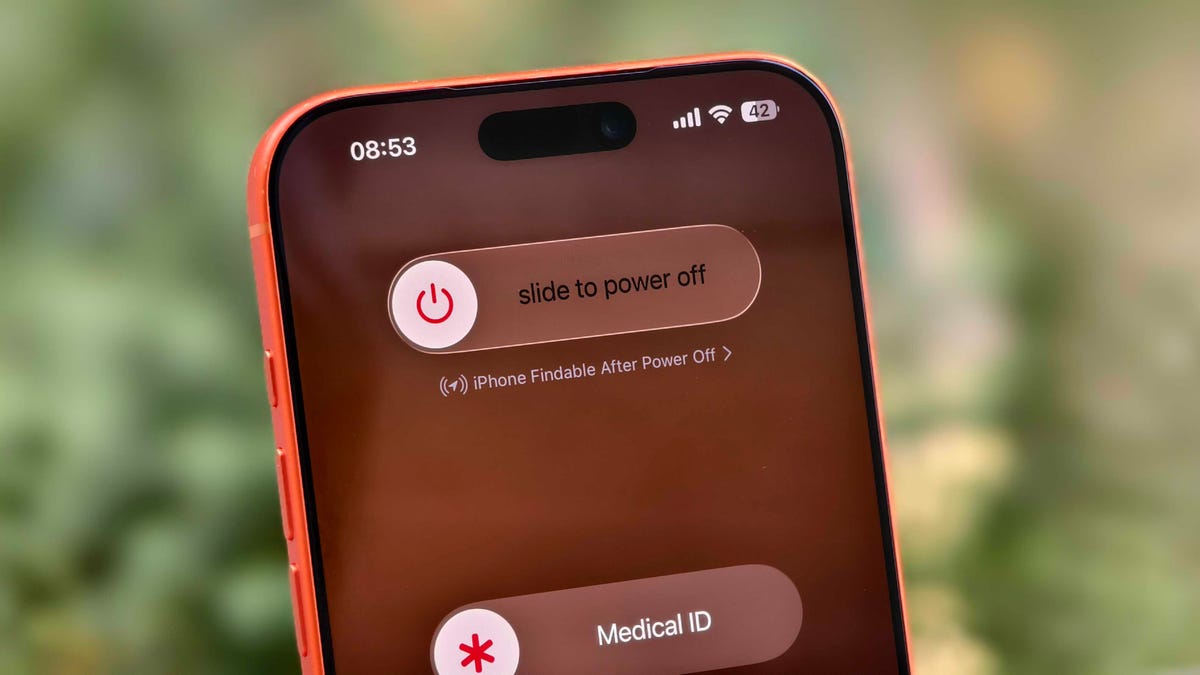
You can check if your iPhone is discoverable even when it’s switched off by going to the power menu: Swipe down from the top-right corner to view Control Center and press and hold the power button in that corner, or hold the side and volume down button. Under the «slide to power off» slider, look for «iPhone Findable After Power Off.» Your iPhone is now all set to be found, even if a thief turns it off.
However, there are a few exceptions. If your iPhone hasn’t sent its location to Apple through Find My in the last seven days, you’ll see «No location found» next to your device. It can happen if there’s an issue with your device’s location services.
How to find a lost iPhone with the Find My app on another Apple device
Now comes the hard part: What happens after you lose your iPhone? Assuming you’ve completed the steps above, you can keep calm. If you have another Apple device, such as an Apple Watch, iPad or MacBook, follow the steps below to locate your misplaced or stolen iPhone. This will also work on a friend’s or family member’s device that you’ve shared your location with.
- Open the Find My app and locate your iPhone in the list under the Devices tab. You should see it in this list (even if it’s powered off) as long as you have previously enabled the Find My iPhone, Find My Network and Send Last Location options.
- Tap or click the name of your iPhone. This should take you to a menu with several options for finding your phone or marking it as lost.
- If you misplaced your iPhone and you’re sure that it’s nearby, tap or click Play Sound or Directions to make the device play a sound or get directions to the device’s last recorded location, respectively.
- If you’re sure your iPhone is stolen, tap Activate under the Mark As Lost option. This immediately locks the device with your passcode, suspends Apple Pay and displays a custom message with your contact information for anyone who finds it. You can also use Send Last Location to locate the last known location of your device.
How to find a lost iPhone if you don’t have another Apple device
In case you don’t have another Apple device, you can sign into your iCloud account in a web browser to find your lost iPhone (though this option can be troublesome if you don’t have another Apple device because of two-factor authentication). Follow these steps to use a web browser to see your lost iPhone’s location:
- Go to icloud.com/find and sign in with your Apple ID.
- Go to the Devices list.
- From here, use the same options for playing a sound, marking your device as lost or erasing the device as you would in the app.
You can also disable Control Center access on the lock screen while traveling abroad to prevent a thief from turning off data or enabling Airplane mode. To do this, do the following:
- Go to Settings > Face ID & Passcode (or Touch ID & Passcode) and enter your passcode.
- Under the Allow Access When Locked section, toggle off the Control Center option.
This option can add some inconvenience to day-to-day use, but I recommend turning off Control Center while traveling.
These settings give you the best chance of finding your iPhone if it’s been stolen and turned off. For more iPhone tips and advice, check out our guide to the Camera Control and how to block distracting websites.
-
 Technologies3 года ago
Tech Companies Need to Be Held Accountable for Security, Experts Say
-
 Technologies3 года ago
Tighten Up Your VR Game With the Best Head Straps for Quest 2
-
 Technologies4 года ago
Black Friday 2021: The best deals on TVs, headphones, kitchenware, and more
-
 Technologies5 лет ago
Google to require vaccinations as Silicon Valley rethinks return-to-office policies
-
 Technologies5 лет ago
Verum, Wickr and Threema: next generation secured messengers
-
 Technologies4 года ago
Olivia Harlan Dekker for Verum Messenger
-
 Technologies4 года ago
iPhone 13 event: How to watch Apple’s big announcement tomorrow
-
 Technologies4 года ago
The number of Сrypto Bank customers increased by 10% in five days