
Technologies
Apple Should Build Its AR on the Meta Quest
Commentary: Its glasses may be on hold, but the immediate future is already in front of us.
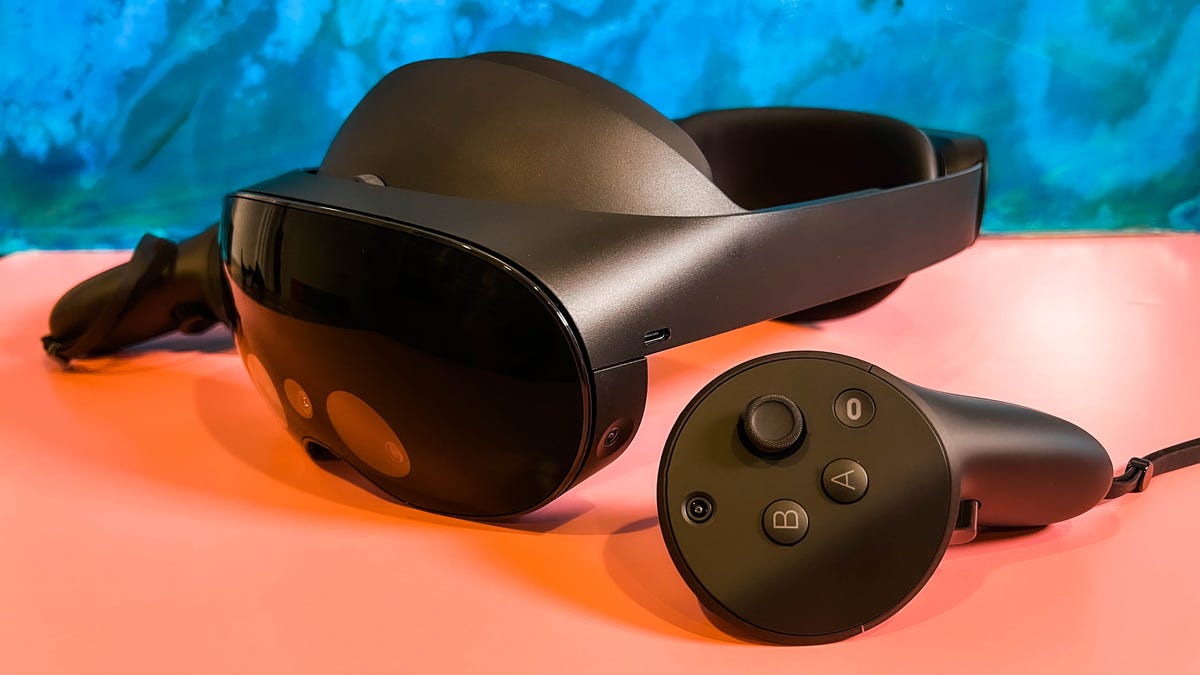
Apple’s first-ever VR-AR or «mixed reality» device is expected this year, and already its follow-up product seems to be on hold. According to Bloomberg’s reliable Mark Gurman, a planned set of AR glasses isn’t coming from Apple anytime soon. That’s OK: AR glasses don’t seem like they’re imminent from anyone.
After a trip to Las Vegas to try out some of the emerging technologies around future VR and AR headsets, one thing is increasingly clear: Everyone’s trying to figure out AR glasses, but everyone’s trying to perfect VR headsets. The difference between those two scenarios is bigger than you think.
All-day AR glasses that are useful, work convincingly, have long enough battery life, work with your phone and function as actually legit prescription glasses haven’t materialized, although the pieces are coming into place. Companies like Meta have promised a decade-long path to these glasses. It turns out, maybe, that’s going to be the case for everyone else, too. I’ve seen smart glasses that look real but don’t do much, or glasses with AR that feel chunky and do some things, but don’t quite work with my vision and can’t figure out how to work with my phone yet. Chipmaker Qualcomm is working on this; Google, Apple and Samsung need to solve it someday, too.
In the meantime, VR already has a very real and reasonably popular product that most families I know in the everyday world are familiar with: the Meta (formerly Oculus) Quest 2.
Read more: The Quest 2 Is Still the Best VR Headset For Now
That recognition is no small thing. I think of the Quest’s place in everyday life like the Amazon Echo was years ago: something odd that over time became familiar, normalized. Something reasonably priced, and good enough to do a few things actually well. The Quest 2 is basically a game console. Where Meta has struggled is figuring out how to expand that base beyond gamers.
Following Meta’s playbook is something I expected Apple would do. Heck, I expect most companies are going to do it. The Quest 2 works just like most people imagine it will, or better. It’s a bit of instant magic that’s totally wire-free.
The Quest 2 does have downsides. In fact, those problems emerge the more you use it. I find connecting with friends and social spaces gets weird and buggy, prone to lag, disconnects and way-too-basic avatars. The battery life is bad. For fitness apps, which the Quest 2 can do surprisingly well, it’s still not good at really managing sweat or keeping my glasses from fogging.
Even though Meta wants the Quest 2 and higher-end, work-focused Quest Pro to open up new ways to work by creating virtual monitors around my laptop, the connections and display quality aren’t good enough to be more than a clever experiment most of the time. I can see my laptop keyboard with the Quest Pro’s passthrough cameras, but typing feels awkward and nowhere near as good as when I’m just on my laptop… and I can’t see my phone screen to check messages, either. The Quest can show me phone notifications like a basic smartwatch from a decade ago, but I can’t interact with them.
These VR headsets can even do some basic AR, using passthrough cameras that «mix reality» to show the real world in fuzzier video, with VR layered on top. The effect is sometimes pretty amazing, and could even approach feelings I’ve had with early AR headsets like the Microsoft HoloLens 2.
So where does that put Apple? Clearly, there’s a headset coming soon. And according to Bloomberg’s Gurman, the next goal after this first expensive headset is to work on a more affordable model. It’s like Meta’s approach to the Quest and Quest Pro, in reverse. And there are plenty of things Apple could focus on to make its entry into VR (and AR) worth the effort.
Better comfort, better fitness
The Quest 2 is already an affordable fitness device, and pairs with watches to show heart rate and fitness stats. Apple clearly has an advantage on time spent developing the Apple Watch, fitness and health tracking, and its Fitness Plus subscription video workouts, which also have overlaid fitness stats.
Apple could emphasize workouts and fitness on its headset, with comfortable, breathable straps and face pieces that could feel better for exercise. Meta is starting to realize it needs to improve comfort for VR: A recent Razer partnership using head straps made by CPAP-maker ResMed shows a need for better materials. I’d expect Apple to make this aspect a key part of the headset’s advantages. There are other advantages, too. Apps like Beat Saber and Supernatural use music for fitness, and Apple already has all of Apple Music at its disposal.
Connect better with laptops, iPads, phones, watches
VR headsets right now have an extremely hard time working well with all the other things we have lying around us. I can’t get a Quest to connect nicely with my phone all the time. To work with my laptop, I need a specialized third-party app with its own thing I have to install on my laptop and turn on.
Meanwhile, Apple has been focusing on handoffs and continuity across AirPods, HomePods, iPhones, Apple Watches, MacBooks, Apple TVs… all over the place. That’s what’s needed to make a VR headset seem seamless and integrated into other stuff. I want to check my watch in VR, or use it to control apps. Or use my phone, and also see the phone. Suddenly grab my laptop, and the headset connects. Incoming calls? No problem. Send myself things back and forth from my phone or laptop and get all the files and things I want, and not feel like I’m on a vacation from them. That’s what Apple’s headset could set out to achieve.
That’s a best-case scenario. Much like the first Apple Watch and iPhone, the actual Day 1 functions of this headset might end up disappointing.
Better social
Even though the metaverse is on everyone’s minds, there aren’t many big social spaces in VR that work well. Microsoft’s Altspace is nice, but often feels empty. VRChat is wild, experimental, full of big features and ideas, and feels like a messy explosion that’s hard to jump into. Meta can’t get enough people into Horizon Worlds. Even when these platforms do work, for concerts or events, the limits on people who can attend at once, the lag and drop-off, not to mention the avatar limits, make it a trade-off versus any other way you could connect on a phone or laptop.
Apple may not be able to solve this any better for larger-scale experiences, but for more intimate and several-person FaceTime-like moments, Apple could make shared experiences in VR work a lot better. Meta hasn’t perfected social VR yet, and someone needs to.
Can Apple make a better controller? (Or none?)
The Quest 2 controllers are fine, but all of VR leans on the same game controller-like inputs for headsets. Apple’s headset could lean more on hand tracking, or wearable inputs like the Apple Watch. I’m curious if a more work-oriented controller or accessory can be created that makes the headset feel better for taking on apps beyond games. Meta’s working on a long-term, game-changing shift to neural input wristbands eventually, but it’s unclear whether this approach will end up succeeding.
The Quest platform has continually improved its hand tracking over the years. However, hand tracking’s reliance on particular gestures without any physical feedback is an imperfect solution right now. Maybe Apple tries hand tracking along with using an Apple Watch or the iPhone for tactile haptic feedback, or finds a smaller go-between accessory.
I’ve been trying out experimental haptic technology recently, trying to imagine how VR could think its way to new inputs. This headset feels like the biggest opportunity Apple’s ever faced to create a brand-new type of input device that could make a big impact on the landscape. If it’s done right, maybe it’ll be the input accessory that makes its future AR glasses, whenever they arrive, seem feasible.
Build out more interesting mixed reality
For all the Meta Quest Pro promises to blend AR and VR with its mixed-reality capabilities, not many apps tap into its extras yet. I’ve seen some mind-blowing demos of mixed reality in VR with the ultra-high-end Varjo XR-3 connected to a PC, which at least showed me ways that a VR headset could begin to feel like a portal interconnected to my own home reality. Apple could start experimenting with more engaging AR moments in a high-end VR headset, and at least get the ball rolling on things that work in advance of whenever its AR glasses are ready, years from now.
Smaller sessions in VR may make more sense right now
VR is a thing I don’t use all the time, and that’s true for most people. Maybe that’s exactly where Apple should start. It’s not a given we’ll want to wear AR glasses everywhere, or even what those glasses would be good for. In the meantime, a VR headset at home that’s meant to be worn sometimes, but not all the time, is the place most of us feel safest to start. It’s why the Quest is something people actually use.
It’s also a way to avoid dealing with questions of accommodating true prescription vision needs in everyday glasses, something no one’s succeeded in tackling, either. VR headsets sometimes need prescription inserts, but many just fit right over the glasses we already have. I prefer the easy-fit solution: I don’t need to make VR a thing I spend a whole day in. I’ll settle for a truly useful hour or two, and if Apple can make that hour or two even better than what we have now, that’s a big enough step forward for me.
Editor’s note, Jan. 20: Adds mention of Meta’s hand tracking for the Quest.
Technologies
Why Privacy Begins Where Even the Service Creator Can’t See Anything
Why Privacy Begins Where Even the Service Creator Can’t See Anything

Today, almost every messenger promises “security” and “encryption.” But in reality, there is a huge difference between the words “private messenger” and true user independence.
Most modern platforms are still built around trust in the company. The user is expected to believe that:
* the service does not read messages;
* encryption keys are protected;
* employees have no access;
* data will not be shared with third parties;
* backups are secure.
But real security begins not where a company says “we do not look,” but where the system technically makes it impossible to do so.
This is exactly the principle behind Verum Messenger.
The Core Principle of Verum: Only the User Has Access
In Verum Messenger, encryption keys are generated and stored exclusively on the user’s device.
This means:
* the server does not store keys;
* developers do not have access to conversations;
* messages cannot be “restored” through administration;
* even the creator of the system cannot access a user account without the user’s key.
The key belongs only to the owner.
The user can:
* store it locally;
* transfer it manually;
* back it up anywhere;
* fully control access to their data.
The system is not built around trust in a company. It is built around eliminating the need to trust anyone at all.
Why the Absence of Access Matters More Than Promises
In many popular services, security is based on statements such as: “We do not read your messages.”
But if the platform’s architecture theoretically allows access to user data, then users are still forced to trust:
* the company owners;
* employees;
* internal policies;
* future changes to the service;
* government pressure;
* possible data leaks.
Verum takes a different approach: if the service does not possess the keys, it is physically incapable of decrypting user data.
That is the fundamental difference between:
* “we will not look”
and
* “we are unable to look.”
Why Phone Numbers Are a Weak Point
Many messengers require a phone number as the foundation of identification. But a phone number is not just a registration method.
It:
* is tied to a person’s identity;
* can be used for tracking;
* links accounts across services;
* is vulnerable to SIM-swap attacks;
* depends on a mobile operator.
Verum removes this dependency.
Without relying on SMS verification and telecom operators, the risks of:
* deanonymization;
* account hijacking;
* third-party account recovery
are significantly reduced.
Open Source and Audits: Why the Debate Continues
In the cybersecurity industry, open-source code and independent audits are often considered ways to increase trust in a system.
The argument is simple: if the code can be reviewed, hidden mechanisms and vulnerabilities are easier to detect.
But there is another perspective.
Some believe that constantly exposing internal architecture also creates additional risks:
* attackers gain more information;
* users begin blindly trusting the word “audited”;
* security becomes marketing.
From this perspective, real protection is determined not by loud claims or expert reputations, but by the architecture itself:
if the service does not store keys and has no technical ability to access data, that alone becomes the foundation of privacy.
Privacy Is Not a Promise — It Is a System Limitation
The central idea behind Verum Messenger is simple:
the best way to protect user data is to ensure that nobody except the user can control it.
Even the platform owner.
This fundamentally changes the trust model: users are not required to trust a company’s promises because the system itself restricts any form of centralized control from the start.
In this approach, privacy stops being a feature.
It becomes an architectural principle.
Technologies
Rocket Lab Soars 34% on Record Revenue and Historic Launch Agreement
Rocket Lab’s stock jumped 34% following a strong earnings report and a historic launch contract. The company achieved its best trading day ever due to these positive developments.

<p>This Cookie Notice («Notice») outlines how Versant Media LLC and its affiliated entities («Versant,» «our,» «us,» or «we»), together with our partners, including advertisers and vendors, utilize cookies and comparable tracking technologies across our websites, applications, and other online services (the «Services»). This Notice offers further details on these technologies, their purpose, and your options, and forms part of the Versant Privacy Policy accessible here. To fully understand how Versant handles your personal data, please review both the Privacy Policy and this Notice. Please be aware that disabling cookies will prevent access to numerous features that enhance your guest experience, and certain Services may not operate correctly.
WHAT ARE COOKIES?
Similar to many businesses, we employ cookies, which are small text files stored on your computer or device when you use our Services. We may utilize various types of cookies, including HTTP cookies, HTML5, and Flash local storage/flash cookies. Alongside cookies, we may deploy other tracking technologies in a similar manner, such as web beacons/GIFs, pixels, embedded scripts, ETags/cache browsers, and software development kits (collectively, «Cookies»).
Cookies may automatically gather and store information like your IP address, a unique identifier, and/or other data regarding you and your device. Cookies might also be used to share your information with: Versant; another party acting on our behalf; and/or a third party (e.g., an advertising or marketing partner) in line with its privacy policy. Cookies also allow us and third parties to identify you or consolidate information about you from and across different sources.
HOW ARE COOKIES USED?
As detailed below, Versant, our partners, and other third parties use Cookies for various purposes on our Services:
Strictly Necessary: These Cookies are essential for Service functionality, including system administration, delivering requested content and features, security and fraud prevention, identifying and resolving technical issues, authenticating your identity, and enabling purchasing capabilities. You can configure your browser to block these Cookies, but some parts of the Services may not function properly.
Information Storage and Access: These Cookies allow the storage and access of information on and across your devices, such as device identifiers and your preferences (e.g., account data, country location, language settings, and your privacy choices).
Measurement and Analytics: These Cookies enable us, our vendors, and third parties to collect data for statistical analysis, such as regarding your usage and performance of the Services (e.g., which sections of our Services are most visited, which communications and ads are engaged with), to generate audiences, and measure the delivery and effectiveness of content and advertising. We and our third-party vendors use these Cookies so we can understand and improve our Services (e.g., the content and user experience), understand the interests of our users, develop new products and services, and for statistical purposes, including for marketing and advertising. They are also used to recognize you and provide further insights across platforms and devices for the above purposes.
Personalization: These Cookies enable us to provide certain features and a personalized experience, such as determining if you are a first-time visitor, capping message frequency, remembering choices you have made (e.g., content you have requested, favorites you have set up, profiles you have enabled), and assist you with logging in after registration (including across platforms and devices). These Cookies also allow your device to receive and send information, so you can see and interact with ads and content.
Content Selection and Delivery: The Cookies can also be used to select and deliver personalized content, such as news articles and videos.
Ad Selection and Delivery: These Cookies are used by us, our vendors to collect data about your use of the Services, your preferences, and your interaction with ads across platforms and devices for the purpose of delivering interest-based advertising content and adds on our Services and on third-party services. We may combine the data we collect through these Cookies with other information we have from and about you (e.g., your account data) for these purposes.
Third parties (e.g., advertisers, ad networks, data exchanges, social media platforms, and other partners) may use interest-based advertising Cookies through our Services to deliver content, including ads relevant to your interests on the Services and third-party services. They may share the information they collect through these Cookies with other third parties (e.g., advertisers) according to their privacy policy.
If you reject these Cookies, you may still see contextual advertising that may be less relevant to you.
Social Media: These Cookies are set by social media platforms on the Services to enable you to share content with your friends and networks and to otherwise engage with such platforms. Social media platforms have the ability to track your online activity outside of the Services. This may impact the content and messages you see on other services.
We and third parties may associate data collected through all of the Cookies identified above with other information we may have collected or received from and about you.
HOW DO I MANAGE COOKIES?
Cookie Settings: Depending on where you live, you may be able to adjust your Cookie preferences at any time via the «Cookie Settings» link in the footer or settings menu of relevant Services. You must adjust your settings on each browser or device that you use. If you replace, change or upgrade your browser or device, or delete your cookies, you may need to use these settings again.
Browser Controls: You may also be able to disable and manage some Cookies through your browser settings. If you use multiple browsers on the same device, you will need to manage your settings for each browser. Please click on any of the below browser links for instructions:
If the browser you use is not listed above, please refer to your browser’s help menu for information on how to manage cookies. Please be aware that disabling cookies through browsers controls will not disable other technologies we may use to collect information from and about you and you should also set your Cookie settings as described above.
Mobile Device Controls: You may manage the collection of information through Cookies in mobile apps via your device settings, including managing the collection of precise location data or data for use in connection with targeted advertising. Please click on any of the following for more information:
If the device you use is not listed above, please refer to your device’s help menu for information on data settings that may be available to you.
Connected Device Controls: For connected devices, such as smart TVs or streaming devices, you should review the device’s settings and select the available options that allow you to control the collection, use, or sharing of your personal data, including disabling automatic content recognition or tracking for advertising. Typically, to opt out, such devices require you to select options like “limit ad tracking” or to disable options such as “interest-based advertising,” “interactive TV,” or “smart interactivity”. These settings vary by device type.
Certain Partner-Specific Controls: Some vendors and partners we work with (including in connection with advertising, marketing, and analytics) provide individual information on their data practices and provide individual mechanisms that allow you to control your data, including:
The above are examples of our vendors and partners and this is not an exhaustive list. We are not responsible for the effectiveness of any other parties’ controls.
Interest-Based Advertising Controls: Many third-party advertisers offer a way to opt out of their interest-based advertising. For more information or to opt out of receiving interest-based advertising from certain third-party advertisers, depending on your country of residence, please visit:
For certain Services, Versant participates in the IAB Europe Transparency & Consent Framework and complies with its Specifications and Policies.
Consequences of Deactivation of Cookies: If you disable or remove Cookies, some parts of the Services may not function properly. Information may still be collected and used for other purposes, such as research, online services analytics or internal operations, and to remember your opt-out preferences.
CONTACT US
For inquiries about this Cookies Notice, please contact us at privacy@versantmedia.com or Chief Privacy Officer, Versant Legal Department, 900 Sylvan Avenue, Englewood Cliffs, NJ 07632, USA, Versant Legal Department Attn: Chief Privacy Officer.
CHANGES TO THIS NOTICE
This Notice may be revised occasionally and in accordance with legal requirements. Please revisit this Cookie Notice regularly to stay informed about our and our analytic and advertising partners’ use of Cookies.</p>
Technologies
AI Infrastructure Shift: AMD and Intel Surge as Nvidia Trails in ‘Guard Change’
AMD and Intel surge as investors bet on a broader AI infrastructure boom, shifting focus from Nvidia’s dominance to memory and CPU markets.

Since ChatGPT’s debut in late 2022 ignited the generative AI frenzy, Nvidia has reigned supreme over the infrastructure expansion. Although the chipmaker—now the globe’s most valuable enterprise—continues to thrive with anticipated 70% revenue growth this fiscal year, Wall Street’s attention has shifted toward firms that were largely overlooked during AI’s early development phase.
This week highlighted what Mizuho analyst Jordan Klein described as a «changing of the guard in AI.» Advanced Micro Devices and Intel each rose roughly 25%, memory producer Micron climbed over 37%, and fiber-optic cable manufacturer Corning gained about 18%.
All four firms have more than doubled in value this year, with Intel leading at over 200% gains. Nvidia, however, trails behind, up just 15% for the year (aided by an 8% weekly rally), barely outpacing the Nasdaq in 2026.
Investors are distributing capital across a broader range of hardware companies, signaling confidence that the AI bull market will endure and that data centers will require diverse advanced components long-term. Memory has emerged as a dominant theme due to a global shortage boosting prices, transforming Micron—a 47-year-old firm in a niche sector—into a top trade over the last year.
Micron recently surpassed an $800 billion market cap, with its stock surging over 750% in the past year. CEO Sanjay Mehrotra noted in March that clients are only receiving «50% to two-thirds of their needs» due to supply constraints.
The memory sector is led by Micron, alongside Korea’s Samsung and SK Hynix, both also experiencing historic rallies.
«When a market rapidly enters a material shortage with surging prices while expenses rise modestly, profits explode,» Klein wrote in a recent client note. «Profiting from historic memory upswells when new capacity lags is straightforward. That simple.»
Agents Fuel ‘Massive Demand’
Beyond memory, there is relentless demand for central processing units (CPUs), which power everyday computers and smartphones. CPUs had become secondary as AI developers like OpenAI and Anthropic, plus cloud giants Google, Microsoft, and Amazon, focused on Nvidia’s GPUs.
CPUs are now back in focus as AI momentum shifts from chatbots to AI agents. Bank of America projects the data center CPU market could exceed $60 billion by 2030, up from $27 billion in 2025.
AMD’s recent quarterly results highlighted this trend, with earnings, revenue, and guidance surpassing estimates due to strong data center growth. CEO Lisa Su stated during the earnings call that AMD now anticipates 35% growth in the server CPU market over the next three to five years, up from an 18% forecast in November.
«Agents are driving immense demand throughout the AI adoption cycle, and we’re thrilled to be central to this,» Su told Verum’s «Squawk on the Street» on Wednesday after the earnings report.
Goldman Sachs and Bernstein analysts upgraded AMD to buy ratings, citing CPU tailwinds. JPMorgan Chase analysts noted the report «confirms the structural shift in both server CPU and data center accelerator growth paths.»
-
 Technologies3 года ago
Tech Companies Need to Be Held Accountable for Security, Experts Say
-
 Technologies3 года ago
Best Handheld Game Console in 2023
-
 Technologies3 года ago
Tighten Up Your VR Game With the Best Head Straps for Quest 2
-
 Technologies4 года ago
Black Friday 2021: The best deals on TVs, headphones, kitchenware, and more
-
 Technologies5 лет ago
Google to require vaccinations as Silicon Valley rethinks return-to-office policies
-
 Technologies5 лет ago
Verum, Wickr and Threema: next generation secured messengers
-
 Technologies4 года ago
The number of Сrypto Bank customers increased by 10% in five days
-
 Technologies5 лет ago
Olivia Harlan Dekker for Verum Messenger