

Technologies
How to Find the Journalists Banned From Twitter on Mastodon
Social network Mastodon has exploded with new accounts since Twitter’s controversial suspensions.


Twitter’s sudden decision to suspend the accounts of several journalists who cover company owner Elon Musk continues to reverberate across the internet. It’s also created a lot of new users at Mastodon, an open-source social network that was averaging about 20,000 new accounts daily but has garnered more than 70,000 new users in the past 24 hours, per a popular Mastodon tracking bot.
Twitter raised eyebrows on Dec. 14 when it banned the account of a student who tracked flights of Musk’s private jet using publicly available information. It set off alarm bells the next day by suspending reporters from The New York Times, The Washington Post and Mashable, among other outlets, with no warning or explanation.
Many of those suspended reporters now have accounts on Mastodon. You don’t even need an account to find and read posts from these reporters or anyone on Mastodon — I’ll show you how. And if you do want to start your own Mastodon account, it’s not much harder than creating a new email address.
Read on for more about Mastodon and how to find the accounts of the more famous people who’ve switched over from Twitter. You can also get the step-by-step process for creating a Mastodon account and participating on the growing social network. For more about social media, here’s how to download your Twitter archive.
Which reporters and accounts were suspended by Twitter?
On Dec. 14, Twitter suspended @elonjet, a bot account that tracked the private flights of Elon Musk. It’s run by University of Central Florida student Jack Sweeney, whose personal account and other bot accounts were also suspended. Musk had criticized Sweeney’s account but also pledged not to ban it in a now infamous tweet from Nov. 6.
To justify its suspension of Sweeney’s accounts, Twitter updated its private information and media policy on Wednesday to prohibit «live location information, including information shared on Twitter directly or links to 3rd-party URL(s) of travel routes.»
The following day, the official Twitter account for Mastodon was suspended, apparently for sharing a link to the Elonjet account on mastodon.social.
Later in the day on Dec. 15, around 4:30 p.m. PT, several technology reporters found their Twitter accounts had been suspended. Some, but not all, of the accounts had posted links to the Elonjet account on Mastodon.
In response to news of the suspensions, Musk tweeted, «Same doxxing rules apply to ‘journalists’ as to everyone else.» Suspensions of other reporters who tweeted about Musk continued through the evening.
Most of the major Twitter accounts that were suspended on Thursday have created accounts on the decentralized social media network Mastodon, with differing levels of participation. Here are the links to their official accounts on Mastodon:
- Elonjet flight tracker
- Elonjet owner Jack Sweeney
- Washington Post reporter Drew Harwell
- CNN reporter Donie O’Sullivan
- Mashable reporter Matt Binder
- Intercept reporter Micah Lee
- Voice of America correspondent Steve Herman
- Independent journalist Tony Webster
Other journalists suspended by Twitter on Wednesday include New York Times reporter Ryan Mac, independent journalist Aaron Rupar and former ESPN and MSNBC host Keith Olberman, but none of the three seems to have an active Mastodon account yet.
Other famous Twitter accounts that are now on Mastodon include:
- English actor Stephen Fry
- Climate activist Greta Thunberg
- Comedian Kathy Griffin
- Guardians of the Galaxy director James Gunn
- Actor and director Alex Winter
- New York Times columnist and economist Paul Krugman
How can I follow someone on Mastodon without joining?
Almost all Mastodon servers allow public posts on the network to be viewed by anyone, regardless of whether you have a Mastodon account. You can simply point your web browser to any user’s profile and scroll through their posts.
If you want a centralized way to track multiple Mastodon users, the easiest way is to join a Mastodon server and follow people as you would on Twitter or any other social network (see more below). However, if you really don’t want to join Mastodon, you can also follow accounts using an RSS reader.
Every account on Mastodon automatically publishes an RSS feed that can be followed, For example, you can see an RSS feed of my original Mastodon posts at https://mas.to/@peterbutler.rss.
How do I join Mastodon?
Unlike Twitter, Mastodon is not a single website: It’s a decentralized network made up of thousands of websites talking to each other. To start posting on Mastodon (which until quite recently was called «tooting«) and following other people, you’ll need to create an account on a specific Mastodon server or «instance.»
To start following people and posting messages on the Mastodon social service, you begin by joining one specific instance. Each server (if open for registration) has its own sign-up process, but the majority only require a username, email address and password.
Once you’ve joined a Mastodon instance, however, you’re not limited to just following people and posts on that server. You can follow, favorite, reblog or reply to any Mastodon account that’s connected to the larger Fediverse.
How do I choose a Mastodon server?
The Mastodon organization provides a partial list of servers — about 100 — on its joinmastodon.org site. You can filter the servers by geographic region, language, topic registration process and whether or not they’re hosted by individuals or organizations. All servers on the official Mastodon site have agreed to follow the best practices of the Mastodon Server Covenant.
If you’re just testing Mastodon out, you might consider one of the official server instances run by the Mastodon organization. While the first and biggest — mastodon.social — has temporarily paused registration, a newer mastodon.online server is still open and picking up the slack.
If you want a bigger list of Mastodon servers to review, your best bet right now is instances.social, which offers a sortable list of about 4,000 Mastodon servers, as well as a wizard-style app that helps you choose a server that fits your requirements.
The site provides useful data about each Mastodon instance, including number of users, number of «statuses» (posts), server uptime percentage and which versions of the Mastodon software it is running. It also lets you filter servers by language; minimum/maximum number of users; and prohibited/allowed content such as nudity, pornography, advertisements or entertainment spoilers. You can also click any instance name — fosstodon.org, for example, a server devoted to open-source software — to read a brief description of the community.
Once you’re actually on a Mastodon site, you can learn about the instance from its «about» page, browse community users on its «explore» page or view recent posts on its «public» page.
You should read the server rules for each Mastodon instance to make sure it’s a good fit, but don’t worry too much about which server you join. You can follow users on other servers and join and leave as many Mastodon servers as you’d like. If you do move around, Mastodon allows you to migrate all of your followers and lists with you.
How do I join a Mastodon server?
Each Mastodon instance will have its own sign-up process, but the vast majority are the same. You provide a username, email address and password, check the box agreeing to the terms of service and server rules, and click «Sign Up.»
You’ll then see a notification asking you to check your email for a verification message. Click the «Verify email address» in that email message, and you’re done. You can now start posting on your Mastodon server and follow anyone in the Fediverse.
Because of the increased traffic to Mastodon servers since Elon Musk’s purchase of Twitter, some of those registration emails are taking a long time to show up or never arriving at all.
When I registered for the mas.to server last week, I got a confirmation email in about 15 minutes. I’m still waiting for a verification email from sfba.social for a registration attempt three days ago. Be patient, and try a new server if you can’t complete the registration for another.
After you verify your email address, your Mastodon account should be up and running. You can start posting or following people, though it will take a while to build up your feed. Web tools like Debirdify and FediFinder can jump-start the process by helping you find your Twitter contacts on Mastodon.
While most Mastodon servers offer the quick registration process described above, other, more private instances will ask that you apply for an invitation to the instance, which requires a manual review and longer registration time.
If you do decide to register on a Mastodon server and make it through the process, come visit me @peterbutler@mas.to to say hi.
For more, learn how social media could be hurting your mental health.
Technologies
Facebook Brings Back Local Job Listings: How to Apply
One of Facebook’s most practical features from 2022 is being revived by Meta.
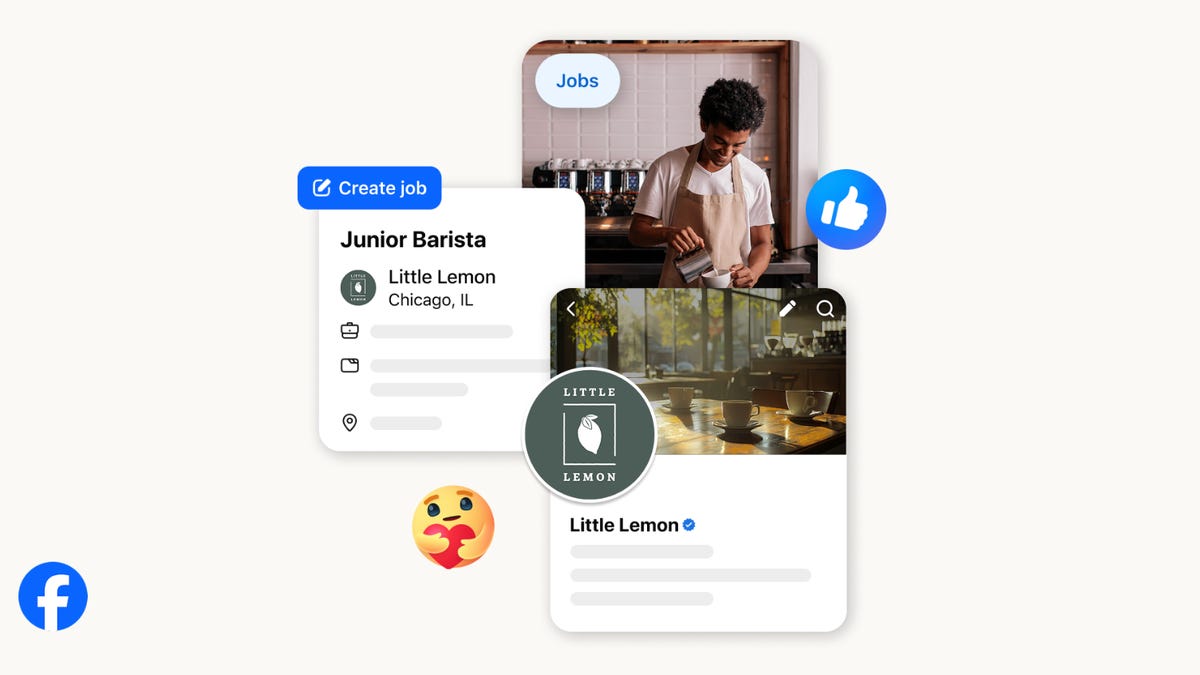
On the hunt for work? A Local Jobs search is being rolled out by Meta to make it easier for people in the US to discover and apply for nearby work directly on Facebook. The feature is inside Facebook Marketplace, Groups and Pages, Meta said last week, letting employers post openings and job seekers filter roles by distance, category or employment type.
You can apply or message employers directly through Facebook Messenger, while employers can publish job listings with just a few taps — similar to how you would post items for sale on Marketplace.
Don’t miss any of our unbiased tech content and lab-based reviews. Add CNET as a preferred Google source.
Facebook offered a Jobs feature before discontinuing it in 2022, pushing business hiring toward its other platforms. Its return suggests Meta is attempting to expand Facebook’s usefulness beyond social networking and to position it once again as a hub for community-driven opportunities.
Read more: Meta’s All In on AI Creating the Ads You See on Instagram, Facebook and WhatsApp
«We’ve always been about connecting with people, whether through shared interests or key life events,» the press release states. «Now, if you’re looking for entry-level, trade and service industry employment in your community, Facebook can help you connect with local people and small businesses who are hiring.»
Read more: What Is Meta AI? Everything to Know About These AI Tools
How to get started with Local Jobs on Facebook
According to Meta, Local Jobs will appear as a dedicated section in Facebook Marketplace starting this week. If you’re 18 or older, you can:
- Tap the Marketplace tab on the Facebook app or website.
- Select Jobs to browse available positions nearby.
- Use filters for job type, category and distance.
- Tap Apply or message the employer directly via Messenger.
Businesses and page admins can post jobs by creating a new listing in Marketplace or from their Facebook Page. Listings can include job details, pay range, and scheduling information and will appear in local searches automatically.
The Local Jobs feature is rolling out across the US now, with Meta saying it plans to expand it in the months ahead.
Technologies
Tesla Has a New Range of Affordable Electric Cars: How Much They Cost
The new, stripped-back versions of the Model Y and Model 3 have a more affordable starting price.

Technologies
Today’s NYT Strands Hints, Answers and Help for Oct. 22 #598
Here are hints and answers for the NYT Strands puzzle for Oct. 22, No. 598.

Looking for the most recent Strands answer? Click here for our daily Strands hints, as well as our daily answers and hints for The New York Times Mini Crossword, Wordle, Connections and Connections: Sports Edition puzzles.
Today’s NYT Strands puzzle is a fun one — I definitely have at least two of these in my house. Some of the answers are a bit tough to unscramble, so if you need hints and answers, read on.
I go into depth about the rules for Strands in this story.
If you’re looking for today’s Wordle, Connections and Mini Crossword answers, you can visit CNET’s NYT puzzle hints page.
Read more: NYT Connections Turns 1: These Are the 5 Toughest Puzzles So Far
Hint for today’s Strands puzzle
Today’s Strands theme is: Catch all.
If that doesn’t help you, here’s a clue: A mess of items.
Clue words to unlock in-game hints
Your goal is to find hidden words that fit the puzzle’s theme. If you’re stuck, find any words you can. Every time you find three words of four letters or more, Strands will reveal one of the theme words. These are the words I used to get those hints but any words of four or more letters that you find will work:
- BATE, LICE, SLUM, CAPE, HOLE, CARE, BARE, THEN, SLAM, SAMBA, BACK
Answers for today’s Strands puzzle
These are the answers that tie into the theme. The goal of the puzzle is to find them all, including the spangram, a theme word that reaches from one side of the puzzle to the other. When you have all of them (I originally thought there were always eight but learned that the number can vary), every letter on the board will be used. Here are the nonspangram answers:
- TAPE, COIN, PENCIL, BATTERY, SHOELACE, THUMBTACK
Today’s Strands spangram
Today’s Strands spangram is JUNKDRAWER. To find it, look for the J that’s five letters down on the far-left row, and wind down, over and then up.
Quick tips for Strands
#1: To get more clue words, see if you can tweak the words you’ve already found, by adding an «S» or other variants. And if you find a word like WILL, see if other letters are close enough to help you make SILL, or BILL.
#2: Once you get one theme word, look at the puzzle to see if you can spot other related words.
#3: If you’ve been given the letters for a theme word, but can’t figure it out, guess three more clue words, and the puzzle will light up each letter in order, revealing the word.
-
 Technologies3 года ago
Tech Companies Need to Be Held Accountable for Security, Experts Say
-
 Technologies3 года ago
Best Handheld Game Console in 2023
-
 Technologies3 года ago
Tighten Up Your VR Game With the Best Head Straps for Quest 2
-
 Technologies4 года ago
Verum, Wickr and Threema: next generation secured messengers
-
 Technologies4 года ago
Black Friday 2021: The best deals on TVs, headphones, kitchenware, and more
-
 Technologies4 года ago
Google to require vaccinations as Silicon Valley rethinks return-to-office policies
-
 Technologies4 года ago
Olivia Harlan Dekker for Verum Messenger
-
 Technologies4 года ago
iPhone 13 event: How to watch Apple’s big announcement tomorrow


