
Technologies
NFL Thanksgiving Day: How to Watch, Stream Giants vs. Cowboys on Fox, Patriots vs. Vikings on NBC and More
Thanksgiving is a time for football, with the Giants and Cowboys game available in 4K.
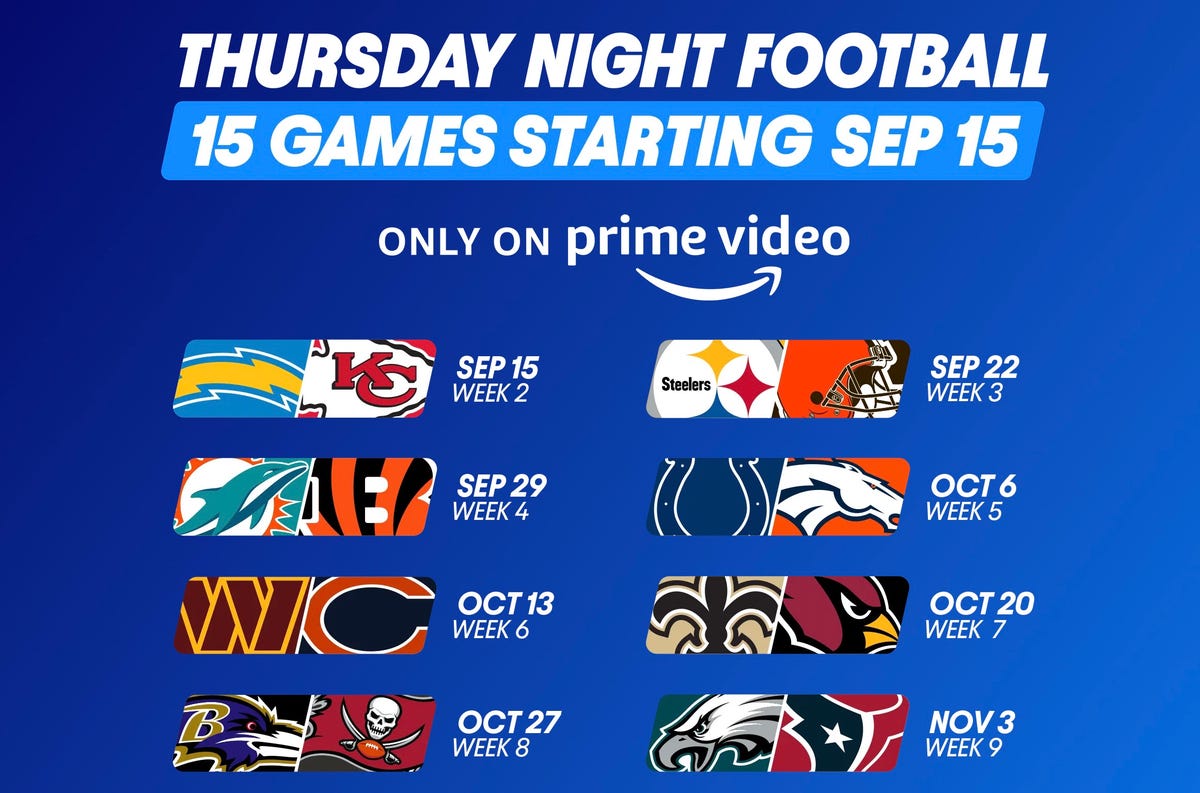
The NFL this season has played the bulk of its Thursday night games on Amazon’s Thursday Night Football, but this week we get a triple-header of Thanksgiving fun. The Bills held off the Lions to take the day’s first matchup, while the second game of the day will be an NFC East showdown as the Giants head to Texas to take on the Cowboys at 4:30 p.m. ET (1:30 p.m. PT) on Fox.
As spotted by The TV Answer Man, this Giants/Cowboys game will be broadcast in 4K on a variety of cable providers such as DirecTV and Verizon Fios, streaming services like YouTube TV (assuming you have the 4K add-on) as well in the Fox Sports and Fox Now apps (assuming you log in to a TV provider).
Finally, NBC closes out the festivities with the Patriots on the road against the Vikings at 8:20 p.m. ET (5:20 p.m. PT) on NBC.
Here’s what you need to know to watch and stream the games, and our recommendations for the best ways to watch the rest of the 2022 NFL season, including RedZone, week in and week out without cable.
What are my streaming options for NFL games in 2022?
Paying for cable is the easiest solution, but not the cheapest. For cord-cutters looking to save some money, NFL football streaming options can get complicated, with games played across three different days and nights each week on different channels and streaming services.
Most NFL games are played on Sunday, with a game each week on Thursday night and another each week on Monday night. On Sundays, games start at 1 p.m. ET (10 a.m. PT) and 4 p.m. ET (1 p.m. ET), with most AFC teams on CBS and most NFC teams on Fox.
Although the first Thursday night game was on NBC, the rest of the games for Thursday Night Football (with the exception of Week 12’s Thanksgiving Thursday games) will be shown on Amazon Prime Video. Unlike last season, Prime Video is now the exclusive home of Thursday Night Football and the games are no longer available on Fox or NFL Network, though the games will be available on TV in teams’ local markets.
As in previous seasons, Monday Night Football games will be on ESPN.
All five of the live TV streaming services carry ESPN and Fox, and all but Sling TV carry CBS. All but DirecTV Stream carry NFL Network. For the games on CBS and Fox, keep in mind that not every service carries every local network, so check each one using the links below to make sure it carries CBS and Fox in your area.
In addition to Prime Video, there are three other streaming services that cord-cutting NFL fans should consider. The paid Premium plan of Paramount Plus will show CBS games on Sundays, and the paid Premium plan of Peacock will show NBC’s broadcasts of Sunday Night Football.
Wait, there’s one more streaming service to consider for the remainder of the year. Prior to the season, the NFL launched a new streaming service for watching games on your phone or tablet — no casting to your TV. In past years, you could do this for free with the Yahoo Sports app, but now you’ll need to pay $5 a month or $40 for the season for the NFL Plus subscription. With it, you’ll be able to watch every local game on Sunday and the national games on Sunday, Monday and Thursday nights as well as the playoffs and Super Bowl — again, only on your phone or tablet.
Lastly, there’s NFL RedZone, a channel that springs to life each fall and shows live NFL action during the Sunday afternoon games. It pops in and out of the live games and attempts to show each touchdown scored in each game. RedZone is available as an add-on on four of the five major live TV streaming services — all but DirecTV Stream.
Best for everything: YouTube TV ($65)
Our pick from the last two years remains our go-to choice in 2022.
At $65 per month each, YouTube TV checks all the NFL boxes. Local channels CBS, NBC and Fox are included in many markets, and ESPN and the NFL Network are also included so you can watch Sundays and Monday nights. The next best options are FuboTV and Hulu Plus Live TV; both offer the same channels as YouTube TV for NFL fans, but for $70 a month.
Want to follow your fantasy team with RedZone? That’s available on all three services as part of an add-on. If you’re a YouTube TV subscriber, you can add the $11 per month Sports Plus add-on by clicking on your profile and going to Settings, then the Membership tab. FuboTV subscribers can go into My Profile and choose Manage Add-ons to get its $11-per-month Sports Plus with NFL RedZone offering. And Hulu users can now add RedZone for $10 per month with its Sports add-on.
Both YouTube TV and FuboTV allow three people to watch at once (Hulu allows two live streams) and all three have apps on nearly every mobile device and major streaming platform, including Amazon Fire TV, Google TV, Roku and Apple TV.
While all three are largely similar, we like YouTube TV for its superior DVR — unlimited storage compared with 30 hours on FuboTV and 50 hours on Hulu. We also like YouTube TV because it gives you an option to stream in 4K for an extra $20 a month. FuboTV does, too, with its $80-a-month Elite plan. Keep in mind that only Fox and NBC offer 4K NFL broadcasts; CBS and ESPN do not.
DirecTV Stream offers the main broadcast channels for NFL games, but it starts at $70 per month and lacks NFL Network and RedZone.
Sling TV’s Orange and Blue plan for $55 a month gets you ESPN and the NFL Network, and, in select major markets, Fox and/or NBC, but you’ll still lack CBS. You can also add RedZone for $11 per month with the Sports Extra add-on.
The cheapest way to stream NFL RedZone
A frequent fan-favorite method of following all the NFL action on Sundays, RedZone is a way to catch every big play around the league. The cheapest road to RedZone is to get Sling TV Blue for $40 per month and add the $11 per month Sports Extra add-on.
This option can also be streamed on a host of devices including iOS, Android, Apple TV, Roku, Chromecast, Amazon Fire TV and web browsers.
Note: If you only subscribe to Sling’s Orange package you won’t be able to get RedZone in Sports Extra. Your base package needs to be either Sling Blue or its larger Sling Blue Plus Orange bundle for you to be able to get RedZone as an add-on. If you choose the latter, the Sports Extra add-on is more, $15 per month, as you will also get additional channels like the SEC Network, ACC Network and PAC 12 Network.
If you mainly plan to watch on a phone, you can also check out RedZone Mobile, which is in the NFL app. This is a separate subscription from NFL Plus and runs $35 for the season (which breaks down to around $7.78 per month for the roughly four-and-a-half months of regular season football). While this is one of the cheapest ways to get RedZone, be aware that — similar to NFL Plus — you will not be able to AirPlay or Chromecast it onto a larger screen and will need to watch on your phone.
Budget alternative for NFC fans in big cities: Sling Blue ($40) or antenna ($20 one-time)
Those looking to save some cash might want to check out Sling Blue for $40 a month. While it lacks ESPN, meaning you’ll miss out on Monday Night Football, in select markets you’ll be able to get Fox and NBC. The catch is that those markets are mainly in big cities, so if you live outside one of those areas, Sling Blue might not be for you.
You can also add RedZone through the company’s $11 per month Sports Extra add-on.
Fox broadcasts most NFC games on Sundays, while NBC has Sunday Night Football. CBS, which broadcasts the bulk of AFC games, isn’t included on Sling at all. But an antenna can fill those local channel gaps without a monthly charge.
Budget alternatives for AFC fans: Paramount Plus (or an antenna)
There are some apps that offer CBS’ slate of Sunday AFC games live, including Paramount Plus’ Premium tier for $10 per month. Depending on where you live, however, your local CBS station (and those NFL games) might not be available. CBS offers livestreaming services in many markets; you can check for yourself if your area has live CBS streaming here.
An antenna is another option for getting CBS. And as we mentioned above, an over-the-air antenna connected to your TV provides another option, no streaming or monthly fee required, as long as you have good reception.
Thursday Night Football: Amazon Prime Video
In past years, Thursday Night Football games were shown on Prime Video but were also available on Fox or NFL Network. This year, starting Week 2, the games on Thursday nights are available only on Prime Video, giving NFL fans more incentive than free two-day shipping to sign up for an Amazon Prime account for $15 a month or $139 a year. You can also subscribe only to Prime Video for $9 a month.
What about Sunday Ticket?
For one more season, NFL Sunday Ticket is still largely limited to DirecTV satellite subscribers. While that is expected to change in 2023, those who live in buildings that can’t add a satellite dish can already get a streaming version to watch football starting at $294 for its To Go package for the season, or $396 for a Max package that includes the RedZone channel (a student version is also available at a discount). You can check your address on the Sunday Ticket site. Both packages have a one-week free trial.
With the season at the halfway point, those prices have dropped to $220.47 for the To Go option and $281.97 for Max.
The problem here, however, is that even if you’re eligible, it doesn’t include local games. You can only watch Sunday games that aren’t being broadcast on CBS, Fox or NBC in your area. They also won’t be helpful come playoff time — as you’ll need your local stations and ESPN to catch all those games.
Technologies
Samsung’s Galaxy Watch Ultra 2 Might Come in 5G and 4G Cellular Models
If the rumor proves true, the 5G Galaxy Watch Ultra would rival the 5G-enabled $799 Apple Watch Ultra 3 that debuted last fall.

Samsung’s next high-end Galaxy Watch could support faster 5G speeds, but if this leak is true, it will depend on where you live. The rumored Samsung Galaxy Watch Ultra 2 might come in 5G and 4G cellular models, with availability for each smartwatch depending on the country.
According to the Dutch website Galaxy Club (and spotted by SamMobile), Samsung’s servers may have revealed a series of model numbers that point to 5G, 4G and Wi-Fi-enabled editions of the next Galaxy Watch Ultra, which would succeed the original model that debuted in 2024.
A representative for Samsung did not immediately respond to a request for comment.
The Galaxy Club website speculates that the 5G edition would be sold in the US and Korean markets, while the 4G edition would sell in the rest of the world. In the US, a 5G version of the Galaxy Watch Ultra would rival the 5G-enabled $799 Apple Watch Ultra 3, which debuted last fall. The 4G edition would have broader compatibility worldwide, since the earlier network is far more established.
It will likely be a few months until we hear anything official about the Galaxy Watch Ultra 2. Samsung typically unveils its new watches in the summer alongside its Galaxy Z Fold and Z Flip foldable phones. Last year, Samsung unveiled the Galaxy Watch 8 and the Galaxy Watch 8 Classic, but otherwise left the prior 2024 Ultra in the lineup for those looking for a larger 47mm smartwatch.
Technologies
2 Cases Show Supreme Court Isn’t Holding ISPs Responsible for Piracy
Technologies
Today’s NYT Connections Hints, Answers and Help for April 8, #1032
Here are some hints and the answers for the NYT Connections puzzle for April 8, No. 1032.

Looking for the most recent Connections answers? Click here for today’s Connections hints, as well as our daily answers and hints for The New York Times Mini Crossword, Wordle, Connections: Sports Edition and Strands puzzles.
Today’s NYT Connections puzzle is kind of tough. The purple category is a fun one, once you see the connection. Read on for clues and today’s Connections answers.
The Times has a Connections Bot, like the one for Wordle. Go there after you play to receive a numeric score and to have the program analyze your answers. Players who are registered with the Times Games section can now nerd out by following their progress, including the number of puzzles completed, win rate, number of times they nabbed a perfect score and their win streak.
Read more: Hints, Tips and Strategies to Help You Win at NYT Connections Every Time
Hints for today’s Connections groups
Here are four hints for the groupings in today’s Connections puzzle, ranked from the easiest yellow group to the tough (and sometimes bizarre) purple group.
Yellow group hint: In the group.
Green group hint: Appearance details.
Blue group hint: Often found in gyms.
Purple group hint: They help you see.
Answers for today’s Connections groups
Yellow group: Cohort member.
Green group: Aesthetic.
Blue group: Kinds of bar apparatuses.
Purple group: Eyewear in the singular.
Read more: Wordle Cheat Sheet: Here Are the Most Popular Letters Used in English Words
What are today’s Connections answers?
The yellow words in today’s Connections
The theme is cohort member. The four answers are associate, colleague, fellow and peer.
The green words in today’s Connections
The theme is aesthetic. The four answers are design, look, scheme and style.
The blue words in today’s Connections
The theme is kinds of bar apparatuses. The four answers are monkey, parallel, pull-up and uneven.
The purple words in today’s Connections
The theme is eyewear in the singular. The four answers are contact, goggle, shade and spectacle.
-
 Technologies3 года ago
Tech Companies Need to Be Held Accountable for Security, Experts Say
-
 Technologies3 года ago
Best Handheld Game Console in 2023
-
 Technologies3 года ago
Tighten Up Your VR Game With the Best Head Straps for Quest 2
-
 Technologies4 года ago
Black Friday 2021: The best deals on TVs, headphones, kitchenware, and more
-
 Technologies5 лет ago
Google to require vaccinations as Silicon Valley rethinks return-to-office policies
-
 Technologies5 лет ago
Verum, Wickr and Threema: next generation secured messengers
-
 Technologies4 года ago
Olivia Harlan Dekker for Verum Messenger
-
 Technologies4 года ago
The number of Сrypto Bank customers increased by 10% in five days