
Technologies
COVID vaccine boosters: When is it time for that extra shot? Here’s what we know
Officials set an initial Sept. 20 date for vaccine booster shots. We’ll update you on the White House’s booster plan and tell you what’s happening with each vaccine.
On Friday, The New York Times reported that officials from the Food and Drug Administration as well as the Centers for Disease Control and Prevention are advising the White House to scale back its original booster recommendation. Last month, President Joe Biden announced that his administration would start offering boosters to those who’d been fully immunized at least eight months ago by the Pfizer-BioNTech or Moderna vaccine. The original plan was contingent on approval by the FDA, which still says there’s not enough data on booster shots to go forward.
Government officials are now cautioning that boosters may be available just for those who received the Pfizer vaccine, because regulators may need more time to evaluate the vaccines from Moderna and Johnson & Johnson.
The booster recommendations come as research shows how the effectiveness of the vaccines can decline. An additional shot from Johnson & Johnson, Pfizer or Moderna could provide enhanced protection against the COVID-19 delta variant as it surges across the country. «Recent data makes clear that protection against mild and moderate disease has decreased over time,» US Surgeon General Vivek Murthy said during an August briefing on COVID-19 vaccines. «This is likely due to both waning immunity and the strength of the widespread delta variant.»
What does all this mean for you? Read on for what we know about COVID-19 booster shots today, including who can get them now, why they’re needed, how they relate to breakthrough infections and what the controversy has been surrounding third shots. We’ll be updating this as new information is released.
Why would a Pfizer vaccine booster be authorized first?
According to a report by The New York Times on Sept. 3, administration health officials warn that the FDA and CDC may not have enough time to approve boosters from Moderna and Johnson & Johnson in time to meet Biden’s goal of starting booster shots on Sept. 20.
While the Pfizer plan seems to remain on track, Moderna announced it just began submitting booster data to the FDA, so the process may take some more time to determine a recommended dosage for a third Moderna shot. Data from Johnson & Johnson has not yet been delivered.
Who would qualify for a booster shot and when?
In August, healthofficials in the Biden administration recommended an additionalshot for Americans 18 and over who are fully vaccinated with thePfizer or Moderna shots, proposing a booster eight months after being fully vaccinated.
During a meeting with Israeli Prime Minister Naftali Bennett at the end of August, Biden said administration health officials were evaluating a five-month gap, based in part on data from Israel’s booster program. The news followed a report by The Wall Street Journal that the Biden administration was evaluating a booster shot six months after the last jab.
Waiting months in between doses allows the immune system to develop a full response before it is helped by a boost. Whatever the time gap, the booster plan would need to be evaluated and approved by the FDA. The plan is also pendingrecommendation by the CDC’sAdvisory Committee on Immunization Practices.
«We believethat that third dose will ultimately be needed to provide the fullestand continual extent of protection that we think people need from thevirus,» Murthy said. «Our plan is to stay ahead of this virus by beingprepared to offer COVID-19 booster shots to fully vaccinated adults 18years and older.» Murthy said the FDA will evaluate booster shots forthose younger than 18 years of age, and the administration will followFDA recommendations for minors.
Does full FDA approval of Pfizer’s vaccine include a booster?
On Aug. 23, the FDA approved Pfizer’s COVID-19 vaccine for two doses for people 16 and older. The Pfizer vaccine is the first to receive FDA approval, while Moderna and Johnson & Johnson vaccines are available under an emergency use authorization. And for children ages 12 to 15, Pfizer’s vaccine is authorized for emergency use.
While a third dose for some immunocompromised individuals is authorized for emergency use, the FDA final authorization does not include a booster shot, which the Biden administration is hoping to roll out as soon as this month. But some health care experts believe the two-shot approval could give a push to those who were waiting on the FDA before getting vaccinated.
«The moment you have been waiting for is here,» Biden said, following the FDA approval. «Now it has been granted. Those who’ve been waiting for full approval should go get their shot now.»
The approval could also lead to more businesses, schools and venues mandating vaccine requirements.
What about a Johnson & Johnson vaccine booster shot?
On Aug. 25, Johnson & Johnson saida booster shot of its COVID-19 vaccine increases antibody responses inthose who received the company’s one-dose vaccine, based on interimdatafrom anearly trial. The company said it would work with public healthofficials on a plan for a booster shot for eightmonths or longerafter the first dose of its vaccine.
Currently,the one-doseJohnson & Johnson vaccine is available under anemergency useauthorization for individuals 18 years of age and older.
Bidenadministration health officials said they expect those who receivedtheone-dose Johnson & Johnson vaccine will need another jab, butmoreresearch is necessary. «We expect more data on J&Jin thecomingweeks,» Murthy said when announcing plans for booster shots in late August.»With thatdata in hand, we willkeep the public informed with thetimely plan forJ&J boostershots.»
What about those eligible for booster shots now?
Some people who already are eligible under guidelines from the CDC can go out and get their third dose of a COVID-19 vaccine immediately. The list of immunocompromised people who can get a third shot includes solid-organ transplant recipients and people who have an «equivalent level of immunocompromise» and who have a reduced ability to fight off infections, making them more vulnerable to the coronavirus. Booster authorization hasn’t yet been expanded more broadly to those with other chronic medical conditions.
The current CDC recommendation is for an additional dose of the two-shot vaccine for certain immunocompromised people. Within that category, the recommendation is for those 18 and older for the Moderna vaccine, and 12 and older for the Pfizer vaccine. The FDA didn’t authorize an additional dose of the Johnson & Johnson vaccine, and because of a lack of data the CDC hasn’t recommended a second dose for immunocompromised people who got the one-shot vaccine.
About 3% of US adults are immunocompromised, according to the CDC, but research suggests they account for about 44% of hospitalized breakthrough cases of COVID-19. Not only are they more likely to get very ill from COVID-19, they also have a lower antibody response to vaccines and are at a higher risk of transmitting the virus.
Those with other conditions, like diabetes and heart disease, aren’t advised to get a booster, at least for now. Here’s a list of people the CDC recommends get an extra dose if they got the Pfizer or Moderna vaccine:
- Those with advanced or untreated HIV infection.
- Cancer patients and transplant recipients who are taking certain immunosuppressive drugs.
- Those receiving active cancer treatment for tumors or cancers of the blood.
- Those with moderate or severe primary immunodeficiency.
- Patients being treated with high-dose corticosteroids or other drugs that may suppress immune response.
- People who received a stem cell transplant within the last two years and are taking certain drugs. The CDC says to talk to your medical provider about your health condition and whether a third shot is appropriate.
If you’re unsure whether you’re qualified, the CDC says to talk to your medical provider about your health condition and whether a third dose is appropriate.
Will the booster shots be free and available?
The current one-dose vaccine shot from Johnson & Johnson and two-dose vaccines from Moderna and Pfizer are free to anyone who wants to get vaccinated. And the additional shots will be free too. «These booster shots are free,» Biden said. «It will be easy. Just show your vaccination card and you’ll get a booster. No other ID. No insurance. No state registry requirements.»
«It will be just as easy and convenient to get a booster shot as it is to get a first shot today. We have enough vaccine supply for every American,» said White House COVID-19 Response Coordinator Jeff Zients, adding that those who are eligible will be able to get a booster at roughly 80,000 places across the country, including over 40,000 local pharmacies. Zients said 90% of Americans have a vaccine site within 5 miles of where they live.
What’s behind the need for COVID-19 booster shots?
«The COVID-19 vaccines that are authorized in the United States have been remarkably effective, even against the widespread delta variant,» Murthy said. «But we know that even highly effective vaccines become less effective over time.»
Calling the eradication of the COVID-19 virus «unlikely,» a UK scientific advisory group found (PDF) that there’s a «realistic possibility» that a variant will emerge that is resistant to the current battery of vaccines. Governments, public health organizations and vaccine makers are all tracking developments in coronavirus variants like delta and lambda, hoping to determine if booster shots targeting new variants will be needed among the general population.
What’s the relationship to COVID-19 breakthrough cases?
As of July, in the US, «breakthrough» coronavirus cases caused by the dominant delta variant amount to less than 1% of people who are fully vaccinated. Both the Moderna and Pfizer vaccines have proved to be more than 90% effective against hospitalizations and death. Nonetheless, a CDC study shows that vaccinated people can both contract the highly contagious delta variant and spread it. According to a widely reported internal CDC memo, the delta variant spreads as easily as chicken pox, which is considered more contagious than the flu but less contagious than measles.
The surge in new COVID-19 cases is primarily affecting unvaccinated people and causing community spread, and in turn, prompting the return of mask mandates and guidance in hard-hit areas, even for people who have full vaccine protection. The debate over mask use and vaccine boosters underscores how scientists and other health experts continue to grapple with the uncertainties of COVID-19.
According to Murthy, «We are concerned that this pattern of decline we are seeing will continue in the months ahead, which could lead to reduced protection against severe disease, hospitalization and death.»
What’s the global controversy over booster shots?
Israel is now administering third doses of the vaccine to those 50 and older, and the UK has similar plans for September. However, this is resulting in a backlash among countries that are struggling to deliver first and second shots to residents.
World Health Organization Director-General Tedros Adhanom Ghebreyesus called for a «moratorium» on booster shots in high-income countries, citing the global disparity in vaccine distribution. Of the 4 billion doses administered globally, 80% have gone to high- and upper-middle income countries that make up less than half the world’s population, he said.
«We cannot accept countries that have already used most of the global supply of vaccines using even more of it, while the world’s most vulnerable people remain unprotected. We call on vaccine producers to prioritize Covax,» Tedros said, referring to the world’s COVID-19 vaccine distribution program.
White House Press Secretary Jen Psaki said on Aug. 17 that the US will have enough vaccines to both provide boosters for those who are fully vaccinated in the US and meet the global demand. «We have long planned from enough supply,» she said.
The US has so far shipped 115 million vaccine doses to 80 different countries, Zients said. «Our wartime efforts will continue doing everything we can to get even more people vaccinated both here at home and around the world. We can and must do both at the same time because that’s what it’s going to take to end this pandemic,» he said.
Is it possible to mix and match COVID-19 vaccines?
According to The New York Times, administration officials will recommend people get a booster of the same vaccine they originally received. The CDC now says a third dose of a different vaccine brand is permitted if a dose of the same type isn’t available.
Other global health agencies and countries are testing administered vaccines from two different manufacturers. In the UK, for example, a recent study found that those who received a first dose of the AstraZeneca vaccine and a second of Pfizer had a higher immune response than those who received two doses of the AstraZeneca vaccine.
While we watch how the situation develops, here’s what we know about the delta variant and info on whether you need to continue to wear a mask.
The information contained in this article is for educational and informational purposes only and is not intended as health or medical advice. Always consult a physician or other qualified health provider regarding any questions you may have about a medical condition or health objectives.
Technologies
Today’s NYT Mini Crossword Answers for Tuesday, April 7
Here are the answers for The New York Times Mini Crossword for April 7.

Looking for the most recent Mini Crossword answer? Click here for today’s Mini Crossword hints, as well as our daily answers and hints for The New York Times Wordle, Strands, Connections and Connections: Sports Edition puzzles.
Need some help with today’s Mini Crossword? Read on for all the answers. And if you could use some hints and guidance for daily solving, check out our Mini Crossword tips.
If you’re looking for today’s Wordle, Connections, Connections: Sports Edition and Strands answers, you can visit CNET’s NYT puzzle hints page.
Read more: Tips and Tricks for Solving The New York Times Mini Crossword
Let’s get to those Mini Crossword clues and answers.
Mini across clues and answers
1A clue: Informative commercial, for short
Answer: PSA
4A clue: Something you trace to draw a Thanksgiving turkey
Answer: HAND
5A clue: ___ Johnson, former Prime Minister of the U.K.
Answer: BORIS
6A clue: Opposite of include
Answer: OMIT
7A clue: Crosses (out)
Answer: XES
Mini down clues and answers
1D clue: City with the Notre-Dame Cathedral
Answer: PARIS
2D clue: Bad mood
Answer: SNIT
3D clue: About eight minutes of the average half-hour sitcom
Answer: ADS
4D clue: Remote worker’s office, perhaps
Answer: HOME
5D clue: Word that can follow each group of circled letters (and hints at its shape)
Answer: BOX
Technologies
NASA’s Artemis II Breaks Record With Trip Around The Moon
Technologies
In Honor of the Artemis II Mission, Explore the Moon in Fortnite Now
You might not be able to see the moon the way the Artemis II team is, but there’s an educational Fortnite simulation that will get you onto the celestial body’s surface.
You may not be able to explore the vast majesty of space in the same way that the four-person crew of the Artemis II is, but you can still get an up-close-and-personal view of the moon… in Fortnite, at least.
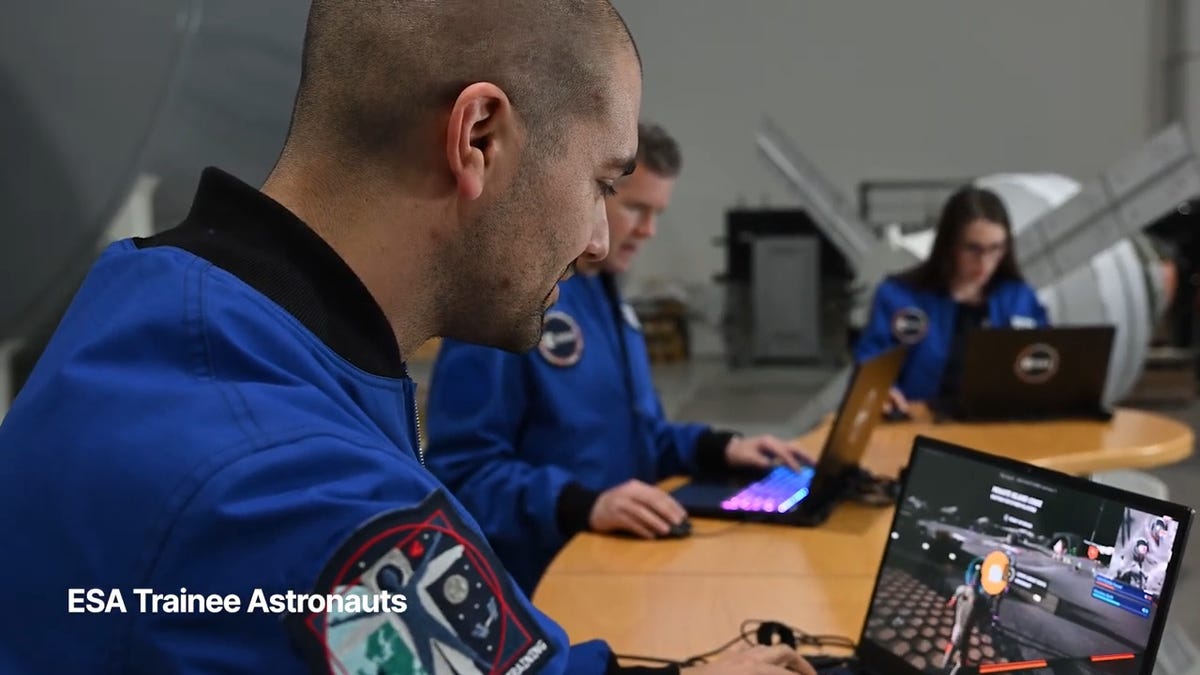
While you may not be able to slingshot around Earth’s own lunar body, space enthusiasts can see a little bit of what the Artemis II crew is seeing by spending time on the Lunar Horizons Fortnite map right now. The map is a creative collaboration between Fortnite’s creator, Epic Games, and the European Space Agency. Lunar Horizons was released in 2024 after extensive testing and play from ESA trainee astronauts.
If you’re looking to learn more about our own orbiting body, the Lunar Horizons map is an educational simulation of the surface of the moon’s South Pole.
It blends game mechanics with learning, as players get to build up their own sterile lunar habitat bases, interact with ESA astronauts and roll around with robotic rovers as they discover informative plaques that contain information about the moon and international space agencies. There are still dangers to navigate, too — a solar storm may strike when you least expect it.
If you’re interested in exploring the moon, we’ve got all the information you need to join in on the Fortnite fun below. And if you’re looking for a more serious livestream during this momentous human achievement, tune into NASA’s feed here.
How to join the Moon Fortnite island while you follow the Artemis II mission
The Lunar Horizons Fortnite map is a great educational simulation that shares details about ESA’s work and catalogs information about humanity’s lunar research.
These three simple steps will get you up and running (or more accurately, taking slow leaps and bounds) on the surface of the Lunar Horizons Fortnite map:
Download Fortnite
If you haven’t played Fortnite before, but you want to check out this limited-time event, you’ll have to download the game. If you’re on PC, you can download Fortnite for free from the Epic Games Store. Console players can navigate the PlayStation Store, Microsoft Store or Nintendo eShop in order to download Fortnite on their devices.
Navigate the in-game menus until you reach the Search button
Once you’re in the game, scroll down past the different official Fortnite game modes and the Discover tab until you find the Search button.
Input the Lunar Horizons island code
In the search bar, you can input a map’s name or its distinct search code in order to find it in the map directory. You can search for the Lunar Horizons map or input the code 3207-0960-6428 to explore this map in time.
Correction, 3:35 p.m. PT: This story initially was in error about the features available in the Lunar Horizons map. There is no Artemis II-specific mission in Fortnite. Rather, the Lunar Horizons map is an educational simulation of part of the moon’s surface.
-
 Technologies3 года ago
Tech Companies Need to Be Held Accountable for Security, Experts Say
-
 Technologies3 года ago
Best Handheld Game Console in 2023
-
 Technologies3 года ago
Tighten Up Your VR Game With the Best Head Straps for Quest 2
-
 Technologies4 года ago
Black Friday 2021: The best deals on TVs, headphones, kitchenware, and more
-
 Technologies5 лет ago
Google to require vaccinations as Silicon Valley rethinks return-to-office policies
-
 Technologies5 лет ago
Verum, Wickr and Threema: next generation secured messengers
-
 Technologies4 года ago
Olivia Harlan Dekker for Verum Messenger
-
 Technologies4 года ago
The number of Сrypto Bank customers increased by 10% in five days